
🌈 ComfyUI 赛博朋克主题插件|Cyberpunk Theme Plugin
一个全面的 ComfyUI 主题插件,提供炫酷的赛博朋克美学和强大的自定义功能
A comprehensive ComfyUI theme plugin with stunning cyberpunk aesthetics and powerful customization features
📺 教学视频 | Tutorial Video
🎬 [首个]自定义主题管理器Comfyui主题完全DIY-CYBERPUNK-STYLE-DIY-上线啦!
📺 观看教学视频 | Watch Tutorial Video
💡 强烈推荐观看教学视频!
视频详细演示了插件的所有功能和使用技巧,帮助您快速上手。
💡 Highly recommended to watch the tutorial video!
The video demonstrates all plugin features and usage tips to help you get started quickly.
🛡️ 重要说明 | Important Notice
🚀 零破坏安装 | Zero-Impact Installation ✅ 本插件不会破坏任何环境!无需安装任何requirements.txt! ✅ This plugin will NOT break any environment! No requirements.txt installation needed!
🔒 完全安全 | Completely Safe
- 🛡️ 纯前端扩展,无需后端依赖 | Pure frontend extension, no backend dependencies required
- 🚫 不修改系统文件 | Does not modify system files
- ⚡ 即插即用,一键启用 | Plug-and-play, one-click enable
- 🔄 随时可以完全卸载 | Can be completely uninstalled at any time
🚨 未知问题 | Unknown Issues 🆕
作为新插件,可能遇到未预期的问题,可以随时禁用插件
As a new plugin, unexpected issues may occur. You can disable the plugin at any time
✨ 主要功能 | Key Features
🌍 多语言支持 | Multi-language Support 🆕
- 🇨🇳 简体中文 | Simplified Chinese: 完整的中文界面支持 | Complete Chinese interface support
- 🇺🇸 English | 英文: Full English interface support | 完整的英文界面支持
- ⚡ 实时切换 | Real-time Switching: 无需重启,即时生效 | No restart required, instant effect
- 🎯 智能适配 | Smart Adaptation: 所有功能和提示均支持双语 | All features and prompts support bilingual
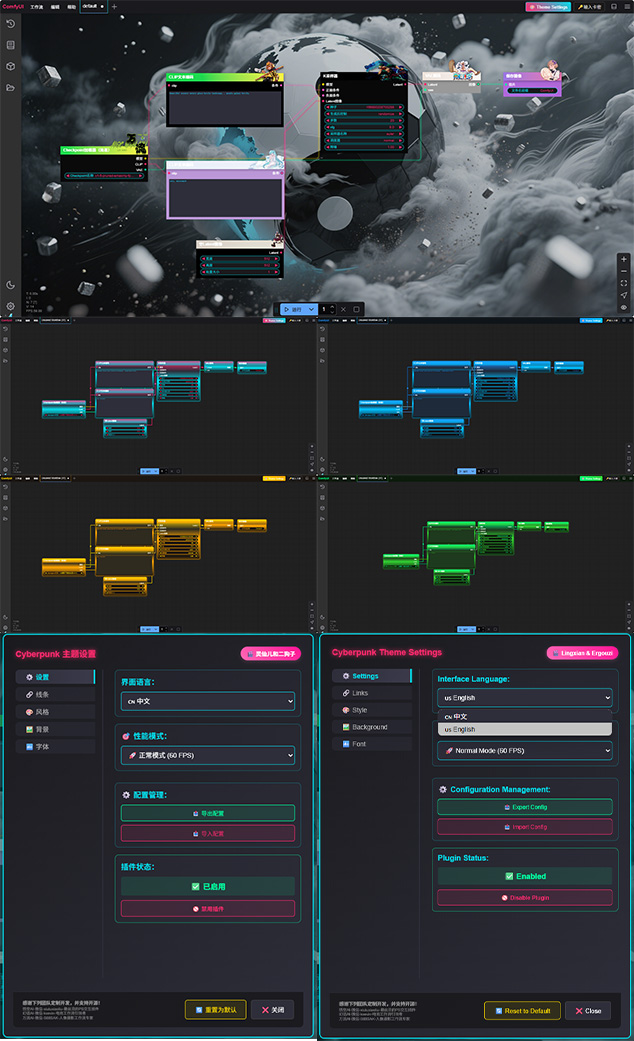
🎨 多种主题选择 | Multiple Theme Options
- 🎨 默认主题 | Default Theme: 简洁、极简主义界面 | Clean, minimalist interface
- 🌈 赛博朋克主题 | Cyberpunk Theme: 霓虹粉红和青色美学,带有发光效果 | Neon pink and cyan aesthetics with glowing effects
- ✨ 黄金主题 | Golden Theme: 优雅的金色和橙色配色方案 | Elegant gold and orange color scheme
- 💙 蓝色主题 | Blue Theme: 专业外观的冷蓝色调 | Cool blue tones for a professional look
- 💚 绿色主题 | Green Theme: 自然灵感的绿色调色板 | Nature-inspired green palette
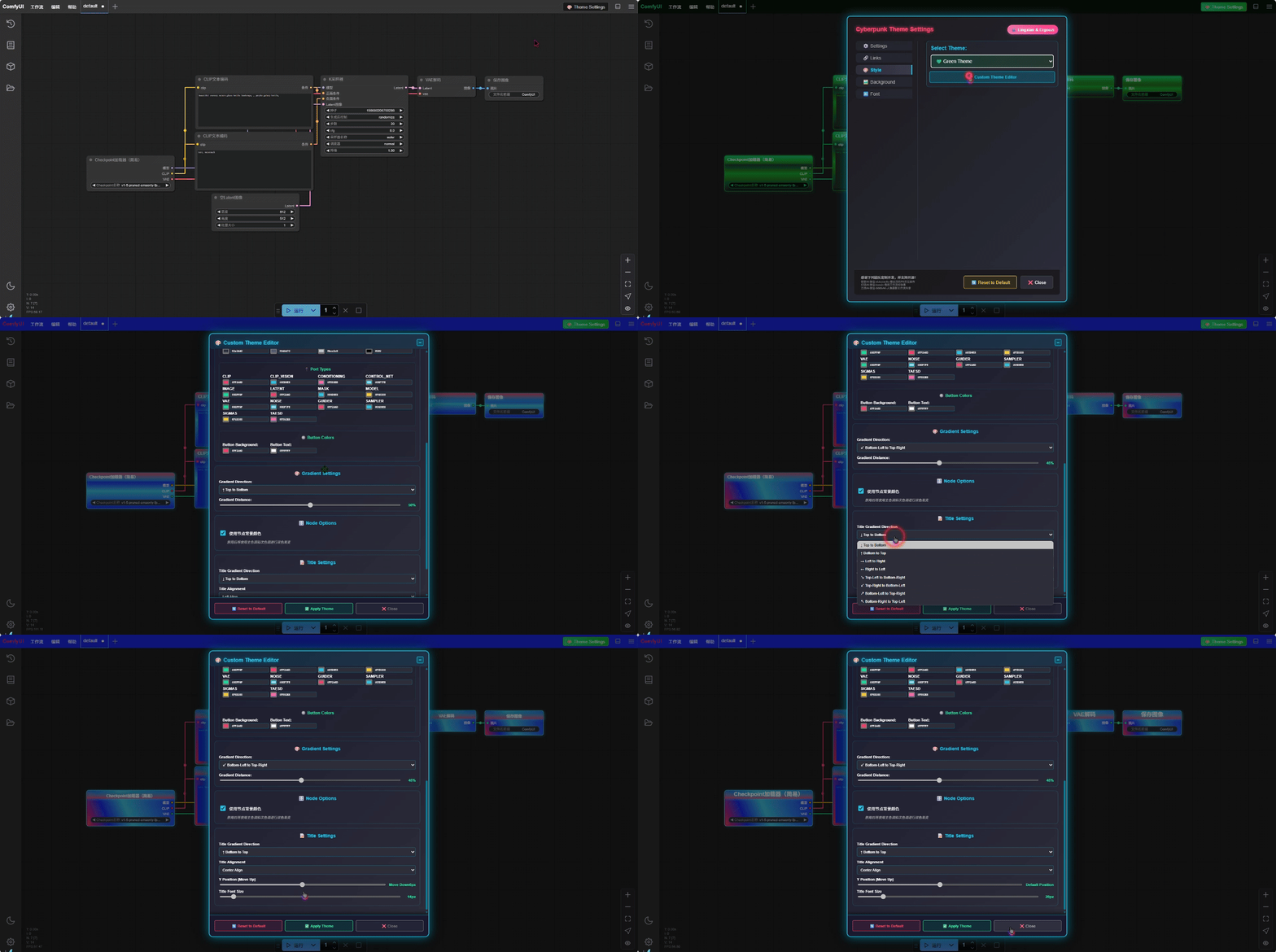
- 🎨 自定义主题 | Custom Theme: 完全可自定义的颜色配置 | Fully customizable color configuration
⚡ 动态视觉效果 | Dynamic Visual Effects
🔗 动态连线效果 | Dynamic Link Effects
支持8种不同的动画模式:
Supports 8 different animation modes:
- 🔘 简单粒子 | Simple Particle: 圆点移动效果 | Dot movement effects
- ⚡ 简单传输 | Simple Transfer: 快速移动点 | Fast moving dots
- 📦 数据流 | Data Flow: 矩形数据包传输 | Rectangle data packet transmission
- 💨 呼吸效果 | Breath Effect: 平缓律动 | Gentle rhythm pulsing
- ➖ 虚线效果 | Dashed Effect: 银色虚线动画 | Silver dashed line animation
- ✨ 超细流光 | Ultra Thin: 亮银色光束 | Bright silver beam effects
- 🐶 可爱狗狗 | Cute Dog: 简单移动的狗狗emoji | Simple moving dog emoji
- ✍️ 自定义文字 | Custom Text: 🆕 用户输入的文字动画 | 🆕 User input text animation
- 🖼️ 自定义图像 | Custom Image: 🆕 用户输入的图像动画 | 🆕 User input Image animation
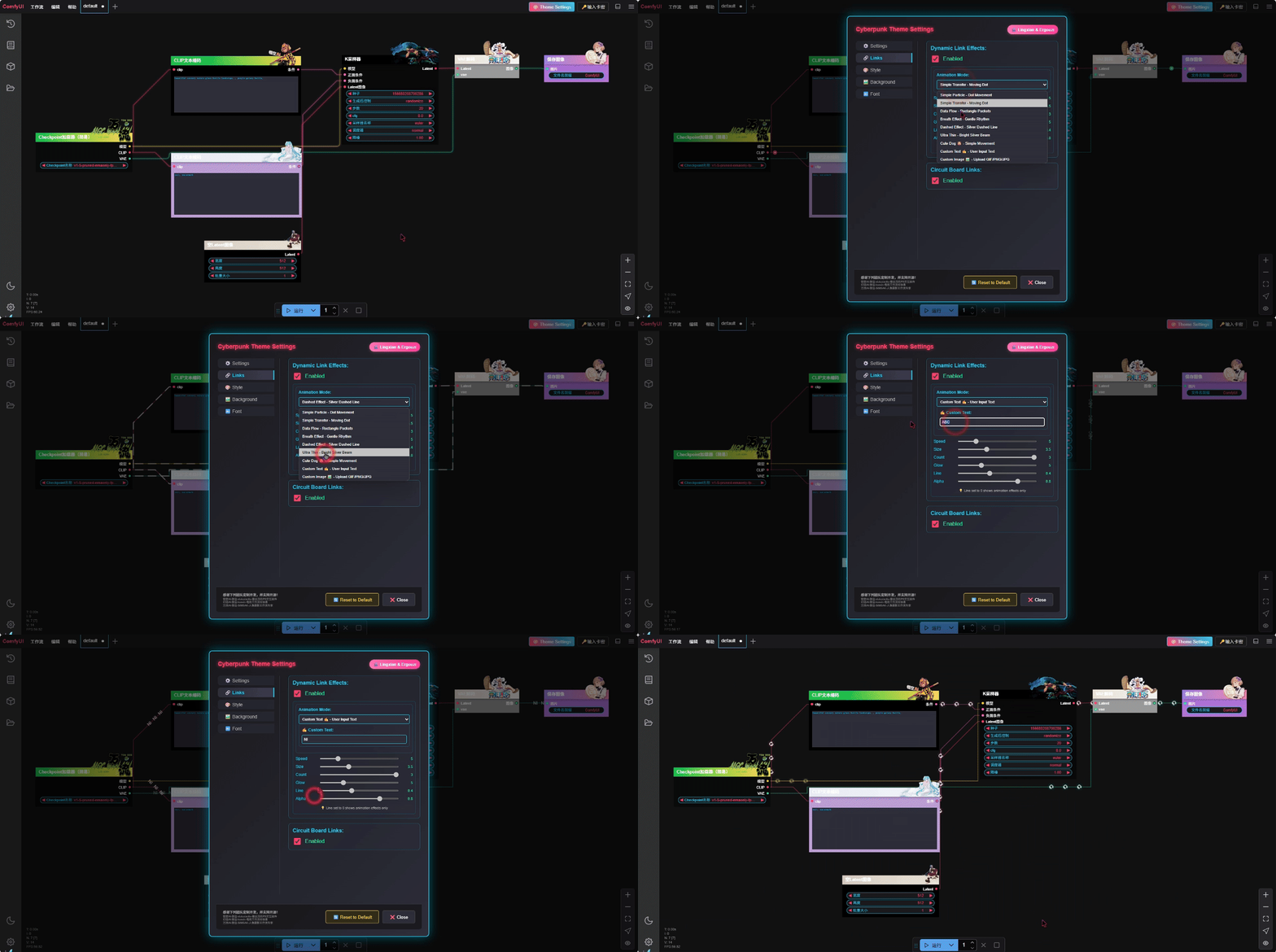
⚙️ 可调节参数 | Adjustable Parameters
- 速度控制 | Speed Control: 1-20级可调 | Adjustable from 1-20 levels
- 粒子大小 | Particle Size: 1-8级精细调节 | Fine adjustment from 1-8 levels
- 发光强度 | Glow Intensity: 光晕效果强度 | Halo effect intensity
- 粒子数量 | Particle Count: 同时显示的粒子数 | Number of simultaneous particles
- 透明度 | Alpha: 粒子和连线透明度 | Particle and line transparency
🔌 电路板连线 | Circuit Board Lines
- 技术风格连接 | Technical Style Connections: 电路板风格的连线效果 | Circuit board style connection effects
- 智能路径规划 | Smart Path Planning: 自动避障的连线路径 | Automatic obstacle-avoiding connection paths
🔌 端口快速连接 | Port Quick Connect 🆕
- 智能端口识别 | Smart Port Recognition: 自动识别同名端口 | Automatically recognize same-name ports
- 右键快速连接 | Right-click Quick Connect: 右键端口显示快速连接选项 | Right-click on ports to show quick connect options
- 一键连接同名端口 | One-click Connect Same-name Ports: 快速连接工作流中所有同名端口 | Quickly connect all same-name ports in workflow
- 连接状态提示 | Connection Status Prompt: 显示已连接端口数量和状态 | Display connected port count and status

🔌 快速连线 | Quick Connect 🆕
- 端口快速连线 | Port quick connection: 快速显示端口连线导航 | Quick display port connection navigation
- 磁性快速连线 | Magnetic quick connect: 磁性端口快捷连线 | Magnetic port quick connection
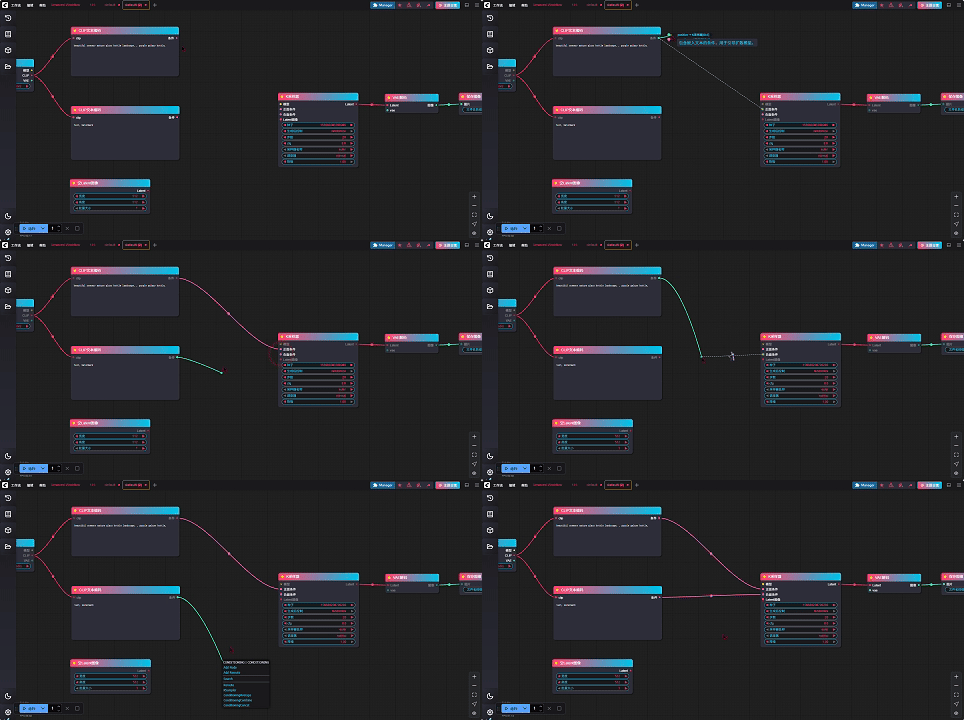
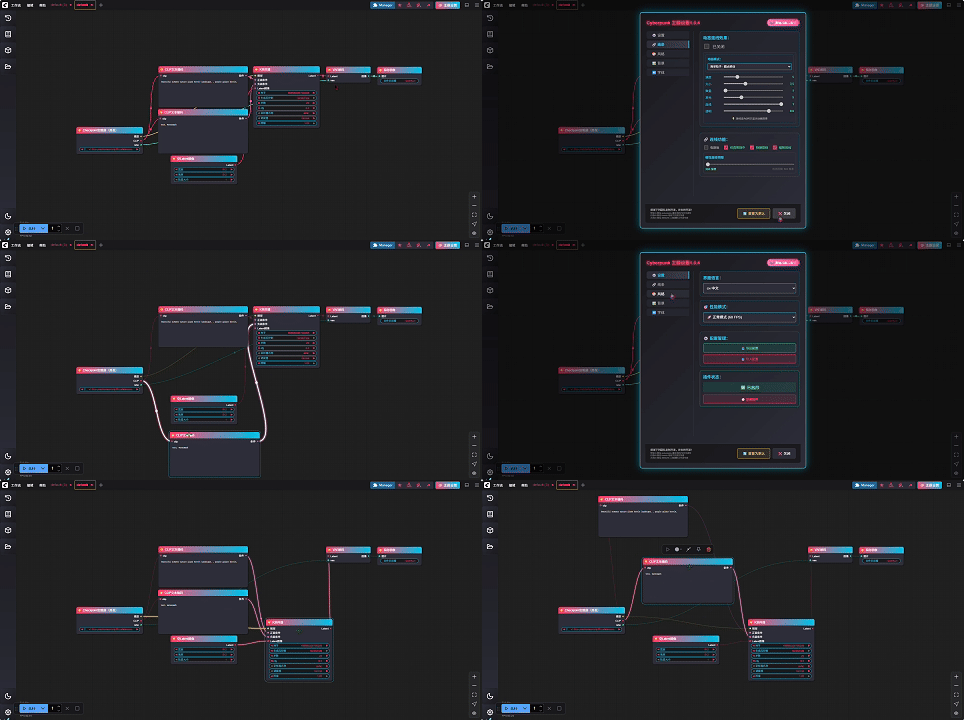
🔌 高亮选择连线 | Highlight Select Connection 🆕
- 常规模式高亮连线 | High brightness connection in regular mode: 开启仅高亮后 选中节点以高亮突出显示 | Enable only highlighting and select nodes to highlight them
- 动画模式高亮连线 | Animation mode highlights lines: 开启动画后 选中节点以高亮突出显示 | After starting the animation, select the node to highlight it
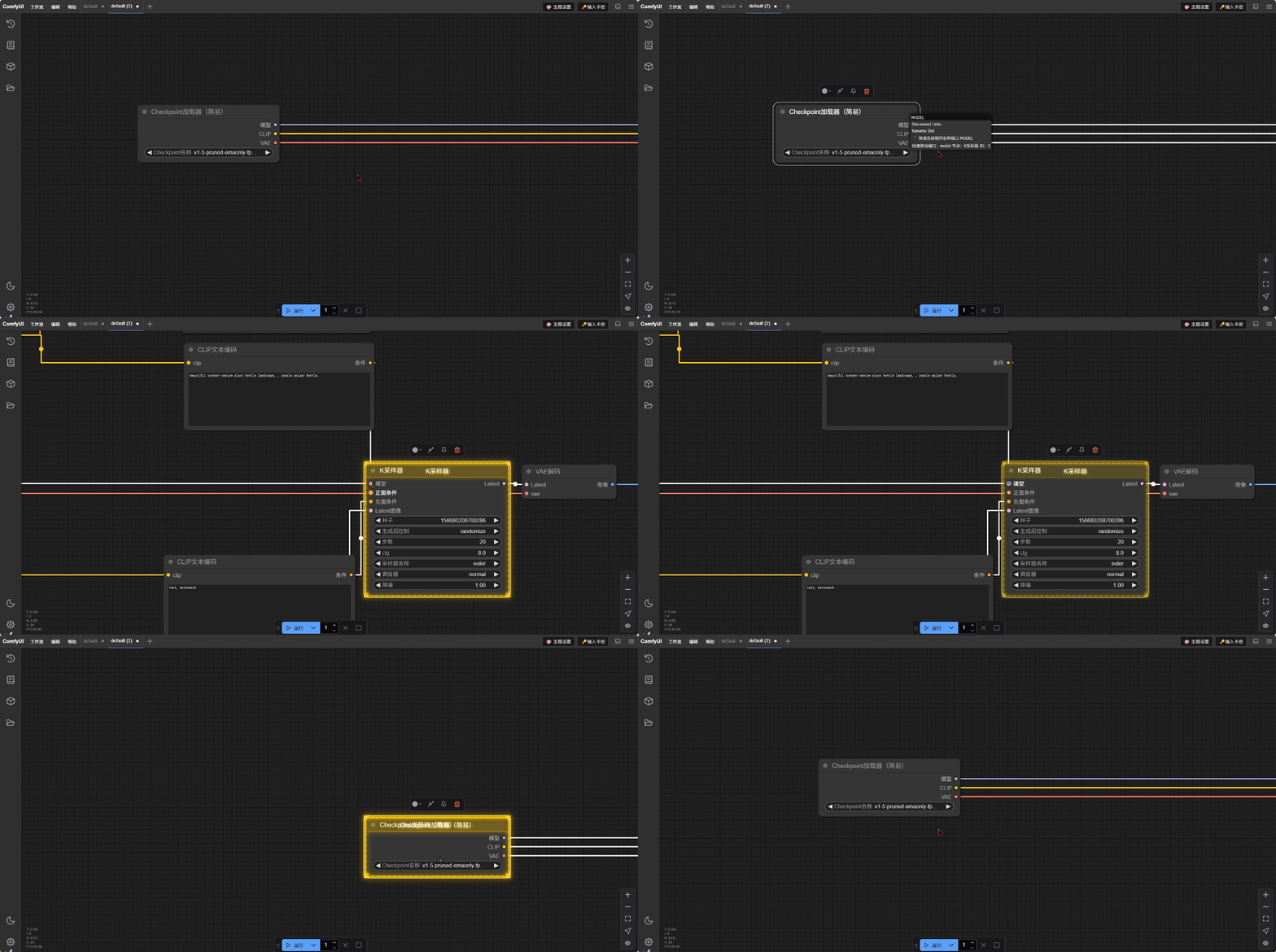
🎯 节点快速导航 | Node Quick Navigation 🆕
- 快速移动到连接节点 | Quick Navigate to Connected Node: 右键端口选择"🎯 转到连接点"快速跳转到连接的节点 | Right-click on ports and select "🎯 Go To Connection" to quickly jump to connected nodes
- 平滑动画跳转 | Smooth Animation Transition: 使用平滑动画效果移动到目标节点位置 | Use smooth animation effects to move to target node position
- 智能高亮显示 | Smart Highlighting: 目标节点会有脉冲高亮效果,便于快速识别 | Target nodes will have pulsing highlight effects for quick identification
- 双向导航支持 | Bidirectional Navigation Support: 支持从输入端口跳转到输出端口,反之亦然 | Support jumping from input ports to output ports and vice versa
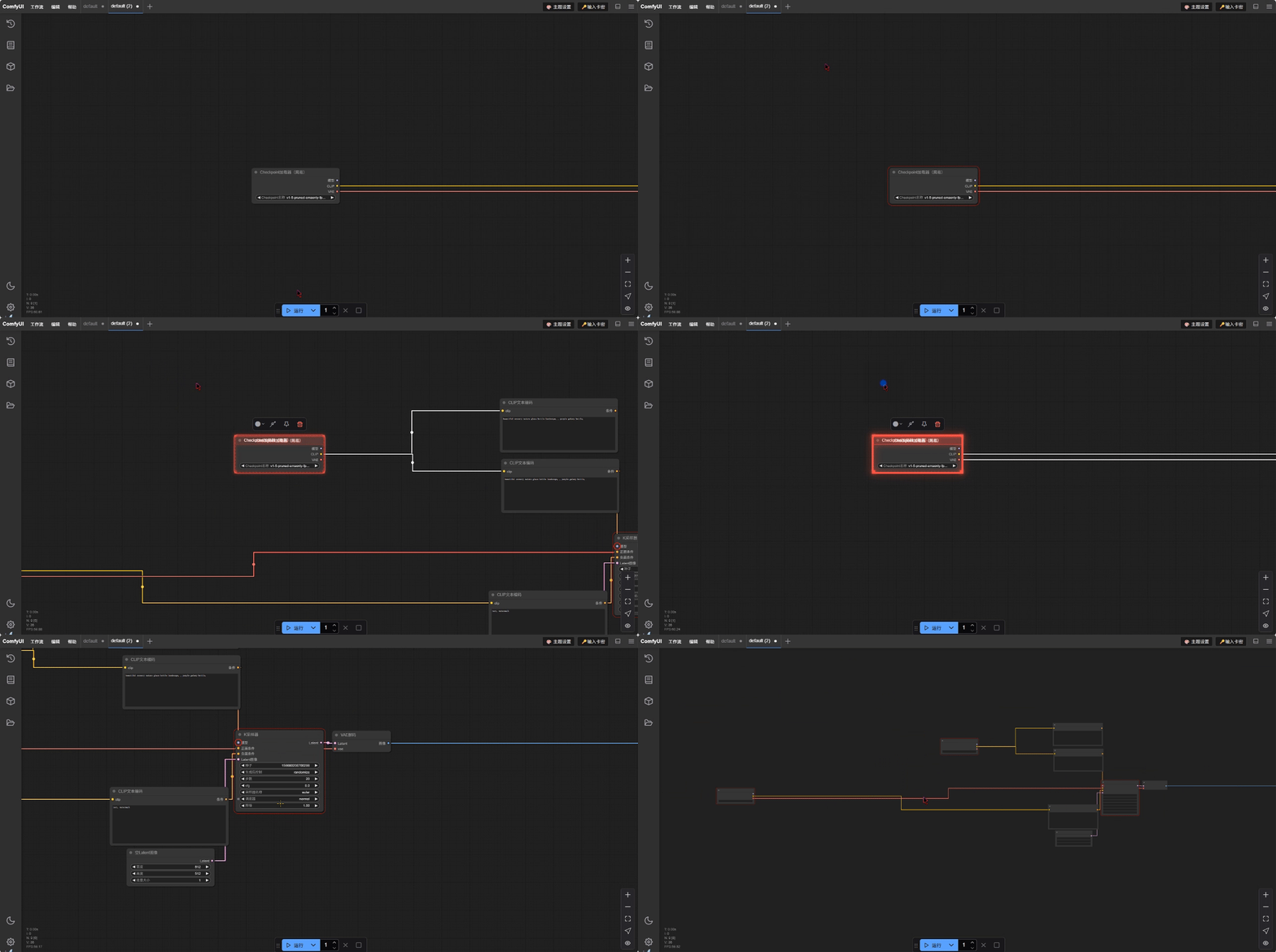
🚨 错误节点快速定位 | Error Node Quick Location 🆕
- 自动错误检测 | Automatic Error Detection: 智能识别执行失败、验证错误等各种类型的错误节点 | Intelligently identify various types of error nodes including execution failures and validation errors
- 一键跳转报错节点 | One-click Jump to Error Node: 右键画布选择"🚨 跳转到报错节点"快速定位错误 | Right-click on canvas and select "🚨 Jump to Error Node" to quickly locate errors
- 循环查看多个错误 | Cycle Through Multiple Errors: 如有多个错误节点,可连续点击循环查看所有错误 | If there are multiple error nodes, you can click continuously to cycle through all errors
- 详细错误信息显示 | Detailed Error Information Display: 控制台显示详细的错误信息和堆栈跟踪 | Console displays detailed error information and stack traces
- 特殊错误样式 | Special Error Styling: 错误节点具有红色脉冲高亮效果,易于识别 | Error nodes have red pulsing highlight effects for easy identification
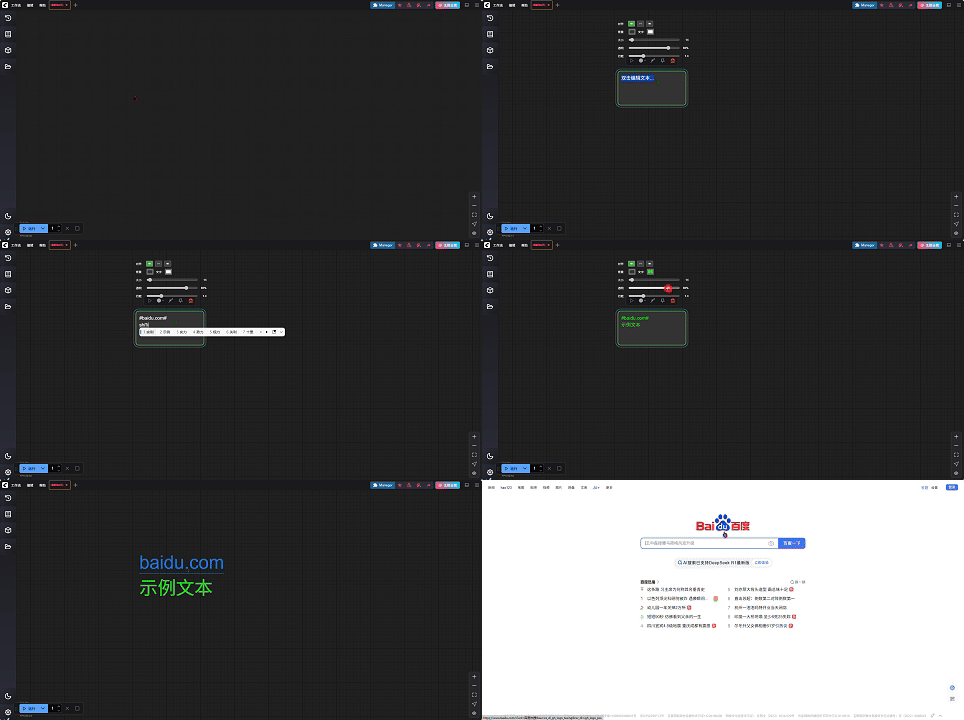
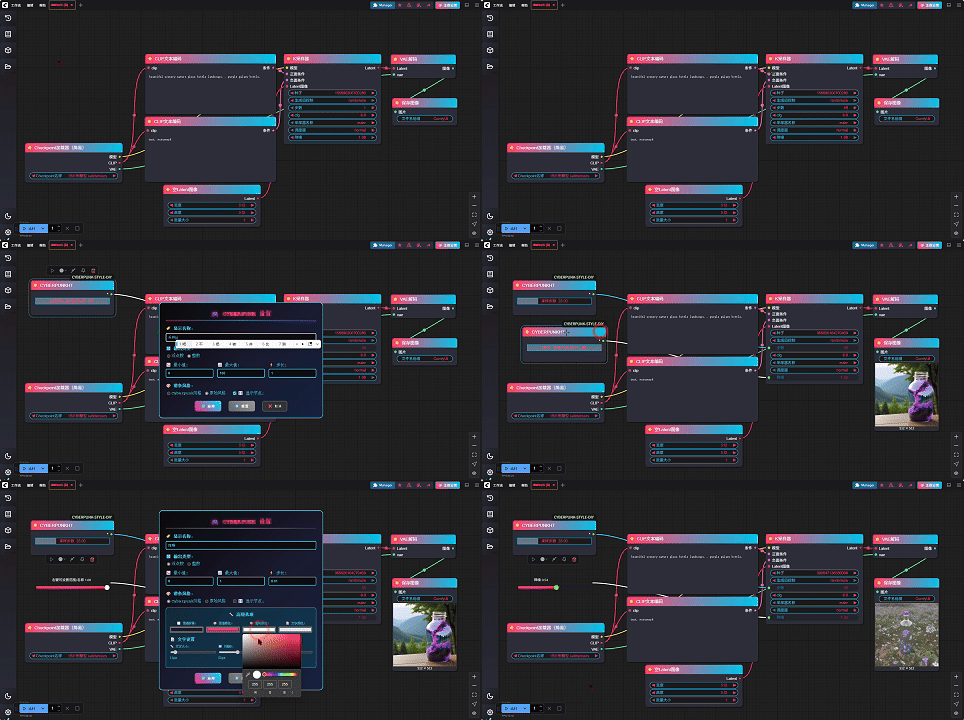
💻 透明笔记标注 | Transparent note annotation 🆕
- 自定义透明笔记节点 | Customize transparent note nodes: 自由调整文本大小 颜色 背景透明度 植入链接 | Freely adjust text size, color, background transparency, and embed links
💻 通用自定义滑条 | Universal custom slider 🆕
- 自定义整数浮点滑条 | Custom integer floating-point slider: 输出类型可调整 滑条风格可调整 | Output type adjustable, slider style adjustable
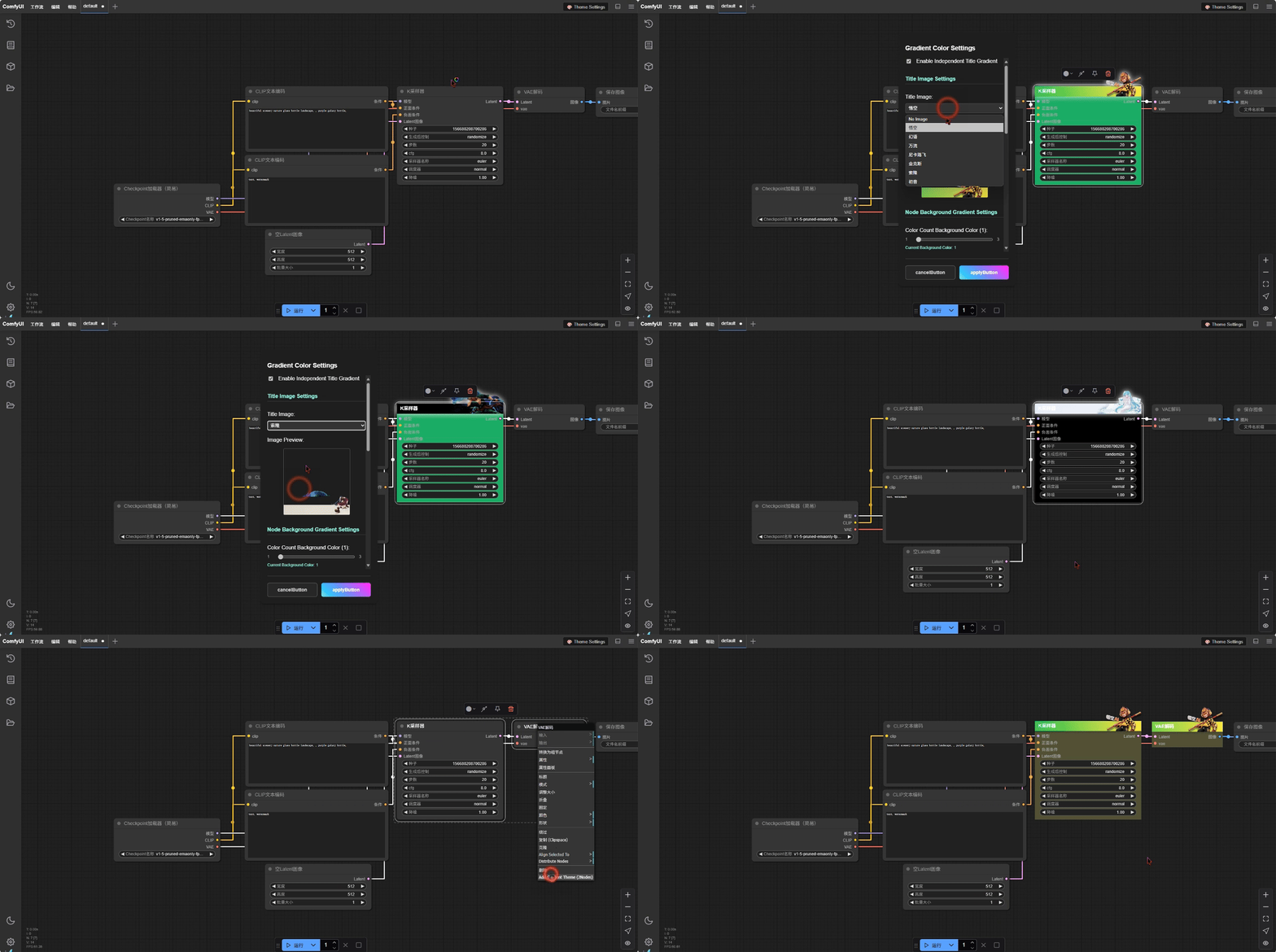
🖼️ 节点标题图像 | Node Title Images 🆕
- 自定义节点图标 | Custom Node Icons: 为节点标题添加自定义图像 | Add custom images to node titles
- 内置图像库 | Built-in Image Library: 预制的图标和装饰图像 | Pre-built icons and decorative images
- 图像预览功能 | Image Preview Function: 选择图像时实时预览效果 | Real-time preview when selecting images
- 自适应缩放 | Adaptive Scaling: 图像自动适配节点标题区域 | Images automatically adapt to node title area
- 批量应用 | Batch Application: 可同时为多个节点设置相同图像 | Apply same image to multiple nodes simultaneously
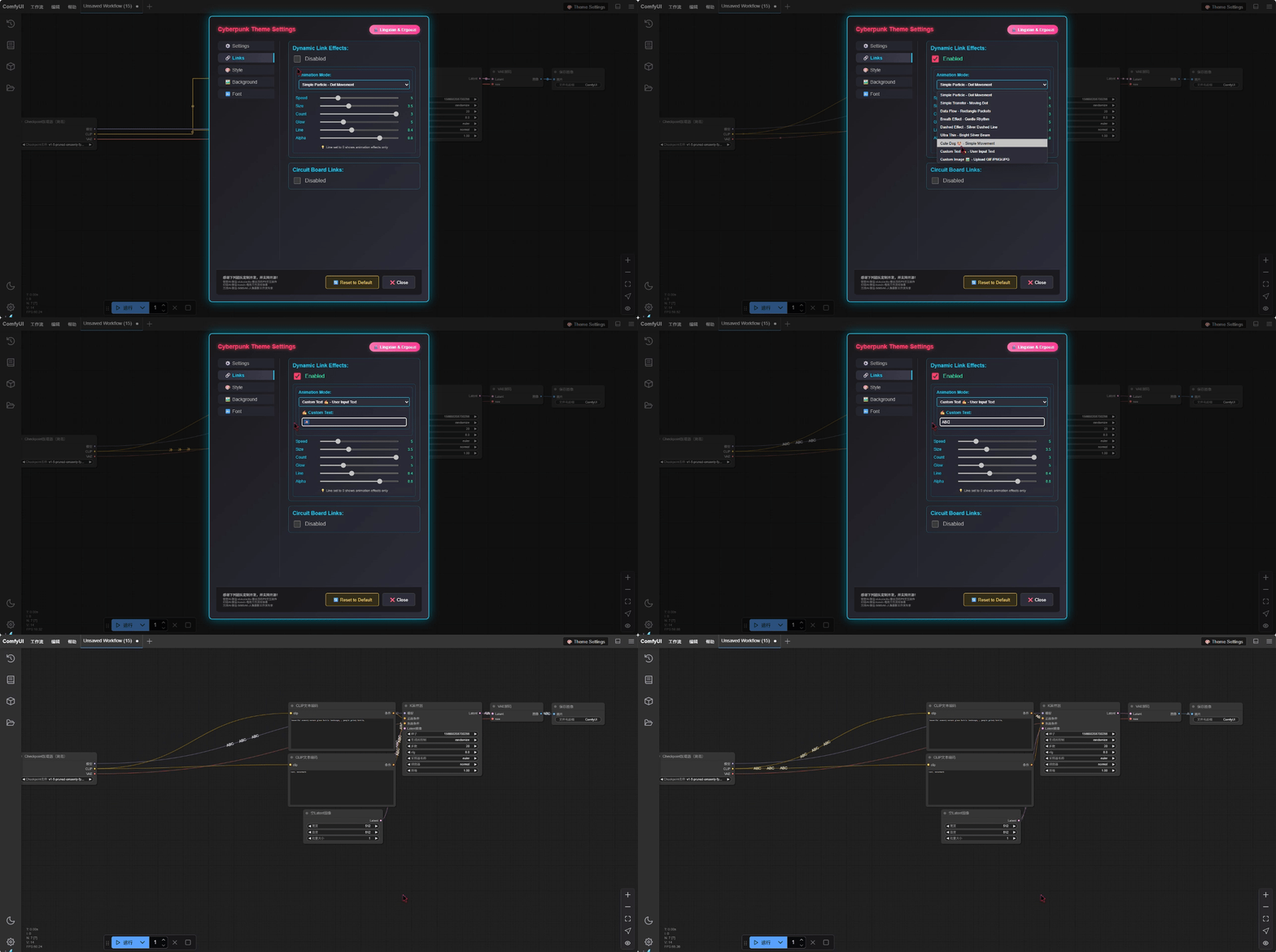
✍️ 自定义文字动画 | Custom Text Animation 🆕
- 个性化文字 | Personalized Text: 用户可输入任意文字作为动画元素 | Users can input any text as animation elements
- 实时输入 | Real-time Input: 选择自定义文字模式时显示输入框 | Input box appears when custom text mode is selected
- 即时生效 | Instant Effect: 输入的文字立即在连线上显示动画效果 | Input text immediately shows animation effects on connections
- 多语言支持 | Multi-language Support: 支持中文、英文、emoji和特殊字符 | Supports Chinese, English, emojis and special characters
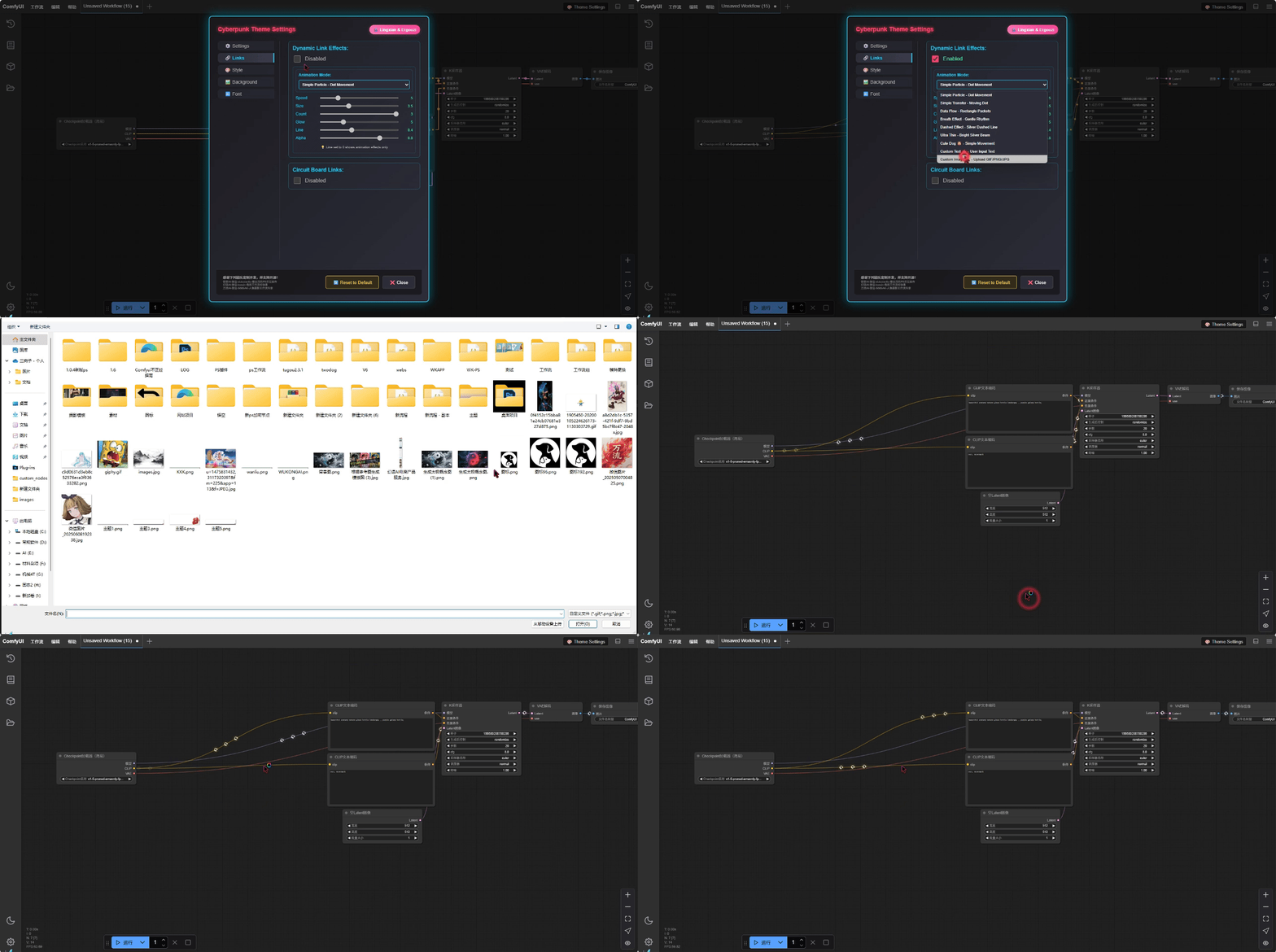
🖼️ 高级背景管理 | Advanced Background Management
📁 自定义背景图片 | Custom Background Images
- 多格式支持 | Multi-format Support: PNG、JPG、GIF等常见格式 | PNG, JPG, GIF and other common formats
- 文件大小限制 | File Size Limit: 最大5MB,确保性能 | Max 5MB for optimal performance
- 拖拽上传 | Drag & Drop: 便捷的文件上传方式 | Convenient file upload method
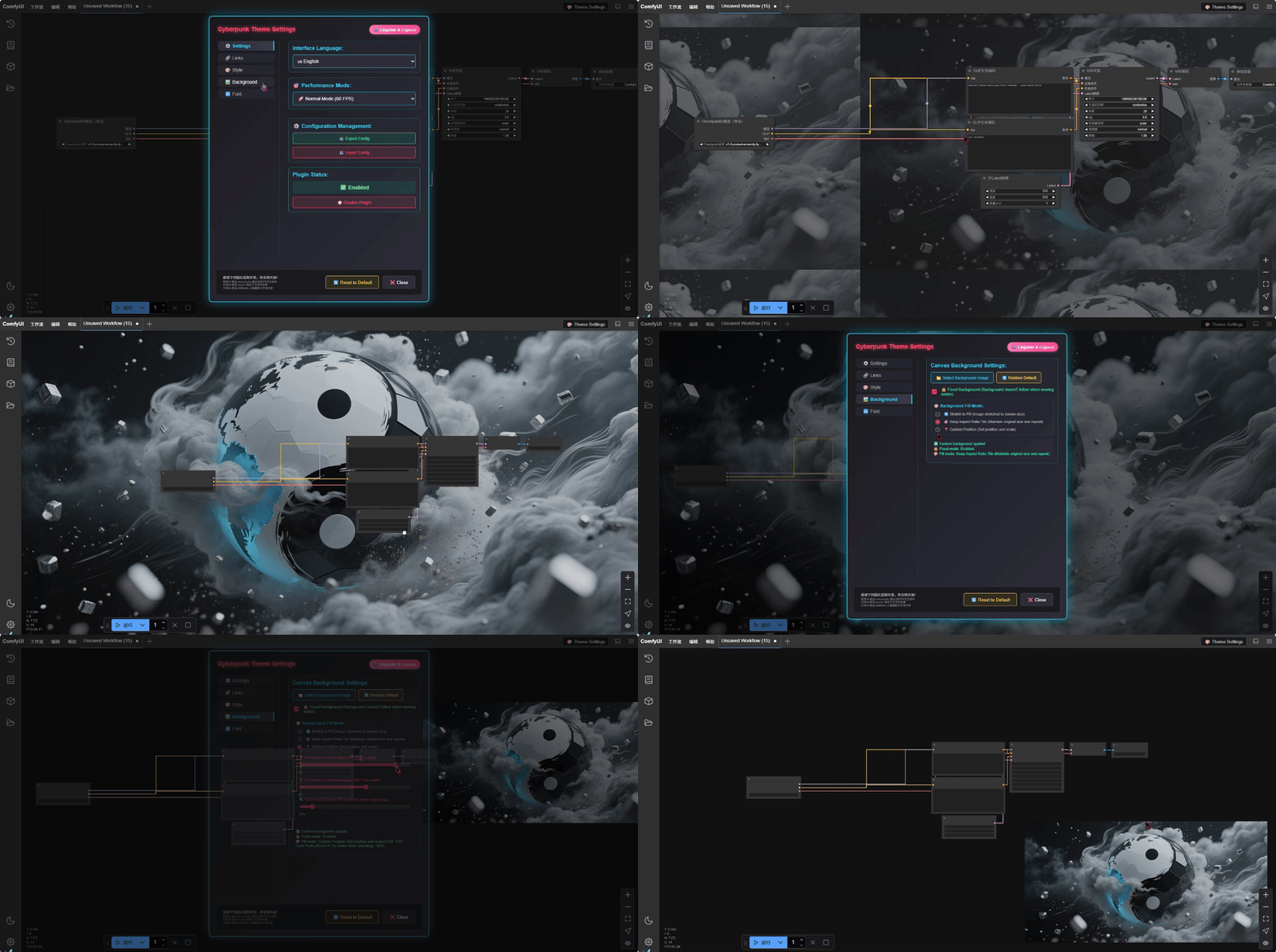
🎨 三种填充模式 | Three Fill Modes
- 🔄 拉伸铺满 | Stretch Fill: 图像拉伸至屏幕大小 | Scale image to fill entire screen
- 🎯 保持比例平铺 | Aspect Ratio Tile: 保持原始尺寸重复铺设 | Repeat image at original size
- 📍 自定义位置 | Custom Position: 精确的位置和缩放控制 | Precise position and scale control
🎛️ 精密位置控制 | Precision Position Control
- 坐标系统 | Coordinate System:
- X坐标 | X-axis: 1=左边缘 | left edge, 100=右边缘 | right edge
- Y坐标 | Y-axis: 1=底部边缘 | bottom edge, 100=顶部边缘 | top edge
- 缩放控制 | Scale Control: 10%-300%,以中心为基准 | 10%-300% with center-based scaling
- 自动重置 | Auto Reset: 缩放时位置自动居中 | Position auto-centers when scaling
- 边界外定位 | Out-of-bounds Positioning: 支持移动到屏幕外 | Support for moving outside screen boundaries
🔒 固定背景模式 | Fixed Background Mode
- 独立移动 | Independent Movement: 节点移动时背景保持固定 | Background stays fixed when nodes move
- 视觉稳定性 | Visual Stability: 提供稳定的视觉参考点 | Provides stable visual reference points
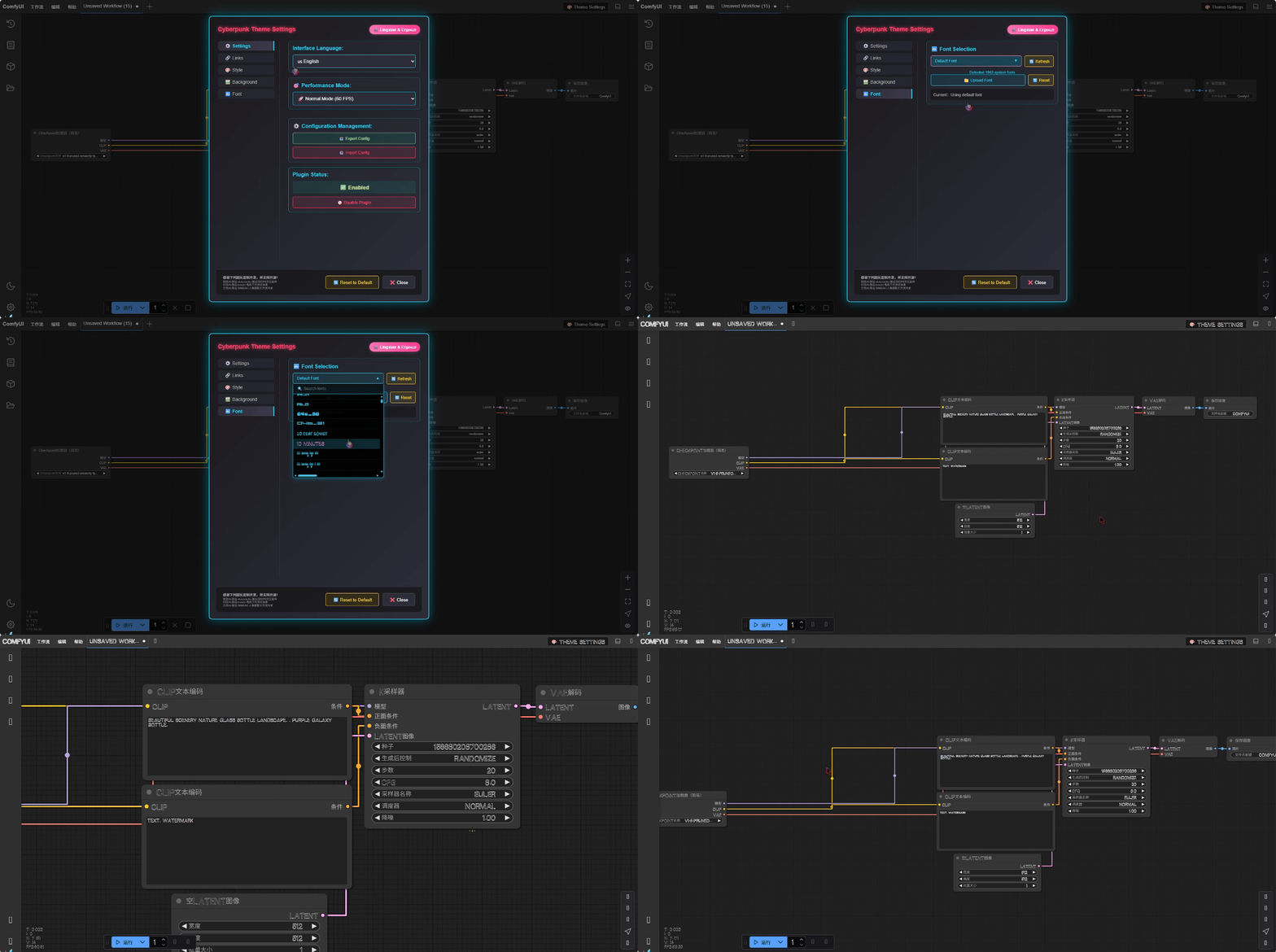
🔤 字体管理 | Font Management
- 系统字体检测 | System Font Detection: 自动检测可用系统字体 | Automatically detect available system fonts
- 自定义字体上传 | Custom Font Upload: 支持上传TTF、OTF字体文件 | Support for uploading TTF, OTF font files
- 实时预览 | Real-time Preview: 字体更改即时预览效果 | Instant preview of font changes
- 字体搜索 | Font Search: 快速搜索和筛选字体 | Quick search and filter fonts
⚡ 性能优化 | Performance Optimization
🎯 性能模式 | Performance Modes
- 🚀 正常模式 | Normal Mode: 60 FPS,完整效果 | 60 FPS with full effects
- ⚡ 性能模式 | Performance Mode: 45 FPS,优化性能 | 45 FPS with optimized performance
- 💾 低配模式 | Low-end Mode: 30 FPS,最大兼容性 | 30 FPS with maximum compatibility
🪶 轻量模式 | Light Mode
- 最小资源消耗 | Minimal Resource Usage: 极简动画效果 | Minimal animation effects
- 低端设备优化 | Low-end Device Optimization: 适合配置较低的设备 | Suitable for lower-spec devices
⚙️ 配置管理 | Configuration Management
- 📤 导出配置 | Export Configuration: 保存当前设置到JSON文件 | Save current settings to JSON file
- 📥 导入配置 | Import Configuration: 加载之前保存的配置 | Load previously saved configurations
- 🔄 重置配置 | Reset Configuration: 恢复默认设置并清除缓存 | Restore default settings and clear cache
- 💾 自动保存 | Auto Save: 设置更改实时保存 | Settings changes saved in real-time
🎨 自定义主题编辑器 | Custom Theme Editor
- 🎨 颜色自定义 | Color Customization: 完全自定义所有UI颜色 | Fully customize all UI colors
- 🌈 渐变设置 | Gradient Settings: 支持多种渐变方向和效果 | Support for various gradient directions and effects
- 🔧 节点样式 | Node Styling: 自定义节点外观和边框 | Customize node appearance and borders
- 🔌 端口颜色 | Port Colors: 不同数据类型的端口颜色配置 | Port color configuration for different data types
📦 安装方法 | Installation
📸 关于图片文件 | About Image Files
🚀 轻量化仓库 | Lightweight Repository
为了减少仓库大小和提高克隆速度,我们将文档图片存储在独立的图片仓库中。
To reduce repository size and improve clone speed, we store documentation images in a separate image repository.✅ 完美体验 | Perfect Experience:
- 🚀 快速克隆:仅下载代码文件(<5MB)| Fast clone: Only downloads code files (<5MB)
- 📖 完整文档:GitHub 页面图片正常显示 | Complete docs: Images display properly on GitHub pages
- 🔧 无依赖:插件功能完全独立 | No dependencies: Plugin functionality completely independent
- 💾 无限制:图片大小不受限制 | No limits: Image sizes unrestricted
方法一:Git克隆 | Method 1: Git Clone
# 进入ComfyUI自定义节点目录
# Navigate to ComfyUI custom nodes directory
cd ComfyUI/custom_nodes/

# 克隆仓库
# Clone repository
git clone https://github.com/11dogzi/CYBERPUNK-STYLE-DIY.git

# 重启ComfyUI
# Restart ComfyUI
方法二:手动下载 | Method 2: Manual Download
- 下载插件压缩包 | Download the plugin archive
- 解压到
ComfyUI/custom_nodes/目录 | Extract toComfyUI/custom_nodes/directory - 重启ComfyUI | Restart ComfyUI
安装完成确认 | Installation Verification
安装成功后,您应该能在ComfyUI界面中看到 "🎨 主题设置" 按钮。
After successful installation, you should see the "🎨 Theme Settings" button in the ComfyUI interface.
🚀 使用指南 | Usage Guide
📱 访问设置面板 | Accessing Settings Panel
点击界面中的 "🎨 主题设置" 按钮打开设置面板,面板包含多个标签页:
Click the "🎨 Theme Settings" button in the interface to open the settings panel with multiple tabs:
- ⚙️ 设置 | Settings: 基本主题和语言设置 | Basic theme and language settings
- 🔗 线条 | Effects: 动态连线和动画效果 | Dynamic links and animation effects
- 🎨 风格 | Style: 自定义主题编辑器 | Custom theme editor
- 🖼️ 背景 | Background: 背景图片管理 | Background image management
- 🔤 字体 | Font: 字体选择和上传 | Font selection and upload
🎨 主题选择和切换 | Theme Selection and Switching
-
选择预设主题 | Select Preset Theme:
- 在设置标签页的主题下拉菜单中选择 | Select from theme dropdown in settings tab
- 更改立即生效,支持实时预览 | Changes apply instantly with real-time preview
-
创建自定义主题 | Create Custom Theme:
- 点击 "🎨 自定义主题编辑器" | Click "🎨 Custom Theme Editor"
- 调整各种颜色参数 | Adjust various color parameters
- 实时预览效果 | Real-time preview effects
🔗 动态连线设置 | Dynamic Link Settings
-
启用动态效果 | Enable Dynamic Effects:
- 切换到 "🔗 线条" 标签页 | Switch to "🔗 Effects" tab
- 开启 "动态连线效果" | Enable "Dynamic Link Effects"
-
选择动画模式 | Select Animation Mode:
- 从8种动画模式中选择(建议从简单粒子开始)| Choose from 8 animation modes (recommended to start with Simple Particle)
- 自定义文字模式:选择后会出现文本输入框 | Custom Text Mode: Input box appears when selected
-
调节动画参数 | Adjust Animation Parameters:
- 速度 | Speed: 控制动画播放速度 | Control animation playback speed
- 大小 | Size: 调整粒子或文字大小 | Adjust particle or text size
- 数量 | Count: 同时显示的动画元素数量 | Number of simultaneous animation elements
- 发光 | Glow: 发光效果强度 | Glow effect intensity
-
自定义文字动画 | Custom Text Animation 🆕:
- 选择 "✍️ 自定义文字" 动画模式 | Select "✍️ Custom Text" animation mode
- 在出现的输入框中输入您想要的文字 | Enter your desired text in the input box that appears
- 文字将立即在连线上显示动画效果 | Text will immediately show animation effects on connections
- 支持emoji和特殊字符:🚀✨🎯💡 | Supports emojis and special characters: 🚀✨🎯💡
🎯 节点快速导航使用 | Node Quick Navigation Usage
快速跳转到连接节点 | Quick Jump to Connected Node
-
右键点击端口 | Right-click on Port:
右键点击任意端口 → 选择"🎯 转到连接点" → 自动跳转到连接的节点 Right-click on any port → Select "🎯 Go To Connection" → Auto jump to connected node -
查看跳转效果 | View Jump Effect:
- 画布会平滑移动到目标节点位置 | Canvas will smoothly move to target node position
- 目标节点会出现脉冲高亮效果 | Target node will show pulsing highlight effect
- 支持输入端口和输出端口的双向跳转 | Support bidirectional jumping for input and output ports
🚨 错误节点快速定位使用 | Error Node Quick Location Usage
快速定位错误节点 | Quick Locate Error Node
-
执行工作流出现错误时 | When Workflow Execution Has Errors:
右键点击画布空白区域 → 选择"🚨 跳转到报错节点" → 自动定位到错误节点 Right-click on canvas blank area → Select "🚨 Jump to Error Node" → Auto locate to error node -
多个错误节点处理 | Multiple Error Nodes Handling:
- 连续点击可循环查看所有错误节点 | Continuous clicking cycles through all error nodes
- 控制台会显示当前错误节点信息 | Console displays current error node information
- 错误节点会有红色脉冲高亮效果 | Error nodes will have red pulsing highlight effects
-
错误信息查看 | Error Information Viewing:
- 打开浏览器开发者工具控制台 | Open browser developer tools console
- 查看详细的错误信息和堆栈跟踪 | View detailed error information and stack traces
- 错误信息包含节点ID、类型和具体错误原因 | Error information includes node ID, type and specific error cause
🖼️ 背景图片设置 | Background Image Settings
上传和应用背景 | Upload and Apply Background
-
选择图片 | Select Image:
📁 选择背景图片 → 浏览文件 → 确认上传 📁 Select Background Image → Browse Files → Confirm Upload -
选择填充模式 | Choose Fill Mode:
- 🔄 拉伸铺满 | Stretch Fill: 适合纯色或简单图案 | Suitable for solid colors or simple patterns
- 🎯 保持比例平铺 | Aspect Ratio Tile: 适合无缝平铺图案 | Suitable for seamless tiling patterns
- 📍 自定义位置 | Custom Position: 需要精确控制的复杂背景 | Complex backgrounds requiring precise control
自定义位置模式使用 | Custom Position Mode Usage
-
设置缩放 | Set Scale:
🔍 缩放比例滑条 → 调整到合适大小 → 位置自动居中 🔍 Scale Slider → Adjust to appropriate size → Position auto-centers -
微调位置 | Fine-tune Position:
📍 X坐标: 1(左) ←→ 100(右) 📍 Y坐标: 1(下) ←→ 100(上) 📍 X-axis: 1(left) ←→ 100(right) 📍 Y-axis: 1(bottom) ←→ 100(top) -
高级技巧 | Advanced Tips:
- 可以设置坐标超出1-100范围,将图片移到屏幕外 | Can set coordinates beyond 1-100 range to move image off-screen
- 先调整缩放获得理想大小,再微调位置 | First adjust scale for ideal size, then fine-tune position
- 使用固定背景模式保持背景稳定 | Use fixed background mode to keep background stable
🔤 字体管理 | Font Management
-
选择系统字体 | Select System Font:
- 插件会自动检测可用字体 | Plugin automatically detects available fonts
- 使用搜索框快速查找 | Use search box for quick finding
-
上传自定义字体 | Upload Custom Font:
- 支持TTF、OTF格式 | Supports TTF, OTF formats
- 上传后立即可用 | Available immediately after upload
-
字体应用范围 | Font Application Scope:
- 同时应用到ComfyUI界面和节点文本 | Applied to both ComfyUI interface and node text
- 支持中文、英文、特殊字符 | Supports Chinese, English, special characters
⚙️ 配置管理 | Configuration Management
导出配置 | Export Configuration
📤 导出配置按钮 → 下载JSON文件 → 保存备份
📤 Export Config Button → Download JSON File → Save Backup
导入配置 | Import Configuration
📥 导入配置按钮 → 选择JSON文件 → 应用设置
📥 Import Config Button → Select JSON File → Apply Settings
重置配置 | Reset Configuration
🔄 重置配置 → 确认操作 → 恢复默认 + 清除缓存 + 刷新页面
🔄 Reset Config → Confirm Action → Restore Defaults + Clear Cache + Refresh Page
🎯 最佳实践 | Best Practices
📸 图片优化建议 | Image Optimization Tips
| 用途 Purpose | 建议分辨率 Recommended Resolution | 文件大小 File Size | 格式 Format |
|---|---|---|---|
| 桌面背景 Desktop Background | 1920x1080或更高 or higher | <3MB | PNG/JPG |
| 纹理图案 Texture Pattern | 512x512-1024x1024 | <1MB | PNG |
| 简单图案 Simple Pattern | 256x256-512x512 | <500KB | PNG |
⚡ 性能优化建议 | Performance Optimization Tips
-
根据设备选择模式 | Choose Mode Based on Device:
- 高端设备:正常模式(60 FPS) | High-end: Normal Mode (60 FPS)
- 中端设备:性能模式(45 FPS) | Mid-range: Performance Mode (45 FPS)
- 低端设备:低配模式(30 FPS)或轻量模式 | Low-end: Low Mode (30 FPS) or Light Mode
-
动画效果建议 | Animation Effect Recommendations:
- 复杂项目:使用简单动画(粒子、虚线) | Complex projects: Use simple animations (particle, dashed)
- 演示场景:使用炫酷效果(数据流、自定义文字) | Demo scenarios: Use cool effects (dataflow, custom text)
- 性能优先:禁用动画或使用轻量模式 | Performance priority: Disable animations or use light mode
-
背景图片建议 | Background Image Recommendations:
- 优先使用压缩过的图片 | Prioritize compressed images
- 避免过于复杂的背景影响节点可读性 | Avoid overly complex backgrounds affecting node readability
- 使用固定背景模式提升工作效率 | Use fixed background mode to improve work efficiency
-
自定义文字动画建议 | Custom Text Animation Recommendations 🆕:
- 短文字效果更佳:1-3个字符 | Short text works better: 1-3 characters
- 使用emoji增加趣味性:🚀💡⭐ | Use emojis for fun: 🚀💡⭐
- 避免过长文字影响性能 | Avoid overly long text affecting performance
-
节点导航使用建议 | Node Navigation Usage Recommendations 🆕:
- 复杂工作流中快速定位连接关系 | Quickly locate connection relationships in complex workflows
- 调试时跟踪数据流向 | Track data flow during debugging
- 大型画布中快速跳转到相关节点 | Quickly jump to related nodes in large canvases
-
错误定位使用建议 | Error Location Usage Recommendations 🆕:
- 工作流执行失败后立即使用错误定位功能 | Use error location feature immediately after workflow execution failure
- 结合控制台查看详细错误信息 | Combine with console to view detailed error information
- 修复一个错误后重新检查是否还有其他错误 | After fixing one error, recheck for other errors
🎨 主题设计建议 | Theme Design Recommendations
-
颜色搭配 | Color Matching:
- 保持足够的对比度确保可读性 | Maintain sufficient contrast for readability
- 使用相近色调营造统一感 | Use similar tones for unified feel
- 避免过于鲜艳的颜色造成视觉疲劳 | Avoid overly bright colors causing visual fatigue
-
自定义主题创建 | Custom Theme Creation:
- 从预设主题开始修改更容易 | Easier to start by modifying preset themes
- 先设置主要颜色,再调整细节 | Set main colors first, then adjust details
- 经常保存和导出配置作为备份 | Frequently save and export configurations as backup
🔧 技术规格 | Technical Specifications
💻 系统要求 | System Requirements
| 项目 Item | 最低要求 Minimum | 推荐配置 Recommended |
|---|---|---|
| 浏览器 Browser | Chrome 70+, Firefox 65+, Safari 12+ | 最新版本 Latest version |
| 内存 RAM | 4GB | 8GB+ |
| 显卡 GPU | 集成显卡 Integrated GPU | 独立显卡 Dedicated GPU |
| JavaScript | ES6支持 ES6 support | ES2020+ |
📁 文件支持 | File Support
| 类型 Type | 格式 Format | 大小限制 Size Limit | 用途 Purpose |
|---|---|---|---|
| 背景图片 Background Image | PNG, JPG, GIF, WebP | 5MB | 界面背景 Interface background |
| 字体文件 Font File | TTF, OTF, WOFF | 10MB | 自定义字体 Custom fonts |
| 配置文件 Config File | JSON | 1MB | 设置备份 Settings backup |
⚡ 性能参数 | Performance Parameters
- 渲染帧率 Rendering FPS: 30-60 FPS可调 adjustable
- 内存占用 Memory Usage: <100MB (正常使用 normal usage)
- CPU占用 CPU Usage: <5% (空闲时 when idle)
- 网络占用 Network Usage: 仅初始加载 Only initial loading
🐛 故障排除 | Troubleshooting
🔍 常见问题 | Common Issues
背景相关 | Background Related
| 问题 Problem | 可能原因 Possible Cause | 解决方案 Solution |
|---|---|---|
| 背景不显示 Background not showing | 文件过大或格式不支持 File too large or unsupported format | 检查文件<5MB,使用PNG/JPG格式 Check file <5MB, use PNG/JPG format |
| 背景模糊 Background blurry | 图片分辨率过低 Image resolution too low | 使用高分辨率图片(1920x1080+) Use high resolution image (1920x1080+) |
| 位置设置无效 Position settings ineffective | 未选择自定义位置模式 Custom position mode not selected | 在填充模式中选择"自定义位置" Select "Custom Position" in fill mode |
动画相关 | Animation Related
| 问题 Problem | 可能原因 Possible Cause | 解决方案 Solution |
|---|---|---|
| 动画卡顿 Animation stuttering | 设备性能不足 Insufficient device performance | 降低动画速度或切换到性能模式 Reduce animation speed or switch to performance mode |
| 自定义文字不显示 Custom text not showing | 输入框为空或含特殊字符 Input box empty or contains special characters | 输入普通文字,避免特殊符号 Input normal text, avoid special symbols |
| 连线效果消失 Link effects disappearing | 动画被禁用或冲突 Animation disabled or conflicting | 重新启用动态连线效果 Re-enable dynamic link effects |
| 文字输入框不出现 Text input box not appearing | 未选择自定义文字模式 Custom text mode not selected | 确保在动画模式中选择"自定义文字" Ensure "Custom Text" is selected in animation mode |
主题相关 | Theme Related
| 问题 Problem | 可能原因 Possible Cause | 解决方案 Solution |
|---|---|---|
| 主题不生效 Theme not applying | 浏览器缓存问题 Browser cache issue | 清除浏览器缓存并刷新 Clear browser cache and refresh |
| 颜色显示异常 Abnormal color display | 自定义主题配置错误 Custom theme configuration error | 重置到默认主题后重新配置 Reset to default theme and reconfigure |
| 设置不保存 Settings not saving | 浏览器禁用本地存储 Browser disabled local storage | 检查浏览器设置,允许本地存储 Check browser settings, allow local storage |
字体相关 | Font Related
| 问题 Problem | 可能原因 Possible Cause | 解决方案 Solution |
|---|---|---|
| 字体上传失败 Font upload failed | 文件格式不支持或损坏 Unsupported file format or corrupted | 使用TTF/OTF格式,确保文件完整 Use TTF/OTF format, ensure file integrity |
| 字体不显示 Font not displaying | 字体文件不兼容 Font file incompatible | 尝试其他字体文件或重置为默认 Try other font files or reset to default |
🔄 重置和恢复 | Reset and Recovery
快速重置步骤 | Quick Reset Steps
- 点击设置面板中的 "🔄 重置配置" 按钮 | Click "🔄 Reset Config" button in settings panel
- 确认重置操作 | Confirm reset operation
- 等待页面自动刷新 | Wait for automatic page refresh
- 检查所有设置已恢复默认 | Verify all settings restored to default
手动清理步骤 | Manual Cleanup Steps
如果自动重置无效,可以手动清理:| If automatic reset is ineffective, manual cleanup:
-
清除浏览器存储 | Clear Browser Storage:
F12 → Application/存储 → Local Storage → 删除相关条目 F12 → Application/Storage → Local Storage → Delete related entries -
禁用插件重启 | Disable Plugin and Restart:
重命名插件文件夹 → 重启ComfyUI → 重新启用
Rename plugin folder → Restart ComfyUI → Re-enable
--
👥 作者信息 | Author Information
🎬 创作团队 | Creative Team
- 作者 | Author: 灵仙儿和二狗子 | Lingxian & Ergouzi
- Bilibili: 🎬 灵仙儿和二狗子
- 🐵 悟空AI | Wukong AI: xiutuxiaoliu
- 💭 幻语AI | Huanyu AI: clinton
- 🌊 万流AI | Wanliu AI: S68SAK
🤝 社区支持 | Community Support
- 问题反馈 | Issue Reports: 通过GitHub Issues提交 | Submit via GitHub Issues
- 功能建议 | Feature Requests: 欢迎提出改进意见 | Welcome improvement suggestions
- 技术交流 | Technical Discussion: Bilibili评论区或私信 | Bilibili comments or private messages
📄 许可证 | License
本项目采用开源许可证,详细信息请参考LICENSE文件。
This project uses an open source license. For details, please refer to the LICENSE file.
📋 使用条款 | Terms of Use
- ✅ 允许个人和商业使用 | Personal and commercial use allowed
- ✅ 保留原作者信息 | Retain original author information
- ❌ 不提供任何担保 | No warranty provided
🎉 致谢 | Acknowledgments
感谢所有为此项目贡献代码、反馈和建议的用户!
Thanks to all users who contributed code, feedback and suggestions to this project
特别感谢ComfyUI开发团队提供的优秀平台。
Special thanks to the ComfyUI development team for providing an excellent platform.
🌟 享受您增强的ComfyUI体验!| Enjoy your enhanced ComfyUI experience! 🌟
如果这个插件对您有帮助,请给我们一个⭐Star支持!
If this plugin helps you, please give us a ⭐Star for support!