# ComfyUI-KikoTools





> A modular collection of essential custom ComfyUI nodes missing from the standard release.
ComfyUI-KikoTools provides carefully crafted, production-ready nodes under the "ComfyAssets" category.
Each tool is built with clean interfaces, thorough testing, and optimized performance for SDXL and FLUX workflows.
This project started out of frustration with keeping ComfyUI up to date and waiting for dozens of custom nodes to update—most of which I didn’t even use. After taking a hard look at my workflow, I realized I only needed one or two features from these nodes, many of which were abandoned or stuck in maintenance mode.
I tried forking, patching, and submitting merge requests, but eventually decided to create my own curated collection of tools—fully supported and maintained by me. That’s how Kiko’s Tools was born.
I’m sharing them here with the community, and I hope you find them as useful as I do.
## 🚀 Features
### ✨ Current Tools
| Tool | Description | Category |
|------|-------------|----------|
| [📐 Resolution Calculator](#-resolution-calculator) | Calculate upscaled dimensions with model optimization | 🖼️ Resolution |
| [📏 Width Height Selector](#-width-height-selector) | Preset-based dimension selection with visual swap | 🖼️ Resolution |
| [🎲 Seed History](#-seed-history) | Advanced seed tracking with interactive history | 🌱 Seeds |
| [⚙️ Sampler Combo](#️-sampler-combo) | Unified sampling configuration interface | 🌀 Samplers |
| [📦 Empty Latent Batch](#-empty-latent-batch) | Create empty latent batches with preset support | 📦 Latents |
| [💾 Kiko Save Image](#-kiko-save-image) | Enhanced image saving with popup viewer | 💾 Images |
| [📋 Display Text](#-display-text) | Smart text display with prompt detection | 👁️ Display |
| [🤖 Gemini Prompt Engineer](#-gemini-prompt-engineer) | AI-powered image analysis and prompt generation | 🧠 Prompts |
| [🔍 Display Any](#-display-any) | Universal debugging tool for any data type | 👁️ Display |
| [🖼️ Image to Multiple Of](#️-image-to-multiple-of) | Adjust dimensions to multiples for compatibility | 🖼️ Resolution |
| [📉 Image Scale Down By](#-image-scale-down-by) | Scale images down by a factor with quality preservation | 🖼️ Resolution |
| [🎬 Film Grain](#-film-grain) | Add realistic film grain effects to images | 💾 Images |
| [🔤 Embedding Autocomplete](#-embedding-autocomplete) | Smart autocomplete for embeddings, LoRAs, and tags | 🔧 Utils |
| [🧹 Kiko Purge VRAM](#-kiko-purge-vram) | Intelligent VRAM management with detailed reporting | 🛠️ Utils |
| [📂 Local Image Loader](#-local-image-loader) | Visual gallery browser for local media files | 💾 Images |
| [🌐 Model Downloader](#-model-downloader) | Download models from CivitAI, HuggingFace, and custom URLs | 🛠️ Utils |
| [⏱️ Workflow Timer](#️-workflow-timer) | Real-time execution timer with customizable display | 🛠️ Utils |
### 🧰 xyz-helpers Tools
Advanced parameter management tools adapted from [comfyui-essentials-nodes](https://github.com/cubiq/ComfyUI_essentials) (now in maintenance mode):
| Tool | Description | Category |
|------|-------------|----------|
| [🎛️ Flux Sampler Params](#️-flux-sampler-params) | FLUX-optimized parameter generator with batch support | 🧰 xyz-helpers |
| [📁 LoRA Folder Batch](#-lora-folder-batch) | Batch process multiple LoRAs from folders | 🧰 xyz-helpers |
| [📊 Plot Parameters](#-plot-parameters) | Visualize parameter effects with graphs | 🧰 xyz-helpers |
| [🎯 Sampler Select Helper](#-sampler-select-helper) | Intelligent sampler selection with recommendations | 🧰 xyz-helpers |
| [📅 Scheduler Select Helper](#-scheduler-select-helper) | Optimal scheduler selection for samplers | 🧰 xyz-helpers |
| [✍️ Text Encode Sampler Params](#️-text-encode-sampler-params) | Combined text encoding and parameter management | 🧰 xyz-helpers |
#### 📐 Resolution Calculator
Calculate upscaled dimensions from image or latent inputs with precision.
- **Smart Input Handling**: Works with both IMAGE and LATENT tensors
- **Model Optimized**: Specific optimizations for SDXL (~1MP) and FLUX (0.2-2MP) models
- **Constraint Enforcement**: Automatically ensures dimensions divisible by 8
- **Flexible Scaling**: Supports scale factors from 1.0x to 8.0x with 0.1 precision
- **Aspect Ratio Preservation**: Maintains original proportions during scaling
**Use Cases:**
- Calculate target dimensions for upscaler nodes
- Plan memory usage for large generations
- Ensure ComfyUI tensor compatibility
- Optimize batch processing workflows

#### 📏 Width Height Selector
Advanced preset-based dimension selection with visual swap button.
- **26 Curated Presets**: SDXL, FLUX, and Ultra-Wide optimized resolutions
- **Smart Categories**: Organized by model type and aspect ratio
- **Visual Swap Button**: Modern blue button for quick orientation changes
- **Intelligent Swapping**: Preset-aware orientation switching
- **Custom Support**: Manual dimension input with validation
**Use Cases:**
- Quick dimension selection for different models
- Consistent aspect ratios across workflows
- Mobile and ultra-wide format support
- Integration with upscaling pipelines
#### 🎲 Seed History
Advanced seed tracking with interactive history management and UI.
- **Automatic Tracking**: Monitors all seed changes with timestamps
- **Interactive History**: Click any historical seed to reload instantly
- **Smart Deduplication**: 500ms window prevents duplicate rapid additions
- **Persistent Storage**: History survives browser sessions and ComfyUI restarts
- **Auto-Hide UI**: Clean interface that hides after 2.5 seconds of inactivity
- **Visual Feedback**: Toast notifications and selection highlighting
**Use Cases:**
- Track promising seeds during creative exploration
- Quickly return to successful generation parameters
- Maintain reproducibility across sessions
- Compare results from different seeds efficiently
![Seed History functionality is shown in various workflow examples]
#### ⚙️ Sampler Combo
Unified sampling configuration interface combining sampler, scheduler, steps, and CFG.
- **All-in-One Interface**: Single node for complete sampling configuration
- **Smart Recommendations**: Optimal settings suggestions per sampler type
- **Compatibility Validation**: Ensures sampler/scheduler combinations work well
- **Intelligent Defaults**: Context-aware parameter recommendations
- **Range Validation**: Prevents invalid parameter combinations
- **Comprehensive Tooltips**: Detailed guidance for each parameter
**Use Cases:**
- Simplify complex sampling workflows
- Ensure optimal sampler/scheduler combinations
- Reduce node clutter in workflows
- Quick sampling parameter experimentation
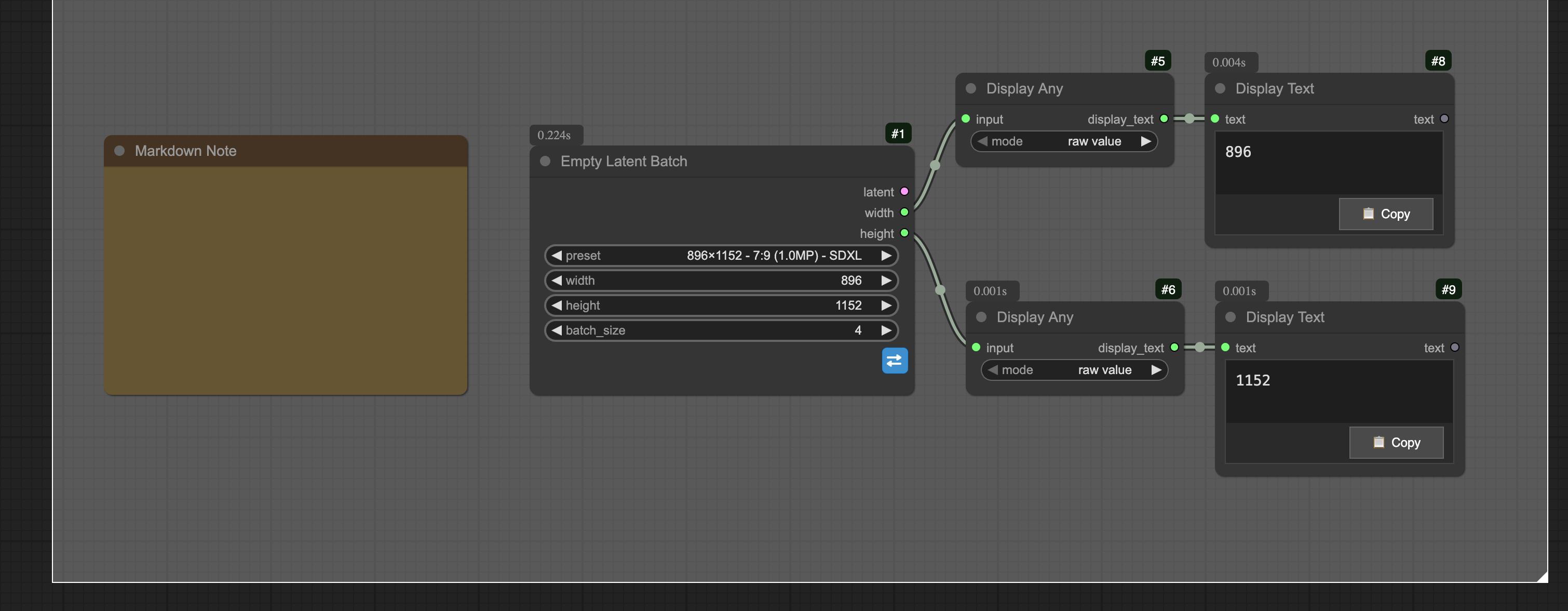
#### 📦 Empty Latent Batch
Advanced empty latent creation with preset support and batch processing capabilities.
- **Preset Integration**: 26 curated resolution presets with model optimization
- **Batch Processing**: Create multiple empty latents (1-64) in a single operation
- **Visual Swap Button**: Interactive blue button for quick dimension swapping
- **Smart Validation**: Automatic dimension sanitization for VAE compatibility
- **Memory Estimation**: Built-in memory usage calculation and warnings
- **Model-Aware Presets**: SDXL (~1MP), FLUX (high-res), and Ultra-wide options
**Use Cases:**
- Initialize batch processing workflows efficiently
- Create consistent latent dimensions across model types
- Optimize memory usage with batch size planning
- Quick preset-based latent generation for different aspect ratios
#### 💾 Kiko Save Image
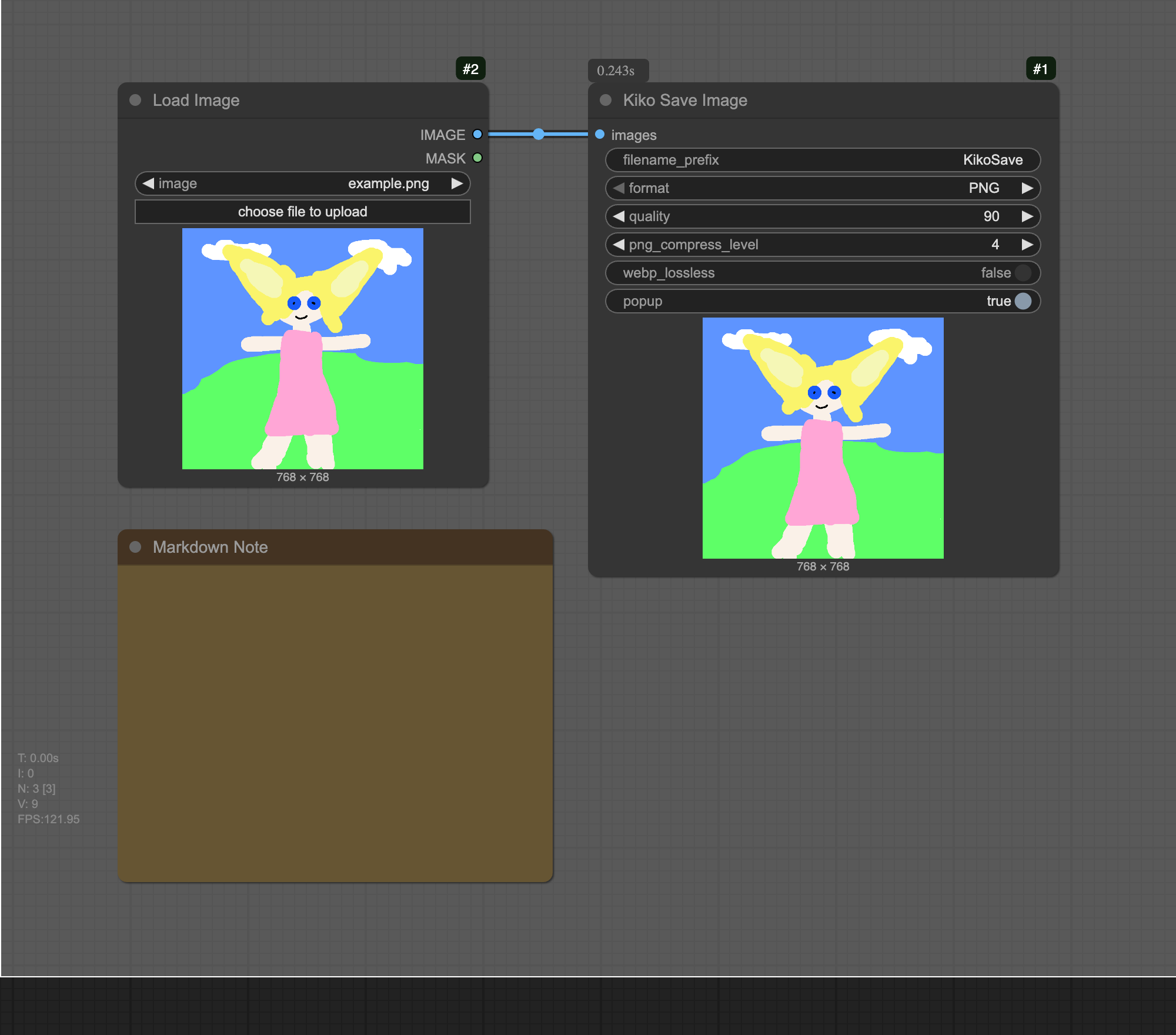
Enhanced image saving with format selection, quality control, and floating popup viewer.
- **Multiple Format Support**: Save as PNG, JPEG, or WebP with format-specific optimizations
- **Advanced Quality Controls**: JPEG/WebP quality (1-100), PNG compression (0-9), WebP lossless mode
- **Floating Popup Viewer**: Draggable, resizable window that shows saved images immediately
- **Interactive Previews**: Click any image to open in new tab, download individual images
- **Batch Selection**: Multi-select images for bulk actions (open all, download all)
- **Format-Specific Settings**: Quality indicators, file size display, compression info
- **Smart UI**: Auto-hide/show, minimize/maximize, roll-up functionality
- **Popup Toggle**: Enable/disable popup viewer per save operation
#### 📋 Display Text
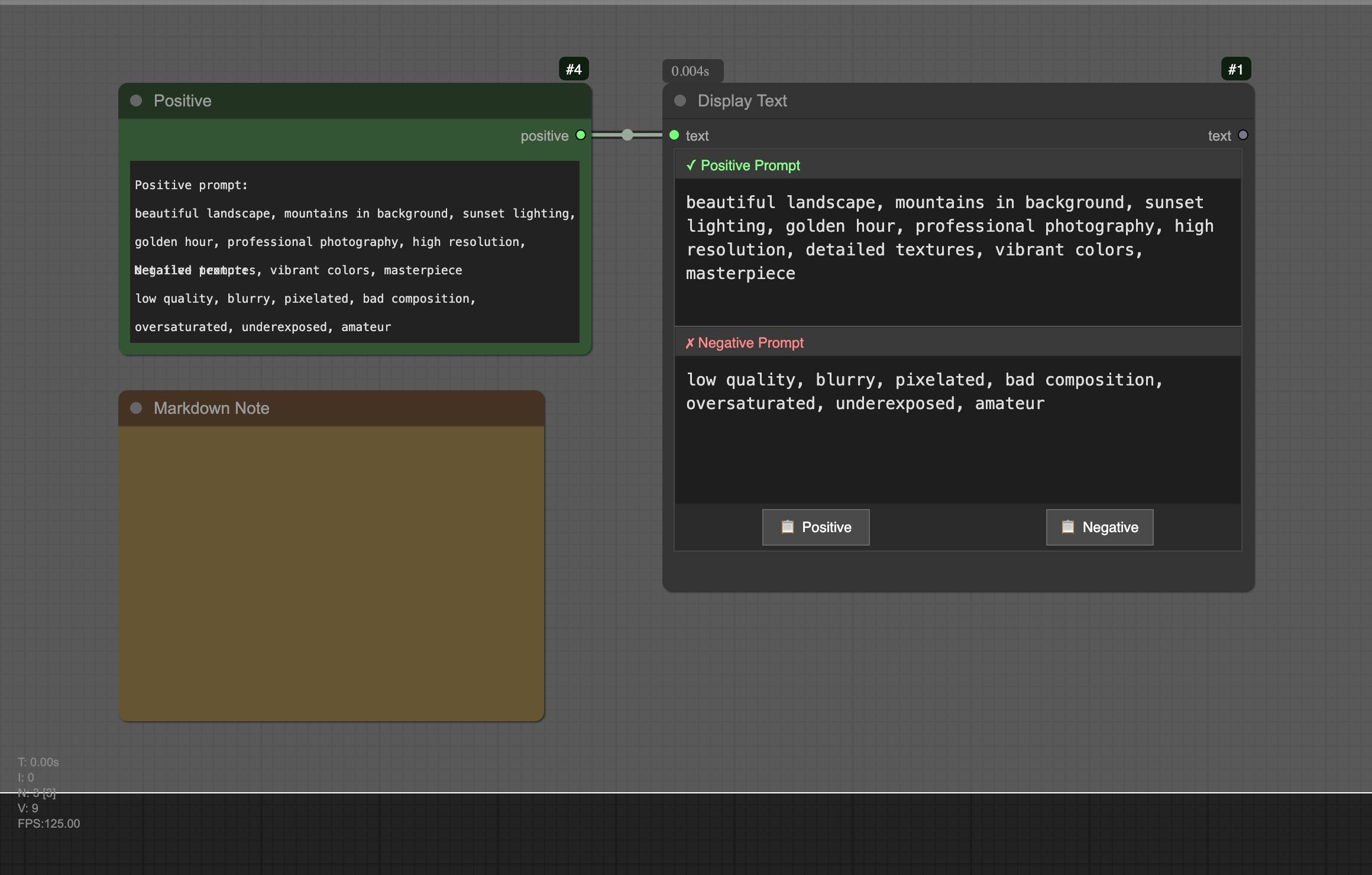
Advanced text display node with intelligent formatting and enhanced user interaction.
- **Smart Prompt Detection**: Automatically detects positive/negative prompt pairs and displays in split view
- **Text Wrapping**: Proper word wrapping that reflows when node is resized
- **Scrollable Content**: Mouse wheel scrolling for long texts with visual scroll indicators
- **Copy Functionality**: Always-visible copy button with visual feedback
- **Split View Mode**: Automatic detection and formatting of SDXL-style prompts
- **Responsive Design**: Content adapts to node resizing with proper text reflow
- **Clean Formatting**: Strips prompt labels when copying for direct use
**Use Cases:**
- Display generated prompts with proper formatting
- Compare positive and negative prompts side-by-side
- Copy prompts without manual label removal
- View long text content with proper wrapping
- Debug prompt generation workflows
#### 🤖 Gemini Prompt Engineer
AI-powered image analysis using Google's Gemini to generate optimized prompts for various models.
- **Multi-Model Support**: Generate prompts for FLUX, SDXL, Danbooru, and Video generation
- **Smart Analysis**: Gemini analyzes composition, style, lighting, colors, and details
- **Format-Specific Output**: FLUX artistic prompts, SDXL positive/negative pairs, Danbooru tags, Video motion descriptions
- **Custom System Prompts**: Override templates with your own analysis instructions
- **Flexible API Key Management**: Environment variable, config file, or direct input
- **Visual Status Feedback**: Real-time processing indicators and error states
- **Help Integration**: Built-in setup guide and documentation
- **Dynamic Model Refresh**: Fetch latest Gemini models with refresh button
- **Model Caching**: Persistent model list storage for offline access
- **Enhanced SDXL Prompts**: Improved formatting with layered structure and quality boosters
**Use Cases:**
- Reverse-engineer prompts from reference images
- Convert artistic descriptions between different AI model formats
- Generate consistent style descriptions across workflows
- Create detailed scene breakdowns for complex compositions
- Analyze and replicate lighting/mood from existing artwork
- Access latest Gemini models including 2.0 and 2.5 versions

#### 🔍 Display Any
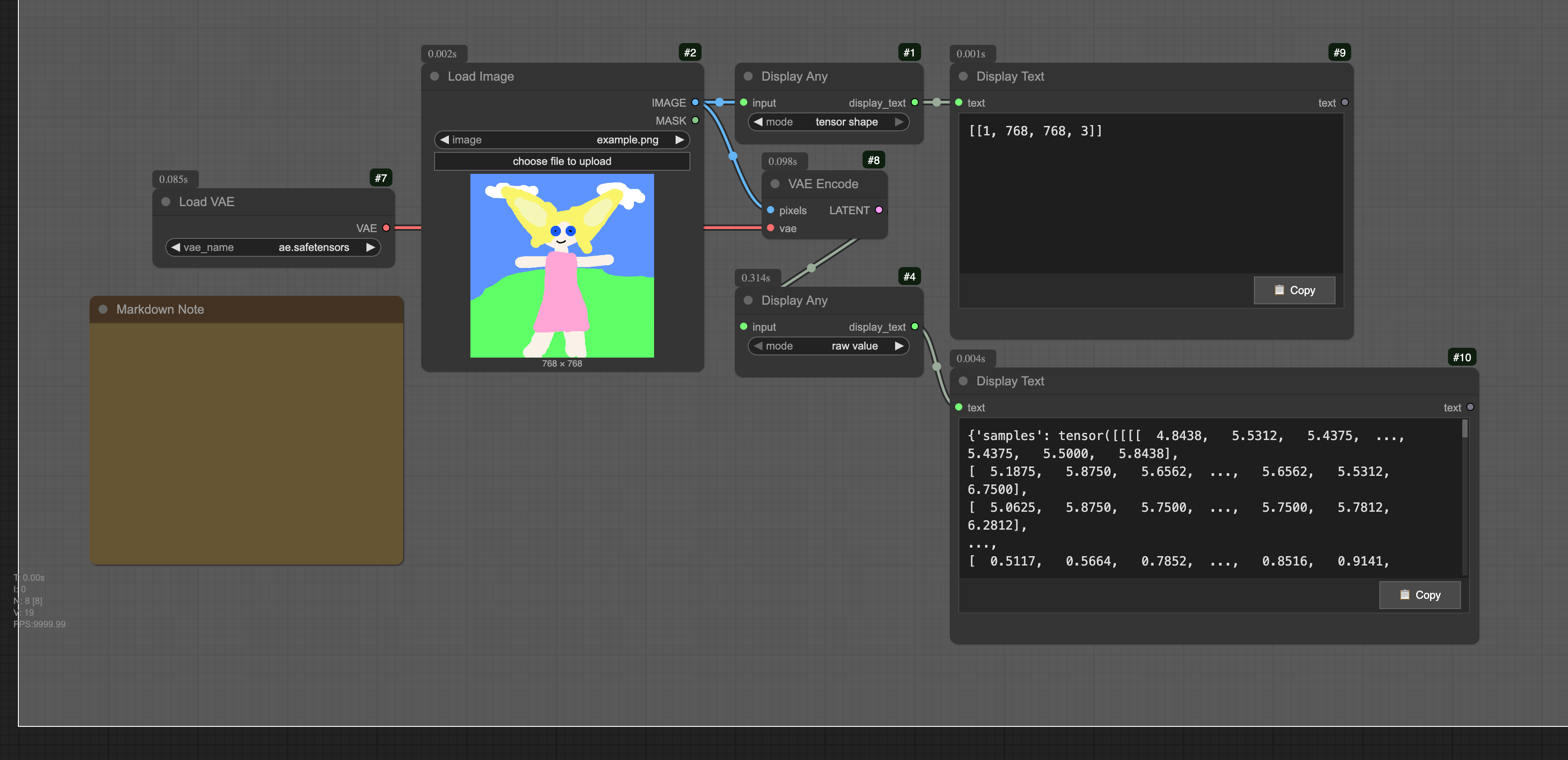
Universal debugging node that displays any type of input value or tensor information.
- **Universal Input Acceptance**: Works with any data type (tensors, strings, numbers, lists, dicts)
- **Two Display Modes**: Raw value showing string representation, or tensor shape extraction
- **Nested Structure Support**: Finds tensors within complex nested data structures
- **Debugging Focus**: Essential tool for understanding data flow and tensor dimensions
- **Clean Output**: Formatted display directly in ComfyUI interface
**Use Cases:**
- Debug tensor dimensions at any point in workflow
- Inspect latent space data structures
- View metadata and configuration objects
- Track shape changes through processing nodes
- Understand complex data types in ComfyUI
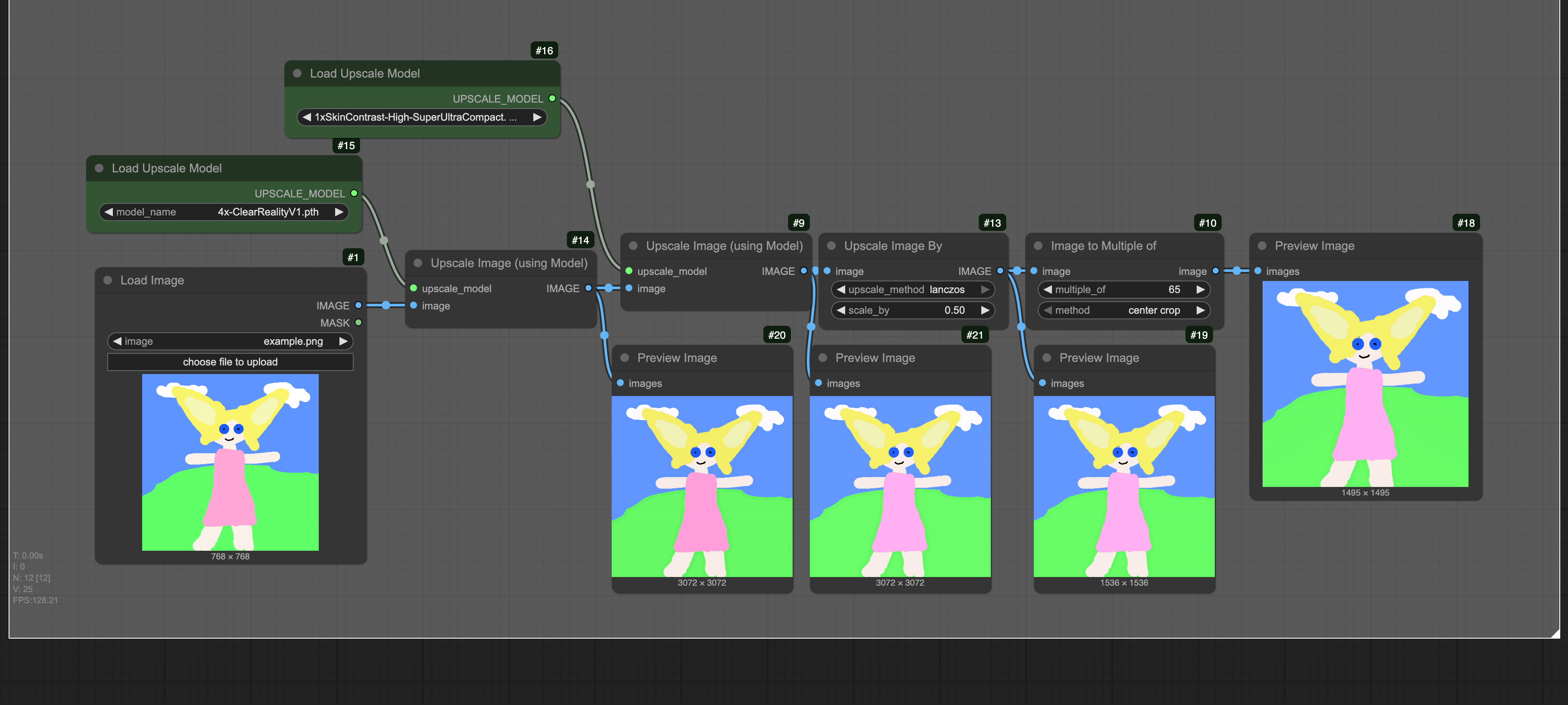
#### 🖼️ Image to Multiple Of
Adjusts image dimensions to be multiples of a specified value for model compatibility.
- **Dimension Adjustment**: Ensures image dimensions are multiples of specified value (e.g., 64, 128)
- **Two Processing Methods**: Center crop for minimal loss, or rescale to fit
- **Model Compatibility**: Essential for models requiring specific dimension constraints
- **Flexible Multiple Values**: Support from 1 to 256 with 16-step increments
- **Preserves Quality**: Smart processing maintains image quality
**Use Cases:**
- Prepare images for VAE encoding (multiple of 8 requirement)
- Ensure compatibility with specific model architectures
- Standardize dimensions across image batches
- Fix dimension errors in complex workflows
- Optimize for tiled processing requirements
#### 📉 Image Scale Down By
Efficiently scale images down by a specified factor with quality preservation.
- **Proportional Scaling**: Reduces both width and height by the same factor
- **Quality Preservation**: Uses bilinear interpolation with antialiasing
- **Batch Support**: Process multiple images simultaneously
- **Memory Efficient**: Optimized for large image batches
- **Flexible Factor**: Scale from 0.01x to 1.0x with 0.01 precision
**Use Cases:**
- Create thumbnails or preview images
- Reduce memory usage for large workflows
- Generate image pyramids for multi-scale processing
- Quick downsampling for performance optimization
- Prepare images for web display or transmission
#### 🎬 Film Grain
Add realistic analog film grain effects to generated images.
- **Realistic Grain Simulation**: Mimics actual film photography characteristics
- **Grain Size Control**: Fine to coarse grain patterns (0.25x to 2.0x)
- **Intensity Adjustment**: Variable strength from subtle to pronounced (0-10)
- **Color Saturation**: Monochrome to full color grain (0-2)
- **Shadow Lifting (Toe)**: Film-like shadow response curves
- **Red Multiplier**: Adjust red channel independently for vintage looks
- **Alpha Preservation**: Maintains transparency when present
- **ITU-R BT.709 Color Space**: Professional color handling
**Use Cases:**
- Add vintage film aesthetic to AI-generated images
- Create cinematic looks with authentic grain patterns
- Simulate different film stocks (35mm, 16mm, etc.)
- Add texture to overly smooth AI renders
- Match grain from reference photography
#### 🎛️ Flux Sampler Params
FLUX-optimized parameter generator with intelligent batch processing capabilities.
- **FLUX-Specific Tuning**: Optimized guidance, shift values, and step counts for FLUX models
- **Batch Parameter Testing**: Generate multiple parameter sets for comparative analysis
- **LoRA Integration**: Seamlessly combine with LoRA Folder Batch for comprehensive testing
- **Smart Defaults**: Pre-configured optimal settings based on extensive FLUX testing
- **Range Syntax Support**: Use `start...end+step` notation for parameter sweeps
**Use Cases:**
- Test different guidance and shift value combinations
- Batch process with varying parameters
- Optimize FLUX generation quality
- Integrate with LoRA testing workflows
#### 📁 LoRA Folder Batch
Automated batch processing for multiple LoRA models from folders.
- **Automatic Scanning**: Discovers all .safetensors files in specified folders
- **Natural Epoch Sorting**: Intelligently sorts training epochs (epoch_004, epoch_020, etc.)
- **Pattern Filtering**: Include/exclude LoRAs using powerful regex patterns
- **Flexible Strength Control**: Single, multiple, or range-based strength values
- **Batch Modes**: Sequential or combinatorial strength application
- **Epoch Detection**: Automatically extracts epoch numbers from filenames
**Use Cases:**
- Test all epochs from a training run
- Compare different LoRA versions
- Evaluate strength variations
- Batch process style transfers

#### 📊 Plot Parameters
Visual analysis tool for understanding parameter relationships and effects.
- **Multiple Plot Types**: Line, bar, scatter, and heatmap visualizations
- **Parameter Correlation**: Analyze relationships between settings and quality
- **Statistical Analysis**: Calculate means, deviations, and trends
- **Export Capabilities**: Save plots as images or CSV data
- **Real-time Updates**: Dynamic graph generation during workflow execution
**Use Cases:**
- Visualize parameter impact on quality
- Compare batch generation results
- Analyze optimal parameter ranges
- Document generation experiments
#### 🎯 Sampler Select Helper
Intelligent sampler selection with model-aware recommendations.
- **Model Detection**: Automatic identification of SDXL, SD1.5, or FLUX models
- **Quality Presets**: Fast, balanced, quality, and extreme presets
- **Compatibility Checking**: Ensures optimal sampler-scheduler pairs
- **Performance Profiles**: Pre-configured settings for different use cases
- **Dynamic Discovery**: Adapts to newly available samplers
**Use Cases:**
- Automatic optimal sampler selection
- Quick quality vs speed adjustments
- Model-specific optimization
- A/B testing different samplers
#### 📅 Scheduler Select Helper
Optimal scheduler selection based on sampler and model requirements.
- **Sampler-Aware**: Recommends best schedulers for each sampler
- **Noise Schedule Visualization**: Preview and compare schedule curves
- **Model Optimization**: Specific tuning for SDXL, SD1.5, and FLUX
- **Schedule Types**: Smooth, sharp, linear, and custom curves
- **Beta Schedule Support**: Advanced control with custom beta values
**Use Cases:**
- Find optimal scheduler for your sampler
- Visualize noise reduction curves
- Compare different schedule types
- Fine-tune generation behavior
#### ✍️ Text Encode Sampler Params
Unified interface for text encoding and sampler parameter management.
- **All-in-One Node**: Combine prompt encoding with sampling configuration
- **Template System**: Pre-configured settings for portraits, landscapes, etc.
- **Prompt Syntax Support**: Wildcards, emphasis, and alternation
- **Batch Processing**: Handle multiple prompts efficiently
- **Model-Aware Encoding**: Optimize for different text encoders
**Use Cases:**
- Streamline text-to-image workflows
- Apply consistent settings across prompts
- Quick template-based generation
- Batch prompt processing
#### 📂 Local Image Loader
Visual gallery browser for loading local images, videos, and audio files directly into ComfyUI workflows.
- **Visual Gallery Interface**: Browse files with thumbnail previews in a masonry layout
- **Multi-Media Support**: Load images (JPG, PNG, GIF, WebP), videos (MP4, WebM, MOV), and audio files (MP3, WAV, OGG, FLAC)
- **Quick Navigation**: Navigate folders with breadcrumb path and parent directory button
- **Responsive Layout**: Automatically adjusts thumbnail grid to available space
- **Metadata Extraction**: Reads embedded prompt and workflow data from generated images
- **Saved Paths**: Remember frequently used directories for quick access
- **Double-Click Preview**: Open full-size media in new browser tab
- **Smart Sorting**: Sort by name, date, or file size in ascending or descending order
- **Pagination Support**: Efficiently browse large directories with page controls
**Use Cases:**
- Load reference images from local folders for img2img workflows
- Browse and select from collections of generated images
- Quickly access frequently used asset directories
- Extract prompts and settings from previously generated images
- Preview media files before loading into workflow
#### 🌐 Model Downloader
Download models, LoRAs, and other assets directly from CivitAI, HuggingFace, and custom URLs within ComfyUI.
- **Multi-Platform Support**: CivitAI, HuggingFace, and direct download URLs
- **Smart URL Detection**: Automatic detection of download source and file handling
- **API Token Support**: Optional authentication for private/gated models
- **Progress Reporting**: Real-time download progress with speed indicators
- **Resume Support**: Skip existing files or force re-download
- **Interrupt Handling**: Respects ComfyUI's "Cancel current run" button
- **Automatic Cleanup**: Removes partial downloads on cancellation
- **Custom Filenames**: Override auto-detected filenames when needed
**Platform Features:**
- **CivitAI**: Model page URLs, version-specific downloads, API authentication
- **HuggingFace**: Blob and resolve URLs, branch/revision support, gated model access
- **Custom URLs**: Direct download links with bearer token authentication
**Use Cases:**
- Download models without leaving ComfyUI
- Automate asset acquisition in workflows
- Access private or gated models with API tokens
- Build reproducible workflows with automatic model fetching
- Quickly test new models from the community

#### ⏱️ Workflow Timer
Real-time execution timer that displays workflow duration with millisecond precision.
- **Live Timing**: Updates in real-time during workflow execution (MM:SS:mmm format)
- **Customizable Color**: Choose your preferred display color via KikoTools settings
- **Glow Effect**: Optional pulsing glow animation (can be enabled/disabled in settings)
- **Global Settings**: Color and glow preferences apply to all timer nodes
- **Persistent Display**: Shows final execution time after workflow completes
- **Multi-Node Sync**: All timer nodes stay synchronized during execution
**Use Cases:**
- Monitor workflow execution performance
- Compare generation times across different settings
- Identify slow nodes by adding timers at different workflow stages
- Track optimization improvements over time
**Settings (KikoTools Settings Panel):**
- **Workflow Timer: Color** - Custom color picker for timer display
- **Workflow Timer: Enable Glow** - Toggle pulsing glow effect on/off
### 🔤 Embedding Autocomplete
**Intelligent autocomplete for embeddings, LoRAs, and custom tags in text prompts.**
This feature is an enhanced fork of the autocomplete functionality from [ComfyUI-Custom-Scripts](https://github.com/pythongosssss/ComfyUI-Custom-Scripts) by pythongosssss. We've modernized the codebase, fixed existing bugs, and added robust security features.
**Key Features:**
- **Smart Triggers**: Type `embedding:` for embeddings, `
SDXL Portrait Upscaling
```json
{
"workflow": "Load SDXL portrait → Calculate 1.5x dimensions → Feed to upscaler",
"input_resolution": "832×1216",
"scale_factor": 1.5,
"output_resolution": "1248×1824",
"memory_efficient": true
}
```
FLUX Batch Processing
```json
{
"workflow": "Generate latents → Calculate target size → Batch upscale",
"input_resolution": "1024×1024",
"scale_factor": 2.0,
"output_resolution": "2048×2048",
"batch_optimized": true
}
```
LoRA Testing with xyz-helpers
```json
{
"workflow": "Scan LoRA folder → Apply strength ranges → Generate grid → Plot parameters",
"strength_range": "0.9...1.2+0.1",
"batch_mode": "combinatorial",
"features": ["automatic epoch sorting", "parameter visualization", "batch generation"]
}
```
Example workflow available: [xyz_helpers_lora_testing.json](examples/workflows/xyz_helpers_lora_testing.json)
## 📚 Documentation
### Available Tools
| Tool | Description | Status | Documentation |
|------|-------------|--------|---------------|
| **Resolution Calculator** | Calculate upscaled dimensions with model optimization | ✅ Complete | [Docs](examples/documentation/resolution_calculator.md) |
| **Width Height Selector** | Preset-based dimension selection with 26 curated options | ✅ Complete | [Docs](examples/documentation/width_height_selector.md) |
| **Seed History** | Advanced seed tracking with interactive history management | ✅ Complete | [Docs](examples/documentation/seed_history.md) |
| **Sampler Combo** | Unified sampling configuration with smart recommendations | ✅ Complete | [Docs](examples/documentation/sampler_combo.md) |
| **Empty Latent Batch** | Create empty latent batches with preset support | ✅ Complete | [Docs](examples/documentation/empty_latent_batch.md) |
| **Kiko Save Image** | Enhanced image saving with popup viewer and multi-format support | ✅ Complete | [Docs](examples/documentation/kiko_save_image.md) |
| **Display Text** | Advanced text display with smart prompt detection and split view | ✅ Complete | [Docs](examples/documentation/display_text.md) |
| **Gemini Prompt Engineer** | AI-powered image analysis with dynamic model refresh | ✅ Complete | [Docs](examples/documentation/gemini_prompt.md) |
| **Display Any** | Universal debugging tool for any data type or tensor shapes | ✅ Complete | [Docs](examples/documentation/display_any.md) |
| **Image to Multiple Of** | Adjust image dimensions to multiples for model compatibility | ✅ Complete | [Docs](examples/documentation/image_to_multiple_of.md) |
| **Image Scale Down By** | Efficiently scale images down by a specified factor | ✅ Complete | [Docs](examples/documentation/image_scale_down_by.md) |
| **Film Grain** | Add realistic analog film grain effects to images | ✅ Complete | [Docs](examples/documentation/film_grain.md) |
| **Flux Sampler Params** | FLUX-optimized parameter generator with batch support | ✅ Complete | [Docs](examples/documentation/flux_sampler_params.md) |
| **LoRA Folder Batch** | Batch process multiple LoRAs from folders | ✅ Complete | [Docs](examples/documentation/lora_folder_batch.md) |
| **Plot Parameters** | Visualize parameter effects with graphs | ✅ Complete | [Docs](examples/documentation/plot_parameters.md) |
| **Sampler Select Helper** | Intelligent sampler selection with recommendations | ✅ Complete | [Docs](examples/documentation/sampler_select_helper.md) |
| **Scheduler Select Helper** | Optimal scheduler selection for samplers | ✅ Complete | [Docs](examples/documentation/scheduler_select_helper.md) |
| **Text Encode Sampler Params** | Combined text encoding and parameter management | ✅ Complete | [Docs](examples/documentation/text_encode_sampler_params.md) |
| **Local Image Loader** | Visual gallery browser for local media files | ✅ Complete | [Docs](examples/documentation/local_image_loader.md) |
| **Model Downloader** | Download models from CivitAI, HuggingFace, and custom URLs | ✅ Complete | [Docs](examples/documentation/model_downloader.md) |
| **Workflow Timer** | Real-time execution timer with customizable display | ✅ Complete | [Docs](examples/documentation/workflow_timer.md) |
| **Batch Image Processor** | Process multiple images with consistent settings | 🚧 Planned | Coming Soon |
| **Advanced Prompt Utilities** | Enhanced prompt manipulation and generation | 🚧 Planned | Coming Soon |
### Technical Specifications
#### Resolution Calculator
**Inputs:**
- `scale_factor` (FLOAT): 1.0-8.0, default 2.0
- `image` (IMAGE, optional): Input image tensor
- `latent` (LATENT, optional): Input latent tensor
**Outputs:**
- `width` (INT): Calculated target width
- `height` (INT): Calculated target height
**Constraints:**
- All outputs divisible by 8 (ComfyUI requirement)
- Preserves aspect ratio
- Validates input tensors
- Graceful error handling
#### Width Height Selector
**Inputs:**
- `preset` (DROPDOWN): 26 preset options + custom
- `width` (INT): 64-8192, step 8, default 1024
- `height` (INT): 64-8192, step 8, default 1024
**Outputs:**
- `width` (INT): Selected or calculated width
- `height` (INT): Selected or calculated height
**UI Features:**
- Visual blue swap button in bottom-right corner
- Intelligent preset switching when swapping
- Modern hover effects and cursor feedback
**Preset Categories:**
- SDXL Presets (9): 1024×1024 to 1536×640 (~1MP optimized)
- FLUX Presets (8): 1920×1080 to 1152×1728 (high resolution)
- Ultra-Wide (8): 2560×1080 to 768×2304 (modern ratios)
#### Seed History
**Inputs:**
- `seed` (INT): 0 to 18,446,744,073,709,551,615, default 12345
**Outputs:**
- `seed` (INT): Validated and processed seed value
**UI Features:**
- Interactive history display with timestamps
- Generate random seed button (🎲 Generate)
- Clear history button (🗑️ Clear)
- Auto-hide after 2.5 seconds of inactivity
- Click-to-restore hidden history
**History Management:**
- Maximum 10 entries for optimal performance
- Smart deduplication with 500ms window
- Persistent localStorage storage
- Newest entries displayed first
- Human-readable time formatting (5m ago, 2h ago)
#### Sampler Combo
**Inputs:**
- `sampler_name` (DROPDOWN): Available ComfyUI samplers (euler, dpmpp_2m, etc.)
- `scheduler` (DROPDOWN): Available schedulers (normal, karras, exponential, etc.)
- `steps` (INT): 1-1000, default 20
- `cfg` (FLOAT): 0.0-30.0, default 7.0
**Outputs:**
- `sampler_name` (STRING): Selected sampler algorithm
- `scheduler` (STRING): Selected scheduler algorithm
- `steps` (INT): Validated step count
- `cfg` (FLOAT): Validated CFG scale
**Features:**
- Smart parameter validation and sanitization
- Sampler-specific recommendations for optimal settings
- Compatibility checking between samplers and schedulers
- Graceful error handling with safe defaults
- Comprehensive tooltips for user guidance
#### Empty Latent Batch
**Inputs:**
- `preset` (DROPDOWN): 26 preset options + custom with formatted metadata display
- `width` (INT): 64-8192, step 8, default 1024
- `height` (INT): 64-8192, step 8, default 1024
- `batch_size` (INT): 1-64, default 1
**Outputs:**
- `latent` (LATENT): Batch of empty latent tensors in ComfyUI format
- `width` (INT): Final sanitized width (divisible by 8)
- `height` (INT): Final sanitized height (divisible by 8)
**UI Features:**
- Visual blue swap button with hover and click feedback
- Intelligent preset switching when swapping dimensions
- Memory usage estimation and warnings for large batches
- Auto-update width/height widgets when presets change
**Batch Processing:**
- Creates tensors with shape: [batch_size, 4, height//8, width//8]
- Efficient memory allocation with torch.zeros
- Validates batch size limits (1-64) with performance warnings
- Compatible with all ComfyUI latent processing nodes
**Preset Integration:**
- Full access to 26 curated resolution presets from Width Height Selector
- Model-aware categorization (SDXL, FLUX, Ultra-wide)
- Formatted display with aspect ratio and megapixel information
- Intelligent fallback to custom dimensions for invalid presets
#### Kiko Save Image
**Inputs:**
- `images` (IMAGE): Batch of images to save
- `filename_prefix` (STRING): Prefix for saved filenames, default "KikoSave"
- `format` (DROPDOWN): Output format (PNG, JPEG, WEBP), default PNG
- `quality` (INT): JPEG/WebP quality (1-100), default 90
- `png_compress_level` (INT): PNG compression level (0-9), default 4
- `webp_lossless` (BOOLEAN): Use lossless WebP compression, default False
- `popup` (BOOLEAN): Enable popup viewer window, default True
**Outputs:**
- `UI`: Enhanced image preview data with popup viewer functionality
**UI Features:**
- Floating, draggable popup window showing saved images immediately
- Interactive image grid with click-to-open functionality
- Individual image download buttons with format-specific quality indicators
- Batch selection with multi-select checkboxes for bulk operations
- Window controls: minimize, maximize, roll-up, close, and dragging
- Auto-hide/show behavior with smart positioning
**Format Support:**
- **PNG**: Lossless compression with metadata preservation, configurable compression levels
- **JPEG**: Quality-controlled lossy compression with automatic transparency handling
- **WebP**: Modern format with both lossy and lossless modes, superior compression ratios
**Advanced Features:**
- File size monitoring and display for optimization feedback
- Format-specific quality indicators (PNG compression level, JPEG/WebP quality percentage)
- Smart filename sanitization with timestamp-based uniqueness
- Persistent popup viewer across multiple save operations
- Toggle button integration in node UI for manual viewer control
## 🛠️ Development
### Prerequisites
- Python 3.8+
- ComfyUI installation
- PyTorch 2.0+
### Development Setup
```bash
# Clone the repository
git clone https://github.com/ComfyAssets/ComfyUI-KikoTools.git
cd ComfyUI-KikoTools
# Create virtual environment
python -m venv venv
source venv/bin/activate # On Windows: venv\Scripts\activate
# Install development dependencies
pip install -r requirements-dev.txt
# Install pre-commit hooks
pre-commit install
# Run tests
python -c "
import sys, os
sys.path.insert(0, os.getcwd())
from kikotools.tools.resolution_calculator.node import ResolutionCalculatorNode
import torch
# Quick test
node = ResolutionCalculatorNode()
result = node.calculate_resolution(2.0, image=torch.randn(1, 512, 512, 3))
print(f'✅ Development setup successful! Test result: {result[0]}x{result[1]}')
"
```
### Code Quality
We maintain high code quality standards with automated pre-commit hooks:
#### Pre-commit Hooks
Our pre-commit configuration automatically runs:
- **Black**: Code formatting (127 char line length)
- **Flake8**: Linting and style checks
- **Bandit**: Security vulnerability scanning
- **detect-secrets**: Prevents accidental secret commits
- File checks: trailing whitespace, YAML validation, merge conflicts
```bash
# Run all pre-commit hooks manually
pre-commit run --all-files
# Update hooks to latest versions
pre-commit autoupdate
```
#### Manual Code Quality Checks
```bash
# Format code
black .
# Lint code
flake8 .
# Type checking
mypy .
# Run all quality checks
make quality-check # If Makefile exists
```
### Testing Philosophy
Following **Test-Driven Development (TDD)**:
1. **Write Tests First**: Define expected behavior before implementation
2. **Red-Green-Refactor**: Fail → Pass → Improve cycle
3. **Comprehensive Coverage**: Unit, integration, and scenario testing
4. **Real-World Validation**: Test with actual ComfyUI workflows
```bash
# Test structure
tests/
├── unit/ # Individual component tests
├── integration/ # ComfyUI workflow tests
└── fixtures/ # Test data and workflows
```
### Adding New Tools
1. **Plan**: Define tool purpose, inputs, outputs in `plan.md`
2. **Test**: Write comprehensive tests following TDD
3. **Implement**: Build tool logic with proper validation
4. **Integrate**: Create ComfyUI node interface
5. **Document**: Add usage examples and workflows
6. **Validate**: Test in real ComfyUI environment
See our [Contributing Guide](CONTRIBUTING.md) for detailed instructions.
## 🤝 Contributing
We welcome contributions! Please see [CONTRIBUTING.md](CONTRIBUTING.md) for guidelines.
### Development Principles
- **KISS**: Keep It Simple, Stupid
- **Separation of Concerns**: Clear module boundaries
- **DRY**: Don't Repeat Yourself
- **SOLID**: Object-oriented design principles
- **TDD**: Test-driven development
### Reporting Issues
Please use GitHub Issues with:
- ComfyUI version
- Tool/node name
- Expected vs actual behavior
- Minimal reproduction steps
- Error logs if applicable
## 📄 License
MIT License - see [LICENSE](LICENSE) file for details.
## 🏷️ Tags
`comfyui` `custom-nodes` `image-processing` `ai-tools` `sdxl` `flux` `upscaling` `resolution` `batch-processing` `model-downloader` `civitai` `huggingface` `python` `pytorch`
## 🔗 Links
- **ComfyUI**: [https://github.com/comfyanonymous/ComfyUI](https://github.com/comfyanonymous/ComfyUI)
- **Documentation**: [examples/documentation/](examples/documentation/)
- **Example Workflows**: [examples/workflows/](examples/workflows/)
- **Issue Tracker**: [GitHub Issues](https://github.com/ComfyAssets/ComfyUI-KikoTools/issues)
## 📈 Stats
- **Nodes**: 21 (15 core tools + 6 xyz-helpers)
- **Features**: Embedding Autocomplete (settings-based, not a node)
- **Categories**: 9 emoji-based categories for better organization
- **Download Platforms**: 3 (CivitAI, HuggingFace, Custom URLs)
- **Format Support**: 3 (PNG, JPEG, WebP with advanced controls)
- **Presets**: 26 curated resolution presets
- **Interactive Features**: 8+ (swap buttons, history UI, popup viewers, parameter visualization)
- **AI Integration**: Gemini API with 40+ model support
- **Test Coverage**: 100% (470+ comprehensive tests)
- **Python Version**: 3.8+
- **ComfyUI Compatibility**: Latest
- **Dependencies**: Minimal (PyTorch, NumPy, Pillow, google-generativeai for Gemini)
## 🙏 Attribution
### xyz-helpers Tools
The xyz-helpers collection was adapted from [comfyui-essentials-nodes](https://github.com/cubiq/ComfyUI_essentials) by cubiq. The original project is in maintenance-only mode, and we've adopted these essential tools to ensure continued support and compatibility with modern ComfyUI workflows. We're grateful for cubiq's original work and contributions to the ComfyUI community.
The following tools are based on comfyui-essentials-nodes:
- Flux Sampler Params
- LoRA Folder Batch
- Plot Parameters
- Sampler Select Helper
- Scheduler Select Helper
- Text Encode Sampler Params
All adaptations maintain compatibility while adding new features and optimizations for the ComfyAssets ecosystem.
---
**Made with ❤️ for the ComfyUI community**
[⭐ Star this repo](https://github.com/ComfyAssets/ComfyUI-KikoTools) • [🐛 Report Bug](https://github.com/ComfyAssets/ComfyUI-KikoTools/issues) • [💡 Request Feature](https://github.com/ComfyAssets/ComfyUI-KikoTools/issues)


