 IsulionandClaude Opus 5.5
96553dee1c
IsulionandClaude Opus 5.5
96553dee1c
New nodes:
- Isulion Censored Part: blur/pixelate/black bar/noise over a mask and/or
  a percent rectangle; accepts 2D/3D/4D masks and fails closed (blacks the
  item out) instead of passing an uncensored image through
- Prompt Vault Save/Load: named prompt library stored in ComfyUI's user
  directory (outside the checkout, so updates never conflict), seeded from
  prompt_vault.example.json; Load re-runs when the vault changes

Refactor:
- SimpleSelectorNode base: ~20 selector nodes use an instance RNG instead
  of reseeding the global random module (same seed => same output)
- Theme handlers declare DISPLAY_NAME; theme package auto-discovers modules
- __init__ imports node classes directly

Fixes:
- net_utils: re-validate every redirect hop, unwrap IPv4-mapped IPv6,
  block NAT64 and all non-global addresses (SSRF)
- Multiple Prompt Generator: no duplicate prompts for themes listed in two
  categories; 6 themes missing from every category are now reachable
- Shutdown node: parameter renamed to match its "any" input (TypeError)
- ConfigManager: deterministic (sorted) merge order, warns on key
  collisions; drop stale space_colony copy from tropical_paradise_config
- Mega Prompt V3: seed honored again with randomize=disable

Breaking: Civitai api_key widget removed (use CIVITAI_API_TOKEN), absolute
paths refused by Load Images, Negative Prompt pools de-duplicated (shorter
"strict" output), Dynamic Random theme order is now alphabetical.

Tooling: pytest suite (51 tests), GitHub CI (compileall, pytest, ruff),
ruff config, uv.lock.

Co-Authored-By: Claude Opus 5.5 <noreply@anthropic.com>
14 KiB
Mega Prompt Generator Node
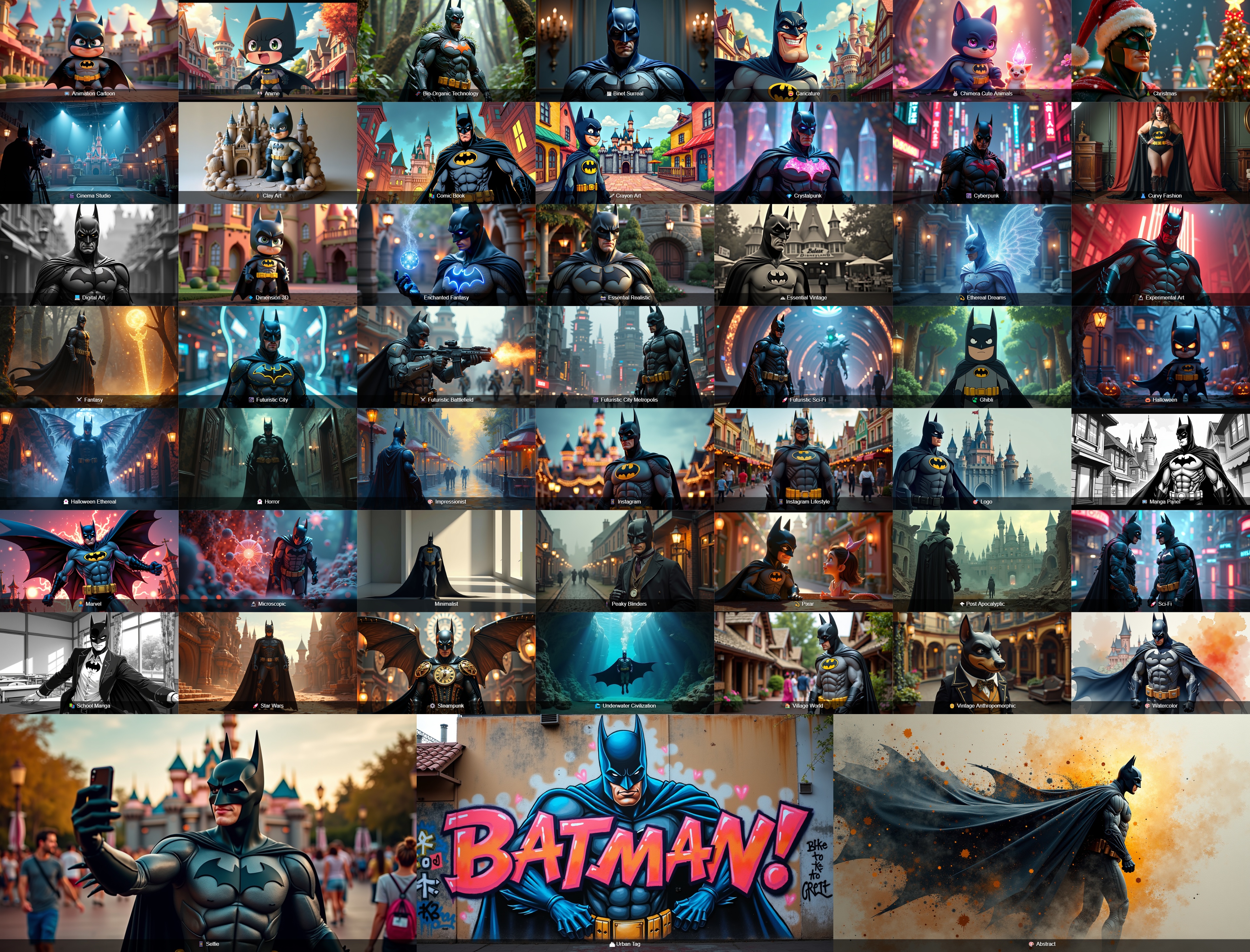
The Mega Prompt Generator is a sophisticated ComfyUI node that generates detailed, thematic prompts for image generation. It supports multiple themes and styles with extensive customization options.
Breaking changes in v6.1.0
- Civitai Explorer / Civitai Trending no longer take an
api_keywidget. Set theCIVITAI_API_TOKENenvironment variable instead — this prevents API tokens from leaking into shared workflow files. - URL/image download nodes now refuse non-http(s) schemes and private/internal network addresses (SSRF protection).
- IsulionLoadImagesNode resolves directories strictly inside ComfyUI's input directory; absolute paths outside it are rejected.
- Selector nodes use an instance-seeded RNG: the same seeds give the same results regardless of execution order.
- Negative Prompt Generator pools are de-duplicated:
strictnow yields 32–43 unique terms (previously 60–80 picks, many of them duplicates), so outputs for a given seed differ from v6.0. - 🎲 Dynamic Random may pick a different theme for a given seed than v6.0, because themes are now discovered automatically (alphabetical order).
Installation
Quick Start
Use ComfyUI Manager, go to "Custom Nodes Manager" and search "Isulion" !
Old install
cd "your_ComfyUI_install_dir"
cd custom_nodes
git clone https://github.com/Isulion/ComfyUI_Isulion
Available Nodes
🎯 Mega Prompt Generator V3 🎯
Theme Categories
Here's a categorized overview of all available themes (109):
1. Art Styles & Techniques
- 🎨 Abstract
- 🎨 Concept Art
- 🖍️ Crayon Art
- 🖼️ Digital Art
- 🔬 Experimental Art
- 🧊 Glassmorphism
- 🎨 Impressionist
- 🎈 Inflatable World
- 🧶 Knitted World
- 🧊 Liquid Chrome
- ⬜ Minimalist
- 🏺 Clay Art
- ✂️ Papercraft
- 🎨 Watercolor
- 🪩 Y2K Retro-Futurism
2. Animation & Entertainment
- 📺 Animation Cartoon
- 🎌 Anime
- 🎬 Cinema Studio
- 📚 Comic Book
- 🎡 Disney
- 🎬 Dreamworks
- 🐱 Giant Cat-zilla
- 🍃 Ghibli
- 🎯 Logo
- 📺 Manga Panel
- 🦸 Marvel
- 🎬 Nolan Epic
- 👾 16-Bit Pixel Art
- 💫 Pixar
- 📚 School Manga
- 🎭 Stop Motion
- 🕹️ Voxel Low-Poly
3. Science Fiction & Fantasy
- 🧬 Bio-Organic Technology
- 🪼 Bioluminescent Jelly
- 🌧️ Cinematic Neon Rain
- 💎 Crystalpunk
- 👟 Cyber Hypebeast
- 🌆 Cyberpunk
- ✨ Enchanted Fantasy
- ⚔️ Fantasy
- ⚔️ Futuristic Battlefield
- 🌆 Futuristic City
- 🌆 Futuristic City Metropolis
- 🚀 Futuristic Sci-Fi
- ⚔️ Miura Dark Fantasy
- 🍄 Psychedelic Cyber Fungus
- 🚀 Sci-Fi
- 🚀 Star Wars
- ⚙️ Steampunk
- 🌊 Underwater Civilization
- 🩻 X-Ray Anatomy
4. Character Art
- 😄 Caricature
- 👤 Character Designer
- 🦄 Chimera Animals
- 🐰 Chimera Cute Animals
5. Architectural & Spaces
- 🏛️ Architectural
- 🏠 Interior Spaces
- 🏙️ Urban Tag
- 🏠 Village World
6. Dark & Horror
- 👻 Halloween Ethereal
- 👻 Horror
- ⚔️ Miura Dark Fantasy
- 📹 VHS Found Footage
7. Holiday Themes
- 🏮 Chinese New Year
- 🎄 Christmas
- 👹 Dia de los Muertos
- 🐰 Easter
- 🎃 Halloween
- 👻 Halloween Ethereal
- 🎆 New Year's Eve
- 🍀 St. Patrick's Day
- 🦃 Thanksgiving
- 💘 Valentine's Day
8. Nature & Environment
- 🌌 Astrophotography
- 🌿 Nature
- 🌿 Overgrown Ruins
- 🌊 Underwater Civilization
9. Photography & Fashion
- 🎬 Analog 35mm Film
- 👗 Curvy Fashion
- 📸 Essential Realistic
- 📱 Fisheye Action Cam
- 📱 Instagram Lifestyle
- 📱 Selfie
10. Food
- 🍳 Culinary/Food
- 🍕 Food Apocalypse
- 🥙 Street Food Kebab
11. Vintage & Historical
- 🧺 50s Commercial
- 🪩 Disco Medieval
- 🕰️ Essential Vintage
- 🏛️ Historical Monuments
- 🕴️ Peaky Blinders
- 🛒 Retro Vaporwave Mall
- 👴 Vintage Anthropomorphic
- 📸 Vintage 1800s Photography
12. Surreal & Dreams
- 🖼️ Binet Surreal
- 💠 Dimension 3D
- ✨ Ethereal Dreams
- 🌌 Glitch Core
- 🛋️ IKEA Backrooms
- 🔬 Microscopic
- 🧩 Puzzle Dimension
- 🦆 Rubber Duck Supremacy
- 💗 Spectral Mist
- 📦 Unboxing Surrealism
13. Post-Apocalyptic
- 🌪️ Post Apocalyptic
14. Random
- 🎲 Dynamic Random
Bonus Themes
- 🧸 Starter Pack
- 🚀 Space Colony
- 🏝️ Tropical Paradise
- 👧 Skinny Blonde Girl
- ⚔️ Medieval
- 🏛️ Spartan 300
Input Parameters
- Theme: Select from 109 themed generators
- Complexity: Choose between simple, detailed, or complex outputs
- Randomization: Enable/disable random generation
- Custom Inputs:
- Custom Subject: Define specific subjects
- Custom Location: Specify scene locations
Node List
- 🚀 Isulion Mega Prompt V3
- 🔄 Isulion Multiple Prompt Generator
- 🦁 Isulion Animal Selector
- 🐰 Isulion Cute Animal Selector
- 🦊 Isulion Animal Behavior Generator
- 🌳 Isulion Habitat Generator
- 🌤️ Isulion Weather Generator
- 🌅 Isulion Time of Day Generator
- 🖼️ Isulion Art Style Generator
- ⚡ Isulion Action Generator
- 🎬 Isulion Scene Composition
- 👨💼 Isulion Profession Generator
- 🧝♂️ Isulion Fantasy Race Generator
- 👔 Isulion Clothing Generator
- ✨ Isulion Magical Effect Generator
- 🏰 Isulion Mythical Location Generator
- ⚔️ Isulion Artifact Generator
- 🤖 Isulion Tech Generator
- 👽 Isulion Alien World Generator
- 🛸 Isulion Spacecraft Generator
- 😊 Isulion Emotion Generator
- 🎨 Isulion Style Mixer
- 💫 Isulion Prompt Enhancer
- ⛔ Isulion Negative Prompt Generator
- 🖼️ Isulion Image Collage
- 📁 Isulion Load Images from Directory
- ⏳ Isulion Epoch Generator
- 🧩 Isulion QRCode Generator
- ⧉ IsulionOverlay
- 🔒 Isulion Censored Part
- 🖼️ Isulion Display Image From URL
- 💾 Isulion Prompt Vault Save
- 🗃️ Isulion Prompt Vault Load
- 🔍 Isulion Civitai Model Explorer
- 🔥 Isulion Civitai Trending
- 🖼️ Isulion Civitai Image Display
🖼️ Load Images Node
The Load Images node allows you to load multiple images from a specified directory, making it easy to work with batches of images in your workflow.
🎭 Image Collage Node
The Image Collage node enables you to create visually appealing collages from multiple input images, perfect for showcasing collections or creating mood boards.
🗃️ Prompt Vault
A shared library of named prompt fragments, stored in ComfyUI's user directory (ComfyUI/user/isulion/prompt_vault.json) so your entries survive node updates. Until your first save, the example entries from Core_Nodes/prompt_vault.example.json are offered.
- 💾 Isulion Prompt Vault Save — stores the
textwidget (typed or connected from any STRING node, e.g. Mega Prompt) undername, and passes the text through unchanged so it can be chained straight into KSampler. Saving an existing name updates it in place. - 🗃️ Isulion Prompt Vault Load — picks a stored entry from a dropdown and outputs its text, ready to feed any prompt input.
The vault path can be overridden with the ISULION_PROMPT_VAULT environment variable. A missing or corrupt vault file degrades to an empty vault instead of crashing the queue.
Note: the load node's dropdown is populated from the vault at page load, so newly saved entries appear in the list after a browser refresh (Ctrl+Shift+R). In the meantime you can always type any entry name directly into the widget — it accepts free text as well as dropdown picks, and the load node re-runs automatically whenever the vault file changes.
Specific Nodes
- 🦊 Animal Behavior - Animal actions and poses
- 🦁 Animal - General animal selection
- 🐱 Cute Animal - Cute and baby animal selection
- 👔 Clothing Style - Outfit and fashion descriptions
- 👨🍳 Character Profession - Occupations and roles
- 🧝♂️ Fantasy Race - Fantasy species and races
- ⚔️ Action - Dynamic poses and activities
- 🎥 Scene Composition - Camera angles and shot types
- 🌲 Habitat - Natural environments and landscapes
- 🌅 Time of Day - Time and lighting conditions
- ⛅ Weather - Weather conditions
- 🖌️ Art Style - Artistic styles and techniques
- 😊 Emotion - Emotional characteristics
- 🏰 Artifact - Magical items and artifacts
- 🌟 Magical Effect - Spell effects and magical phenomena
- 🏰 Mythical Location - Fantasy environments
- 🪐 Alien World - Exotic planet environments
- 🛸 Spacecraft - Space vehicle descriptions
- 🤖 Tech - Futuristic technology descriptions
🔧 Enhancement Nodes
- 📝 Prompt Enhancer - More details, mood, composition, lighting, or color enhancements
- ⛔ Negative Prompt - Creates matching negative prompts with adjustable strictness
- 🎨 Style Mixer - Combines multiple art styles with adjustable blend modes
Directory Structure
ComfyUI_Isulion/
├── Core_Nodes/         # Core functionality nodes
├── animals_nodes/      # Animal-related node implementations
├── character_nodes/    # Character generation nodes
├── configs/           # Configuration files
├── enhancement_nodes/ # Enhancement and improvement nodes
├── fantasy_nodes/    # Fantasy-themed node implementations
├── scene_nodes/      # Scene generation nodes
├── scifi_nodes/      # Science fiction themed nodes
├── theme_handlers/   # Theme-specific handling logic
├── isucollage_node.py   # Collage generation functionality
├── load_images_node.py  # Image loading utilities
└── mega_prompt_V3.py    # Latest version of Mega Prompt generator
Example workflows
The bundled workflows in example_workflows/*.json reference the ShowText|pysssss node, which is provided by ComfyUI-Custom-Scripts ("pysssss" custom nodes). Install that pack first, or replace those nodes with any other text-display node.
FLUX Workflow (old) Examples
Basic MegaPrompt (old) Workflow
Chimera (with Ollama) (old) Workflow
MegaPrompt + Ollama + LoRa (old) Workflow
🦙 Ollama Requirements
- Ollama_generator node installed in ComfyUI
Environment Variables
- OLLAMA_KEEP_ALIVE: 0
- OLLAMA_ORIGINS: *
All Available Nodes
Core Nodes
- Isulion Mega Prompt V3: Advanced version of the prompt generator node with extended capabilities
Animal-Related Nodes
- Isulion Animal Selector: Generate random animal prompts
- Isulion Cute Animal Selector: Generate cute animal-specific prompts
- Isulion Animal Behavior Generator: Create prompts for animal behaviors and actions
Scene Generation Nodes
- Isulion Habitat Generator: Create environment and habitat descriptions
- Isulion Weather Generator: Generate weather condition prompts
- Isulion Time of Day Generator: Add time-of-day elements to scenes
- Isulion Art Style Generator: Generate various artistic style prompts
- Isulion Action Generator: Create action and movement descriptions
- Isulion Scene Composition: Generate complete scene composition prompts
Character Generation Nodes
- Isulion Profession Generator: Create profession-based character descriptions
- Isulion Fantasy Race Generator: Generate fantasy race characteristics
- Isulion Clothing Generator: Create detailed clothing descriptions
- Isulion Epoch Generator: Generate historical period-specific elements
Fantasy Nodes
- Isulion Magical Effect Generator: Create magical effect descriptions
- Isulion Mythical Location Generator: Generate mythical place descriptions
- Isulion Artifact Generator: Create magical item and artifact descriptions
Sci-Fi Nodes
- Isulion Tech Generator: Generate futuristic technology descriptions
- Isulion Alien World Generator: Create alien planet and environment descriptions
- Isulion Spacecraft Generator: Generate spacecraft and space vehicle descriptions
Enhancement Nodes
- Isulion Emotion Generator: Add emotional elements to prompts
- Isulion Style Mixer: Combine different artistic styles
- Isulion Prompt Enhancer: Enhance existing prompts with additional details
- Isulion Negative Prompt Generator: Generate effective negative prompts
Utility Nodes
- IsuCollage Node: Create image collages
- Isulion Load Images Node: Load and manage multiple images (directories are resolved strictly inside ComfyUI's input directory)
- 💤 IsulionShutdown: Shut down ComfyUI when a workflow finishes. It is a safe no-op by default — it only actually arms when the environment variable
ISULION_ENABLE_SHUTDOWN=1is set. - Overlay Node: Add overlay or watermarks to your images
- Censored Part Node: Censor part of an image with blur, pixelate, pixelate+blur, black bar or noise. Select the area via a painted mask (MaskEditor) or the built-in rectangle widgets; supports mask grow/shrink, invert, edge feathering and outputs the censor mask for inpainting.
- QRCode Node: Create Various moderns QRCode
- Display Image From URL: Download an image from a URL and display it in the ComfyUI queue
- 💾 Prompt Vault Save / 🗃️ Prompt Vault Load: Save named prompt fragments to a shared JSON vault and load them back via dropdown in any workflow (see the Prompt Vault section above)
Civitai Nodes
- Isulion Civitai Model Explorer: Browse/search Civitai models from within ComfyUI
- Isulion Civitai Trending: List currently trending Civitai models
- Isulion Civitai Image Display: Fetch and display images from Civitai
The Explorer/Trending nodes authenticate via the
CIVITAI_API_TOKENenvironment variable (no API key widget in the node itself).