# ComfyUI Multi-Analysis Heatmaps
A custom ComfyUI node for **visual comparison of two images** using multiple perceptual and mathematical methods.
The goal: make hidden differences *visible* as colorful heatmaps, so you can **see** where an upscaler, denoiser, or diffusion model changed your image — even when your eyes can’t tell at first glance.
---
## ✨ Features
Each method outputs its own heatmap (and sometimes a numeric score) so you can inspect everything side by side:
- **SSIM / DSSIM / MS-SSIM**
Structural similarity.
- Bright = dissimilar, dark = similar.
- DSSIM is the inverse (bright = more difference).
- MS-SSIM averages across multiple scales (robust to small shifts).
- **LPIPS (VGG16, perceptual map)**
Estimates whether differences are **visible to human perception**.
- Bright areas = regions that look different to the eye.
- Dark = visually similar.
- **Per-Pixel Difference (Abs)**
Direct pixel math.
- Bright = strong raw value difference, even if imperceptible.
- **Residual (Signed)**
Highlights what B has **added or removed** compared to A.
- Bright = added details/noise.
- Dark = lost details.
- **FFT / Spectrum Analysis**
Looks at **frequency content** (textures, fine detail).
- Shows original spectrum, upscaled spectrum, and difference.
- Large changes in high frequencies = sharpening or hallucinated texture.
- **ΔE2000 (Color Difference)**
Shows perceptual color shifts in Lab color space.
- Includes total ΔE2000 heatmap and individual **L\*** (lightness), **a\*** (red/green), **b\*** (blue/yellow) differences.
- **Gradient Difference (Scharr)**
Compares edge strength.
- Bright = edge got stronger/weaker.
- Useful to detect oversharpening.
- **Edge IoU (Canny-like)**
Compares binary edge maps of A and B.
- Bright = edges overlap.
- Gray = edges differ.
- Includes IoU score as text output.
- **Wavelet Band Difference**
Multi-scale Haar wavelet decomposition.
- Bright = changes in fine details/texture.
- **Denoiser Residual**
Highlights **high-frequency noise patterns**.
- Bright = new noise/texture in B.
- Can reveal “fake texture” added by diffusion upscalers.
- **Round-Trip Stability**
Downscale & re-upscale B, compare to itself.
- Bright = unstable areas (info lost or artifacts added).
- Useful to judge robustness, not just looks.
---
## 🧑🎨 How to Interpret
Think of each heatmap as a **different pair of glasses**:
- **Dark = good match** (few differences)
- **Bright = more change** (differences, artifacts, or enhancements)
Use the right “glasses” depending on what you care about:
- **Overall similarity:** SSIM / DSSIM
- **Human perception:** LPIPS, MS-SSIM
- **Color shifts:** ΔE2000, a\*, b\*
- **Sharpness / edges:** Gradient Diff, Edge IoU
- **Textures / hallucinations:** FFT Diff, Wavelet Diff, Denoiser Residual
- **Robustness:** Round-Trip Stability
---
## ⚠️ Disclaimer
This project is **vibe-coded**:
- Heatmaps are **heuristic visualizations**.
- Bright ≠ bad, dark ≠ good — interpretation depends on context.
- The node does *not* decide quality for you.
👉 **Interpretation and responsibility are fully on the user.**
These tools are meant for exploration and intuition, not absolute ground-truth judgment.
---
## 📸 Example

---
## 🛠 Installation
1. Clone or download this repo into your `ComfyUI/custom_nodes/` folder:
```bash
git clone https://github.com/Justify87/ComfyUI-Multi-Analysis-Heatmaps
## Additionals
- Upscaler Used in the example workflow:
- https://github.com/daredevilstudio/AI-upscaling-models
- https://github.com/daredevilstudio/AI-upscaling-models/releases/download/PureVision/2x_PureVision.pth
- image compare node:
- https://github.com/quasiblob/ComfyUI-EsesImageCompare
## ⚙️ Node Options
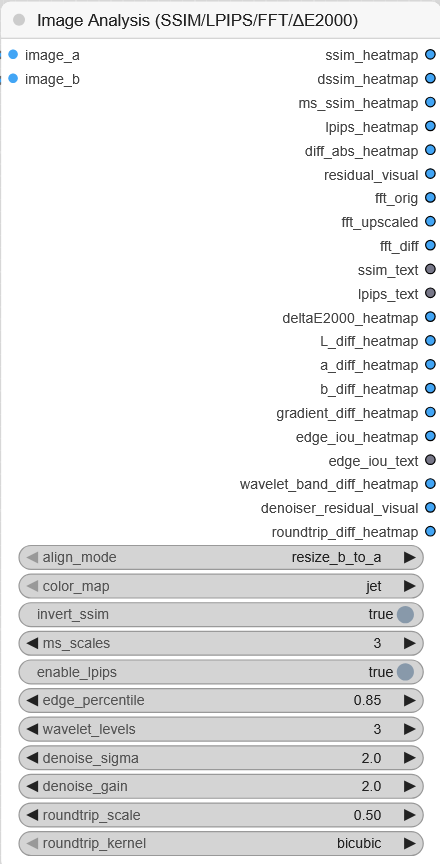
The **Multi-Analysis Heatmap Node** provides several options to control how comparisons are made:
| Option | Type | Default | Description |
|--------|------|---------|-------------|
| **align_mode** | combo | `resize_b_to_a` | How to align the two input images:
• `resize_b_to_a` → resizes B to match A
• `center_crop_to_min` → crops both to the smaller overlap
• `pad_to_max` → pads smaller one with black pixels |
| **color_map** | combo | `jet` | The color scheme for heatmaps:
• `jet` → rainbow style (bright = more difference)
• `grayscale` → black–white map |
| **invert_ssim** | bool | `true` | Flip SSIM visualization so differences appear **bright** instead of dark. |
| **ms_scales** | int | `3` | Number of scales for **MS-SSIM**. Higher = more robust but slower. |
| **resid_gain** | float | `2.0` | Strength multiplier for the **Residual Visualization**. Higher = amplifies added/removed details more strongly. |
| **fft_log_eps** | float | `1e-3` | Stabilization constant for FFT log spectrum. Adjust only if you see black/overblown spectra. |
| **enable_lpips** | bool | `false` | Whether to compute the **LPIPS perceptual heatmap** (uses VGG16 features, slower, more VRAM). |
| **denoise_sigma** | float | `1.0` | Standard deviation for Gaussian blur in **Denoiser Residual**. Controls how aggressively “noise” is extracted. |
| **denoise_gain** | float | `2.0` | Amplification factor for the residual visualization in **Denoiser Residual**. |
| **roundtrip_scale** | float | `0.5` | Downscale factor for **Round-Trip Stability** test. (0.5 = downscale by 2×, then upscale again). |
| **roundtrip_kernel** | combo | `bicubic` | Resampling kernel for round-trip test. Options: `bicubic`, `bilinear`, `lanczos`. |
---
👉 **Tip:**
- Start with defaults.
- Enable `LPIPS` only if you want human-perception-like feedback.
- Use `invert_ssim = true` for easier visual spotting (bright = problem).
- Play with `resid_gain` and `denoise_gain` if maps look too weak/too strong.