 Bubbliiiing
94f420c257
Bubbliiiing
94f420c257
* Fix bug in install comfyui

* support model load in 30GB RAM

* Update requirement

* Update requirement

* Update VAE outlier_penalty_loss

* Fix bug in ui

* Fix bug in ui

* Fix bug in ui
ComfyUI EasyAnimate
Easily use EasyAnimate inside ComfyUI!




1. Installation
Option 1: Install via ComfyUI Manager
TBD
Option 2: Install manually
The EasyAnimate repository needs to be placed at ComfyUI/custom_nodes/EasyAnimate/.
cd ComfyUI/custom_nodes/

# Git clone the easyanimate itself
git clone https://github.com/aigc-apps/EasyAnimate.git

# Git clone the video outout node
git clone https://github.com/Kosinkadink/ComfyUI-VideoHelperSuite.git

cd EasyAnimate/
pip install -r comfyui/requirements.txt
2. Download models into ComfyUI/models/EasyAnimate/
EasyAnimateV5:
| Name | Type | Storage Space | Hugging Face | Model Scope | Description |
|---|---|---|---|---|---|
| EasyAnimateV5-12b-zh-InP | EasyAnimateV5 | 34 GB | 🤗Link | 😄Link | Official image-to-video weights. Supports video prediction at multiple resolutions (512, 768, 1024), trained with 49 frames at 8 frames per second, and supports bilingual prediction in Chinese and English. |
| EasyAnimateV5-12b-zh-Control | EasyAnimateV5 | 34 GB | 🤗Link | 😄Link | Official video control weights, supporting various control conditions such as Canny, Depth, Pose, MLSD, etc. Supports video prediction at multiple resolutions (512, 768, 1024) and is trained with 49 frames at 8 frames per second. Bilingual prediction in Chinese and English is supported. |
| EasyAnimateV5-12b-zh | EasyAnimateV5 | 34 GB | 🤗Link | 😄Link | Official text-to-video weights. Supports video prediction at multiple resolutions (512, 768, 1024), trained with 49 frames at 8 frames per second, and supports bilingual prediction in Chinese and English. |
(Obsolete) EasyAnimateV4:
| Name | Type | Storage Space | Url | Hugging Face | Description |
|---|---|---|---|---|---|
| EasyAnimateV4-XL-2-InP.tar.gz | EasyAnimateV4 | Before extraction: 8.9 GB / After extraction: 14.0 GB | Download | 🤗Link | Our official graph-generated video model is capable of predicting videos at multiple resolutions (512, 768, 1024, 1280) and has been trained on 144 frames at a rate of 24 frames per second. |
(Obsolete) EasyAnimateV3:
| Name | Type | Storage Space | Url | Hugging Face | Description |
|---|---|---|---|---|---|
| EasyAnimateV3-XL-2-InP-512x512.tar | EasyAnimateV3 | 18.2GB | Download | 🤗Link | EasyAnimateV3 official weights for 512x512 text and image to video resolution. Training with 144 frames and fps 24 |
| EasyAnimateV3-XL-2-InP-768x768.tar | EasyAnimateV3 | 18.2GB | Download | 🤗Link | EasyAnimateV3 official weights for 768x768 text and image to video resolution. Training with 144 frames and fps 24 |
| EasyAnimateV3-XL-2-InP-960x960.tar | EasyAnimateV3 | 18.2GB | Download | 🤗Link | EasyAnimateV3 official weights for 960x960 text and image to video resolution. Training with 144 frames and fps 24 |
Node types
- LoadEasyAnimateModel
- Loads the EasyAnimate model
- EasyAnimate_TextBox
- Write the prompt for EasyAnimate model
- EasyAnimateI2VSampler
- EasyAnimate Sampler for Image to Video
- EasyAnimateT2VSampler
- EasyAnimate Sampler for Text to Video
- EasyAnimateV2VSampler
- EasyAnimate Sampler for Video to Video
Example workflows
Video to video generation
Our ui is shown as follow, this is the download link of the json:
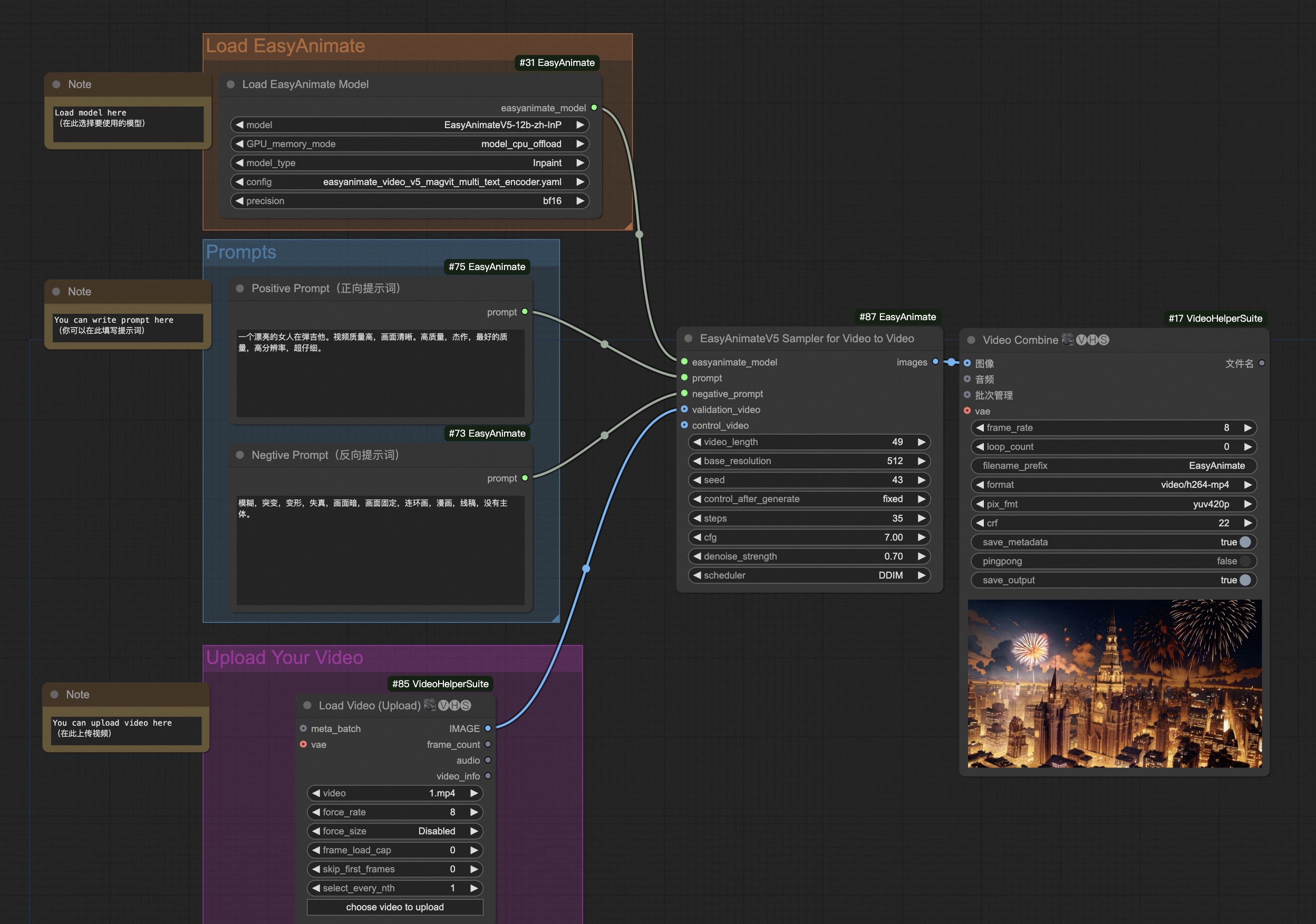
You can run the demo using following video: demo video
Control video generation
Our ui is shown as follow, this is the download link of the json:
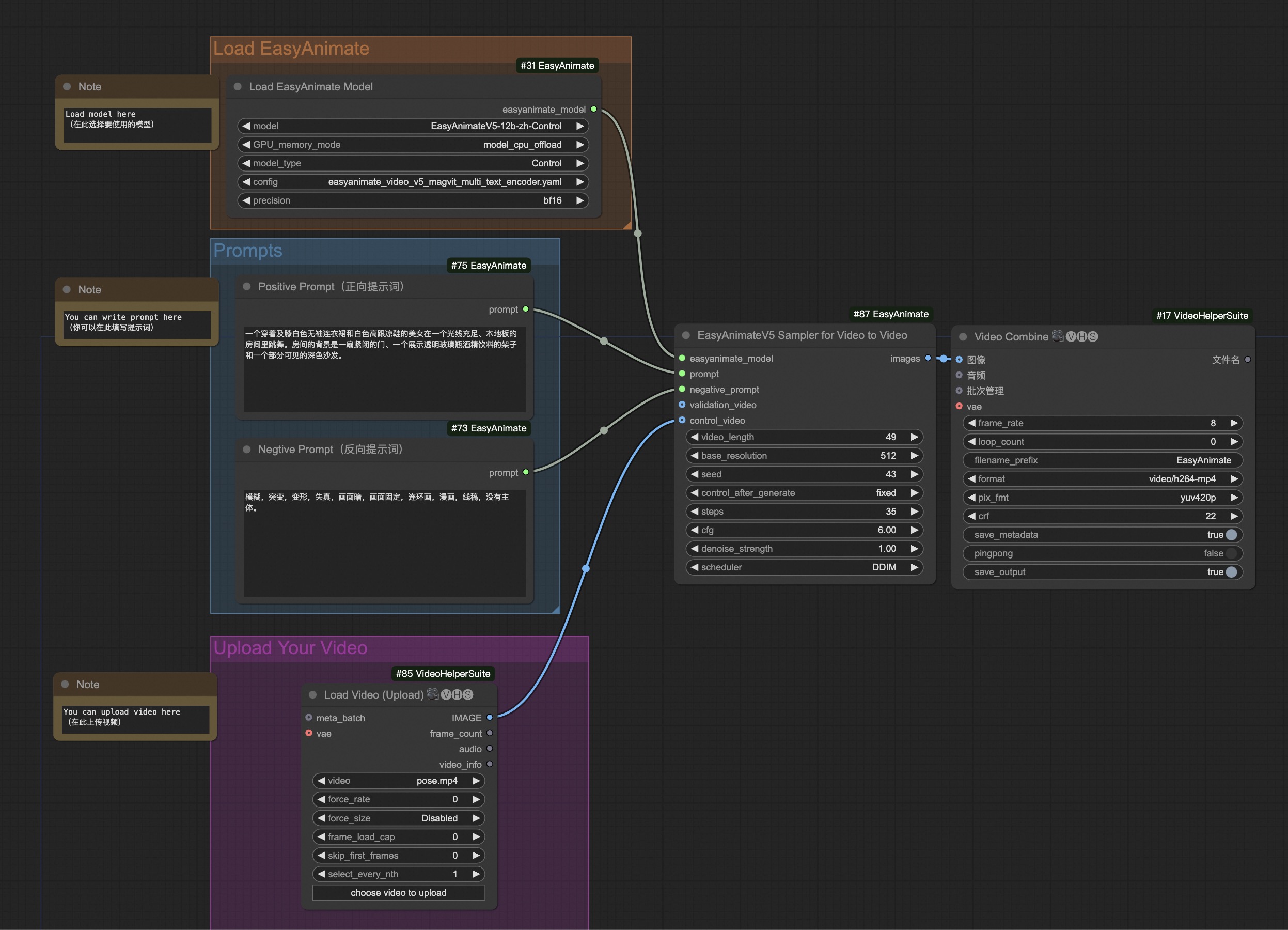
You can run the demo using following video: demo video
Image to video generation
Our ui is shown as follow, this is the download link of the json:
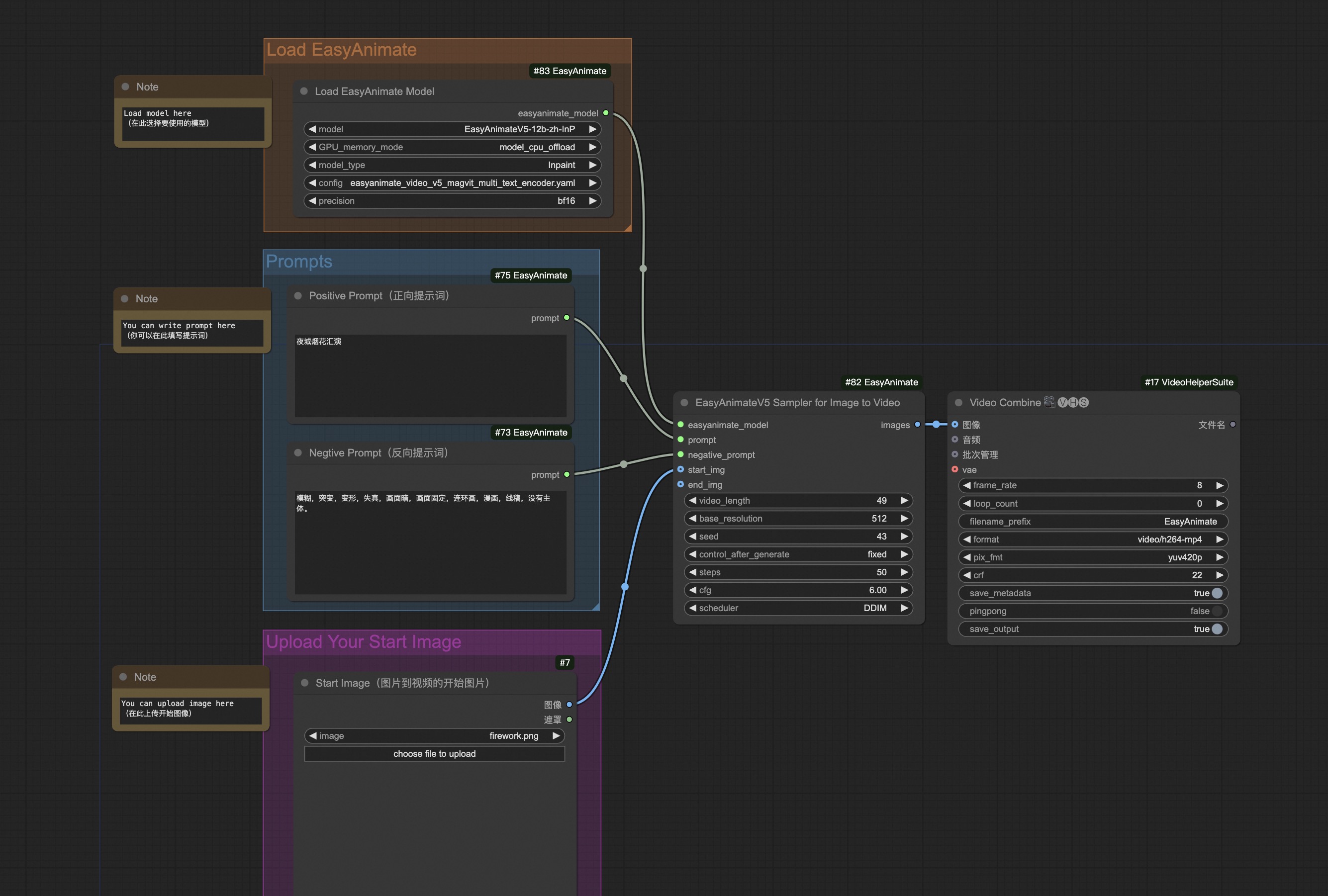
You can run the demo using following photo:

Text to video generation
Our ui is shown as follow, this is the download link of the json:
