e4f1a4fe97
* update train_lora && update deepspeed && update training with max token length

* fix bug in train.py

* fix bug in training_with_video_token_length

* update v2v && update v2v api

* add rope2d embedding precomputation; move text encoder to dataloader to reduce gpu memory consumpution

* add cuda multi-stream to speedup vae encode

* update new vae && new comfyui

* fix some bug in training code

* Add lcm lora (#89)

Co-authored-by: xuanyuan.lb <xuanyuan.lb@alibaba-inc.com>

* Update Training Code and fix bug in low vram mode

* fix bug in low vram mode

* update report

* update cfg

* actual text clip

---------

Co-authored-by: mengli.cml <mengli.cml@alibaba-inc.com>
Co-authored-by: liubo0902 <38622806+liubo0902@users.noreply.github.com>
Co-authored-by: xuanyuan.lb <xuanyuan.lb@alibaba-inc.com>
ComfyUI EasyAnimate
Easily use EasyAnimate inside ComfyUI!




1. Installation
Option 1: Install via ComfyUI Manager
TBD
Option 2: Install manually
The EasyAnimate repository needs to be placed at ComfyUI/custom_nodes/EasyAnimate/.
cd ComfyUI/custom_nodes/

# Git clone the easyanimate itself
git clone https://github.com/aigc-apps/EasyAnimate.git

# Git clone the video outout node
git clone https://github.com/Kosinkadink/ComfyUI-VideoHelperSuite.git

cd EasyAnimate/
python install.py
2. Download models into ComfyUI/models/EasyAnimate/
| Name | Type | Storage Space | Url | Hugging Face | Description | | EasyAnimateV4-XL-2-InP.tar | EasyAnimateV4 | 18.2GB | Download | 🤗Link| Our official graph-generated video model is capable of predicting videos at multiple resolutions (512, 768, 1024, 1280) and has been trained on 144 frames at a rate of 24 frames per second. |
(Obsolete) EasyAnimateV3:
| Name | Type | Storage Space | Url | Hugging Face | Description |
|---|---|---|---|---|---|
| EasyAnimateV3-XL-2-InP-512x512.tar | EasyAnimateV3 | 18.2GB | Download | 🤗Link | EasyAnimateV3 official weights for 512x512 text and image to video resolution. Training with 144 frames and fps 24 |
| EasyAnimateV3-XL-2-InP-768x768.tar | EasyAnimateV3 | 18.2GB | Download | 🤗Link | EasyAnimateV3 official weights for 768x768 text and image to video resolution. Training with 144 frames and fps 24 |
| EasyAnimateV3-XL-2-InP-960x960.tar | EasyAnimateV3 | 18.2GB | Download | 🤗Link | EasyAnimateV3 official weights for 960x960 text and image to video resolution. Training with 144 frames and fps 24 |
Node types
- LoadEasyAnimateModel
- Loads the EasyAnimate model
- TextBox
- Write the prompt for EasyAnimate model
- EasyAnimateI2VSampler
- EasyAnimate Sampler for Image to Video
- EasyAnimateT2VSampler
- EasyAnimate Sampler for Text to Video
- EasyAnimateV2VSampler
- EasyAnimate Sampler for Video to Video
Example workflows
Video to video generation
Our ui is shown as follow, this is the download link of the json:
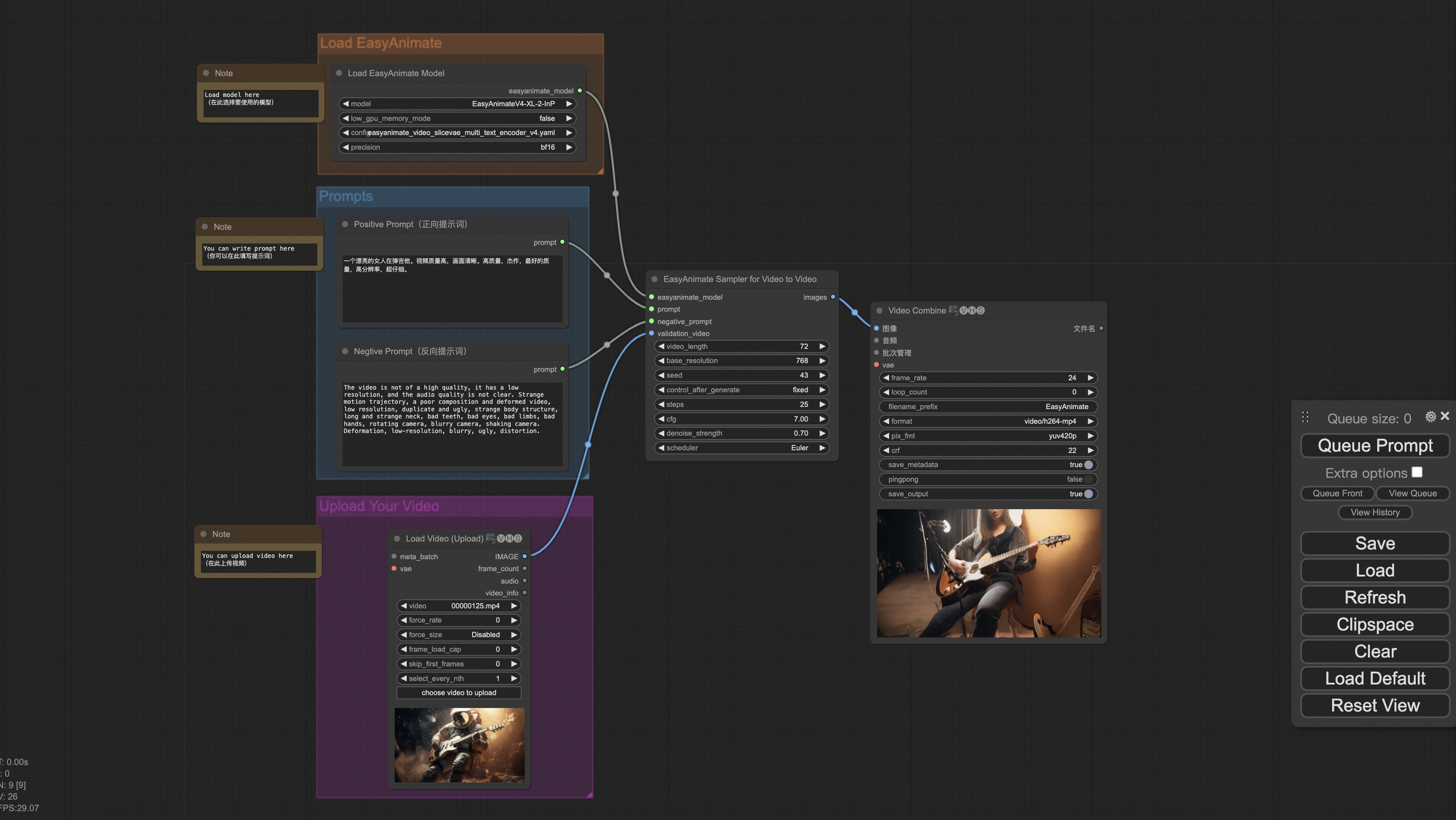
You can run the demo using following video: demo video
Image to video generation
Our ui is shown as follow, this is the download link of the json:
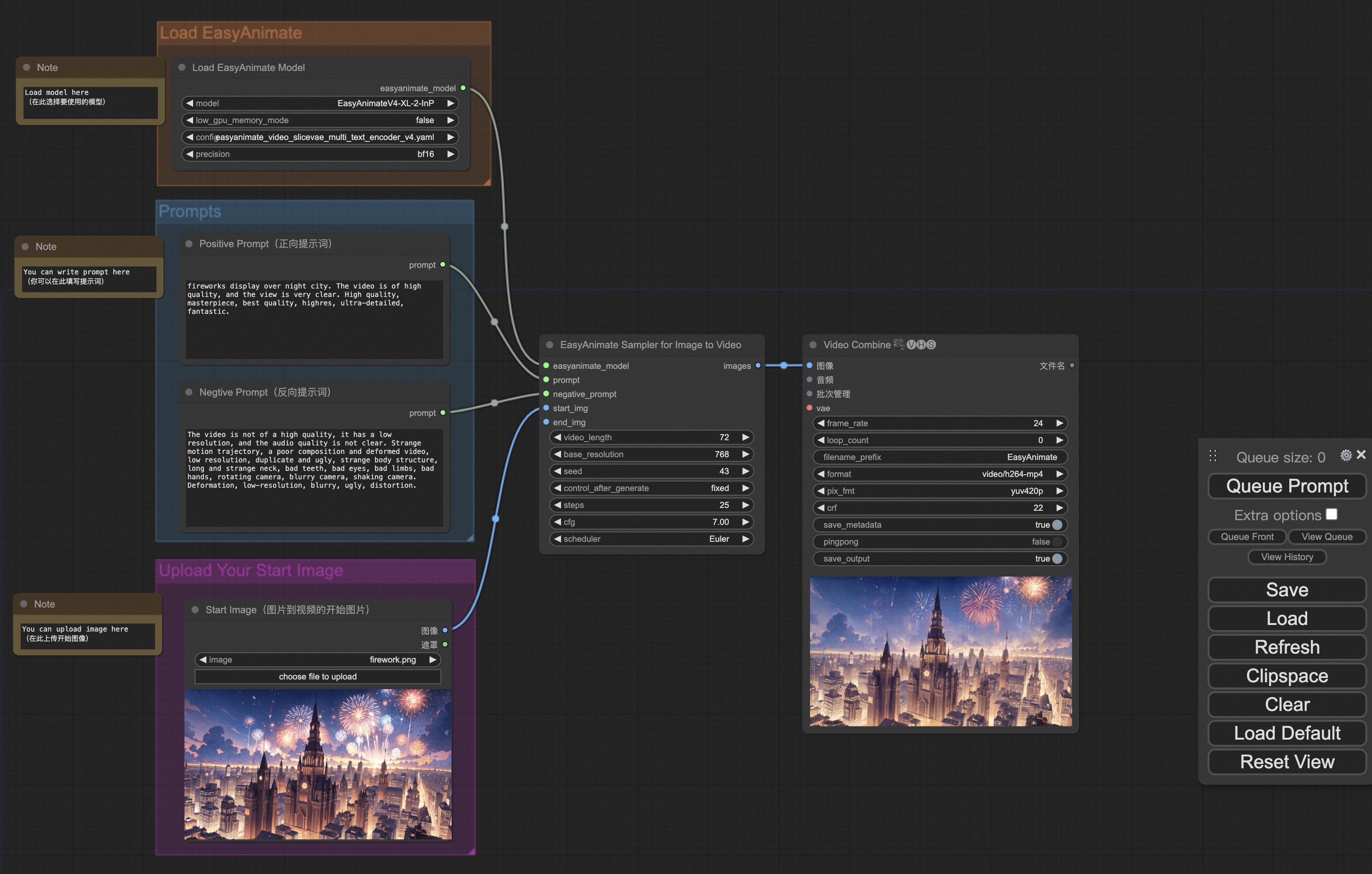
You can run the demo using following photo:

Text to video generation
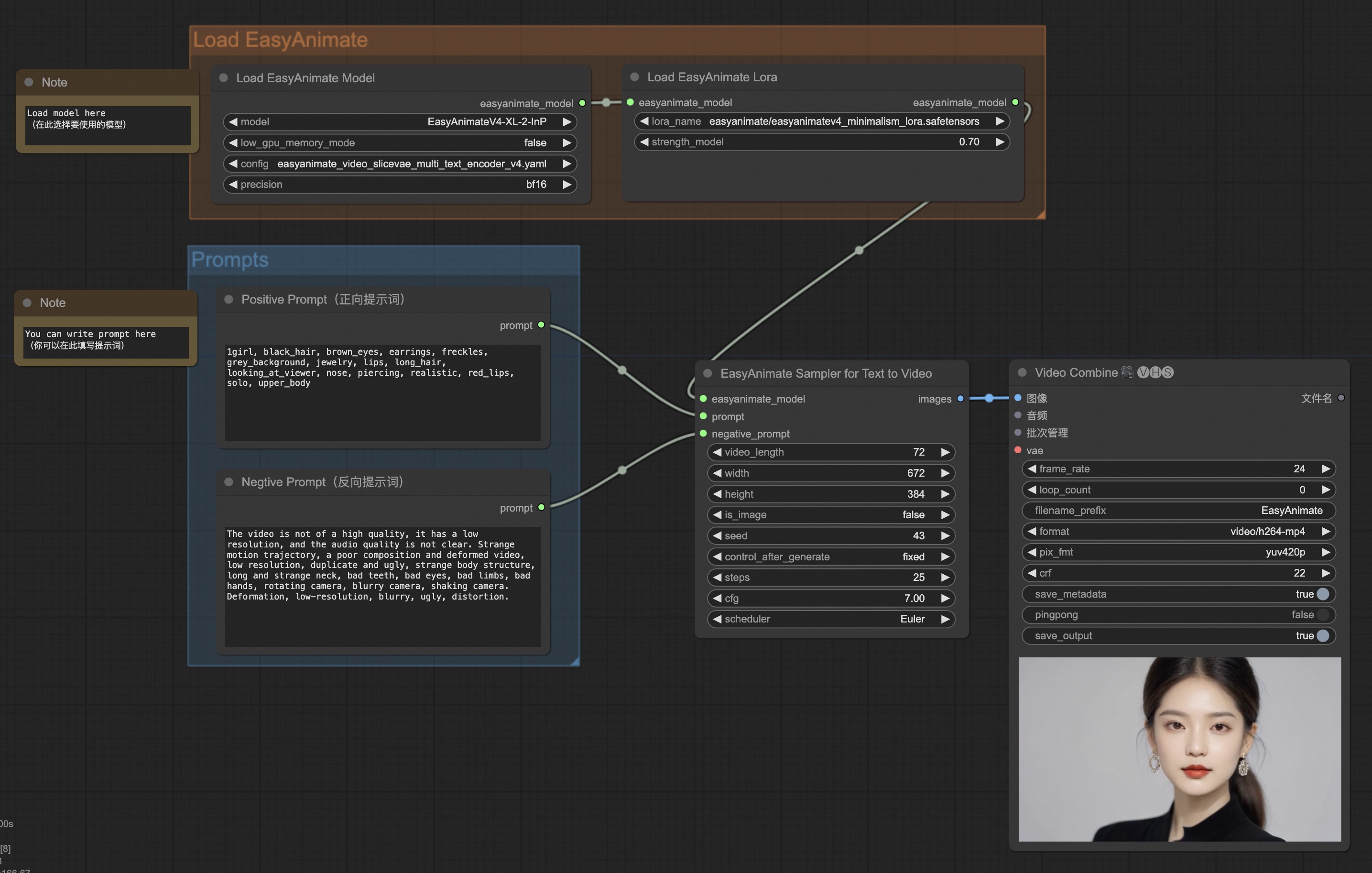
Our ui is shown as follow, this is the download link of the json:

Text to video generation With Lora
We have provided a v4 version of the portrait Lora for testing, and the specific download link is Lora download Link.
You can put this Lora at ComfyUI/models/loras/easyanimate.
Our ui is shown as follow, this is the download link of the json: