
12 KiB
📷 EasyAnimate | Integrated generation of baseline scheme for videos and images.
😊 EasyAnimate is a repo for generating long videos and images, training transformer based diffusion generators.
😊 Based on Sora like structure and DIT, we use transformer as a diffuser for video generation. In order to ensure good expansibility, we built easyanimate based on motion module. In the future, we will try more training programs to improve the effect.
😊 Welcome!
English | 简体中文
Table of Contents
- Table of Contents
- Introduction
- TODO List
- Model zoo
- Quick Start
- How to use
- Algorithm Detailed
- Reference
- License
Introduction
EasyAnimate is a pipeline based on the transformer architecture that can be used to generate AI photos and videos, train baseline models and Lora models for the Diffusion Transformer. We support making predictions directly from the pre-trained EasyAnimate model to generate videos of about different resolutions, 6 seconds with 24 fps (1 ~ 144 frames, in the future, we will support longer videos). Users are also supported to train their own baseline models and Lora models to perform certain style transformations.
We will support quick pull-ups from different platforms, refer to Quick Start.
What's New:
- Updated to v2 version, supports a maximum of 144 frames (6s, 24fps) for generation. [ 2024.05.26 ]
- Create Code! Support for Windows and Linux Now. [ 2024.04.12 ]
These are our generated results:

Our UI interface is as follows:

TODO List
- Support model with larger resolution.
- Support video inpaint model.
Model zoo
EasyAnimateV2:
| Name | Type | Storage Space | Url | Description |
|---|---|---|---|---|
| EasyAnimateV2-XL-2-512x512.tar | EasyAnimateV2 | 16.2GB | download | EasyAnimateV2 official weights for 512x512 resolution. Training with 144 frames and fps 24 |
| EasyAnimateV2-XL-2-768x768.tar | EasyAnimateV2 | 16.2GB | Coming soon | EasyAnimateV2 official weights for 768x768 resolution. Training with 144 frames and fps 24 |
| easyanimatev2_minimalism_lora.safetensors | Lora of Pixart | 654.0MB | download | A lora training with a specifial type images. Images can be downloaded from download. |
EasyAnimateV1:
1、Motion Weights
| Name | Type | Storage Space | Url | Description |
|---|---|---|---|---|
| easyanimate_v1_mm.safetensors | Motion Module | 4.1GB | download | Training with 80 frames and fps 12 |
2、Other Weights
| Name | Type | Storage Space | Url | Description |
|---|---|---|---|---|
| PixArt-XL-2-512x512.tar | Pixart | 11.4GB | download | Pixart-Alpha official weights |
| easyanimate_portrait.safetensors | Checkpoint of Pixart | 2.3GB | download | Training with internal portrait datasets |
| easyanimate_portrait_lora.safetensors | Lora of Pixart | 654.0MB | download | Training with internal portrait datasets |
Result Gallery
We show some results in the GALLERY.
Quick Start
1. Cloud usage: AliyunDSW/Docker
a. From AliyunDSW
Stay tuned.
b. From docker
If you are using docker, please make sure that the graphics card driver and CUDA environment have been installed correctly in your machine.
Then execute the following commands in this way:
EasyAnimateV2:
# pull image
docker pull mybigpai-public-registry.cn-beijing.cr.aliyuncs.com/easycv/torch_cuda:easyanimate

# enter image
docker run -it -p 7860:7860 --network host --gpus all --security-opt seccomp:unconfined --shm-size 200g mybigpai-public-registry.cn-beijing.cr.aliyuncs.com/easycv/torch_cuda:easyanimate

# clone code
git clone https://github.com/aigc-apps/EasyAnimate.git

# enter EasyAnimate's dir
cd EasyAnimate

# download weights
mkdir models/Diffusion_Transformer
mkdir models/Motion_Module
mkdir models/Personalized_Model

wget https://pai-aigc-photog.oss-cn-hangzhou.aliyuncs.com/easyanimate/Diffusion_Transformer/EasyAnimateV2-XL-2-512x512.tar -O models/Diffusion_Transformer/EasyAnimateV2-XL-2-512x512.tar

cd models/Diffusion_Transformer/
tar -xvf EasyAnimateV2-XL-2-512x512.tar
cd ../../
EasyAnimateV1:
# pull image
docker pull mybigpai-public-registry.cn-beijing.cr.aliyuncs.com/easycv/torch_cuda:easyanimate

# enter image
docker run -it -p 7860:7860 --network host --gpus all --security-opt seccomp:unconfined --shm-size 200g mybigpai-public-registry.cn-beijing.cr.aliyuncs.com/easycv/torch_cuda:easyanimate

# clone code
git clone https://github.com/aigc-apps/EasyAnimate.git

# enter EasyAnimate's dir
cd EasyAnimate

# download weights
mkdir models/Diffusion_Transformer
mkdir models/Motion_Module
mkdir models/Personalized_Model

wget https://pai-aigc-photog.oss-cn-hangzhou.aliyuncs.com/easyanimate/Motion_Module/easyanimate_v1_mm.safetensors -O models/Motion_Module/easyanimate_v1_mm.safetensors
wget https://pai-aigc-photog.oss-cn-hangzhou.aliyuncs.com/easyanimate/Personalized_Model/easyanimate_portrait.safetensors -O models/Personalized_Model/easyanimate_portrait.safetensors
wget https://pai-aigc-photog.oss-cn-hangzhou.aliyuncs.com/easyanimate/Personalized_Model/easyanimate_portrait_lora.safetensors -O models/Personalized_Model/easyanimate_portrait_lora.safetensors
wget https://pai-aigc-photog.oss-cn-hangzhou.aliyuncs.com/easyanimate/Diffusion_Transformer/PixArt-XL-2-512x512.tar -O models/Diffusion_Transformer/PixArt-XL-2-512x512.tar

cd models/Diffusion_Transformer/
tar -xvf PixArt-XL-2-512x512.tar
cd ../../
2. Local install: Environment Check/Downloading/Installation
a. Environment Check
We have verified EasyAnimate execution on the following environment:
The detailed of Linux:
- OS: Ubuntu 20.04, CentOS
- python: py3.10 & py3.11
- pytorch: torch2.2.0
- CUDA: 11.8
- CUDNN: 8+
- GPU: Nvidia-A10 24G & Nvidia-A100 40G & Nvidia-A100 80G
We need about 60GB available on disk (for saving weights), please check!
b. Weights
We'd better place the weights along the specified path:
EasyAnimateV2:
📦 models/
├── 📂 Diffusion_Transformer/
│   └── 📂 EasyAnimateV2-XL-2-512x512/
EasyAnimateV1:
📦 models/
├── 📂 Diffusion_Transformer/
│   └── 📂 PixArt-XL-2-512x512/
├── 📂 Motion_Module/
│   └── 📄 easyanimate_v1_mm.safetensors
├── 📂 Motion_Module/
│   ├── 📄 easyanimate_portrait.safetensors
│   └── 📄 easyanimate_portrait_lora.safetensors
How to use
1. Inference
a. Using Python Code
- Step 1: Download the corresponding weights and place them in the models folder.
- Step 2: Modify prompt, neg_prompt, guidance_scale, and seed in the predict_t2v.py file.
- Step 3: Run the predict_t2v.py file, wait for the generated results, and save the results in the samples/easyanimate-videos folder.
- Step 4: If you want to combine other backbones you have trained with Lora, modify the predict_t2v.py and Lora_path in predict_t2v.py depending on the situation.
b. Using webui
- Step 1: Download the corresponding weights and place them in the models folder.
- Step 2: Run the app. py file to enter the graph page.
- Step 3: Select the generated model based on the page, fill in prompt, neg_prompt, guidance_scale, and seed, click on generate, wait for the generated result, and save the result in the samples folder.
2. Model Training
If you want to train a text to image and video generation model. You need to arrange the dataset in this format.
📦 project/
├── 📂 datasets/
│   ├── 📂 internal_datasets/
│       ├── 📂 videos/
│       │   ├── 📄 00000001.mp4
│       │   ├── 📄 00000001.jpg
│       │   └── 📄 .....
│       └── 📄 json_of_internal_datasets.json
The json_of_internal_datasets.json is a standard JSON file, as shown in below:
[
    {
      "file_path": "videos/00000001.mp4",
      "text": "A group of young men in suits and sunglasses are walking down a city street.",
      "type": "video"
    },
    {
      "file_path": "train/00000001.jpg",
      "text": "A group of young men in suits and sunglasses are walking down a city street.",
      "type": "image"
    },
    .....
]
The file_path in the json can to be set as relative path.
Then, set scripts/train_t2iv.sh.
export DATASET_NAME="datasets/internal_datasets/"
export DATASET_META_NAME="datasets/internal_datasets/json_of_internal_datasets.json"
You can also set the path as absolute path as follow:
[
    {
      "file_path": "/mnt/data/videos/00000001.mp4",
      "text": "A group of young men in suits and sunglasses are walking down a city street.",
      "type": "video"
    },
    {
      "file_path": "/mnt/data/train/00000001.jpg",
      "text": "A group of young men in suits and sunglasses are walking down a city street.",
      "type": "image"
    },
    .....
]
The scripts/train_t2iv.sh should be set as follow:
export DATASET_NAME=""
export DATASET_META_NAME="/mnt/data/json_of_internal_datasets.json"
Then, we run scripts/train_t2iv.sh.
sh scripts/train_t2iv.sh
Algorithm Detailed
We build EasyAnimate by introducing additional motion module upon PixArt-alpha,so that can extend the DiT model from 2D image generation to 3D video generation. The pipeline is shwon as follows.
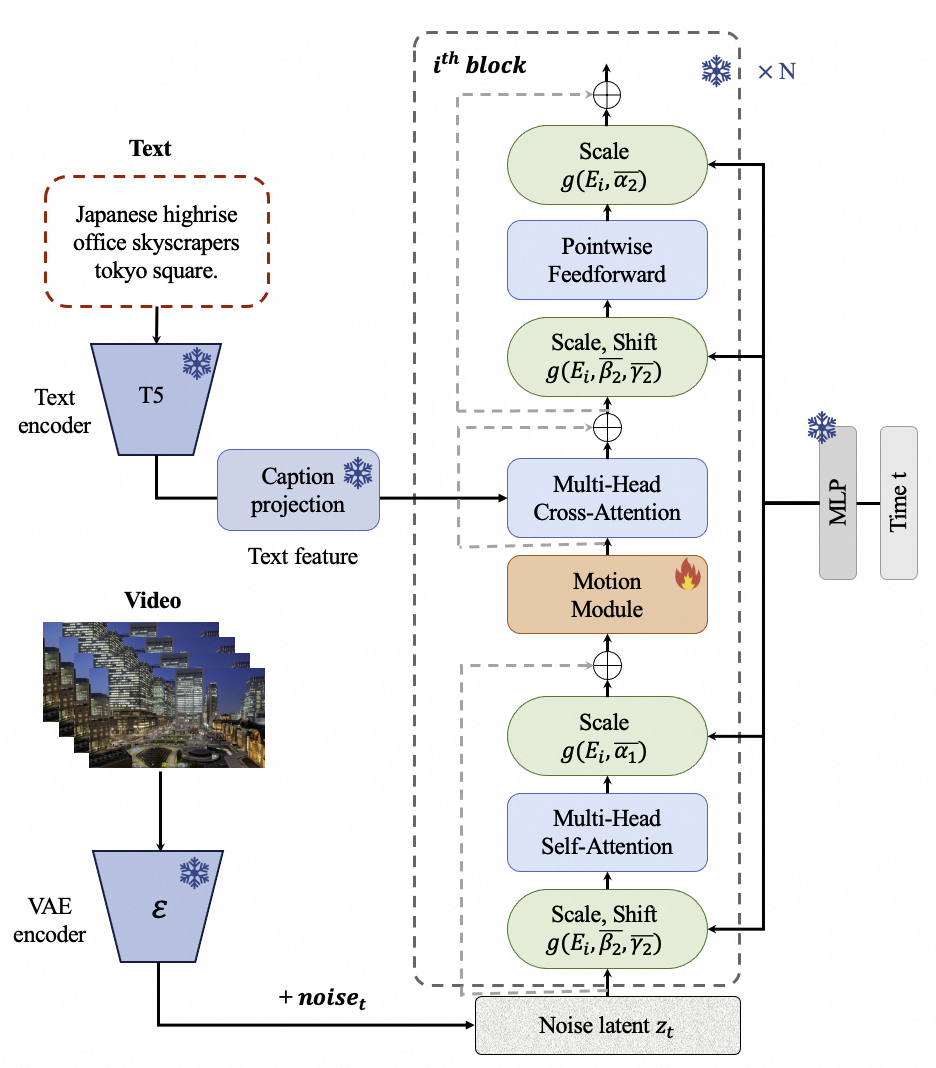
The motion module is used to capture the temporal information among frames. The structure is shown as follows.
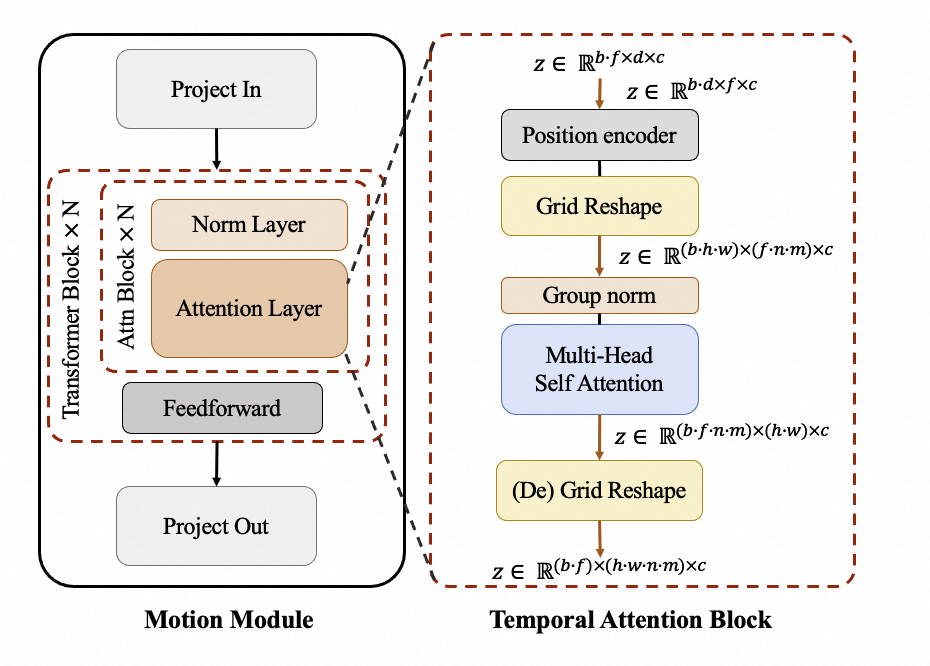
We introduce attention mechanisms in the temporal dimension to enable the model to learn temporal information for generating continuous video frames. At the same time, we utilize an additional Grid Reshape calculation to expand the number of input tokens for the attention mechanism, thus making greater use of the spatial information in images to achieve better generative results.
Reference
- magvit: https://github.com/google-research/magvit
- PixArt: https://github.com/PixArt-alpha/PixArt-alpha
- Open-Sora-Plan: https://github.com/PKU-YuanGroup/Open-Sora-Plan
- Open-Sora: https://github.com/hpcaitech/Open-Sora
- Animatediff: https://github.com/guoyww/AnimateDiff
License
This project is licensed under the Apache License (Version 2.0).