
ComfyUI Upload to BASE Node
A custom ComfyUI node that lets you upload generated media directly to your BASE account — no manual downloads or re-uploads needed.
🚀 Features
- Upload static images or MP4 videos from a ComfyUI workflow to your BASE account
- Supports direct upload of browser-compatible MP4 video files
- Optionally specify a folder ID to organize uploads
- Secure uploads via personal API key
- Streamlines creative workflow between ComfyUI and BASE
🧩 Installation
-
Clone this repo into your ComfyUI
custom_nodes/directory:cd ComfyUI/custom_nodes/ git clone https://github.com/babe-and-spencer-enterprises/base-comfyui-node.git -
Restart ComfyUI.
-
The node will appear under the BASE category in the node menu as
Upload to BASE.
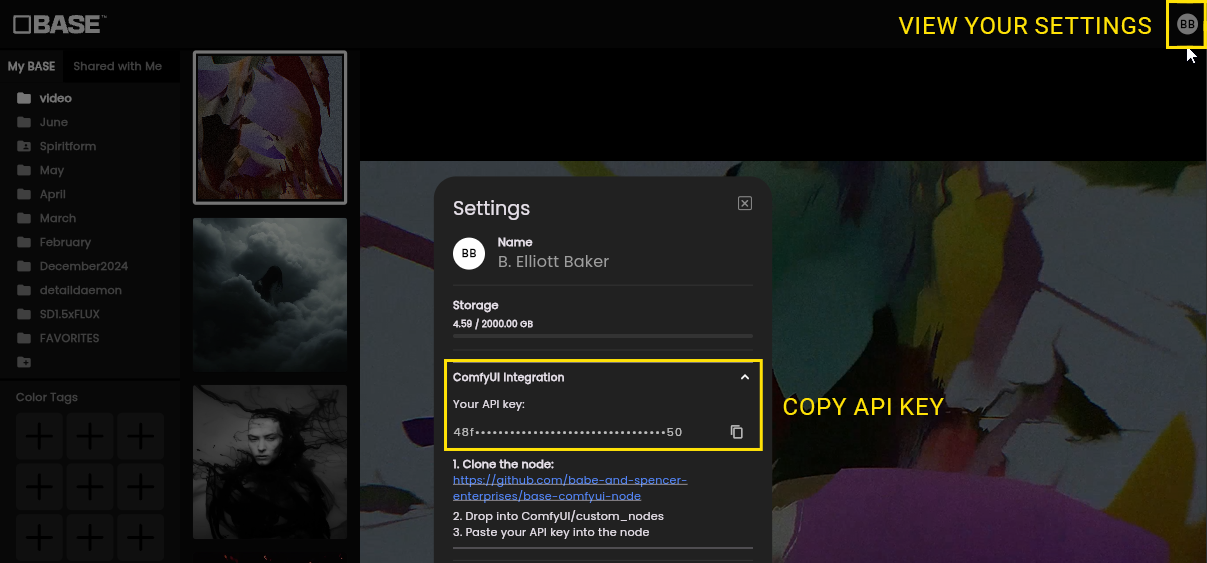
🔐 Generate Your API Key
- Log in at go.getbase.app
- Go to Settings → Integrations
- Click Generate API Key
- Copy and paste this key into the
api_keyinput of the node in ComfyUI
This key securely links your uploads to your BASE account.
🛠️ Node Inputs
| Input | Description |
|---|---|
image |
(Optional) A single image to upload (connect from a VAEDecode node). Ignored if video is provided. |
video |
(Optional) A video file to upload as browser-compatible MP4. Takes precedence over image. |
api_key |
Your personal BASE API key (see above). |
filename_prefix |
(Optional) Prefix for the saved file name. May include formatting variables like %date:yyyy-MM-dd%. Defaults to "ComfyUI". |
folder_id |
(Optional) The ID of a folder in your BASE account to store the image/video under. Right-click a folder in BASE to copy its ID. |
At least one of image or video must be provided.
📦 Node Behavior
This is an output node in ComfyUI. It performs an upload as a side effect and does not return any value to the graph.
- If
videois provided, the node uploads a browser-compatible MP4 video to your BASE account. - Otherwise, a static PNG image is uploaded.
💡 Example Workflow
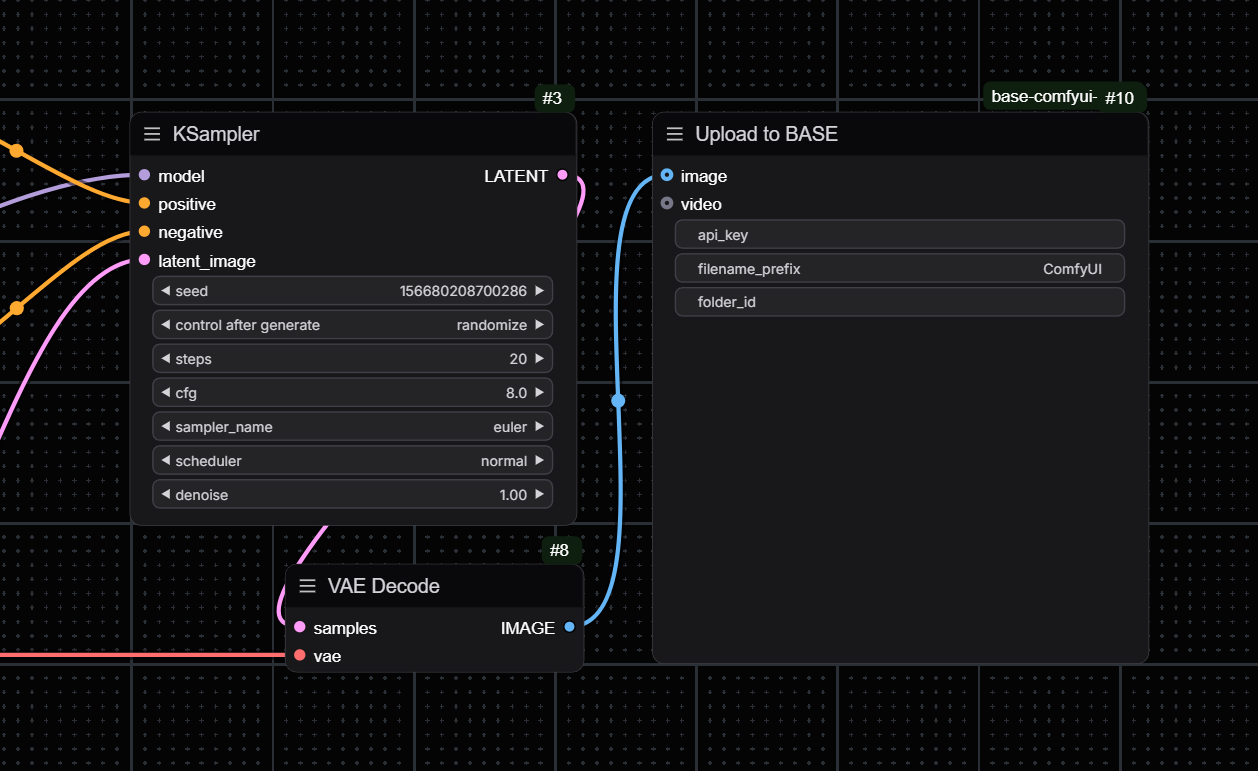
Place this node at the end of your workflow as an output node. Example use cases:
- Static image upload: Connect a single image (e.g., from
VAEDecode) toimageinput to upload a PNG. - Video upload: Connect a video file to the
videoinput to upload it as an MP4.
Provide your BASE API key and (optionally) a folder ID. The node will upload the file to your BASE account as a side effect; it does not return any value to the graph.
You can customize the file naming by setting the filename_prefix input. This helps keep your uploads organized by including date or node values.
📁 Repository Structure
base-comfyui-node/
├── base_upload_node.py   # The custom node logic
├── __init__.py           # Node registration
├── README.md             # This file
├── LICENSE               # MIT License
├── .gitignore            # Python-specific ignores
🤝 License
This project is licensed under the MIT License. Use freely with attribution.