# ComfyUI-Flux2Klein-Enhancer
Conditioning enhancement node for FLUX.2 Klein 9B in ComfyUI. Built from empirical analysis of the model's conditioning structure.
## What This Does
FLUX.2 Klein uses a Qwen3 8B text encoder that outputs conditioning tensors of shape `[batch, 512, 12288]`. Through diagnostic analysis, I found:
- **Positions 0-77**: Active text embeddings (std ~40.7)
- **Positions 77-511**: Padding/inactive tokens (std ~2.3)
- **Image edit mode**: Adds `reference_latents` to metadata
This node modifies only the active text region (0-77) to affect prompt adherence and edit behavior. The padding region is left untouched.
## Installation
1. Navigate to your ComfyUI custom nodes folder:
```
cd ComfyUI/custom_nodes/
```
2. Clone this repository:
```
git clone https://github.com/capitan01R/ComfyUI-Flux2Klein-Enhancer.git
```
3. Restart ComfyUI
## Nodes

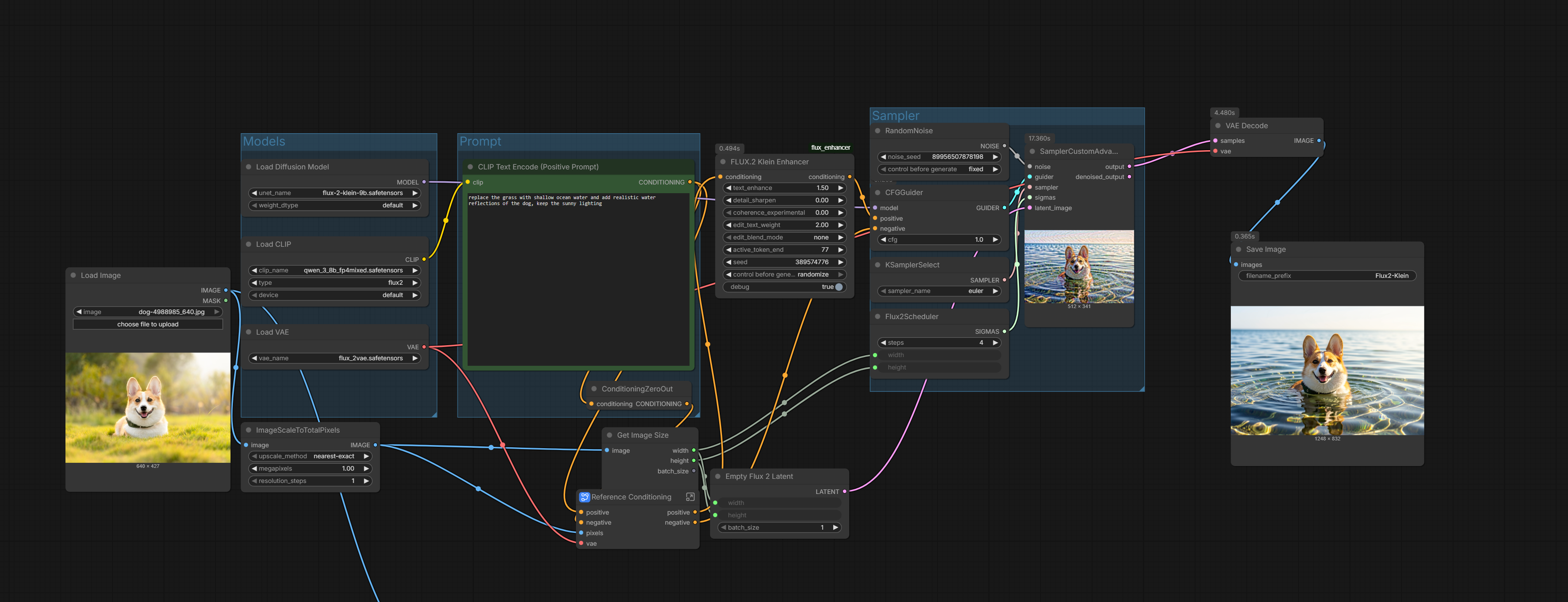 ### FLUX.2 Klein Enhancer
General-purpose conditioning enhancement for both text-to-image and image editing workflows.
#### Parameters
| Parameter | Default | Range | Description |
|-----------|---------|-------|-------------|
| `text_enhance` | 0.0 | -1.0 to 2.0 | Scales magnitude of active tokens. Positive values increase prompt influence, negative values decrease it. |
| `detail_sharpen` | 0.0 | -1.0 to 2.0 | Amplifies differences between tokens. Positive sharpens, negative smooths. |
| `coherence_experimental` | 0.0 | 0.0 to 1.0 | Self-attention pass across tokens. Experimental - start with low values (0.1-0.2). |
| `edit_text_weight` | 1.0 | 0.0 to 3.0 | Image edit mode only. Values below 1.0 preserve more of the original image, above 1.0 follows the prompt more strongly. |
| `edit_blend_mode` | none | none/boost_text/preserve_image/balanced | Image edit mode only. Preset configurations for common edit scenarios. |
| `active_token_end` | 77 | 1 to 512 | End position of active text region. Default based on diagnostic findings. |
| `seed` | 0 | 0 to 2147483647 | Random seed for reproducibility. 0 disables seeding. |
| `debug` | False | True/False | Prints tensor statistics and modification details to console. |
### FLUX.2 Klein Edit Controller
Fine-grained control specifically for image editing workflows.
#### Parameters
| Parameter | Default | Range | Description |
|-----------|---------|-------|-------------|
| `prompt_strength` | 1.0 | 0.0 to 3.0 | Global multiplier for text conditioning influence. |
| `preserve_structure` | 0.0 | 0.0 to 1.0 | Applies smoothing to conditioning for more conservative edits. |
| `token_emphasis_start` | 0 | 0 to 76 | Start position of token range to emphasize. |
| `token_emphasis_end` | 77 | 1 to 77 | End position of token range to emphasize. |
| `emphasis_strength` | 1.0 | 0.0 to 3.0 | Multiplier for the emphasized token range. |
| `debug` | False | True/False | Prints debug information to console. |
## How It Works
### Text Enhancement
The `text_enhance` parameter scales the magnitude of embedding vectors in the active region:
```
scale = 1.0 + (text_enhance * 0.5)
region = region * scale
```
A value of 0.5 results in a 1.25x magnitude increase. This affects how strongly the text conditioning influences the diffusion process.
### Detail Sharpening
Computes the mean embedding across the sequence, then amplifies deviations from that mean:
```
seq_mean = region.mean(dim=1)
detail = region - seq_mean
sharpened = seq_mean + detail * (1.0 + sharpen)
```
This increases the distinctiveness of individual token embeddings.
### Coherence (Experimental)
Projects embeddings to a lower dimension (1024), applies self-attention with temperature scaling, then projects back. This encourages tokens to share information but can cause artifacts at high values.
### Image Edit Mode Detection
The node automatically detects image edit mode by checking for `reference_latents` in the conditioning metadata. When detected, `edit_text_weight` and `edit_blend_mode` become active.
## Usage Examples
### Text-to-Image: Stronger Prompt Adherence
```
text_enhance: 0.3
detail_sharpen: 0.2
coherence_experimental: 0.0
edit_text_weight: 1.0
edit_blend_mode: none
```
### Image Edit: Follow Prompt More
```
text_enhance: 0.2
detail_sharpen: 0.1
coherence_experimental: 0.0
edit_text_weight: 1.5
edit_blend_mode: none
```
### Image Edit: Preserve Original More
```
text_enhance: 0.0
detail_sharpen: 0.0
coherence_experimental: 0.0
edit_text_weight: 0.5
edit_blend_mode: none
```
### Image Edit: My preferred settings:
```
text_enhance: 1.5
detail_sharpen: 0.0
coherence_experimental: 0.0
edit_text_weight: 2.0
edit_blend_mode: none
```
## Debugging
Enable `debug: True` to see console output:
```
=== Flux2KleinEnhancer Item 0 ===
Input shape: torch.Size([1, 512, 12288])
Metadata keys: ['pooled_output', 'attention_mask', 'reference_latents']
Active region: 0 to 71
Active region std: 42.4100
Padding region std: 2.3094
Enhancement: scale=1.250, mag 893.77 -> 1117.21
Image edit mode detected: 1 reference latent(s)
Output change: mean=5.234821, max=1045.291038
```
The `Output change` line confirms the conditioning tensor was modified. If it shows `0.000000`, no changes were applied.
## Technical Details
- **Model**: FLUX.2 Klein 9B
- **Text Encoder**: Qwen3 8B (4096 hidden dim, 36 layers)
- **Conditioning Shape**: [batch, 512, 12288]
- **Active Region**: Positions 0-77 (determined by attention mask)
- **Embedding Dimension**: 12288 (likely 4096 × 3 concatenated representations)
## Visual Results: Vanilla vs. With Flux2Klein-Enhancer
Exact same workflow, seed and prompt — only difference is using the node or not.
Click images to view full size.
# source photo:
[](examples/source.jpg)
### Comparison 1
**Prompt:** [turn only the ground into a mirror surface reflecting the sky, keep the full dog and it's body unchanged and add the dog's reflection below]
Vanilla Flux.2 Klein | With Enhancer Node
:-----------------------------:|:-----------------------------:
[](examples/vanilla_01.png) | [](examples/with_node_01.png)
### Comparison 2
**Prompt:** [replace the grass with shallow ocean water and add realistic water reflections of the dog, keep the sunny lighting]
Vanilla | With Enhancer Node
:-----------------------------:|:-----------------------------:
[](examples/vanilla_02.png) | [](examples/with_node_02.png)
## Acknowledgments
Built through empirical analysis of FLUX.2 Klein's conditioning structure using diagnostic tools to inspect actual tensor shapes and statistics during inference.