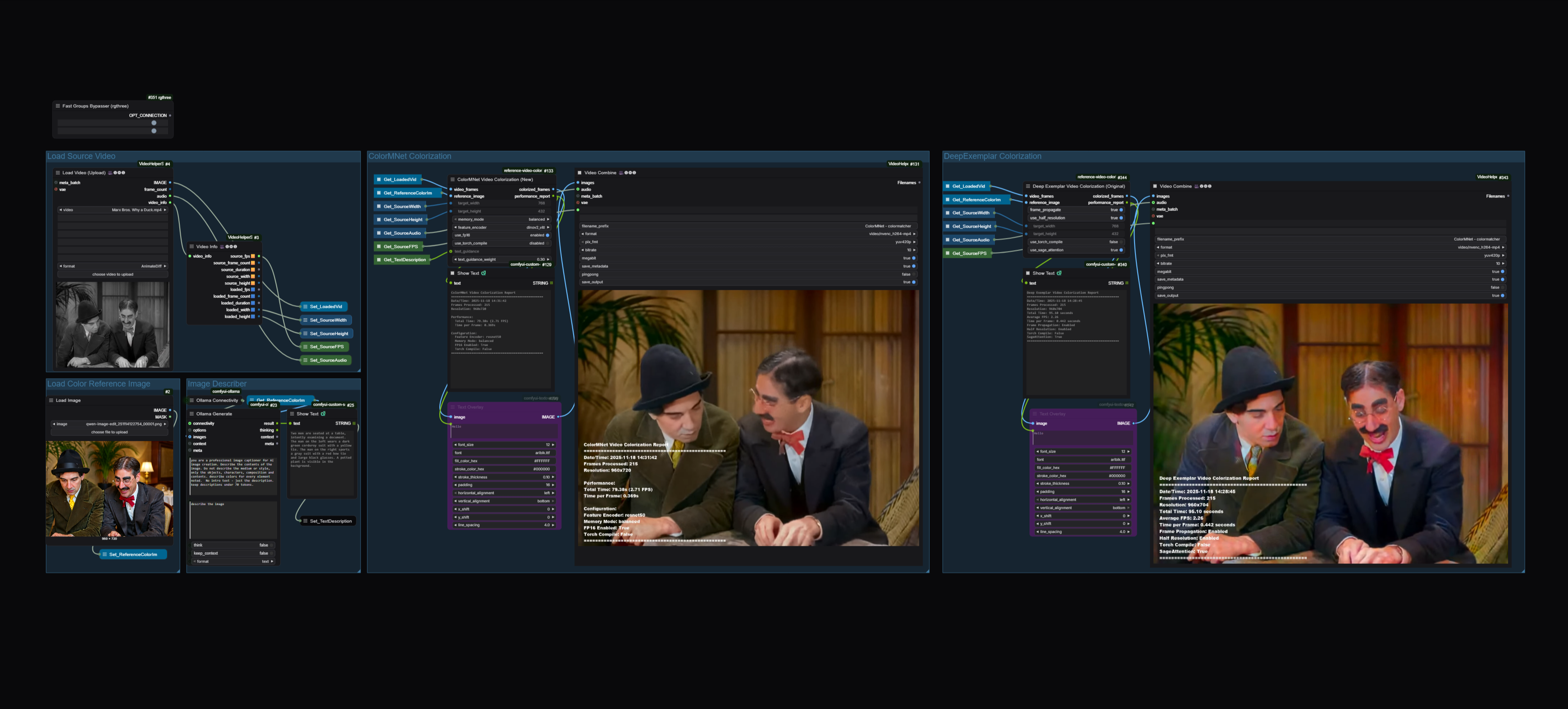
A comprehensive ComfyUI implementation featuring **two state-of-the-art** reference-based video colorization methods:
- **🎨 ColorMNet (2024)** - Modern memory-based approach with DINOv2 features
- **🎬 Deep Exemplar (2019)** - Classic CVPR method with temporal propagation
Transform black & white videos and images into vibrant color using reference images!
## 🎬 Demo
See ColorMNet in action colorizing classic black & white footage:
> **Example**: Colorized using ColorMNet with color matching post-processing.
> The model successfully transfers colors from a reference image while maintaining temporal consistency.
---
## ✨ Features
### ColorMNet Nodes (New)
- **ColorMNet Video Colorization** - Memory-based temporal coherent colorization
- **ColorMNet Image Colorization** - Single image colorization
- DINOv2-based feature extraction for superior quality
- Multiple memory modes (balanced, low memory, high quality)
- FP16 support for faster processing
- **torch.compile optimization** for 15-25% speedup (PyTorch 2.0+)
- **Performance reports** with timing and FPS metrics
### Deep Exemplar Nodes (Original)
- **Deep Exemplar Video Colorization** - Frame propagation for temporal consistency
- **Deep Exemplar Image Colorization** - Classic exemplar-based method
- WLS (Weighted Least Squares) filtering for smoother results
- Configurable lambda and sigma parameters
- **torch.compile optimization** for 15-25% speedup (PyTorch 2.0+)
- **SageAttention** for 20-30% faster attention operations
- **Performance reports** for benchmarking
### Common Features
- ✅ **Automatic model download** - No manual setup required!
- ✅ **Progress bars** - Real-time processing feedback in ComfyUI
- ✅ **Performance metrics** - Compare speed and quality between methods
- ✅ **Flexible resolution** - Process at any resolution
- ✅ **ComfyUI native** - Fully integrated workflow support
---
## 📦 Installation
### Method 1: ComfyUI Manager (Recommended)
1. Install [ComfyUI Manager](https://github.com/ltdrdata/ComfyUI-Manager)
2. Open ComfyUI → Manager → Install Custom Nodes
3. Search for "Deep Exemplar Video Colorization"
4. Click Install
5. Restart ComfyUI
Models will download automatically on first use (~700MB total).
### Method 2: Manual Installation
```bash
cd ComfyUI/custom_nodes/
git clone https://github.com/jonstreeter/ComfyUI-Reference-Based-Video-Colorization.git
cd ComfyUI-Reference-Based-Video-Colorization/
pip install -r requirements.txt
```
Restart ComfyUI. Models download automatically on first use.
### Recent changes
- Fixed ColorMNet pipeline normalization to match training (L-only input to encoder, normalized ab masks).
- Added auto-install for git-based CUDA deps (py-thin-plate-spline, correlation sampler) on node load.
- New sample: `Workflows/ColorMNet_Image_Workflow.json` for single-image colorization.
### ColorMNet git-based dependencies
ColorMNet uses two CUDA extensions that are shipped as git repos, not PyPI packages. The node now installs them automatically when it loads, so no manual steps are required. If your environment blocks installs and you need to do it yourself, the commands are:
```bash
pip install git+https://github.com/cheind/py-thin-plate-spline.git
pip install git+https://github.com/ClementPinard/Pytorch-Correlation-extension.git
```
If compilation fails on Windows, install the **Desktop development with C++** workload in Visual Studio Build Tools and ensure `CUDA_HOME` points to your CUDA Toolkit path. The nodes will still run without these extensions, just a bit slower.
---
## 🚀 Quick Start
### Example Workflow
Load the example workflow from `Workflows/Colorize_Video_Workflow.json`:
1. **Load Video** - Use VHS Video Loader to load your grayscale video
2. **Load Reference** - Load a color reference image
3. **Choose Method** - Try both ColorMNet and Deep Exemplar
4. **Compare Results** - Use the performance reports to benchmark
5. **Save Output** - Export colorized video with VHS Video Combine
For single-frame work, use the lightweight image workflow at `Workflows/ColorMNet_Image_Workflow.json`. It loads a target image, loads a reference image, runs the `ColorMNetImage` node, and saves the result.
### Nodes Overview
#### ColorMNet Nodes
**ColorMNet Video** (`ColorMNet/Video`)
- `video_frames` - Input grayscale video frames
- `reference_image` - Color reference image
- `target_width/height` - Output resolution
- `memory_mode` - balanced | low_memory | high_quality
- `use_fp16` - Enable FP16 for speed (default: True)
- `use_torch_compile` - Enable PyTorch 2.0+ compilation (default: False)
- **Outputs**: colorized_frames, performance_report
**ColorMNet Image** (`ColorMNet/Image`)
- `image` - Input grayscale image
- `reference_image` - Color reference image
- `target_width/height` - Output resolution
- `use_fp16` - Enable FP16 (default: True)
- `use_torch_compile` - Enable PyTorch 2.0+ compilation (default: False)
- **Outputs**: colorized_image, performance_report
#### Deep Exemplar Nodes
**Deep Exemplar Video** (`DeepExemplar/Video`)
- `video_frames` - Input grayscale video frames
- `reference_image` - Color reference image
- `target_width/height` - Output resolution
- `frame_propagate` - Use temporal consistency (default: True)
- `use_half_resolution` - Process at half resolution (default: True)
- `use_torch_compile` - Enable PyTorch 2.0+ compilation (default: False)
- `use_sage_attention` - Enable SageAttention optimization (default: False)
- **Outputs**: colorized_frames, performance_report
**Deep Exemplar Image** (`DeepExemplar/Image`)
- `image_to_colorize` - Input grayscale image
- `reference_image` - Color reference image
- `target_width/height` - Output resolution
- `use_torch_compile` - Enable PyTorch 2.0+ compilation (default: False)
- `use_sage_attention` - Enable SageAttention optimization (default: False)
- **Outputs**: colorized_image, performance_report
---
## 📊 Performance Reports
All nodes output optional performance reports with timing metrics:
### Example ColorMNet Video Report
```
ColorMNet Video Colorization Report
==================================================
Frames Processed: 240
Resolution: 768x432
Total Time: 45.23 seconds
Average FPS: 5.31
Time per Frame: 0.188 seconds
Memory Mode: balanced
FP16 Enabled: True
Torch Compile: False
==================================================
```
### Example Deep Exemplar Video Report
```
Deep Exemplar Video Colorization Report
==================================================
Frames Processed: 240
Resolution: 768x432
Total Time: 52.34 seconds
Average FPS: 4.59
Time per Frame: 0.218 seconds
Frame Propagation: Enabled
Half Resolution: Enabled
WLS Filter: Enabled
Lambda: 500.0
Sigma Color: 4.0
Torch Compile: False
SageAttention: False
==================================================
```
Connect the performance_report output to a text display node or save to file for benchmarking!
---
## 💡 Tips & Best Practices
### Reference Image Selection
- Choose references **semantically similar** to your content
- Match the **color palette** you want to achieve
- Higher quality references = better results
- Try multiple references to find the best match
### Resolution Settings
- **ColorMNet**: Processes at full target resolution
- **Deep Exemplar**: Internally uses half resolution by default
- Start with 768x432 for good speed/quality balance
- Increase for final high-quality renders
### Memory Management
**ColorMNet Memory Modes:**
- `balanced` - Good quality, moderate memory (recommended)
- `low_memory` - Reduced memory usage, slight quality trade-off
- `high_quality` - Best quality, higher memory requirements
**Deep Exemplar:**
- Enable `use_half_resolution` to reduce memory
- Disable `frame_propagate` for independent frame processing
- Process shorter clips if encountering OOM errors
### Quality vs Speed
**For Best Quality:**
- ColorMNet: `memory_mode=high_quality`, `use_fp16=False`, `use_torch_compile=False`
- Deep Exemplar: `use_half_resolution=False`, `use_torch_compile=False`, `use_sage_attention=False`
**For Best Speed:**
- ColorMNet: `memory_mode=low_memory`, `use_fp16=True`, `use_torch_compile=True`
- Deep Exemplar: `use_half_resolution=True`, `use_torch_compile=True`, `use_sage_attention=True`
**Optimization Notes:**
- `torch.compile` requires PyTorch 2.0+ and provides 15-25% speedup after initial warmup
- `use_sage_attention` (Deep Exemplar only) provides 20-30% faster attention with `sageattention` installed
- Both optimizations maintain identical quality to non-optimized versions
---
## 🔧 Advanced Configuration
### Custom Model Paths
Models are automatically downloaded to:
```
custom_nodes/ComfyUI-Reference-Based-Video-Colorization/
├── checkpoints/
│ ├── DINOv2FeatureV6_LocalAtten_s2_154000.pth # ColorMNet (~500MB)
│ └── video_moredata_l1/
│ ├── nonlocal_net_iter_76000.pth # Deep Exemplar
│ └── colornet_iter_76000.pth # Deep Exemplar
└── data/
├── vgg19_conv.pth # Shared VGG19
└── vgg19_gray.pth # Deep Exemplar VGG
```
### Optimizations
**torch.compile (PyTorch 2.0+):**
Provides 15-25% speedup through graph compilation and optimization.
- Available for all 4 nodes (ColorMNet + Deep Exemplar)
- Enable via `use_torch_compile=True` parameter
- First run includes warmup compilation (slower), subsequent runs benefit from speedup
- No additional installation required if using PyTorch 2.0+
**SageAttention (Deep Exemplar only):**
INT8-quantized attention for 20-30% faster attention operations.
Installation:
```bash
pip install sageattention
```
Requirements:
- CUDA-capable GPU
- PyTorch with CUDA support
- Enable via `use_sage_attention=True` parameter
- Automatically falls back to standard attention if unavailable
**CUDA Correlation Sampler (Optional for ColorMNet):**
ColorMNet can use optimized CUDA correlation operations if available.
Requirements:
- CUDA Toolkit installed
- Visual Studio Build Tools (Windows)
- Will be attempted automatically on first run
**OpenCV Contrib (Required for WLS):**
```bash
pip install opencv-contrib-python
```
---
## 📚 Documentation
- **[Architecture](ARCHITECTURE.md)** - Technical implementation details
- **[Performance](PERFORMANCE.md)** - Benchmarks and optimization guide
- **[Quick Start](QUICKSTART.md)** - Detailed getting started guide
- **[Migration Guide](MIGRATION_GUIDE.md)** - Upgrading from older versions
---
## 🎓 Citation
If you use these methods in your research, please cite the original papers:
### ColorMNet
```bibtex
@article{yang2024colormnet,
title={ColorMNet: A Memory-based Deep Spatial-Temporal Feature Propagation Network for Video Colorization},
author={Yang, Yixin and Zhou, Xiaoyu and Liu, Chao and Chen, Junchi and Wang, Zhiwen},
journal={arXiv preprint arXiv:2404.06251},
year={2024}
}
```
### Deep Exemplar
```bibtex
@inproceedings{zhang2019deep,
title={Deep exemplar-based video colorization},
author={Zhang, Bo and He, Mingming and Liao, Jing and Sander, Pedro V and Yuan, Lu and Bermak, Amine and Chen, Dong},
booktitle={Proceedings of the IEEE Conference on Computer Vision and Pattern Recognition},
pages={8052--8061},
year={2019}
}
```
---
## 🔗 Related Projects
- **Original ColorMNet**: [https://github.com/yyang181/colormnet](https://github.com/yyang181/colormnet)
- **Original Deep Exemplar**: [https://github.com/zhangmozhe/Deep-Exemplar-based-Video-Colorization](https://github.com/zhangmozhe/Deep-Exemplar-based-Video-Colorization)
- **ComfyUI**: [https://github.com/comfyanonymous/ComfyUI](https://github.com/comfyanonymous/ComfyUI)
- **Bringing Old Photos Back to Life**: [https://github.com/microsoft/Bringing-Old-Photos-Back-to-Life](https://github.com/microsoft/Bringing-Old-Photos-Back-to-Life)
---
## 📝 License
This ComfyUI implementation is licensed under the MIT License.
**Note on Model Licenses:**
- ColorMNet model: CC BY-NC-SA 4.0 (Non-commercial use only)
- Deep Exemplar model: Subject to original project license
---
## 🙏 Acknowledgments
- ColorMNet implementation based on [yyang181/colormnet](https://github.com/yyang181/colormnet)
- Deep Exemplar implementation based on [zhangmozhe/Deep-Exemplar-based-Video-Colorization](https://github.com/zhangmozhe/Deep-Exemplar-based-Video-Colorization)
- Thanks to the ComfyUI community for feedback and testing
---
## 🐛 Issues & Support
Found a bug or have a feature request? Please open an issue on GitHub!
For general questions:
1. Check the [documentation](QUICKSTART.md)
2. Review [existing issues](https://github.com/jonstreeter/ComfyUI-Reference-Based-Video-Colorization/issues)
3. Open a new issue with details
---
## 🎯 Roadmap
- [ ] Batch processing optimization
- [ ] Memory-efficient streaming for long videos
- [ ] Additional colorization methods
- [ ] Color transfer utilities
- [ ] Integration with other ComfyUI nodes
---
**Star ⭐ this repo if you find it useful!**