# ComfyUI Deep Exemplar-based Colorization Nodes
 This repository provides custom nodes for [ComfyUI](https://github.com/comfyanonymous/ComfyUI) that implement the **Deep Exemplar-based Video Colorization** method (CVPR 2019). It allows you to colorize grayscale images or video frames using a color reference image directly within the ComfyUI workflow.
Based on the original paper and Pytorch implementation:
**[Paper](https://arxiv.org/abs/1906.09909) | [Original Project](https://github.com/zhangmozhe/Deep-Exemplar-based-Video-Colorization) | [Original Pretrained Model](https://github.com/zhangmozhe/Deep-Exemplar-based-Video-Colorization/releases/download/v1.0/colorization_checkpoint.zip)**
**Deep Exemplar-based Video Colorization, CVPR2019**
[Bo Zhang](https://www.microsoft.com/en-us/research/people/zhanbo/)1,3, [Mingming He](http://mingminghe.com/)1,5, [Jing Liao](https://liaojing.github.io/html/)2, [Pedro V. Sander](https://www.cse.ust.hk/~psander/)1, [Lu Yuan](https://www.microsoft.com/en-us/research/people/luyuan/)4, [Amine Bermak](https://eebermak.home.ece.ust.hk/)1, [Dong Chen](https://www.microsoft.com/en-us/research/people/doch/)3
This repository provides custom nodes for [ComfyUI](https://github.com/comfyanonymous/ComfyUI) that implement the **Deep Exemplar-based Video Colorization** method (CVPR 2019). It allows you to colorize grayscale images or video frames using a color reference image directly within the ComfyUI workflow.
Based on the original paper and Pytorch implementation:
**[Paper](https://arxiv.org/abs/1906.09909) | [Original Project](https://github.com/zhangmozhe/Deep-Exemplar-based-Video-Colorization) | [Original Pretrained Model](https://github.com/zhangmozhe/Deep-Exemplar-based-Video-Colorization/releases/download/v1.0/colorization_checkpoint.zip)**
**Deep Exemplar-based Video Colorization, CVPR2019**
[Bo Zhang](https://www.microsoft.com/en-us/research/people/zhanbo/)1,3, [Mingming He](http://mingminghe.com/)1,5, [Jing Liao](https://liaojing.github.io/html/)2, [Pedro V. Sander](https://www.cse.ust.hk/~psander/)1, [Lu Yuan](https://www.microsoft.com/en-us/research/people/luyuan/)4, [Amine Bermak](https://eebermak.home.ece.ust.hk/)1, [Dong Chen](https://www.microsoft.com/en-us/research/people/doch/)3
1HKUST, 2CityU HK, 3Microsoft Research Asia, 4Microsoft Cloud&AI, 5USC ICT
## Features
* **DeepExColorImageNode:** Colorizes a single grayscale image using a color reference image.
* **DeepExColorVideoNode:** Colorizes a batch of grayscale video frames using a color reference image, with optional frame-to-frame propagation.
* Integration with ComfyUI workflows.
* Automatic download of pretrained models via ComfyUI Manager or included `install.py`.
* Adjustable target resolution (internally processed at half-resolution).
* Optional WLS (Fast Global Smoother) filter post-processing (requires `opencv-contrib-python`).
## Installation
### Using ComfyUI Manager (Recommended)
1. Install [ComfyUI Manager](https://github.com/ltdrdata/ComfyUI-Manager) if you haven't already.
2. Open ComfyUI and navigate to the "Manager" menu.
3. Click "Install Custom Nodes".
4. Search for "DeepExemplarColorization".
5. Click "Install".
6. **Wait for installation to complete.** The manager will run the `install.py` script to download the required model checkpoints (~500MB) into the `ComfyUI/custom_nodes/ComfyUI-Deep-Exemplar-based-Video-Colorization/` directory.
7. **Install Dependencies:** Ensure `opencv-contrib-python` is installed in your ComfyUI environment if you want to use the WLS filter. The Manager will attempt to install packages listed in `requirements.txt`. You can verify/install manually if needed:
```bash
# In ComfyUI's Python environment:
# pip install opencv-contrib-python
```
8. **Restart ComfyUI.**
### Manual Installation
1. Navigate to your ComfyUI `custom_nodes` directory:
```bash
cd ComfyUI/custom_nodes/
```
2. Clone this repository:
```bash
git clone https://github.com/jonstreeter/ComfyUI-Deep-Exemplar-based-Video-Colorization # <-- Replace with your repo URL!
```
3. Navigate into the cloned directory:
```bash
cd ComfyUI-Deep-Exemplar-based-Video-Colorization/
```
4. **Download Model Checkpoints:** Run the installation script using the Python environment ComfyUI uses:
```bash
# Example using ComfyUI's portable python:
# ../../python_embeded/python.exe install.py
# Or if using a venv:
# path/to/your/venv/Scripts/python.exe install.py
```
This will download `colorization_checkpoint.zip` and extract the necessary files into the `checkpoints/` and `data/` subdirectories within this custom node folder.
5. **Install Dependencies:** Install the required Python packages using the same Python environment:
```bash
# Example using ComfyUI's portable python:
# ../../python_embeded/python.exe -m pip install -r requirements.txt
# Or if using a venv:
# path/to/your/venv/Scripts/python.exe -m pip install -r requirements.txt
```
*Note:* This includes `opencv-contrib-python`, which is required for the WLS filter.
6. **Restart ComfyUI.**
## Usage
After installation and restarting ComfyUI, you can find the nodes under the "DeepExemplar" category when adding nodes (Right Click -> Add Node -> DeepExemplar).
### Nodes
* **`DeepExColorImageNode`**:
* Inputs:
* `image_to_colorize`: The single grayscale image (standard ComfyUI IMAGE format).
* `reference_image`: The single color reference image (standard ComfyUI IMAGE format).
* `target_width`/`target_height`: Desired output resolution (internal processing is at half this size; will be adjusted to be multiples of 32, min 64x64).
* `wls_filter_on`: Enable WLS post-processing filter (requires `opencv-contrib-python`).
* `lambda_value`: WLS filter parameter (controls smoothing amount).
* `sigma_color`: WLS filter parameter (controls color sensitivity).
* Output:
* `IMAGE`: The colorized image.
* **`DeepExColorVideoNode`**:
* Inputs:
* `video_frames`: A batch of grayscale images (standard ComfyUI IMAGE format, BxHxWxC tensor). Use ComfyUI's `Load Video` or `Load Image Sequence` nodes upstream.
* `reference_image`: The single color reference image.
* `frame_propagate`: If true, uses the previous frame's colorization to guide the current frame (helps temporal consistency).
* `use_half_resolution`: If true, performs core computations at half the target resolution (faster, matches original paper). *Note: This was the default and only behavior in the reverted code, but the parameter exists.*
* `target_width`/`target_height`: Desired output resolution.
* `wls_filter_on`: Enable WLS post-processing filter (requires `opencv-contrib-python`).
* `lambda_value`: WLS filter parameter.
* `sigma_color`: WLS filter parameter.
* Output:
* `IMAGE`: A batch containing the colorized frames. Use ComfyUI's `Save Animated PNG/WEBP/GIF` or `Video Combine` nodes downstream.
### Example Workflows
Example Workflow provided in Workflows folder
### Tips
* **Reference Image:** The quality and color palette of the reference image significantly impact the result. Choose a reference that is semantically similar and has the desired color style. See the original project's README for links to image retrieval algorithms if needed.
* **Resolution:** The nodes process images internally based on half the `target_width` and `target_height`. Final output is scaled up to the target resolution.
* **Frame Propagation:** Enabling `frame_propagate` in the video node generally improves temporal stability but might slightly change the color compared to processing each frame independently.
* **WLS Filter:** The WLS (Fast Global Smoother) filter helps smooth colors while respecting edges. It requires `opencv-contrib-python`. If unavailable or disabled, colors might appear less smooth or blocky.
* **Memory:** Processing high-resolution videos can be memory-intensive. Adjust `target_width`/`target_height` or process shorter clips if you encounter out-of-memory errors.
## Results Comparison
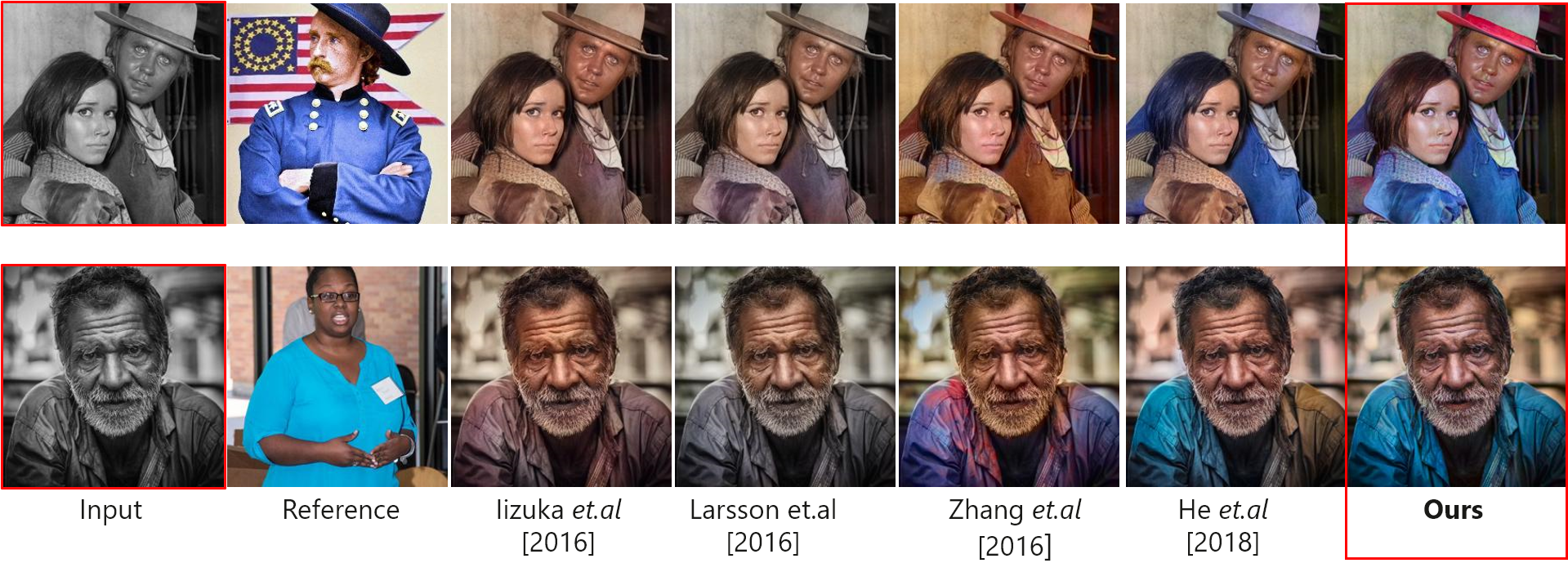 Check out this Sample video showing the node in action!
[Video](https://github.com/jonstreeter/ComfyUI-Deep-Exemplar-based-Video-Colorization/raw/refs/heads/main/assets/Why_A_Duck_Colorized.mp4)
## Citation (Original Paper)
If you use the underlying method in your research, please cite the original paper: @inproceedings{zhang2019deep,
title={Deep exemplar-based video colorization},
author={Zhang, Bo and He, Mingming and Liao, Jing and Sander, Pedro V and Yuan, Lu and Bermak, Amine and Chen, Dong},
booktitle={Proceedings of the IEEE Conference on Computer Vision and Pattern Recognition},
pages={8052--8061},
year={2019}
}
## Related Projects
* Original Implementation: [https://github.com/zhangmozhe/Deep-Exemplar-based-Video-Colorization](https://github.com/zhangmozhe/Deep-Exemplar-based-Video-Colorization)
* Bringing Old Photos Back to Life: [https://github.com/microsoft/Bringing-Old-Photos-Back-to-Life](https://github.com/microsoft/Bringing-Old-Photos-Back-to-Life)
## License
This ComfyUI node implementation is licensed under the MIT license. The underlying model and original code are subject to their respective licenses.
Check out this Sample video showing the node in action!
[Video](https://github.com/jonstreeter/ComfyUI-Deep-Exemplar-based-Video-Colorization/raw/refs/heads/main/assets/Why_A_Duck_Colorized.mp4)
## Citation (Original Paper)
If you use the underlying method in your research, please cite the original paper: @inproceedings{zhang2019deep,
title={Deep exemplar-based video colorization},
author={Zhang, Bo and He, Mingming and Liao, Jing and Sander, Pedro V and Yuan, Lu and Bermak, Amine and Chen, Dong},
booktitle={Proceedings of the IEEE Conference on Computer Vision and Pattern Recognition},
pages={8052--8061},
year={2019}
}
## Related Projects
* Original Implementation: [https://github.com/zhangmozhe/Deep-Exemplar-based-Video-Colorization](https://github.com/zhangmozhe/Deep-Exemplar-based-Video-Colorization)
* Bringing Old Photos Back to Life: [https://github.com/microsoft/Bringing-Old-Photos-Back-to-Life](https://github.com/microsoft/Bringing-Old-Photos-Back-to-Life)
## License
This ComfyUI node implementation is licensed under the MIT license. The underlying model and original code are subject to their respective licenses.