


πŸͺ„SCEPTER

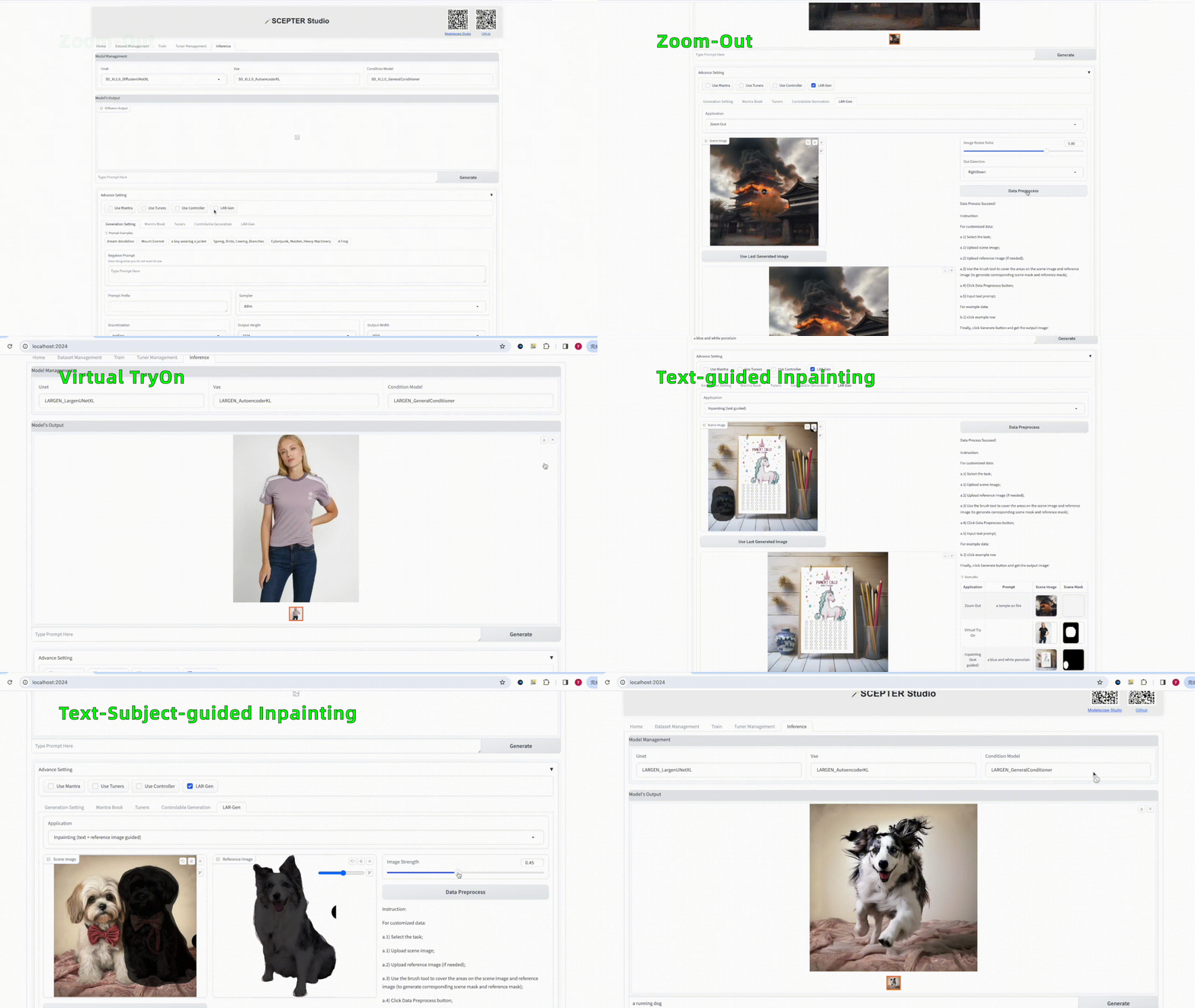
## πŸ“– Table of Contents - [News](#-news) - [Introduction](#-introduction) - [Installation](#%EF%B8%8F-installation) - [Getting Started](#-getting-started) - [SCEPTER Studio](#%EF%B8%8F-scepter-studio) - [Gallery](#%EF%B8%8F-gallery) - [Features](#-features) - [Learn More](#-learn-more) - [License](#license) - [Acknowledgement](#acknowledgement) ## πŸŽ‰ News - [2024.03]: We optimize the training UI and checkpoint management. New [LAR-Gen](https://arxiv.org/abs/2403.19534) model has been added on SCEPTER Studio, supporting `zoom-out`, `virtual try on`, `inpainting`. - [2024.02]: We release new SCEdit controllable image synthesis models for SD v2.1 and SD XL. Multiple strategies applied to accelerate inference time for SCEPTER Studio. - [2024.01]: We release **SCEPTER Studio**, an integrated toolkit for data management, model training and inference based on [Gradio](https://www.gradio.app/). - [2024.01]: [SCEdit](https://arxiv.org/abs/2312.11392) support controllable image synthesis for training and inference. - [2023.12]: We propose [SCEdit](https://arxiv.org/abs/2312.11392), an efficient and controllable generation framework. - [2023.12]: We release [πŸͺ„SCEPTER](https://github.com/modelscope/scepter/) library. ## πŸ“ Introduction SCEPTER is an open-source code repository dedicated to generative training, fine-tuning, and inference, encompassing a suite of downstream tasks such as image generation, transfer, editing. It integrates popular community-driven implementations as well as proprietary methods by Tongyi Lab of Alibaba Group, offering a comprehensive toolkit for researchers and practitioners in the field of AIGC. This versatile library is designed to facilitate innovation and accelerate development in the rapidly evolving domain of generative models. Main Feature: - Task: - Text-to-image generation - Controllable image synthesis - Image editing - Training / Inference: - Distribute: DDP / FSDP / FairScale / Xformers - File system: Local / Http / OSS / Modelscope - Deploy: - Data management - Training - Inference Currently supported approaches (and counting): 1. SD Series: [Stable Diffusion v1.5](https://huggingface.co/runwayml/stable-diffusion-v1-5) / [Stable Diffusion v2.1](https://huggingface.co/runwayml/stable-diffusion-v1-5) / [Stable Diffusion XL](https://huggingface.co/stabilityai/stable-diffusion-xl-base-1.0) 2. SCEdit(CVPR2024): [SCEdit: Efficient and Controllable Image Diffusion Generation via Skip Connection Editing](https://arxiv.org/abs/2312.11392) [![Arxiv link](https://img.shields.io/static/v1?label=arXiv&message=SCEdit&color=red&logo=arxiv)](https://arxiv.org/abs/2312.11392) [![Page link](https://img.shields.io/badge/Page-SCEdit-Gree)](https://scedit.github.io/) 3. Res-Tuning(NeurIPS2023 TODO): [Res-Tuning: A Flexible and Efficient Tuning Paradigm via Unbinding Tuner from Backbone](https://arxiv.org/abs/2310.19859) [![Arxiv link](https://img.shields.io/static/v1?label=arXiv&message=ResTuning&color=red&logo=arxiv)](https://arxiv.org/abs/2310.19859) [![Page link](https://img.shields.io/badge/Page-ResTuning-Gree)](https://res-tuning.github.io/) 4. LAR-Gen: [Locate, Assign, Refine: Taming Customized Image Inpainting with Text-Subject Guidance](https://arxiv.org/abs/2403.19534) [![Arxiv link](https://img.shields.io/static/v1?label=arXiv&message=LARGen&color=red&logo=arxiv)](https://arxiv.org/abs/2403.19534) [![Page link](https://img.shields.io/badge/Page-LARGen-Gree)](https://ali-vilab.github.io/largen-page/) ## πŸ› οΈ Installation - Create new environment ```shell conda env create -f environment.yaml conda activate scepter ``` - We recommend installing the specific version of PyTorch and accelerate toolbox [xFormers](https://pypi.org/project/xformers/). You can install these recommended version by pip: ```shell pip install -r requirements/recommended.txt ``` - Install SCEPTER by the `pip` command: ```shell pip install scepter ``` ## πŸš€ Getting Started ### Dataset #### Modelscope Format We use a [custom-stylized dataset](https://modelscope.cn/datasets/damo/style_custom_dataset/summary), which included classes 3D, anime, flat illustration, oil painting, sketch, and watercolor, each with 30 image-text pairs. ```python # pip install modelscope from modelscope.msdatasets import MsDataset ms_train_dataset = MsDataset.load('style_custom_dataset', namespace='damo', subset_name='3D', split='train_short') print(next(iter(ms_train_dataset))) ``` #### CSV Format For the data format used by SCEPTER Studio, please refer to [3D_example_csv.zip](https://modelscope.cn/api/v1/models/damo/scepter/repo?Revision=master&FilePath=datasets/3D_example_csv.zip). #### TXT Format To facilitate starting training in command-line mode, you can use a dataset in text format, please refer to [3D_example_txt.zip](https://modelscope.cn/api/v1/models/damo/scepter/repo?Revision=master&FilePath=datasets/3D_example_txt.zip) ```shell mkdir -p cache/datasets/ && wget 'https://modelscope.cn/api/v1/models/damo/scepter_scedit/repo?Revision=master&FilePath=dataset/3D_example_txt.zip' -O cache/datasets/3D_example_txt.zip && unzip cache/datasets/3D_example_txt.zip -d cache/datasets/ && rm cache/datasets/3D_example_txt.zip ``` ### Training We provide a framework for training and inference, so the script below is just for illustration purposes. To achieve better results, you can modify the corresponding parameters as needed. #### Text-to-Image Generation - SCEdit ```python python scepter/tools/run_train.py --cfg scepter/methods/scedit/t2i/sd15_512_sce_t2i.yaml # SD v1.5 python scepter/tools/run_train.py --cfg scepter/methods/scedit/t2i/sd21_768_sce_t2i.yaml # SD v2.1 python scepter/tools/run_train.py --cfg scepter/methods/scedit/t2i/sdxl_1024_sce_t2i.yaml # SD XL ``` - Existing Tuning Strategies ```python python scepter/tools/run_train.py --cfg scepter/methods/examples/generation/stable_diffusion_1.5_512.yaml # fully-tuning on SD v1.5 python scepter/tools/run_train.py --cfg scepter/methods/examples/generation/stable_diffusion_2.1_768_lora.yaml # lora-tuning on SD v2.1 ``` - Data Text Format ```python # Download the 3D_example_txt.zip as previously mentioned python scepter/tools/run_train.py --cfg scepter/methods/scedit/t2i/sdxl_1024_sce_t2i_datatxt.yaml ``` #### Controllable Image Synthesis - SCEdit The YAML configuration can be modified to combine different base models and conditions. The following is provided as an example. ```python python scepter/tools/run_train.py --cfg scepter/methods/scedit/ctr/sd15_512_sce_ctr_hed.yaml # SD v1.5 + hed python scepter/tools/run_train.py --cfg scepter/methods/scedit/ctr/sd21_768_sce_ctr_canny.yaml # SD v2.1 + canny python scepter/tools/run_train.py --cfg scepter/methods/scedit/ctr/sd21_768_sce_ctr_pose.yaml # SD v2.1 + pose python scepter/tools/run_train.py --cfg scepter/methods/scedit/ctr/sdxl_1024_sce_ctr_depth.yaml # SD XL + depth python scepter/tools/run_train.py --cfg scepter/methods/scedit/ctr/sdxl_1024_sce_ctr_color.yaml # SD XL + color ``` - Data Text Format ```python # Download the 3D_example_txt.zip as previously mentioned python scepter/tools/run_train.py --cfg scepter/methods/scedit/ctr/sdxl_1024_sce_ctr_color_datatxt.yaml ``` ### Inference #### Base Model Inference ```python python scepter/tools/run_inference.py --cfg scepter/methods/examples/generation/stable_diffusion_1.5_512.yaml --prompt 'a cute dog' --save_folder 'inference' # generation on SD v1.5 python scepter/tools/run_inference.py --cfg scepter/methods/examples/generation/stable_diffusion_2.1_768.yaml --prompt 'a cute dog' --save_folder 'inference' # generation on SD v2.1 python scepter/tools/run_inference.py --cfg scepter/methods/examples/generation/stable_diffusion_xl_1024.yaml --prompt 'a cute dog' --save_folder 'inference' # generation on SD XL ``` #### Fine-tuned Model Inference ```python python scepter/tools/run_inference.py --cfg scepter/methods/scedit/t2i/sd15_512_sce_t2i_swift.yaml --pretrained_model 'cache/save_data/sd15_512_sce_t2i_swift/checkpoints/ldm_step-100.pth' --prompt 'A close up of a small rabbit wearing a hat and scarf' --save_folder 'trained_test_prompt_rabbit' ``` #### Controllable Image Synthesis Inference - SCEdit ```python python scepter/tools/run_inference.py --cfg scepter/methods/scedit/ctr/sd21_768_sce_ctr_canny.yaml --num_samples 1 --prompt 'a single flower is shown in front of a tree' --save_folder 'test_flower_canny' --image_size 768 --task control --image 'asset/images/flower.jpg' --control_mode canny --pretrained_model ms://damo/scepter_scedit@controllable_model/SD2.1/canny_control/0_SwiftSCETuning/pytorch_model.bin # canny python scepter/tools/run_inference.py --cfg scepter/methods/scedit/ctr/sd21_768_sce_ctr_pose.yaml --num_samples 1 --prompt 'super mario' --save_folder 'test_mario_pose' --image_size 768 --task control --image 'asset/images/pose_source.png' --control_mode source --pretrained_model ms://damo/scepter_scedit@controllable_model/SD2.1/pose_control/0_SwiftSCETuning/pytorch_model.bin # pose ``` ### Customize Modules Refer to `example`, build the modules of your task in `example/{task}`. ```python cd example/classifier python run.py --cfg classifier.yaml ``` ## πŸ–₯️ SCEPTER Studio ### Launch To fully experience **SCEPTER Studio**, you can launch the following command line: ```shell pip install scepter python -m scepter.tools.webui ``` or run after clone repo code ```shell git clone https://github.com/modelscope/scepter.git PYTHONPATH=. python scepter/tools/webui.py --cfg scepter/methods/studio/scepter_ui.yaml ``` The startup of **SCEPTER Studio** eliminates the need for manual downloading and organizing of models; it will automatically load the corresponding models and store them in a local directory. Depending on the network and hardware situation, the initial startup usually requires 15-60 minutes, primarily involving the download and processing of SDv1.5, SDv2.1, and SDXL models. Therefore, subsequent startups will become much faster (about one minute) as downloading is no longer required. * LAR-Gen: we release `zoom-out`, `virtual try on`, `inpainting(text guided)`, `inpainting(text + reference image guided)` image editing capabilities. Please note that the **Data Preprocess** button must be clicked before clicking the **Generate** button.

### Modelscope Studio We deploy a work studio on Modelscope that includes only the inference tab, please refer to [ms_scepter_studio](https://www.modelscope.cn/studios/damo/scepter_studio/summary) ## πŸ–ΌοΈ Gallery ### LAR-Gen: Zoom Out
Origin Image
Prompt: a temple on fire
Zoom-Out
CenterAround:0.75
Zoom-Out
CenterAround:0.75
Zoom-Out
CenterAround:0.75
Zoom-Out
CenterAround:0.75
### LAR-Gen: Virtual Try-on
Model Image Model Mask Clothing Image Clothing Mask Try-on Output
### LAR-Gen: Inpainting (Text guided)
Origin Image
Prompt: a blue and white porcelain
Inpainting Mask1 Inpainting Output1 Inpainting Mask2
Prompt: a clock
Inpainting Output2
### LAR-Gen: Inpainting (Text and Subject guided)
Origin Image
Prompt: a dog wearing sunglasses
Origin Mask Reference Image Reference Mask Inpainting Output
### Dragon Year Special: Dragon Tuner
Gold Dragon Tuner Sloppy Dragon Tuner Red Dragon Tuner
+ Papercraft Mantra
Azure Dragon Tuner
+ Pose Control
### Text Effect Image
Conditional Image Midas Control
"Race track, top view"
Midas Control
+ Watercolor Mantra
"white lilies"
Midas Control
+ Dragon Tuner
"Spring Festival, Chinese dragon"
## ✨ Features ### Text-to-Image Generation | **Model** | **SCEdit** | **Full** | **LoRA** | |:---------:|:----------:|:--------:|:--------:| | SD 1.5 | πŸͺ„ | βœ… | βœ… | | SD 2.1 | πŸͺ„ | βœ… | βœ… | | SD XL | πŸͺ„ | βœ… | βœ… | ### Controllable Image Synthesis - SCEdit | **Model** | **Canny** | **HED** | **Depth** | **Pose** | **Color** | |:---------:|:---------:|:-------:|:---------:|:--------:|:---------:| | SD 1.5 | βœ… | βœ… | βœ… | βœ… | βœ… | | SD 2.1 | πŸͺ„ | πŸͺ„ | πŸͺ„ | πŸͺ„ | πŸͺ„ | | SD XL | πŸͺ„ | πŸͺ„ | πŸͺ„ | πŸͺ„ | πŸͺ„ | ### Image Editing - LAR-Gen | **Model** | **Locate** | **Assign** | **Refine** | |:---------:|:----------:|:----------:|:----------:| | SD XL | πŸͺ„ | πŸͺ„ | ⏳ | ### Model URL - βœ… indicates support for both training and inference. - πŸͺ„ denotes that the model has been published. - ⏳ denotes that the module has not been integrated currently. - More models will be released in the future. | Model | URL | |--------|------------------------------------------------------------------------------------------------------------------------------------------------| | SCEdit | [ModelScope](https://modelscope.cn/models/iic/scepter_scedit/summary) [HuggingFace](https://huggingface.co/scepter-studio/scepter_scedit) | | LAR-Gen | [ModelScope](https://www.modelscope.cn/models/iic/LARGEN/summary) | PS: Scripts running within the SCEPTER framework will automatically fetch and load models based on the required dependency files, eliminating the need for manual downloads. ## πŸ” Learn More - [Alibaba TongYi Vision Intelligence Lab](https://github.com/ali-vilab) Discover more about open-source projects on image generation, video generation, and editing tasks. - [ModelScope library](https://github.com/modelscope/modelscope/) ModelScope Library is the model library of ModelScope project, which contains a large number of popular models. - [SWIFT library](https://github.com/modelscope/swift/) SWIFT (Scalable lightWeight Infrastructure for Fine-Tuning) is an extensible framwork designed to faciliate lightweight model fine-tuning and inference. ## BibTeX If our work is useful for your research, please consider citing: ```bibtex @misc{scepter, title = {SCEPTER, https://github.com/modelscope/scepter}, author = {SCEPTER}, year = {2023} } ``` ## License This project is licensed under the [Apache License (Version 2.0)](https://github.com/modelscope/modelscope/blob/master/LICENSE). ## Acknowledgement Thanks to [Stability-AI](https://github.com/Stability-AI), [SWIFT library](https://github.com/modelscope/swift/) and [Fooocus](https://github.com/lllyasviel/Fooocus) for their awesome work.