
2.0 KiB
General


PromptTermList (1-6) are some nodes that help with the creation of Prompts inside ComfyUI.
Screenshots
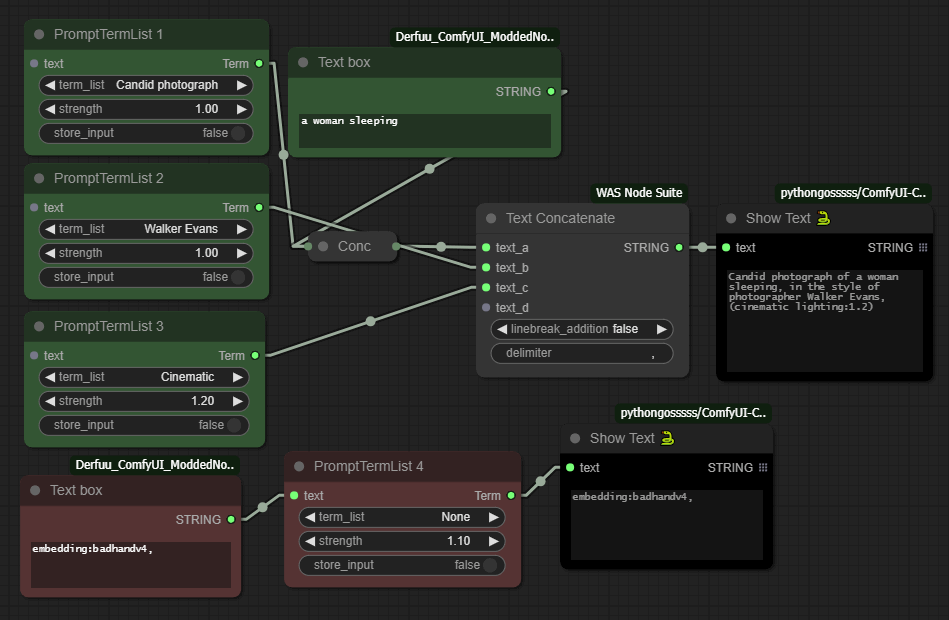
Usage
Every one of the 6 nodes have a different json file that stores its Prompt Terms in "label"/"value" pairs.
The "label" part is what we see at the node's dropdown menu, and the "value" part is what it produces at its Term output when we run a generation job.
These json files are located inside the TermLists directory, in the node's folder.
There are two ways to add a new term.
-
From within ComfyUI:
- Connect a text box to the node's
textinput. - Write the "label"/"value" part in the box using the following format:
label=Descriptive text
value=masterpiece, artful and cozy - Enable the
store_inputswitch. - Run a generation job.
- Refresh the page.
- Connect a text box to the node's
-
Manually:
- Just open the
jsonfile and add/remove/change entries.
Of course we must be very careful with this, to keep the
jsonformat of labels/values (with the appropriate commas), otherwise the file will not be parsed. - Just open the
This text input is also useful if we want to manually add something after our term, or as the only term if we select the None label of the dropdown.
The strength value is changing the impact of the term by using the parenthesis format like this: (a great term:1.3)
Installation
- cd to
ComfyUI\custom_nodes - git clone https://github.com/noembryo/ComfyUI-noEmbryo.git
- Restart ComfyUI