# ComfyUI-WanVideoWrapper_QQ **Version 1.2.1** - 2025-12-11 - Some changes to spline editor + added wan move example. Look like mix of ati and control 2.1 (update kj [ComfyUI-WanVideoWrapper](https://github.com/kijai/ComfyUI-WanVideoWrapper)) [Example](examples//rabbit_control_wan_move/wan21_wan_move.json)
https://github.com/user-attachments/assets/119824e7-e309-4f00-9cc8-1404f10d91c9 https://github.com/user-attachments/assets/881f887d-d930-43d2-b197-ac44668a36e5
**Version 1.2.0** - 2025-12-01 - Added ability to connect video to bg_image and animate over it [Example](examples/ttm_ref_vid/ttm_ref_vid_example.json) - [timeline hotkey/usage](git_assets/docs/power_spline_editor.md) https://github.com/user-attachments/assets/dffe5da8-7626-45cf-ad22-777b5a14879f **Version 1.1.0** - 2025-11-26 - Added `Prepare Refs` (needs cv2) to cut out parts for `Power Spline Editor` [Example](examples/ttm_ref_cutout/ttm_ref_cutout_example.json) - `Power Spline Editor` can trigger ref preparation with Canvas button in backend without starting comfyui run
https://github.com/user-attachments/assets/7c3d1c3a-4777-432b-997e-eafa678f7e64 https://github.com/user-attachments/assets/72f46a94-a3f3-4f66-9962-c87c5c02c987
**Version 1.0.92** - 2025-11-25 - Optional color match added to `Create Image List` batch node (if no ref_image connected it's not used) - Bugfixes , Canvas refresh now can read ImageResizeKJv2 resize and match its parameters to be able to draw on same aspect ratio/crop etc. https://github.com/user-attachments/assets/e1b70e5a-71af-4d01-9034-f80c9172811f **Version 1.0.9** - 2025-11-24 - **Proper keyframes control in editor + TTM sample**: Cleaned up keyframe layer , added ref pull and animation to later be used with ttm [WF Example](examples/ttm/ttm_example_wf.json) - From https://github.com/time-to-move/TTM , ty https://github.com/kijai/ComfyUI-WanVideoWrapper for wrapper implementation. - [Power Spline Editor - keyframe hotkey usage](git_assets/docs/power_spline_editor.md) https://github.com/user-attachments/assets/41974029-4935-4952-92b6-d2d69a8873d9 **Version 1.0.8** - 2025-11-17 - **Refactor + better ATI driver control**: Slight messy refactor + proper ati point output with pause [Example](examples/ATI_buildings_wobble/ATI_buildings_wobble.json) https://github.com/user-attachments/assets/c945432c-fe58-4783-a1c3-565e61868245 **Version 1.0.6** - 2025-11-13 - **New Wan22FMLF**: A better way to add midframe control from https://github.com/wallen0322/ComfyUI-Wan22FMLF + amplitude test in one node - **Lora high.low filter**: Clicking the circle icon cycles through: ◎ → ◐ → ◑ → ◎ + right icon right click options (low/high only / both) - **Mp4 muulti cache**: save/load steps between samplers **Version 1.0.3** - 2025-11-07 - **New Hand-Drawn Spline Layer**: Added freeform path drawing with full animation controls. Special thanks to [filliptm](https://github.com/filliptm/ComfyUI_Fill-Nodes) for the implementation example - **Enhanced Spline Editor Fixes**: Improved coordinate parsing, multi-spline handling, and UI fixes across canvas, context menus, and layer rendering - **Independent Layer Point Control**: Layer points now drive independently for better animation path control --- A collection of custom nodes for ComfyUI providing video manipulation, LoRA loading, path animation, and visual drawing tools for WanVideo workflows.
https://github.com/user-attachments/assets/16f0da4c-38f1-4789-97dc-c331ad8a6d92 https://github.com/user-attachments/assets/5689c666-924a-4362-9788-d8f662c0d925
### Power Spline Editor
![img](git_assets/img/spline.png) [Power Spline Editor - usage](git_assets/docs/power_spline_editor.md) - **Multi-layer canvas**: Draw unlimited paths with per-layer controls - **Interpolation modes**: `linear`, `cardinal` (Catmull-Rom), `basis` (B-spline), `points` (static) - **Repeat system**: Loop animations with automatic closed-path handling - **Driver/driven**: One path controls another with rotation, scaling, and smoothing - **Easing functions**: Smooth transitions with various easing curves for path animation - **Right-click controls**: Context menu for driver path with additional options - **Offset timing**: Positive/negative timing shifts with pause frame control - **Pause frames**: Start/end pause per layer for precise animation timing
### Power Lora Loader
![img](git_assets/img/lora.png) - **LoRAs**: Dynamic UI with rgthree-style interface - **Auto-detection**: Finds Low variant pairs from High LoRAs automatically - **Smart patterns**: `-`, `_`, ` ` separators at prefix/suffix/infix positions - **Case variations**: `High`/`high`/`HIGH`/`H`/`h` → `Low`/`low`/`LOW`/`L`/`l` - **Dual strength**: Separate High (H) and Low (L) sliders with copy buttons - **Block selection**: Per-LoRA layer control with merge and memory options
### Wan Video VACE Frame Replace
![img](git_assets/img/vace.png) [Wan Video VACE Frame Replace - example](git_assets/examples/frame_replace.json) - **Single frames**: `5` (gray), `5+` (replacement image) - **Ranges**: `22-26` (gray), `*1-5` (keep start), `1-5*` (keep end) - **a-b-c patterns**: Middle frame `b` with `a` left/`c` right context - **Multiple +**: `++a-b-c++` creates gradual duplicates on both sides - **Custom opacity**: `++a-b-c++ 0.8` for blend strength control - **Custom masks**: Auto-scaled replacement masks with opacity blending
### Wan Video Cache Samples
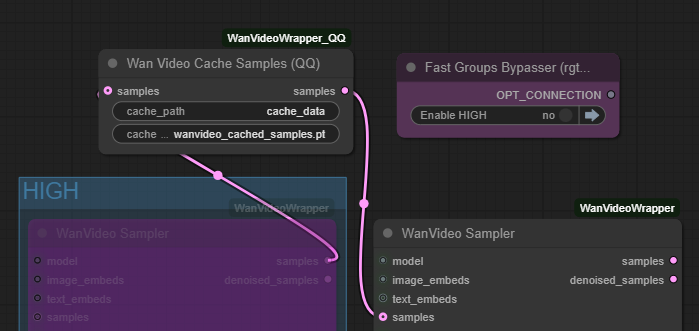
![img](git_assets/img/cache.png) - **Cache/Load workflow**: Save latent samples to disk for faster workflow iteration - **Dual mode**: With input → cache and passthrough; Without input → load from cache - **Auto-path handling**: Saves to node directory with customizable cache names - **Workflow speedup**: Skip HIGH sampling steps during prompt/parameter testing to resample LOW
### Wan Video Image To Video Encode_v2
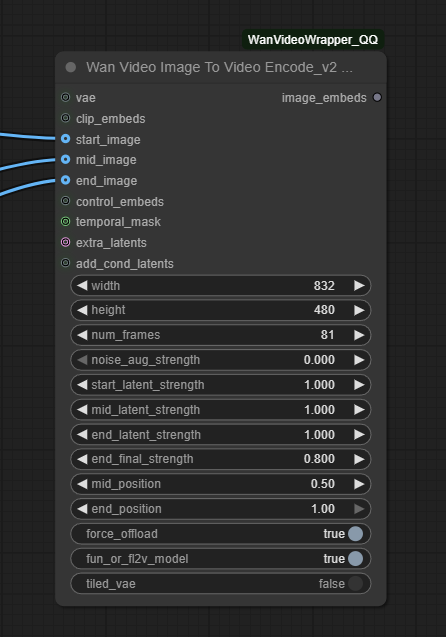
![img](git_assets/img/encode.png) - (EXPERIMENTAL) Maybe there's native ways to do this , but it seems to work - **Multi-frame I2V**: Start/mid/end image conditioning with position control - **Temporal feathering**: Cosine interpolation for smooth frame transitions - **Latent strength**: Per-frame multipliers (start/mid/end) for motion control (default setting work but can be adjusted)
### Control only vs Control + I2V
https://github.com/user-attachments/assets/d65bb9d7-962a-4e1f-bc5d-be90adc9e311 https://github.com/user-attachments/assets/c4b70388-54a8-4b08-8f37-6028e1f2f471
### Other Experimental Node List ![Node List](git_assets/img/list.png) ## Features - **Power LoRA Loader**: Advanced LoRA loading with High/Low pair detection, block selection, and custom UI - **Power Spline Editors**: Multi-layer canvas-based path drawing with interpolation modes (linear, cardinal, basis, points) - **Video Manipulation**: Speed adjustment, frame extraction, video merging, and frame replacement - **Path Animation**: Draw shapes (circle/square/triangle) along animated paths with easing functions - **Image-to-Video Encoding**: TAEHV (Tiny AutoEncoder for Hunyuan Video) with temporal feathering and memory-efficient modes - **Cache Management**: Sample caching for faster workflow iteration - **VAE Frame Replacement**: Replace specific frames in VAE-encoded video latents ## Installation 1. Navigate to your ComfyUI custom nodes directory: ```bash cd ComfyUI/custom_nodes/ ``` 2. Clone this repository: ```bash git clone https://github.com/siraxe/ComfyUI-WanVideoWrapper_QQ.git ``` 3. Restart ComfyUI ## Requirements - ComfyUI (latest version recommended) - PyTorch with CUDA support (for GPU acceleration) - Standard ComfyUI dependencies ## Credits Experimental node package for WanVideo workflows in ComfyUI. **Special Thanks** - **KJ** - [ComfyUI-WanVideoWrapper](https://github.com/kijai/ComfyUI-WanVideoWrapper) - **rgthree** - [rgthree-comfy](https://github.com/rgthree/rgthree-comfy)