
187 lines
7.4 KiB
Markdown
187 lines
7.4 KiB
Markdown
[中文](./README_CN.md) | English
|
||
|
||
<div align="center">
|
||
|
||
# 🎯 ComfyUI-Copilot: Your Intelligent Assistant for Comfy-UI
|
||
|
||
<!-- Enhancing Image Generation Development with Smart Assistance -->
|
||
|
||
<h4 align="center">
|
||
|
||
<div align="center">
|
||
<img src="https://img.shields.io/badge/Version-1.0.0-blue.svg" alt="Version">
|
||
<img src="https://img.shields.io/badge/License-MIT-green.svg" alt="License">
|
||
<img src="https://img.shields.io/github/stars/AIDC-AI/ComfyUI-Copilot?color=yellow" alt="Stars">
|
||
<img src="https://img.shields.io/github/issues/AIDC-AI/ComfyUI-Copilot?color=red" alt="Issues">
|
||
<img src="https://img.shields.io/badge/python-3.10%2B-purple.svg" alt="Python">
|
||
|
||
</h4>
|
||
|
||
|
||
👾 _**Alibaba International Digital Commerce**_ 👾
|
||
|
||
:octocat: [**Github**](https://github.com/AIDC-AI/ComfyUI-Copilot)
|
||
|
||
</div>
|
||
|
||
https://github.com/user-attachments/assets/0372faf4-eb64-4aad-82e6-5fd69f349c2c
|
||
|
||
## 🌟 Introduction
|
||
|
||
Welcome to **ComfyUI-Copilot**, an intelligent assistant built on the Comfy-UI framework that simplifies and enhances the AI algorithm debugging and deployment process through natural language interactions.
|
||
|
||
Whether it's generating text, images, or audio, ComfyUI-Copilot offers intuitive node recommendations, workflow building aids, and model querying services to streamline your development process.
|
||
|
||
<div align="center">
|
||
<img src="assets/Framework.png"/>
|
||
</div>
|
||
|
||
|
||
---
|
||
|
||
## 🤔 Why Choose ComfyUI-Copilot?
|
||
|
||
- 🍀 **Ease of Use**: Lower the barriers to entry with natural language interaction, making Comfy-UI accessible even for beginners.
|
||
- 🍀 **Smart Recommendations**: Leverage AI-driven node suggestions and workflow implementations to boost development efficiency.
|
||
- 🍀 **Real-Time Assistance**: Benefit from round-the-clock interactive support to address any issues encountered during development.
|
||
|
||
---
|
||
|
||
## 🚀 Updates
|
||
### 2025.05.16 Release
|
||
#### ✨ New Features
|
||
- GenLab History: Support querying historical results after parameter exploration.
|
||
- Personalized workflow generation: Users can input their own requirements, and a large language model generates a tailored workflow for them.
|
||
|
||
<div align="center">
|
||
<img src="assets/GenLabHistory.png" width=50% />
|
||
</div>
|
||
|
||
|
||
### 2025.04.28 Release
|
||
#### ✨ New Features
|
||
- Our frontend UI is embedded within the ComfyUI interface. Simply click on the ComfyUI-Copilot icon in the left sidebar to launch our service.
|
||
- The UI automatically adapts to ComfyUI's black/light theme, switching background colors accordingly.
|
||
|
||
<img src="assets/comfyui_ui_icon.png"/>
|
||
|
||
|
||
### 2025.04.08 Release
|
||
#### ✨ New Features
|
||
|
||
##### 1. 🎉 GenLab Launch
|
||
We are excited to announce that GenLab is now officially live, bringing two powerful new features:
|
||
|
||
###### a. 🔍 Parameter Exploration
|
||
- Now you can optimize parameters for executable workflows
|
||
- How to use:
|
||
- Click on the node you wish to explore
|
||
- Select the parameters to explore
|
||
- Set the parameter value ranges
|
||
- The system will automatically batch execute different parameter combinations
|
||
- Generated results support visual comparison, helping you quickly find the optimal parameter configuration
|
||
|
||
https://github.com/user-attachments/assets/8069744a-411e-4a25-b1a5-4503a303bc6c
|
||
|
||
###### b. ✏️ Prompt Rewriting Assistant
|
||
- New feature helps users generate rich, high-quality "spells"
|
||
- Optimize your prompts to enhance the quality and diversity of generated content
|
||
|
||
https://github.com/user-attachments/assets/85decdbf-9ae5-4c78-818b-8db444ed4e7b
|
||
|
||
#### 🛠️ Bug Fixes
|
||
- 🐛 Fixed multiple known issues, improving system stability
|
||
|
||
### 2025.02.27 Release
|
||
|
||
* **Multiple Model Support**: Added DeepSeek AI and Qwen-plus models
|
||
* **Node Installation Guide**: Smart redirection to GitHub repos or Google search results for uninstalled nodes
|
||
* **Prompt Generation**: Enhanced SD prompt generation and error log analysis
|
||
* **Performance**: Fixed lag issues reported in GitHub Issues when using Copilot
|
||
* **Multilingual Support**: Implemented multilingual responses for node queries
|
||
* **Subgraph Recommendation**: Redesigned downstream subgraph generation with improved filtering
|
||
* **Model Database**: Added coverage for 60,000+ LoRA and Checkpoint models
|
||
|
||
---
|
||
|
||
## 🔥 Core Features
|
||
|
||
- 💎 **Interactive Q&A Bot**: Access a robust Q&A platform where users can inquire about model intricacies, node details, and parameter utilization with ease.
|
||
- 💎 **Natural Language Node Suggestions**: Employ our advanced search mechanism to swiftly identify desired nodes and enhance workflow construction efficacy.
|
||
<img src="assets/comfycopilot_nodes_recommend.gif"/>
|
||
|
||
- 💎 **Node Query System**: Dive deeper into nodes by exploring their explanations, parameter definitions, usage tips, and downstream workflow recommendations.
|
||
<img src="assets/comfycopilot_nodes_search.gif"/>
|
||
|
||
- 💎 **Smart Workflow Assistance**: Automatically discern developer needs to recommend and build fitting workflow frameworks, minimizing manual setup time.
|
||
- 💎 **Model Querying**: Prompt Copilot to seek foundational models and 'lora' based on requirements.
|
||
- 💎 **Up-and-Coming Features**:
|
||
|
||
- **Automated Parameter Tuning**: Exploit machine learning algorithms for seamless analysis and optimization of critical workflow parameters.
|
||
- **Error Diagnosis and Fix Suggestions**: Receive comprehensive error insights and corrective advice to swiftly pinpoint and resolve issues.
|
||
|
||
---
|
||
|
||
## 🚀 Getting Started
|
||
|
||
**Repository Overview**: Visit the [GitHub Repository](https://github.com/AIDC-AI/ComfyUI-Copilot) to access the complete codebase.
|
||
|
||
1. **Installation**:
|
||
|
||
```bash
|
||
cd ComfyUI/custom_nodes
|
||
git clone git@github.com:AIDC-AI/ComfyUI-Copilot.git
|
||
```
|
||
|
||
or
|
||
|
||
```bash
|
||
cd ComfyUI/custom_nodes
|
||
git clone https://github.com/AIDC-AI/ComfyUI-Copilot
|
||
```
|
||
|
||
or
|
||
|
||
**Using ComfyUI Manager**: Open ComfyUI Manager, click on Custom Nodes Manager, search for ComfyUI-Copilot, and click the install button.
|
||
<img src="assets/comfyui_manager.png"/>
|
||
<img src="assets/comfyui_manager_install.png"/>
|
||
|
||
2. **Activation**: After running the ComfyUI project, find the Copilot activation button at the top-right corner of the board to launch its service.
|
||
<img src="assets/start.png"/>
|
||
|
||
3. **KeyGeneration**:Enter your email address on the link, the api-key will automatically be sent to your email address later.
|
||
<img src="assets/keygen.png"/>
|
||
|
||
4. **Note:** This project is in its early stages. Please regularly update to the latest code to access new features. You can either use `git pull` to fetch the latest code or click "Update" in the ComfyUI Manager.
|
||
|
||
---
|
||
|
||
## 🤝 Contributions
|
||
|
||
We welcome any form of contribution! Feel free to make issues, pull requests, or suggest new features.
|
||
|
||
---
|
||
|
||
## 📞 Contact Us
|
||
|
||
For any queries or suggestions, please feel free to contact: ComfyUI-Copilot@service.alibaba.com.
|
||
<div align="center">
|
||
<img src="assets/qrcode.png" width="20%"/>
|
||
|
||
WeChat
|
||
|
||
<img src="assets/discordqrcode.png" width="20%"/>
|
||
|
||
Discord
|
||
</div>
|
||
|
||
|
||
## 📚 License
|
||
|
||
This project is licensed under the MIT License - see the [LICENSE](https://opensource.org/licenses/MIT) file for details.
|
||
|
||
---
|
||
## Star History
|
||
|
||
[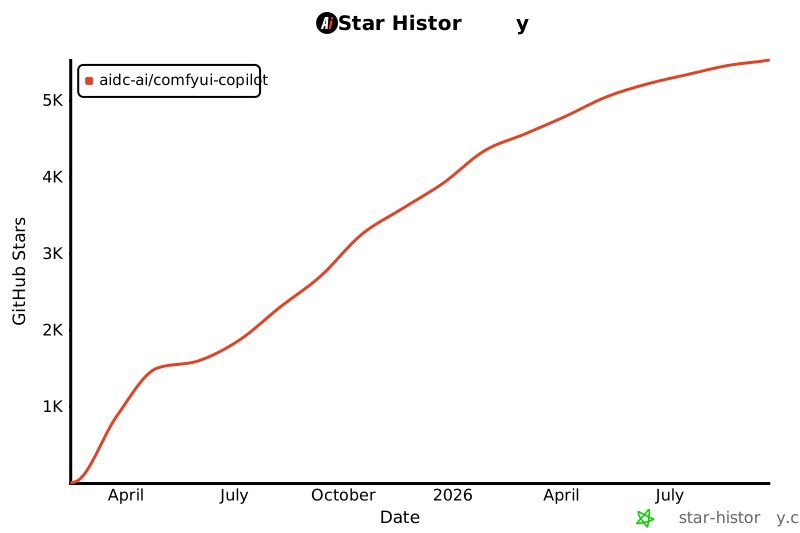](https://star-history.com/#AIDC-AI/ComfyUI-Copilot&Date)
|