
23 lines
1.3 KiB
Markdown
23 lines
1.3 KiB
Markdown
# CPlus_Ardenius ComfyUI Control Box ( 1 node to have control over your workflow )
|
|
ComfyUI CPlus Control Box custom node
|
|
#### Donations help in imporoving and making new free custom nodes and other software at [Coffee Page](https://ko-fi.com/ardenius)
|
|
#### Change the mood ! by Visiting my [AI Image Gallery](https://ko-fi.com/ardenius/gallery)
|
|
#### See Member Perks [Free Custom nodes, AI Models, Embedding, Workflows, Image prompts, and exclusive content](https://ko-fi.com/ardenius/tiers).
|
|
|
|
## [Download link CPlus control box for ComfyUI](https://ko-fi.com/s/2e67e2ae70)
|
|
## what does this Custom node do ?
|
|
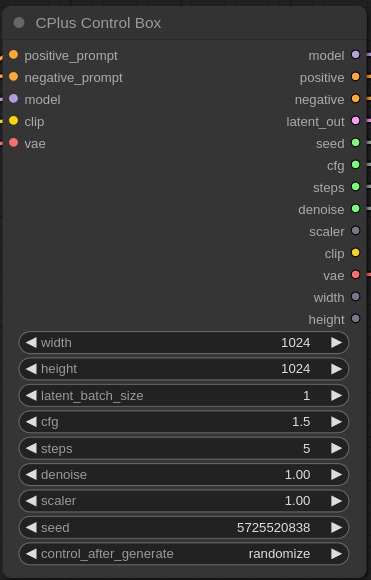
the CPlus control box gets a model and prompts input and outputs:
|
|
model, positive, negative, latent image, seed, width, height, cfg, steps, denoise, scaler, clip, vae
|
|
|
|
|
|
|
|
### Manual install
|
|
IMPORTANT: if you download the zip file make sure to rename the folder to ( CPlus_Ardenius ) instead of ( CPlus_Ardenius-main ) without the -main at the end
|
|
1. click on the green button above ( Code )
|
|
2. download zip file
|
|
3. extract the zip file
|
|
4. copy the contents to ComfyUI/custom-nodes/
|
|
5. restart your comfyui server
|
|
6. click ( refersh ) on the comfy ui panel
|
|
7. double click anywhere on your workflow and search for CPlus control box
|