
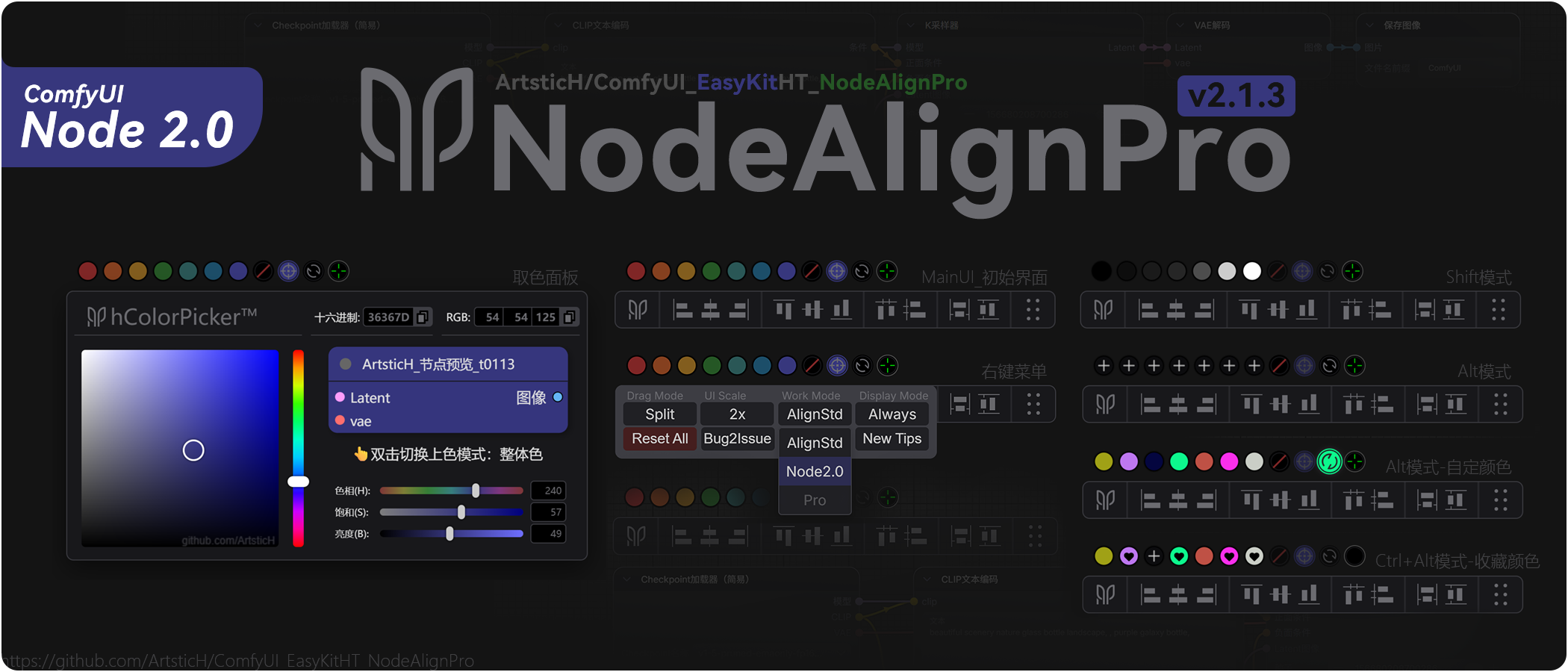
EasyKit-NodeAlign-Pro [↙Switch to Chinese] 🎨




📋 Project Introduction
EasyKit-NodeAlign-Pro is independently developed by a designer (original name: ComfyUI_EasyKitHT_NodeAlign Pro): v2.1.14: 🔥This plugin is the first to support - the latest ComfyUI Node2.0 nodes. Pioneering alignment algorithm based on Node2.0 (innovative adaptation): An essential plugin for managing node layout and color schemes in ComfyUI, featuring professional alignment functions and a real-time node color picker now adapted for ComfyUI Node2.0. Functions cover alignment distribution, real-time node color picker, color palette, 7 preset colors, grayscale/custom modes, and one-click reverse alignment, providing new alignment tools and a professional node color management system. The layout of the built-in alignment tools aligns better with industry-standard operational logic and experience, and the coloring tools with multiple coloring modes are more rational. (Natively supports multilingual UI display) Original real-time preview color adjustment/picking component based on nodes, facilitating quick node color picking/coloring. This plugin aims to enhance ComfyUI users' workflow efficiency by simplifying node layout and color management processes with an intuitive interface and rich features.
🔥 v2.1 New Version Update Notes (Adapted for Node2.0)
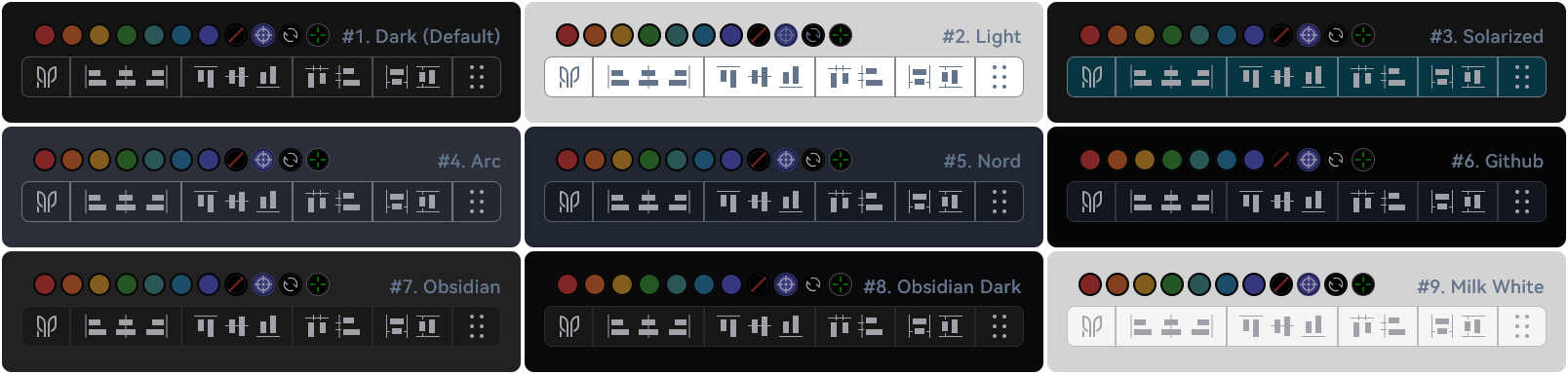
The new v2.0 is fully adapted with i18n multilingual configuration files, natively supporting Chinese, English, and other languages (more languages such as Russian, French can be added later if needed), making it more friendly to international friends worldwide. While preserving the previous version's UI and interaction habits as much as possible, the interface interaction logic has been fine-tuned, and the UI continues to be updated and iterated (see details in the image below).
✅【h260201 Update】: Added automatic theme color (automatically follows ComfyUI theme color)👇
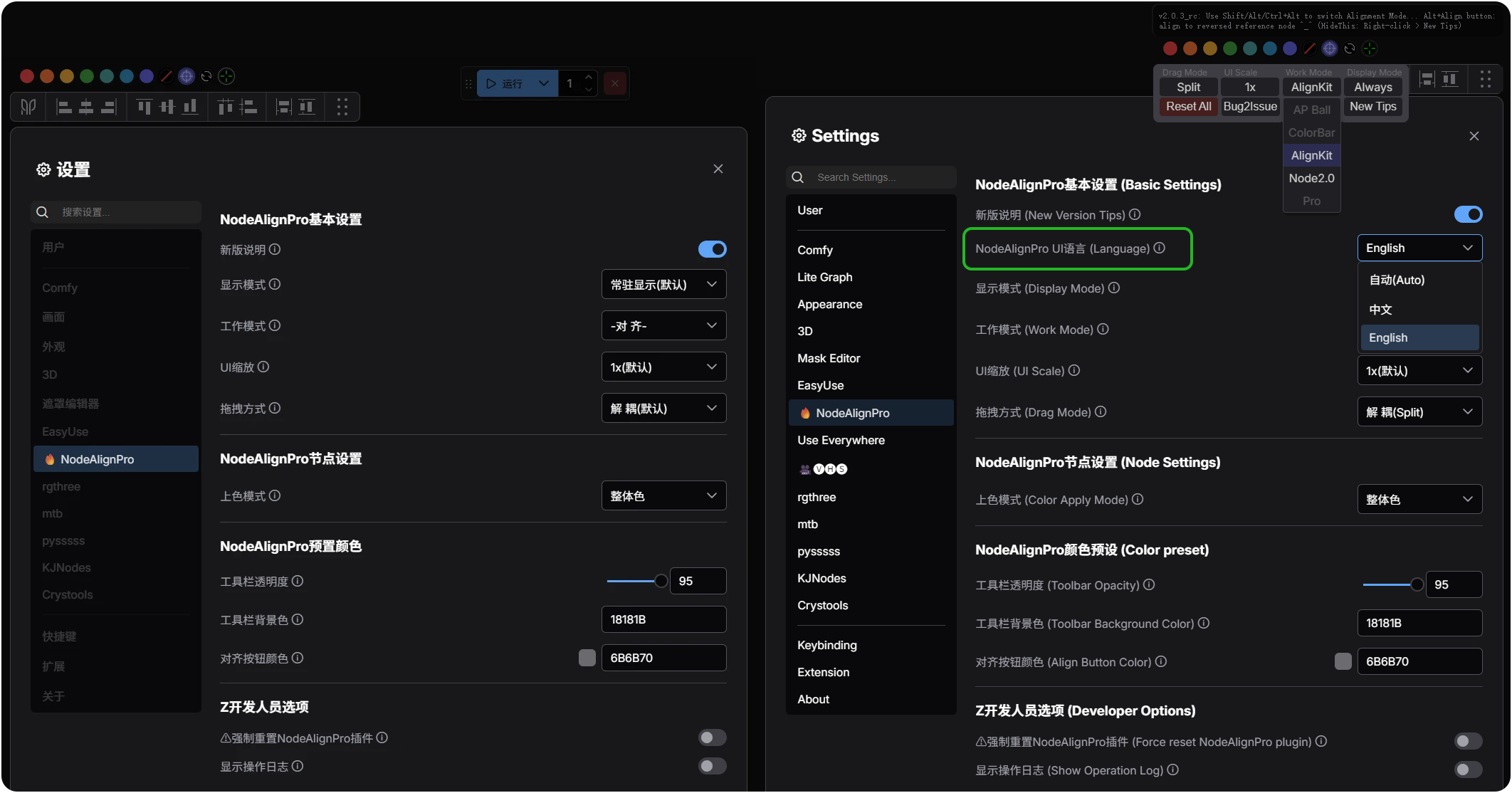
✅【h260125 Update】: Added ComfyUI menu, added i18n multilingual adaptation (now integrated into the official menu page)👇
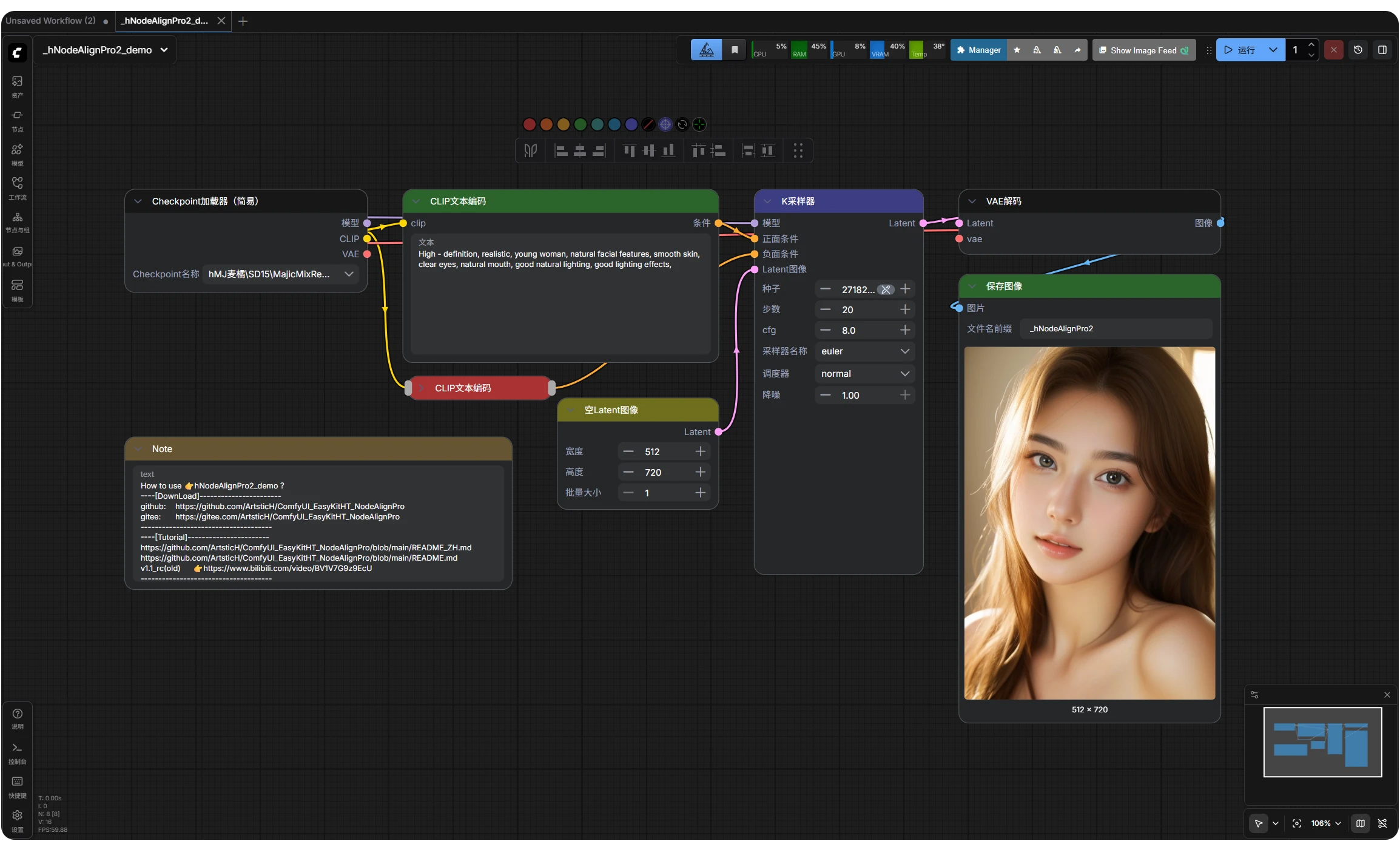
If you find it useful, please give it a ⭐Star, your encouragement is my greatest motivation~
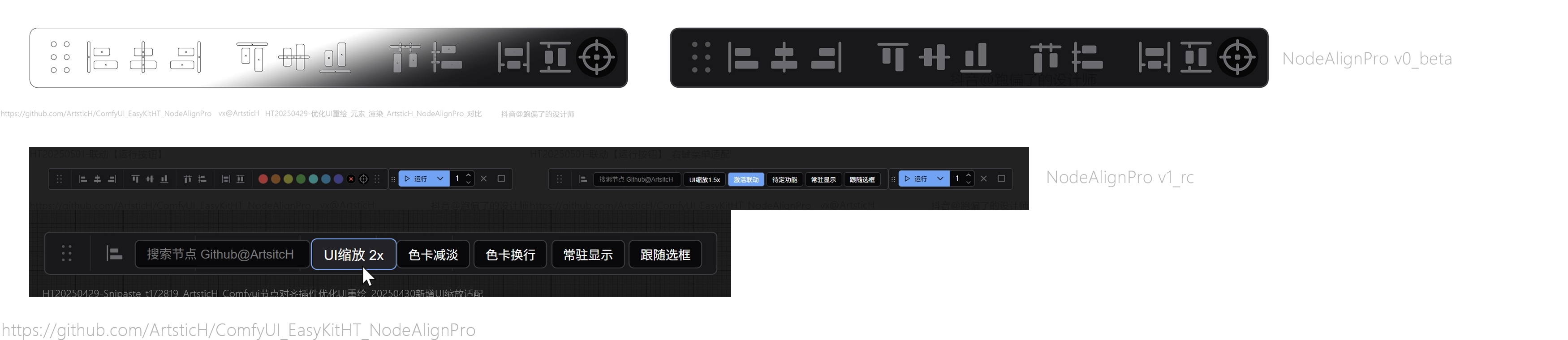
⚠️Old version v1.0.4_rc UI interface...
Old version v1.0.4_rc: Only provides basic node alignment tools and fixed coloring tools:
✨ Core Features (Officially Launched)
| 💫Node2.0 Node Alignment System | 💫New Coloring System | 💫User-friendly Interaction Design | 💫New Color Picker (Original Design) |
|---|---|---|---|
| 🔥 New Node2.0 Node Algorithm | 🖼️ One-click Color Management Scheme | 🖱️ Floating Tool Panel | ✅ Original Real-time Preview Color Adjustment/Picking Component |
| 📐 Original Alt Reverse Baseline Alignment Algorithm | 🔗 Real-time Full-screen Color Picker Linkage | ⚙️ New Custom Configuration | 🎨 Color Card Modes: Color/Grayscale/Custom |
| 📊 Two Sets of Alignment Distribution Algorithms | 🎨 Whole Node Coloring / Title-only Coloring Modes | 💾 Layout Memory and Recovery System | 🧩 Color Cards: Random/Favorite/Remove/Manual |
| 🧩 Multiple Alignment Distribution Modes | 🧩 Custom Color Card Favorite and Recovery System | 🌐 Native i18n Multilingual System | 🎨 Preset Colors: Specially Tuned Color Values |
🎯 Advanced Features
- i18n Multilingual: Natively adapted i18n multilingual system
- Supports Node2.0 Nodes: New support for ComfyUI Node2.0 nodes 【v2.1.13+ added】
- ComfyUI System Menu Integration: Can perform related settings in the ComfyUI system menu (including advanced settings) 【v2.0.3_rc added】
- Custom Drag and Scale: Freely draggable and scalable operation panel
- AcBar Linkage Mode: Linkage drag positioning with ComfyUI run button
- Right-click Menu: Rich setting options and quick operations
- Node Batch Selection: Multiple selection tools and magic wand function (Under development/debugging...)
- Node Batch Rename: Batch rename node function (Under development/debugging...)
🎨 Color Management Module
- Two Coloring Modes: Color node title only / Color entire node 【v2.0.3_rc added】
- Seven Groups of Preset Colors: Quickly apply standard colors to selected nodes
- Grayscale Palette: Hold Shift key to switch to grayscale color mode 【v2.0.1_rc added】
- Custom Palette: Hold Alt key to enter custom color mode 【v2.0.1_rc added】
- Color Favorites: Ctrl+Alt combination locks/unlocks custom colors 【v2.0.1_rc added】
- Random Color: Click the random color button to get a random color 【v2.0.1_rc added】
- Super Random Color: Press Alt key + Random Color Button to randomly generate 7 colors at once and apply random colors to selected nodes in real-time 【v2.0.1_rc added】
- Real-time Color Picker: Built-in full-screen real-time color picker 【v2.0.1_rc added】 (0 dependencies, purely native js+css development design)
- Node Color Adjustment Real-time Preview Component: Original real-time preview color adjustment/picking component based on nodes 【v2.0.1_rc added】 (0 dependencies, purely native js+css development design)
🔧 Node Alignment Module
- Basic Alignment: Left-align, Right-align, Top-align, Bottom-align
- Center Distribution: Vertical center and horizontal center
- Equal Spacing Distribution: Horizontal equal spacing and vertical equal spacing
- Size Unification: Equal width and equal height adjustment
- Reverse Baseline Mode: Press Alt key + click the corresponding alignment button to achieve reverse baseline alignment 【v2.0.1_rc added】
🚀 Plugin Installation
Method 1: ComfyUI Manager (Recommended)
- Search for "NodeAlign Pro" in ComfyUI Manager (note the space before "Pro")
- Find
EasyKit-NodeAlign-Pro, click install(This method is the ComfyUI registered plugin: will automatically generate the easykit-node-align directory under ComfyUI's official standard ecosystem)
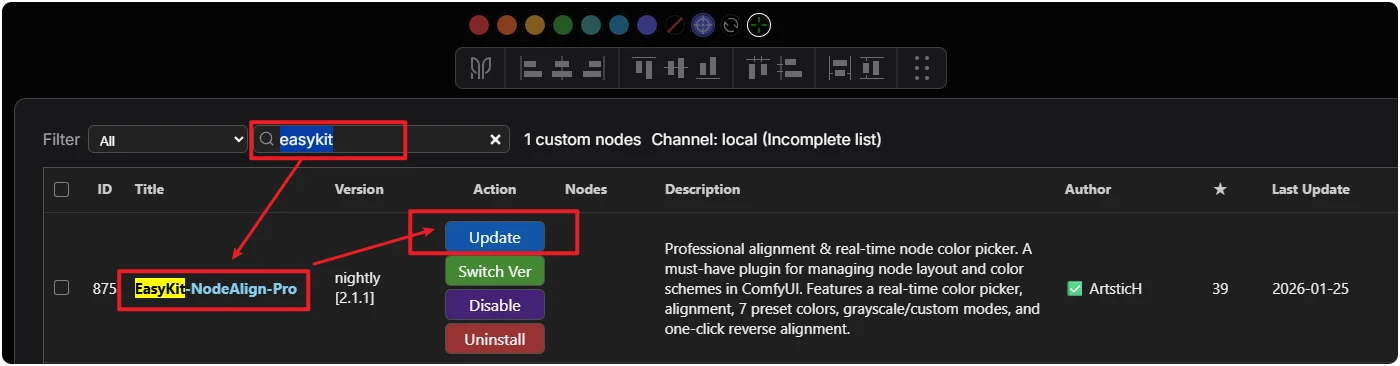
- Wait for the prompt to restart ComfyUI, then it's ready to use
Method 2: Git Clone (Recommended)
- Navigate to the ComfyUI/custom_nodes directory and execute the following command
(This method is the git version plugin: will automatically generate the ComfyUI_EasyKitHT_NodeAlignPro directory):
git clone https://github.com/ArtsticH/ComfyUI_EasyKitHT_NodeAlignPro.git
- For Chinese users and those unable to access github, please use the gitee mirror source:
git clone https://gitee.com/ArtsticH/ComfyUI_EasyKitHT_NodeAlignPro.git
- Restart ComfyUI, then it's ready to use
Method 3: comfy install
(This method is the ComfyUI registered plugin: will automatically generate the easykit-node-align directory under ComfyUI's official standard ecosystem)
comfy node install easykit-node-align
Method 4: Git Manual Installation
- Open the project address: https://github.com/ArtsticH/ComfyUI_EasyKitHT_NodeAlignPro
- Download the plugin zip file (
<>Code>Download ZIP) - Extract to the
ComfyUI/custom_nodesdirectory (Note: The correct directory level should be:ComfyUI/custom_nodes/ComfyUI_EasyKitHT_NodeAlignPro) - Restart ComfyUI, then it's ready to use
🚀 Plugin Update
Method 1: ComfyUI Manager Update (Recommended)
- Search for "NodeAlign Pro" in ComfyUI Manager (note the space before "Pro")
- Find
EasyKit-NodeAlign-Pro, click install(This method is the ComfyUI registered plugin: will automatically generate the easykit-node-align directory under ComfyUI's official standard ecosystem) - Wait for the prompt to restart ComfyUI, then it's ready to use
Method 2: Git Update (First navigate to the ComfyUI_EasyKitHT_NodeAlignPro directory)
git fetch --all && git reset --hard origin/main
🚀 Quick Start (Brief Guide)
After successfully installing NodeAlignPro, basic operations (for reference only)
- Node Coloring: Enter ComfyUI, select any node > click any color button on the NodeAlignPro panel (hereinafter referred to as NAP panel) (🔴🟠🟡🟢🔵🟣🟤,
Clear ColorColor PickerRandom Color); - Custom Color: Select any node > click the color picker button on the NAP panel;
- Node Alignment: Select any node > click any alignment button on the NAP panel;
- Reverse Alignment: Select any node > press Alt key + click the corresponding alignment button to achieve reverse baseline alignment;
└Example:
Left-align→ Select multiple nodes > pressAlt key+Left-align button, then uses therightmost nodeas thebaselineforleft-align(default left-align uses theleftmost nodeas thebaselineforleft-align); - Drag NAP Panel: No need to select any node > click the buttons on the left and right sides of the NAP panel, a four-way arrow cursor (↕↔) will appear, then you can drag it
- Reset Settings: No need to select any node > in the NAP panel >【Right-click】 >【One-click Reset】;
- Advanced Techniques: Please refer to the Usage Guide below 👇.
🖥️ 《Usage Guide》...
Basic Operations
- Start Plugin: Plugin loads automatically after ComfyUI starts
- Show/Hide: Control display via right-click menu or shortcuts
- Drag to Move: Drag the title bar or separator to move the panel
- Scale Adjustment: Adjust UI scaling via right-click menu
Color Mode Switching
| Key Combination | Mode Description | Function Description |
|---|---|---|
| No Key | Default Mode | Seven preset colors |
| Shift | Grayscale Mode | Black, white, gray series colors |
| Alt | Custom Mode | Custom color management |
| Ctrl+Alt | Lock Mode | Lock/Unlock custom colors |
Alignment Operations
- Select 2 or more nodes on the ComfyUI canvas
- Click the corresponding button on the alignment panel:
- Left-align: All nodes align left
- Vertical Center: All nodes align vertically centered
- Right-align: All nodes align right
- Top-align: All nodes align top
- Horizontal Center: All nodes align horizontally centered
- Bottom-align: All nodes align bottom
Advanced Techniques
- Alt + Alignment Button: Use "reverse baseline" for alignment
- Double-click Color Picker Preview: Switch between whole node / title-only coloring mode
- Right-click Menu: Access complete settings and reset functions
- Container Linkage: Link the operation panel with the run button for positioning
🐛 Frequently Asked Questions
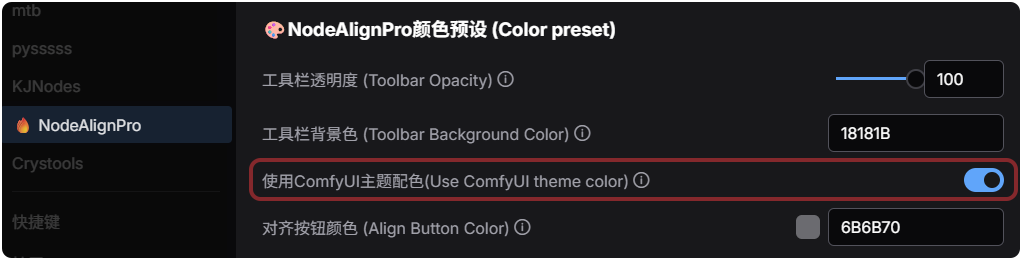
Q: How to turn on/off 【Automatic】 theme color?
→A: Click the menu in the lower left corner of ComfyUI> 🔥 NodeAlignPro> 🎨NodeAlignPro Color preset(Color preset)> Use ComfyUI theme color(Use ComfyUI theme color)> 【Turn On/Off】;
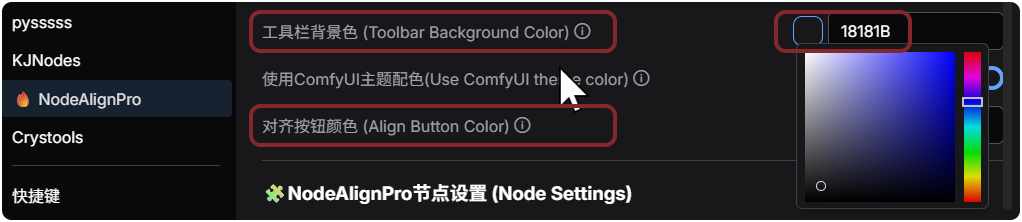
Q: How to 【Customize】 theme color?
→A: ...> 🔥 NodeAlignPro> 🎨NodeAlignPro Color preset(Color preset)> Use ComfyUI theme color(Use ComfyUI theme color)> 【Turn On】;
Q: How to switch languages?
→A: ...> 🔥 NodeAlignPro> NodeAlignPro Basic Settings(Basic Settings)> NodeAlignPro UI Language(Language);
Q: How to use alignment/distribution/coloring functions in the new Node2.0 mode?
→A-Method1: Right-click on the plugin toolbar> Work Mode(Work Mode)> Node2.0
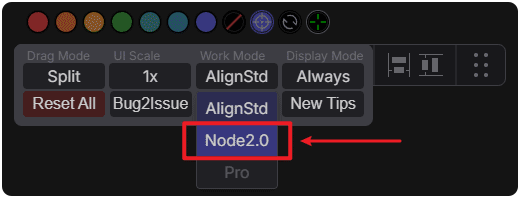
→A-Method2: ...> 🔥 NodeAlignPro> NodeAlignPro Basic Settings(Basic Settings)> Work Mode (Work Mode)> Node2.0;
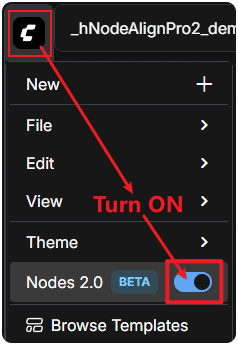
Q: My plugin is in Node2.0 mode, but there is a noticeable delay after clicking the alignment button?
→A-Method1: You are currently using the traditional Canvas nodes. If you need to maintain the current traditional Canvas node usage environment, please switch the plugin's work mode to traditional mode: Work Mode(Work Mode)> Traditional Alignment(AlignStd)
→A-Method2: You are currently using the traditional Canvas nodes. If you must use the new Node2.0 mode, please manually enable ComfyUI's new Node2.0 switch (see image below)
Q: Color cannot be applied to nodes? →A: Ensure nodes are selected, check if nodes are locked, try refreshing the page;
Q: Alignment function is invalid? →A: Ensure 2 or more nodes are selected, check node selection status, try clearing selection and re-selecting;
Q: How to reset all settings?
→A: Right-click menu → "One-click reset", or ComfyUI lower left corner menu> 🔥 NodeAlignPro> Z Developer Options(Developer Options)> ⚠Force reset NodeAlignPro plugin;
Q: What if the plugin doesn't show up?
→A: Click the menu in the lower left corner of ComfyUI> 🔥 NodeAlignPro> Z Developer Options(Developer Options)> ⚠Force reset NodeAlignPro plugin.

↑If still not effective after 【Force Reset】, please use ComfyUI Manager to check if the plugin is correctly installed. If not installed, search for "NodeAlign Pro" and reinstall. If installed, try FIX repair or try Update.
🔄 Changelog
v2.1.14 (Latest Official Release) -260201 Update
- Major Update: Added automatic theme color (automatically follows ComfyUI theme color)
- Fully added alignment algorithm based on ComfyUI Node2.0, while retaining and being compatible with the original traditional Canvas alignment mode
- Added Node2.0-based alignment mode (can be used by changing the work mode to "Node2.0" in the right-click menu or ComfyUI menu)
- Refactored ComfyUI menu
- Optimized right-click menu logic
- Optimized i18n multilingual adaptation
- Fixed several potentially non-critical syntax issues
- Fixed several bugs
- Revised and improved Readme documentation
📄 Historical Versions...
v2.1.12
- Optimized ComfyUI menu
- Optimized i18n multilingual adaptation
- Optimized Node2.0-based alignment algorithm (minor test refactoring)
- Revised and improved Readme documentation
- Fixed several bugs
v2.1.0 【v2.1 Release】
- Optimized ComfyUI menu, added i18n multilingual adaptation
- Optimized some parameters
- Revised and improved Readme documentation
- Fixed several bugs
v2.0.3_rc
- Added ComfyUI menu (integrated into the official menu page)
- Refactored color conversion logic
- Refactored screen color picking function
- Revised and improved Readme documentation
- Fixed several bugs
v2.0.2_rc (2025-12-22)
- Improved new version (v2.0.3_rc) interface prompts
- Fixed some bugs
- Rewrote md tutorial documents (Chinese and English bilingual)
v2.0.1_rc (2025-12-22)【v2.0 Release】
- Added Shift/Alt/Ctrl combination key modes
- Improved color picker performance and stability
- Added node preview function
- Optimized UI interaction experience
v1.0.4_rc (2025-08-14)
v1.0.3_rc (2025-05-01)
v1.0.2_rc (2025-04-30)
v1.0.1_rc (2025-04-29)【v1.0 Release】
- Initial version release
- Complete alignment and color functions
- Draggable container system
- Integrated color picker tool
📄 Historical Changelog...
v2.0.2_rc   8a12160: 🔥NodeAlignPro major version update, optimized file structure (new UI, more comprehensive node coloring system)→See readme for details
----------------
v2.0.1_rc   dd2a09f: 🔥NodeAlignPro major version update released (new UI, more comprehensive node coloring system)
d90bd02: 🔥Update Preview (A Major Update for the Upcoming Version 😁)→See README for details.🔥Major update preview (a major update is coming soon 😁)→See readme for details.
----------------
v1.0.4_rc   b77a9d7: FIX README, ht history optimization
----------------
v1.0.3_rc   a62e3a6: Fix the ui scaling adaptation issue, The interlocking control function has been newly added.
d067502: remove res, add hPic, FIX README,FIX README_ZH.md
----------------
v1.0.2_rc   b11f325: upload README
cb93ffa-461032d: README modifications
4e60dc2: Fixed REEADME, Rename some img, Add README_ZH.md
fac4c81: UPLoad README , Create README_ZH.md
9f1839e: README modifications - added UI scaling adaptation
ef5735d: Added UI scaling, fixed issue where color removal didn't work in old version
8ac01db: Added main functions: alignment distribution, node coloring. Fixed Readme image display abnormality.
----------------
v1.0.1_rc   2926b82: README modifications
10749c7: ComfyUI_EasyKitHT_NodeAlignPro is a newly designed ComfyUI node alignment plugin, node coloring plugin.
    New visual UI, more in line with the usual operational logic of designer friends. Aims to provide a relatively beautiful user experience for everyone.
    Added main functions: alignment distribution, node coloring.
----------------
ca28236: Initial commit
----------------
/**
 * @Artstich_Example
 * @name         easykit-node-align (ComfyUI Plugin)
 * @description  Node2.0-based professional alignment & real-time node color picker - innovative first support: A must-have plugin for managing node layout and color schemes in ComfyUI. Features a real-time color picker, alignment, 7 preset colors, grayscale/custom modes, and one-click reverse alignment.
 * @author ArtsticH
 * @see https://registry.comfy.org/nodes/easykit-node-align
 * @see https://github.com/ArtsticH/ComfyUI_EasyKitHT_NodeAlignPro
 * @see https://gitee.com/ArtsticH/ComfyUI_EasyKitHT_NodeAlignPro
 * @installCommand comfy node install easykit-node-align
 * @installCommand git clone https://github.com/ArtsticH/ComfyUI_EasyKitHT_NodeAlignPro.git
 * @installCommand git clone https://gitee.com/ArtsticH/ComfyUI_EasyKitHT_NodeAlignPro.git
 * @created 2025-04-29 @date 2025-06-15 @lastUpdated 2026-01-28 @version v2.1.14 @license GPL-3.0
 * @copyright ©2012-2026, All rights reserved. Freely open to use, modify, and distribute in accordance with the GPL-3.0 license.
 */
🤝 Contribution Guide
- Welcome to participate in improvements through the following ways:
🥰Submit Usage Feedback、👾New Issue、💬Discussions、📚️WiKi、
as well as Fork & PR, improve multilingual documentation, share your creative node layouts, share your custom color cards...
👥 Contributors
- Creator: @ArtsticH
- Advocates & Shapers: 👤@kakachiex2(👾issues-page)、👤@aimposer(👾issues-page)、👤@Rock-suv(👾issues-page)、👤@JGDMGJAPT 、👤@MAOMAOCHONGNE、👤@BlissiraHQ...
- Thanks All: Thanks to everyone who contributed — including all designers, developers, testers, ComfyUI users, and those who provided feedback.
🌐 Related Links
- 🧩NodeAlign Pro Source 1: 📥︎ Last Releases | Source 2: 📥︎ Gitee Mirror | Source 3: 📥︎ Comfy registry(old ver:v2.1.1)
👾Problem Feedback | ComfyUI Community | ComfyUI-Manager - Author's Video Tutorial Link: https://www.bilibili.com/video/BV1V7G9z9EcU (This link is for the old version
v1.0.4_rctutorial, new version v2.1.0 tutorial to be recorded)
📜 License
- This project adopts the GPL-3.0 license. For details, please see the LICENSE file.
👨💻 A designer's first small project developed in spare time, welcome to report usage issues
⚠️ There may be anomalies in untested scenarios, please report via Issues
(If you find it good, welcome to give it a Star⭐, thank you) Welcome interested friends to join!
This document updated: 2026 January 28 16:21 @ArtsticH·2026