
182 lines
11 KiB
Markdown
182 lines
11 KiB
Markdown
# ComfyUI Functional Usage Guide
|
||
|
||
This guide walks through the day-to-day workflow of using ComfyUI-Functional. For Chinese-language instructions, please refer to https://duanyll.com/2025/9/25/ComfyUI-Functional/.
|
||
|
||
## Prerequisites
|
||
|
||
- A working [ComfyUI](https://docs.comfy.org/get_started) installation.
|
||
- [ComfyUI-Manager](https://github.com/ltdrdata/ComfyUI-Manager) for one-click installs (optional, but recommended).
|
||
- The [Basic Data Handling](https://github.com/StableLlama/ComfyUI-basic_data_handling) node pack. Always use its `LIST` data type when passing arrays into or out of the functional nodes.
|
||
|
||
## Installing or Updating the Extension
|
||
|
||
1. Install through ComfyUI-Manager by searching for `comfyui_functional`.
|
||
2. Manual installation: clone this repository under `ComfyUI/custom_nodes` and restart ComfyUI.
|
||
3. Load the sample graphs found under `example_workflows/` in this repo to experiment with the nodes.
|
||
|
||
> ⚠️ This node pack is intentionally hacky: it reaches into ComfyUI's scheduler to run and reuse node outputs. Expect breaking changes whenever ComfyUI is updated and keep test workflows handy.
|
||
|
||
## Building Functions Inside ComfyUI
|
||
|
||
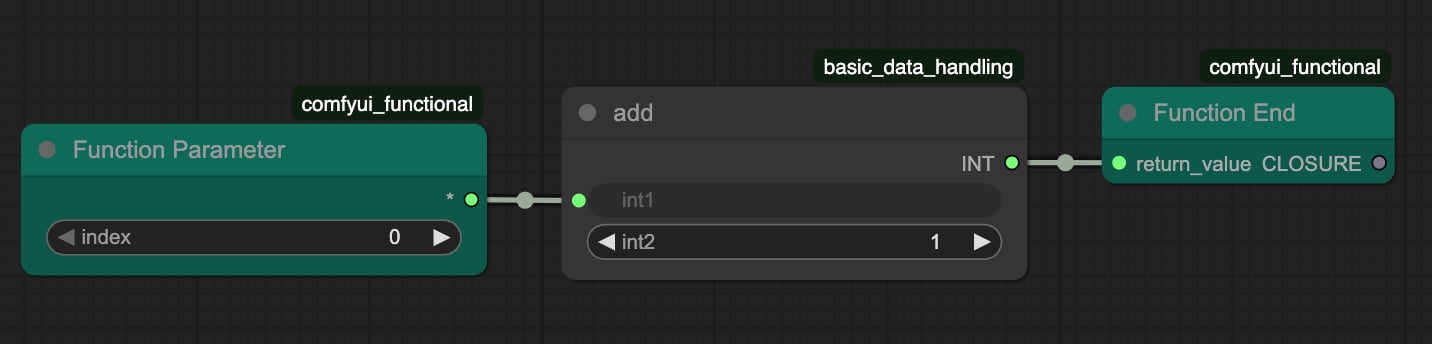
1. Drop **Function Parameter** nodes for each argument your function accepts. Double-click the node title to rename it for clarity.
|
||
2. Wire the parameters into the computation graph that forms the function body.
|
||
3. Connect the last node of the body to a **Function End** node. Each function can return only one value; bundle multiple outputs into a `LIST` if needed.
|
||
|
||
|
||
|
||
Tips:
|
||
- Nodes that do not depend on Function Parameter inputs are evaluated a single time during function definition and reused for every call. This makes it safe to load checkpoints or text encoders inside a function.
|
||
- When you see `Prompt has no outputs`, it usually means you forgot to connect the result to `Function End` or to actually call the function (see below).
|
||
|
||
## Calling Functions and Reusing Graphs
|
||
|
||
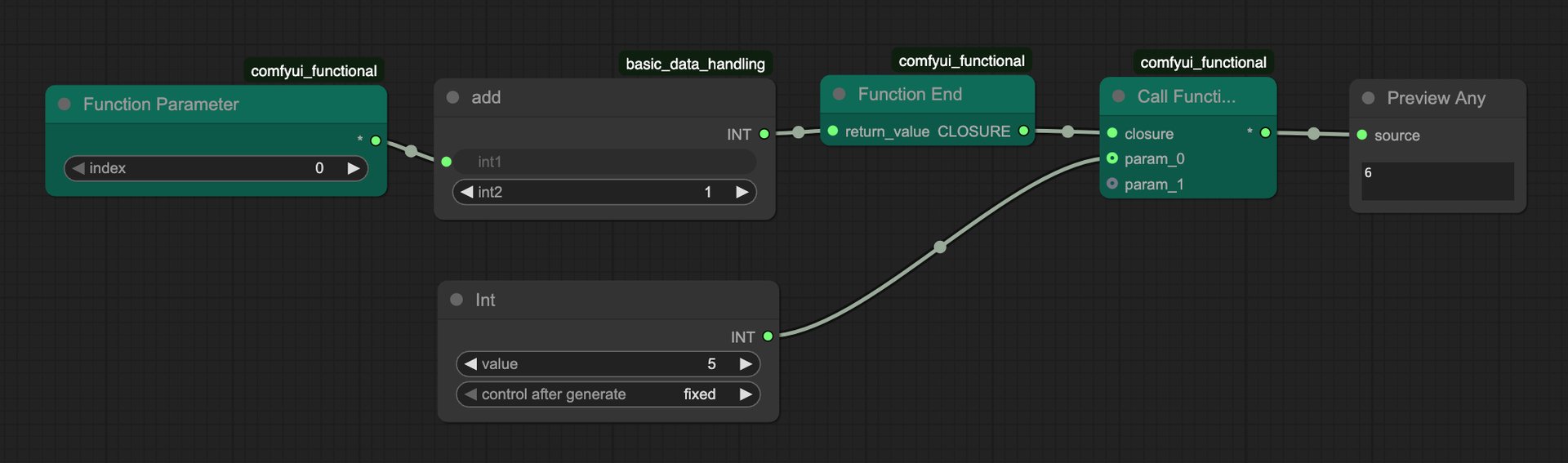
1. Add a **Call Function** node.
|
||
2. Connect the `Function` input to the `Function End` output.
|
||
3. Provide arguments in the same order as the Function Parameter nodes.
|
||
4. Use the `Return` output like a regular node output anywhere in your workflow.
|
||
|
||
|
||
|
||
You can feed the same function into multiple Call Function nodes to reuse logic throughout the graph, or even pass functions as arguments to build higher-order abstractions. Recursive calls are possible—feed the function object back into one of its own arguments—but always protect them with a termination condition to avoid infinite loops.
|
||
|
||
## Working with Lists and Control Flow
|
||
|
||
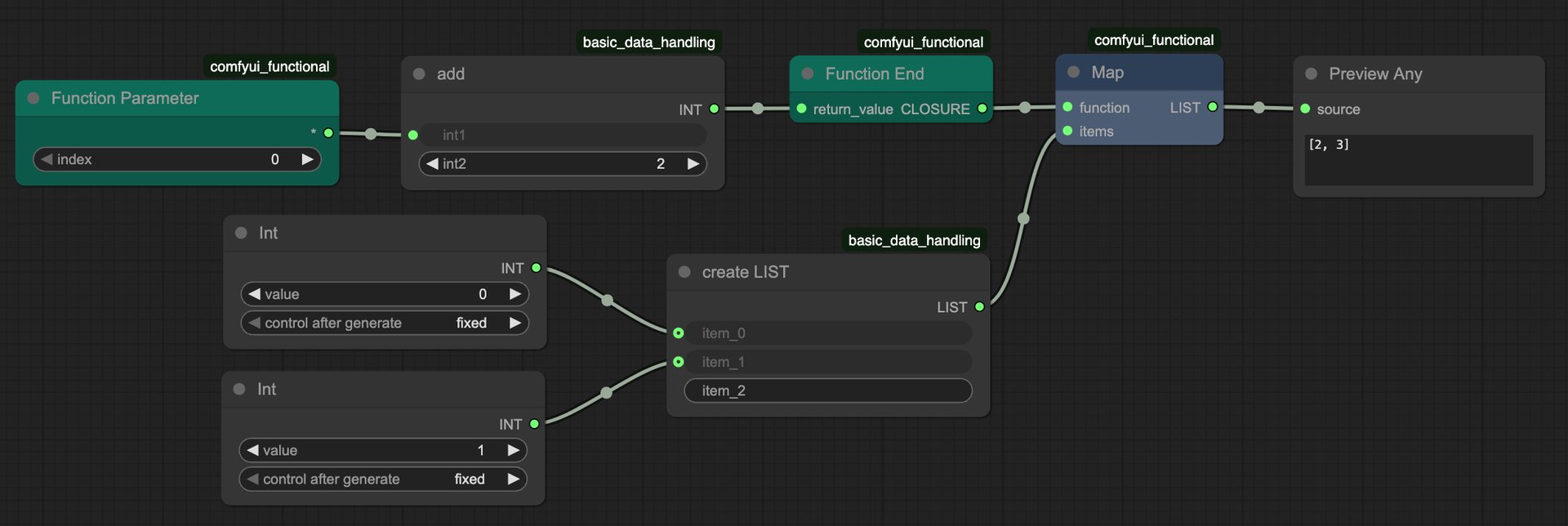
To implement loops or other flow control primitives, rely on the high-order nodes found under `duanyll/functional/high_order`.
|
||
|
||
- Always convert ComfyUI Data Lists into `LIST` objects before sending them into functional nodes. `Data List` values force eager evaluation and will crash or hang your workflow.
|
||
- The table below summarizes the built-in high-order nodes; see `docs/node-reference.md` for parameter details and new nodes you can script yourself.
|
||
|
||
| Node | Purpose |
|
||
| --- | --- |
|
||
| `Comap` | Apply multiple functions to the same input and collect the results. |
|
||
| `Fold` | Reduce a list from left to right (`functools.reduce`-style). |
|
||
| `Map` | Apply a function to every element in a `LIST`. |
|
||
| `MapIndexed` | Like Map, but passes the element index as the second argument. |
|
||
| `Nest` | Apply a function to an initial value `n` times. |
|
||
| `NestWhile` | Keep applying the function until the predicate returns `False`; behaves like a `while` loop. |
|
||
| `Select` | Filter a list based on a predicate function. |
|
||
| `TakeWhile` | Consume items from the start of a list while the predicate stays `True`. |
|
||
|
||
|
||
|
||
Implementation hint: the nodes rely on Python coroutines. Take a look at `comfyui_functional/high_level.py` and `CoroutineNodeBase` if you want to add your own high-order helpers.
|
||
|
||
## Remote Function Calls
|
||
|
||
The **Call Remote Function** node lets you execute a function on another ComfyUI instance—either on a different GPU on the same machine or on a completely separate server. This is useful for:
|
||
|
||
- **Pipeline parallelism**: Run different stages of your workflow on different hardware simultaneously.
|
||
- **Avoiding model swapping**: Keep large models loaded on dedicated workers instead of loading/unloading them repeatedly on one GPU.
|
||
- **Distributed rendering**: Spread batch processing across multiple machines.
|
||
|
||
### Setting Up Remote Calls
|
||
|
||
1. Start a ComfyUI server on the remote machine (or a second instance locally on a different port/GPU).
|
||
2. Replace **Call Function** with **Call Remote Function**.
|
||
3. Provide the `base_url` of the remote ComfyUI server (e.g., `http://192.168.1.100:8188` or `http://localhost:8189`).
|
||
4. Set `timeout` to an appropriate value for your workload.
|
||
5. Enable `use_shared_memory` if both instances run on the same machine and you want to avoid tensor serialization overhead.
|
||
|
||
### Capture vs. No-Capture Mode
|
||
|
||
Understanding the difference between local and remote function calls is critical:
|
||
|
||
| Aspect | Local Function (`Call Function`) | Remote Function (`Call Remote Function`) |
|
||
| --- | --- | --- |
|
||
| **Capture mode** | Enabled by default; nodes not depending on parameters are evaluated once and reused | Must be **disabled** (`capture = False` on `Function End`) |
|
||
| **Model loading** | Load models outside the function; they get captured | Load models **inside** the function body |
|
||
| **Caching** | Node IDs change per call, so ComfyUI cache doesn't help | Node IDs stay consistent, ComfyUI cache works normally |
|
||
| **Serialization** | Not needed; values passed by reference | Parameters and return values must be serializable |
|
||
|
||
**Why disable capture for remote calls?**
|
||
|
||
- Captured values (like loaded models) must be serialized and sent over the network.
|
||
- Models, samplers, and other complex objects cannot be serialized.
|
||
- By disabling capture, model loaders stay inside the function body and run on the remote server.
|
||
- Since remote calls don't reassign node IDs, the remote ComfyUI instance can cache the loaded models between calls.
|
||
|
||
### Example: Remote Image Generation
|
||
|
||
```
|
||
[Local Machine] [Remote GPU Server]
|
||
|
||
┌──────────────┐
|
||
│ Encode Prompt│
|
||
└──────┬───────┘
|
||
│ (conditioning)
|
||
▼
|
||
┌──────────────────────┐ HTTP/WS ┌─────────────────────────┐
|
||
│ Call Remote Function │ ─────────────→ │ Function Body: │
|
||
│ base_url: ... │ │ Load Checkpoint │
|
||
│ param_0: cond │ │ KSampler │
|
||
│ param_1: seed │ │ VAE Decode │
|
||
└──────────┬───────────┘ ←───────────── │ (returns IMAGE) │
|
||
│ (image) └─────────────────────────┘
|
||
▼
|
||
┌──────────────┐
|
||
│ Save Image │
|
||
└──────────────┘
|
||
```
|
||
|
||
### Serialization Support
|
||
|
||
The following types can be passed as parameters or returned from remote functions:
|
||
|
||
- Basic Python types: `int`, `float`, `str`, `bool`, `list`, `dict`, `set`, `tuple`
|
||
- Binary data: `bytes`
|
||
- NumPy arrays: `numpy.ndarray`
|
||
- PyTorch tensors: `torch.Tensor` (CPU only; GPU tensors are moved to CPU automatically)
|
||
- PIL images: `PIL.Image`
|
||
|
||
Types that **cannot** be serialized (and must stay inside the remote function body):
|
||
- Models (checkpoints, VAE, CLIP, ControlNet, etc.)
|
||
- Samplers and schedulers
|
||
- Custom objects without explicit serialization support
|
||
|
||
### Shared Memory Optimization
|
||
|
||
When both ComfyUI instances run on the same physical machine, enable `use_shared_memory` to pass PyTorch tensors via shared memory instead of JSON serialization. This dramatically reduces overhead for large tensors (images, latents).
|
||
|
||
> Note: Shared memory only works for CPU tensors on the same machine. Cross-machine calls always use standard serialization.
|
||
|
||
## Using Side Effects Safely
|
||
|
||
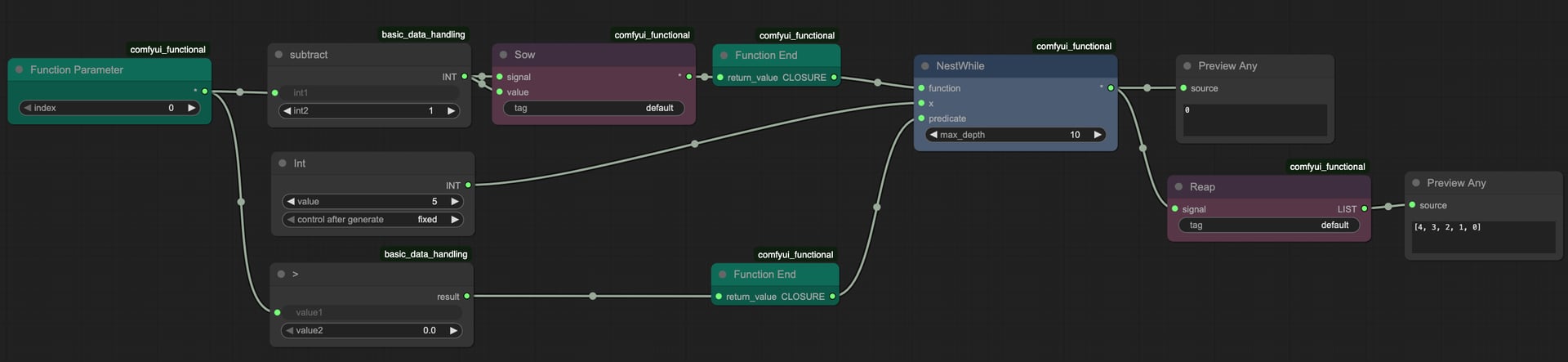
Some situations call for side effects (logging, collecting intermediate results, pacing execution). The following nodes make that practical:
|
||
|
||
- `Sow` / `Reap`: `Sow` pushes values into an implicit list, `Reap` returns everything collected so far. Chain the `signal` input/output with the surrounding nodes to enforce execution order.
|
||
- `Inspect`: Attach a raw node output to the `value` output on Inspect to probe intermediate values without forcing the entire branch to run at graph build time. Only runs when its `signal` output is consumed.
|
||
- `Sleep`: Adds a delay to make Inspect output easier to read in fast loops.
|
||
|
||
|
||
|
||
Because these nodes may disable ComfyUI's cache for correctness, expect longer runtimes whenever side effects are involved.
|
||
|
||
## Debugging Checklist
|
||
|
||
- Function body outputs must terminate at `Function End`. Any loose connection that depends on Function Parameters will fire eagerly and break evaluation.
|
||
- Protect recursive or long-running loops with `max_depth` or `NestWhile` predicates.
|
||
- Use `Inspect` liberally to tap into conditionals. It prevents ComfyUI from rendering both branches of an `If/Else` when only one should run.
|
||
|
||
## Example Workflows
|
||
|
||
The `example_workflows/` directory ships with working graphs:
|
||
|
||
- `functional-map.json` – demonstrates Map/MapIndexed on a numeric `LIST`.
|
||
- `functional-list-param.json` – shows how to juggle multiple parameters plus list inputs.
|
||
- `functional-nested-calls.json` – functions that call other functions (mirrors the blog demo).
|
||
- `functional-recursion.json` – guarded recursion via `Call Function`.
|
||
- `functional-sow-reap.json` & `functional-inspect.json` – Sow/Reap, Inspect, and Sleep in context.
|
||
|
||
Open them via ComfyUI's load workflow dialog, study the wiring, and start adapting them for your projects.
|
||
|
||
## Common Pitfalls
|
||
|
||
- **"Prompt has no outputs"**: add a Call Function node or ensure something depends on the Call Function output.
|
||
- **Data List lock-ups**: convert everything to `LIST` using Basic Data Handling's conversion nodes before interacting with functional nodes.
|
||
- **Stale cached results**: the pack disables caching when it detects side effects. If you still see stale data, clear your ComfyUI cache manually.
|
||
|
||
## Further Reading
|
||
|
||
- Blog (Chinese): https://duanyll.com/2025/9/25/ComfyUI-Functional/
|
||
- Node reference: [`docs/node-reference.md`](./node-reference.md)
|