canvas_tab
ComfyUI canvas editor page
This plugin provides two nodes to provide a full page editor that runs in another tab.
There is an input node and an output node.
There is a green Tab on the side of images in the editor, click on that tab to highlight it. The image with the highlighted tab is sent through to the comfyUI node.
You can have multiple image layers and you can select generated images to be added as new layers or new images.
You can drag images around with the middle mouse button and scale them with the mouseWheel.
You can delete layers by clicking on the layer widget with Ctrl-LefTClick. Ctrl-click on palette entries reassigns the palette color tho the current color. Middle-click on palette entries sets the palette color to the current foreground color.
My main motivation for making this was to develop an inpainting workflow, but I have also found it quite useful for scribble base images,
I have been using the controlnet inpaint with a workflow like this.
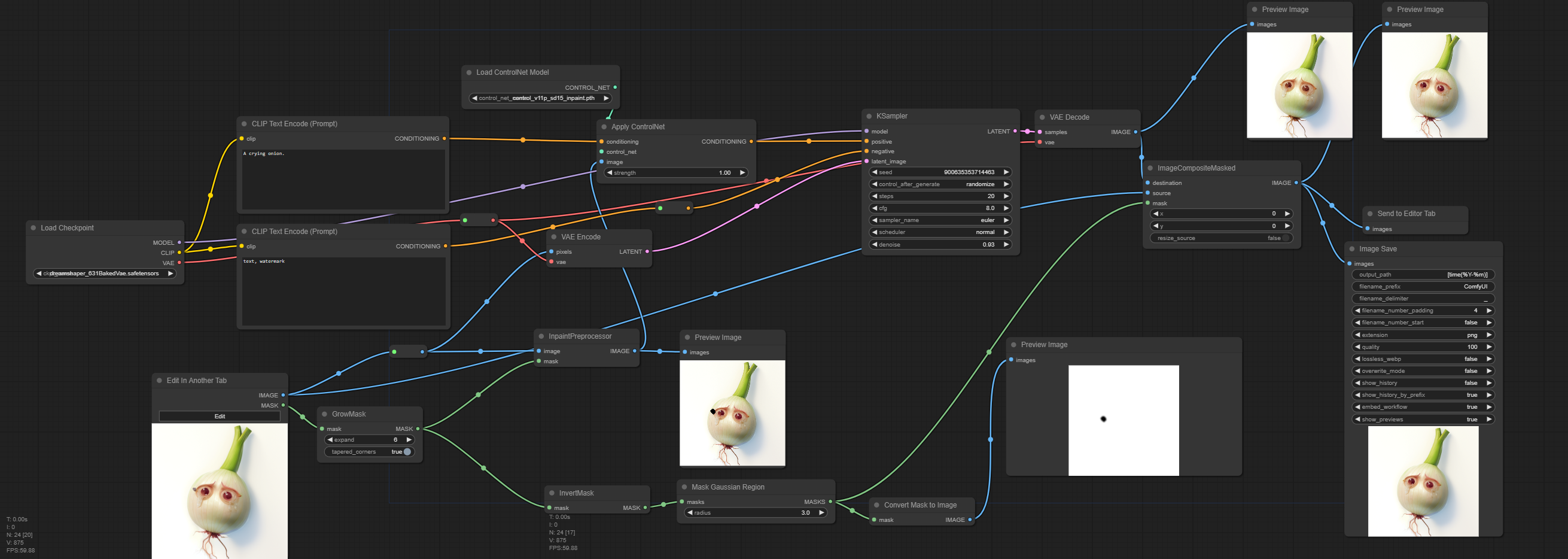
That workflow should be embedded in this image.