 BehzadandClaude Opus 5
26b02e86f0
BehzadandClaude Opus 5
26b02e86f0
Release 1.1.0. Everything here came out of using the style picker and finding
the same shape of problem in several places: the connector showed the REST
API's own words to someone who cannot act on them, or showed nothing at all.

Errors, in one place. `friendly_error`/`short_error` (styleref_api.py) rewrite
an API failure as something a node graph can act on — the Login node's Sign in
button, the Search styles… dialog, generate-it-once for a 409 — and Load and
Apply re-raise through them. The raw 401 told users to send an
`Authorization: Bearer` header into ComfyUI's red error window, which has no
buttons at all. `short_error` is the same failure at widget width; the
"loaded style" line used to render the whole paragraph uncut, because the
length guard sat on the success branch only.

The picker:
- Sign in moved to the title row. It changes what the whole dialog can show,
  so it is not a property of one list.
- "My styles" hides itself when empty, and its rows now carry the thumbnail,
  category and tags a gallery row carries — with visibility (Private /
  Link-shared / Public) where a gallery row carries its author. A name on a
  blank square sat directly above real cards.
- The gallery lane drops styles you own, so a published style of yours appears
  once rather than in both lanes.
- No matches now offers /styles/create instead of a dead end.
- ↓/↑ walk the rows, Enter takes the top hit, Esc closes; query, category and
  sort survive between opens.

Load hides `search`/`category` when the dialog is available — they are the
headless fallback, and next to a working button they are the same duplication
the Login node's `action` dropdown was removed for. Picking also clears the
query, which otherwise made every later execution run a search it did not need.

Apply gains a Copy prompt button. Four of its six targets exist to be copied
out of ComfyUI, and the only way to read one in full was to wire up a Preview
Any node. The warning badge now matches any text encoder, not the exact class
`CLIPTextEncode` — SDXL, SD3 and Flux ship their own, so it did nothing on most
real graphs.

Reference Images no longer fails the queue when a style has no inspiration
images: it feeds IPAdapter or a preview, never the sampler, so it reports and
returns an empty batch. `max_images: 0` mutes it without rewiring.

Needs the matching StyleRef-Webapp deploy: the library lane's category, tags
and heroImage come from /api/v1/me/styles, and its search now scores the same
fields the gallery search scores.

Co-Authored-By: Claude Opus 5 <noreply@anthropic.com>
230 lines
11 KiB
Markdown
230 lines
11 KiB
Markdown
# StyleRef nodes for ComfyUI
|
||
|
||
Define a creative style once on [StyleRef](https://styleref.io) — colors,
|
||
lighting, mood, composition, guardrails — then load it as a node and reuse it
|
||
across your workflows.
|
||
|
||
|
||
|
||
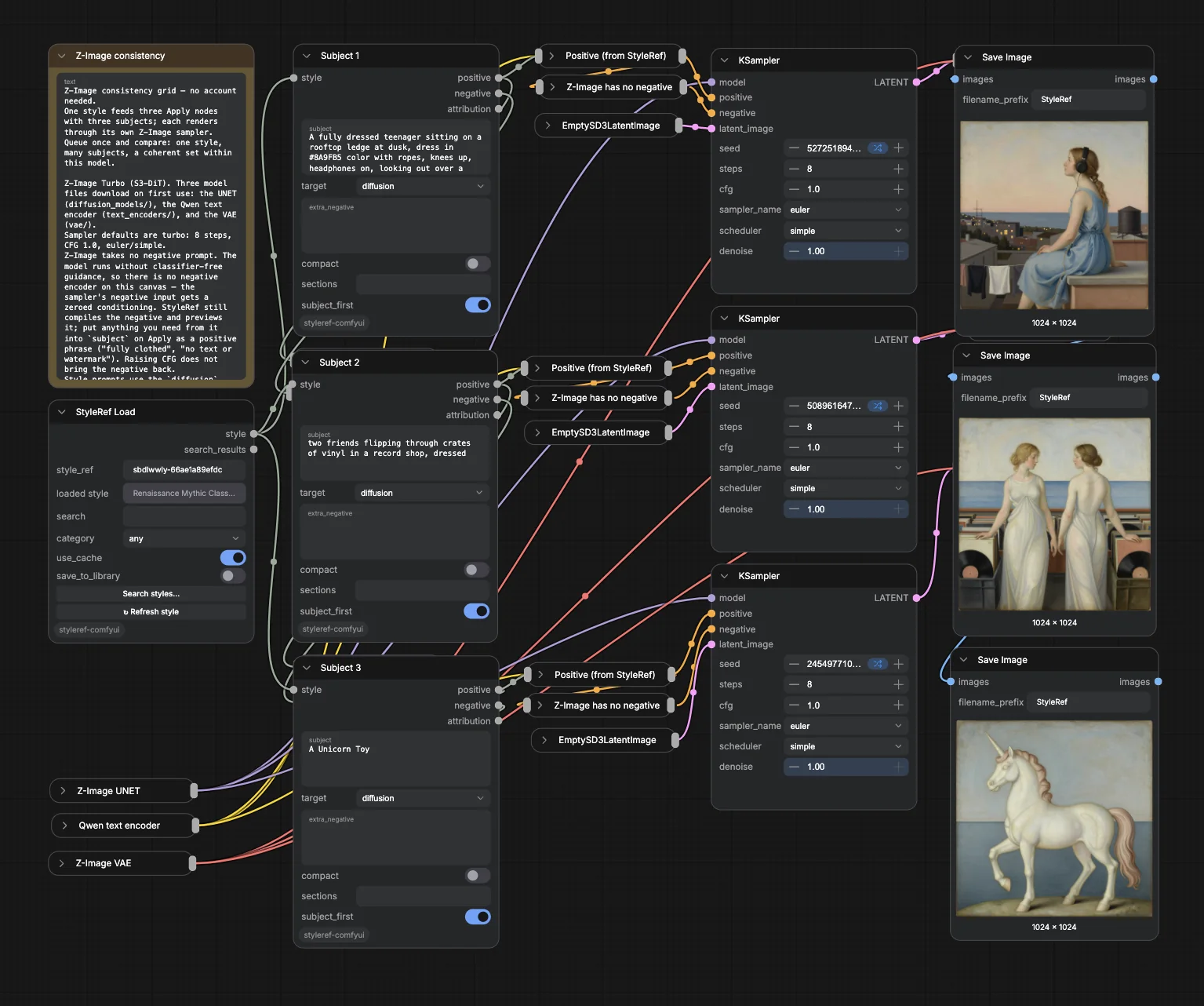
One **StyleRef Load** feeding three **Apply** nodes with three unrelated
|
||
subjects — a rooftop at dusk, a record shop, a toy unicorn. The style holds;
|
||
only the subject changes. That is the whole idea.
|
||
|
||
The style is compiled server-side for whichever model you point it at, so the
|
||
same style produces prompt text phrased appropriately for each one.
|
||
|
||
**No account needed** to load and apply public gallery styles. An account adds
|
||
your own private styles. **Nothing in this node pack spends credits.**
|
||
|
||
---
|
||
|
||
## Install
|
||
|
||
**ComfyUI Manager** (recommended) — search for **StyleRef** and click Install.
|
||
|
||
**Manually:**
|
||
|
||
```bash
|
||
cd ComfyUI/custom_nodes
|
||
git clone https://github.com/StyleRef/styleref-comfyui
|
||
```
|
||
|
||
Restart ComfyUI. Nothing to install: the pack declares no Python dependencies
|
||
and imports on the standard library alone. The Reference Images node reaches
|
||
for Pillow and numpy when it runs, and every ComfyUI install already ships
|
||
those. Look for `[StyleRef] v1.1.0 — 5 nodes registered` in the server console
|
||
at startup.
|
||
|
||
**It does depend on styleref.io.** These nodes are a client, not a local
|
||
library: every style is fetched from the StyleRef API at
|
||
`https://styleref.io/api/v1`, and all prompt compilation happens there. So the
|
||
pack needs a working internet connection and the service to be up — offline, or
|
||
during an outage, the nodes fail with an error rather than degrading. Loaded
|
||
styles are cached for the session, so a graph mid-run keeps working, but the
|
||
first load of any style is a network call. `STYLEREF_API` repoints the client
|
||
if you run your own instance.
|
||
|
||
Two hosts, then, and no others: the API above, and — only when the Reference
|
||
Images node runs — the storage host serving that style's inspiration images.
|
||
Those image requests are deliberately anonymous: your token is never sent to a
|
||
host outside the API. Nothing here spends credits.
|
||
|
||
## 60-second quickstart
|
||
|
||
1. Add **StyleRef Load** and paste a slug from the
|
||
[gallery](https://styleref.io/gallery) into `style_ref` (try
|
||
`azch4ptx-2ca7d3a07f37`, the Raw Theatrical Cinematic style) — or click
|
||
**Search styles…** to pick one.
|
||
2. Add **StyleRef Apply**, connect `style`, type a subject, pick your target.
|
||
3. Wire `positive` / `negative` into your CLIP Text Encode nodes.
|
||
|
||
Or drag [`workflows/01-quickstart.json`](workflows/01-quickstart.json) onto the
|
||
canvas.
|
||
|
||
## Nodes
|
||
|
||
| Node | Sign-in | What it does |
|
||
| --- | --- | --- |
|
||
| **StyleRef Load** | No | Fetch a style by share slug or share URL — and, signed in, your own private styles by id or `/styles/{id}` URL. Names the loaded style on the node, plus gallery search with a picker dialog and a ↻ Refresh button. |
|
||
| **StyleRef Apply** | No | Compose a subject with a style into `positive` / `negative` prompts for a chosen target, with a prompt preview in the node body. |
|
||
| **StyleRef Facets** | No | Every schema section as its own output — exactly the style board's section list, plus the six custom style items. |
|
||
| **StyleRef Reference Images** | No | The style's inspiration images as an IMAGE batch — for IPAdapter and reference conditioning. |
|
||
| **StyleRef Login** | — | Status line + Sign in / Sign out buttons. Needed only to load your own private styles. |
|
||
|
||
### Targets
|
||
|
||
`ai_tools`, `style_md`, `flux`, `midjourney`, `diffusion`, `json` — exactly the
|
||
web app's copy-box format list. For the sampler in your graph use `flux` (FLUX
|
||
models) or `diffusion` (SDXL, SD1.5, DALL·E-class); the other four are for
|
||
copying the output out of ComfyUI, and the node warns if one feeds a CLIP
|
||
encoder.
|
||
|
||
### Browse the gallery
|
||
|
||
[](https://styleref.io/gallery)
|
||
|
||
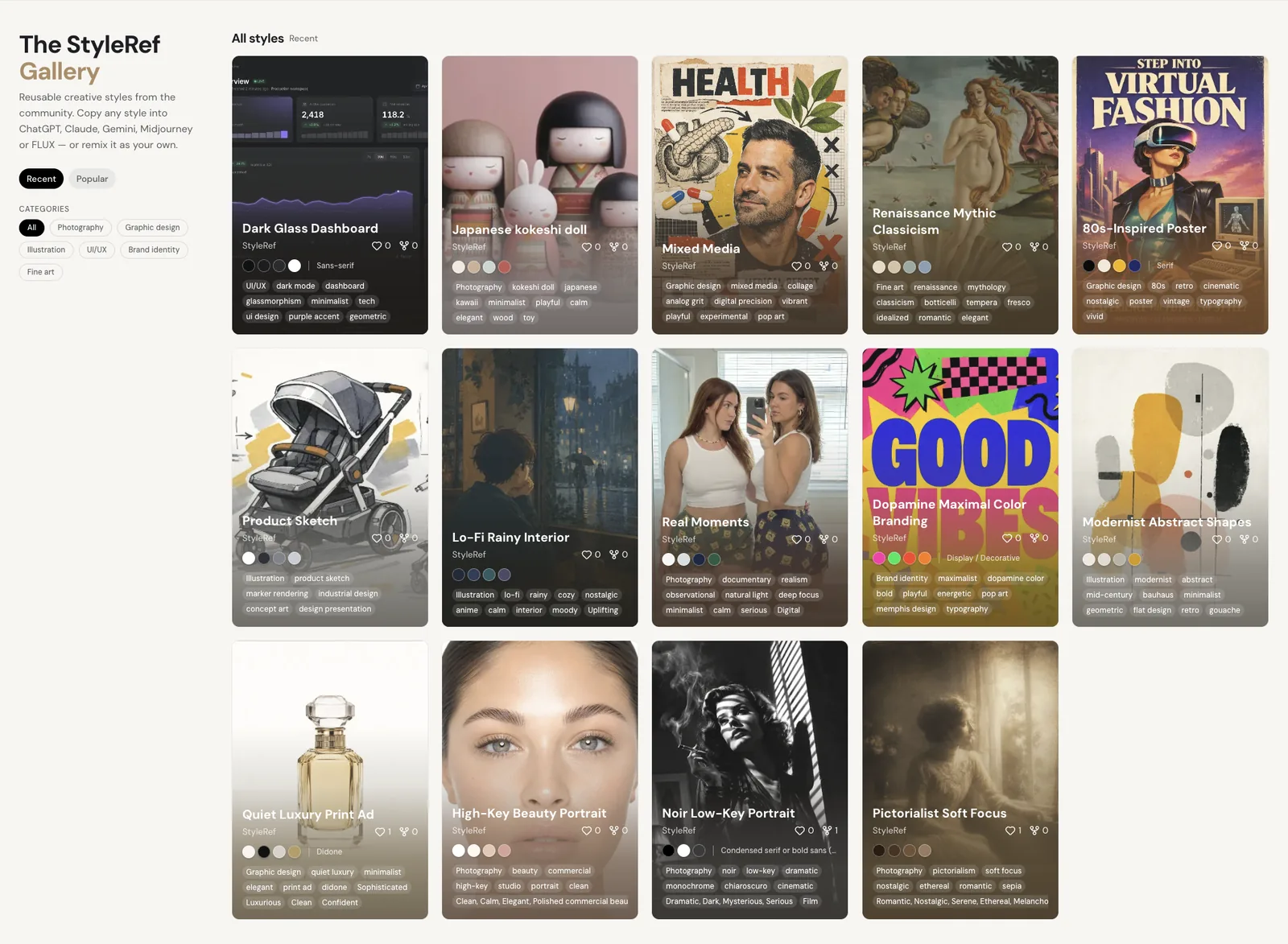
Every style on [styleref.io/gallery](https://styleref.io/gallery) loads here by
|
||
its slug — no account needed.
|
||
|
||
### Making your own styles
|
||
|
||
Extraction (turning an image into a style) happens on
|
||
[styleref.io](https://styleref.io) — upload an image there, refine the result,
|
||
and it lands in your library. Load it here by its share slug or id
|
||
(sign in with the Login node first).
|
||
|
||
## Workflow templates
|
||
|
||
The templates at the root run on **FLUX.1 dev** (the Comfy-Org fp8 all-in-one
|
||
checkpoint, downloaded on first queue). FLUX reads the prompt with T5, so a
|
||
full compiled style fits — an SDXL CLIP encoder truncates it at ~77 tokens,
|
||
which is why the style washes out there no matter which checkpoint you use.
|
||
|
||
| File | Sign-in | Story |
|
||
| --- | --- | --- |
|
||
| [`01-quickstart.json`](workflows/01-quickstart.json) | No | Load → Apply → generate |
|
||
| [`02-consistency-grid.json`](workflows/02-consistency-grid.json) | No | One style, three subjects, side by side |
|
||
| [`03-your-own-style.json`](workflows/03-your-own-style.json) | Yes | Extract on the web, load your own style here |
|
||
| [`04-reference-images.json`](workflows/04-reference-images.json) | No | The style's inspiration images as a batch, next to a render |
|
||
| [`05-facets.json`](workflows/05-facets.json) | No | Every section of the style as its own output, next to a normal render |
|
||
|
||
A parallel set wired for **Z-Image Turbo** (an S3-DiT model — UNET + Qwen text
|
||
encoder + VAE, compiled from the `diffusion` target) lives in
|
||
[`workflows/z-image/`](workflows/z-image): the same five stories on that
|
||
loader stack. The three model files download on first run.
|
||
|
||
The two sets load **different gallery styles on purpose.** How well a style
|
||
demos is a property of the style *and* the model. FLUX is strongest at light
|
||
and colour rather than brushwork, so its templates load a theatrical cinematic
|
||
style — hard cast shadows, a saturated key, staged props. Z-Image reproduces
|
||
painterly technique faithfully, so its
|
||
templates load a Renaissance tempera style. Swap either for any slug from the
|
||
[gallery](https://styleref.io/gallery); these are starting points, not
|
||
limits.
|
||
|
||
Every template is built to read at a glance on open: the on-canvas notes say
|
||
what the template produces and where the model comes from, and the plumbing
|
||
between Apply and the sampler (the text encoder, the zeroed conditioning, VAE
|
||
Decode) ships **collapsed** — nothing in there is yours to edit. Expand any of
|
||
them if you want to rewire.
|
||
|
||
**Neither FLUX nor Z-Image takes a negative prompt.** Both are guidance
|
||
distilled and run at CFG 1.0, where the negative branch is multiplied out
|
||
entirely — so neither set carries a negative encoder, and the sampler's
|
||
negative input gets a zeroed conditioning. StyleRef still compiles the negative
|
||
and returns it on Apply's `negative` output; fold anything you need from it into
|
||
`subject` on Apply as a positive phrase. Raising CFG does not bring it back.
|
||
|
||
Apply prints the prompt it composed, and its token estimate, in its own node
|
||
body after a queue — that is where to read what StyleRef actually sent the
|
||
sampler.
|
||
|
||
### Style not coming through strongly enough?
|
||
|
||
FLUX has a confident house look and drifts back to it. Two dials, in the order
|
||
worth trying:
|
||
|
||
1. **`Flux guidance`** (3.5 in the templates, FLUX's default) is the blunt one.
|
||
4–5 makes the style bite harder; past that the subject starts losing to it,
|
||
colour goes poster-flat, and a dark style can go to pure black.
|
||
2. **Narrow `sections` on StyleRef Apply** to the parts that define this style.
|
||
For a period or painterly style that is usually
|
||
`artistic_mediums,references,surface_material,colors` — the sections naming
|
||
the medium, the era and the finish. Left empty, every section is sent, and the
|
||
identity-carrying ones render last, so a long style can read as generic. For a
|
||
geometric or layout-led style keep `shape_language` and `spatial_hierarchy`
|
||
instead. Queue the Facets template to see what a style actually carries.
|
||
|
||
Sampler defaults, for reference: FLUX 20 steps, Z-Image Turbo 8, both at CFG 1.0
|
||
with euler/simple, seeds randomizing on every queue.
|
||
|
||
## Signing in
|
||
|
||
Add the **StyleRef Login** node and click **Sign in (browser)** — no queueing
|
||
needed. Your browser opens, you approve, and the node's status flips to signed
|
||
in. The token is stored at `~/.config/styleref/credentials.json` with `0600`
|
||
permissions. The [`styleref` CLI](https://www.npmjs.com/package/styleref)
|
||
shares this login.
|
||
|
||
(No frontend at all? `npx styleref login` signs in the same credentials file,
|
||
and queueing the Login node reports the current status.)
|
||
|
||
### Running ComfyUI on a remote or headless machine
|
||
|
||
Browser sign-in **cannot** work on a rented GPU box, RunPod, or any headless
|
||
server: there is no browser to open, and `localhost` is the wrong machine. Use a
|
||
token instead:
|
||
|
||
1. Copy a token from your [account page](https://styleref.io/account).
|
||
2. Where ComfyUI runs, set `STYLEREF_TOKEN=<token>`
|
||
3. Restart ComfyUI.
|
||
|
||
`STYLEREF_TOKEN` always takes precedence over stored credentials. The Login node
|
||
detects the headless case and prints these instructions rather than hanging.
|
||
|
||
## Credits
|
||
|
||
**Nothing in this node pack spends credits.** Loading, searching, and applying
|
||
styles is free and unlimited within the public rate limit. Extraction — the one
|
||
paid action — happens on [styleref.io](https://styleref.io), where you can
|
||
preview and refine the result before it costs anything beyond the extraction
|
||
itself. See [plans and limits](https://docs.styleref.io/using-styleref/plans-and-limits).
|
||
|
||
## Configuration
|
||
|
||
| Variable | Purpose |
|
||
| --- | --- |
|
||
| `STYLEREF_TOKEN` | Bearer token; overrides stored credentials. The headless path. |
|
||
| `STYLEREF_API` | API base URL. Defaults to `https://styleref.io/api/v1`. |
|
||
| `STYLEREF_FORCE_BROWSER_LOGIN` | `1` forces browser login, `0` forces the token path. |
|
||
|
||
## Development
|
||
|
||
```bash
|
||
pip install pytest ruff pillow numpy # pillow/numpy are test-only deps
|
||
pytest tests/ -q
|
||
ruff check .
|
||
python scripts/build_workflows.py # regenerate workflow templates
|
||
```
|
||
|
||
The workflow templates are generated — edit
|
||
[`scripts/build_workflows.py`](scripts/build_workflows.py), not the JSON.
|
||
|
||
Shipping a change to users — a version bump, a Registry publish, updating the
|
||
monorepo pointer — is [`RELEASING.md`](RELEASING.md).
|
||
|
||
The nodes are a thin client over StyleRef's public
|
||
[REST API v1](https://docs.styleref.io/for-ai-agents/rest-api/overview-and-authentication)
|
||
([OpenAPI](https://styleref.io/api/v1/openapi.json)). All prompt compilation
|
||
happens server-side — this pack never writes style prose itself, so improvements
|
||
to StyleRef's compiler reach you without an update to this pack.
|
||
|
||
## Docs & support
|
||
|
||
- [ComfyUI connector docs](https://docs.styleref.io/connectors/comfyui/install-and-quickstart)
|
||
- [Issues](https://github.com/StyleRef/styleref-comfyui/issues)
|
||
|
||
## License
|
||
|
||
MIT — see [LICENSE](LICENSE).
|