
25 lines
1.2 KiB
Markdown
25 lines
1.2 KiB
Markdown
# Image & Mask Batch Management
|
|
|
|
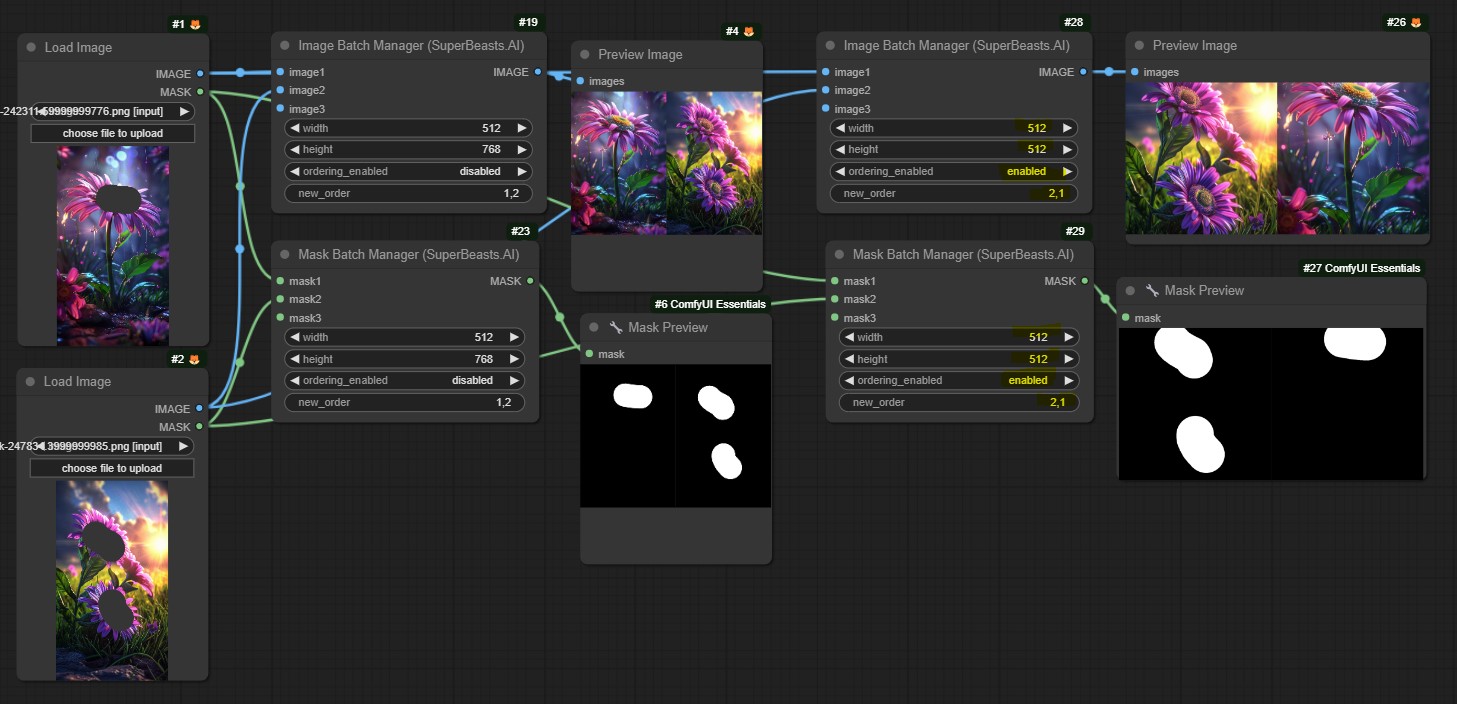
Keep your image and masks sized, cropped and ordered how ever you like without having to recreate the masks or mess with connections.
|
|
Note the resizing capability doesn't provide any settings, we simply crop and resize to maximise the image size with your provided width/height.
|
|
|
|
|
|
|
|
|
|
## ImageBatchManagement
|
|
|
|
The ImageBatchManagement node provides functionality to resize, crop, and reorder a batch of images. It ensures that all images in the batch have the same specified dimensions.
|
|
|
|
### Features
|
|
- Resizes and crops images to the specified width and height
|
|
- Allows reordering the images in the batch based on a provided order
|
|
- Supports unlimited input images
|
|
|
|
## MaskBatchManagement
|
|
|
|
The MaskBatchManagement node is similar to the ImageBatchManagement node but works with mask inputs. It resizes, crops, and reorders a batch of masks to match the specified dimensions.
|
|
|
|
### Features
|
|
- Resizes and crops masks to the specified width and height
|
|
- Allows reordering the masks in the batch based on a provided order
|
|
- Supports unlimited input masks |