Compare commits
3
Commits
| Author | SHA1 | Date | |
|---|---|---|---|
 mengli.cml mengli.cml
|
89cae4def0 | ||
|
mengli.cml
|
a35d7bbf0e | ||
|
mengli.cml
|
bfce9c2583 |
@@ -1,25 +0,0 @@
|
||||
name: Publish to Comfy registry
|
||||
on:
|
||||
workflow_dispatch:
|
||||
push:
|
||||
branches:
|
||||
- main
|
||||
- master
|
||||
paths:
|
||||
- "pyproject.toml"
|
||||
|
||||
jobs:
|
||||
publish-node:
|
||||
name: Publish Custom Node to registry
|
||||
runs-on: ubuntu-latest
|
||||
if: ${{ github.repository_owner == 'aigc-apps' }}
|
||||
steps:
|
||||
- name: Check out code
|
||||
uses: actions/checkout@v4
|
||||
with:
|
||||
submodules: true
|
||||
- name: Publish Custom Node
|
||||
uses: Comfy-Org/publish-node-action@main
|
||||
with:
|
||||
## Add your own personal access token to your Github Repository secrets and reference it here.
|
||||
personal_access_token: ${{ secrets.REGISTRY_ACCESS_TOKEN }}
|
||||
@@ -8,7 +8,6 @@ _*
|
||||
__pycache__/
|
||||
*.py[cod]
|
||||
*$py.class
|
||||
scripts_demo*
|
||||
|
||||
# C extensions
|
||||
*.so
|
||||
|
||||
@@ -31,7 +31,6 @@ EasyAnimate is a pipeline based on the transformer architecture, designed for ge
|
||||
We will support quick pull-ups from different platforms, refer to [Quick Start](#quick-start).
|
||||
|
||||
**New Features:**
|
||||
- **Updated to version v5.1**, the Qwen2 VL is used as the text encoder, and Flow is used as the sampling method. It supports bilingual prediction in both Chinese and English. In addition to common controls such as Canny and Pose, it also supports trajectory control, camera control. [2025.01.21]
|
||||
- Use reward backpropagation to train Lora and optimize the video, aligning it better with human preferences, detailes in [here](scripts/README_TRAIN_REWARD.md). EasyAnimateV5-7b is released now. [2024.11.27]
|
||||
- **Updated to v5**, supporting video generation up to 1024x1024, 49 frames, 6s, 8fps, with expanded model scale to 12B, incorporating the MMDIT structure, and enabling control models with diverse inputs; supports bilingual predictions in Chinese and English. [2024.11.08]
|
||||
- **Updated to v4**, allowing for video generation up to 1024x1024, 144 frames, 6s, 24fps; supports video generation from text, image, and video, with a single model handling resolutions from 512 to 1280; bilingual predictions in Chinese and English enabled. [2024.08.15]
|
||||
@@ -84,12 +83,13 @@ mkdir models/Diffusion_Transformer
|
||||
mkdir models/Motion_Module
|
||||
mkdir models/Personalized_Model
|
||||
|
||||
# Please use the hugginface link or modelscope link to download the EasyAnimateV5.1 model.
|
||||
# https://huggingface.co/alibaba-pai/EasyAnimateV5.1-12b-zh-InP
|
||||
# https://modelscope.cn/models/PAI/EasyAnimateV5.1-12b-zh-InP
|
||||
|
||||
# https://huggingface.co/alibaba-pai/EasyAnimateV5.1-12b-zh
|
||||
# https://modelscope.cn/models/PAI/EasyAnimateV5.1-12b-zh
|
||||
# Please use the hugginface link or modelscope link to download the EasyAnimateV5 model.
|
||||
# I2V models
|
||||
# https://huggingface.co/alibaba-pai/EasyAnimateV5-12b-zh-InP
|
||||
# https://modelscope.cn/models/PAI/EasyAnimateV5-12b-zh-InP
|
||||
# T2V models
|
||||
# https://huggingface.co/alibaba-pai/EasyAnimateV5-12b-zh
|
||||
# https://modelscope.cn/models/PAI/EasyAnimateV5-12b-zh
|
||||
```
|
||||
|
||||
### 2. Local install: Environment Check/Downloading/Installation
|
||||
@@ -114,78 +114,82 @@ The detailed of Linux:
|
||||
|
||||
We need about 60GB available on disk (for saving weights), please check!
|
||||
|
||||
The video size for EasyAnimateV5.1-12B can be generated by different GPU Memory, including:
|
||||
| GPU memory | 384x672x25 | 384x672x49 | 576x1008x25 | 576x1008x49 | 768x1344x25 | 768x1344x49 |
|
||||
|------------|------------|------------|------------|------------|------------|------------|
|
||||
| 16GB | 🧡 | ⭕️ | ⭕️ | ⭕️ | ❌ | ❌ |
|
||||
The video size for EasyAnimateV5-12B can be generated by different GPU Memory, including:
|
||||
| GPU memory |384x672x25|384x672x49|576x1008x25|576x1008x49|768x1344x25|768x1344x49|
|
||||
|----------|----------|----------|----------|----------|----------|----------|
|
||||
| 16GB | 🧡 | 🧡 | ❌ | ❌ | ❌ | ❌ |
|
||||
| 24GB | 🧡 | 🧡 | 🧡 | 🧡 | 🧡 | ❌ |
|
||||
| 40GB | ✅ | ✅ | ✅ | ✅ | ✅ | ✅ |
|
||||
| 80GB | ✅ | ✅ | ✅ | ✅ | ✅ | ✅ |
|
||||
|
||||
The video size for EasyAnimateV5.1-7B can be generated by different GPU Memory, including:
|
||||
The video size for EasyAnimateV5-7B can be generated by different GPU Memory, including:
|
||||
| GPU memory |384x672x25|384x672x49|576x1008x25|576x1008x49|768x1344x25|768x1344x49|
|
||||
|----------|----------|----------|----------|----------|----------|----------|
|
||||
| 16GB | 🧡 | 🧡 | ⭕️ | ⭕️ | ❌ | ❌ |
|
||||
| 16GB | 🧡 | 🧡 | ❌ | ❌ | ❌ | ❌ |
|
||||
| 24GB | ✅ | ✅ | ✅ | 🧡 | 🧡 | ❌ |
|
||||
| 40GB | ✅ | ✅ | ✅ | ✅ | ✅ | ✅ |
|
||||
| 80GB | ✅ | ✅ | ✅ | ✅ | ✅ | ✅ |
|
||||
|
||||
|
||||
✅ indicates it can run under "model_cpu_offload", 🧡 represents it can run under "model_cpu_offload_and_qfloat8", ⭕️ indicates it can run under "sequential_cpu_offload", ❌ means it can't run. Please note that running with sequential_cpu_offload will be slower.
|
||||
|
||||
Some GPUs that do not support torch.bfloat16, such as 2080ti and V100, require changing the weight_dtype in app.py and predict files to torch.float16 in order to run.
|
||||
|
||||
The generation time for EasyAnimateV5.1-12B using different GPUs over 25 steps is as follows:
|
||||
The generation time for EasyAnimateV5-12B using different GPUs over 25 steps is as follows:
|
||||
|
||||
| GPU | 384x672x25 | 384x672x49 | 576x1008x25 | 576x1008x49 | 768x1344x25 | 768x1344x49 |
|
||||
|-----------|------------------|------------------|------------------|------------------|------------------|-----------------|
|
||||
| A10 24GB | ~120s (4.8s/it) | ~240s (9.6s/it) | ~320s (12.7s/it) | ~750s (29.8s/it) | ❌ | ❌ |
|
||||
| A100 80GB | ~45s (1.75s/it) | ~90s (3.7s/it) | ~120s (4.7s/it) | ~300s (11.4s/it) | ~265s (10.6s/it) | ~710s (28.3s/it) |
|
||||
|
||||
(⭕️) indicates it can run with low_gpu_memory_mode=True, but at a slower speed, and ❌ means it can't run.
|
||||
|
||||
<details>
|
||||
<summary>(Obsolete) EasyAnimateV3:</summary>
|
||||
|
||||
The video size for EasyAnimateV3 can be generated by different GPU Memory, including:
|
||||
|
||||
| GPU memory | 384x672x72 | 384x672x144 | 576x1008x72 | 576x1008x144 | 720x1280x72 | 720x1280x144 |
|
||||
| GPU memory | 384x672x25 | 384x672x144 | 576x1008x72 | 576x1008x144 | 720x1280x72 | 720x1280x144 |
|
||||
|------------|------------|-------------|-------------|--------------|-------------|--------------|
|
||||
| 12GB | ⭕️ | ⭕️ | ⭕️ | ⭕️ | ❌ | ❌ |
|
||||
| 16GB | ✅ | ✅ | ⭕️ | ⭕️ | ⭕️ | ❌ |
|
||||
| 24GB | ✅ | ✅ | ✅ | ✅ | ✅ | ❌ |
|
||||
| 40GB | ✅ | ✅ | ✅ | ✅ | ✅ | ✅ |
|
||||
| 80GB | ✅ | ✅ | ✅ | ✅ | ✅ | ✅ |
|
||||
|
||||
(⭕️) indicates it can run with low_gpu_memory_mode=True, but at a slower speed, and ❌ means it can't run.
|
||||
</details>
|
||||
|
||||
#### b. Weights
|
||||
We'd better place the [weights](#model-zoo) along the specified path:
|
||||
|
||||
EasyAnimateV5.1:
|
||||
EasyAnimateV5:
|
||||
```
|
||||
📦 models/
|
||||
├── 📂 Diffusion_Transformer/
|
||||
│ ├── 📂 EasyAnimateV5.1-12b-zh-InP/
|
||||
│ └── 📂 EasyAnimateV5.1-12b-zh/
|
||||
│ ├── 📂 EasyAnimateV5-12b-zh-InP/
|
||||
│ └── 📂 EasyAnimateV5-12b-zh/
|
||||
├── 📂 Personalized_Model/
|
||||
│ └── your trained trainformer model / your trained lora model (for UI load)
|
||||
```
|
||||
|
||||
# Video Result
|
||||
# 视频作品
|
||||
The results displayed are all based on image.
|
||||
|
||||
### Image to Video with EasyAnimateV5.1-12b-zh-InP
|
||||
### EasyAnimateV5-12b-zh-InP
|
||||
|
||||
#### I2V
|
||||
<table border="0" style="width: 100%; text-align: left; margin-top: 20px;">
|
||||
<tr>
|
||||
<td>
|
||||
<video src="https://github.com/user-attachments/assets/74a23109-f555-4026-a3d8-1ac27bb3884c" width="100%" controls autoplay loop></video>
|
||||
<video src="https://github.com/user-attachments/assets/bb393b7c-ba33-494c-ab06-b314adea9fc1" width="100%" controls autoplay loop></video>
|
||||
</td>
|
||||
<td>
|
||||
<video src="https://github.com/user-attachments/assets/ab5aab27-fbd7-4f55-add9-29644125bde7" width="100%" controls autoplay loop></video>
|
||||
<video src="https://github.com/user-attachments/assets/cb0d0253-919d-4dd6-9dc1-5cd94443c7f1" width="100%" controls autoplay loop></video>
|
||||
</td>
|
||||
<td>
|
||||
<video src="https://github.com/user-attachments/assets/238043c2-cdbd-4288-9857-a273d96f021f" width="100%" controls autoplay loop></video>
|
||||
<video src="https://github.com/user-attachments/assets/09ed361f-c0c5-4025-aad7-71fe1a1a52b1" width="100%" controls autoplay loop></video>
|
||||
</td>
|
||||
<td>
|
||||
<video src="https://github.com/user-attachments/assets/48881a0e-5513-4482-ae49-13a0ad7a2557" width="100%" controls autoplay loop></video>
|
||||
<video src="https://github.com/user-attachments/assets/9f42848d-34eb-473f-97ea-a5ebd0268106" width="100%" controls autoplay loop></video>
|
||||
</td>
|
||||
</tr>
|
||||
</table>
|
||||
@@ -194,16 +198,16 @@ EasyAnimateV5.1:
|
||||
<table border="0" style="width: 100%; text-align: left; margin-top: 20px;">
|
||||
<tr>
|
||||
<td>
|
||||
<video src="https://github.com/user-attachments/assets/3e7aba7f-6232-4f39-80a8-6cfae968f38c" width="100%" controls autoplay loop></video>
|
||||
<video src="https://github.com/user-attachments/assets/903fda91-a0bd-48ee-bf64-fff4e4d96f17" width="100%" controls autoplay loop></video>
|
||||
</td>
|
||||
<td>
|
||||
<video src="https://github.com/user-attachments/assets/986d9f77-8dc3-45fa-bc9d-8b26023fffbc" width="100%" controls autoplay loop></video>
|
||||
<video src="https://github.com/user-attachments/assets/407c6628-9688-44b6-b12d-77de10fbbe95" width="100%" controls autoplay loop></video>
|
||||
</td>
|
||||
<td>
|
||||
<video src="https://github.com/user-attachments/assets/7f62795a-2b3b-4c14-aeb1-1230cb818067" width="100%" controls autoplay loop></video>
|
||||
<video src="https://github.com/user-attachments/assets/ccf30ec1-91d2-4d82-9ce0-fcc585fc2f21" width="100%" controls autoplay loop></video>
|
||||
</td>
|
||||
<td>
|
||||
<video src="https://github.com/user-attachments/assets/b581df84-ade1-4605-a7a8-fd735ce3e222" width="100%" controls autoplay loop></video>
|
||||
<video src="https://github.com/user-attachments/assets/5dfe0f92-7d0d-43e0-b7df-0ff7b325663c" width="100%" controls autoplay loop></video>
|
||||
</td>
|
||||
</tr>
|
||||
</table>
|
||||
@@ -211,35 +215,34 @@ EasyAnimateV5.1:
|
||||
<table border="0" style="width: 100%; text-align: left; margin-top: 20px;">
|
||||
<tr>
|
||||
<td>
|
||||
<video src="https://github.com/user-attachments/assets/eab1db91-1082-4de2-bb0a-d97fd25ceea1" width="100%" controls autoplay loop></video>
|
||||
<video src="https://github.com/user-attachments/assets/2b542b85-be19-4537-9607-9d28ea7e932e" width="100%" controls autoplay loop></video>
|
||||
</td>
|
||||
<td>
|
||||
<video src="https://github.com/user-attachments/assets/3fda0e96-c1a8-4186-9c4c-043e11420f05" width="100%" controls autoplay loop></video>
|
||||
<video src="https://github.com/user-attachments/assets/c1662745-752d-4ad2-92bc-fe53734347b2" width="100%" controls autoplay loop></video>
|
||||
</td>
|
||||
<td>
|
||||
<video src="https://github.com/user-attachments/assets/4b53145d-7e98-493a-83c9-4ea4f5b58289" width="100%" controls autoplay loop></video>
|
||||
<video src="https://github.com/user-attachments/assets/8bec3d66-50a3-4af5-a381-be2c865825a0" width="100%" controls autoplay loop></video>
|
||||
</td>
|
||||
<td>
|
||||
<video src="https://github.com/user-attachments/assets/75f7935f-17a8-4e20-b24c-b61479cf07fc" width="100%" controls autoplay loop></video>
|
||||
<video src="https://github.com/user-attachments/assets/bcec22f4-732c-446f-958c-2ebbfd8f94be" width="100%" controls autoplay loop></video>
|
||||
</td>
|
||||
</tr>
|
||||
</table>
|
||||
|
||||
### Text to Video with EasyAnimateV5.1-12b-zh
|
||||
|
||||
#### T2V
|
||||
<table border="0" style="width: 100%; text-align: left; margin-top: 20px;">
|
||||
<tr>
|
||||
<td>
|
||||
<video src="https://github.com/user-attachments/assets/8818dae8-e329-4b08-94fa-00d923f38fd2" width="100%" controls autoplay loop></video>
|
||||
<video src="https://github.com/user-attachments/assets/eccb0797-4feb-48e9-91d3-5769ce30142b" width="100%" controls autoplay loop></video>
|
||||
</td>
|
||||
<td>
|
||||
<video src="https://github.com/user-attachments/assets/d3e483c3-c710-47d2-9fac-89f732f2260a" width="100%" controls autoplay loop></video>
|
||||
<video src="https://github.com/user-attachments/assets/76b3db64-9c7a-4d38-8854-dba940240ceb" width="100%" controls autoplay loop></video>
|
||||
</td>
|
||||
<td>
|
||||
<video src="https://github.com/user-attachments/assets/4dfa2067-d5d4-4741-a52c-97483de1050d" width="100%" controls autoplay loop></video>
|
||||
<video src="https://github.com/user-attachments/assets/0b8fab66-8de7-44ff-bd43-8f701bad6bb7" width="100%" controls autoplay loop></video>
|
||||
</td>
|
||||
<td>
|
||||
<video src="https://github.com/user-attachments/assets/fb44c2db-82c6-427e-9297-97dcce9a4948" width="100%" controls autoplay loop></video>
|
||||
<video src="https://github.com/user-attachments/assets/9fbddf5f-7fcd-4cc6-9d7c-3bdf1d4ce59e" width="100%" controls autoplay loop></video>
|
||||
</td>
|
||||
</tr>
|
||||
</table>
|
||||
@@ -247,38 +250,22 @@ EasyAnimateV5.1:
|
||||
<table border="0" style="width: 100%; text-align: left; margin-top: 20px;">
|
||||
<tr>
|
||||
<td>
|
||||
<video src="https://github.com/user-attachments/assets/dc6b8eaf-f21b-4576-a139-0e10438f20e4" width="100%" controls autoplay loop></video>
|
||||
<video src="https://github.com/user-attachments/assets/19c1742b-e417-45ac-97d6-8bf3a80d8e13" width="100%" controls autoplay loop></video>
|
||||
</td>
|
||||
<td>
|
||||
<video src="https://github.com/user-attachments/assets/b3f8fd5b-c5c8-44ee-9b27-49105a08fbff" width="100%" controls autoplay loop></video>
|
||||
<video src="https://github.com/user-attachments/assets/641e56c8-a3d9-489d-a3a6-42c50a9aeca1" width="100%" controls autoplay loop></video>
|
||||
</td>
|
||||
<td>
|
||||
<video src="https://github.com/user-attachments/assets/a68ed61b-eed3-41d2-b208-5f039bf2788e" width="100%" controls autoplay loop></video>
|
||||
<video src="https://github.com/user-attachments/assets/2b16be76-518b-44c6-a69b-5c49d76df365" width="100%" controls autoplay loop></video>
|
||||
</td>
|
||||
<td>
|
||||
<video src="https://github.com/user-attachments/assets/4e33f512-0126-4412-9ae8-236ff08bcd21" width="100%" controls autoplay loop></video>
|
||||
<video src="https://github.com/user-attachments/assets/e7d9c0fc-136f-405c-9fab-629389e196be" width="100%" controls autoplay loop></video>
|
||||
</td>
|
||||
</tr>
|
||||
</table>
|
||||
|
||||
### Control Video with EasyAnimateV5.1-12b-zh-Control
|
||||
### EasyAnimateV5-12b-zh-Control
|
||||
|
||||
Trajectory Control:
|
||||
<table border="0" style="width: 100%; text-align: left; margin-top: 20px;">
|
||||
<tr>
|
||||
<td>
|
||||
<video src="https://github.com/user-attachments/assets/bf3b8970-ca7b-447f-8301-72dfe028055b" width="100%" controls autoplay loop></video>
|
||||
</td>
|
||||
<td>
|
||||
<video src="https://github.com/user-attachments/assets/63a7057b-573e-4f73-9d7b-8f8001245af4" width="100%" controls autoplay loop></video>
|
||||
</td>
|
||||
<td>
|
||||
<video src="https://github.com/user-attachments/assets/090ac2f3-1a76-45cf-abe5-4e326113389b" width="100%" controls autoplay loop></video>
|
||||
</td>
|
||||
<tr>
|
||||
</table>
|
||||
|
||||
Generic Control Video (Canny, Pose, Depth, etc.):
|
||||
<table border="0" style="width: 100%; text-align: left; margin-top: 20px;">
|
||||
<tr>
|
||||
<td>
|
||||
@@ -303,105 +290,32 @@ Generic Control Video (Canny, Pose, Depth, etc.):
|
||||
</tr>
|
||||
</table>
|
||||
|
||||
### Camera Control with EasyAnimateV5.1-12b-zh-Control-Camera
|
||||
|
||||
<table border="0" style="width: 100%; text-align: left; margin-top: 20px;">
|
||||
<tr>
|
||||
<td>
|
||||
Pan Up
|
||||
</td>
|
||||
<td>
|
||||
Pan Left
|
||||
</td>
|
||||
<td>
|
||||
Pan Right
|
||||
</td>
|
||||
<tr>
|
||||
<td>
|
||||
<video src="https://github.com/user-attachments/assets/a88f81da-e263-4038-a5b3-77b26f79719e" width="100%" controls autoplay loop></video>
|
||||
</td>
|
||||
<td>
|
||||
<video src="https://github.com/user-attachments/assets/e346c59d-7bca-4253-97fb-8cbabc484afb" width="100%" controls autoplay loop></video>
|
||||
</td>
|
||||
<td>
|
||||
<video src="https://github.com/user-attachments/assets/4de470d4-47b7-46e3-82d3-b714a2f6aef6" width="100%" controls autoplay loop></video>
|
||||
</td>
|
||||
<tr>
|
||||
<td>
|
||||
Pan Down
|
||||
</td>
|
||||
<td>
|
||||
Pan Up + Pan Left
|
||||
</td>
|
||||
<td>
|
||||
Pan Up + Pan Right
|
||||
</td>
|
||||
<tr>
|
||||
<td>
|
||||
<video src="https://github.com/user-attachments/assets/7a3fecc2-d41a-4de3-86cd-5e19aea34a0d" width="100%" controls autoplay loop></video>
|
||||
</td>
|
||||
<td>
|
||||
<video src="https://github.com/user-attachments/assets/cb281259-28b6-448e-a76f-643c3465672e" width="100%" controls autoplay loop></video>
|
||||
</td>
|
||||
<td>
|
||||
<video src="https://github.com/user-attachments/assets/44faf5b6-d83c-4646-9436-971b2b9c7216" width="100%" controls autoplay loop></video>
|
||||
</td>
|
||||
</tr>
|
||||
</table>
|
||||
|
||||
# How to use
|
||||
|
||||
<h3 id="video-gen">1. Inference </h3>
|
||||
|
||||
#### a. Memory-Saving Options
|
||||
Since EasyAnimateV5 and V5.1 have very large parameters, we need to consider memory-saving options to adapt to consumer-grade graphics cards. We provide GPU_memory_mode for each prediction file, allowing you to choose from model_cpu_offload, model_cpu_offload_and_qfloat8, or sequential_cpu_offload.
|
||||
|
||||
- model_cpu_offload means the entire model will move to the CPU after use, saving some memory.
|
||||
- model_cpu_offload_and_qfloat8 means the entire model will move to the CPU after use and applies float8 quantization to the transformer model, saving more memory.
|
||||
- sequential_cpu_offload means each layer of the model moves to CPU after use, which is slower but saves a lot of memory.
|
||||
|
||||
qfloat8 may reduce model performance but saves more memory. If memory is sufficient, it's recommended to use model_cpu_offload.
|
||||
|
||||
#### b. Via ComfyUI
|
||||
For more details, see the [ComfyUI README](comfyui/README.md).
|
||||
|
||||
#### c. Run Python Files
|
||||
#### a. Using Python Code
|
||||
- Step 1: Download the corresponding [weights](#model-zoo) and place them in the models folder.
|
||||
- Step 2: Use different files for predictions based on the weights and prediction goals.
|
||||
- Text-to-Video:
|
||||
- Modify the prompt, neg_prompt, guidance_scale, and seed in the predict_t2v.py file.
|
||||
- Then run the predict_t2v.py file and wait for the results, which are stored in the samples/easyanimate-videos folder.
|
||||
- Image-to-Video:
|
||||
- Modify validation_image_start, validation_image_end, prompt, neg_prompt, guidance_scale, and seed in the predict_i2v.py file.
|
||||
- validation_image_start is the starting image, and validation_image_end is the ending image of the video.
|
||||
- Then run the predict_i2v.py file and wait for the results, which are stored in the samples/easyanimate-videos_i2v folder.
|
||||
- Video-to-Video:
|
||||
- Modify validation_video, validation_image_end, prompt, neg_prompt, guidance_scale, and seed in the predict_v2v.py file.
|
||||
- validation_video is the reference video for video-to-video. You can run a demo with the following video: [Demo Video](https://pai-aigc-photog.oss-cn-hangzhou.aliyuncs.com/cogvideox_fun/asset/v1/play_guitar.mp4)
|
||||
- Then run the predict_v2v.py file and wait for the results, which are stored in samples/easyanimate-videos_v2v folder.
|
||||
- Generic Control Video (Canny, Pose, Depth, etc.):
|
||||
- Modify control_video, validation_image_end, prompt, neg_prompt, guidance_scale, and seed in the predict_v2v_control.py file.
|
||||
- control_video is the control video for video generation, extracted using Canny, Pose, Depth, etc. You can run a demo with the following video: [Demo Video](https://pai-aigc-photog.oss-cn-hangzhou.aliyuncs.com/cogvideox_fun/asset/v1.1/pose.mp4)
|
||||
- Then run the predict_v2v_control.py file and wait for the results, which are stored in samples/easyanimate-videos_v2v_control folder.
|
||||
- Trajectory Control Video:
|
||||
- Modify control_video, ref_image, validation_image_end, prompt, neg_prompt, guidance_scale, and seed in the predict_v2v_control.py file.
|
||||
- control_video is the control video, and ref_image is the reference first frame image. You can run a demo with the following image and video: [Demo Image](https://pai-aigc-photog.oss-cn-hangzhou.aliyuncs.com/easyanimate/asset/v5.1/dog.png), [Demo Video](https://pai-aigc-photog.oss-cn-hangzhou.aliyuncs.com/easyanimate/asset/v5.1/trajectory_demo.mp4)
|
||||
- Then run the predict_v2v_control.py file and wait for the results, which are stored in samples/easyanimate-videos_v2v_control folder.
|
||||
- Interaction via ComfyUI is recommended.
|
||||
- Camera Control Video:
|
||||
- Modify control_video, ref_image, validation_image_end, prompt, neg_prompt, guidance_scale, and seed in the predict_v2v_control.py file.
|
||||
- control_camera_txt is the control file for camera control video, and ref_image is the reference first frame image. You can run a demo with the following image and control file: [Demo Image](https://pai-aigc-photog.oss-cn-hangzhou.aliyuncs.com/cogvideox_fun/asset/v1/firework.png), [Demo File (from CameraCtrl)](https://pai-aigc-photog.oss-cn-hangzhou.aliyuncs.com/easyanimate/asset/v5.1/0a3b5fb184936a83.txt)
|
||||
- Then run the predict_v2v_control.py file and wait for the results, which are stored in samples/easyanimate-videos_v2v_control folder.
|
||||
- Interaction via ComfyUI is recommended.
|
||||
- Step 3: To combine with other backbones and Lora trained by yourself, modify predict_t2v.py and lora_path accordingly in the predict_t2v.py file.
|
||||
|
||||
#### d. Via WebUI Interface
|
||||
|
||||
WebUI supports text-to-video, image-to-video, video-to-video, and control-based video generation (such as Canny, Pose, Depth, etc.).
|
||||
- Step 2: Modify prompt, neg_prompt, guidance_scale, and seed in the predict_t2v.py file.
|
||||
- Step 3: Run the predict_t2v.py file, wait for the generated results, and save the results in the samples/easyanimate-videos folder.
|
||||
- Step 4: If you want to combine other backbones you have trained with Lora, modify the predict_t2v.py and Lora_path in predict_t2v.py depending on the situation.
|
||||
|
||||
#### b. Using webui
|
||||
- Step 1: Download the corresponding [weights](#model-zoo) and place them in the models folder.
|
||||
- Step 2: Run the app.py file to enter the Gradio page.
|
||||
- Step 3: Choose the generation model from the page, fill in prompt, neg_prompt, guidance_scale, seed, etc., click generate, and wait for the results, which are stored in the sample folder.
|
||||
- Step 2: Run the app.py file to enter the graph page.
|
||||
- Step 3: Select the generated model based on the page, fill in prompt, neg_prompt, guidance_scale, and seed, click on generate, wait for the generated result, and save the result in the samples folder.
|
||||
|
||||
#### c. From ComfyUI
|
||||
Please refer to [ComfyUI README](comfyui/README.md) for details.
|
||||
|
||||
#### d. GPU Memory Saving Schemes
|
||||
|
||||
Due to the large parameters of EasyAnimateV5, we need to consider GPU memory saving schemes to conserve memory. We provide a `GPU_memory_mode` option for each prediction file, which can be selected from `model_cpu_offload`, `model_cpu_offload_and_qfloat8`, and `sequential_cpu_offload`.
|
||||
|
||||
- `model_cpu_offload` indicates that the entire model will be offloaded to the CPU after use, saving some GPU memory.
|
||||
- `model_cpu_offload_and_qfloat8` indicates that the entire model will be offloaded to the CPU after use, and the transformer model is quantized to float8, saving even more GPU memory.
|
||||
- `sequential_cpu_offload` means that each layer of the model will be offloaded to the CPU after use, which is slower but saves a substantial amount of GPU memory.
|
||||
|
||||
|
||||
### 2. Model Training
|
||||
@@ -496,26 +410,7 @@ For details on setting some parameters, please refer to [Readme Train](scripts/R
|
||||
|
||||
# Model zoo
|
||||
|
||||
EasyAnimateV5.1:
|
||||
|
||||
7B:
|
||||
| Name | Type | Storage Space | Hugging Face | Model Scope | Description |
|
||||
|--|--|--|--|--|--|
|
||||
| EasyAnimateV5.1-7b-zh-InP | EasyAnimateV5.1 | 30 GB | [🤗Link](https://huggingface.co/alibaba-pai/EasyAnimateV5.1-7b-zh-InP) | [😄Link](https://modelscope.cn/models/PAI/EasyAnimateV5.1-7b-zh-InP) | Official image-to-video weights. Supports video prediction at multiple resolutions (512, 768, 1024), trained with 49 frames at 8 frames per second, and supports for multilingual prediction. |
|
||||
| EasyAnimateV5.1-7b-zh-Control | EasyAnimateV5.1 | 30 GB | [🤗Link](https://huggingface.co/alibaba-pai/EasyAnimateV5.1-7b-zh-Control) | [😄Link](https://modelscope.cn/models/PAI/EasyAnimateV5.1-7b-zh-Control) | Official video control weights, supporting various control conditions such as Canny, Depth, Pose, MLSD, and trajectory control. Supports video prediction at multiple resolutions (512, 768, 1024), trained with 49 frames at 8 frames per second, and supports for multilingual prediction. |
|
||||
| EasyAnimateV5.1-7b-zh-Control-Camera | EasyAnimateV5.1 | 30 GB | [🤗Link](https://huggingface.co/alibaba-pai/EasyAnimateV5.1-7b-zh-Control-Camera) | [😄Link](https://modelscope.cn/models/PAI/EasyAnimateV5.1-7b-zh-Control-Camera) | Official video camera control weights, supporting direction generation control by inputting camera motion trajectories. Supports video prediction at multiple resolutions (512, 768, 1024), trained with 49 frames at 8 frames per second, and supports for multilingual prediction. |
|
||||
| EasyAnimateV5.1-7b-zh | EasyAnimateV5.1 | 30 GB | [🤗Link](https://huggingface.co/alibaba-pai/EasyAnimateV5.1-7b-zh) | [😄Link](https://modelscope.cn/models/PAI/EasyAnimateV5.1-7b-zh) | Official text-to-video weights. Supports video prediction at multiple resolutions (512, 768, 1024), trained with 49 frames at 8 frames per second, and supports for multilingual prediction. |
|
||||
|
||||
12B:
|
||||
| Name | Type | Storage Space | Hugging Face | Model Scope | Description |
|
||||
|--|--|--|--|--|--|
|
||||
| EasyAnimateV5.1-12b-zh-InP | EasyAnimateV5.1 | 39 GB | [🤗Link](https://huggingface.co/alibaba-pai/EasyAnimateV5.1-12b-zh-InP) | [😄Link](https://modelscope.cn/models/PAI/EasyAnimateV5.1-12b-zh-InP) | Official image-to-video weights. Supports video prediction at multiple resolutions (512, 768, 1024), trained with 49 frames at 8 frames per second, and supports for multilingual prediction. |
|
||||
| EasyAnimateV5.1-12b-zh-Control | EasyAnimateV5.1 | 39 GB | [🤗Link](https://huggingface.co/alibaba-pai/EasyAnimateV5.1-12b-zh-Control) | [😄Link](https://modelscope.cn/models/PAI/EasyAnimateV5.1-12b-zh-Control) | Official video control weights, supporting various control conditions such as Canny, Depth, Pose, MLSD, and trajectory control. Supports video prediction at multiple resolutions (512, 768, 1024), trained with 49 frames at 8 frames per second, and supports for multilingual prediction. |
|
||||
| EasyAnimateV5.1-12b-zh-Control-Camera | EasyAnimateV5.1 | 39 GB | [🤗Link](https://huggingface.co/alibaba-pai/EasyAnimateV5.1-12b-zh-Control-Camera) | [😄Link](https://modelscope.cn/models/PAI/EasyAnimateV5.1-12b-zh-Control-Camera) | Official video camera control weights, supporting direction generation control by inputting camera motion trajectories. Supports video prediction at multiple resolutions (512, 768, 1024), trained with 49 frames at 8 frames per second, and supports for multilingual prediction. |
|
||||
| EasyAnimateV5.1-12b-zh | EasyAnimateV5.1 | 39 GB | [🤗Link](https://huggingface.co/alibaba-pai/EasyAnimateV5.1-12b-zh) | [😄Link](https://modelscope.cn/models/PAI/EasyAnimateV5.1-12b-zh) | Official text-to-video weights. Supports video prediction at multiple resolutions (512, 768, 1024), trained with 49 frames at 8 frames per second, and supports for multilingual prediction. |
|
||||
|
||||
<details>
|
||||
<summary>(Obsolete) EasyAnimateV5:</summary>
|
||||
EasyAnimateV5:
|
||||
|
||||
7B:
|
||||
| Name | Type | Storage Space | Hugging Face | Model Scope | Description |
|
||||
@@ -531,14 +426,13 @@ EasyAnimateV5.1:
|
||||
| EasyAnimateV5-12b-zh-Control | EasyAnimateV5 | 34 GB | [🤗Link](https://huggingface.co/alibaba-pai/EasyAnimateV5-12b-zh-Control) | [😄Link](https://modelscope.cn/models/PAI/EasyAnimateV5-12b-zh-Control) | Official video control weights, supporting various control conditions such as Canny, Depth, Pose, MLSD, etc. Supports video prediction at multiple resolutions (512, 768, 1024) and is trained with 49 frames at 8 frames per second. Bilingual prediction in Chinese and English is supported. |
|
||||
| EasyAnimateV5-12b-zh | EasyAnimateV5 | 34 GB | [🤗Link](https://huggingface.co/alibaba-pai/EasyAnimateV5-12b-zh) | [😄Link](https://modelscope.cn/models/PAI/EasyAnimateV5-12b-zh) | Official text-to-video weights. Supports video prediction at multiple resolutions (512, 768, 1024), trained with 49 frames at 8 frames per second, and supports bilingual prediction in Chinese and English. |
|
||||
| EasyAnimateV5-Reward-LoRAs | EasyAnimateV5 | - | [🤗Link](https://huggingface.co/alibaba-pai/EasyAnimateV5-Reward-LoRAs) | [😄Link](https://modelscope.cn/models/PAI/EasyAnimateV5-Reward-LoRAs) | The official reward backpropagation technology model optimizes the videos generated by EasyAnimateV5-12b to better match human preferences. |
|
||||
</details>
|
||||
|
||||
<details>
|
||||
<summary>(Obsolete) EasyAnimateV4:</summary>
|
||||
|
||||
| Name | Type | Storage Space | Hugging Face | Model Scope | Description |
|
||||
|--|--|--|--|--|--|
|
||||
| EasyAnimateV4-XL-2-InP | EasyAnimateV4 | Before extraction: 8.9 GB \/ After extraction: 14.0 GB |[🤗Link](https://huggingface.co/alibaba-pai/EasyAnimateV4-XL-2-InP)| [😄Link](https://modelscope.cn/models/PAI/EasyAnimateV4-XL-2-InP)| | Our official graph-generated video model is capable of predicting videos at multiple resolutions (512, 768, 1024, 1280) and has been trained on 144 frames at a rate of 24 frames per second. |
|
||||
| EasyAnimateV4-XL-2-InP.tar.gz | EasyAnimateV4 | Before extraction: 8.9 GB \/ After extraction: 14.0 GB |[🤗Link](https://huggingface.co/alibaba-pai/EasyAnimateV4-XL-2-InP)| [😄Link](https://modelscope.cn/models/PAI/EasyAnimateV4-XL-2-InP)| | Our official graph-generated video model is capable of predicting videos at multiple resolutions (512, 768, 1024, 1280) and has been trained on 144 frames at a rate of 24 frames per second. |
|
||||
</details>
|
||||
|
||||
<details>
|
||||
@@ -546,9 +440,9 @@ EasyAnimateV5.1:
|
||||
|
||||
| Name | Type | Storage Space | Hugging Face | Model Scope | Description |
|
||||
|--|--|--|--|--|--|
|
||||
| EasyAnimateV3-XL-2-InP-512x512 | EasyAnimateV3 | 18.2GB | [🤗Link](https://huggingface.co/alibaba-pai/EasyAnimateV3-XL-2-InP-512x512)| [😄Link](https://modelscope.cn/models/PAI/EasyAnimateV3-XL-2-InP-512x512) | EasyAnimateV3 official weights for 512x512 text and image to video resolution. Training with 144 frames and fps 24 |
|
||||
| EasyAnimateV3-XL-2-InP-768x768 | EasyAnimateV3 | 18.2GB | [🤗Link](https://huggingface.co/alibaba-pai/EasyAnimateV3-XL-2-InP-768x768) | [😄Link](https://modelscope.cn/models/PAI/EasyAnimateV3-XL-2-InP-768x768) | EasyAnimateV3 official weights for 768x768 text and image to video resolution. Training with 144 frames and fps 24 |
|
||||
| EasyAnimateV3-XL-2-InP-960x960 | EasyAnimateV3 | 18.2GB | [🤗Link](https://huggingface.co/alibaba-pai/EasyAnimateV3-XL-2-InP-960x960) | [😄Link](https://modelscope.cn/models/PAI/EasyAnimateV3-XL-2-InP-960x960) | EasyAnimateV3 official weights for 960x960 text and image to video resolution. Training with 144 frames and fps 24 |
|
||||
| EasyAnimateV3-XL-2-InP-512x512.tar | EasyAnimateV3 | 18.2GB | [🤗Link](https://huggingface.co/alibaba-pai/EasyAnimateV3-XL-2-InP-512x512)| [😄Link](https://modelscope.cn/models/PAI/EasyAnimateV3-XL-2-InP-512x512) | EasyAnimateV3 official weights for 512x512 text and image to video resolution. Training with 144 frames and fps 24 |
|
||||
| EasyAnimateV3-XL-2-InP-768x768.tar | EasyAnimateV3 | 18.2GB | [🤗Link](https://huggingface.co/alibaba-pai/EasyAnimateV3-XL-2-InP-768x768) | [😄Link](https://modelscope.cn/models/PAI/EasyAnimateV3-XL-2-InP-768x768) | EasyAnimateV3 official weights for 768x768 text and image to video resolution. Training with 144 frames and fps 24 |
|
||||
| EasyAnimateV3-XL-2-InP-960x960.tar | EasyAnimateV3 | 18.2GB | [🤗Link](https://huggingface.co/alibaba-pai/EasyAnimateV3-XL-2-InP-960x960) | [😄Link](https://modelscope.cn/models/PAI/EasyAnimateV3-XL-2-InP-960x960) | EasyAnimateV3 official weights for 960x960 text and image to video resolution. Training with 144 frames and fps 24 |
|
||||
</details>
|
||||
|
||||
<details>
|
||||
@@ -556,8 +450,8 @@ EasyAnimateV5.1:
|
||||
|
||||
| Name | Type | Storage Space | Url | Hugging Face | Model Scope | Description |
|
||||
|--|--|--|--|--|--|--|
|
||||
| EasyAnimateV2-XL-2-512x512 | EasyAnimateV2 | 16.2GB | - | [🤗Link](https://huggingface.co/alibaba-pai/EasyAnimateV2-XL-2-512x512)| [😄Link](https://modelscope.cn/models/PAI/EasyAnimateV2-XL-2-512x512)| EasyAnimateV2 official weights for 512x512 resolution. Training with 144 frames and fps 24 |
|
||||
| EasyAnimateV2-XL-2-768x768 | EasyAnimateV2 | 16.2GB | - | [🤗Link](https://huggingface.co/alibaba-pai/EasyAnimateV2-XL-2-768x768) | [😄Link](https://modelscope.cn/models/PAI/EasyAnimateV2-XL-2-768x768)| EasyAnimateV2 official weights for 768x768 resolution. Training with 144 frames and fps 24 |
|
||||
| EasyAnimateV2-XL-2-512x512.tar | EasyAnimateV2 | 16.2GB | - | [🤗Link](https://huggingface.co/alibaba-pai/EasyAnimateV2-XL-2-512x512)| [😄Link](https://modelscope.cn/models/PAI/EasyAnimateV2-XL-2-512x512)| EasyAnimateV2 official weights for 512x512 resolution. Training with 144 frames and fps 24 |
|
||||
| EasyAnimateV2-XL-2-768x768.tar | EasyAnimateV2 | 16.2GB | - | [🤗Link](https://huggingface.co/alibaba-pai/EasyAnimateV2-XL-2-768x768) | [😄Link](https://modelscope.cn/models/PAI/EasyAnimateV2-XL-2-768x768)| EasyAnimateV2 official weights for 768x768 resolution. Training with 144 frames and fps 24 |
|
||||
| easyanimatev2_minimalism_lora.safetensors | Lora of Pixart | 485.1MB | [Download](https://pai-aigc-photog.oss-cn-hangzhou.aliyuncs.com/easyanimate/Personalized_Model/easyanimatev2_minimalism_lora.safetensors)| - | - | A lora training with a specifial type images. Images can be downloaded from [Url](https://pai-aigc-photog.oss-cn-hangzhou.aliyuncs.com/easyanimate/asset/v2/Minimalism.zip). |
|
||||
</details>
|
||||
|
||||
@@ -597,12 +491,8 @@ EasyAnimateV5.1:
|
||||
- Open-Sora-Plan: https://github.com/PKU-YuanGroup/Open-Sora-Plan
|
||||
- Open-Sora: https://github.com/hpcaitech/Open-Sora
|
||||
- Animatediff: https://github.com/guoyww/AnimateDiff
|
||||
- HunYuan DiT: https://github.com/tencent/HunyuanDiT
|
||||
- ComfyUI-KJNodes: https://github.com/kijai/ComfyUI-KJNodes
|
||||
- ComfyUI-EasyAnimateWrapper: https://github.com/kijai/ComfyUI-EasyAnimateWrapper
|
||||
- ComfyUI-CameraCtrl-Wrapper: https://github.com/chaojie/ComfyUI-CameraCtrl-Wrapper
|
||||
- CameraCtrl: https://github.com/hehao13/CameraCtrl
|
||||
- DragAnything: https://github.com/showlab/DragAnything
|
||||
- HunYuan DiT: https://github.com/tencent/HunyuanDiT
|
||||
|
||||
# License
|
||||
This project is licensed under the [Apache License (Version 2.0)](https://github.com/modelscope/modelscope/blob/master/LICENSE).
|
||||
|
||||
Executable → Regular
+64
-165
@@ -31,7 +31,6 @@ EasyAnimateは、トランスフォーマーアーキテクチャに基づいた
|
||||
異なるプラットフォームからのクイックプルアップをサポートします。詳細は[クイックスタート](#クイックスタート)を参照してください。
|
||||
|
||||
**新機能:**
|
||||
- **バージョンv5.1に更新**、Qwen2 VLがテキストエンコーダーとして使用され、Flowがサンプリング方法として使用されます。中国語と英語の両方でバイリンガル予測をサポートしています。CannyやPoseといった一般的なコントロールに加えて、軌道制御やカメラ制御もサポートしています。[2025.01.21]
|
||||
- インセンティブ逆伝播を使用してLoraを訓練し、人間の好みに合うようにビデオを最適化します。詳細は、[ここ](scripts/README _ train _ REVARD.md)を参照してください。EasyAnimateV 5-7 bがリリースされました。[2024.11.27]
|
||||
- **v5に更新**、1024x1024までの動画生成をサポート、49フレーム、6秒、8fps、モデルスケールを12Bに拡張、MMDIT構造を組み込み、さまざまな入力を持つ制御モデルをサポート。中国語と英語のバイリンガル予測をサポート。[2024.11.08]
|
||||
- **v4に更新**、1024x1024までの動画生成をサポート、144フレーム、6秒、24fps、テキスト、画像、動画からの動画生成をサポート、512から1280までの解像度を単一モデルで処理。中国語と英語のバイリンガル予測をサポート。[2024.08.15]
|
||||
@@ -86,11 +85,11 @@ mkdir models/Personalized_Model
|
||||
|
||||
# EasyAnimateV5モデルをダウンロードするには、hugginfaceリンクまたはmodelscopeリンクを使用してください。
|
||||
# I2Vモデル
|
||||
# https://huggingface.co/alibaba-pai/EasyAnimateV5.1-12b-zh-InP
|
||||
# https://modelscope.cn/models/PAI/EasyAnimateV5.1-12b-zh-InP
|
||||
# https://huggingface.co/alibaba-pai/EasyAnimateV5-12b-zh-InP
|
||||
# https://modelscope.cn/models/PAI/EasyAnimateV5-12b-zh-InP
|
||||
# T2Vモデル
|
||||
# https://huggingface.co/alibaba-pai/EasyAnimateV5.1-12b-zh
|
||||
# https://modelscope.cn/models/PAI/EasyAnimateV5.1-12b-zh
|
||||
# https://huggingface.co/alibaba-pai/EasyAnimateV5-12b-zh
|
||||
# https://modelscope.cn/models/PAI/EasyAnimateV5-12b-zh
|
||||
```
|
||||
|
||||
### 2. ローカルインストール: 環境チェック/ダウンロード/インストール
|
||||
@@ -115,18 +114,18 @@ Linuxの詳細:
|
||||
|
||||
ディスクに約60GBの空き容量が必要です(重みを保存するため)、確認してください!
|
||||
|
||||
EasyAnimateV5.1-12Bのビデオサイズは異なるGPUメモリにより生成できます。以下の表をご覧ください:
|
||||
| GPUメモリ |384x672x25|384x672x49|576x1008x25|576x1008x49|768x1344x25|768x1344x49|
|
||||
EasyAnimateV5-12Bのビデオサイズは異なるGPUメモリにより生成できます。以下の表をご覧ください:
|
||||
| GPU memory |384x672x25|384x672x49|576x1008x25|576x1008x49|768x1344x25|768x1344x49|
|
||||
|----------|----------|----------|----------|----------|----------|----------|
|
||||
| 16GB | 🧡 | ⭕️ | ⭕️ | ⭕️ | ❌ | ❌ |
|
||||
| 16GB | 🧡 | 🧡 | ❌ | ❌ | ❌ | ❌ |
|
||||
| 24GB | 🧡 | 🧡 | 🧡 | 🧡 | 🧡 | ❌ |
|
||||
| 40GB | ✅ | ✅ | ✅ | ✅ | ✅ | ✅ |
|
||||
| 80GB | ✅ | ✅ | ✅ | ✅ | ✅ | ✅ |
|
||||
|
||||
EasyAnimateV5.1-7Bのビデオサイズは異なるGPUメモリにより生成できます。以下の表をご覧ください:
|
||||
EasyAnimateV5-7Bのビデオサイズは異なるGPUメモリにより生成できます。以下の表をご覧ください:
|
||||
| GPU memory |384x672x25|384x672x49|576x1008x25|576x1008x49|768x1344x25|768x1344x49|
|
||||
|----------|----------|----------|----------|----------|----------|----------|
|
||||
| 16GB | 🧡 | 🧡 | ⭕️ | ⭕️ | ❌ | ❌ |
|
||||
| 16GB | 🧡 | 🧡 | ❌ | ❌ | ❌ | ❌ |
|
||||
| 24GB | ✅ | ✅ | ✅ | 🧡 | 🧡 | ❌ |
|
||||
| 40GB | ✅ | ✅ | ✅ | ✅ | ✅ | ✅ |
|
||||
| 80GB | ✅ | ✅ | ✅ | ✅ | ✅ | ✅ |
|
||||
@@ -141,18 +140,18 @@ EasyAnimateV5-12Bは異なるGPUで25ステップ生成する時間は次の通
|
||||
| A10 24GB |約120秒 (4.8s/it)|約240秒 (9.6s/it)|約320秒 (12.7s/it)|約750秒 (29.8s/it)| ❌ | ❌ |
|
||||
| A100 80GB |約45秒 (1.75s/it)|約90秒 (3.7s/it)|約120秒 (4.7s/it)|約300秒 (11.4s/it)|約265秒 (10.6s/it)| 約710秒 (28.3s/it)|
|
||||
|
||||
(⭕️) はlow_gpu_memory_mode=Trueの条件で実行可能であるが、速度が遅くなることを示しています。また、❌は実行できないことを示します。
|
||||
|
||||
<details>
|
||||
<summary>(廃止予定) EasyAnimateV3:</summary>
|
||||
EasyAnimateV3のビデオサイズは異なるGPUメモリにより生成できます。以下の表をご覧ください:
|
||||
| GPUメモリ | 384x672x72 | 384x672x144 | 576x1008x72 | 576x1008x144 | 720x1280x72 | 720x1280x144 |
|
||||
| GPUメモリ | 384x672x25 | 384x672x144 | 576x1008x72 | 576x1008x144 | 720x1280x72 | 720x1280x144 |
|
||||
|----------|----------|----------|----------|----------|----------|----------|
|
||||
| 12GB | ⭕️ | ⭕️ | ⭕️ | ⭕️ | ❌ | ❌ |
|
||||
| 16GB | ✅ | ✅ | ⭕️ | ⭕️ | ⭕️ | ❌ |
|
||||
| 24GB | ✅ | ✅ | ✅ | ✅ | ✅ | ❌ |
|
||||
| 40GB | ✅ | ✅ | ✅ | ✅ | ✅ | ✅ |
|
||||
| 80GB | ✅ | ✅ | ✅ | ✅ | ✅ | ✅ |
|
||||
|
||||
(⭕️) はlow_gpu_memory_mode=Trueの条件で実行可能であるが、速度が遅くなることを示しています。また、❌は実行できないことを示します。
|
||||
</details>
|
||||
|
||||
#### b. 重み
|
||||
@@ -162,28 +161,31 @@ EasyAnimateV5:
|
||||
```
|
||||
📦 models/
|
||||
├── 📂 Diffusion_Transformer/
|
||||
│ ├── 📂 EasyAnimateV5.1-12b-zh-InP/
|
||||
│ └── 📂 EasyAnimateV5.1-12b-zh/
|
||||
│ ├── 📂 EasyAnimateV5-12b-zh-InP/
|
||||
│ └── 📂 EasyAnimateV5-12b-zh/
|
||||
├── 📂 Personalized_Model/
|
||||
│ └── あなたのトレーニング済みのトランスフォーマーモデル / あなたのトレーニング済みのLoraモデル(UIロード用)
|
||||
```
|
||||
|
||||
# ビデオ結果
|
||||
表示されている結果はすべて画像からの生成に基づいています。
|
||||
|
||||
### Image to Video with EasyAnimateV5.1-12b-zh-InP
|
||||
### EasyAnimateV5-12b-zh-InP
|
||||
|
||||
#### I2V
|
||||
<table border="0" style="width: 100%; text-align: left; margin-top: 20px;">
|
||||
<tr>
|
||||
<td>
|
||||
<video src="https://github.com/user-attachments/assets/74a23109-f555-4026-a3d8-1ac27bb3884c" width="100%" controls autoplay loop></video>
|
||||
<video src="https://github.com/user-attachments/assets/bb393b7c-ba33-494c-ab06-b314adea9fc1" width="100%" controls autoplay loop></video>
|
||||
</td>
|
||||
<td>
|
||||
<video src="https://github.com/user-attachments/assets/ab5aab27-fbd7-4f55-add9-29644125bde7" width="100%" controls autoplay loop></video>
|
||||
<video src="https://github.com/user-attachments/assets/cb0d0253-919d-4dd6-9dc1-5cd94443c7f1" width="100%" controls autoplay loop></video>
|
||||
</td>
|
||||
<td>
|
||||
<video src="https://github.com/user-attachments/assets/238043c2-cdbd-4288-9857-a273d96f021f" width="100%" controls autoplay loop></video>
|
||||
<video src="https://github.com/user-attachments/assets/09ed361f-c0c5-4025-aad7-71fe1a1a52b1" width="100%" controls autoplay loop></video>
|
||||
</td>
|
||||
<td>
|
||||
<video src="https://github.com/user-attachments/assets/48881a0e-5513-4482-ae49-13a0ad7a2557" width="100%" controls autoplay loop></video>
|
||||
<video src="https://github.com/user-attachments/assets/9f42848d-34eb-473f-97ea-a5ebd0268106" width="100%" controls autoplay loop></video>
|
||||
</td>
|
||||
</tr>
|
||||
</table>
|
||||
@@ -192,16 +194,16 @@ EasyAnimateV5:
|
||||
<table border="0" style="width: 100%; text-align: left; margin-top: 20px;">
|
||||
<tr>
|
||||
<td>
|
||||
<video src="https://github.com/user-attachments/assets/3e7aba7f-6232-4f39-80a8-6cfae968f38c" width="100%" controls autoplay loop></video>
|
||||
<video src="https://github.com/user-attachments/assets/903fda91-a0bd-48ee-bf64-fff4e4d96f17" width="100%" controls autoplay loop></video>
|
||||
</td>
|
||||
<td>
|
||||
<video src="https://github.com/user-attachments/assets/986d9f77-8dc3-45fa-bc9d-8b26023fffbc" width="100%" controls autoplay loop></video>
|
||||
<video src="https://github.com/user-attachments/assets/407c6628-9688-44b6-b12d-77de10fbbe95" width="100%" controls autoplay loop></video>
|
||||
</td>
|
||||
<td>
|
||||
<video src="https://github.com/user-attachments/assets/7f62795a-2b3b-4c14-aeb1-1230cb818067" width="100%" controls autoplay loop></video>
|
||||
<video src="https://github.com/user-attachments/assets/ccf30ec1-91d2-4d82-9ce0-fcc585fc2f21" width="100%" controls autoplay loop></video>
|
||||
</td>
|
||||
<td>
|
||||
<video src="https://github.com/user-attachments/assets/b581df84-ade1-4605-a7a8-fd735ce3e222" width="100%" controls autoplay loop></video>
|
||||
<video src="https://github.com/user-attachments/assets/5dfe0f92-7d0d-43e0-b7df-0ff7b325663c" width="100%" controls autoplay loop></video>
|
||||
</td>
|
||||
</tr>
|
||||
</table>
|
||||
@@ -209,34 +211,34 @@ EasyAnimateV5:
|
||||
<table border="0" style="width: 100%; text-align: left; margin-top: 20px;">
|
||||
<tr>
|
||||
<td>
|
||||
<video src="https://github.com/user-attachments/assets/eab1db91-1082-4de2-bb0a-d97fd25ceea1" width="100%" controls autoplay loop></video>
|
||||
<video src="https://github.com/user-attachments/assets/2b542b85-be19-4537-9607-9d28ea7e932e" width="100%" controls autoplay loop></video>
|
||||
</td>
|
||||
<td>
|
||||
<video src="https://github.com/user-attachments/assets/3fda0e96-c1a8-4186-9c4c-043e11420f05" width="100%" controls autoplay loop></video>
|
||||
<video src="https://github.com/user-attachments/assets/c1662745-752d-4ad2-92bc-fe53734347b2" width="100%" controls autoplay loop></video>
|
||||
</td>
|
||||
<td>
|
||||
<video src="https://github.com/user-attachments/assets/4b53145d-7e98-493a-83c9-4ea4f5b58289" width="100%" controls autoplay loop></video>
|
||||
<video src="https://github.com/user-attachments/assets/8bec3d66-50a3-4af5-a381-be2c865825a0" width="100%" controls autoplay loop></video>
|
||||
</td>
|
||||
<td>
|
||||
<video src="https://github.com/user-attachments/assets/75f7935f-17a8-4e20-b24c-b61479cf07fc" width="100%" controls autoplay loop></video>
|
||||
<video src="https://github.com/user-attachments/assets/bcec22f4-732c-446f-958c-2ebbfd8f94be" width="100%" controls autoplay loop></video>
|
||||
</td>
|
||||
</tr>
|
||||
</table>
|
||||
|
||||
### Text to Video with EasyAnimateV5.1-12b-zh
|
||||
#### T2V
|
||||
<table border="0" style="width: 100%; text-align: left; margin-top: 20px;">
|
||||
<tr>
|
||||
<td>
|
||||
<video src="https://github.com/user-attachments/assets/8818dae8-e329-4b08-94fa-00d923f38fd2" width="100%" controls autoplay loop></video>
|
||||
<video src="https://github.com/user-attachments/assets/eccb0797-4feb-48e9-91d3-5769ce30142b" width="100%" controls autoplay loop></video>
|
||||
</td>
|
||||
<td>
|
||||
<video src="https://github.com/user-attachments/assets/d3e483c3-c710-47d2-9fac-89f732f2260a" width="100%" controls autoplay loop></video>
|
||||
<video src="https://github.com/user-attachments/assets/76b3db64-9c7a-4d38-8854-dba940240ceb" width="100%" controls autoplay loop></video>
|
||||
</td>
|
||||
<td>
|
||||
<video src="https://github.com/user-attachments/assets/4dfa2067-d5d4-4741-a52c-97483de1050d" width="100%" controls autoplay loop></video>
|
||||
<video src="https://github.com/user-attachments/assets/0b8fab66-8de7-44ff-bd43-8f701bad6bb7" width="100%" controls autoplay loop></video>
|
||||
</td>
|
||||
<td>
|
||||
<video src="https://github.com/user-attachments/assets/fb44c2db-82c6-427e-9297-97dcce9a4948" width="100%" controls autoplay loop></video>
|
||||
<video src="https://github.com/user-attachments/assets/9fbddf5f-7fcd-4cc6-9d7c-3bdf1d4ce59e" width="100%" controls autoplay loop></video>
|
||||
</td>
|
||||
</tr>
|
||||
</table>
|
||||
@@ -244,38 +246,22 @@ EasyAnimateV5:
|
||||
<table border="0" style="width: 100%; text-align: left; margin-top: 20px;">
|
||||
<tr>
|
||||
<td>
|
||||
<video src="https://github.com/user-attachments/assets/dc6b8eaf-f21b-4576-a139-0e10438f20e4" width="100%" controls autoplay loop></video>
|
||||
<video src="https://github.com/user-attachments/assets/19c1742b-e417-45ac-97d6-8bf3a80d8e13" width="100%" controls autoplay loop></video>
|
||||
</td>
|
||||
<td>
|
||||
<video src="https://github.com/user-attachments/assets/b3f8fd5b-c5c8-44ee-9b27-49105a08fbff" width="100%" controls autoplay loop></video>
|
||||
<video src="https://github.com/user-attachments/assets/641e56c8-a3d9-489d-a3a6-42c50a9aeca1" width="100%" controls autoplay loop></video>
|
||||
</td>
|
||||
<td>
|
||||
<video src="https://github.com/user-attachments/assets/a68ed61b-eed3-41d2-b208-5f039bf2788e" width="100%" controls autoplay loop></video>
|
||||
<video src="https://github.com/user-attachments/assets/2b16be76-518b-44c6-a69b-5c49d76df365" width="100%" controls autoplay loop></video>
|
||||
</td>
|
||||
<td>
|
||||
<video src="https://github.com/user-attachments/assets/4e33f512-0126-4412-9ae8-236ff08bcd21" width="100%" controls autoplay loop></video>
|
||||
<video src="https://github.com/user-attachments/assets/e7d9c0fc-136f-405c-9fab-629389e196be" width="100%" controls autoplay loop></video>
|
||||
</td>
|
||||
</tr>
|
||||
</table>
|
||||
|
||||
### Control Video with EasyAnimateV5.1-12b-zh-Control
|
||||
### EasyAnimateV5-12b-zh-Control
|
||||
|
||||
Trajectory Control:
|
||||
<table border="0" style="width: 100%; text-align: left; margin-top: 20px;">
|
||||
<tr>
|
||||
<td>
|
||||
<video src="https://github.com/user-attachments/assets/bf3b8970-ca7b-447f-8301-72dfe028055b" width="100%" controls autoplay loop></video>
|
||||
</td>
|
||||
<td>
|
||||
<video src="https://github.com/user-attachments/assets/63a7057b-573e-4f73-9d7b-8f8001245af4" width="100%" controls autoplay loop></video>
|
||||
</td>
|
||||
<td>
|
||||
<video src="https://github.com/user-attachments/assets/090ac2f3-1a76-45cf-abe5-4e326113389b" width="100%" controls autoplay loop></video>
|
||||
</td>
|
||||
<tr>
|
||||
</table>
|
||||
|
||||
Generic Control Video (Canny, Pose, Depth, etc.):
|
||||
<table border="0" style="width: 100%; text-align: left; margin-top: 20px;">
|
||||
<tr>
|
||||
<td>
|
||||
@@ -300,105 +286,32 @@ Generic Control Video (Canny, Pose, Depth, etc.):
|
||||
</tr>
|
||||
</table>
|
||||
|
||||
### Camera Control with EasyAnimateV5.1-12b-zh-Control-Camera
|
||||
|
||||
<table border="0" style="width: 100%; text-align: left; margin-top: 20px;">
|
||||
<tr>
|
||||
<td>
|
||||
Pan Up
|
||||
</td>
|
||||
<td>
|
||||
Pan Left
|
||||
</td>
|
||||
<td>
|
||||
Pan Right
|
||||
</td>
|
||||
<tr>
|
||||
<td>
|
||||
<video src="https://github.com/user-attachments/assets/a88f81da-e263-4038-a5b3-77b26f79719e" width="100%" controls autoplay loop></video>
|
||||
</td>
|
||||
<td>
|
||||
<video src="https://github.com/user-attachments/assets/e346c59d-7bca-4253-97fb-8cbabc484afb" width="100%" controls autoplay loop></video>
|
||||
</td>
|
||||
<td>
|
||||
<video src="https://github.com/user-attachments/assets/4de470d4-47b7-46e3-82d3-b714a2f6aef6" width="100%" controls autoplay loop></video>
|
||||
</td>
|
||||
<tr>
|
||||
<td>
|
||||
Pan Down
|
||||
</td>
|
||||
<td>
|
||||
Pan Up + Pan Left
|
||||
</td>
|
||||
<td>
|
||||
Pan Up + Pan Right
|
||||
</td>
|
||||
<tr>
|
||||
<td>
|
||||
<video src="https://github.com/user-attachments/assets/7a3fecc2-d41a-4de3-86cd-5e19aea34a0d" width="100%" controls autoplay loop></video>
|
||||
</td>
|
||||
<td>
|
||||
<video src="https://github.com/user-attachments/assets/cb281259-28b6-448e-a76f-643c3465672e" width="100%" controls autoplay loop></video>
|
||||
</td>
|
||||
<td>
|
||||
<video src="https://github.com/user-attachments/assets/44faf5b6-d83c-4646-9436-971b2b9c7216" width="100%" controls autoplay loop></video>
|
||||
</td>
|
||||
</tr>
|
||||
</table>
|
||||
|
||||
# 使い方
|
||||
|
||||
<h3 id="video-gen">1. 推論 </h3>
|
||||
|
||||
#### a、メモリ節約策
|
||||
EasyAnimateV5およびV5.1のパラメータが非常に大きいため、消費者向けグラフィックスカードに適応させるためにメモリの節約策を考慮する必要があります。各予測ファイルにはGPU_memory_modeを提供しており、model_cpu_offload、model_cpu_offload_and_qfloat8、sequential_cpu_offloadから選択することができます。
|
||||
#### a. Pythonコードを使用する
|
||||
- ステップ1:対応する[重み](#model-zoo)をダウンロードし、modelsフォルダに配置します。
|
||||
- ステップ2:predict_t2v.pyファイルでprompt、neg_prompt、guidance_scale、およびseedを変更します。
|
||||
- ステップ3:predict_t2v.pyファイルを実行し、生成された結果を待ちます。結果はsamples/easyanimate-videosフォルダに保存されます。
|
||||
- ステップ4:他のバックボーンとLoraを組み合わせたい場合は、状況に応じてpredict_t2v.pyおよびLora_pathを変更します。
|
||||
|
||||
- model_cpu_offloadは、使用後にモデル全体がCPUに移動することを示し、メモリの一部を節約できます。
|
||||
- model_cpu_offload_and_qfloat8は、使用後にモデル全体がCPUに移動し、トランスフォーマーモデルをfloat8に量子化することを示し、さらに多くのメモリを節約できます。
|
||||
- sequential_cpu_offloadは、使用後に各レイヤーが順次CPUに移動することを示し、速度は遅くなりますが、大量のメモリを節約できます。
|
||||
#### b. WebUIを使用する
|
||||
- ステップ1:対応する[重み](#model-zoo)をダウンロードし、modelsフォルダに配置します。
|
||||
- ステップ2:app.pyファイルを実行してグラフページに入ります。
|
||||
- ステップ3:ページに基づいて生成モデルを選択し、prompt、neg_prompt、guidance_scale、およびseedを入力し、生成をクリックして生成結果を待ちます。結果はsamplesフォルダに保存されます。
|
||||
|
||||
qfloat8はモデルの性能を低下させますが、さらに多くのメモリを節約できます。メモリが十分にある場合は、model_cpu_offloadを使用することをお勧めします。
|
||||
#### c. ComfyUIから
|
||||
詳細は[ComfyUI README](comfyui/README.md)を参照してください。
|
||||
|
||||
#### b、ComfyUIを使用する
|
||||
詳細は[ComfyUI README](comfyui/README.md)をご覧ください。
|
||||
#### d. GPUメモリ節約スキーム
|
||||
|
||||
#### c、pythonファイルを実行する
|
||||
- ステップ1:対応する[重み](#model-zoo)をダウンロードし、modelsフォルダに入れます。
|
||||
- ステップ2:異なる重みと予測目標に応じて異なるファイルを使用して予測を行います。
|
||||
- テキストからビデオの生成:
|
||||
- predict_t2v.pyファイルでprompt、neg_prompt、guidance_scale、seedを変更します。
|
||||
- 次にpredict_t2v.pyファイルを実行し、生成結果を待ちます。結果はsamples/easyanimate-videosフォルダに保存されます。
|
||||
- 画像からビデオの生成:
|
||||
- predict_i2v.pyファイルでvalidation_image_start、validation_image_end、prompt、neg_prompt、guidance_scale、seedを変更します。
|
||||
- validation_image_startはビデオの開始画像、validation_image_endはビデオの終了画像です。
|
||||
- 次にpredict_i2v.pyファイルを実行し、生成結果を待ちます。結果はsamples/easyanimate-videos_i2vフォルダに保存されます。
|
||||
- ビデオからビデオの生成:
|
||||
- predict_v2v.pyファイルでvalidation_video、validation_image_end、prompt、neg_prompt、guidance_scale、seedを変更します。
|
||||
- validation_videoはビデオの参照ビデオです。以下のビデオを使用してデモを実行できます:[デモビデオ](https://pai-aigc-photog.oss-cn-hangzhou.aliyuncs.com/cogvideox_fun/asset/v1/play_guitar.mp4)
|
||||
- 次にpredict_v2v.pyファイルを実行し、生成結果を待ちます。結果はsamples/easyanimate-videos_v2vフォルダに保存されます。
|
||||
- 通常のコントロールビデオ生成(Canny、Pose、Depthなど):
|
||||
- predict_v2v_control.pyファイルでcontrol_video、validation_image_end、prompt、neg_prompt、guidance_scale、seedを変更します。
|
||||
- control_videoはCanny、Pose、Depthなどのフィルタを適用した後のビデオです。以下のビデオを使用してデモを実行できます:[デモビデオ](https://pai-aigc-photog.oss-cn-hangzhou.aliyuncs.com/cogvideox_fun/asset/v1.1/pose.mp4)
|
||||
- 次にpredict_v2v_control.pyファイルを実行し、生成結果を待ちます。結果はsamples/easyanimate-videos_v2v_controlフォルダに保存されます。
|
||||
- トラジェクトリーコントロールビデオ:
|
||||
- predict_v2v_control.pyファイルでcontrol_video、ref_image、validation_image_end、prompt、neg_prompt、guidance_scale、seedを変更します。
|
||||
- control_videoはトラジェクトリーコントロールビデオのコントロールビデオ、ref_imageは参照の初期フレーム画像です。以下の画像とコントロールビデオを使用してデモを実行できます:[デモ画像](https://pai-aigc-photog.oss-cn-hangzhou.aliyuncs.com/easyanimate/asset/v5.1/dog.png)、[デモビデオ](https://pai-aigc-photog.oss-cn-hangzhou.aliyuncs.com/easyanimate/asset/v5.1/trajectory_demo.mp4)
|
||||
- 次にpredict_v2v_control.pyファイルを実行し、生成結果を待ちます。結果はsamples/easyanimate-videos_v2v_controlフォルダに保存されます。
|
||||
- 交互利用にComfyUIの使用を推奨します。
|
||||
- カメラコントロールビデオ:
|
||||
- predict_v2v_control.pyファイルでcontrol_video、ref_image、validation_image_end、prompt、neg_prompt、guidance_scale、seedを変更します。
|
||||
- control_camera_txtはカメラコントロールビデオのコントロールファイル、ref_imageは参照の初期フレーム画像です。以下の画像とコントロールビデオを使用してデモを実行できます:[デモ画像](https://pai-aigc-photog.oss-cn-hangzhou.aliyuncs.com/cogvideox_fun/asset/v1/firework.png)、[デモファイル(CameraCtrlから)](https://pai-aigc-photog.oss-cn-hangzhou.aliyuncs.com/easyanimate/asset/v5.1/0a3b5fb184936a83.txt)
|
||||
- 次にpredict_v2v_control.pyファイルを実行し、生成結果を待ちます。結果はsamples/easyanimate-videos_v2v_controlフォルダに保存されます。
|
||||
- 交互利用にComfyUIの使用を推奨します。
|
||||
- ステップ3:他のトレーニング済みバックボーンとLoraを組み合わせたい場合、predict_t2v.pyでpredict_t2v.pyとlora_pathを適宜変更してください。
|
||||
EasyAnimateV5のパラメータが大きいため、メモリを節約するためにGPUメモリ節約スキームを検討する必要があります。各予測ファイルには、`GPU_memory_mode`オプションがあり、`model_cpu_offload`、`model_cpu_offload_and_qfloat8`、および`sequential_cpu_offload`から選択できます。
|
||||
|
||||
#### d、UIインターフェイスを使用する
|
||||
|
||||
webuiはテキストからビデオ、画像からビデオ、ビデオからビデオ、および通常のコントロールビデオ(Canny、Pose、Depthなど)の生成をサポートしています。
|
||||
|
||||
- ステップ1:対応する[重み](#model-zoo)をダウンロードし、modelsフォルダに入れます。
|
||||
- ステップ2:app.pyファイルを実行し、gradioページに入ります。
|
||||
- ステップ3:ページで生成モデルを選択し、prompt、neg_prompt、guidance_scale、seedなどを入力して生成をクリックし、生成結果を待ちます。結果はsampleフォルダに保存されます。
|
||||
- `model_cpu_offload`は、使用後にモデル全体がCPUにオフロードされることを示し、一部のGPUメモリを節約します。
|
||||
- `model_cpu_offload_and_qfloat8`は、使用後にモデル全体がCPUにオフロードされ、トランスフォーマーモデルがfloat8に量子化され、さらに多くのGPUメモリを節約します。
|
||||
- `sequential_cpu_offload`は、使用後にモデルの各層がCPUにオフロードされることを意味し、速度は遅くなりますが、大量のGPUメモリを節約します。
|
||||
|
||||
### 2. モデルトレーニング
|
||||
完全なEasyAnimateトレーニングパイプラインには、データ前処理、Video VAEトレーニング、およびVideo DiTトレーニングが含まれる必要があります。これらの中で、Video VAEトレーニングはオプションです。すでにトレーニング済みのVideo VAEを提供しているためです。
|
||||
@@ -491,16 +404,7 @@ sh scripts/train.sh
|
||||
|
||||
# モデルズー
|
||||
|
||||
12B:
|
||||
| 名前 | タイプ | ストレージスペース | Hugging Face | モデルスコープ | 説明 |
|
||||
|--|--|--|--|--|--|
|
||||
| EasyAnimateV5.1-12b-zh-InP | EasyAnimateV5.1 | 39 GB | [🤗リンク](https://huggingface.co/alibaba-pai/EasyAnimateV5.1-12b-zh-InP) | [😄リンク](https://modelscope.cn/models/PAI/EasyAnimateV5.1-12b-zh-InP) | 公式の画像からビデオへの変換用の重み。支持多解像度(512、768、1024)的ビデオ予測、49フレームで毎秒8フレームの訓練、多言語予測をサポート |
|
||||
| EasyAnimateV5.1-12b-zh-Control | EasyAnimateV5.1 | 39 GB | [🤗リンク](https://huggingface.co/alibaba-pai/EasyAnimateV5.1-12b-zh-Control) | [😄リンク](https://modelscope.cn/models/PAI/EasyAnimateV5.1-12b-zh-Control) | 公式のビデオ制御用の重み。Canny、Depth、Pose、MLSD、および軌道制御などのさまざまな制御条件をサポートします。支持多解像度(512、768、1024)的ビデオ予測、49フレームで毎秒8フレームの訓練、多言語予測をサポート |
|
||||
| EasyAnimateV5.1-12b-zh-Control-Camera | EasyAnimateV5.1 | 39 GB | [🤗リンク](https://huggingface.co/alibaba-pai/EasyAnimateV5.1-12b-zh-Control-Camera) | [😄リンク](https://modelscope.cn/models/PAI/EasyAnimateV5.1-12b-zh-Control-Camera) | 公式のビデオカメラ制御用の重み。カメラの動きの軌跡を入力することで方向生成を制御します。支持多解像度(512、768、1024)的ビデオ予測、49フレームで毎秒8フレームの訓練、多言語予測をサポート |
|
||||
| EasyAnimateV5.1-12b-zh | EasyAnimateV5.1 | 39 GB | [🤗リンク](https://huggingface.co/alibaba-pai/EasyAnimateV5.1-12b-zh) | [😄リンク](https://modelscope.cn/models/PAI/EasyAnimateV5.1-12b-zh) | 公式のテキストからビデオへの変換用の重み。支持多解像度(512、768、1024)的ビデオ予測、49フレームで毎秒8フレームの訓練、多言語予測をサポート |
|
||||
|
||||
<details>
|
||||
<summary>(Obsolete) EasyAnimateV5:</summary>
|
||||
EasyAnimateV5:
|
||||
|
||||
7B:
|
||||
| 名前 | 種類 | ストレージスペース | Hugging Face | Model Scope | 説明 |
|
||||
@@ -516,14 +420,13 @@ sh scripts/train.sh
|
||||
| EasyAnimateV5-12b-zh-Control | EasyAnimateV5 | 34 GB | [🤗Link](https://huggingface.co/alibaba-pai/EasyAnimateV5-12b-zh-Control) | [😄Link](https://modelscope.cn/models/PAI/EasyAnimateV5-12b-zh-Control) | 公式の動画制御重み。Canny、Depth、Pose、MLSDなどのさまざまな制御条件をサポートします。複数の解像度(512、768、1024)での動画予測をサポートし、49フレーム、毎秒8フレームでトレーニングされ、中国語と英語のバイリンガル予測をサポートします。 |
|
||||
| EasyAnimateV5-12b-zh | EasyAnimateV5 | 34 GB | [🤗Link](https://huggingface.co/alibaba-pai/EasyAnimateV5-12b-zh) | [😄Link](https://modelscope.cn/models/PAI/EasyAnimateV5-12b-zh) | 公式のテキストから動画への重み。複数の解像度(512、768、1024)での動画予測をサポートし、49フレーム、毎秒8フレームでトレーニングされ、中国語と英語のバイリンガル予測をサポートします。 |
|
||||
| EasyAnimateV5-Reward-LoRAs | EasyAnimateV5 | - | [🤗Link](https://huggingface.co/alibaba-pai/EasyAnimateV5-Reward-LoRAs) | [😄Link](https://modelscope.cn/models/PAI/EasyAnimateV5-Reward-LoRAs) | 公式インバース伝播技術モデルによるEasyAnimateV 5-12 b生成ビデオの最適化によるヒト選好の最適化|
|
||||
</details>
|
||||
|
||||
<details>
|
||||
<summary>(Obsolete) EasyAnimateV4:</summary>
|
||||
|
||||
| 名前 | 種類 | ストレージスペース | Hugging Face | Model Scope | 説明 |
|
||||
|--|--|--|--|--|--|
|
||||
| EasyAnimateV4-XL-2-InP | EasyAnimateV4 | 解凍前: 8.9 GB / 解凍後: 14.0 GB | [🤗Link](https://huggingface.co/alibaba-pai/EasyAnimateV4-XL-2-InP)| [😄Link](https://modelscope.cn/models/PAI/EasyAnimateV4-XL-2-InP) | 公式のグラフ生成動画モデル。複数の解像度(512、768、1024、1280)での動画予測をサポートし、144フレーム、毎秒24フレームでトレーニングされています。 |
|
||||
| EasyAnimateV4-XL-2-InP.tar.gz | EasyAnimateV4 | 解凍前: 8.9 GB / 解凍後: 14.0 GB | [🤗Link](https://huggingface.co/alibaba-pai/EasyAnimateV4-XL-2-InP)| [😄Link](https://modelscope.cn/models/PAI/EasyAnimateV4-XL-2-InP) | 公式のグラフ生成動画モデル。複数の解像度(512、768、1024、1280)での動画予測をサポートし、144フレーム、毎秒24フレームでトレーニングされています。 |
|
||||
</details>
|
||||
|
||||
<details>
|
||||
@@ -531,9 +434,9 @@ sh scripts/train.sh
|
||||
|
||||
| 名前 | 種類 | ストレージスペース | Hugging Face | Model Scope | 説明 |
|
||||
|--|--|--|--|--|--|
|
||||
| EasyAnimateV3-XL-2-InP-512x512 | EasyAnimateV3 | 18.2GB | [🤗Link](https://huggingface.co/alibaba-pai/EasyAnimateV3-XL-2-InP-512x512)| [😄Link](https://modelscope.cn/models/PAI/EasyAnimateV3-XL-2-InP-512x512) | EasyAnimateV3公式の512x512テキストおよび画像から動画への重み。144フレーム、毎秒24フレームでトレーニングされています。 |
|
||||
| EasyAnimateV3-XL-2-InP-768x768 | EasyAnimateV3 | 18.2GB | [🤗Link](https://huggingface.co/alibaba-pai/EasyAnimateV3-XL-2-InP-768x768) | [😄Link](https://modelscope.cn/models/PAI/EasyAnimateV3-XL-2-InP-768x768) | EasyAnimateV3公式の768x768テキストおよび画像から動画への重み。144フレーム、毎秒24フレームでトレーニングされています。 |
|
||||
| EasyAnimateV3-XL-2-InP-960x960 | EasyAnimateV3 | 18.2GB | [🤗Link](https://huggingface.co/alibaba-pai/EasyAnimateV3-XL-2-InP-960x960) | [😄Link](https://modelscope.cn/models/PAI/EasyAnimateV3-XL-2-InP-960x960) | EasyAnimateV3公式の960x960テキストおよび画像から動画への重み。144フレーム、毎秒24フレームでトレーニングされています。 |
|
||||
| EasyAnimateV3-XL-2-InP-512x512.tar | EasyAnimateV3 | 18.2GB | [🤗Link](https://huggingface.co/alibaba-pai/EasyAnimateV3-XL-2-InP-512x512)| [😄Link](https://modelscope.cn/models/PAI/EasyAnimateV3-XL-2-InP-512x512) | EasyAnimateV3公式の512x512テキストおよび画像から動画への重み。144フレーム、毎秒24フレームでトレーニングされています。 |
|
||||
| EasyAnimateV3-XL-2-InP-768x768.tar | EasyAnimateV3 | 18.2GB | [🤗Link](https://huggingface.co/alibaba-pai/EasyAnimateV3-XL-2-InP-768x768) | [😄Link](https://modelscope.cn/models/PAI/EasyAnimateV3-XL-2-InP-768x768) | EasyAnimateV3公式の768x768テキストおよび画像から動画への重み。144フレーム、毎秒24フレームでトレーニングされています。 |
|
||||
| EasyAnimateV3-XL-2-InP-960x960.tar | EasyAnimateV3 | 18.2GB | [🤗Link](https://huggingface.co/alibaba-pai/EasyAnimateV3-XL-2-InP-960x960) | [😄Link](https://modelscope.cn/models/PAI/EasyAnimateV3-XL-2-InP-960x960) | EasyAnimateV3公式の960x960テキストおよび画像から動画への重み。144フレーム、毎秒24フレームでトレーニングされています。 |
|
||||
</details>
|
||||
|
||||
<details>
|
||||
@@ -541,8 +444,8 @@ sh scripts/train.sh
|
||||
|
||||
| 名前 | 種類 | ストレージスペース | URL | Hugging Face | Model Scope | 説明 |
|
||||
|--|--|--|--|--|--|--|
|
||||
| EasyAnimateV2-XL-2-512x512 | EasyAnimateV2 | 16.2GB | - | [🤗Link](https://huggingface.co/alibaba-pai/EasyAnimateV2-XL-2-512x512)| [😄Link](https://modelscope.cn/models/PAI/EasyAnimateV2-XL-2-512x512) | EasyAnimateV2公式の512x512解像度の重み。144フレーム、毎秒24フレームでトレーニングされています。 |
|
||||
| EasyAnimateV2-XL-2-768x768 | EasyAnimateV2 | 16.2GB | - | [🤗Link](https://huggingface.co/alibaba-pai/EasyAnimateV2-XL-2-768x768) | [😄Link](https://modelscope.cn/models/PAI/EasyAnimateV2-XL-2-768x768) | EasyAnimateV2公式の768x768解像度の重み。144フレーム、毎秒24フレームでトレーニングされています。 |
|
||||
| EasyAnimateV2-XL-2-512x512.tar | EasyAnimateV2 | 16.2GB | - | [🤗Link](https://huggingface.co/alibaba-pai/EasyAnimateV2-XL-2-512x512)| [😄Link](https://modelscope.cn/models/PAI/EasyAnimateV2-XL-2-512x512) | EasyAnimateV2公式の512x512解像度の重み。144フレーム、毎秒24フレームでトレーニングされています。 |
|
||||
| EasyAnimateV2-XL-2-768x768.tar | EasyAnimateV2 | 16.2GB | - | [🤗Link](https://huggingface.co/alibaba-pai/EasyAnimateV2-XL-2-768x768) | [😄Link](https://modelscope.cn/models/PAI/EasyAnimateV2-XL-2-768x768) | EasyAnimateV2公式の768x768解像度の重み。144フレーム、毎秒24フレームでトレーニングされています。 |
|
||||
| easyanimatev2_minimalism_lora.safetensors | Lora of Pixart | 485.1MB | [ダウンロード](https://pai-aigc-photog.oss-cn-hangzhou.aliyuncs.com/easyanimate/Personalized_Model/easyanimatev2_minimalism_lora.safetensors) | - | - | 特定のタイプの画像でトレーニングされたLora。画像は[URL](https://pai-aigc-photog.oss-cn-hangzhou.aliyuncs.com/easyanimate/asset/v2/Minimalism.zip)からダウンロードできます。 |
|
||||
</details>
|
||||
|
||||
@@ -582,12 +485,8 @@ sh scripts/train.sh
|
||||
- Open-Sora-Plan: https://github.com/PKU-YuanGroup/Open-Sora-Plan
|
||||
- Open-Sora: https://github.com/hpcaitech/Open-Sora
|
||||
- Animatediff: https://github.com/guoyww/AnimateDiff
|
||||
- HunYuan DiT: https://github.com/tencent/HunyuanDiT
|
||||
- ComfyUI-KJNodes: https://github.com/kijai/ComfyUI-KJNodes
|
||||
- ComfyUI-EasyAnimateWrapper: https://github.com/kijai/ComfyUI-EasyAnimateWrapper
|
||||
- ComfyUI-CameraCtrl-Wrapper: https://github.com/chaojie/ComfyUI-CameraCtrl-Wrapper
|
||||
- CameraCtrl: https://github.com/hehao13/CameraCtrl
|
||||
- DragAnything: https://github.com/showlab/DragAnything
|
||||
- HunYuan DiT: https://github.com/tencent/HunyuanDiT
|
||||
|
||||
# ライセンス
|
||||
このプロジェクトは[Apache License (Version 2.0)](https://github.com/modelscope/modelscope/blob/master/LICENSE)の下でライセンスされています。
|
||||
|
||||
Executable → Regular
+69
-180
@@ -26,12 +26,11 @@
|
||||
- [许可证](#许可证)
|
||||
|
||||
# 简介
|
||||
EasyAnimate是一个基于transformer结构的pipeline,可用于生成AI图片与视频、训练Diffusion Transformer的基线模型与Lora模型,我们支持从已经训练好的EasyAnimate模型直接进行预测,生成不同分辨率,6秒左右、fps8的视频(EasyAnimateV5.1,1 ~ 49帧),也支持用户训练自己的基线模型与Lora模型,进行一定的风格变换。
|
||||
EasyAnimate是一个基于transformer结构的pipeline,可用于生成AI图片与视频、训练Diffusion Transformer的基线模型与Lora模型,我们支持从已经训练好的EasyAnimate模型直接进行预测,生成不同分辨率,6秒左右、fps8的视频(EasyAnimateV5,1 ~ 49帧),也支持用户训练自己的基线模型与Lora模型,进行一定的风格变换。
|
||||
|
||||
我们会逐渐支持从不同平台快速启动,请参阅 [快速启动](#快速启动)。
|
||||
|
||||
新特性:
|
||||
- 更新到v5.1版本,应用Qwen2 VL作为文本编码器,支持多语言预测,使用Flow作为采样方式,除去常见控制如Canny、Pose外,还支持轨迹控制,相机控制等。[ 2025.01.21 ]
|
||||
- 使用奖励反向传播来训练Lora并优化视频,使其更好地符合人类偏好,详细信息请参见[此处](scripts/README_train_REVARD.md)。EasyAnimateV5-7b现已发布。[ 2024.11.27 ]
|
||||
- 更新到v5版本,最大支持1024x1024,49帧, 6s, 8fps视频生成,拓展模型规模到12B,应用MMDIT结构,支持不同输入的控制模型,支持中文与英文双语预测。[ 2024.11.08 ]
|
||||
- 更新到v4版本,最大支持1024x1024,144帧, 6s, 24fps视频生成,支持文、图、视频生视频,单个模型可支持512到1280任意分辨率,支持中文与英文双语预测。[ 2024.08.15 ]
|
||||
@@ -82,12 +81,13 @@ mkdir models/Diffusion_Transformer
|
||||
mkdir models/Motion_Module
|
||||
mkdir models/Personalized_Model
|
||||
|
||||
# Please use the hugginface link or modelscope link to download the EasyAnimateV5.1 model.
|
||||
# https://huggingface.co/alibaba-pai/EasyAnimateV5.1-12b-zh-InP
|
||||
# https://modelscope.cn/models/PAI/EasyAnimateV5.1-12b-zh-InP
|
||||
|
||||
# https://huggingface.co/alibaba-pai/EasyAnimateV5.1-12b-zh
|
||||
# https://modelscope.cn/models/PAI/EasyAnimateV5.1-12b-zh
|
||||
# Please use the hugginface link or modelscope link to download the EasyAnimateV5 model.
|
||||
# I2V models
|
||||
# https://huggingface.co/alibaba-pai/EasyAnimateV5-12b-zh-InP
|
||||
# https://modelscope.cn/models/PAI/EasyAnimateV5-12b-zh-InP
|
||||
# T2V models
|
||||
# https://huggingface.co/alibaba-pai/EasyAnimateV5-12b-zh
|
||||
# https://modelscope.cn/models/PAI/EasyAnimateV5-12b-zh
|
||||
```
|
||||
|
||||
### 2. 本地安装: 环境检查/下载/安装
|
||||
@@ -112,18 +112,18 @@ Linux 的详细信息:
|
||||
|
||||
我们需要大约 60GB 的可用磁盘空间,请检查!
|
||||
|
||||
EasyAnimateV5.1-12B的视频大小可以由不同的GPU Memory生成,包括:
|
||||
EasyAnimateV5-12B的视频大小可以由不同的GPU Memory生成,包括:
|
||||
| GPU memory |384x672x25|384x672x49|576x1008x25|576x1008x49|768x1344x25|768x1344x49|
|
||||
|----------|----------|----------|----------|----------|----------|----------|
|
||||
| 16GB | 🧡 | ⭕️ | ⭕️ | ⭕️ | ❌ | ❌ |
|
||||
| 16GB | 🧡 | 🧡 | ❌ | ❌ | ❌ | ❌ |
|
||||
| 24GB | 🧡 | 🧡 | 🧡 | 🧡 | 🧡 | ❌ |
|
||||
| 40GB | ✅ | ✅ | ✅ | ✅ | ✅ | ✅ |
|
||||
| 80GB | ✅ | ✅ | ✅ | ✅ | ✅ | ✅ |
|
||||
|
||||
EasyAnimateV5.1-7B的视频大小可以由不同的GPU Memory生成,包括:
|
||||
EasyAnimateV5-7B的视频大小可以由不同的GPU Memory生成,包括:
|
||||
| GPU memory |384x672x25|384x672x49|576x1008x25|576x1008x49|768x1344x25|768x1344x49|
|
||||
|----------|----------|----------|----------|----------|----------|----------|
|
||||
| 16GB | 🧡 | 🧡 | ⭕️ | ⭕️ | ❌ | ❌ |
|
||||
| 16GB | 🧡 | 🧡 | ❌ | ❌ | ❌ | ❌ |
|
||||
| 24GB | ✅ | ✅ | ✅ | 🧡 | 🧡 | ❌ |
|
||||
| 40GB | ✅ | ✅ | ✅ | ✅ | ✅ | ✅ |
|
||||
| 80GB | ✅ | ✅ | ✅ | ✅ | ✅ | ✅ |
|
||||
@@ -132,56 +132,59 @@ EasyAnimateV5.1-7B的视频大小可以由不同的GPU Memory生成,包括:
|
||||
|
||||
有一些不支持torch.bfloat16的卡型,如2080ti、V100,需要将app.py、predict文件中的weight_dtype修改为torch.float16才可以运行。
|
||||
|
||||
EasyAnimateV5.1-12B使用不同GPU在25个steps中的生成时间如下:
|
||||
EasyAnimateV5-12B使用不同GPU在25个steps中的生成时间如下:
|
||||
| GPU |384x672x25|384x672x49|576x1008x25|576x1008x49|768x1344x25|768x1344x49|
|
||||
|----------|----------|----------|----------|----------|----------|----------|
|
||||
| A10 24GB |约120秒 (4.8s/it)|约240秒 (9.6s/it)|约320秒 (12.7s/it)| 约750秒 (29.8s/it)| ❌ | ❌ |
|
||||
| A100 80GB |约45秒 (1.75s/it)|约90秒 (3.7s/it)|约120秒 (4.7s/it)|约300秒 (11.4s/it)|约265秒 (10.6s/it)| 约710秒 (28.3s/it)|
|
||||
|
||||
(⭕️) 表示它可以在low_gpu_memory_mode=True的情况下运行,但速度较慢,同时❌ 表示它无法运行。
|
||||
|
||||
<details>
|
||||
<summary>(Obsolete) EasyAnimateV3:</summary>
|
||||
|
||||
EasyAnimateV3的视频大小可以由不同的GPU Memory生成,包括:
|
||||
| GPU memory | 384x672x72 | 384x672x144 | 576x1008x72 | 576x1008x144 | 720x1280x72 | 720x1280x144 |
|
||||
| GPU memory | 384x672x25 | 384x672x144 | 576x1008x72 | 576x1008x144 | 720x1280x72 | 720x1280x144 |
|
||||
|----------|----------|----------|----------|----------|----------|----------|
|
||||
| 12GB | ⭕️ | ⭕️ | ⭕️ | ⭕️ | ❌ | ❌ |
|
||||
| 16GB | ✅ | ✅ | ⭕️ | ⭕️ | ⭕️ | ❌ |
|
||||
| 24GB | ✅ | ✅ | ✅ | ✅ | ✅ | ❌ |
|
||||
| 40GB | ✅ | ✅ | ✅ | ✅ | ✅ | ✅ |
|
||||
| 80GB | ✅ | ✅ | ✅ | ✅ | ✅ | ✅ |
|
||||
|
||||
(⭕️) 表示它可以在low_gpu_memory_mode=True的情况下运行,但速度较慢,同时❌ 表示它无法运行。
|
||||
</details>
|
||||
|
||||
#### b. 权重放置
|
||||
我们最好将[权重](#model-zoo)按照指定路径进行放置:
|
||||
|
||||
EasyAnimateV5.1:
|
||||
EasyAnimateV5:
|
||||
```
|
||||
📦 models/
|
||||
├── 📂 Diffusion_Transformer/
|
||||
│ ├── 📂 EasyAnimateV5.1-12b-zh-InP/
|
||||
│ └── 📂 EasyAnimateV5.1-12b-zh/
|
||||
│ ├── 📂 EasyAnimateV5-12b-zh-InP/
|
||||
│ └── 📂 EasyAnimateV5-12b-zh/
|
||||
├── 📂 Personalized_Model/
|
||||
│ └── your trained trainformer model / your trained lora model (for UI load)
|
||||
```
|
||||
|
||||
# 视频作品
|
||||
所展示的结果都是图生视频获得。
|
||||
|
||||
### 图生视频 EasyAnimateV5.1-12b-zh-InP
|
||||
### EasyAnimateV5-12b-zh-InP
|
||||
|
||||
#### I2V
|
||||
<table border="0" style="width: 100%; text-align: left; margin-top: 20px;">
|
||||
<tr>
|
||||
<td>
|
||||
<video src="https://github.com/user-attachments/assets/74a23109-f555-4026-a3d8-1ac27bb3884c" width="100%" controls autoplay loop></video>
|
||||
<video src="https://github.com/user-attachments/assets/bb393b7c-ba33-494c-ab06-b314adea9fc1" width="100%" controls autoplay loop></video>
|
||||
</td>
|
||||
<td>
|
||||
<video src="https://github.com/user-attachments/assets/ab5aab27-fbd7-4f55-add9-29644125bde7" width="100%" controls autoplay loop></video>
|
||||
<video src="https://github.com/user-attachments/assets/cb0d0253-919d-4dd6-9dc1-5cd94443c7f1" width="100%" controls autoplay loop></video>
|
||||
</td>
|
||||
<td>
|
||||
<video src="https://github.com/user-attachments/assets/238043c2-cdbd-4288-9857-a273d96f021f" width="100%" controls autoplay loop></video>
|
||||
<video src="https://github.com/user-attachments/assets/09ed361f-c0c5-4025-aad7-71fe1a1a52b1" width="100%" controls autoplay loop></video>
|
||||
</td>
|
||||
<td>
|
||||
<video src="https://github.com/user-attachments/assets/48881a0e-5513-4482-ae49-13a0ad7a2557" width="100%" controls autoplay loop></video>
|
||||
<video src="https://github.com/user-attachments/assets/9f42848d-34eb-473f-97ea-a5ebd0268106" width="100%" controls autoplay loop></video>
|
||||
</td>
|
||||
</tr>
|
||||
</table>
|
||||
@@ -190,16 +193,16 @@ EasyAnimateV5.1:
|
||||
<table border="0" style="width: 100%; text-align: left; margin-top: 20px;">
|
||||
<tr>
|
||||
<td>
|
||||
<video src="https://github.com/user-attachments/assets/3e7aba7f-6232-4f39-80a8-6cfae968f38c" width="100%" controls autoplay loop></video>
|
||||
<video src="https://github.com/user-attachments/assets/903fda91-a0bd-48ee-bf64-fff4e4d96f17" width="100%" controls autoplay loop></video>
|
||||
</td>
|
||||
<td>
|
||||
<video src="https://github.com/user-attachments/assets/986d9f77-8dc3-45fa-bc9d-8b26023fffbc" width="100%" controls autoplay loop></video>
|
||||
<video src="https://github.com/user-attachments/assets/407c6628-9688-44b6-b12d-77de10fbbe95" width="100%" controls autoplay loop></video>
|
||||
</td>
|
||||
<td>
|
||||
<video src="https://github.com/user-attachments/assets/7f62795a-2b3b-4c14-aeb1-1230cb818067" width="100%" controls autoplay loop></video>
|
||||
<video src="https://github.com/user-attachments/assets/ccf30ec1-91d2-4d82-9ce0-fcc585fc2f21" width="100%" controls autoplay loop></video>
|
||||
</td>
|
||||
<td>
|
||||
<video src="https://github.com/user-attachments/assets/b581df84-ade1-4605-a7a8-fd735ce3e222" width="100%" controls autoplay loop></video>
|
||||
<video src="https://github.com/user-attachments/assets/5dfe0f92-7d0d-43e0-b7df-0ff7b325663c" width="100%" controls autoplay loop></video>
|
||||
</td>
|
||||
</tr>
|
||||
</table>
|
||||
@@ -207,34 +210,34 @@ EasyAnimateV5.1:
|
||||
<table border="0" style="width: 100%; text-align: left; margin-top: 20px;">
|
||||
<tr>
|
||||
<td>
|
||||
<video src="https://github.com/user-attachments/assets/eab1db91-1082-4de2-bb0a-d97fd25ceea1" width="100%" controls autoplay loop></video>
|
||||
<video src="https://github.com/user-attachments/assets/2b542b85-be19-4537-9607-9d28ea7e932e" width="100%" controls autoplay loop></video>
|
||||
</td>
|
||||
<td>
|
||||
<video src="https://github.com/user-attachments/assets/3fda0e96-c1a8-4186-9c4c-043e11420f05" width="100%" controls autoplay loop></video>
|
||||
<video src="https://github.com/user-attachments/assets/c1662745-752d-4ad2-92bc-fe53734347b2" width="100%" controls autoplay loop></video>
|
||||
</td>
|
||||
<td>
|
||||
<video src="https://github.com/user-attachments/assets/4b53145d-7e98-493a-83c9-4ea4f5b58289" width="100%" controls autoplay loop></video>
|
||||
<video src="https://github.com/user-attachments/assets/8bec3d66-50a3-4af5-a381-be2c865825a0" width="100%" controls autoplay loop></video>
|
||||
</td>
|
||||
<td>
|
||||
<video src="https://github.com/user-attachments/assets/75f7935f-17a8-4e20-b24c-b61479cf07fc" width="100%" controls autoplay loop></video>
|
||||
<video src="https://github.com/user-attachments/assets/bcec22f4-732c-446f-958c-2ebbfd8f94be" width="100%" controls autoplay loop></video>
|
||||
</td>
|
||||
</tr>
|
||||
</table>
|
||||
|
||||
### 文生视频 EasyAnimateV5.1-12b-zh
|
||||
#### T2V
|
||||
<table border="0" style="width: 100%; text-align: left; margin-top: 20px;">
|
||||
<tr>
|
||||
<td>
|
||||
<video src="https://github.com/user-attachments/assets/8818dae8-e329-4b08-94fa-00d923f38fd2" width="100%" controls autoplay loop></video>
|
||||
<video src="https://github.com/user-attachments/assets/eccb0797-4feb-48e9-91d3-5769ce30142b" width="100%" controls autoplay loop></video>
|
||||
</td>
|
||||
<td>
|
||||
<video src="https://github.com/user-attachments/assets/d3e483c3-c710-47d2-9fac-89f732f2260a" width="100%" controls autoplay loop></video>
|
||||
<video src="https://github.com/user-attachments/assets/76b3db64-9c7a-4d38-8854-dba940240ceb" width="100%" controls autoplay loop></video>
|
||||
</td>
|
||||
<td>
|
||||
<video src="https://github.com/user-attachments/assets/4dfa2067-d5d4-4741-a52c-97483de1050d" width="100%" controls autoplay loop></video>
|
||||
<video src="https://github.com/user-attachments/assets/0b8fab66-8de7-44ff-bd43-8f701bad6bb7" width="100%" controls autoplay loop></video>
|
||||
</td>
|
||||
<td>
|
||||
<video src="https://github.com/user-attachments/assets/fb44c2db-82c6-427e-9297-97dcce9a4948" width="100%" controls autoplay loop></video>
|
||||
<video src="https://github.com/user-attachments/assets/9fbddf5f-7fcd-4cc6-9d7c-3bdf1d4ce59e" width="100%" controls autoplay loop></video>
|
||||
</td>
|
||||
</tr>
|
||||
</table>
|
||||
@@ -242,38 +245,22 @@ EasyAnimateV5.1:
|
||||
<table border="0" style="width: 100%; text-align: left; margin-top: 20px;">
|
||||
<tr>
|
||||
<td>
|
||||
<video src="https://github.com/user-attachments/assets/dc6b8eaf-f21b-4576-a139-0e10438f20e4" width="100%" controls autoplay loop></video>
|
||||
<video src="https://github.com/user-attachments/assets/19c1742b-e417-45ac-97d6-8bf3a80d8e13" width="100%" controls autoplay loop></video>
|
||||
</td>
|
||||
<td>
|
||||
<video src="https://github.com/user-attachments/assets/b3f8fd5b-c5c8-44ee-9b27-49105a08fbff" width="100%" controls autoplay loop></video>
|
||||
<video src="https://github.com/user-attachments/assets/641e56c8-a3d9-489d-a3a6-42c50a9aeca1" width="100%" controls autoplay loop></video>
|
||||
</td>
|
||||
<td>
|
||||
<video src="https://github.com/user-attachments/assets/a68ed61b-eed3-41d2-b208-5f039bf2788e" width="100%" controls autoplay loop></video>
|
||||
<video src="https://github.com/user-attachments/assets/2b16be76-518b-44c6-a69b-5c49d76df365" width="100%" controls autoplay loop></video>
|
||||
</td>
|
||||
<td>
|
||||
<video src="https://github.com/user-attachments/assets/4e33f512-0126-4412-9ae8-236ff08bcd21" width="100%" controls autoplay loop></video>
|
||||
<video src="https://github.com/user-attachments/assets/e7d9c0fc-136f-405c-9fab-629389e196be" width="100%" controls autoplay loop></video>
|
||||
</td>
|
||||
</tr>
|
||||
</table>
|
||||
|
||||
### 控制生视频 EasyAnimateV5.1-12b-zh-Control
|
||||
### EasyAnimateV5-12b-zh-Control
|
||||
|
||||
轨迹控制
|
||||
<table border="0" style="width: 100%; text-align: left; margin-top: 20px;">
|
||||
<tr>
|
||||
<td>
|
||||
<video src="https://github.com/user-attachments/assets/bf3b8970-ca7b-447f-8301-72dfe028055b" width="100%" controls autoplay loop></video>
|
||||
</td>
|
||||
<td>
|
||||
<video src="https://github.com/user-attachments/assets/63a7057b-573e-4f73-9d7b-8f8001245af4" width="100%" controls autoplay loop></video>
|
||||
</td>
|
||||
<td>
|
||||
<video src="https://github.com/user-attachments/assets/090ac2f3-1a76-45cf-abe5-4e326113389b" width="100%" controls autoplay loop></video>
|
||||
</td>
|
||||
<tr>
|
||||
</table>
|
||||
|
||||
普通控制生视频(Canny、Pose、Depth等)
|
||||
<table border="0" style="width: 100%; text-align: left; margin-top: 20px;">
|
||||
<tr>
|
||||
<td>
|
||||
@@ -298,59 +285,26 @@ EasyAnimateV5.1:
|
||||
</tr>
|
||||
</table>
|
||||
|
||||
### 相机镜头控制 EasyAnimateV5.1-12b-zh-Control-Camera
|
||||
|
||||
<table border="0" style="width: 100%; text-align: left; margin-top: 20px;">
|
||||
<tr>
|
||||
<td>
|
||||
Pan Up
|
||||
</td>
|
||||
<td>
|
||||
Pan Left
|
||||
</td>
|
||||
<td>
|
||||
Pan Right
|
||||
</td>
|
||||
<tr>
|
||||
<td>
|
||||
<video src="https://github.com/user-attachments/assets/a88f81da-e263-4038-a5b3-77b26f79719e" width="100%" controls autoplay loop></video>
|
||||
</td>
|
||||
<td>
|
||||
<video src="https://github.com/user-attachments/assets/e346c59d-7bca-4253-97fb-8cbabc484afb" width="100%" controls autoplay loop></video>
|
||||
</td>
|
||||
<td>
|
||||
<video src="https://github.com/user-attachments/assets/4de470d4-47b7-46e3-82d3-b714a2f6aef6" width="100%" controls autoplay loop></video>
|
||||
</td>
|
||||
<tr>
|
||||
<td>
|
||||
Pan Down
|
||||
</td>
|
||||
<td>
|
||||
Pan Up + Pan Left
|
||||
</td>
|
||||
<td>
|
||||
Pan Up + Pan Right
|
||||
</td>
|
||||
<tr>
|
||||
<td>
|
||||
<video src="https://github.com/user-attachments/assets/7a3fecc2-d41a-4de3-86cd-5e19aea34a0d" width="100%" controls autoplay loop></video>
|
||||
</td>
|
||||
<td>
|
||||
<video src="https://github.com/user-attachments/assets/cb281259-28b6-448e-a76f-643c3465672e" width="100%" controls autoplay loop></video>
|
||||
</td>
|
||||
<td>
|
||||
<video src="https://github.com/user-attachments/assets/44faf5b6-d83c-4646-9436-971b2b9c7216" width="100%" controls autoplay loop></video>
|
||||
</td>
|
||||
</tr>
|
||||
</table>
|
||||
|
||||
|
||||
# 如何使用
|
||||
|
||||
<h3 id="video-gen">1. 生成 </h3>
|
||||
|
||||
#### a、显存节省方案
|
||||
由于EasyAnimateV5和V5.1的参数非常大,我们需要考虑显存节省方案,以节省显存适应消费级显卡。我们给每个预测文件都提供了GPU_memory_mode,可以在model_cpu_offload,model_cpu_offload_and_qfloat8,sequential_cpu_offload中进行选择。
|
||||
#### a、运行python文件
|
||||
- 步骤1:下载对应[权重](#model-zoo)放入models文件夹。
|
||||
- 步骤2:在predict_t2v.py文件中修改prompt、neg_prompt、guidance_scale和seed。
|
||||
- 步骤3:运行predict_t2v.py文件,等待生成结果,结果保存在samples/easyanimate-videos文件夹中。
|
||||
- 步骤4:如果想结合自己训练的其他backbone与Lora,则看情况修改predict_t2v.py中的predict_t2v.py和lora_path。
|
||||
|
||||
#### b、通过ui界面
|
||||
- 步骤1:下载对应[权重](#model-zoo)放入models文件夹。
|
||||
- 步骤2:运行app.py文件,进入gradio页面。
|
||||
- 步骤3:根据页面选择生成模型,填入prompt、neg_prompt、guidance_scale和seed等,点击生成,等待生成结果,结果保存在sample文件夹中。
|
||||
|
||||
#### c、通过comfyui
|
||||
具体查看[ComfyUI README](comfyui/README.md)。
|
||||
|
||||
#### d、显存节省方案
|
||||
由于EasyAnimateV5的参数非常大,我们需要考虑显存节省方案,以节省显存适应消费级显卡。我们给每个预测文件都提供了GPU_memory_mode,可以在model_cpu_offload,model_cpu_offload_and_qfloat8,sequential_cpu_offload中进行选择。
|
||||
|
||||
- model_cpu_offload代表整个模型在使用后会进入cpu,可以节省部分显存。
|
||||
- model_cpu_offload_and_qfloat8代表整个模型在使用后会进入cpu,并且对transformer模型进行了float8的量化,可以节省更多的显存。
|
||||
@@ -358,47 +312,6 @@ EasyAnimateV5.1:
|
||||
|
||||
qfloat8会降低模型的性能,但可以节省更多的显存。如果显存足够,推荐使用model_cpu_offload。
|
||||
|
||||
#### b、通过comfyui
|
||||
具体查看[ComfyUI README](comfyui/README.md)。
|
||||
|
||||
#### c、运行python文件
|
||||
- 步骤1:下载对应[权重](#model-zoo)放入models文件夹。
|
||||
- 步骤2:根据不同的权重与预测目标使用不同的文件进行预测。
|
||||
- 文生视频:
|
||||
- 使用predict_t2v.py文件中修改prompt、neg_prompt、guidance_scale和seed。
|
||||
- 而后运行predict_t2v.py文件,等待生成结果,结果保存在samples/easyanimate-videos文件夹中。
|
||||
- 图生视频:
|
||||
- 使用predict_i2v.py文件中修改validation_image_start、validation_image_end、prompt、neg_prompt、guidance_scale和seed。
|
||||
- validation_image_start是视频的开始图片,validation_image_end是视频的结尾图片。
|
||||
- 而后运行predict_i2v.py文件,等待生成结果,结果保存在samples/easyanimate-videos_i2v文件夹中。
|
||||
- 视频生视频:
|
||||
- 使用predict_v2v.py文件中修改validation_video、validation_image_end、prompt、neg_prompt、guidance_scale和seed。
|
||||
- validation_video是视频生视频的参考视频。您可以使用以下视频运行演示:[演示视频](https://pai-aigc-photog.oss-cn-hangzhou.aliyuncs.com/cogvideox_fun/asset/v1/play_guitar.mp4)
|
||||
- 而后运行predict_v2v.py文件,等待生成结果,结果保存在samples/easyanimate-videos_v2v文件夹中。
|
||||
- 普通控制生视频(Canny、Pose、Depth等):
|
||||
- 使用predict_v2v_control.py文件中修改control_video、validation_image_end、prompt、neg_prompt、guidance_scale和seed。
|
||||
- control_video是控制生视频的控制视频,是使用Canny、Pose、Depth等算子提取后的视频。您可以使用以下视频运行演示:[演示视频](https://pai-aigc-photog.oss-cn-hangzhou.aliyuncs.com/cogvideox_fun/asset/v1.1/pose.mp4)
|
||||
- 而后运行predict_v2v_control.py文件,等待生成结果,结果保存在samples/easyanimate-videos_v2v_control文件夹中。
|
||||
- 轨迹控制视频:
|
||||
- 使用predict_v2v_control.py文件中修改control_video、ref_image、validation_image_end、prompt、neg_prompt、guidance_scale和seed。
|
||||
- control_video是轨迹控制视频的控制视频,ref_image是参考的首帧图片。您可以使用以下图片和控制视频运行演示:[演示图像](https://pai-aigc-photog.oss-cn-hangzhou.aliyuncs.com/easyanimate/asset/v5.1/dog.png),[演示视频](https://pai-aigc-photog.oss-cn-hangzhou.aliyuncs.com/easyanimate/asset/v5.1/trajectory_demo.mp4)
|
||||
- 而后运行predict_v2v_control.py文件,等待生成结果,结果保存在samples/easyanimate-videos_v2v_control文件夹中。
|
||||
- 推荐使用ComfyUI进行交互。
|
||||
- 相机控制视频:
|
||||
- 使用predict_v2v_control.py文件中修改control_video、ref_image、validation_image_end、prompt、neg_prompt、guidance_scale和seed。
|
||||
- control_camera_txt是相机控制视频的控制文件,ref_image是参考的首帧图片。您可以使用以下图片和控制视频运行演示:[演示图像](https://pai-aigc-photog.oss-cn-hangzhou.aliyuncs.com/cogvideox_fun/asset/v1/firework.png),[演示文件(来自于CameraCtrl)](https://pai-aigc-photog.oss-cn-hangzhou.aliyuncs.com/easyanimate/asset/v5.1/0a3b5fb184936a83.txt)
|
||||
- 而后运行predict_v2v_control.py文件,等待生成结果,结果保存在samples/easyanimate-videos_v2v_control文件夹中。
|
||||
- 推荐使用ComfyUI进行交互。
|
||||
- 步骤3:如果想结合自己训练的其他backbone与Lora,则看情况修改predict_t2v.py中的predict_t2v.py和lora_path。
|
||||
|
||||
#### d、通过ui界面
|
||||
|
||||
webui支持文生视频、图生视频、视频生视频和普通控制生视频(Canny、Pose、Depth等)
|
||||
|
||||
- 步骤1:下载对应[权重](#model-zoo)放入models文件夹。
|
||||
- 步骤2:运行app.py文件,进入gradio页面。
|
||||
- 步骤3:根据页面选择生成模型,填入prompt、neg_prompt、guidance_scale和seed等,点击生成,等待生成结果,结果保存在sample文件夹中。
|
||||
|
||||
### 2. 模型训练
|
||||
一个完整的EasyAnimate训练链路应该包括数据预处理、Video VAE训练、Video DiT训练。其中Video VAE训练是一个可选项,因为我们已经提供了训练好的Video VAE。
|
||||
|
||||
@@ -491,26 +404,7 @@ sh scripts/train.sh
|
||||
</details>
|
||||
|
||||
# 模型地址
|
||||
EasyAnimateV5.1:
|
||||
|
||||
7B:
|
||||
| 名称 | 种类 | 存储空间 | Hugging Face | Model Scope | 描述 |
|
||||
|--|--|--|--|--|--|
|
||||
| EasyAnimateV5.1-7b-zh-InP | EasyAnimateV5.1 | 30 GB | [🤗Link](https://huggingface.co/alibaba-pai/EasyAnimateV5.1-7b-zh-InP) | [😄Link](https://modelscope.cn/models/PAI/EasyAnimateV5.1-7b-zh-InP)| 官方的图生视频权重。支持多分辨率(512,768,1024)的视频预测,支持多分辨率(512,768,1024)的视频预测,以49帧、每秒8帧进行训练,支持多语言预测 |
|
||||
| EasyAnimateV5.1-7b-zh-Control | EasyAnimateV5.1 | 30 GB | [🤗Link](https://huggingface.co/alibaba-pai/EasyAnimateV5.1-7b-zh-Control) | [😄Link](https://modelscope.cn/models/PAI/EasyAnimateV5.1-7b-zh-Control)| 官方的视频控制权重,支持不同的控制条件,如Canny、Depth、Pose、MLSD等,同时支持使用轨迹控制。支持多分辨率(512,768,1024)的视频预测,支持多分辨率(512,768,1024)的视频预测,以49帧、每秒8帧进行训练,支持多语言预测 |
|
||||
| EasyAnimateV5.1-7b-zh-Control-Camera | EasyAnimateV5.1 | 30 GB | [🤗Link](https://huggingface.co/alibaba-pai/EasyAnimateV5.1-7b-zh-Control-Camera) | [😄Link](https://modelscope.cn/models/PAI/EasyAnimateV5.1-7b-zh-Control-Camera)| 官方的视频相机控制权重,支持通过输入相机运动轨迹控制生成方向。支持多分辨率(512,768,1024)的视频预测,支持多分辨率(512,768,1024)的视频预测,以49帧、每秒8帧进行训练,支持多语言预测 |
|
||||
| EasyAnimateV5.1-7b-zh | EasyAnimateV5.1 | 30 GB | [🤗Link](https://huggingface.co/alibaba-pai/EasyAnimateV5.1-7b-zh) | [😄Link](https://modelscope.cn/models/PAI/EasyAnimateV5.1-7b-zh)| 官方的文生视频权重。支持多分辨率(512,768,1024)的视频预测,支持多分辨率(512,768,1024)的视频预测,以49帧、每秒8帧进行训练,支持多语言预测 |
|
||||
|
||||
12B:
|
||||
| 名称 | 种类 | 存储空间 | Hugging Face | Model Scope | 描述 |
|
||||
|--|--|--|--|--|--|
|
||||
| EasyAnimateV5.1-12b-zh-InP | EasyAnimateV5.1 | 39 GB | [🤗Link](https://huggingface.co/alibaba-pai/EasyAnimateV5.1-12b-zh-InP) | [😄Link](https://modelscope.cn/models/PAI/EasyAnimateV5.1-12b-zh-InP)| 官方的图生视频权重。支持多分辨率(512,768,1024)的视频预测,支持多分辨率(512,768,1024)的视频预测,以49帧、每秒8帧进行训练,支持多语言预测 |
|
||||
| EasyAnimateV5.1-12b-zh-Control | EasyAnimateV5.1 | 39 GB | [🤗Link](https://huggingface.co/alibaba-pai/EasyAnimateV5.1-12b-zh-Control) | [😄Link](https://modelscope.cn/models/PAI/EasyAnimateV5.1-12b-zh-Control)| 官方的视频控制权重,支持不同的控制条件,如Canny、Depth、Pose、MLSD等,同时支持使用轨迹控制。支持多分辨率(512,768,1024)的视频预测,支持多分辨率(512,768,1024)的视频预测,以49帧、每秒8帧进行训练,支持多语言预测 |
|
||||
| EasyAnimateV5.1-12b-zh-Control-Camera | EasyAnimateV5.1 | 39 GB | [🤗Link](https://huggingface.co/alibaba-pai/EasyAnimateV5.1-12b-zh-Control-Camera) | [😄Link](https://modelscope.cn/models/PAI/EasyAnimateV5.1-12b-zh-Control-Camera)| 官方的视频相机控制权重,支持通过输入相机运动轨迹控制生成方向。支持多分辨率(512,768,1024)的视频预测,支持多分辨率(512,768,1024)的视频预测,以49帧、每秒8帧进行训练,支持多语言预测 |
|
||||
| EasyAnimateV5.1-12b-zh | EasyAnimateV5.1 | 39 GB | [🤗Link](https://huggingface.co/alibaba-pai/EasyAnimateV5.1-12b-zh) | [😄Link](https://modelscope.cn/models/PAI/EasyAnimateV5.1-12b-zh)| 官方的文生视频权重。支持多分辨率(512,768,1024)的视频预测,支持多分辨率(512,768,1024)的视频预测,以49帧、每秒8帧进行训练,支持多语言预测 |
|
||||
|
||||
<details>
|
||||
<summary>(Obsolete) EasyAnimateV5:</summary>
|
||||
EasyAnimateV5:
|
||||
|
||||
7B:
|
||||
| 名称 | 种类 | 存储空间 | Hugging Face | Model Scope | 描述 |
|
||||
@@ -526,14 +420,13 @@ EasyAnimateV5.1:
|
||||
| EasyAnimateV5-12b-zh-Control | EasyAnimateV5 | 34 GB | [🤗Link](https://huggingface.co/alibaba-pai/EasyAnimateV5-12b-zh-Control) | [😄Link](https://modelscope.cn/models/PAI/EasyAnimateV5-12b-zh-Control)| 官方的视频控制权重,支持不同的控制条件,如Canny、Depth、Pose、MLSD等。支持多分辨率(512,768,1024)的视频预测,支持多分辨率(512,768,1024)的视频预测,以49帧、每秒8帧进行训练,支持中文与英文双语预测 |
|
||||
| EasyAnimateV5-12b-zh | EasyAnimateV5 | 34 GB | [🤗Link](https://huggingface.co/alibaba-pai/EasyAnimateV5-12b-zh) | [😄Link](https://modelscope.cn/models/PAI/EasyAnimateV5-12b-zh)| 官方的文生视频权重。可用于进行下游任务的fientune。支持多分辨率(512,768,1024)的视频预测,支持多分辨率(512,768,1024)的视频预测,以49帧、每秒8帧进行训练,支持中文与英文双语预测 |
|
||||
| EasyAnimateV5-Reward-LoRAs | EasyAnimateV5 | - | [🤗Link](https://huggingface.co/alibaba-pai/EasyAnimateV5-Reward-LoRAs) | [😄Link](https://modelscope.cn/models/PAI/EasyAnimateV5-Reward-LoRAs) | 通过奖励反向传播技术,优化了EasyAnimateV5-12b生成的视频,以更好地匹配人类偏好|
|
||||
</details>
|
||||
|
||||
<details>
|
||||
<summary>(Obsolete) EasyAnimateV4:</summary>
|
||||
|
||||
| 名称 | 种类 | 存储空间 | Hugging Face | Model Scope | 描述 |
|
||||
|--|--|--|--|--|--|
|
||||
| EasyAnimateV4-XL-2-InP | EasyAnimateV4 | 解压前 8.9 GB / 解压后 14.0 GB | [🤗Link](https://huggingface.co/alibaba-pai/EasyAnimateV4-XL-2-InP)| [😄Link](https://modelscope.cn/models/PAI/EasyAnimateV4-XL-2-InP)| 官方的图生视频权重。支持多分辨率(512,768,1024,1280)的视频预测,以144帧、每秒24帧进行训练 |
|
||||
| EasyAnimateV4-XL-2-InP.tar.gz | EasyAnimateV4 | 解压前 8.9 GB / 解压后 14.0 GB | [🤗Link](https://huggingface.co/alibaba-pai/EasyAnimateV4-XL-2-InP)| [😄Link](https://modelscope.cn/models/PAI/EasyAnimateV4-XL-2-InP)| 官方的图生视频权重。支持多分辨率(512,768,1024,1280)的视频预测,以144帧、每秒24帧进行训练 |
|
||||
</details>
|
||||
|
||||
<details>
|
||||
@@ -541,9 +434,9 @@ EasyAnimateV5.1:
|
||||
|
||||
| 名称 | 种类 | 存储空间 | Hugging Face | Model Scope | 描述 |
|
||||
|--|--|--|--|--|--|
|
||||
| EasyAnimateV3-XL-2-InP-512x512 | EasyAnimateV3 | 18.2GB| [🤗Link](https://huggingface.co/alibaba-pai/EasyAnimateV3-XL-2-InP-512x512)| [😄Link](https://modelscope.cn/models/PAI/EasyAnimateV3-XL-2-InP-512x512)| 官方的512x512分辨率的图生视频权重。以144帧、每秒24帧进行训练 |
|
||||
| EasyAnimateV3-XL-2-InP-768x768 | EasyAnimateV3 | 18.2GB | [🤗Link](https://huggingface.co/alibaba-pai/EasyAnimateV3-XL-2-InP-768x768) | [😄Link](https://modelscope.cn/models/PAI/EasyAnimateV3-XL-2-InP-768x768)| 官方的768x768分辨率的图生视频权重。以144帧、每秒24帧进行训练 |
|
||||
| EasyAnimateV3-XL-2-InP-960x960 | EasyAnimateV3 | 18.2GB | [🤗Link](https://huggingface.co/alibaba-pai/EasyAnimateV3-XL-2-InP-960x960) | [😄Link](https://modelscope.cn/models/PAI/EasyAnimateV3-XL-2-InP-960x960)| 官方的960x960(720P)分辨率的图生视频权重。以144帧、每秒24帧进行训练 |
|
||||
| EasyAnimateV3-XL-2-InP-512x512.tar | EasyAnimateV3 | 18.2GB| [🤗Link](https://huggingface.co/alibaba-pai/EasyAnimateV3-XL-2-InP-512x512)| [😄Link](https://modelscope.cn/models/PAI/EasyAnimateV3-XL-2-InP-512x512)| 官方的512x512分辨率的图生视频权重。以144帧、每秒24帧进行训练 |
|
||||
| EasyAnimateV3-XL-2-InP-768x768.tar | EasyAnimateV3 | 18.2GB | [🤗Link](https://huggingface.co/alibaba-pai/EasyAnimateV3-XL-2-InP-768x768) | [😄Link](https://modelscope.cn/models/PAI/EasyAnimateV3-XL-2-InP-768x768)| 官方的768x768分辨率的图生视频权重。以144帧、每秒24帧进行训练 |
|
||||
| EasyAnimateV3-XL-2-InP-960x960.tar | EasyAnimateV3 | 18.2GB | [🤗Link](https://huggingface.co/alibaba-pai/EasyAnimateV3-XL-2-InP-960x960) | [😄Link](https://modelscope.cn/models/PAI/EasyAnimateV3-XL-2-InP-960x960)| 官方的960x960(720P)分辨率的图生视频权重。以144帧、每秒24帧进行训练 |
|
||||
</details>
|
||||
|
||||
<details>
|
||||
@@ -551,8 +444,8 @@ EasyAnimateV5.1:
|
||||
|
||||
| 名称 | 种类 | 存储空间 | 下载地址 | Hugging Face | Model Scope | 描述 |
|
||||
|--|--|--|--|--|--|--|
|
||||
| EasyAnimateV2-XL-2-512x512 | EasyAnimateV2 | 16.2GB | - | [🤗Link](https://huggingface.co/alibaba-pai/EasyAnimateV2-XL-2-512x512)| [😄Link](https://modelscope.cn/models/PAI/EasyAnimateV2-XL-2-512x512)| 官方的512x512分辨率的重量。以144帧、每秒24帧进行训练 |
|
||||
| EasyAnimateV2-XL-2-768x768 | EasyAnimateV2 | 16.2GB | - | [🤗Link](https://huggingface.co/alibaba-pai/EasyAnimateV2-XL-2-768x768) | [😄Link](https://modelscope.cn/models/PAI/EasyAnimateV2-XL-2-768x768)| 官方的768x768分辨率的重量。以144帧、每秒24帧进行训练 |
|
||||
| EasyAnimateV2-XL-2-512x512.tar | EasyAnimateV2 | 16.2GB | - | [🤗Link](https://huggingface.co/alibaba-pai/EasyAnimateV2-XL-2-512x512)| [😄Link](https://modelscope.cn/models/PAI/EasyAnimateV2-XL-2-512x512)| 官方的512x512分辨率的重量。以144帧、每秒24帧进行训练 |
|
||||
| EasyAnimateV2-XL-2-768x768.tar | EasyAnimateV2 | 16.2GB | - | [🤗Link](https://huggingface.co/alibaba-pai/EasyAnimateV2-XL-2-768x768) | [😄Link](https://modelscope.cn/models/PAI/EasyAnimateV2-XL-2-768x768)| 官方的768x768分辨率的重量。以144帧、每秒24帧进行训练 |
|
||||
| easyanimatev2_minimalism_lora.safetensors | Lora of Pixart | 485.1MB | [Download](https://pai-aigc-photog.oss-cn-hangzhou.aliyuncs.com/easyanimate/Personalized_Model/easyanimatev2_minimalism_lora.safetensors)| - | - | 使用特定类型的图像进行lora训练的结果。图片可从这里[下载](https://pai-aigc-photog.oss-cn-hangzhou.aliyuncs.com/webui/Minimalism.zip). |
|
||||
</details>
|
||||
|
||||
@@ -590,12 +483,8 @@ EasyAnimateV5.1:
|
||||
- Open-Sora-Plan: https://github.com/PKU-YuanGroup/Open-Sora-Plan
|
||||
- Open-Sora: https://github.com/hpcaitech/Open-Sora
|
||||
- Animatediff: https://github.com/guoyww/AnimateDiff
|
||||
- HunYuan DiT: https://github.com/tencent/HunyuanDiT
|
||||
- ComfyUI-KJNodes: https://github.com/kijai/ComfyUI-KJNodes
|
||||
- ComfyUI-EasyAnimateWrapper: https://github.com/kijai/ComfyUI-EasyAnimateWrapper
|
||||
- ComfyUI-CameraCtrl-Wrapper: https://github.com/chaojie/ComfyUI-CameraCtrl-Wrapper
|
||||
- CameraCtrl: https://github.com/hehao13/CameraCtrl
|
||||
- DragAnything: https://github.com/showlab/DragAnything
|
||||
- HunYuan DiT: https://github.com/tencent/HunyuanDiT
|
||||
|
||||
# 许可证
|
||||
本项目采用 [Apache License (Version 2.0)](https://github.com/modelscope/modelscope/blob/master/LICENSE).
|
||||
|
||||
@@ -19,15 +19,7 @@ if __name__ == "__main__":
|
||||
#
|
||||
# "sequential_cpu_offload" means that each layer of the model will be moved to the CPU after use,
|
||||
# resulting in slower speeds but saving a large amount of GPU memory.
|
||||
#
|
||||
# EasyAnimateV1, V2 and V3 support "model_cpu_offload" "sequential_cpu_offload"
|
||||
# EasyAnimateV4, V5 and V5.1 support "model_cpu_offload" "model_cpu_offload_and_qfloat8" "sequential_cpu_offload"
|
||||
GPU_memory_mode = "model_cpu_offload_and_qfloat8"
|
||||
# EasyAnimateV5.1 support TeaCache.
|
||||
enable_teacache = True
|
||||
# Recommended to be set between 0.05 and 0.1. A larger threshold can cache more steps, speeding up the inference process,
|
||||
# but it may cause slight differences between the generated content and the original content.
|
||||
teacache_threshold = 0.08
|
||||
GPU_memory_mode = "model_cpu_offload"
|
||||
# Use torch.float16 if GPU does not support torch.bfloat16
|
||||
# ome graphics cards, such as v100, 2080ti, do not support torch.bfloat16
|
||||
weight_dtype = torch.bfloat16
|
||||
@@ -37,22 +29,22 @@ if __name__ == "__main__":
|
||||
server_port = 7860
|
||||
|
||||
# Params below is used when ui_mode = "modelscope"
|
||||
edition = "v5.1"
|
||||
edition = "v5"
|
||||
# Config
|
||||
config_path = "config/easyanimate_video_v5.1_magvit_qwen.yaml"
|
||||
config_path = "config/easyanimate_video_v5_magvit_multi_text_encoder.yaml"
|
||||
# Model path of the pretrained model
|
||||
model_name = "models/Diffusion_Transformer/EasyAnimateV5.1-12b-zh-InP"
|
||||
model_name = "models/Diffusion_Transformer/EasyAnimateV5-12b-zh-InP"
|
||||
# "Inpaint" or "Control"
|
||||
model_type = "Inpaint"
|
||||
# Save dir
|
||||
savedir_sample = "samples"
|
||||
|
||||
if ui_mode == "modelscope":
|
||||
demo, controller = ui_modelscope(model_type, edition, config_path, model_name, savedir_sample, GPU_memory_mode, enable_teacache, teacache_threshold, weight_dtype)
|
||||
demo, controller = ui_modelscope(model_type, edition, config_path, model_name, savedir_sample, GPU_memory_mode, weight_dtype)
|
||||
elif ui_mode == "eas":
|
||||
demo, controller = ui_eas(edition, config_path, model_name, savedir_sample)
|
||||
else:
|
||||
demo, controller = ui(GPU_memory_mode, enable_teacache, teacache_threshold, weight_dtype)
|
||||
demo, controller = ui(GPU_memory_mode, weight_dtype)
|
||||
|
||||
# launch gradio
|
||||
app, _, _ = demo.queue(status_update_rate=1).launch(
|
||||
|
||||
@@ -1,175 +0,0 @@
|
||||
https://www.youtube.com/watch?v=jQRHwqNC_0U
|
||||
308341367 0.532139961 0.946026558 0.500000000 0.500000000 0.000000000 0.000000000 0.978989959 -0.010294991 -0.203648433 -0.000762398 -0.007398812 0.996273518 -0.085932352 -0.031535059 0.203774214 0.085633665 0.975265563 -0.153683138
|
||||
308374733 0.532139961 0.946026558 0.500000000 0.500000000 0.000000000 0.000000000 0.977586806 -0.011497887 -0.210218683 0.002481976 -0.007218716 0.996089876 -0.088050455 -0.033528951 0.210409090 0.087594472 0.973681271 -0.161050474
|
||||
308408100 0.532139961 0.946026558 0.500000000 0.500000000 0.000000000 0.000000000 0.976103604 -0.012630552 -0.216938347 0.005673227 -0.007174566 0.995891988 -0.090264283 -0.034554699 0.217187256 0.089663729 0.972003162 -0.168504957
|
||||
308441467 0.532139961 0.946026558 0.500000000 0.500000000 0.000000000 0.000000000 0.974509835 -0.013677491 -0.223927394 0.008982419 -0.007251760 0.995697796 -0.092376187 -0.035320741 0.224227488 0.091645375 0.970218122 -0.175504380
|
||||
308474833 0.532139961 0.946026558 0.500000000 0.500000000 0.000000000 0.000000000 0.972881317 -0.014926891 -0.230822623 0.012480344 -0.007060312 0.995534182 -0.094137549 -0.036223930 0.231196985 0.093214348 0.968431234 -0.182418105
|
||||
308508200 0.532139961 0.946026558 0.500000000 0.500000000 0.000000000 0.000000000 0.971116245 -0.015677260 -0.238091335 0.016362104 -0.007245381 0.995441616 -0.095097564 -0.037379468 0.238496885 0.094075851 0.966575921 -0.188874438
|
||||
308541567 0.532139961 0.946026558 0.500000000 0.500000000 0.000000000 0.000000000 0.969348371 -0.016915115 -0.245107263 0.019519189 -0.007186836 0.995248139 -0.097105585 -0.037570019 0.245585099 0.095890686 0.964620590 -0.194434889
|
||||
308608300 0.532139961 0.946026558 0.500000000 0.500000000 0.000000000 0.000000000 0.965482831 -0.019274237 -0.259752661 0.026318709 -0.007045615 0.994960845 -0.100016415 -0.039387193 0.260371476 0.098394245 0.960481763 -0.206582088
|
||||
308641667 0.532139961 0.946026558 0.500000000 0.500000000 0.000000000 0.000000000 0.963333905 -0.020359756 -0.267531812 0.029517279 -0.007176768 0.994804621 -0.101549059 -0.039716119 0.268209398 0.099745661 0.958182931 -0.212002640
|
||||
308675033 0.532139961 0.946026558 0.500000000 0.500000000 0.000000000 0.000000000 0.961007357 -0.021468673 -0.275688171 0.032829264 -0.007240514 0.994686186 -0.102698565 -0.040377398 0.276428014 0.100690201 0.955745280 -0.217063216
|
||||
308708400 0.532139961 0.946026558 0.500000000 0.500000000 0.000000000 0.000000000 0.958558679 -0.022696253 -0.283989727 0.036218875 -0.007334619 0.994525313 -0.104238495 -0.041102245 0.284800768 0.102001667 0.953144372 -0.221993067
|
||||
308741767 0.532139961 0.946026558 0.500000000 0.500000000 0.000000000 0.000000000 0.955935478 -0.023643453 -0.292623252 0.039282347 -0.007694451 0.994391501 -0.105481185 -0.040878463 0.293476015 0.103084780 0.950392187 -0.226182594
|
||||
308775133 0.532139961 0.946026558 0.500000000 0.500000000 0.000000000 0.000000000 0.953253388 -0.024266239 -0.301196188 0.041521166 -0.008146173 0.994344234 -0.105892323 -0.041338713 0.302062303 0.103395812 0.947664320 -0.229231401
|
||||
308808500 0.532139961 0.946026558 0.500000000 0.500000000 0.000000000 0.000000000 0.950509310 -0.025124749 -0.309678584 0.044002359 -0.008489858 0.994252503 -0.106723674 -0.041918199 0.310580105 0.104070969 0.944832921 -0.232545524
|
||||
308875233 0.532139961 0.946026558 0.500000000 0.500000000 0.000000000 0.000000000 0.944740891 -0.027402855 -0.326670647 0.049495607 -0.008745467 0.994038582 -0.108677343 -0.043024623 0.327701300 0.105528817 0.938869298 -0.238573853
|
||||
308908600 0.532139961 0.946026558 0.500000000 0.500000000 0.000000000 0.000000000 0.941721439 -0.028621495 -0.335173875 0.052471544 -0.008895036 0.993906736 -0.109864593 -0.043136616 0.336276084 0.106443226 0.935728729 -0.241383039
|
||||
308941967 0.532139961 0.946026558 0.500000000 0.500000000 0.000000000 0.000000000 0.938513279 -0.029339867 -0.343994170 0.055158821 -0.009417908 0.993835866 -0.110460714 -0.042776764 0.345114648 0.106908552 0.932451844 -0.243680639
|
||||
308975333 0.532139961 0.946026558 0.500000000 0.500000000 0.000000000 0.000000000 0.935223758 -0.030297186 -0.352758616 0.057885988 -0.009723495 0.993758440 -0.111129038 -0.043273624 0.353923738 0.107360564 0.929091871 -0.245835520
|
||||
309008700 0.532139961 0.946026558 0.500000000 0.500000000 0.000000000 0.000000000 0.931820571 -0.030954622 -0.361596853 0.060782047 -0.010214265 0.993724287 -0.111389861 -0.043572254 0.362775594 0.107488804 0.925656557 -0.247905504
|
||||
309042067 0.532139961 0.946026558 0.500000000 0.500000000 0.000000000 0.000000000 0.928349078 -0.031636182 -0.370360881 0.063609461 -0.010624910 0.993705988 -0.111514710 -0.043950611 0.371557742 0.107459627 0.922169864 -0.249844265
|
||||
309075433 0.532139961 0.946026558 0.500000000 0.500000000 0.000000000 0.000000000 0.924848616 -0.032647923 -0.378931642 0.066337543 -0.010918945 0.993619144 -0.112257645 -0.044287495 0.380178690 0.107958861 0.918590784 -0.251641562
|
||||
309108800 0.532139961 0.946026558 0.500000000 0.500000000 0.000000000 0.000000000 0.921171725 -0.033373199 -0.387722611 0.069763984 -0.011345040 0.993589520 -0.112477288 -0.045101364 0.388990849 0.108009629 0.914887965 -0.254094049
|
||||
309142167 0.532139961 0.946026558 0.500000000 0.500000000 0.000000000 0.000000000 0.917566240 -0.034442890 -0.396088243 0.072676557 -0.011466603 0.993533552 -0.112958498 -0.045261007 0.397417575 0.108188689 0.911237895 -0.255692348
|
||||
309208900 0.532139961 0.946026558 0.500000000 0.500000000 0.000000000 0.000000000 0.910201550 -0.035699584 -0.412624091 0.078700093 -0.012179646 0.993540049 -0.112826422 -0.046712792 0.413986415 0.107720405 0.903886914 -0.259251707
|
||||
309242267 0.532139961 0.946026558 0.500000000 0.500000000 0.000000000 0.000000000 0.906504273 -0.036408246 -0.420623928 0.081863254 -0.012601309 0.993497729 -0.113152504 -0.047517248 0.422008604 0.107873634 0.900151134 -0.260734715
|
||||
309275633 0.532139961 0.946026558 0.500000000 0.500000000 0.000000000 0.000000000 0.902823627 -0.037298322 -0.428390414 0.085099882 -0.012867143 0.993441820 -0.113612421 -0.048487376 0.429818511 0.108084142 0.896422803 -0.262961863
|
||||
309309000 0.532139961 0.946026558 0.500000000 0.500000000 0.000000000 0.000000000 0.899192631 -0.037919387 -0.435906827 0.088240571 -0.013205825 0.993431985 -0.113659412 -0.050131037 0.437353671 0.107958212 0.892785966 -0.264952805
|
||||
309342367 0.532139961 0.946026558 0.500000000 0.500000000 0.000000000 0.000000000 0.895653009 -0.038608752 -0.443074495 0.091415472 -0.013500394 0.993405759 -0.113854058 -0.051581030 0.444548517 0.107955411 0.889225662 -0.267106652
|
||||
309409100 0.532139961 0.946026558 0.500000000 0.500000000 0.000000000 0.000000000 0.889143944 -0.039823636 -0.455891609 0.096863763 -0.014223916 0.993320107 -0.114511266 -0.055615774 0.457406580 0.108301558 0.882638097 -0.271985441
|
||||
309442467 0.532139961 0.946026558 0.500000000 0.500000000 0.000000000 0.000000000 0.886038363 -0.040410291 -0.461847425 0.099748874 -0.014641317 0.993258059 -0.114996016 -0.057240949 0.463380694 0.108652942 0.879473090 -0.275233826
|
||||
309475833 0.532139961 0.946026558 0.500000000 0.500000000 0.000000000 0.000000000 0.883017659 -0.040438525 -0.467594445 0.102214218 -0.015467658 0.993232727 -0.115106329 -0.059105627 0.469084859 0.108873509 0.876416564 -0.278934678
|
||||
309509200 0.532139961 0.946026558 0.500000000 0.500000000 0.000000000 0.000000000 0.880132735 -0.040309701 -0.473013163 0.104434028 -0.016339598 0.993225932 -0.115044698 -0.062218033 0.474446356 0.108983450 0.873512030 -0.284099169
|
||||
309542567 0.532139961 0.946026558 0.500000000 0.500000000 0.000000000 0.000000000 0.877503335 -0.040934134 -0.477820396 0.106557835 -0.016707798 0.993136227 -0.115763828 -0.063666219 0.479279459 0.109566472 0.870796442 -0.287968235
|
||||
309575933 0.532139961 0.946026558 0.500000000 0.500000000 0.000000000 0.000000000 0.874932587 -0.041235302 -0.482485890 0.109189737 -0.017189724 0.993095100 -0.116045728 -0.065114870 0.483939558 0.109825991 0.868182421 -0.292159517
|
||||
309609300 0.532139961 0.946026558 0.500000000 0.500000000 0.000000000 0.000000000 0.872594893 -0.041835159 -0.486649781 0.111891410 -0.017455684 0.993017972 -0.116664611 -0.066478178 0.488132656 0.110295743 0.865772128 -0.296800241
|
||||
309642667 0.532139961 0.946026558 0.500000000 0.500000000 0.000000000 0.000000000 0.870423913 -0.042362280 -0.490476996 0.114751898 -0.017655376 0.992963910 -0.117093928 -0.068415958 0.491986305 0.110580906 0.863551557 -0.302172177
|
||||
309676033 0.532139961 0.946026558 0.500000000 0.500000000 0.000000000 0.000000000 0.868541598 -0.042488880 -0.493791699 0.117357209 -0.018038228 0.992948353 -0.117167257 -0.070397371 0.495287955 0.110671766 0.861650527 -0.307614305
|
||||
309709400 0.532139961 0.946026558 0.500000000 0.500000000 0.000000000 0.000000000 0.867060125 -0.042669602 -0.496372908 0.120216022 -0.018459057 0.992890000 -0.117595725 -0.072785828 0.497861445 0.111125141 0.860107660 -0.313736773
|
||||
309742767 0.532139961 0.946026558 0.500000000 0.500000000 0.000000000 0.000000000 0.866088688 -0.043403506 -0.498002529 0.122453533 -0.018637195 0.992727280 -0.118933745 -0.074490817 0.499542832 0.112288542 0.858980954 -0.320628504
|
||||
309776133 0.532139961 0.946026558 0.500000000 0.500000000 0.000000000 0.000000000 0.865360856 -0.043743186 -0.499236524 0.125043974 -0.018964697 0.992611408 -0.119845577 -0.076056429 0.500790298 0.113177545 0.858137488 -0.327066266
|
||||
309809500 0.532139961 0.946026558 0.500000000 0.500000000 0.000000000 0.000000000 0.864906728 -0.043624546 -0.500033319 0.127037753 -0.019370638 0.992572725 -0.120100662 -0.077751779 0.501558721 0.113561831 0.857637763 -0.333684160
|
||||
309842867 0.532139961 0.946026558 0.500000000 0.500000000 0.000000000 0.000000000 0.864720166 -0.043874834 -0.500333965 0.129334470 -0.019549016 0.992482126 -0.120818146 -0.078636717 0.501873374 0.114254922 0.857361615 -0.339359986
|
||||
309876233 0.532139961 0.946026558 0.500000000 0.500000000 0.000000000 0.000000000 0.864809155 -0.044859517 -0.500092745 0.131949856 -0.019065719 0.992348671 -0.121986344 -0.079543457 0.501738608 0.115029529 0.857336879 -0.345644978
|
||||
309909600 0.532139961 0.946026558 0.500000000 0.500000000 0.000000000 0.000000000 0.864958882 -0.045732468 -0.499754608 0.135265495 -0.018738804 0.992201388 -0.123228706 -0.079543122 0.501492739 0.115952566 0.857356429 -0.352907848
|
||||
309942967 0.532139961 0.946026558 0.500000000 0.500000000 0.000000000 0.000000000 0.865252912 -0.046075005 -0.499213874 0.137627428 -0.018783100 0.992089391 -0.124120452 -0.079804843 0.500983596 0.116772369 0.857542753 -0.358817645
|
||||
309976333 0.532139961 0.946026558 0.500000000 0.500000000 0.000000000 0.000000000 0.865726292 -0.046780419 -0.498326808 0.140424549 -0.018578010 0.991933227 -0.125392660 -0.079780661 0.500172853 0.117813639 0.857873559 -0.365907578
|
||||
310009700 0.532139961 0.946026558 0.500000000 0.500000000 0.000000000 0.000000000 0.866338551 -0.047223259 -0.497219771 0.142905036 -0.018469006 0.991810381 -0.126376569 -0.079630830 0.499115646 0.118668057 0.858371377 -0.372282108
|
||||
310043067 0.532139961 0.946026558 0.500000000 0.500000000 0.000000000 0.000000000 0.867112100 -0.048142657 -0.495781094 0.145746867 -0.017913677 0.991660655 -0.127625570 -0.079277595 0.497790813 0.119546935 0.859018505 -0.379002051
|
||||
310076433 0.532139961 0.946026558 0.500000000 0.500000000 0.000000000 0.000000000 0.868119121 -0.048691329 -0.493961900 0.147833429 -0.017613675 0.991528034 -0.128693298 -0.078908849 0.496043295 0.120421596 0.859906793 -0.385541694
|
||||
310109800 0.532139961 0.946026558 0.500000000 0.500000000 0.000000000 0.000000000 0.869378269 -0.049083445 -0.491703421 0.149461353 -0.017440626 0.991386771 -0.129800156 -0.078681040 0.493839294 0.121421054 0.861034095 -0.391950834
|
||||
310143167 0.532139961 0.946026558 0.500000000 0.500000000 0.000000000 0.000000000 0.870869160 -0.049489144 -0.489017129 0.150919036 -0.017325647 0.991209030 -0.131166071 -0.078495760 0.491209477 0.122701019 0.862355888 -0.397968385
|
||||
310176533 0.532139961 0.946026558 0.500000000 0.500000000 0.000000000 0.000000000 0.872643054 -0.050130539 -0.485778838 0.152483740 -0.016998386 0.990996718 -0.132802665 -0.078367440 0.488062710 0.124146774 0.863934219 -0.404034113
|
||||
310209900 0.532139961 0.946026558 0.500000000 0.500000000 0.000000000 0.000000000 0.874584794 -0.050529797 -0.482232451 0.154256000 -0.016926475 0.990767121 -0.134513766 -0.078088113 0.484577030 0.125806183 0.865654588 -0.410133718
|
||||
310243267 0.532139961 0.946026558 0.500000000 0.500000000 0.000000000 0.000000000 0.876766086 -0.051406279 -0.478161752 0.155479703 -0.016476333 0.990476072 -0.136695534 -0.077475491 0.480634779 0.127728358 0.867568851 -0.416093417
|
||||
310276633 0.532139961 0.946026558 0.500000000 0.500000000 0.000000000 0.000000000 0.878964126 -0.051730625 -0.474073857 0.156369104 -0.016295806 0.990260482 -0.138270065 -0.077875636 0.476609409 0.129259840 0.869560421 -0.421790538
|
||||
310310000 0.532139961 0.946026558 0.500000000 0.500000000 0.000000000 0.000000000 0.881164610 -0.052391429 -0.469897866 0.158341644 -0.015933618 0.989986777 -0.140258059 -0.077393435 0.472541004 0.131077617 0.871506572 -0.427604406
|
||||
310343367 0.532139961 0.946026558 0.500000000 0.500000000 0.000000000 0.000000000 0.883479238 -0.053010881 -0.465461344 0.159226902 -0.015646443 0.989683807 -0.142412066 -0.076457552 0.468208939 0.133100927 0.873535633 -0.432891901
|
||||
310376733 0.532139961 0.946026558 0.500000000 0.500000000 0.000000000 0.000000000 0.885817289 -0.053641621 -0.460923284 0.160340201 -0.015189376 0.989411891 -0.144337848 -0.076142363 0.463785470 0.134858102 0.875623405 -0.438094773
|
||||
310410100 0.532139961 0.946026558 0.500000000 0.500000000 0.000000000 0.000000000 0.888150871 -0.054433405 -0.456316859 0.161588987 -0.014720289 0.989080846 -0.146636873 -0.075492546 0.459316224 0.136952788 0.877651751 -0.443043392
|
||||
310443467 0.532139961 0.946026558 0.500000000 0.500000000 0.000000000 0.000000000 0.890383422 -0.055029280 -0.451872855 0.163150185 -0.014452326 0.988748491 -0.148887515 -0.074526466 0.454981804 0.139097601 0.879570007 -0.448171618
|
||||
310476833 0.532139961 0.946026558 0.500000000 0.500000000 0.000000000 0.000000000 0.892586112 -0.055750020 -0.447417051 0.164995991 -0.014085147 0.988394022 -0.151257530 -0.074047945 0.450656950 0.141312301 0.881441534 -0.453008463
|
||||
310510200 0.532139961 0.946026558 0.500000000 0.500000000 0.000000000 0.000000000 0.894740224 -0.056834452 -0.442955762 0.167782038 -0.013566600 0.987951994 -0.154165044 -0.073001057 0.446380883 0.143947065 0.883189321 -0.458082426
|
||||
310543567 0.532139961 0.946026558 0.500000000 0.500000000 0.000000000 0.000000000 0.896918535 -0.057157692 -0.438486159 0.169308129 -0.013389797 0.987645686 -0.156130597 -0.072796601 0.441993028 0.145907670 0.885072410 -0.463078899
|
||||
310576933 0.532139961 0.946026558 0.500000000 0.500000000 0.000000000 0.000000000 0.899071574 -0.057735413 -0.433977962 0.171331268 -0.012979353 0.987315476 -0.158239439 -0.073365528 0.437609196 0.147901341 0.886917949 -0.467917732
|
||||
310610300 0.532139961 0.946026558 0.500000000 0.500000000 0.000000000 0.000000000 0.901260018 -0.058569729 -0.429301769 0.173732582 -0.012589230 0.986863136 -0.161067307 -0.073096514 0.433095753 0.150568098 0.888682902 -0.473122013
|
||||
310643667 0.532139961 0.946026558 0.500000000 0.500000000 0.000000000 0.000000000 0.903436303 -0.058904551 -0.424656391 0.175884090 -0.012623640 0.986431837 -0.163685232 -0.072987367 0.428536385 0.153239891 0.890434802 -0.478237266
|
||||
310677033 0.532139961 0.946026558 0.500000000 0.500000000 0.000000000 0.000000000 0.905687928 -0.059230026 -0.419787079 0.177477414 -0.012393922 0.986069798 -0.165869713 -0.073552826 0.423763841 0.155429006 0.892337382 -0.483350707
|
||||
310710400 0.532139961 0.946026558 0.500000000 0.500000000 0.000000000 0.000000000 0.907836795 -0.059959110 -0.415014774 0.180778921 -0.011716512 0.985710561 -0.168039829 -0.074532453 0.419159949 0.157415256 0.894161820 -0.488501040
|
||||
310743767 0.532139961 0.946026558 0.500000000 0.500000000 0.000000000 0.000000000 0.910057962 -0.060243253 -0.410079598 0.183003510 -0.011557028 0.985307992 -0.170395508 -0.075045629 0.414319873 0.159809083 0.895991147 -0.493310403
|
||||
310777133 0.532139961 0.946026558 0.500000000 0.500000000 0.000000000 0.000000000 0.912262857 -0.061014563 -0.405035436 0.186047988 -0.010837990 0.984901488 -0.172776058 -0.075995106 0.409461886 0.162006959 0.897827804 -0.498587911
|
||||
310810500 0.532139961 0.946026558 0.500000000 0.500000000 0.000000000 0.000000000 0.914368153 -0.061986543 -0.400110722 0.189918152 -0.009896113 0.984494388 -0.175136760 -0.076662609 0.404762864 0.164099008 0.899576843 -0.503910219
|
||||
310843867 0.532139961 0.946026558 0.500000000 0.500000000 0.000000000 0.000000000 0.916438997 -0.062444899 -0.395272344 0.193107816 -0.009283510 0.984166741 -0.177001923 -0.078113470 0.400066763 0.165880978 0.901349068 -0.509387915
|
||||
310877233 0.532139961 0.946026558 0.500000000 0.500000000 0.000000000 0.000000000 0.918424070 -0.063240312 -0.390509814 0.197583308 -0.008470051 0.983769834 -0.179234952 -0.079494934 0.395506650 0.167921335 0.902982235 -0.515165633
|
||||
310910600 0.532139961 0.946026558 0.500000000 0.500000000 0.000000000 0.000000000 0.920403063 -0.064143844 -0.385673106 0.202006428 -0.007444195 0.983395875 -0.181320533 -0.080844478 0.390899926 0.169759005 0.904643118 -0.521350926
|
||||
310943967 0.532139961 0.946026558 0.500000000 0.500000000 0.000000000 0.000000000 0.922320426 -0.064726412 -0.380966574 0.206782136 -0.006681100 0.983053684 -0.183196262 -0.082257295 0.386368215 0.171510920 0.906258047 -0.527740396
|
||||
310977333 0.532139961 0.946026558 0.500000000 0.500000000 0.000000000 0.000000000 0.924230337 -0.065651573 -0.376149088 0.212224392 -0.005523140 0.982706308 -0.185088485 -0.084043648 0.381795466 0.173141927 0.907884419 -0.534609231
|
||||
311010700 0.532139961 0.946026558 0.500000000 0.500000000 0.000000000 0.000000000 0.926216066 -0.066453293 -0.371089995 0.217445108 -0.004528342 0.982309401 -0.187210441 -0.086343467 0.376965940 0.175077736 0.909529805 -0.542115507
|
||||
311044067 0.532139961 0.946026558 0.500000000 0.500000000 0.000000000 0.000000000 0.928198338 -0.067681506 -0.365878463 0.223651886 -0.003151126 0.981852353 -0.189620674 -0.087078935 0.372072458 0.177158520 0.911140442 -0.549962431
|
||||
311077433 0.532139961 0.946026558 0.500000000 0.500000000 0.000000000 0.000000000 0.930172324 -0.068023682 -0.360766143 0.229434932 -0.002271302 0.981599092 -0.190939993 -0.089419263 0.367116153 0.178426504 0.912901819 -0.557824120
|
||||
311110800 0.532139961 0.946026558 0.500000000 0.500000000 0.000000000 0.000000000 0.932240486 -0.069168136 -0.355166763 0.236034988 -0.000758263 0.981183887 -0.193074211 -0.090408553 0.361838460 0.180260912 0.914646864 -0.565607851
|
||||
311144167 0.532139961 0.946026558 0.500000000 0.500000000 0.000000000 0.000000000 0.934392452 -0.069684349 -0.349363536 0.241615506 0.000344464 0.980858505 -0.194721580 -0.091157813 0.356245220 0.181826025 0.916530788 -0.573942644
|
||||
311177533 0.532139961 0.946026558 0.500000000 0.500000000 0.000000000 0.000000000 0.936547995 -0.069909394 -0.343497574 0.247953960 0.001326483 0.980611086 -0.195959508 -0.092038047 0.350536942 0.183069825 0.918482065 -0.582354554
|
||||
311210900 0.532139961 0.946026558 0.500000000 0.500000000 0.000000000 0.000000000 0.938818872 -0.070407048 -0.337137878 0.254541679 0.002780362 0.980399191 -0.197001785 -0.093128492 0.344399989 0.184011623 0.920613050 -0.591251028
|
||||
311244267 0.532139961 0.946026558 0.500000000 0.500000000 0.000000000 0.000000000 0.941219509 -0.071606763 -0.330118626 0.261408430 0.004858018 0.980041802 -0.198732078 -0.093668373 0.337760627 0.185446784 0.922782362 -0.600339638
|
||||
311277633 0.532139961 0.946026558 0.500000000 0.500000000 0.000000000 0.000000000 0.943640530 -0.073040113 -0.322812200 0.268115280 0.007165964 0.979625583 -0.200704545 -0.093540800 0.330894560 0.187079668 0.924937844 -0.610000653
|
||||
311311000 0.532139961 0.946026558 0.500000000 0.500000000 0.000000000 0.000000000 0.945890248 -0.073155127 -0.316132903 0.274995138 0.008447010 0.979476154 -0.201382905 -0.093009238 0.324376851 0.187815741 0.927094877 -0.618876927
|
||||
311344367 0.532139961 0.946026558 0.500000000 0.500000000 0.000000000 0.000000000 0.948223889 -0.073267952 -0.309036076 0.280257918 0.010031201 0.979450643 -0.201434463 -0.094604409 0.317444265 0.187904969 0.929473460 -0.627696107
|
||||
311377733 0.532139961 0.946026558 0.500000000 0.500000000 0.000000000 0.000000000 0.950452030 -0.073764659 -0.301992863 0.286158851 0.011713448 0.979248285 -0.202325478 -0.094314557 0.310650468 0.188763276 0.931592584 -0.636671149
|
||||
311411100 0.532139961 0.946026558 0.500000000 0.500000000 0.000000000 0.000000000 0.952679396 -0.074046955 -0.294820279 0.291001410 0.013235929 0.979062200 -0.203130454 -0.093537715 0.303688586 0.189615980 0.933712482 -0.646112429
|
||||
311444467 0.532139961 0.946026558 0.500000000 0.500000000 0.000000000 0.000000000 0.954840362 -0.073838852 -0.287797987 0.295123006 0.014388267 0.978982508 -0.203435913 -0.093086854 0.296770692 0.190107912 0.935834467 -0.654897124
|
||||
311477833 0.532139961 0.946026558 0.500000000 0.500000000 0.000000000 0.000000000 0.956956148 -0.073810153 -0.280690134 0.298572477 0.015708711 0.978876293 -0.203849196 -0.091982212 0.289807051 0.190665469 0.937901139 -0.663605042
|
||||
311511200 0.532139961 0.946026558 0.500000000 0.500000000 0.000000000 0.000000000 0.958909094 -0.073471151 -0.274035364 0.302887300 0.016908780 0.978969991 -0.203302488 -0.091291349 0.283209264 0.190314993 0.939985514 -0.671861542
|
||||
311544567 0.532139961 0.946026558 0.500000000 0.500000000 0.000000000 0.000000000 0.960915208 -0.073034637 -0.267035455 0.305233885 0.018035194 0.979039550 -0.202870086 -0.090740338 0.276254803 0.190124914 0.942091167 -0.679444737
|
||||
311577933 0.532139961 0.946026558 0.500000000 0.500000000 0.000000000 0.000000000 0.962860346 -0.072711810 -0.260024965 0.307762635 0.019370908 0.979177117 -0.202081606 -0.090920256 0.269304216 0.189539433 0.944219291 -0.687383897
|
||||
311611300 0.532139961 0.946026558 0.500000000 0.500000000 0.000000000 0.000000000 0.964723289 -0.072647713 -0.253043920 0.310300920 0.020861125 0.979244888 -0.201604083 -0.090013857 0.262438059 0.189213380 0.946215928 -0.695448574
|
||||
311644667 0.532139961 0.946026558 0.500000000 0.500000000 0.000000000 0.000000000 0.966474175 -0.072109833 -0.246430144 0.312982566 0.021857465 0.979376078 -0.200860038 -0.089453733 0.255831778 0.188739702 0.948117852 -0.703693245
|
||||
311678033 0.532139961 0.946026558 0.500000000 0.500000000 0.000000000 0.000000000 0.968180656 -0.071329243 -0.239871487 0.315451422 0.022735778 0.979626119 -0.199538723 -0.090076508 0.249217331 0.187735870 0.950076818 -0.711800049
|
||||
311711400 0.532139961 0.946026558 0.500000000 0.500000000 0.000000000 0.000000000 0.969955564 -0.071214139 -0.232625648 0.317100588 0.024302205 0.979777157 -0.198610634 -0.090612638 0.242065176 0.186990172 0.952070951 -0.720312801
|
||||
311744767 0.532139961 0.946026558 0.500000000 0.500000000 0.000000000 0.000000000 0.971625566 -0.070924461 -0.225640222 0.319752746 0.025612244 0.979922652 -0.197726145 -0.089705197 0.235133588 0.186336622 0.953934431 -0.728574924
|
||||
311778133 0.532139961 0.946026558 0.500000000 0.500000000 0.000000000 0.000000000 0.973283887 -0.070123084 -0.218634889 0.321794502 0.026567144 0.980219960 -0.196119979 -0.090112218 0.228062809 0.185071915 0.955895245 -0.736742499
|
||||
311811500 0.532139961 0.946026558 0.500000000 0.500000000 0.000000000 0.000000000 0.974936903 -0.069585592 -0.211319387 0.323677056 0.027854756 0.980532587 -0.194370747 -0.091601931 0.220730945 0.183612958 0.957895696 -0.745155898
|
||||
311844867 0.532139961 0.946026558 0.500000000 0.500000000 0.000000000 0.000000000 0.976595521 -0.069111675 -0.203678071 0.325412651 0.029160401 0.980770290 -0.192974925 -0.093024940 0.213098213 0.182519123 0.959831178 -0.754124007
|
||||
311878233 0.532139961 0.946026558 0.500000000 0.500000000 0.000000000 0.000000000 0.978225887 -0.068719827 -0.195835873 0.326756322 0.030567350 0.981006324 -0.191552296 -0.094584758 0.205279663 0.181395233 0.961746335 -0.763424584
|
||||
311911600 0.532139961 0.946026558 0.500000000 0.500000000 0.000000000 0.000000000 0.979814947 -0.068927020 -0.187647790 0.328006537 0.032526776 0.981138051 -0.190552205 -0.095768335 0.197242588 0.180602327 0.963575721 -0.773234588
|
||||
311944967 0.532139961 0.946026558 0.500000000 0.500000000 0.000000000 0.000000000 0.981304646 -0.068062313 -0.180024162 0.328447396 0.033387616 0.981400371 -0.189046592 -0.097650805 0.189542726 0.179501727 0.965325177 -0.782386835
|
||||
312011700 0.532139961 0.946026558 0.500000000 0.500000000 0.000000000 0.000000000 0.984019220 -0.066852629 -0.165036008 0.330236824 0.035566866 0.981961370 -0.185706273 -0.102535450 0.174473941 0.176868737 0.968646646 -0.801399816
|
||||
312045067 0.532139961 0.946026558 0.500000000 0.500000000 0.000000000 0.000000000 0.985290170 -0.067055240 -0.157184348 0.331143493 0.037411377 0.982126057 -0.184468970 -0.104100012 0.166744456 0.175874978 0.970187783 -0.810926836
|
||||
312078433 0.532139961 0.946026558 0.500000000 0.500000000 0.000000000 0.000000000 0.986511946 -0.066422537 -0.149607107 0.331300563 0.038505107 0.982488394 -0.182301641 -0.108530280 0.159096181 0.174082100 0.971794128 -0.821033556
|
||||
312111800 0.532139961 0.946026558 0.500000000 0.500000000 0.000000000 0.000000000 0.987675488 -0.066199258 -0.141826585 0.331072149 0.039902102 0.982707620 -0.180813685 -0.111372361 0.151343793 0.172926068 0.973237693 -0.830963007
|
||||
312145167 0.532139961 0.946026558 0.500000000 0.500000000 0.000000000 0.000000000 0.988770187 -0.066454358 -0.133855835 0.331553583 0.041716520 0.982821703 -0.179780975 -0.112955349 0.143503651 0.172178060 0.974557042 -0.841682363
|
||||
312178533 0.532139961 0.946026558 0.500000000 0.500000000 0.000000000 0.000000000 0.989837110 -0.066110969 -0.125903890 0.331052202 0.042937610 0.982986569 -0.178588212 -0.114563927 0.135568470 0.171367228 0.975835264 -0.852094252
|
||||
312211900 0.532139961 0.946026558 0.500000000 0.500000000 0.000000000 0.000000000 0.990878463 -0.065578103 -0.117725685 0.330035525 0.044033892 0.983213663 -0.177064568 -0.116183646 0.127361059 0.170265540 0.977132976 -0.862277506
|
||||
312278633 0.532139961 0.946026558 0.500000000 0.500000000 0.000000000 0.000000000 0.992744386 -0.066010535 -0.100504406 0.327745317 0.047590412 0.983286500 -0.175735101 -0.116441532 0.110424995 0.169676989 0.979293644 -0.882789347
|
||||
312312000 0.532139961 0.946026558 0.500000000 0.500000000 0.000000000 0.000000000 0.993589461 -0.066247106 -0.091604158 0.325707106 0.049457088 0.983374178 -0.174726233 -0.116631901 0.101656273 0.169075668 0.980346560 -0.892507297
|
||||
312345367 0.532139961 0.946026558 0.500000000 0.500000000 0.000000000 0.000000000 0.994361401 -0.066342220 -0.082729384 0.323188511 0.051096663 0.983346462 -0.174410120 -0.115774985 0.092922404 0.169199482 0.981191576 -0.902159014
|
||||
312378733 0.532139961 0.946026558 0.500000000 0.500000000 0.000000000 0.000000000 0.995042205 -0.066394515 -0.074045502 0.321123021 0.052643880 0.983293295 -0.174249545 -0.114348298 0.084377661 0.169487610 0.981913626 -0.912162258
|
||||
312412100 0.532139961 0.946026558 0.500000000 0.500000000 0.000000000 0.000000000 0.995613933 -0.066976570 -0.065322898 0.318750973 0.054698888 0.983161271 -0.174361438 -0.112374767 0.075901076 0.170023575 0.982512593 -0.921916724
|
||||
312445467 0.532139961 0.946026558 0.500000000 0.500000000 0.000000000 0.000000000 0.996080637 -0.067227937 -0.057478175 0.317307963 0.056290012 0.983075321 -0.174339861 -0.110280604 0.068225883 0.170421124 0.983006537 -0.931334752
|
||||
312478833 0.532139961 0.946026558 0.500000000 0.500000000 0.000000000 0.000000000 0.996468782 -0.067571491 -0.049840629 0.315618106 0.057968128 0.983067632 -0.173832446 -0.109043532 0.060742829 0.170329422 0.983513176 -0.939837206
|
||||
312545567 0.532139961 0.946026558 0.500000000 0.500000000 0.000000000 0.000000000 0.996968269 -0.069315284 -0.035350382 0.314066124 0.062181991 0.982864857 -0.173522487 -0.105838595 0.046772409 0.170798257 0.984195232 -0.955363982
|
||||
312578933 0.532139961 0.946026558 0.500000000 0.500000000 0.000000000 0.000000000 0.997107208 -0.070450135 -0.028530471 0.313899569 0.064466320 0.982708693 -0.173573241 -0.103689727 0.040265400 0.171231866 0.984407604 -0.963730355
|
||||
312612300 0.532139961 0.946026558 0.500000000 0.500000000 0.000000000 0.000000000 0.997229338 -0.070999384 -0.022197181 0.313870797 0.066098705 0.982622564 -0.173446819 -0.101718329 0.034126069 0.171499059 0.984593034 -0.971128799
|
||||
312645667 0.532139961 0.946026558 0.500000000 0.500000000 0.000000000 0.000000000 0.997287095 -0.071806230 -0.016196592 0.314430778 0.067936778 0.982572377 -0.173020676 -0.100299084 0.028338285 0.171450943 0.984785020 -0.978330016
|
||||
312679033 0.532139961 0.946026558 0.500000000 0.500000000 0.000000000 0.000000000 0.997283638 -0.072916023 -0.010419844 0.315631738 0.070025228 0.982450604 -0.172879487 -0.098055672 0.022842666 0.171680242 0.984887838 -0.984845557
|
||||
312712400 0.532139961 0.946026558 0.500000000 0.500000000 0.000000000 0.000000000 0.997224033 -0.074311025 -0.004705389 0.317342441 0.072381146 0.982274473 -0.172909766 -0.096280689 0.017471086 0.172089189 0.984926403 -0.992249970
|
||||
312745767 0.532139961 0.946026558 0.500000000 0.500000000 0.000000000 0.000000000 0.997132242 -0.075674556 0.000820772 0.318938381 0.074675784 0.982096016 -0.172947705 -0.094996659 0.012281665 0.172513023 0.984930694 -0.999476186
|
||||
312812500 0.532139961 0.946026558 0.500000000 0.500000000 0.000000000 0.000000000 0.996909559 -0.077861786 0.010432968 0.324937323 0.078491226 0.981783450 -0.173032805 -0.093071054 0.003229727 0.173316956 0.984860778 -1.013745687
|
||||
312845867 0.532139961 0.946026558 0.500000000 0.500000000 0.000000000 0.000000000 0.996714592 -0.079571702 0.015111177 0.328924485 0.080987111 0.981538177 -0.173274204 -0.092338295 -0.001044474 0.173928753 0.984757662 -1.021159174
|
||||
312879233 0.532139961 0.946026558 0.500000000 0.500000000 0.000000000 0.000000000 0.996513069 -0.081097923 0.019618591 0.333397250 0.083276160 0.981306016 -0.173503771 -0.091893403 -0.005181046 0.174532533 0.984637797 -1.029133014
|
||||
312912600 0.532139961 0.946026558 0.500000000 0.500000000 0.000000000 0.000000000 0.996304870 -0.082457803 0.024027303 0.337992655 0.085388854 0.981065631 -0.173836112 -0.091045184 -0.009238216 0.175245434 0.984481454 -1.037087884
|
||||
312945967 0.532139961 0.946026558 0.500000000 0.500000000 0.000000000 0.000000000 0.996070623 -0.083987780 0.028095186 0.343686830 0.087608948 0.980874479 -0.173810199 -0.091655046 -0.012959917 0.175588638 0.984378338 -1.044999310
|
||||
312979333 0.532139961 0.946026558 0.500000000 0.500000000 0.000000000 0.000000000 0.995813906 -0.085612535 0.032017611 0.350273173 0.089899555 0.980658352 -0.173859864 -0.091970538 -0.016513752 0.176010445 0.984249771 -1.053555188
|
||||
313012700 0.532139961 0.946026558 0.500000000 0.500000000 0.000000000 0.000000000 0.995503247 -0.087631822 0.035970747 0.357148609 0.092598148 0.980293870 -0.174497828 -0.090711195 -0.019970341 0.177043974 0.984000325 -1.061743164
|
||||
313079433 0.532139961 0.946026558 0.500000000 0.500000000 0.000000000 0.000000000 0.994937420 -0.090959743 0.042729396 0.373297310 0.097084567 0.979798555 -0.174840838 -0.090398274 -0.025962725 0.178104073 0.983669102 -1.078977520
|
||||
313112800 0.532139961 0.946026558 0.500000000 0.500000000 0.000000000 0.000000000 0.994614422 -0.092794865 0.046166051 0.381723551 0.099512480 0.979511738 -0.175082847 -0.089482401 -0.028973402 0.178734019 0.983470738 -1.087453627
|
||||
313146167 0.532139961 0.946026558 0.500000000 0.500000000 0.000000000 0.000000000 0.994313717 -0.094416864 0.049250986 0.390708714 0.101667836 0.979261696 -0.175243229 -0.088835057 -0.031683687 0.179253995 0.983292520 -1.095919010
|
||||
313179533 0.532139961 0.946026558 0.500000000 0.500000000 0.000000000 0.000000000 0.993896365 -0.096884072 0.052758712 0.399868176 0.104732476 0.978918135 -0.175357893 -0.087236466 -0.034657072 0.179813117 0.983090103 -1.104234639
|
||||
313212900 0.532139961 0.946026558 0.500000000 0.500000000 0.000000000 0.000000000 0.993500292 -0.099100336 0.056002490 0.409121225 0.107507646 0.978583992 -0.175543502 -0.085376763 -0.037406720 0.180423230 0.982877493 -1.112553390
|
||||
313246267 0.532139961 0.946026558 0.500000000 0.500000000 0.000000000 0.000000000 0.993204832 -0.100486375 0.058708660 0.418360786 0.109358117 0.978399456 -0.175428808 -0.084241278 -0.039812319 0.180656999 0.982740045 -1.120491631
|
||||
313279633 0.532139961 0.946026558 0.500000000 0.500000000 0.000000000 0.000000000 0.992889166 -0.101999812 0.061376773 0.427805427 0.111317404 0.978242636 -0.175070733 -0.083516541 -0.042184193 0.180658147 0.982640922 -1.127647949
|
||||
313346367 0.532139961 0.946026558 0.500000000 0.500000000 0.000000000 0.000000000 0.992061853 -0.106166579 0.067394227 0.445514137 0.116490223 0.977736056 -0.174534425 -0.080255502 -0.047364041 0.180999696 0.982341945 -1.142586657
|
||||
313379733 0.532139961 0.946026558 0.500000000 0.500000000 0.000000000 0.000000000 0.991662741 -0.107884496 0.070469089 0.453512451 0.118734807 0.977493227 -0.174381718 -0.078337505 -0.050069973 0.181294993 0.982153296 -1.150170997
|
||||
313413100 0.532139961 0.946026558 0.500000000 0.500000000 0.000000000 0.000000000 0.991388381 -0.108525760 0.073288999 0.460772594 0.119887300 0.977330446 -0.174505711 -0.076005143 -0.052689210 0.181789353 0.981924891 -1.158226337
|
||||
313446467 0.532139961 0.946026558 0.500000000 0.500000000 0.000000000 0.000000000 0.991075039 -0.109311312 0.076297723 0.467606044 0.121208653 0.977176785 -0.174453244 -0.073937978 -0.055486653 0.182144195 0.981705010 -1.166156226
|
||||
313479833 0.532139961 0.946026558 0.500000000 0.500000000 0.000000000 0.000000000 0.990619421 -0.110958062 0.079758711 0.474376029 0.123461276 0.976910770 -0.174363598 -0.071721072 -0.058570098 0.182575077 0.981445789 -1.174459386
|
||||
313513200 0.532139961 0.946026558 0.500000000 0.500000000 0.000000000 0.000000000 0.990172505 -0.112342887 0.083291881 0.480516238 0.125477433 0.976650715 -0.174381196 -0.068654050 -0.061756589 0.183118701 0.981149137 -1.183004429
|
||||
313546567 0.532139961 0.946026558 0.500000000 0.500000000 0.000000000 0.000000000 0.989827931 -0.113005586 0.086431257 0.486888950 0.126704708 0.976506293 -0.174302593 -0.067375589 -0.064703502 0.183480829 0.980891585 -1.191320360
|
||||
313613300 0.532139961 0.946026558 0.500000000 0.500000000 0.000000000 0.000000000 0.988945186 -0.115346938 0.093179770 0.499662732 0.130252182 0.976069808 -0.174132317 -0.063686413 -0.070864335 0.184344187 0.980303764 -1.208898578
|
||||
313646667 0.532139961 0.946026558 0.500000000 0.500000000 0.000000000 0.000000000 0.988459945 -0.116609581 0.096691161 0.506144929 0.132137433 0.975849390 -0.173947304 -0.062244953 -0.074072085 0.184716463 0.979996502 -1.217641786
|
||||
313680033 0.532139961 0.946026558 0.500000000 0.500000000 0.000000000 0.000000000 0.988017082 -0.117491372 0.100090228 0.512718848 0.133605868 0.975730240 -0.173493326 -0.061754347 -0.077277094 0.184787005 0.979735672 -1.226863594
|
||||
313713400 0.532139961 0.946026558 0.500000000 0.500000000 0.000000000 0.000000000 0.987563848 -0.118110009 0.103767216 0.518689193 0.134914964 0.975524366 -0.173638180 -0.060329507 -0.080719039 0.185478538 0.979327381 -1.236867288
|
||||
313746767 0.532139961 0.946026558 0.500000000 0.500000000 0.000000000 0.000000000 0.987033010 -0.118996739 0.107729606 0.524762689 0.136519402 0.975330830 -0.173470974 -0.059829060 -0.084429525 0.185928762 0.978929102 -1.246822833
|
||||
313780133 0.532139961 0.946026558 0.500000000 0.500000000 0.000000000 0.000000000 0.986401439 -0.120181613 0.112109698 0.530664721 0.138509735 0.975059330 -0.173419476 -0.059006379 -0.088471778 0.186589509 0.978446245 -1.258217434
|
||||
313813500 0.532139961 0.946026558 0.500000000 0.500000000 0.000000000 0.000000000 0.985843003 -0.120521255 0.116568401 0.535510951 0.139647990 0.974971712 -0.172998726 -0.059314780 -0.092800871 0.186828136 0.977999628 -1.269093504
|
||||
313846867 0.532139961 0.946026558 0.500000000 0.500000000 0.000000000 0.000000000 0.985232770 -0.121064983 0.121076837 0.540980122 0.140994951 0.974857450 -0.172549531 -0.060076193 -0.097142950 0.187072679 0.977531075 -1.280287059
|
||||
313880233 0.532139961 0.946026558 0.500000000 0.500000000 0.000000000 0.000000000 0.984595537 -0.121475510 0.125759080 0.546086741 0.142260700 0.974723399 -0.172267690 -0.060268856 -0.101654008 0.187504575 0.976989508 -1.291598254
|
||||
313913600 0.532139961 0.946026558 0.500000000 0.500000000 0.000000000 0.000000000 0.983899355 -0.121927045 0.130674735 0.550774390 0.143620268 0.974562824 -0.172047913 -0.060330612 -0.106373444 0.188045368 0.976382911 -1.304011370
|
||||
313946967 0.532139961 0.946026558 0.500000000 0.500000000 0.000000000 0.000000000 0.983338177 -0.121466361 0.135247782 0.555621417 0.143982768 0.974595249 -0.171560779 -0.061902538 -0.110972978 0.188175604 0.975845754 -1.315990335
|
||||
313980333 0.532139961 0.946026558 0.500000000 0.500000000 0.000000000 0.000000000 0.982553363 -0.122138359 0.140253618 0.560540623 0.145558864 0.974434435 -0.171143770 -0.061990912 -0.115764737 0.188573048 0.975212157 -1.328550227
|
||||
314013700 0.532139961 0.946026558 0.500000000 0.500000000 0.000000000 0.000000000 0.981700897 -0.122885726 0.145473063 0.564752855 0.147349611 0.974100709 -0.171510577 -0.060449997 -0.120629206 0.189807490 0.974382758 -1.341307995
|
||||
314047067 0.532139961 0.946026558 0.500000000 0.500000000 0.000000000 0.000000000 0.981288731 -0.121079043 0.149707228 0.568971736 0.146342263 0.974299014 -0.171246439 -0.061612007 -0.125125244 0.189950690 0.973787665 -1.353429746
|
||||
314080433 0.532139961 0.946026558 0.500000000 0.500000000 0.000000000 0.000000000 0.980634212 -0.120555021 0.154347181 0.573425937 0.146657199 0.974337697 -0.170756325 -0.061823666 -0.129800752 0.190085620 0.973149121 -1.365053305
|
||||
314113800 0.532139961 0.946026558 0.500000000 0.500000000 0.000000000 0.000000000 0.979800701 -0.120869070 0.159314975 0.577789203 0.147821948 0.974305928 -0.169931293 -0.061812832 -0.134682089 0.190049052 0.972492695 -1.376315743
|
||||
314147167 0.532139961 0.946026558 0.500000000 0.500000000 0.000000000 0.000000000 0.979101181 -0.120271996 0.163998693 0.582034585 0.148152247 0.974241316 -0.170014083 -0.060640746 -0.139326364 0.190757766 0.971699357 -1.388087496
|
||||
314180533 0.532139961 0.946026558 0.500000000 0.500000000 0.000000000 0.000000000 0.978274286 -0.120084383 0.168994710 0.585730462 0.148978561 0.974074721 -0.170246392 -0.058376753 -0.144169539 0.191724256 0.970802248 -1.399741900
|
||||
314213900 0.532139961 0.946026558 0.500000000 0.500000000 0.000000000 0.000000000 0.977639973 -0.118906699 0.173439533 0.589550700 0.148618758 0.974200964 -0.169837952 -0.057725391 -0.148770094 0.191816747 0.970089555 -1.410344264
|
||||
314247267 0.532139961 0.946026558 0.500000000 0.500000000 0.000000000 0.000000000 0.977026641 -0.117842659 0.177572533 0.593727427 0.148278132 0.974358559 -0.169230476 -0.057729606 -0.153076753 0.191672817 0.969447792 -1.420295571
|
||||
314280633 0.532139961 0.946026558 0.500000000 0.500000000 0.000000000 0.000000000 0.976238608 -0.117690220 0.181953743 0.597938800 0.148924977 0.974331498 -0.168817803 -0.056156679 -0.157415062 0.191903919 0.968707085 -1.430101872
|
||||
314314000 0.532139961 0.946026558 0.500000000 0.500000000 0.000000000 0.000000000 0.975512862 -0.117311463 0.186044857 0.602367459 0.149293035 0.974342108 -0.168431297 -0.054473966 -0.161512420 0.192082092 0.967997015 -1.439945870
|
||||
314347367 0.532139961 0.946026558 0.500000000 0.500000000 0.000000000 0.000000000 0.974990189 -0.115997307 0.189575255 0.606349966 0.148653150 0.974467874 -0.168269381 -0.053204794 -0.165216208 0.192241952 0.967339993 -1.448945088
|
||||
314380733 0.532139961 0.946026558 0.500000000 0.500000000 0.000000000 0.000000000 0.974489450 -0.115080222 0.192683354 0.612068472 0.148202047 0.974687278 -0.167394280 -0.053188083 -0.168542251 0.191680029 0.966877580 -1.457338892
|
||||
314414100 0.532139961 0.946026558 0.500000000 0.500000000 0.000000000 0.000000000 0.974016428 -0.114069194 0.195653155 0.617461597 0.147714734 0.974824429 -0.167025849 -0.052650804 -0.171674982 0.191586778 0.966344774 -1.466093030
|
||||
314480833 0.532139961 0.946026558 0.500000000 0.500000000 0.000000000 0.000000000 0.973019421 -0.112725042 0.201311350 0.630637185 0.147350907 0.975013077 -0.166244537 -0.051408918 -0.177541271 0.191422582 0.965316772 -1.483657565
|
||||
314514200 0.532139961 0.946026558 0.500000000 0.500000000 0.000000000 0.000000000 0.972666502 -0.111541182 0.203662574 0.637904932 0.146565586 0.975191951 -0.165888965 -0.051916880 -0.180106655 0.191204563 0.964884639 -1.492338334
|
||||
BIN
Binary file not shown.

Binary file not shown.
|
Before Width: | Height: | Size: 11 KiB |
Binary file not shown.
Executable → Regular
+31
-77
@@ -6,16 +6,16 @@ Easily use EasyAnimate inside ComfyUI!
|
||||
[](https://modelscope.cn/studios/PAI/EasyAnimate/summary)
|
||||
[](https://huggingface.co/spaces/alibaba-pai/EasyAnimate)
|
||||
|
||||
English | [简体中文](./README_zh-CN.md)
|
||||
|
||||
- [Installation](#installation)
|
||||
- [Installation](#1-installation)
|
||||
- [Node types](#node-types)
|
||||
- [Example workflows](#example-workflows)
|
||||
- [Image to video](#image-to-video)
|
||||
- [Image to video generation (high FPS w/ frame interpolation)](#image-to-video-generation-high-fps-w-frame-interpolation)
|
||||
|
||||
## Installation
|
||||
## 1. Installation
|
||||
|
||||
### Option 1: Install via ComfyUI Manager
|
||||

|
||||
TBD
|
||||
|
||||
### Option 2: Install manually
|
||||
The EasyAnimate repository needs to be placed at `ComfyUI/custom_nodes/EasyAnimate/`.
|
||||
@@ -28,58 +28,37 @@ git clone https://github.com/aigc-apps/EasyAnimate.git
|
||||
|
||||
# Git clone the video outout node
|
||||
git clone https://github.com/Kosinkadink/ComfyUI-VideoHelperSuite.git
|
||||
git clone https://github.com/kijai/ComfyUI-KJNodes.git
|
||||
|
||||
cd EasyAnimate/
|
||||
pip install -r comfyui/requirements.txt
|
||||
```
|
||||
|
||||
### Download models into `ComfyUI/models/EasyAnimate/`
|
||||
### 2. Download models into `ComfyUI/models/EasyAnimate/`
|
||||
|
||||
EasyAnimateV5.1:
|
||||
|
||||
7B:
|
||||
| Name | Type | Storage Space | Hugging Face | Model Scope | Description |
|
||||
|--|--|--|--|--|--|
|
||||
| EasyAnimateV5.1-7b-zh-InP | EasyAnimateV5.1 | 30 GB | [🤗Link](https://huggingface.co/alibaba-pai/EasyAnimateV5.1-7b-zh-InP) | [😄Link](https://modelscope.cn/models/PAI/EasyAnimateV5.1-7b-zh-InP) | Official image-to-video weights. Supports video prediction at multiple resolutions (512, 768, 1024), trained with 49 frames at 8 frames per second, and supports for multilingual prediction. |
|
||||
| EasyAnimateV5.1-7b-zh-Control | EasyAnimateV5.1 | 30 GB | [🤗Link](https://huggingface.co/alibaba-pai/EasyAnimateV5.1-7b-zh-Control) | [😄Link](https://modelscope.cn/models/PAI/EasyAnimateV5.1-7b-zh-Control) | Official video control weights, supporting various control conditions such as Canny, Depth, Pose, MLSD, and trajectory control. Supports video prediction at multiple resolutions (512, 768, 1024), trained with 49 frames at 8 frames per second, and supports for multilingual prediction. |
|
||||
| EasyAnimateV5.1-7b-zh-Control-Camera | EasyAnimateV5.1 | 30 GB | [🤗Link](https://huggingface.co/alibaba-pai/EasyAnimateV5.1-7b-zh-Control-Camera) | [😄Link](https://modelscope.cn/models/PAI/EasyAnimateV5.1-7b-zh-Control-Camera) | Official video camera control weights, supporting direction generation control by inputting camera motion trajectories. Supports video prediction at multiple resolutions (512, 768, 1024), trained with 49 frames at 8 frames per second, and supports for multilingual prediction. |
|
||||
| EasyAnimateV5.1-7b-zh | EasyAnimateV5.1 | 30 GB | [🤗Link](https://huggingface.co/alibaba-pai/EasyAnimateV5.1-7b-zh) | [😄Link](https://modelscope.cn/models/PAI/EasyAnimateV5.1-7b-zh) | Official text-to-video weights. Supports video prediction at multiple resolutions (512, 768, 1024), trained with 49 frames at 8 frames per second, and supports for multilingual prediction. |
|
||||
|
||||
12B:
|
||||
| Name | Type | Storage Space | Hugging Face | Model Scope | Description |
|
||||
|--|--|--|--|--|--|
|
||||
| EasyAnimateV5.1-12b-zh-InP | EasyAnimateV5.1 | 39 GB | [🤗Link](https://huggingface.co/alibaba-pai/EasyAnimateV5.1-12b-zh-InP) | [😄Link](https://modelscope.cn/models/PAI/EasyAnimateV5.1-12b-zh-InP) | Official image-to-video weights. Supports video prediction at multiple resolutions (512, 768, 1024), trained with 49 frames at 8 frames per second, and supports for multilingual prediction. |
|
||||
| EasyAnimateV5.1-12b-zh-Control | EasyAnimateV5.1 | 39 GB | [🤗Link](https://huggingface.co/alibaba-pai/EasyAnimateV5.1-12b-zh-Control) | [😄Link](https://modelscope.cn/models/PAI/EasyAnimateV5.1-12b-zh-Control) | Official video control weights, supporting various control conditions such as Canny, Depth, Pose, MLSD, and trajectory control. Supports video prediction at multiple resolutions (512, 768, 1024), trained with 49 frames at 8 frames per second, and supports for multilingual prediction. |
|
||||
| EasyAnimateV5.1-12b-zh-Control-Camera | EasyAnimateV5.1 | 39 GB | [🤗Link](https://huggingface.co/alibaba-pai/EasyAnimateV5.1-12b-zh-Control-Camera) | [😄Link](https://modelscope.cn/models/PAI/EasyAnimateV5.1-12b-zh-Control-Camera) | Official video camera control weights, supporting direction generation control by inputting camera motion trajectories. Supports video prediction at multiple resolutions (512, 768, 1024), trained with 49 frames at 8 frames per second, and supports for multilingual prediction. |
|
||||
| EasyAnimateV5.1-12b-zh | EasyAnimateV5.1 | 39 GB | [🤗Link](https://huggingface.co/alibaba-pai/EasyAnimateV5.1-12b-zh) | [😄Link](https://modelscope.cn/models/PAI/EasyAnimateV5.1-12b-zh) | Official text-to-video weights. Supports video prediction at multiple resolutions (512, 768, 1024), trained with 49 frames at 8 frames per second, and supports for multilingual prediction. |
|
||||
|
||||
<details>
|
||||
<summary>(Obsolete) EasyAnimateV5:</summary>
|
||||
EasyAnimateV5:
|
||||
|
||||
| Name | Type | Storage Space | Hugging Face | Model Scope | Description |
|
||||
|--|--|--|--|--|--|
|
||||
| EasyAnimateV5-12b-zh-InP | EasyAnimateV5 | 34 GB | [🤗Link](https://huggingface.co/alibaba-pai/EasyAnimateV5-12b-zh-InP) | [😄Link](https://modelscope.cn/models/PAI/EasyAnimateV5-12b-zh-InP) | Official image-to-video weights. Supports video prediction at multiple resolutions (512, 768, 1024), trained with 49 frames at 8 frames per second, and supports bilingual prediction in Chinese and English. |
|
||||
| EasyAnimateV5-12b-zh-Control | EasyAnimateV5 | 34 GB | [🤗Link](https://huggingface.co/alibaba-pai/EasyAnimateV5-12b-zh-Control) | [😄Link](https://modelscope.cn/models/PAI/EasyAnimateV5-12b-zh-Control) | Official video control weights, supporting various control conditions such as Canny, Depth, Pose, MLSD, etc. Supports video prediction at multiple resolutions (512, 768, 1024) and is trained with 49 frames at 8 frames per second. Bilingual prediction in Chinese and English is supported. |
|
||||
| EasyAnimateV5-12b-zh | EasyAnimateV5 | 34 GB | [🤗Link](https://huggingface.co/alibaba-pai/EasyAnimateV5-12b-zh) | [😄Link](https://modelscope.cn/models/PAI/EasyAnimateV5-12b-zh) | Official text-to-video weights. Supports video prediction at multiple resolutions (512, 768, 1024), trained with 49 frames at 8 frames per second, and supports bilingual prediction in Chinese and English. |
|
||||
</details>
|
||||
|
||||
<details>
|
||||
<summary>(Obsolete) EasyAnimateV4:</summary>
|
||||
|
||||
| Name | Type | Storage Space | Hugging Face | Model Scope | Description |
|
||||
| Name | Type | Storage Space | Url | Hugging Face | Description |
|
||||
|--|--|--|--|--|--|
|
||||
| EasyAnimateV4-XL-2-InP | EasyAnimateV4 | Before extraction: 8.9 GB \/ After extraction: 14.0 GB |[🤗Link](https://huggingface.co/alibaba-pai/EasyAnimateV4-XL-2-InP)| [😄Link](https://modelscope.cn/models/PAI/EasyAnimateV4-XL-2-InP)| | Our official graph-generated video model is capable of predicting videos at multiple resolutions (512, 768, 1024, 1280) and has been trained on 144 frames at a rate of 24 frames per second. |
|
||||
| EasyAnimateV4-XL-2-InP.tar.gz | EasyAnimateV4 | Before extraction: 8.9 GB \/ After extraction: 14.0 GB | [Download](https://pai-aigc-photog.oss-cn-hangzhou.aliyuncs.com/easyanimate/Diffusion_Transformer/EasyAnimateV4-XL-2-InP.tar.gz) | [🤗Link](https://huggingface.co/alibaba-pai/EasyAnimateV4-XL-2-InP)| Our official graph-generated video model is capable of predicting videos at multiple resolutions (512, 768, 1024, 1280) and has been trained on 144 frames at a rate of 24 frames per second. |
|
||||
</details>
|
||||
|
||||
<details>
|
||||
<summary>(Obsolete) EasyAnimateV3:</summary>
|
||||
|
||||
| Name | Type | Storage Space | Hugging Face | Model Scope | Description |
|
||||
| Name | Type | Storage Space | Url | Hugging Face | Description |
|
||||
|--|--|--|--|--|--|
|
||||
| EasyAnimateV3-XL-2-InP-512x512 | EasyAnimateV3 | 18.2GB | [🤗Link](https://huggingface.co/alibaba-pai/EasyAnimateV3-XL-2-InP-512x512)| [😄Link](https://modelscope.cn/models/PAI/EasyAnimateV3-XL-2-InP-512x512) | EasyAnimateV3 official weights for 512x512 text and image to video resolution. Training with 144 frames and fps 24 |
|
||||
| EasyAnimateV3-XL-2-InP-768x768 | EasyAnimateV3 | 18.2GB | [🤗Link](https://huggingface.co/alibaba-pai/EasyAnimateV3-XL-2-InP-768x768) | [😄Link](https://modelscope.cn/models/PAI/EasyAnimateV3-XL-2-InP-768x768) | EasyAnimateV3 official weights for 768x768 text and image to video resolution. Training with 144 frames and fps 24 |
|
||||
| EasyAnimateV3-XL-2-InP-960x960 | EasyAnimateV3 | 18.2GB | [🤗Link](https://huggingface.co/alibaba-pai/EasyAnimateV3-XL-2-InP-960x960) | [😄Link](https://modelscope.cn/models/PAI/EasyAnimateV3-XL-2-InP-960x960) | EasyAnimateV3 official weights for 960x960 text and image to video resolution. Training with 144 frames and fps 24 |
|
||||
| EasyAnimateV3-XL-2-InP-512x512.tar | EasyAnimateV3 | 18.2GB | [Download](https://pai-aigc-photog.oss-cn-hangzhou.aliyuncs.com/easyanimate/Diffusion_Transformer/EasyAnimateV3-XL-2-InP-512x512.tar) | [🤗Link](https://huggingface.co/alibaba-pai/EasyAnimateV3-XL-2-InP-512x512) | EasyAnimateV3 official weights for 512x512 text and image to video resolution. Training with 144 frames and fps 24 |
|
||||
| EasyAnimateV3-XL-2-InP-768x768.tar | EasyAnimateV3 | 18.2GB | [Download](https://pai-aigc-photog.oss-cn-hangzhou.aliyuncs.com/easyanimate/Diffusion_Transformer/EasyAnimateV3-XL-2-InP-768x768.tar) | [🤗Link](https://huggingface.co/alibaba-pai/EasyAnimateV3-XL-2-InP-768x768) | EasyAnimateV3 official weights for 768x768 text and image to video resolution. Training with 144 frames and fps 24 |
|
||||
| EasyAnimateV3-XL-2-InP-960x960.tar | EasyAnimateV3 | 18.2GB | [Download](https://pai-aigc-photog.oss-cn-hangzhou.aliyuncs.com/easyanimate/Diffusion_Transformer/EasyAnimateV3-XL-2-InP-960x960.tar) | [🤗Link](https://huggingface.co/alibaba-pai/EasyAnimateV3-XL-2-InP-960x960) | EasyAnimateV3 official weights for 960x960 text and image to video resolution. Training with 144 frames and fps 24 |
|
||||
</details>
|
||||
|
||||
## Node types
|
||||
@@ -96,52 +75,27 @@ EasyAnimateV5.1:
|
||||
|
||||
## Example workflows
|
||||
|
||||
### Text to Video Generation
|
||||
Our user interface is shown as follows, this is the [json](https://pai-aigc-photog.oss-cn-hangzhou.aliyuncs.com/easyanimate/asset/v5.1/easyanimatev5.1_workflow_t2v.json):
|
||||
### Video to video generation
|
||||
Our ui is shown as follow, this is the [download link](https://pai-aigc-photog.oss-cn-hangzhou.aliyuncs.com/easyanimate/asset/v5/easyanimatev5_workflow_v2v.json) of the json:
|
||||
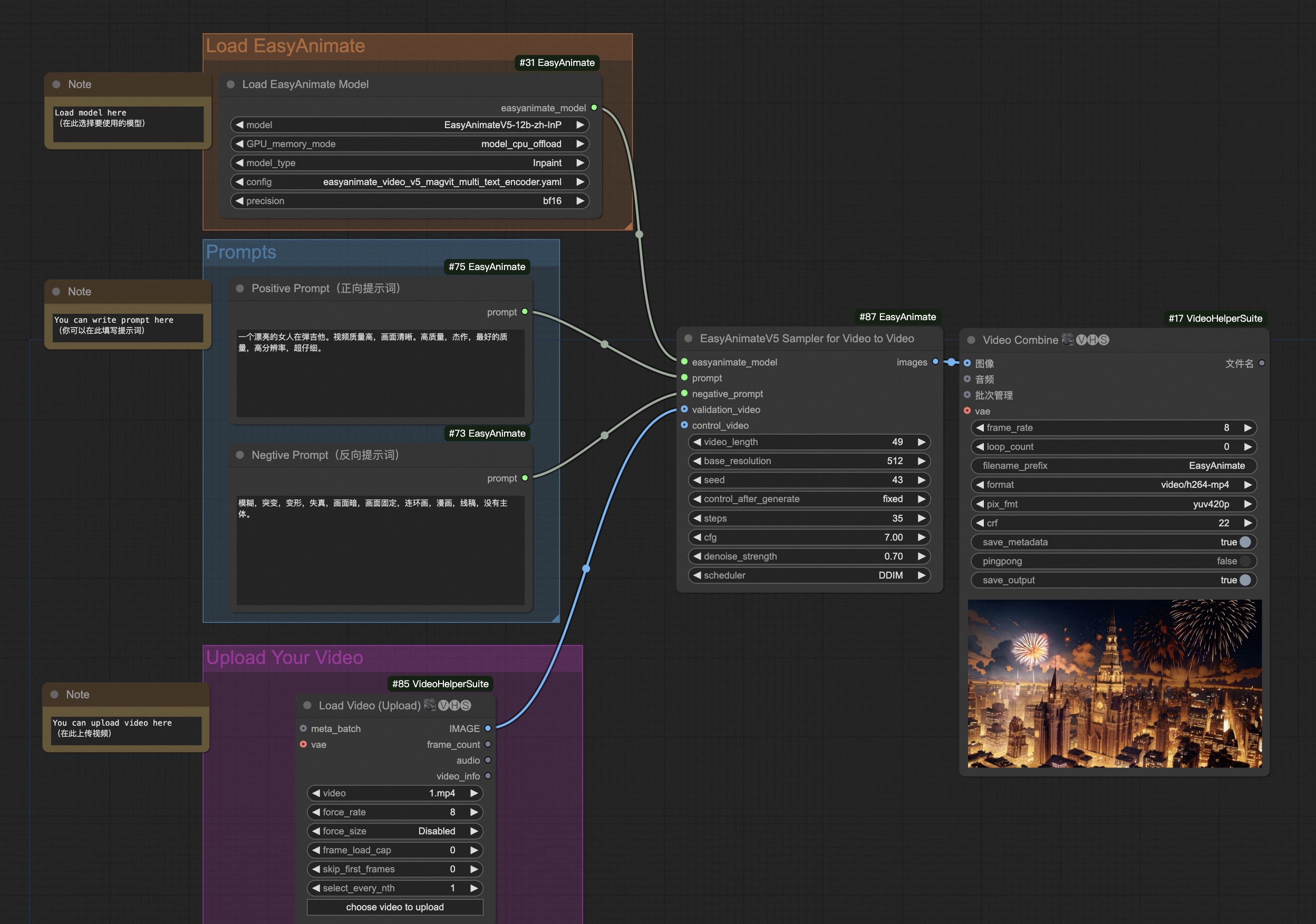
|
||||
|
||||
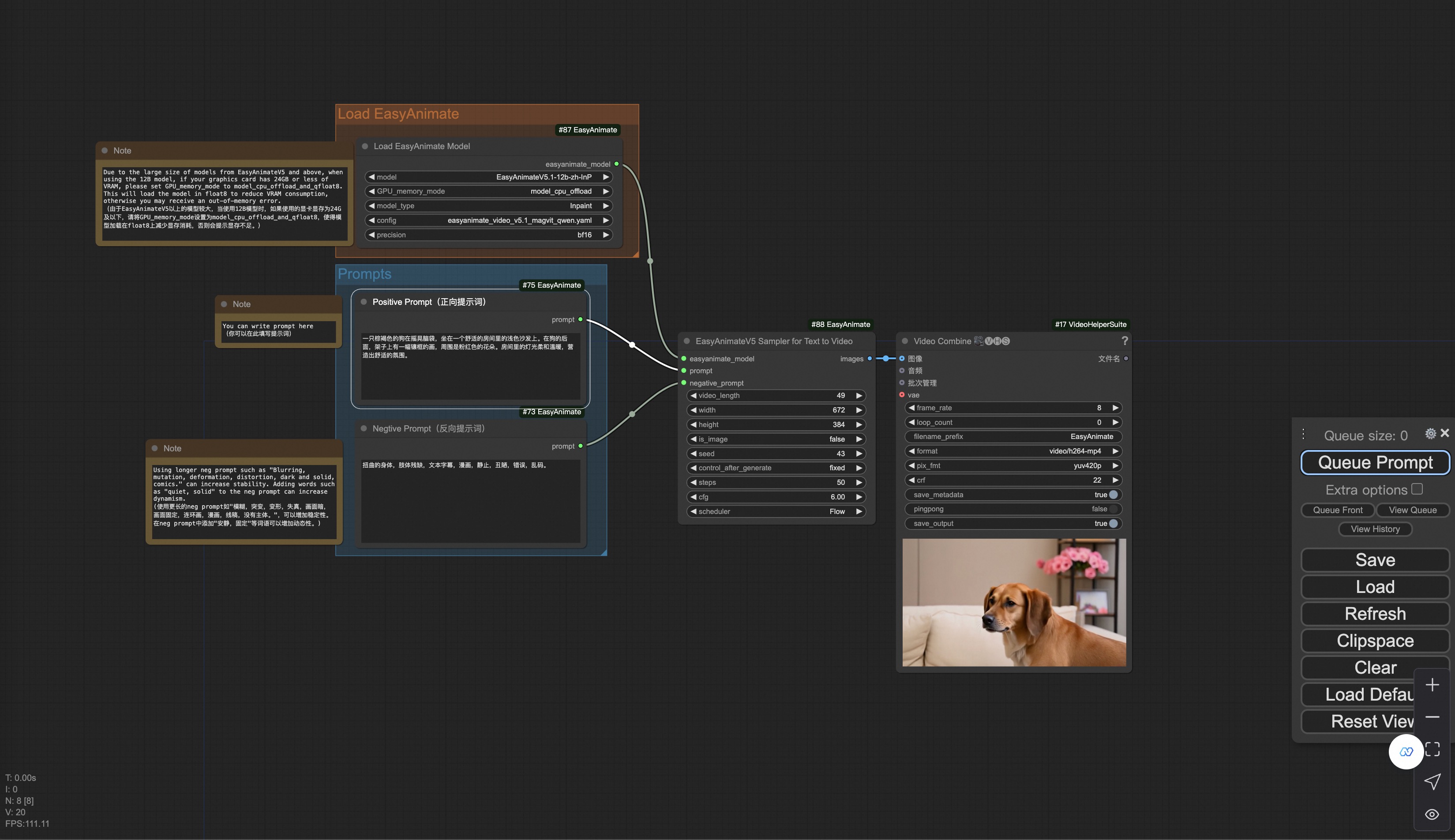
|
||||
You can run the demo using following video:
|
||||
[demo video](https://pai-aigc-photog.oss-cn-hangzhou.aliyuncs.com/cogvideox_fun/asset/v1/play_guitar.mp4)
|
||||
|
||||
### Image to Video Generation
|
||||
Our user interface is shown as follows, this is the [json](https://pai-aigc-photog.oss-cn-hangzhou.aliyuncs.com/easyanimate/asset/v5.1/easyanimatev5.1_workflow_i2v.json):
|
||||
### Control video generation
|
||||
Our ui is shown as follow, this is the [download link](https://pai-aigc-photog.oss-cn-hangzhou.aliyuncs.com/easyanimate/asset/v5/easyanimatev5_workflow_v2v_control.json) of the json:
|
||||
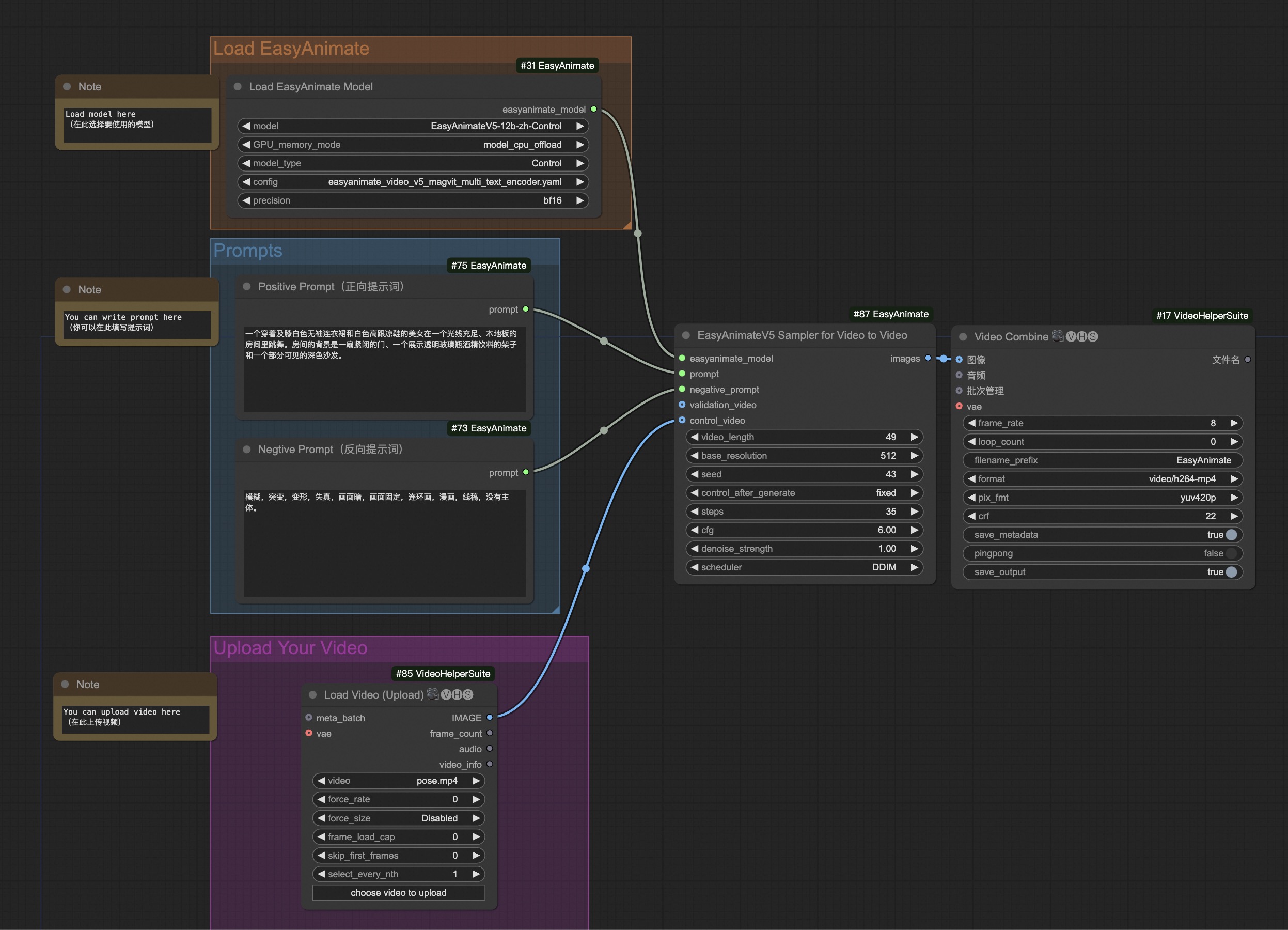
|
||||
|
||||
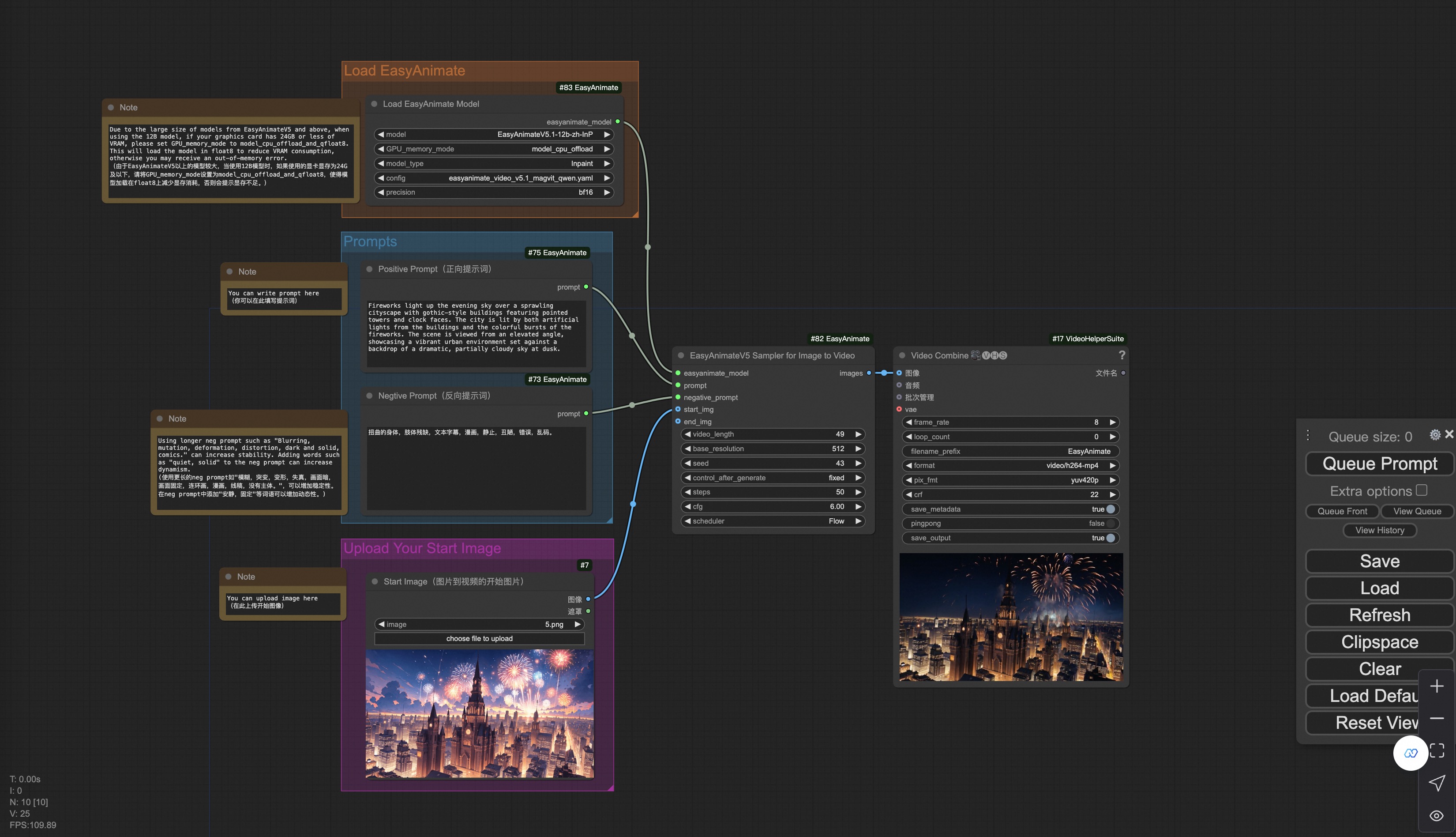
|
||||
You can run the demo using following video:
|
||||
[demo video](https://pai-aigc-photog.oss-cn-hangzhou.aliyuncs.com/cogvideox_fun/asset/v1.1/pose.mp4)
|
||||
|
||||
You can run a demo using the following photo:
|
||||
### Image to video generation
|
||||
Our ui is shown as follow, this is the [download link](https://pai-aigc-photog.oss-cn-hangzhou.aliyuncs.com/easyanimate/asset/v5/easyanimatev5_workflow_i2v.json) of the json:
|
||||
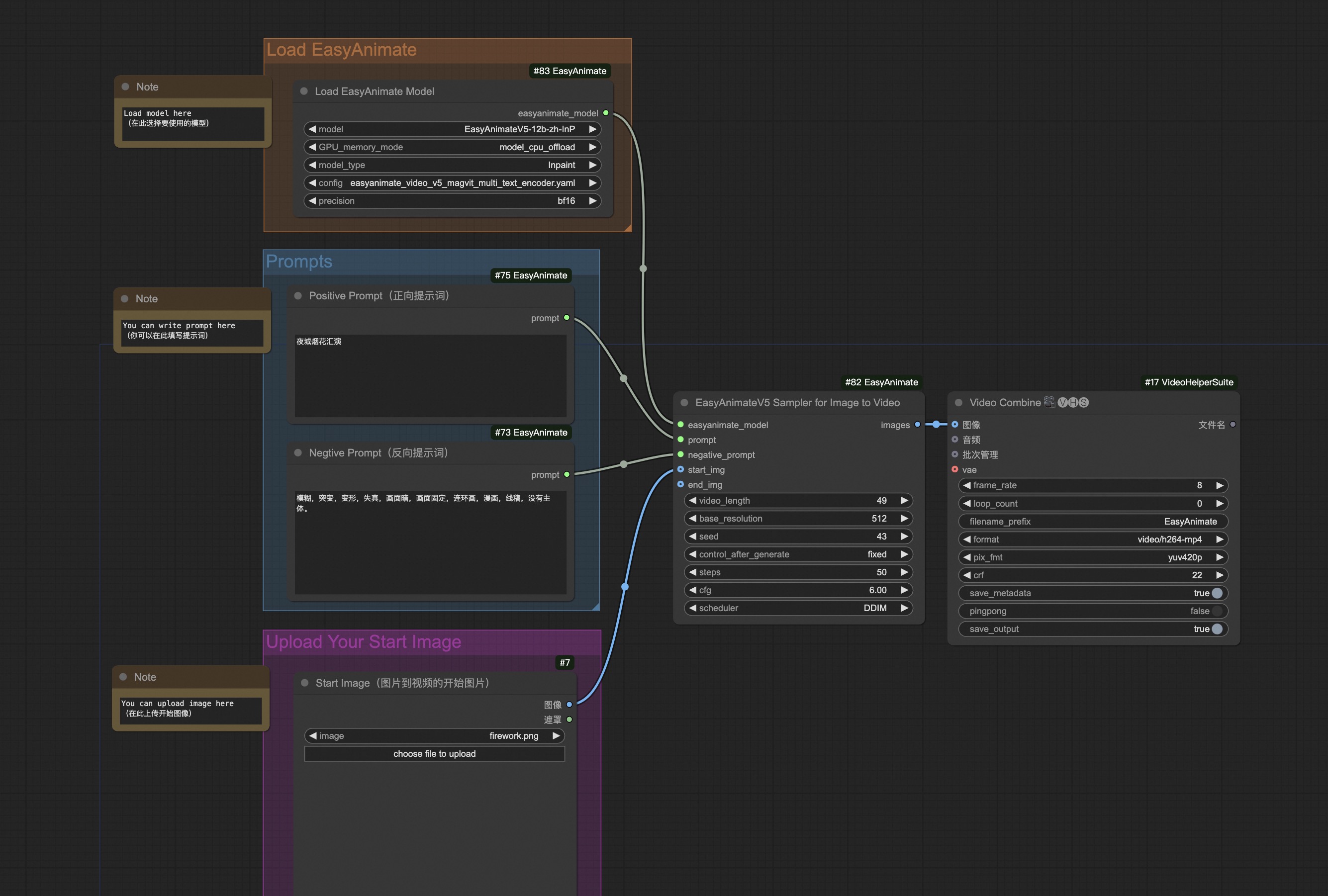
|
||||
|
||||

|
||||
You can run the demo using following photo:
|
||||

|
||||
|
||||
### Video to Video Generation
|
||||
Our user interface is shown as follows, this is the [json](https://pai-aigc-photog.oss-cn-hangzhou.aliyuncs.com/easyanimate/asset/v5.1/easyanimatev5.1_workflow_v2v.json):
|
||||
|
||||
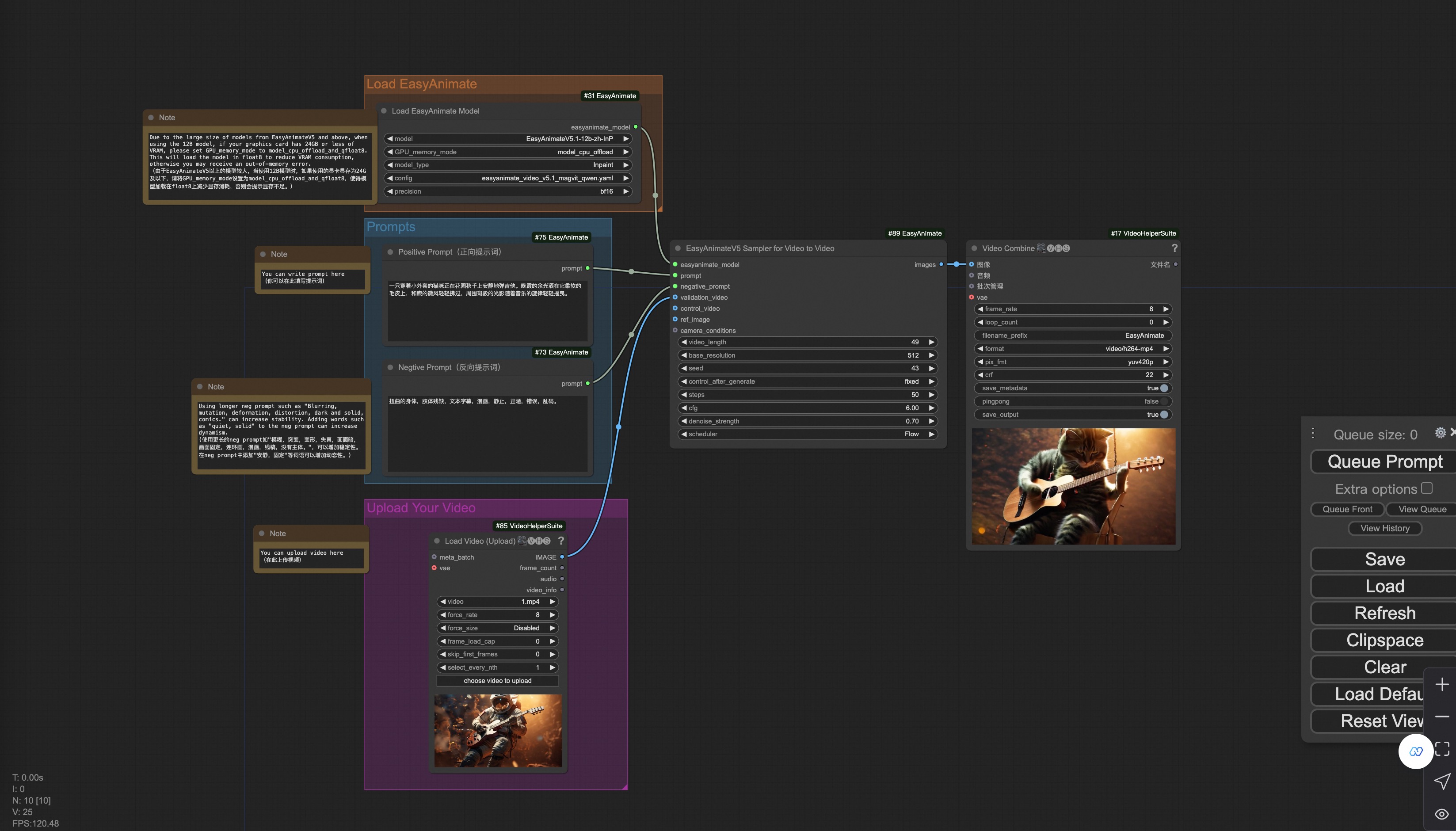
|
||||
|
||||
You can run a demo using the following video:
|
||||
|
||||
[Demo Video](https://pai-aigc-photog.oss-cn-hangzhou.aliyuncs.com/cogvideox_fun/asset/v1/play_guitar.mp4)
|
||||
|
||||
### Camera Control Video Generation
|
||||
Our user interface is shown as follows, this is the [json](https://pai-aigc-photog.oss-cn-hangzhou.aliyuncs.com/easyanimate/asset/v5.1/easyanimatev5.1_workflow_control_camera.json):
|
||||
|
||||
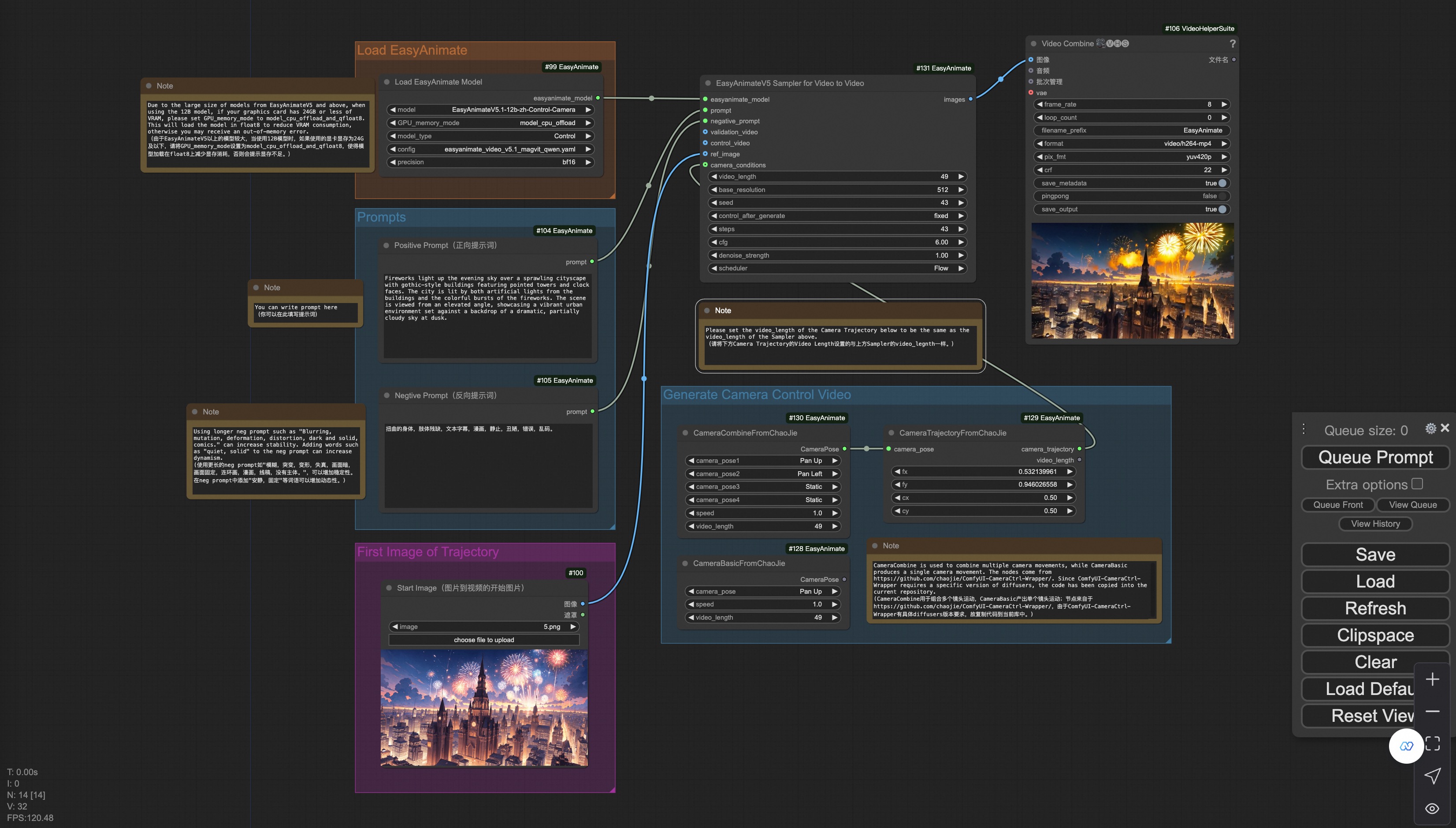
|
||||
|
||||
You can run a demo using the following photo:
|
||||
|
||||

|
||||
|
||||
### Trajectory Control Video Generation
|
||||
Our user interface is shown as follows, this is the [json](https://pai-aigc-photog.oss-cn-hangzhou.aliyuncs.com/easyanimate/asset/v5.1/easyanimatev5.1_workflow_control_trajectory.json):
|
||||
|
||||
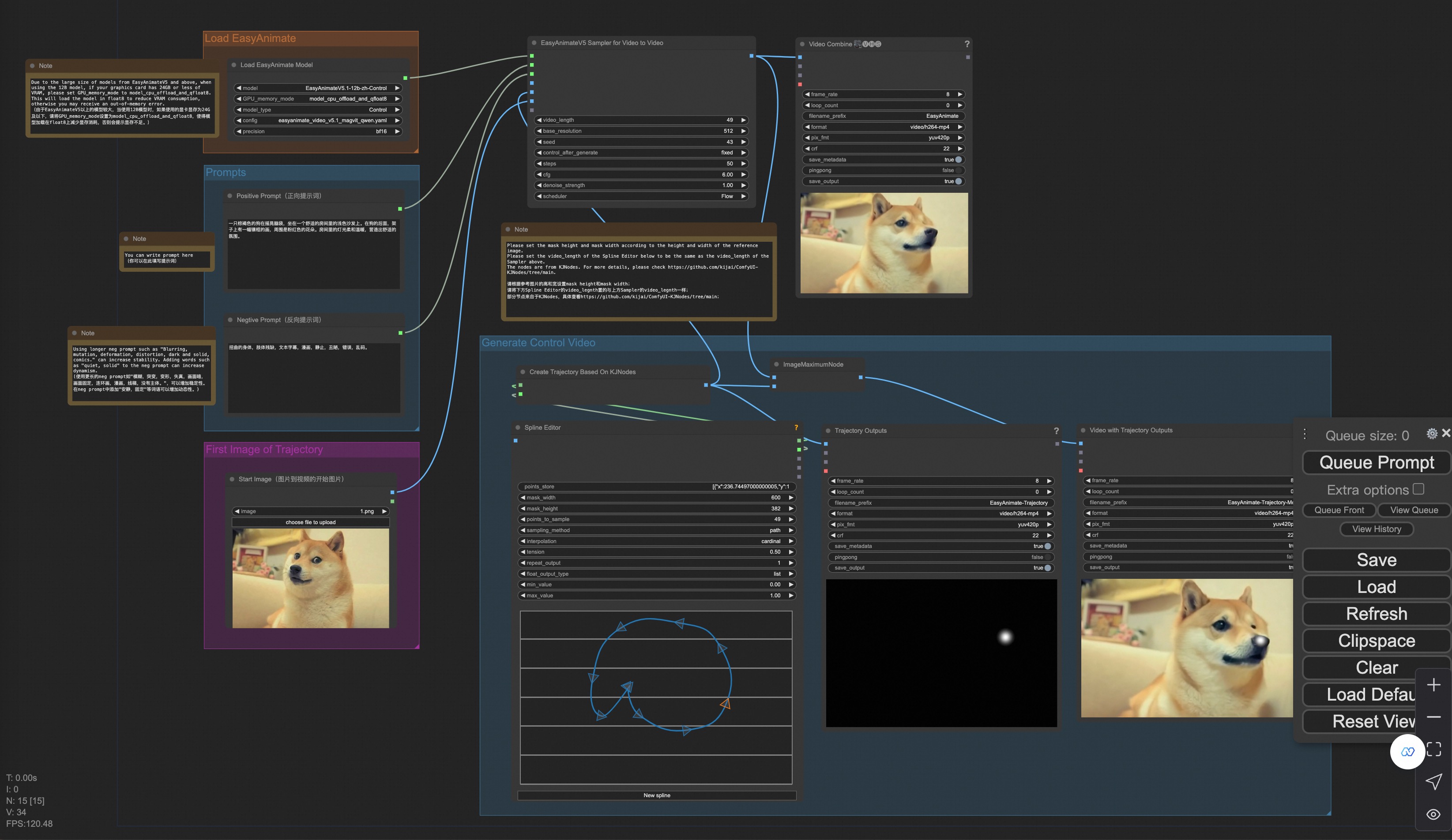
|
||||
|
||||
You can run a demo using the following photo:
|
||||
|
||||

|
||||
|
||||
### Control Video Generation
|
||||
Our user interface is shown as follows, this is the [json](https://pai-aigc-photog.oss-cn-hangzhou.aliyuncs.com/easyanimate/asset/v5/easyanimatev5.1_workflow_v2v_control.json):
|
||||
|
||||
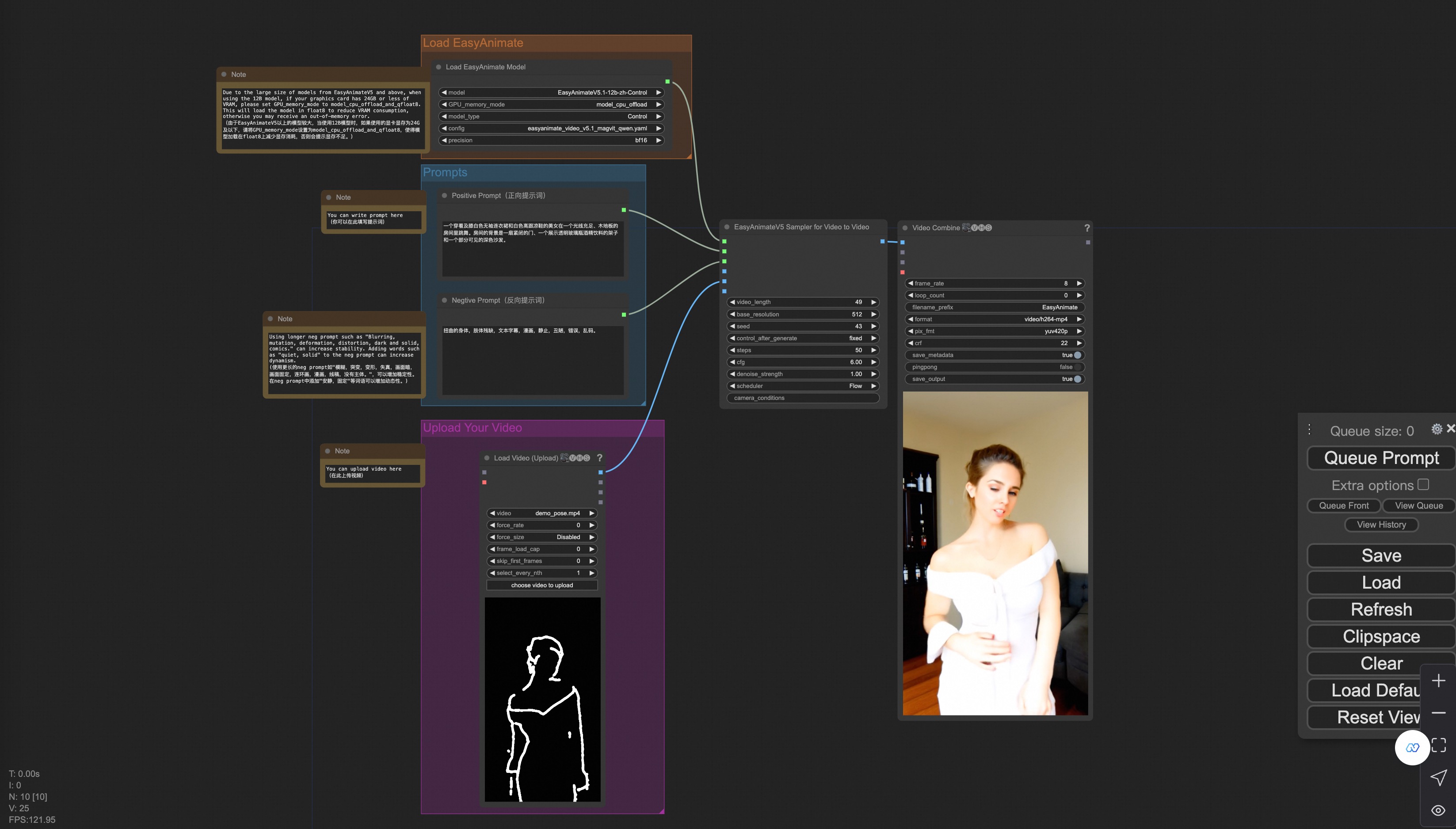
|
||||
|
||||
You can run a demo using the following video:
|
||||
|
||||
[Demo Video](https://pai-aigc-photog.oss-cn-hangzhou.aliyuncs.com/cogvideox_fun/asset/v1.1/pose.mp4)
|
||||
### Text to video generation
|
||||
Our ui is shown as follow, this is the [download link](https://pai-aigc-photog.oss-cn-hangzhou.aliyuncs.com/easyanimate/asset/v5/easyanimatev5_workflow_t2v.json) of the json:
|
||||

|
||||
@@ -1,155 +0,0 @@
|
||||
# ComfyUI EasyAnimate
|
||||
在ComfyUI中使用EasyAnimate!
|
||||
|
||||
[](https://arxiv.org/abs/2405.18991)
|
||||
[](https://easyanimate.github.io/)
|
||||
[](https://modelscope.cn/studios/PAI/EasyAnimate/summary)
|
||||
[](https://huggingface.co/spaces/alibaba-pai/EasyAnimate)
|
||||
|
||||
[English](./README.md) | 简体中文
|
||||
|
||||
- [安装](#安装)
|
||||
- [节点类型](#节点类型)
|
||||
- [示例工作流](#示例工作流)
|
||||
|
||||
## 安装
|
||||
### 选项1:通过ComfyUI管理器安装
|
||||

|
||||
|
||||
### 选项2:手动安装
|
||||
EasyAnimate存储库需要放置在`ComfyUI/custom_nodes/EasyAnimate/`。
|
||||
|
||||
```
|
||||
cd ComfyUI/custom_nodes/
|
||||
|
||||
# Git clone the easyanimate itself
|
||||
git clone https://github.com/aigc-apps/EasyAnimate.git
|
||||
|
||||
# Git clone the video outout node
|
||||
git clone https://github.com/Kosinkadink/ComfyUI-VideoHelperSuite.git
|
||||
git clone https://github.com/kijai/ComfyUI-KJNodes.git
|
||||
|
||||
cd EasyAnimate/
|
||||
pip install -r comfyui/requirements.txt
|
||||
```
|
||||
|
||||
## 将模型下载到`ComfyUI/models/EasyAnimate/`
|
||||
|
||||
EasyAnimateV5.1:
|
||||
|
||||
7B:
|
||||
| 名称 | 种类 | 存储空间 | Hugging Face | Model Scope | 描述 |
|
||||
|--|--|--|--|--|--|
|
||||
| EasyAnimateV5.1-7b-zh-InP | EasyAnimateV5.1 | 30 GB | [🤗Link](https://huggingface.co/alibaba-pai/EasyAnimateV5.1-7b-zh-InP) | [😄Link](https://modelscope.cn/models/PAI/EasyAnimateV5.1-7b-zh-InP)| 官方的图生视频权重。支持多分辨率(512,768,1024)的视频预测,支持多分辨率(512,768,1024)的视频预测,以49帧、每秒8帧进行训练,支持多语言预测 |
|
||||
| EasyAnimateV5.1-7b-zh-Control | EasyAnimateV5.1 | 30 GB | [🤗Link](https://huggingface.co/alibaba-pai/EasyAnimateV5.1-7b-zh-Control) | [😄Link](https://modelscope.cn/models/PAI/EasyAnimateV5.1-7b-zh-Control)| 官方的视频控制权重,支持不同的控制条件,如Canny、Depth、Pose、MLSD等,同时支持使用轨迹控制。支持多分辨率(512,768,1024)的视频预测,支持多分辨率(512,768,1024)的视频预测,以49帧、每秒8帧进行训练,支持多语言预测 |
|
||||
| EasyAnimateV5.1-7b-zh-Control-Camera | EasyAnimateV5.1 | 30 GB | [🤗Link](https://huggingface.co/alibaba-pai/EasyAnimateV5.1-7b-zh-Control-Camera) | [😄Link](https://modelscope.cn/models/PAI/EasyAnimateV5.1-7b-zh-Control-Camera)| 官方的视频相机控制权重,支持通过输入相机运动轨迹控制生成方向。支持多分辨率(512,768,1024)的视频预测,支持多分辨率(512,768,1024)的视频预测,以49帧、每秒8帧进行训练,支持多语言预测 |
|
||||
| EasyAnimateV5.1-7b-zh | EasyAnimateV5.1 | 30 GB | [🤗Link](https://huggingface.co/alibaba-pai/EasyAnimateV5.1-7b-zh) | [😄Link](https://modelscope.cn/models/PAI/EasyAnimateV5.1-7b-zh)| 官方的文生视频权重。支持多分辨率(512,768,1024)的视频预测,支持多分辨率(512,768,1024)的视频预测,以49帧、每秒8帧进行训练,支持多语言预测 |
|
||||
|
||||
12B:
|
||||
|名称|类型|存储空间|拥抱面|型号范围|描述|
|
||||
|--|--|--|--|--|--|
|
||||
|EasyAnimateV5.1-12b-zh-InP | EasyAnimateV5.1 | 39 GB |[🤗链接](https://huggingface.co/alibaba-pai/EasyAnimateV5.1-12b-zh-InP) | [😄链接](https://modelscope.cn/models/PAI/EasyAnimateV5.1-12b-zh-InP)|官方图像到视频权重。支持多种分辨率(5127681024)的视频预测,以每秒8帧的速度训练49帧,支持多语言预测|
|
||||
|EasyAnimateV5.1-12b-zh-控件| EasyAnimateV5.1 | 39 GB |[🤗链接](https://huggingface.co/alibaba-pai/EasyAnimateV5.1-12b-zh-Control) | [😄链接](https://modelscope.cn/models/PAI/EasyAnimateV5.1-12b-zh-Control)|官方视频控制权重,支持Canny、Depth、Pose、MLSD和轨迹控制等各种控制条件。支持多种分辨率(5127681024)的视频预测,以每秒8帧的速度训练49帧,支持多语言预测|
|
||||
|EasyAnimateV5.1-12b-zh-控制摄像头| EasyAnimateV5.1 | 39 GB |[🤗链接](https://huggingface.co/alibaba-pai/EasyAnimateV5.1-12b-zh-Control-Camera) | [😄链接](https://modelscope.cn/models/PAI/EasyAnimateV5.1-12b-zh-Control-Camera)|官方摄像机控制权重,支持通过输入摄像机运动轨迹进行方向生成控制。支持多种分辨率(5127681024)的视频预测,以每秒8帧的速度训练49帧,支持多语言预测|
|
||||
|EasyAnimateV5.1-12b-zh| EasyAnimateV5.1 | 39 GB |[🤗链接](https://huggingface.co/alibaba-pai/EasyAnimateV5.1-12b-zh) | [😄链接](https://modelscope.cn/models/PAI/EasyAnimateV5.1-12b-zh)|官方文本到视频权重。支持多种分辨率(5127681024)的视频预测,以每秒8帧的速度训练49帧,支持多语言预测|
|
||||
|
||||
<details>
|
||||
<summary>(Obsolete) EasyAnimateV5:</summary>
|
||||
|
||||
7B:
|
||||
| 名称 | 种类 | 存储空间 | Hugging Face | Model Scope | 描述 |
|
||||
|--|--|--|--|--|--|
|
||||
| EasyAnimateV5-7b-zh-InP | EasyAnimateV5 | 22 GB | [🤗Link](https://huggingface.co/alibaba-pai/EasyAnimateV5-7b-zh-InP) | [😄Link](https://modelscope.cn/models/PAI/EasyAnimateV5-7b-zh-InP)| 官方的7B图生视频权重。支持多分辨率(512,768,1024)的视频预测,支持多分辨率(512,768,1024)的视频预测,以49帧、每秒8帧进行训练,支持中文与英文双语预测 |
|
||||
| EasyAnimateV5-7b-zh | EasyAnimateV5 | 22 GB | [🤗Link](https://huggingface.co/alibaba-pai/EasyAnimateV5-7b-zh) | [😄Link](https://modelscope.cn/models/PAI/EasyAnimateV5-12b-zh)| 官方的7B文生视频权重。可用于进行下游任务的fientune。支持多分辨率(512,768,1024)的视频预测,支持多分辨率(512,768,1024)的视频预测,以49帧、每秒8帧进行训练,支持中文与英文双语预测 |
|
||||
| EasyAnimateV5-Reward-LoRAs | EasyAnimateV5 | - | [🤗Link](https://huggingface.co/alibaba-pai/EasyAnimateV5-Reward-LoRAs) | [😄Link](https://modelscope.cn/models/PAI/EasyAnimateV5-Reward-LoRAs) | 通过奖励反向传播技术,优化了EasyAnimateV5-12b生成的视频,以更好地匹配人类偏好|
|
||||
|
||||
12B:
|
||||
| 名称 | 种类 | 存储空间 | Hugging Face | Model Scope | 描述 |
|
||||
|--|--|--|--|--|--|
|
||||
| EasyAnimateV5-12b-zh-InP | EasyAnimateV5 | 34 GB | [🤗Link](https://huggingface.co/alibaba-pai/EasyAnimateV5-12b-zh-InP) | [😄Link](https://modelscope.cn/models/PAI/EasyAnimateV5-12b-zh-InP)| 官方的图生视频权重。支持多分辨率(512,768,1024)的视频预测,支持多分辨率(512,768,1024)的视频预测,以49帧、每秒8帧进行训练,支持中文与英文双语预测 |
|
||||
| EasyAnimateV5-12b-zh-Control | EasyAnimateV5 | 34 GB | [🤗Link](https://huggingface.co/alibaba-pai/EasyAnimateV5-12b-zh-Control) | [😄Link](https://modelscope.cn/models/PAI/EasyAnimateV5-12b-zh-Control)| 官方的视频控制权重,支持不同的控制条件,如Canny、Depth、Pose、MLSD等。支持多分辨率(512,768,1024)的视频预测,支持多分辨率(512,768,1024)的视频预测,以49帧、每秒8帧进行训练,支持中文与英文双语预测 |
|
||||
| EasyAnimateV5-12b-zh | EasyAnimateV5 | 34 GB | [🤗Link](https://huggingface.co/alibaba-pai/EasyAnimateV5-12b-zh) | [😄Link](https://modelscope.cn/models/PAI/EasyAnimateV5-12b-zh)| 官方的文生视频权重。可用于进行下游任务的fientune。支持多分辨率(512,768,1024)的视频预测,支持多分辨率(512,768,1024)的视频预测,以49帧、每秒8帧进行训练,支持中文与英文双语预测 |
|
||||
| EasyAnimateV5-Reward-LoRAs | EasyAnimateV5 | - | [🤗Link](https://huggingface.co/alibaba-pai/EasyAnimateV5-Reward-LoRAs) | [😄Link](https://modelscope.cn/models/PAI/EasyAnimateV5-Reward-LoRAs) | 通过奖励反向传播技术,优化了EasyAnimateV5-12b生成的视频,以更好地匹配人类偏好|
|
||||
</details>
|
||||
|
||||
<details>
|
||||
<summary>(Obsolete) EasyAnimateV4:</summary>
|
||||
|
||||
| 名称 | 种类 | 存储空间 | Hugging Face | Model Scope | 描述 |
|
||||
|--|--|--|--|--|--|
|
||||
| EasyAnimateV4-XL-2-InP | EasyAnimateV4 | 解压前 8.9 GB / 解压后 14.0 GB | [🤗Link](https://huggingface.co/alibaba-pai/EasyAnimateV4-XL-2-InP)| [😄Link](https://modelscope.cn/models/PAI/EasyAnimateV4-XL-2-InP)| 官方的图生视频权重。支持多分辨率(512,768,1024,1280)的视频预测,以144帧、每秒24帧进行训练 |
|
||||
</details>
|
||||
|
||||
<details>
|
||||
<summary>(Obsolete) EasyAnimateV3:</summary>
|
||||
|
||||
| 名称 | 种类 | 存储空间 | Hugging Face | Model Scope | 描述 |
|
||||
|--|--|--|--|--|--|
|
||||
| EasyAnimateV3-XL-2-InP-512x512 | EasyAnimateV3 | 18.2GB| [🤗Link](https://huggingface.co/alibaba-pai/EasyAnimateV3-XL-2-InP-512x512)| [😄Link](https://modelscope.cn/models/PAI/EasyAnimateV3-XL-2-InP-512x512)| 官方的512x512分辨率的图生视频权重。以144帧、每秒24帧进行训练 |
|
||||
| EasyAnimateV3-XL-2-InP-768x768 | EasyAnimateV3 | 18.2GB | [🤗Link](https://huggingface.co/alibaba-pai/EasyAnimateV3-XL-2-InP-768x768) | [😄Link](https://modelscope.cn/models/PAI/EasyAnimateV3-XL-2-InP-768x768)| 官方的768x768分辨率的图生视频权重。以144帧、每秒24帧进行训练 |
|
||||
| EasyAnimateV3-XL-2-InP-960x960 | EasyAnimateV3 | 18.2GB | [🤗Link](https://huggingface.co/alibaba-pai/EasyAnimateV3-XL-2-InP-960x960) | [😄Link](https://modelscope.cn/models/PAI/EasyAnimateV3-XL-2-InP-960x960)| 官方的960x960(720P)分辨率的图生视频权重。以144帧、每秒24帧进行训练 |
|
||||
</details>
|
||||
|
||||
## 节点类型
|
||||
- **LoadEasyAnimateModel**
|
||||
- 加载EasyAnimate模型
|
||||
- **EasyAnimate_TextBox**
|
||||
- 编写EasyAnimate模型的提示词
|
||||
- **EasyAnimateI2VSampler**
|
||||
- EasyAnimate图像到视频采样节点
|
||||
- **EasyAnimateT2VSampler**
|
||||
- EasyAnimate文本到视频采样节点
|
||||
- **EasyAnimateV2VSampler**
|
||||
- EasyAnimate视频到视频采样节点
|
||||
|
||||
## 示例工作流
|
||||
|
||||
### 文本到视频生成
|
||||
我们的用户界面显示如下,这是[json](https://pai-aigc-photog.oss-cn-hangzhou.aliyuncs.com/easyanimate/asset/v5.1/easyanimatev5.1_workflow_t2v.json):
|
||||
|
||||

|
||||
|
||||
### 图像到视频生成
|
||||
我们的用户界面显示如下,这是[json](https://pai-aigc-photog.oss-cn-hangzhou.aliyuncs.com/easyanimate/asset/v5.1/easyanimatev5.1_workflow_i2v.json):
|
||||
|
||||

|
||||
|
||||
您可以使用以下照片运行演示:
|
||||
|
||||

|
||||
|
||||
### 视频到视频生成
|
||||
我们的用户界面显示如下,这是[json](https://pai-aigc-photog.oss-cn-hangzhou.aliyuncs.com/easyanimate/asset/v5.1/easyanimatev5.1_workflow_v2v.json):
|
||||
|
||||

|
||||
|
||||
您可以使用以下视频运行演示:
|
||||
|
||||
[演示视频](https://pai-aigc-photog.oss-cn-hangzhou.aliyuncs.com/cogvideox_fun/asset/v1/play_guitar.mp4)
|
||||
|
||||
### 镜头控制视频生成
|
||||
我们的用户界面显示如下,这是[json](https://pai-aigc-photog.oss-cn-hangzhou.aliyuncs.com/easyanimate/asset/v5.1/easyanimatev5.1_workflow_control_camera.json):
|
||||
|
||||

|
||||
|
||||
您可以使用以下照片运行演示:
|
||||
|
||||

|
||||
|
||||
### 轨迹控制视频生成
|
||||
我们的用户界面显示如下,这是[json](https://pai-aigc-photog.oss-cn-hangzhou.aliyuncs.com/easyanimate/asset/v5.1/easyanimatev5.1_workflow_control_trajectory.json):
|
||||
|
||||

|
||||
|
||||
您可以使用以下照片运行演示:
|
||||
|
||||

|
||||
|
||||
### 控制视频生成
|
||||
我们的用户界面显示如下,这是[json](https://pai-aigc-photog.oss-cn-hangzhou.aliyuncs.com/easyanimate/asset/v5/easyanimatev5.1_workflow_v2v_control.json):
|
||||
|
||||

|
||||
|
||||
您可以使用以下视频运行演示:
|
||||
|
||||
[演示视频](https://pai-aigc-photog.oss-cn-hangzhou.aliyuncs.com/cogvideox_fun/asset/v1.1/pose.mp4)
|
||||
Executable → Regular
+320
-574
File diff suppressed because it is too large
Load Diff
@@ -1,80 +0,0 @@
|
||||
"""Modified from https://github.com/chaojie/ComfyUI-CameraCtrl-Wrapper/blob/main/camera_utils.py
|
||||
"""
|
||||
import copy
|
||||
import numpy as np
|
||||
|
||||
CAMERA = {
|
||||
# T
|
||||
"base_T_norm": 1.5,
|
||||
"base_angle": np.pi/3,
|
||||
|
||||
"Static": { "angle":[0., 0., 0.], "T":[0., 0., 0.]},
|
||||
"Pan Up": { "angle":[0., 0., 0.], "T":[0., 1., 0.]},
|
||||
"Pan Down": { "angle":[0., 0., 0.], "T":[0.,-1.,0.]},
|
||||
"Pan Left": { "angle":[0., 0., 0.], "T":[1.,0.,0.]},
|
||||
"Pan Right": { "angle":[0., 0., 0.], "T": [-1.,0.,0.]},
|
||||
"Zoom In": { "angle":[0., 0., 0.], "T": [0.,0.,-2.]},
|
||||
"Zoom Out": { "angle":[0., 0., 0.], "T": [0.,0.,2.]},
|
||||
"ACW": { "angle": [0., 0., 1.], "T":[0., 0., 0.]},
|
||||
"CW": { "angle": [0., 0., -1.], "T":[0., 0., 0.]},
|
||||
}
|
||||
|
||||
def compute_R_form_rad_angle(angles):
|
||||
theta_x, theta_y, theta_z = angles
|
||||
Rx = np.array([[1, 0, 0],
|
||||
[0, np.cos(theta_x), -np.sin(theta_x)],
|
||||
[0, np.sin(theta_x), np.cos(theta_x)]])
|
||||
|
||||
Ry = np.array([[np.cos(theta_y), 0, np.sin(theta_y)],
|
||||
[0, 1, 0],
|
||||
[-np.sin(theta_y), 0, np.cos(theta_y)]])
|
||||
|
||||
Rz = np.array([[np.cos(theta_z), -np.sin(theta_z), 0],
|
||||
[np.sin(theta_z), np.cos(theta_z), 0],
|
||||
[0, 0, 1]])
|
||||
|
||||
# 计算相机外参的旋转矩阵
|
||||
R = np.dot(Rz, np.dot(Ry, Rx))
|
||||
return R
|
||||
|
||||
def get_camera_motion(angle, T, speed, n=16):
|
||||
RT = []
|
||||
for i in range(n):
|
||||
_angle = (i/n)*speed*(CAMERA["base_angle"])*angle
|
||||
R = compute_R_form_rad_angle(_angle)
|
||||
# _T = (i/n)*speed*(T.reshape(3,1))
|
||||
_T=(i/n)*speed*(CAMERA["base_T_norm"])*(T.reshape(3,1))
|
||||
_RT = np.concatenate([R,_T], axis=1)
|
||||
RT.append(_RT)
|
||||
RT = np.stack(RT)
|
||||
return RT
|
||||
|
||||
def create_relative(RT_list, K_1=4.7, dataset="syn"):
|
||||
RT = copy.deepcopy(RT_list[0])
|
||||
R_inv = RT[:,:3].T
|
||||
T = RT[:,-1]
|
||||
|
||||
temp = []
|
||||
for _RT in RT_list:
|
||||
_RT[:,:3] = np.dot(_RT[:,:3], R_inv)
|
||||
_RT[:,-1] = _RT[:,-1] - np.dot(_RT[:,:3], T)
|
||||
temp.append(_RT)
|
||||
RT_list = temp
|
||||
|
||||
return RT_list
|
||||
|
||||
def combine_camera_motion(RT_0, RT_1):
|
||||
RT = copy.deepcopy(RT_0[-1])
|
||||
R = RT[:,:3]
|
||||
R_inv = RT[:,:3].T
|
||||
T = RT[:,-1]
|
||||
|
||||
temp = []
|
||||
for _RT in RT_1:
|
||||
_RT[:,:3] = np.dot(_RT[:,:3], R)
|
||||
_RT[:,-1] = _RT[:,-1] + np.dot(np.dot(_RT[:,:3], R_inv), T)
|
||||
temp.append(_RT)
|
||||
|
||||
RT_1 = np.stack(temp)
|
||||
|
||||
return np.concatenate([RT_0, RT_1], axis=0)
|
||||
@@ -134,7 +134,7 @@
|
||||
"Node name for S&R": "EasyAnimate_TextBox"
|
||||
},
|
||||
"widgets_values": [
|
||||
"一只穿着小外套的猫咪正在花园秋千上安静地弹吉他。晚霞的余光洒在它柔软的毛皮上,和煦的微风轻轻拂过,周围斑驳的光影随着音乐的旋律轻轻摇曳。"
|
||||
"一个漂亮的女人在弹吉他。视频质量高,画面清晰。高质量,杰作,最好的质量,高分辨率,超仔细。"
|
||||
]
|
||||
},
|
||||
{
|
||||
|
||||
@@ -1,680 +0,0 @@
|
||||
{
|
||||
"last_node_id": 133,
|
||||
"last_link_id": 283,
|
||||
"nodes": [
|
||||
{
|
||||
"id": 105,
|
||||
"type": "EasyAnimate_TextBox",
|
||||
"pos": {
|
||||
"0": 234,
|
||||
"1": 813
|
||||
},
|
||||
"size": {
|
||||
"0": 400,
|
||||
"1": 200
|
||||
},
|
||||
"flags": {},
|
||||
"order": 0,
|
||||
"mode": 0,
|
||||
"inputs": [],
|
||||
"outputs": [
|
||||
{
|
||||
"name": "prompt",
|
||||
"type": "STRING_PROMPT",
|
||||
"links": [
|
||||
273
|
||||
],
|
||||
"slot_index": 0
|
||||
}
|
||||
],
|
||||
"title": "Negtive Prompt(反向提示词)",
|
||||
"properties": {
|
||||
"Node name for S&R": "EasyAnimate_TextBox"
|
||||
},
|
||||
"widgets_values": [
|
||||
"扭曲的身体,肢体残缺,文本字幕,漫画,静止,丑陋,错误,乱码。"
|
||||
]
|
||||
},
|
||||
{
|
||||
"id": 123,
|
||||
"type": "Note",
|
||||
"pos": {
|
||||
"0": -5,
|
||||
"1": 616
|
||||
},
|
||||
"size": {
|
||||
"0": 210,
|
||||
"1": 58
|
||||
},
|
||||
"flags": {},
|
||||
"order": 1,
|
||||
"mode": 0,
|
||||
"inputs": [],
|
||||
"outputs": [],
|
||||
"properties": {
|
||||
"text": ""
|
||||
},
|
||||
"widgets_values": [
|
||||
"You can write prompt here\n(你可以在此填写提示词)"
|
||||
],
|
||||
"color": "#432",
|
||||
"bgcolor": "#653"
|
||||
},
|
||||
{
|
||||
"id": 125,
|
||||
"type": "Note",
|
||||
"pos": {
|
||||
"0": -117,
|
||||
"1": 843
|
||||
},
|
||||
"size": {
|
||||
"0": 326.1556091308594,
|
||||
"1": 145.20904541015625
|
||||
},
|
||||
"flags": {},
|
||||
"order": 2,
|
||||
"mode": 0,
|
||||
"inputs": [],
|
||||
"outputs": [],
|
||||
"properties": {
|
||||
"text": ""
|
||||
},
|
||||
"widgets_values": [
|
||||
"Using longer neg prompt such as \"Blurring, mutation, deformation, distortion, dark and solid, comics.\" can increase stability. Adding words such as \"quiet, solid\" to the neg prompt can increase dynamism.\n(使用更长的neg prompt如\"模糊,突变,变形,失真,画面暗,画面固定,连环画,漫画,线稿,没有主体。\",可以增加稳定性。在neg prompt中添加\"安静,固定\"等词语可以增加动态性。)"
|
||||
],
|
||||
"color": "#432",
|
||||
"bgcolor": "#653"
|
||||
},
|
||||
{
|
||||
"id": 127,
|
||||
"type": "Note",
|
||||
"pos": {
|
||||
"0": 1125.8018798828125,
|
||||
"1": 1088.0283203125
|
||||
},
|
||||
"size": {
|
||||
"0": 538.7950439453125,
|
||||
"1": 127.34957885742188
|
||||
},
|
||||
"flags": {},
|
||||
"order": 3,
|
||||
"mode": 0,
|
||||
"inputs": [],
|
||||
"outputs": [],
|
||||
"properties": {
|
||||
"text": ""
|
||||
},
|
||||
"widgets_values": [
|
||||
"CameraCombine is used to combine multiple camera movements, while CameraBasic produces a single camera movement. The nodes come from https://github.com/chaojie/ComfyUI-CameraCtrl-Wrapper/. Since ComfyUI-CameraCtrl-Wrapper requires a specific version of diffusers, the code has been copied into the current repository.\n(CameraCombine用于组合多个镜头运动,CameraBasic产出单个镜头运动;节点来自于https://github.com/chaojie/ComfyUI-CameraCtrl-Wrapper/,由于ComfyUI-CameraCtrl-Wrapper有具体diffusers版本要求,故复制代码到当前库中。)"
|
||||
],
|
||||
"color": "#432",
|
||||
"bgcolor": "#653"
|
||||
},
|
||||
{
|
||||
"id": 133,
|
||||
"type": "Note",
|
||||
"pos": {
|
||||
"0": -201,
|
||||
"1": 247
|
||||
},
|
||||
"size": {
|
||||
"0": 427.074951171875,
|
||||
"1": 143.9142608642578
|
||||
},
|
||||
"flags": {},
|
||||
"order": 4,
|
||||
"mode": 0,
|
||||
"inputs": [],
|
||||
"outputs": [],
|
||||
"properties": {
|
||||
"text": ""
|
||||
},
|
||||
"widgets_values": [
|
||||
"Due to the large size of models from EasyAnimateV5 and above, when using the 12B model, if your graphics card has 24GB or less of VRAM, please set GPU_memory_mode to model_cpu_offload_and_qfloat8. This will load the model in float8 to reduce VRAM consumption, otherwise you may receive an out-of-memory error. \n(由于EasyAnimateV5以上的模型较大,当使用12B模型时,如果使用的显卡显存为24G及以下,请将GPU_memory_mode设置为model_cpu_offload_and_qfloat8,使得模型加载在float8上减少显存消耗,否则会提示显存不足。)"
|
||||
],
|
||||
"color": "#432",
|
||||
"bgcolor": "#653"
|
||||
},
|
||||
{
|
||||
"id": 100,
|
||||
"type": "LoadImage",
|
||||
"pos": {
|
||||
"0": 238,
|
||||
"1": 1165
|
||||
},
|
||||
"size": {
|
||||
"0": 378.07147216796875,
|
||||
"1": 314
|
||||
},
|
||||
"flags": {},
|
||||
"order": 5,
|
||||
"mode": 0,
|
||||
"inputs": [],
|
||||
"outputs": [
|
||||
{
|
||||
"name": "IMAGE",
|
||||
"type": "IMAGE",
|
||||
"links": [
|
||||
274
|
||||
],
|
||||
"slot_index": 0,
|
||||
"shape": 3,
|
||||
"label": "图像"
|
||||
},
|
||||
{
|
||||
"name": "MASK",
|
||||
"type": "MASK",
|
||||
"links": null,
|
||||
"shape": 3,
|
||||
"label": "遮罩"
|
||||
}
|
||||
],
|
||||
"title": "Start Image(图片到视频的开始图片)",
|
||||
"properties": {
|
||||
"Node name for S&R": "LoadImage"
|
||||
},
|
||||
"widgets_values": [
|
||||
"5.png",
|
||||
"image"
|
||||
]
|
||||
},
|
||||
{
|
||||
"id": 99,
|
||||
"type": "LoadEasyAnimateModel",
|
||||
"pos": {
|
||||
"0": 234,
|
||||
"1": 240
|
||||
},
|
||||
"size": {
|
||||
"0": 409.7983703613281,
|
||||
"1": 158.7380828857422
|
||||
},
|
||||
"flags": {},
|
||||
"order": 6,
|
||||
"mode": 0,
|
||||
"inputs": [],
|
||||
"outputs": [
|
||||
{
|
||||
"name": "easyanimate_model",
|
||||
"type": "EASYANIMATESMODEL",
|
||||
"links": [
|
||||
271
|
||||
],
|
||||
"slot_index": 0
|
||||
}
|
||||
],
|
||||
"properties": {
|
||||
"Node name for S&R": "LoadEasyAnimateModel"
|
||||
},
|
||||
"widgets_values": [
|
||||
"EasyAnimateV5.1-12b-zh-Control-Camera",
|
||||
"model_cpu_offload_and_qfloat8",
|
||||
"Control",
|
||||
"easyanimate_video_v5.1_magvit_qwen.yaml",
|
||||
"bf16"
|
||||
]
|
||||
},
|
||||
{
|
||||
"id": 129,
|
||||
"type": "CameraTrajectoryFromChaoJie",
|
||||
"pos": {
|
||||
"0": 1156.0380859375,
|
||||
"1": 881.3924560546875
|
||||
},
|
||||
"size": {
|
||||
"0": 367.79998779296875,
|
||||
"1": 150
|
||||
},
|
||||
"flags": {},
|
||||
"order": 11,
|
||||
"mode": 0,
|
||||
"inputs": [
|
||||
{
|
||||
"name": "camera_pose",
|
||||
"type": "CameraPose",
|
||||
"link": 283
|
||||
}
|
||||
],
|
||||
"outputs": [
|
||||
{
|
||||
"name": "camera_trajectory",
|
||||
"type": "STRING",
|
||||
"links": [
|
||||
275
|
||||
],
|
||||
"slot_index": 0
|
||||
},
|
||||
{
|
||||
"name": "video_length",
|
||||
"type": "INT",
|
||||
"links": null
|
||||
}
|
||||
],
|
||||
"properties": {
|
||||
"Node name for S&R": "CameraTrajectoryFromChaoJie"
|
||||
},
|
||||
"widgets_values": [
|
||||
0.532139961,
|
||||
0.946026558,
|
||||
0.5,
|
||||
0.5
|
||||
]
|
||||
},
|
||||
{
|
||||
"id": 128,
|
||||
"type": "CameraBasicFromChaoJie",
|
||||
"pos": {
|
||||
"0": 779.039306640625,
|
||||
"1": 1120.39013671875
|
||||
},
|
||||
"size": {
|
||||
"0": 315,
|
||||
"1": 106
|
||||
},
|
||||
"flags": {},
|
||||
"order": 7,
|
||||
"mode": 0,
|
||||
"inputs": [],
|
||||
"outputs": [
|
||||
{
|
||||
"name": "CameraPose",
|
||||
"type": "CameraPose",
|
||||
"links": [],
|
||||
"slot_index": 0
|
||||
}
|
||||
],
|
||||
"properties": {
|
||||
"Node name for S&R": "CameraBasicFromChaoJie"
|
||||
},
|
||||
"widgets_values": [
|
||||
"Pan Up",
|
||||
1,
|
||||
49
|
||||
]
|
||||
},
|
||||
{
|
||||
"id": 130,
|
||||
"type": "CameraCombineFromChaoJie",
|
||||
"pos": {
|
||||
"0": 779.491943359375,
|
||||
"1": 881.4488525390625
|
||||
},
|
||||
"size": {
|
||||
"0": 315,
|
||||
"1": 178
|
||||
},
|
||||
"flags": {},
|
||||
"order": 8,
|
||||
"mode": 0,
|
||||
"inputs": [],
|
||||
"outputs": [
|
||||
{
|
||||
"name": "CameraPose",
|
||||
"type": "CameraPose",
|
||||
"links": [
|
||||
283
|
||||
],
|
||||
"slot_index": 0
|
||||
}
|
||||
],
|
||||
"properties": {
|
||||
"Node name for S&R": "CameraCombineFromChaoJie"
|
||||
},
|
||||
"widgets_values": [
|
||||
"Pan Up",
|
||||
"Pan Left",
|
||||
"Static",
|
||||
"Static",
|
||||
1,
|
||||
49
|
||||
]
|
||||
},
|
||||
{
|
||||
"id": 104,
|
||||
"type": "EasyAnimate_TextBox",
|
||||
"pos": {
|
||||
"0": 233,
|
||||
"1": 539
|
||||
},
|
||||
"size": {
|
||||
"0": 400,
|
||||
"1": 200
|
||||
},
|
||||
"flags": {},
|
||||
"order": 9,
|
||||
"mode": 0,
|
||||
"inputs": [],
|
||||
"outputs": [
|
||||
{
|
||||
"name": "prompt",
|
||||
"type": "STRING_PROMPT",
|
||||
"links": [
|
||||
272
|
||||
],
|
||||
"slot_index": 0
|
||||
}
|
||||
],
|
||||
"title": "Positive Prompt(正向提示词)",
|
||||
"properties": {
|
||||
"Node name for S&R": "EasyAnimate_TextBox"
|
||||
},
|
||||
"widgets_values": [
|
||||
"Fireworks light up the evening sky over a sprawling cityscape with gothic-style buildings featuring pointed towers and clock faces. The city is lit by both artificial lights from the buildings and the colorful bursts of the fireworks. The scene is viewed from an elevated angle, showcasing a vibrant urban environment set against a backdrop of a dramatic, partially cloudy sky at dusk."
|
||||
]
|
||||
},
|
||||
{
|
||||
"id": 106,
|
||||
"type": "VHS_VideoCombine",
|
||||
"pos": {
|
||||
"0": 1416,
|
||||
"1": 170
|
||||
},
|
||||
"size": [
|
||||
390,
|
||||
546
|
||||
],
|
||||
"flags": {},
|
||||
"order": 13,
|
||||
"mode": 0,
|
||||
"inputs": [
|
||||
{
|
||||
"name": "images",
|
||||
"type": "IMAGE",
|
||||
"link": 276,
|
||||
"slot_index": 0,
|
||||
"label": "图像",
|
||||
"shape": 7
|
||||
},
|
||||
{
|
||||
"name": "audio",
|
||||
"type": "AUDIO",
|
||||
"link": null,
|
||||
"label": "音频",
|
||||
"shape": 7
|
||||
},
|
||||
{
|
||||
"name": "meta_batch",
|
||||
"type": "VHS_BatchManager",
|
||||
"link": null,
|
||||
"label": "批次管理",
|
||||
"shape": 7
|
||||
},
|
||||
{
|
||||
"name": "vae",
|
||||
"type": "VAE",
|
||||
"link": null,
|
||||
"shape": 7
|
||||
}
|
||||
],
|
||||
"outputs": [
|
||||
{
|
||||
"name": "Filenames",
|
||||
"type": "VHS_FILENAMES",
|
||||
"links": null,
|
||||
"slot_index": 0,
|
||||
"shape": 3,
|
||||
"label": "文件名"
|
||||
}
|
||||
],
|
||||
"properties": {
|
||||
"Node name for S&R": "VHS_VideoCombine"
|
||||
},
|
||||
"widgets_values": {
|
||||
"frame_rate": 8,
|
||||
"loop_count": 0,
|
||||
"filename_prefix": "EasyAnimate",
|
||||
"format": "video/h264-mp4",
|
||||
"pix_fmt": "yuv420p",
|
||||
"crf": 22,
|
||||
"save_metadata": true,
|
||||
"pingpong": false,
|
||||
"save_output": true,
|
||||
"videopreview": {
|
||||
"hidden": false,
|
||||
"paused": false,
|
||||
"params": {
|
||||
"filename": "EasyAnimate_00049.mp4",
|
||||
"subfolder": "",
|
||||
"type": "output",
|
||||
"format": "video/h264-mp4",
|
||||
"frame_rate": 8
|
||||
}
|
||||
}
|
||||
}
|
||||
},
|
||||
{
|
||||
"id": 132,
|
||||
"type": "Note",
|
||||
"pos": {
|
||||
"0": 819,
|
||||
"1": 658
|
||||
},
|
||||
"size": {
|
||||
"0": 517.6458129882812,
|
||||
"1": 93.61251831054688
|
||||
},
|
||||
"flags": {},
|
||||
"order": 10,
|
||||
"mode": 0,
|
||||
"inputs": [],
|
||||
"outputs": [],
|
||||
"properties": {
|
||||
"text": ""
|
||||
},
|
||||
"widgets_values": [
|
||||
"Please set the video_length of the Camera Trajectory below to be the same as the video_length of the Sampler above.\n(请将下方Camera Trajectory的Video Length设置的与上方Sampler的video_legnth一样。)"
|
||||
],
|
||||
"color": "#432",
|
||||
"bgcolor": "#653"
|
||||
},
|
||||
{
|
||||
"id": 131,
|
||||
"type": "EasyAnimateV5_V2VSampler",
|
||||
"pos": {
|
||||
"0": 822,
|
||||
"1": 211
|
||||
},
|
||||
"size": {
|
||||
"0": 504,
|
||||
"1": 394
|
||||
},
|
||||
"flags": {},
|
||||
"order": 12,
|
||||
"mode": 0,
|
||||
"inputs": [
|
||||
{
|
||||
"name": "easyanimate_model",
|
||||
"type": "EASYANIMATESMODEL",
|
||||
"link": 271
|
||||
},
|
||||
{
|
||||
"name": "prompt",
|
||||
"type": "STRING_PROMPT",
|
||||
"link": 272
|
||||
},
|
||||
{
|
||||
"name": "negative_prompt",
|
||||
"type": "STRING_PROMPT",
|
||||
"link": 273
|
||||
},
|
||||
{
|
||||
"name": "validation_video",
|
||||
"type": "IMAGE",
|
||||
"link": null,
|
||||
"shape": 7
|
||||
},
|
||||
{
|
||||
"name": "control_video",
|
||||
"type": "IMAGE",
|
||||
"link": null,
|
||||
"shape": 7
|
||||
},
|
||||
{
|
||||
"name": "ref_image",
|
||||
"type": "IMAGE",
|
||||
"link": 274,
|
||||
"shape": 7
|
||||
},
|
||||
{
|
||||
"name": "camera_conditions",
|
||||
"type": "STRING",
|
||||
"link": 275,
|
||||
"widget": {
|
||||
"name": "camera_conditions"
|
||||
},
|
||||
"shape": 7
|
||||
}
|
||||
],
|
||||
"outputs": [
|
||||
{
|
||||
"name": "images",
|
||||
"type": "IMAGE",
|
||||
"links": [
|
||||
276
|
||||
],
|
||||
"slot_index": 0
|
||||
}
|
||||
],
|
||||
"properties": {
|
||||
"Node name for S&R": "EasyAnimateV5_V2VSampler"
|
||||
},
|
||||
"widgets_values": [
|
||||
49,
|
||||
512,
|
||||
43,
|
||||
"fixed",
|
||||
43,
|
||||
6,
|
||||
1,
|
||||
"Flow",
|
||||
0.08,
|
||||
true,
|
||||
""
|
||||
]
|
||||
}
|
||||
],
|
||||
"links": [
|
||||
[
|
||||
271,
|
||||
99,
|
||||
0,
|
||||
131,
|
||||
0,
|
||||
"EASYANIMATESMODEL"
|
||||
],
|
||||
[
|
||||
272,
|
||||
104,
|
||||
0,
|
||||
131,
|
||||
1,
|
||||
"STRING_PROMPT"
|
||||
],
|
||||
[
|
||||
273,
|
||||
105,
|
||||
0,
|
||||
131,
|
||||
2,
|
||||
"STRING_PROMPT"
|
||||
],
|
||||
[
|
||||
274,
|
||||
100,
|
||||
0,
|
||||
131,
|
||||
5,
|
||||
"IMAGE"
|
||||
],
|
||||
[
|
||||
275,
|
||||
129,
|
||||
0,
|
||||
131,
|
||||
6,
|
||||
"STRING"
|
||||
],
|
||||
[
|
||||
276,
|
||||
131,
|
||||
0,
|
||||
106,
|
||||
0,
|
||||
"IMAGE"
|
||||
],
|
||||
[
|
||||
283,
|
||||
130,
|
||||
0,
|
||||
129,
|
||||
0,
|
||||
"CameraPose"
|
||||
]
|
||||
],
|
||||
"groups": [
|
||||
{
|
||||
"title": "Load EasyAnimate",
|
||||
"bounding": [
|
||||
191,
|
||||
151,
|
||||
475,
|
||||
287
|
||||
],
|
||||
"color": "#b06634",
|
||||
"font_size": 24,
|
||||
"flags": {}
|
||||
},
|
||||
{
|
||||
"title": "Prompts",
|
||||
"bounding": [
|
||||
191,
|
||||
456,
|
||||
475,
|
||||
587
|
||||
],
|
||||
"color": "#3f789e",
|
||||
"font_size": 24,
|
||||
"flags": {}
|
||||
},
|
||||
{
|
||||
"title": "First Image of Trajectory",
|
||||
"bounding": [
|
||||
191,
|
||||
1068,
|
||||
475,
|
||||
456
|
||||
],
|
||||
"color": "#a1309b",
|
||||
"font_size": 24,
|
||||
"flags": {}
|
||||
},
|
||||
{
|
||||
"title": "Generate Camera Control Video",
|
||||
"bounding": [
|
||||
750,
|
||||
781,
|
||||
932,
|
||||
470
|
||||
],
|
||||
"color": "#3f789e",
|
||||
"font_size": 24,
|
||||
"flags": {}
|
||||
}
|
||||
],
|
||||
"config": {},
|
||||
"extra": {
|
||||
"ds": {
|
||||
"scale": 1.1,
|
||||
"offset": [
|
||||
-465.8996857769304,
|
||||
51.92597569190605
|
||||
]
|
||||
},
|
||||
"node_versions": {
|
||||
"EasyAnimate": "de24d49f07f6d9b12b4e98de98ec959a8b44b989",
|
||||
"comfy-core": "v0.2.7-3-g8afb97c",
|
||||
"ComfyUI-VideoHelperSuite": "70faa9bcef65932ab72e7404d6373fb300013a2e"
|
||||
}
|
||||
},
|
||||
"version": 0.4
|
||||
}
|
||||
File diff suppressed because it is too large
Load Diff
@@ -1,497 +0,0 @@
|
||||
{
|
||||
"last_node_id": 85,
|
||||
"last_link_id": 49,
|
||||
"nodes": [
|
||||
{
|
||||
"id": 79,
|
||||
"type": "Note",
|
||||
"pos": {
|
||||
"0": 16,
|
||||
"1": 460
|
||||
},
|
||||
"size": {
|
||||
"0": 210,
|
||||
"1": 58
|
||||
},
|
||||
"flags": {},
|
||||
"order": 0,
|
||||
"mode": 0,
|
||||
"inputs": [],
|
||||
"outputs": [],
|
||||
"properties": {
|
||||
"text": ""
|
||||
},
|
||||
"widgets_values": [
|
||||
"You can upload image here\n(在此上传开始图像)"
|
||||
],
|
||||
"color": "#432",
|
||||
"bgcolor": "#653"
|
||||
},
|
||||
{
|
||||
"id": 17,
|
||||
"type": "VHS_VideoCombine",
|
||||
"pos": {
|
||||
"0": 1134,
|
||||
"1": 93
|
||||
},
|
||||
"size": [
|
||||
390.9534912109375,
|
||||
535.9734235491071
|
||||
],
|
||||
"flags": {},
|
||||
"order": 9,
|
||||
"mode": 0,
|
||||
"inputs": [
|
||||
{
|
||||
"name": "images",
|
||||
"type": "IMAGE",
|
||||
"link": 42,
|
||||
"slot_index": 0,
|
||||
"label": "图像",
|
||||
"shape": 7
|
||||
},
|
||||
{
|
||||
"name": "audio",
|
||||
"type": "AUDIO",
|
||||
"link": null,
|
||||
"label": "音频",
|
||||
"shape": 7
|
||||
},
|
||||
{
|
||||
"name": "meta_batch",
|
||||
"type": "VHS_BatchManager",
|
||||
"link": null,
|
||||
"label": "批次管理",
|
||||
"shape": 7
|
||||
},
|
||||
{
|
||||
"name": "vae",
|
||||
"type": "VAE",
|
||||
"link": null,
|
||||
"shape": 7
|
||||
}
|
||||
],
|
||||
"outputs": [
|
||||
{
|
||||
"name": "Filenames",
|
||||
"type": "VHS_FILENAMES",
|
||||
"links": null,
|
||||
"slot_index": 0,
|
||||
"shape": 3,
|
||||
"label": "文件名"
|
||||
}
|
||||
],
|
||||
"properties": {
|
||||
"Node name for S&R": "VHS_VideoCombine"
|
||||
},
|
||||
"widgets_values": {
|
||||
"frame_rate": 8,
|
||||
"loop_count": 0,
|
||||
"filename_prefix": "EasyAnimate",
|
||||
"format": "video/h264-mp4",
|
||||
"pix_fmt": "yuv420p",
|
||||
"crf": 22,
|
||||
"save_metadata": true,
|
||||
"pingpong": false,
|
||||
"save_output": true,
|
||||
"videopreview": {
|
||||
"hidden": false,
|
||||
"paused": false,
|
||||
"params": {
|
||||
"filename": "EasyAnimate_00050.mp4",
|
||||
"subfolder": "",
|
||||
"type": "output",
|
||||
"format": "video/h264-mp4",
|
||||
"frame_rate": 8
|
||||
}
|
||||
}
|
||||
}
|
||||
},
|
||||
{
|
||||
"id": 73,
|
||||
"type": "EasyAnimate_TextBox",
|
||||
"pos": {
|
||||
"0": 250,
|
||||
"1": 160
|
||||
},
|
||||
"size": {
|
||||
"0": 383.7149963378906,
|
||||
"1": 183.83506774902344
|
||||
},
|
||||
"flags": {},
|
||||
"order": 1,
|
||||
"mode": 0,
|
||||
"inputs": [],
|
||||
"outputs": [
|
||||
{
|
||||
"name": "prompt",
|
||||
"type": "STRING_PROMPT",
|
||||
"links": [
|
||||
45
|
||||
],
|
||||
"slot_index": 0,
|
||||
"shape": 3
|
||||
}
|
||||
],
|
||||
"title": "Negtive Prompt(反向提示词)",
|
||||
"properties": {
|
||||
"Node name for S&R": "EasyAnimate_TextBox"
|
||||
},
|
||||
"widgets_values": [
|
||||
"扭曲的身体,肢体残缺,文本字幕,漫画,静止,丑陋,错误,乱码。"
|
||||
]
|
||||
},
|
||||
{
|
||||
"id": 78,
|
||||
"type": "Note",
|
||||
"pos": {
|
||||
"0": 18,
|
||||
"1": -46
|
||||
},
|
||||
"size": {
|
||||
"0": 210,
|
||||
"1": 58
|
||||
},
|
||||
"flags": {},
|
||||
"order": 2,
|
||||
"mode": 0,
|
||||
"inputs": [],
|
||||
"outputs": [],
|
||||
"properties": {
|
||||
"text": ""
|
||||
},
|
||||
"widgets_values": [
|
||||
"You can write prompt here\n(你可以在此填写提示词)"
|
||||
],
|
||||
"color": "#432",
|
||||
"bgcolor": "#653"
|
||||
},
|
||||
{
|
||||
"id": 84,
|
||||
"type": "Note",
|
||||
"pos": {
|
||||
"0": -98,
|
||||
"1": 198
|
||||
},
|
||||
"size": {
|
||||
"0": 326.1556091308594,
|
||||
"1": 145.20904541015625
|
||||
},
|
||||
"flags": {},
|
||||
"order": 3,
|
||||
"mode": 0,
|
||||
"inputs": [],
|
||||
"outputs": [],
|
||||
"properties": {
|
||||
"text": ""
|
||||
},
|
||||
"widgets_values": [
|
||||
"Using longer neg prompt such as \"Blurring, mutation, deformation, distortion, dark and solid, comics.\" can increase stability. Adding words such as \"quiet, solid\" to the neg prompt can increase dynamism.\n(使用更长的neg prompt如\"模糊,突变,变形,失真,画面暗,画面固定,连环画,漫画,线稿,没有主体。\",可以增加稳定性。在neg prompt中添加\"安静,固定\"等词语可以增加动态性。)"
|
||||
],
|
||||
"color": "#432",
|
||||
"bgcolor": "#653"
|
||||
},
|
||||
{
|
||||
"id": 75,
|
||||
"type": "EasyAnimate_TextBox",
|
||||
"pos": {
|
||||
"0": 250,
|
||||
"1": -50
|
||||
},
|
||||
"size": {
|
||||
"0": 383.54010009765625,
|
||||
"1": 156.71620178222656
|
||||
},
|
||||
"flags": {},
|
||||
"order": 4,
|
||||
"mode": 0,
|
||||
"inputs": [],
|
||||
"outputs": [
|
||||
{
|
||||
"name": "prompt",
|
||||
"type": "STRING_PROMPT",
|
||||
"links": [
|
||||
44
|
||||
],
|
||||
"slot_index": 0,
|
||||
"shape": 3
|
||||
}
|
||||
],
|
||||
"title": "Positive Prompt(正向提示词)",
|
||||
"properties": {
|
||||
"Node name for S&R": "EasyAnimate_TextBox"
|
||||
},
|
||||
"widgets_values": [
|
||||
"Fireworks light up the evening sky over a sprawling cityscape with gothic-style buildings featuring pointed towers and clock faces. The city is lit by both artificial lights from the buildings and the colorful bursts of the fireworks. The scene is viewed from an elevated angle, showcasing a vibrant urban environment set against a backdrop of a dramatic, partially cloudy sky at dusk."
|
||||
]
|
||||
},
|
||||
{
|
||||
"id": 82,
|
||||
"type": "EasyAnimateV5_I2VSampler",
|
||||
"pos": {
|
||||
"0": 767,
|
||||
"1": 93
|
||||
},
|
||||
"size": {
|
||||
"0": 336,
|
||||
"1": 282
|
||||
},
|
||||
"flags": {},
|
||||
"order": 8,
|
||||
"mode": 0,
|
||||
"inputs": [
|
||||
{
|
||||
"name": "easyanimate_model",
|
||||
"type": "EASYANIMATESMODEL",
|
||||
"link": 48
|
||||
},
|
||||
{
|
||||
"name": "prompt",
|
||||
"type": "STRING_PROMPT",
|
||||
"link": 44
|
||||
},
|
||||
{
|
||||
"name": "negative_prompt",
|
||||
"type": "STRING_PROMPT",
|
||||
"link": 45
|
||||
},
|
||||
{
|
||||
"name": "start_img",
|
||||
"type": "IMAGE",
|
||||
"link": 49,
|
||||
"shape": 7
|
||||
},
|
||||
{
|
||||
"name": "end_img",
|
||||
"type": "IMAGE",
|
||||
"link": null,
|
||||
"shape": 7
|
||||
}
|
||||
],
|
||||
"outputs": [
|
||||
{
|
||||
"name": "images",
|
||||
"type": "IMAGE",
|
||||
"links": [
|
||||
42
|
||||
],
|
||||
"slot_index": 0,
|
||||
"shape": 3
|
||||
}
|
||||
],
|
||||
"properties": {
|
||||
"Node name for S&R": "EasyAnimateV5_I2VSampler"
|
||||
},
|
||||
"widgets_values": [
|
||||
49,
|
||||
512,
|
||||
43,
|
||||
"fixed",
|
||||
50,
|
||||
6,
|
||||
"Flow",
|
||||
0.08,
|
||||
true
|
||||
]
|
||||
},
|
||||
{
|
||||
"id": 83,
|
||||
"type": "LoadEasyAnimateModel",
|
||||
"pos": {
|
||||
"0": 258,
|
||||
"1": -324
|
||||
},
|
||||
"size": {
|
||||
"0": 427.9729919433594,
|
||||
"1": 154
|
||||
},
|
||||
"flags": {},
|
||||
"order": 5,
|
||||
"mode": 0,
|
||||
"inputs": [],
|
||||
"outputs": [
|
||||
{
|
||||
"name": "easyanimate_model",
|
||||
"type": "EASYANIMATESMODEL",
|
||||
"links": [
|
||||
48
|
||||
],
|
||||
"slot_index": 0,
|
||||
"shape": 3
|
||||
}
|
||||
],
|
||||
"properties": {
|
||||
"Node name for S&R": "LoadEasyAnimateModel"
|
||||
},
|
||||
"widgets_values": [
|
||||
"EasyAnimateV5.1-12b-zh-InP",
|
||||
"model_cpu_offload_and_qfloat8",
|
||||
"Inpaint",
|
||||
"easyanimate_video_v5.1_magvit_qwen.yaml",
|
||||
"bf16"
|
||||
]
|
||||
},
|
||||
{
|
||||
"id": 7,
|
||||
"type": "LoadImage",
|
||||
"pos": {
|
||||
"0": 259,
|
||||
"1": 468
|
||||
},
|
||||
"size": {
|
||||
"0": 378.07147216796875,
|
||||
"1": 314
|
||||
},
|
||||
"flags": {},
|
||||
"order": 6,
|
||||
"mode": 0,
|
||||
"inputs": [],
|
||||
"outputs": [
|
||||
{
|
||||
"name": "IMAGE",
|
||||
"type": "IMAGE",
|
||||
"links": [
|
||||
49
|
||||
],
|
||||
"slot_index": 0,
|
||||
"shape": 3,
|
||||
"label": "图像"
|
||||
},
|
||||
{
|
||||
"name": "MASK",
|
||||
"type": "MASK",
|
||||
"links": null,
|
||||
"shape": 3,
|
||||
"label": "遮罩"
|
||||
}
|
||||
],
|
||||
"title": "Start Image(图片到视频的开始图片)",
|
||||
"properties": {
|
||||
"Node name for S&R": "LoadImage"
|
||||
},
|
||||
"widgets_values": [
|
||||
"5.png",
|
||||
"image"
|
||||
]
|
||||
},
|
||||
{
|
||||
"id": 85,
|
||||
"type": "Note",
|
||||
"pos": {
|
||||
"0": -179,
|
||||
"1": -318
|
||||
},
|
||||
"size": [
|
||||
427.074951171875,
|
||||
143.9142608642578
|
||||
],
|
||||
"flags": {},
|
||||
"order": 7,
|
||||
"mode": 0,
|
||||
"inputs": [],
|
||||
"outputs": [],
|
||||
"properties": {
|
||||
"text": ""
|
||||
},
|
||||
"widgets_values": [
|
||||
"Due to the large size of models from EasyAnimateV5 and above, when using the 12B model, if your graphics card has 24GB or less of VRAM, please set GPU_memory_mode to model_cpu_offload_and_qfloat8. This will load the model in float8 to reduce VRAM consumption, otherwise you may receive an out-of-memory error. \n(由于EasyAnimateV5以上的模型较大,当使用12B模型时,如果使用的显卡显存为24G及以下,请将GPU_memory_mode设置为model_cpu_offload_and_qfloat8,使得模型加载在float8上减少显存消耗,否则会提示显存不足。)"
|
||||
],
|
||||
"color": "#432",
|
||||
"bgcolor": "#653"
|
||||
}
|
||||
],
|
||||
"links": [
|
||||
[
|
||||
42,
|
||||
82,
|
||||
0,
|
||||
17,
|
||||
0,
|
||||
"IMAGE"
|
||||
],
|
||||
[
|
||||
44,
|
||||
75,
|
||||
0,
|
||||
82,
|
||||
1,
|
||||
"STRING_PROMPT"
|
||||
],
|
||||
[
|
||||
45,
|
||||
73,
|
||||
0,
|
||||
82,
|
||||
2,
|
||||
"STRING_PROMPT"
|
||||
],
|
||||
[
|
||||
48,
|
||||
83,
|
||||
0,
|
||||
82,
|
||||
0,
|
||||
"EASYANIMATESMODEL"
|
||||
],
|
||||
[
|
||||
49,
|
||||
7,
|
||||
0,
|
||||
82,
|
||||
3,
|
||||
"IMAGE"
|
||||
]
|
||||
],
|
||||
"groups": [
|
||||
{
|
||||
"title": "Prompts",
|
||||
"bounding": [
|
||||
218,
|
||||
-127,
|
||||
450,
|
||||
483
|
||||
],
|
||||
"color": "#3f789e",
|
||||
"font_size": 24,
|
||||
"flags": {}
|
||||
},
|
||||
{
|
||||
"title": "Load EasyAnimate",
|
||||
"bounding": [
|
||||
219,
|
||||
-410,
|
||||
492,
|
||||
259
|
||||
],
|
||||
"color": "#b06634",
|
||||
"font_size": 24,
|
||||
"flags": {}
|
||||
},
|
||||
{
|
||||
"title": "Upload Your Start Image",
|
||||
"bounding": [
|
||||
218,
|
||||
382,
|
||||
452,
|
||||
418
|
||||
],
|
||||
"color": "#a1309b",
|
||||
"font_size": 24,
|
||||
"flags": {}
|
||||
}
|
||||
],
|
||||
"config": {},
|
||||
"extra": {
|
||||
"ds": {
|
||||
"scale": 0.6830134553650716,
|
||||
"offset": [
|
||||
353.6981370759636,
|
||||
518.5082328158873
|
||||
]
|
||||
},
|
||||
"workspace_info": {
|
||||
"id": "776b62b4-bd17-4ed3-9923-b7aad000b1ea"
|
||||
}
|
||||
},
|
||||
"version": 0.4
|
||||
}
|
||||
@@ -1,402 +0,0 @@
|
||||
{
|
||||
"last_node_id": 90,
|
||||
"last_link_id": 53,
|
||||
"nodes": [
|
||||
{
|
||||
"id": 78,
|
||||
"type": "Note",
|
||||
"pos": {
|
||||
"0": 18,
|
||||
"1": -46
|
||||
},
|
||||
"size": {
|
||||
"0": 210,
|
||||
"1": 58
|
||||
},
|
||||
"flags": {},
|
||||
"order": 0,
|
||||
"mode": 0,
|
||||
"inputs": [],
|
||||
"outputs": [],
|
||||
"properties": {
|
||||
"text": ""
|
||||
},
|
||||
"widgets_values": [
|
||||
"You can write prompt here\n(你可以在此填写提示词)"
|
||||
],
|
||||
"color": "#432",
|
||||
"bgcolor": "#653"
|
||||
},
|
||||
{
|
||||
"id": 88,
|
||||
"type": "EasyAnimateV5_T2VSampler",
|
||||
"pos": {
|
||||
"0": 786,
|
||||
"1": 15
|
||||
},
|
||||
"size": {
|
||||
"0": 327.6000061035156,
|
||||
"1": 290
|
||||
},
|
||||
"flags": {},
|
||||
"order": 6,
|
||||
"mode": 0,
|
||||
"inputs": [
|
||||
{
|
||||
"name": "easyanimate_model",
|
||||
"type": "EASYANIMATESMODEL",
|
||||
"link": 51,
|
||||
"slot_index": 0
|
||||
},
|
||||
{
|
||||
"name": "prompt",
|
||||
"type": "STRING_PROMPT",
|
||||
"link": 52,
|
||||
"slot_index": 1
|
||||
},
|
||||
{
|
||||
"name": "negative_prompt",
|
||||
"type": "STRING_PROMPT",
|
||||
"link": 53,
|
||||
"slot_index": 2
|
||||
}
|
||||
],
|
||||
"outputs": [
|
||||
{
|
||||
"name": "images",
|
||||
"type": "IMAGE",
|
||||
"links": [
|
||||
50
|
||||
],
|
||||
"slot_index": 0,
|
||||
"shape": 3
|
||||
}
|
||||
],
|
||||
"properties": {
|
||||
"Node name for S&R": "EasyAnimateV5_T2VSampler"
|
||||
},
|
||||
"widgets_values": [
|
||||
49,
|
||||
672,
|
||||
384,
|
||||
false,
|
||||
43,
|
||||
"fixed",
|
||||
50,
|
||||
6,
|
||||
"Flow",
|
||||
0.08,
|
||||
true
|
||||
]
|
||||
},
|
||||
{
|
||||
"id": 73,
|
||||
"type": "EasyAnimate_TextBox",
|
||||
"pos": {
|
||||
"0": 250,
|
||||
"1": 160
|
||||
},
|
||||
"size": {
|
||||
"0": 383.7149963378906,
|
||||
"1": 183.83506774902344
|
||||
},
|
||||
"flags": {},
|
||||
"order": 1,
|
||||
"mode": 0,
|
||||
"inputs": [],
|
||||
"outputs": [
|
||||
{
|
||||
"name": "prompt",
|
||||
"type": "STRING_PROMPT",
|
||||
"links": [
|
||||
53
|
||||
],
|
||||
"slot_index": 0,
|
||||
"shape": 3
|
||||
}
|
||||
],
|
||||
"title": "Negtive Prompt(反向提示词)",
|
||||
"properties": {
|
||||
"Node name for S&R": "EasyAnimate_TextBox"
|
||||
},
|
||||
"widgets_values": [
|
||||
"扭曲的身体,肢体残缺,文本字幕,漫画,静止,丑陋,错误,乱码。"
|
||||
]
|
||||
},
|
||||
{
|
||||
"id": 17,
|
||||
"type": "VHS_VideoCombine",
|
||||
"pos": {
|
||||
"0": 1148,
|
||||
"1": 15
|
||||
},
|
||||
"size": [
|
||||
390.9534912109375,
|
||||
535.9734235491071
|
||||
],
|
||||
"flags": {},
|
||||
"order": 7,
|
||||
"mode": 0,
|
||||
"inputs": [
|
||||
{
|
||||
"name": "images",
|
||||
"type": "IMAGE",
|
||||
"link": 50,
|
||||
"slot_index": 0,
|
||||
"label": "图像",
|
||||
"shape": 7
|
||||
},
|
||||
{
|
||||
"name": "audio",
|
||||
"type": "AUDIO",
|
||||
"link": null,
|
||||
"label": "音频",
|
||||
"shape": 7
|
||||
},
|
||||
{
|
||||
"name": "meta_batch",
|
||||
"type": "VHS_BatchManager",
|
||||
"link": null,
|
||||
"label": "批次管理",
|
||||
"shape": 7
|
||||
},
|
||||
{
|
||||
"name": "vae",
|
||||
"type": "VAE",
|
||||
"link": null,
|
||||
"shape": 7
|
||||
}
|
||||
],
|
||||
"outputs": [
|
||||
{
|
||||
"name": "Filenames",
|
||||
"type": "VHS_FILENAMES",
|
||||
"links": null,
|
||||
"slot_index": 0,
|
||||
"shape": 3,
|
||||
"label": "文件名"
|
||||
}
|
||||
],
|
||||
"properties": {
|
||||
"Node name for S&R": "VHS_VideoCombine"
|
||||
},
|
||||
"widgets_values": {
|
||||
"frame_rate": 8,
|
||||
"loop_count": 0,
|
||||
"filename_prefix": "EasyAnimate",
|
||||
"format": "video/h264-mp4",
|
||||
"pix_fmt": "yuv420p",
|
||||
"crf": 22,
|
||||
"save_metadata": true,
|
||||
"pingpong": false,
|
||||
"save_output": true,
|
||||
"videopreview": {
|
||||
"hidden": false,
|
||||
"paused": false,
|
||||
"params": {
|
||||
"filename": "EasyAnimate_00053.mp4",
|
||||
"subfolder": "",
|
||||
"type": "output",
|
||||
"format": "video/h264-mp4",
|
||||
"frame_rate": 8
|
||||
}
|
||||
}
|
||||
}
|
||||
},
|
||||
{
|
||||
"id": 89,
|
||||
"type": "Note",
|
||||
"pos": {
|
||||
"0": -97,
|
||||
"1": 193
|
||||
},
|
||||
"size": {
|
||||
"0": 326.1556091308594,
|
||||
"1": 145.20904541015625
|
||||
},
|
||||
"flags": {},
|
||||
"order": 2,
|
||||
"mode": 0,
|
||||
"inputs": [],
|
||||
"outputs": [],
|
||||
"properties": {
|
||||
"text": ""
|
||||
},
|
||||
"widgets_values": [
|
||||
"Using longer neg prompt such as \"Blurring, mutation, deformation, distortion, dark and solid, comics.\" can increase stability. Adding words such as \"quiet, solid\" to the neg prompt can increase dynamism.\n(使用更长的neg prompt如\"模糊,突变,变形,失真,画面暗,画面固定,连环画,漫画,线稿,没有主体。\",可以增加稳定性。在neg prompt中添加\"安静,固定\"等词语可以增加动态性。)"
|
||||
],
|
||||
"color": "#432",
|
||||
"bgcolor": "#653"
|
||||
},
|
||||
{
|
||||
"id": 87,
|
||||
"type": "LoadEasyAnimateModel",
|
||||
"pos": {
|
||||
"0": 252,
|
||||
"1": -308
|
||||
},
|
||||
"size": {
|
||||
"0": 441.4525451660156,
|
||||
"1": 154
|
||||
},
|
||||
"flags": {},
|
||||
"order": 3,
|
||||
"mode": 0,
|
||||
"inputs": [],
|
||||
"outputs": [
|
||||
{
|
||||
"name": "easyanimate_model",
|
||||
"type": "EASYANIMATESMODEL",
|
||||
"links": [
|
||||
51
|
||||
],
|
||||
"slot_index": 0,
|
||||
"shape": 3
|
||||
}
|
||||
],
|
||||
"properties": {
|
||||
"Node name for S&R": "LoadEasyAnimateModel"
|
||||
},
|
||||
"widgets_values": [
|
||||
"EasyAnimateV5.1-12b-zh-InP",
|
||||
"model_cpu_offload_and_qfloat8",
|
||||
"Inpaint",
|
||||
"easyanimate_video_v5.1_magvit_qwen.yaml",
|
||||
"bf16"
|
||||
]
|
||||
},
|
||||
{
|
||||
"id": 90,
|
||||
"type": "Note",
|
||||
"pos": {
|
||||
"0": -180,
|
||||
"1": -301
|
||||
},
|
||||
"size": [
|
||||
427.074951171875,
|
||||
143.9142608642578
|
||||
],
|
||||
"flags": {},
|
||||
"order": 4,
|
||||
"mode": 0,
|
||||
"inputs": [],
|
||||
"outputs": [],
|
||||
"properties": {
|
||||
"text": ""
|
||||
},
|
||||
"widgets_values": [
|
||||
"Due to the large size of models from EasyAnimateV5 and above, when using the 12B model, if your graphics card has 24GB or less of VRAM, please set GPU_memory_mode to model_cpu_offload_and_qfloat8. This will load the model in float8 to reduce VRAM consumption, otherwise you may receive an out-of-memory error. \n(由于EasyAnimateV5以上的模型较大,当使用12B模型时,如果使用的显卡显存为24G及以下,请将GPU_memory_mode设置为model_cpu_offload_and_qfloat8,使得模型加载在float8上减少显存消耗,否则会提示显存不足。)"
|
||||
],
|
||||
"color": "#432",
|
||||
"bgcolor": "#653"
|
||||
},
|
||||
{
|
||||
"id": 75,
|
||||
"type": "EasyAnimate_TextBox",
|
||||
"pos": {
|
||||
"0": 250,
|
||||
"1": -50
|
||||
},
|
||||
"size": {
|
||||
"0": 383.54010009765625,
|
||||
"1": 156.71620178222656
|
||||
},
|
||||
"flags": {},
|
||||
"order": 5,
|
||||
"mode": 0,
|
||||
"inputs": [],
|
||||
"outputs": [
|
||||
{
|
||||
"name": "prompt",
|
||||
"type": "STRING_PROMPT",
|
||||
"links": [
|
||||
52
|
||||
],
|
||||
"slot_index": 0,
|
||||
"shape": 3
|
||||
}
|
||||
],
|
||||
"title": "Positive Prompt(正向提示词)",
|
||||
"properties": {
|
||||
"Node name for S&R": "EasyAnimate_TextBox"
|
||||
},
|
||||
"widgets_values": [
|
||||
"一只棕褐色的狗正摇晃着脑袋,坐在一个舒适的房间里的浅色沙发上。沙发看起来柔软而宽敞,为这只活泼的狗狗提供了一个完美的休息地点。在狗的后面,靠墙摆放着一个架子,架子上挂着一幅精美的镶框画,画中描绘着一些美丽的风景或场景。画框周围装饰着粉红色的花朵,这些花朵不仅增添了房间的色彩,还带来了一丝自然和生机。房间里的灯光柔和而温暖,从天花板上的吊灯和角落里的台灯散发出来,营造出一种温馨舒适的氛围。整个空间给人一种宁静和谐的感觉,仿佛时间在这里变得缓慢而美好。"
|
||||
]
|
||||
}
|
||||
],
|
||||
"links": [
|
||||
[
|
||||
50,
|
||||
88,
|
||||
0,
|
||||
17,
|
||||
0,
|
||||
"IMAGE"
|
||||
],
|
||||
[
|
||||
51,
|
||||
87,
|
||||
0,
|
||||
88,
|
||||
0,
|
||||
"EASYANIMATESMODEL"
|
||||
],
|
||||
[
|
||||
52,
|
||||
75,
|
||||
0,
|
||||
88,
|
||||
1,
|
||||
"STRING_PROMPT"
|
||||
],
|
||||
[
|
||||
53,
|
||||
73,
|
||||
0,
|
||||
88,
|
||||
2,
|
||||
"STRING_PROMPT"
|
||||
]
|
||||
],
|
||||
"groups": [
|
||||
{
|
||||
"title": "Load EasyAnimate",
|
||||
"bounding": [
|
||||
218,
|
||||
-393,
|
||||
503,
|
||||
254
|
||||
],
|
||||
"color": "#b06634",
|
||||
"font_size": 24,
|
||||
"flags": {}
|
||||
},
|
||||
{
|
||||
"title": "Prompts",
|
||||
"bounding": [
|
||||
218,
|
||||
-127,
|
||||
450,
|
||||
483
|
||||
],
|
||||
"color": "#3f789e",
|
||||
"font_size": 24,
|
||||
"flags": {}
|
||||
}
|
||||
],
|
||||
"config": {},
|
||||
"extra": {
|
||||
"ds": {
|
||||
"scale": 0.6830134553650716,
|
||||
"offset": [
|
||||
351.74219098221363,
|
||||
574.4414281283872
|
||||
]
|
||||
},
|
||||
"workspace_info": {
|
||||
"id": "776b62b4-bd17-4ed3-9923-b7aad000b1ea"
|
||||
}
|
||||
},
|
||||
"version": 0.4
|
||||
}
|
||||
@@ -1,555 +0,0 @@
|
||||
{
|
||||
"last_node_id": 90,
|
||||
"last_link_id": 58,
|
||||
"nodes": [
|
||||
{
|
||||
"id": 78,
|
||||
"type": "Note",
|
||||
"pos": {
|
||||
"0": 18,
|
||||
"1": -46
|
||||
},
|
||||
"size": {
|
||||
"0": 210,
|
||||
"1": 58
|
||||
},
|
||||
"flags": {},
|
||||
"order": 0,
|
||||
"mode": 0,
|
||||
"inputs": [],
|
||||
"outputs": [],
|
||||
"properties": {
|
||||
"text": ""
|
||||
},
|
||||
"widgets_values": [
|
||||
"You can write prompt here\n(你可以在此填写提示词)"
|
||||
],
|
||||
"color": "#432",
|
||||
"bgcolor": "#653"
|
||||
},
|
||||
{
|
||||
"id": 79,
|
||||
"type": "Note",
|
||||
"pos": {
|
||||
"0": 15.739953994750977,
|
||||
"1": 462.38665771484375
|
||||
},
|
||||
"size": {
|
||||
"0": 210,
|
||||
"1": 58
|
||||
},
|
||||
"flags": {},
|
||||
"order": 1,
|
||||
"mode": 0,
|
||||
"inputs": [],
|
||||
"outputs": [],
|
||||
"properties": {
|
||||
"text": ""
|
||||
},
|
||||
"widgets_values": [
|
||||
"You can upload video here\n(在此上传视频)"
|
||||
],
|
||||
"color": "#432",
|
||||
"bgcolor": "#653"
|
||||
},
|
||||
{
|
||||
"id": 73,
|
||||
"type": "EasyAnimate_TextBox",
|
||||
"pos": {
|
||||
"0": 250,
|
||||
"1": 160
|
||||
},
|
||||
"size": {
|
||||
"0": 383.7149963378906,
|
||||
"1": 183.83506774902344
|
||||
},
|
||||
"flags": {},
|
||||
"order": 2,
|
||||
"mode": 0,
|
||||
"inputs": [],
|
||||
"outputs": [
|
||||
{
|
||||
"name": "prompt",
|
||||
"type": "STRING_PROMPT",
|
||||
"links": [
|
||||
55
|
||||
],
|
||||
"slot_index": 0,
|
||||
"shape": 3
|
||||
}
|
||||
],
|
||||
"title": "Negtive Prompt(反向提示词)",
|
||||
"properties": {
|
||||
"Node name for S&R": "EasyAnimate_TextBox"
|
||||
},
|
||||
"widgets_values": [
|
||||
"扭曲的身体,肢体残缺,文本字幕,漫画,静止,丑陋,错误,乱码。"
|
||||
]
|
||||
},
|
||||
{
|
||||
"id": 75,
|
||||
"type": "EasyAnimate_TextBox",
|
||||
"pos": {
|
||||
"0": 250,
|
||||
"1": -50
|
||||
},
|
||||
"size": {
|
||||
"0": 383.54010009765625,
|
||||
"1": 156.71620178222656
|
||||
},
|
||||
"flags": {},
|
||||
"order": 3,
|
||||
"mode": 0,
|
||||
"inputs": [],
|
||||
"outputs": [
|
||||
{
|
||||
"name": "prompt",
|
||||
"type": "STRING_PROMPT",
|
||||
"links": [
|
||||
54
|
||||
],
|
||||
"slot_index": 0,
|
||||
"shape": 3
|
||||
}
|
||||
],
|
||||
"title": "Positive Prompt(正向提示词)",
|
||||
"properties": {
|
||||
"Node name for S&R": "EasyAnimate_TextBox"
|
||||
},
|
||||
"widgets_values": [
|
||||
"一只穿着小外套的猫咪正安静地坐在花园的秋千上弹吉他。它的小外套精致而合身,增添了几分俏皮与可爱。晚霞的余光洒在它柔软的毛皮上,给它的毛发镀上了一层温暖的金色光辉。和煦的微风轻轻拂过,带来阵阵花香和草木的气息,令人心旷神怡。周围斑驳的光影随着音乐的旋律轻轻摇曳,仿佛整个花园都在为这只小猫咪的演奏伴舞。阳光透过树叶间的缝隙,投下一片片光影交错的图案,与悠扬的吉他声交织在一起,营造出一种梦幻而宁静的氛围。猫咪专注而投入地弹奏着,每一个音符都似乎充满了魔力,让这个傍晚变得更加美好。"
|
||||
]
|
||||
},
|
||||
{
|
||||
"id": 88,
|
||||
"type": "Note",
|
||||
"pos": {
|
||||
"0": -97,
|
||||
"1": 195
|
||||
},
|
||||
"size": {
|
||||
"0": 326.1556091308594,
|
||||
"1": 145.20904541015625
|
||||
},
|
||||
"flags": {},
|
||||
"order": 4,
|
||||
"mode": 0,
|
||||
"inputs": [],
|
||||
"outputs": [],
|
||||
"properties": {
|
||||
"text": ""
|
||||
},
|
||||
"widgets_values": [
|
||||
"Using longer neg prompt such as \"Blurring, mutation, deformation, distortion, dark and solid, comics.\" can increase stability. Adding words such as \"quiet, solid\" to the neg prompt can increase dynamism.\n(使用更长的neg prompt如\"模糊,突变,变形,失真,画面暗,画面固定,连环画,漫画,线稿,没有主体。\",可以增加稳定性。在neg prompt中添加\"安静,固定\"等词语可以增加动态性。)"
|
||||
],
|
||||
"color": "#432",
|
||||
"bgcolor": "#653"
|
||||
},
|
||||
{
|
||||
"id": 17,
|
||||
"type": "VHS_VideoCombine",
|
||||
"pos": {
|
||||
"0": 1314,
|
||||
"1": -57
|
||||
},
|
||||
"size": [
|
||||
390.9534912109375,
|
||||
535.9734235491071
|
||||
],
|
||||
"flags": {},
|
||||
"order": 9,
|
||||
"mode": 0,
|
||||
"inputs": [
|
||||
{
|
||||
"name": "images",
|
||||
"type": "IMAGE",
|
||||
"link": 57,
|
||||
"slot_index": 0,
|
||||
"label": "图像",
|
||||
"shape": 7
|
||||
},
|
||||
{
|
||||
"name": "audio",
|
||||
"type": "AUDIO",
|
||||
"link": null,
|
||||
"label": "音频",
|
||||
"shape": 7
|
||||
},
|
||||
{
|
||||
"name": "meta_batch",
|
||||
"type": "VHS_BatchManager",
|
||||
"link": null,
|
||||
"label": "批次管理",
|
||||
"shape": 7
|
||||
},
|
||||
{
|
||||
"name": "vae",
|
||||
"type": "VAE",
|
||||
"link": null,
|
||||
"shape": 7
|
||||
}
|
||||
],
|
||||
"outputs": [
|
||||
{
|
||||
"name": "Filenames",
|
||||
"type": "VHS_FILENAMES",
|
||||
"links": null,
|
||||
"slot_index": 0,
|
||||
"shape": 3,
|
||||
"label": "文件名"
|
||||
}
|
||||
],
|
||||
"properties": {
|
||||
"Node name for S&R": "VHS_VideoCombine"
|
||||
},
|
||||
"widgets_values": {
|
||||
"frame_rate": 8,
|
||||
"loop_count": 0,
|
||||
"filename_prefix": "EasyAnimate",
|
||||
"format": "video/h264-mp4",
|
||||
"pix_fmt": "yuv420p",
|
||||
"crf": 22,
|
||||
"save_metadata": true,
|
||||
"pingpong": false,
|
||||
"save_output": true,
|
||||
"videopreview": {
|
||||
"hidden": false,
|
||||
"paused": false,
|
||||
"params": {
|
||||
"filename": "EasyAnimate_00055.mp4",
|
||||
"subfolder": "",
|
||||
"type": "output",
|
||||
"format": "video/h264-mp4",
|
||||
"frame_rate": 8
|
||||
}
|
||||
}
|
||||
}
|
||||
},
|
||||
{
|
||||
"id": 89,
|
||||
"type": "EasyAnimateV5_V2VSampler",
|
||||
"pos": {
|
||||
"0": 774,
|
||||
"1": -57
|
||||
},
|
||||
"size": {
|
||||
"0": 504,
|
||||
"1": 350
|
||||
},
|
||||
"flags": {},
|
||||
"order": 8,
|
||||
"mode": 0,
|
||||
"inputs": [
|
||||
{
|
||||
"name": "easyanimate_model",
|
||||
"type": "EASYANIMATESMODEL",
|
||||
"link": 53
|
||||
},
|
||||
{
|
||||
"name": "prompt",
|
||||
"type": "STRING_PROMPT",
|
||||
"link": 54
|
||||
},
|
||||
{
|
||||
"name": "negative_prompt",
|
||||
"type": "STRING_PROMPT",
|
||||
"link": 55
|
||||
},
|
||||
{
|
||||
"name": "validation_video",
|
||||
"type": "IMAGE",
|
||||
"link": 58,
|
||||
"shape": 7
|
||||
},
|
||||
{
|
||||
"name": "control_video",
|
||||
"type": "IMAGE",
|
||||
"link": null,
|
||||
"shape": 7
|
||||
},
|
||||
{
|
||||
"name": "ref_image",
|
||||
"type": "IMAGE",
|
||||
"link": null,
|
||||
"shape": 7
|
||||
},
|
||||
{
|
||||
"name": "camera_conditions",
|
||||
"type": "STRING",
|
||||
"link": null,
|
||||
"widget": {
|
||||
"name": "camera_conditions"
|
||||
},
|
||||
"shape": 7
|
||||
}
|
||||
],
|
||||
"outputs": [
|
||||
{
|
||||
"name": "images",
|
||||
"type": "IMAGE",
|
||||
"links": [
|
||||
57
|
||||
],
|
||||
"slot_index": 0
|
||||
}
|
||||
],
|
||||
"properties": {
|
||||
"Node name for S&R": "EasyAnimateV5_V2VSampler"
|
||||
},
|
||||
"widgets_values": [
|
||||
49,
|
||||
512,
|
||||
43,
|
||||
"fixed",
|
||||
50,
|
||||
6,
|
||||
0.7000000000000001,
|
||||
"Flow",
|
||||
0.08,
|
||||
true,
|
||||
""
|
||||
]
|
||||
},
|
||||
{
|
||||
"id": 31,
|
||||
"type": "LoadEasyAnimateModel",
|
||||
"pos": {
|
||||
"0": 238.2776641845703,
|
||||
"1": -307.4300537109375
|
||||
},
|
||||
"size": {
|
||||
"0": 482.8221435546875,
|
||||
"1": 154
|
||||
},
|
||||
"flags": {},
|
||||
"order": 5,
|
||||
"mode": 0,
|
||||
"inputs": [],
|
||||
"outputs": [
|
||||
{
|
||||
"name": "easyanimate_model",
|
||||
"type": "EASYANIMATESMODEL",
|
||||
"links": [
|
||||
53
|
||||
],
|
||||
"slot_index": 0,
|
||||
"shape": 3
|
||||
}
|
||||
],
|
||||
"properties": {
|
||||
"Node name for S&R": "LoadEasyAnimateModel"
|
||||
},
|
||||
"widgets_values": [
|
||||
"EasyAnimateV5.1-12b-zh-InP",
|
||||
"model_cpu_offload_and_qfloat8",
|
||||
"Inpaint",
|
||||
"easyanimate_video_v5.1_magvit_qwen.yaml",
|
||||
"bf16"
|
||||
]
|
||||
},
|
||||
{
|
||||
"id": 85,
|
||||
"type": "VHS_LoadVideo",
|
||||
"pos": {
|
||||
"0": 335,
|
||||
"1": 476
|
||||
},
|
||||
"size": [
|
||||
252.056640625,
|
||||
408.6037946428571
|
||||
],
|
||||
"flags": {},
|
||||
"order": 6,
|
||||
"mode": 0,
|
||||
"inputs": [
|
||||
{
|
||||
"name": "meta_batch",
|
||||
"type": "VHS_BatchManager",
|
||||
"link": null,
|
||||
"shape": 7
|
||||
},
|
||||
{
|
||||
"name": "vae",
|
||||
"type": "VAE",
|
||||
"link": null,
|
||||
"shape": 7
|
||||
}
|
||||
],
|
||||
"outputs": [
|
||||
{
|
||||
"name": "IMAGE",
|
||||
"type": "IMAGE",
|
||||
"links": [
|
||||
58
|
||||
],
|
||||
"slot_index": 0,
|
||||
"shape": 3
|
||||
},
|
||||
{
|
||||
"name": "frame_count",
|
||||
"type": "INT",
|
||||
"links": null,
|
||||
"shape": 3
|
||||
},
|
||||
{
|
||||
"name": "audio",
|
||||
"type": "AUDIO",
|
||||
"links": null,
|
||||
"shape": 3
|
||||
},
|
||||
{
|
||||
"name": "video_info",
|
||||
"type": "VHS_VIDEOINFO",
|
||||
"links": null,
|
||||
"shape": 3
|
||||
}
|
||||
],
|
||||
"properties": {
|
||||
"Node name for S&R": "VHS_LoadVideo"
|
||||
},
|
||||
"widgets_values": {
|
||||
"video": "1.mp4",
|
||||
"force_rate": 8,
|
||||
"force_size": "Disabled",
|
||||
"custom_width": 512,
|
||||
"custom_height": 512,
|
||||
"frame_load_cap": 0,
|
||||
"skip_first_frames": 0,
|
||||
"select_every_nth": 1,
|
||||
"choose video to upload": "image",
|
||||
"videopreview": {
|
||||
"hidden": false,
|
||||
"paused": false,
|
||||
"params": {
|
||||
"frame_load_cap": 0,
|
||||
"skip_first_frames": 0,
|
||||
"force_rate": 8,
|
||||
"filename": "1.mp4",
|
||||
"type": "input",
|
||||
"format": "video/mp4",
|
||||
"select_every_nth": 1
|
||||
}
|
||||
}
|
||||
}
|
||||
},
|
||||
{
|
||||
"id": 90,
|
||||
"type": "Note",
|
||||
"pos": {
|
||||
"0": -186,
|
||||
"1": -295
|
||||
},
|
||||
"size": [
|
||||
427.074951171875,
|
||||
143.9142608642578
|
||||
],
|
||||
"flags": {},
|
||||
"order": 7,
|
||||
"mode": 0,
|
||||
"inputs": [],
|
||||
"outputs": [],
|
||||
"properties": {
|
||||
"text": ""
|
||||
},
|
||||
"widgets_values": [
|
||||
"Due to the large size of models from EasyAnimateV5 and above, when using the 12B model, if your graphics card has 24GB or less of VRAM, please set GPU_memory_mode to model_cpu_offload_and_qfloat8. This will load the model in float8 to reduce VRAM consumption, otherwise you may receive an out-of-memory error. \n(由于EasyAnimateV5以上的模型较大,当使用12B模型时,如果使用的显卡显存为24G及以下,请将GPU_memory_mode设置为model_cpu_offload_and_qfloat8,使得模型加载在float8上减少显存消耗,否则会提示显存不足。)"
|
||||
],
|
||||
"color": "#432",
|
||||
"bgcolor": "#653"
|
||||
}
|
||||
],
|
||||
"links": [
|
||||
[
|
||||
53,
|
||||
31,
|
||||
0,
|
||||
89,
|
||||
0,
|
||||
"EASYANIMATESMODEL"
|
||||
],
|
||||
[
|
||||
54,
|
||||
75,
|
||||
0,
|
||||
89,
|
||||
1,
|
||||
"STRING_PROMPT"
|
||||
],
|
||||
[
|
||||
55,
|
||||
73,
|
||||
0,
|
||||
89,
|
||||
2,
|
||||
"STRING_PROMPT"
|
||||
],
|
||||
[
|
||||
57,
|
||||
89,
|
||||
0,
|
||||
17,
|
||||
0,
|
||||
"IMAGE"
|
||||
],
|
||||
[
|
||||
58,
|
||||
85,
|
||||
0,
|
||||
89,
|
||||
3,
|
||||
"IMAGE"
|
||||
]
|
||||
],
|
||||
"groups": [
|
||||
{
|
||||
"title": "Prompts",
|
||||
"bounding": [
|
||||
218,
|
||||
-127,
|
||||
450,
|
||||
483
|
||||
],
|
||||
"color": "#3f789e",
|
||||
"font_size": 24,
|
||||
"flags": {}
|
||||
},
|
||||
{
|
||||
"title": "Load EasyAnimate",
|
||||
"bounding": [
|
||||
218,
|
||||
-387,
|
||||
542,
|
||||
248
|
||||
],
|
||||
"color": "#b06634",
|
||||
"font_size": 24,
|
||||
"flags": {}
|
||||
},
|
||||
{
|
||||
"title": "Upload Your Video",
|
||||
"bounding": [
|
||||
218,
|
||||
385,
|
||||
479,
|
||||
529
|
||||
],
|
||||
"color": "#a1309b",
|
||||
"font_size": 24,
|
||||
"flags": {}
|
||||
}
|
||||
],
|
||||
"config": {},
|
||||
"extra": {
|
||||
"ds": {
|
||||
"scale": 0.6209213230591561,
|
||||
"offset": [
|
||||
447.5231554509637,
|
||||
537.020461913544
|
||||
]
|
||||
},
|
||||
"workspace_info": {
|
||||
"id": "776b62b4-bd17-4ed3-9923-b7aad000b1ea"
|
||||
}
|
||||
},
|
||||
"version": 0.4
|
||||
}
|
||||
@@ -1,563 +0,0 @@
|
||||
{
|
||||
"last_node_id": 89,
|
||||
"last_link_id": 53,
|
||||
"nodes": [
|
||||
{
|
||||
"id": 78,
|
||||
"type": "Note",
|
||||
"pos": {
|
||||
"0": 18,
|
||||
"1": -46
|
||||
},
|
||||
"size": {
|
||||
"0": 210,
|
||||
"1": 58
|
||||
},
|
||||
"flags": {},
|
||||
"order": 0,
|
||||
"mode": 0,
|
||||
"inputs": [],
|
||||
"outputs": [],
|
||||
"properties": {
|
||||
"text": ""
|
||||
},
|
||||
"widgets_values": [
|
||||
"You can write prompt here\n(你可以在此填写提示词)"
|
||||
],
|
||||
"color": "#432",
|
||||
"bgcolor": "#653"
|
||||
},
|
||||
{
|
||||
"id": 79,
|
||||
"type": "Note",
|
||||
"pos": {
|
||||
"0": 15.739953994750977,
|
||||
"1": 462.38665771484375
|
||||
},
|
||||
"size": {
|
||||
"0": 210,
|
||||
"1": 58
|
||||
},
|
||||
"flags": {},
|
||||
"order": 1,
|
||||
"mode": 0,
|
||||
"inputs": [],
|
||||
"outputs": [],
|
||||
"properties": {
|
||||
"text": ""
|
||||
},
|
||||
"widgets_values": [
|
||||
"You can upload video here\n(在此上传视频)"
|
||||
],
|
||||
"color": "#432",
|
||||
"bgcolor": "#653"
|
||||
},
|
||||
{
|
||||
"id": 73,
|
||||
"type": "EasyAnimate_TextBox",
|
||||
"pos": {
|
||||
"0": 250,
|
||||
"1": 160
|
||||
},
|
||||
"size": {
|
||||
"0": 383.7149963378906,
|
||||
"1": 183.83506774902344
|
||||
},
|
||||
"flags": {},
|
||||
"order": 2,
|
||||
"mode": 0,
|
||||
"inputs": [],
|
||||
"outputs": [
|
||||
{
|
||||
"name": "prompt",
|
||||
"type": "STRING_PROMPT",
|
||||
"links": [
|
||||
51
|
||||
],
|
||||
"slot_index": 0,
|
||||
"shape": 3
|
||||
}
|
||||
],
|
||||
"title": "Negtive Prompt(反向提示词)",
|
||||
"properties": {
|
||||
"Node name for S&R": "EasyAnimate_TextBox"
|
||||
},
|
||||
"widgets_values": [
|
||||
"扭曲的身体,肢体残缺,文本字幕,漫画,静止,丑陋,错误,乱码。"
|
||||
]
|
||||
},
|
||||
{
|
||||
"id": 75,
|
||||
"type": "EasyAnimate_TextBox",
|
||||
"pos": {
|
||||
"0": 250,
|
||||
"1": -50
|
||||
},
|
||||
"size": {
|
||||
"0": 383.54010009765625,
|
||||
"1": 156.71620178222656
|
||||
},
|
||||
"flags": {},
|
||||
"order": 3,
|
||||
"mode": 0,
|
||||
"inputs": [],
|
||||
"outputs": [
|
||||
{
|
||||
"name": "prompt",
|
||||
"type": "STRING_PROMPT",
|
||||
"links": [
|
||||
50
|
||||
],
|
||||
"slot_index": 0,
|
||||
"shape": 3
|
||||
}
|
||||
],
|
||||
"title": "Positive Prompt(正向提示词)",
|
||||
"properties": {
|
||||
"Node name for S&R": "EasyAnimate_TextBox"
|
||||
},
|
||||
"widgets_values": [
|
||||
"在这个阳光明媚的户外花园里,美女身穿一袭及膝的白色无袖连衣裙,裙摆在她轻盈的舞姿中轻柔地摆动,宛如一只翩翩起舞的蝴蝶。阳光透过树叶间洒下斑驳的光影,映衬出她柔和的脸庞和清澈的眼眸,显得格外优雅。仿佛每一个动作都在诉说着青春与活力,她在草地上旋转,裙摆随之飞扬,仿佛整个花园都因她的舞动而欢愉。周围五彩缤纷的花朵在微风中摇曳,玫瑰、菊花、百合,各自释放出阵阵香气,营造出一种轻松而愉快的氛围。"
|
||||
]
|
||||
},
|
||||
{
|
||||
"id": 88,
|
||||
"type": "Note",
|
||||
"pos": {
|
||||
"0": -99,
|
||||
"1": 197
|
||||
},
|
||||
"size": {
|
||||
"0": 326.1556091308594,
|
||||
"1": 145.20904541015625
|
||||
},
|
||||
"flags": {},
|
||||
"order": 4,
|
||||
"mode": 0,
|
||||
"inputs": [],
|
||||
"outputs": [],
|
||||
"properties": {
|
||||
"text": ""
|
||||
},
|
||||
"widgets_values": [
|
||||
"Using longer neg prompt such as \"Blurring, mutation, deformation, distortion, dark and solid, comics.\" can increase stability. Adding words such as \"quiet, solid\" to the neg prompt can increase dynamism.\n(使用更长的neg prompt如\"模糊,突变,变形,失真,画面暗,画面固定,连环画,漫画,线稿,没有主体。\",可以增加稳定性。在neg prompt中添加\"安静,固定\"等词语可以增加动态性。)"
|
||||
],
|
||||
"color": "#432",
|
||||
"bgcolor": "#653"
|
||||
},
|
||||
{
|
||||
"id": 17,
|
||||
"type": "VHS_VideoCombine",
|
||||
"pos": {
|
||||
"0": 1173,
|
||||
"1": 15
|
||||
},
|
||||
"size": [
|
||||
390.9534912109375,
|
||||
546.5720947265625
|
||||
],
|
||||
"flags": {},
|
||||
"order": 9,
|
||||
"mode": 0,
|
||||
"inputs": [
|
||||
{
|
||||
"name": "images",
|
||||
"type": "IMAGE",
|
||||
"link": 48,
|
||||
"slot_index": 0,
|
||||
"label": "图像",
|
||||
"shape": 7
|
||||
},
|
||||
{
|
||||
"name": "audio",
|
||||
"type": "AUDIO",
|
||||
"link": null,
|
||||
"label": "音频",
|
||||
"shape": 7
|
||||
},
|
||||
{
|
||||
"name": "meta_batch",
|
||||
"type": "VHS_BatchManager",
|
||||
"link": null,
|
||||
"label": "批次管理",
|
||||
"shape": 7
|
||||
},
|
||||
{
|
||||
"name": "vae",
|
||||
"type": "VAE",
|
||||
"link": null,
|
||||
"shape": 7
|
||||
}
|
||||
],
|
||||
"outputs": [
|
||||
{
|
||||
"name": "Filenames",
|
||||
"type": "VHS_FILENAMES",
|
||||
"links": null,
|
||||
"slot_index": 0,
|
||||
"shape": 3,
|
||||
"label": "文件名"
|
||||
}
|
||||
],
|
||||
"properties": {
|
||||
"Node name for S&R": "VHS_VideoCombine"
|
||||
},
|
||||
"widgets_values": {
|
||||
"frame_rate": 8,
|
||||
"loop_count": 0,
|
||||
"filename_prefix": "EasyAnimate",
|
||||
"format": "video/h264-mp4",
|
||||
"pix_fmt": "yuv420p",
|
||||
"crf": 22,
|
||||
"save_metadata": true,
|
||||
"pingpong": false,
|
||||
"save_output": true,
|
||||
"videopreview": {
|
||||
"hidden": false,
|
||||
"paused": false,
|
||||
"params": {
|
||||
"filename": "EasyAnimate_00054.mp4",
|
||||
"subfolder": "",
|
||||
"type": "output",
|
||||
"format": "video/h264-mp4",
|
||||
"frame_rate": 8
|
||||
}
|
||||
}
|
||||
}
|
||||
},
|
||||
{
|
||||
"id": 87,
|
||||
"type": "EasyAnimateV5_V2VSampler",
|
||||
"pos": {
|
||||
"0": 816,
|
||||
"1": 13
|
||||
},
|
||||
"size": {
|
||||
"0": 336,
|
||||
"1": 394
|
||||
},
|
||||
"flags": {},
|
||||
"order": 8,
|
||||
"mode": 0,
|
||||
"inputs": [
|
||||
{
|
||||
"name": "easyanimate_model",
|
||||
"type": "EASYANIMATESMODEL",
|
||||
"link": 49
|
||||
},
|
||||
{
|
||||
"name": "prompt",
|
||||
"type": "STRING_PROMPT",
|
||||
"link": 50,
|
||||
"slot_index": 1
|
||||
},
|
||||
{
|
||||
"name": "negative_prompt",
|
||||
"type": "STRING_PROMPT",
|
||||
"link": 51,
|
||||
"slot_index": 2
|
||||
},
|
||||
{
|
||||
"name": "validation_video",
|
||||
"type": "IMAGE",
|
||||
"link": null,
|
||||
"slot_index": 3,
|
||||
"shape": 7
|
||||
},
|
||||
{
|
||||
"name": "control_video",
|
||||
"type": "IMAGE",
|
||||
"link": 53,
|
||||
"shape": 7
|
||||
},
|
||||
{
|
||||
"name": "ref_image",
|
||||
"type": "IMAGE",
|
||||
"link": null,
|
||||
"shape": 7
|
||||
},
|
||||
{
|
||||
"name": "camera_conditions",
|
||||
"type": "STRING",
|
||||
"link": null,
|
||||
"widget": {
|
||||
"name": "camera_conditions"
|
||||
},
|
||||
"shape": 7
|
||||
}
|
||||
],
|
||||
"outputs": [
|
||||
{
|
||||
"name": "images",
|
||||
"type": "IMAGE",
|
||||
"links": [
|
||||
48
|
||||
],
|
||||
"slot_index": 0,
|
||||
"shape": 3
|
||||
}
|
||||
],
|
||||
"properties": {
|
||||
"Node name for S&R": "EasyAnimateV5_V2VSampler"
|
||||
},
|
||||
"widgets_values": [
|
||||
49,
|
||||
512,
|
||||
43,
|
||||
"fixed",
|
||||
50,
|
||||
6,
|
||||
1,
|
||||
"Flow",
|
||||
0.08,
|
||||
true,
|
||||
""
|
||||
]
|
||||
},
|
||||
{
|
||||
"id": 31,
|
||||
"type": "LoadEasyAnimateModel",
|
||||
"pos": {
|
||||
"0": 238.2776641845703,
|
||||
"1": -307.4300537109375
|
||||
},
|
||||
"size": {
|
||||
"0": 482.8221435546875,
|
||||
"1": 154
|
||||
},
|
||||
"flags": {},
|
||||
"order": 5,
|
||||
"mode": 0,
|
||||
"inputs": [],
|
||||
"outputs": [
|
||||
{
|
||||
"name": "easyanimate_model",
|
||||
"type": "EASYANIMATESMODEL",
|
||||
"links": [
|
||||
49
|
||||
],
|
||||
"slot_index": 0,
|
||||
"shape": 3
|
||||
}
|
||||
],
|
||||
"properties": {
|
||||
"Node name for S&R": "LoadEasyAnimateModel"
|
||||
},
|
||||
"widgets_values": [
|
||||
"EasyAnimateV5.1-12b-zh-Control",
|
||||
"model_cpu_offload_and_qfloat8",
|
||||
"Control",
|
||||
"easyanimate_video_v5.1_magvit_qwen.yaml",
|
||||
"bf16"
|
||||
]
|
||||
},
|
||||
{
|
||||
"id": 85,
|
||||
"type": "VHS_LoadVideo",
|
||||
"pos": {
|
||||
"0": 335,
|
||||
"1": 476
|
||||
},
|
||||
"size": [
|
||||
252.056640625,
|
||||
262
|
||||
],
|
||||
"flags": {},
|
||||
"order": 6,
|
||||
"mode": 0,
|
||||
"inputs": [
|
||||
{
|
||||
"name": "meta_batch",
|
||||
"type": "VHS_BatchManager",
|
||||
"link": null,
|
||||
"shape": 7
|
||||
},
|
||||
{
|
||||
"name": "vae",
|
||||
"type": "VAE",
|
||||
"link": null,
|
||||
"shape": 7
|
||||
}
|
||||
],
|
||||
"outputs": [
|
||||
{
|
||||
"name": "IMAGE",
|
||||
"type": "IMAGE",
|
||||
"links": [
|
||||
53
|
||||
],
|
||||
"slot_index": 0,
|
||||
"shape": 3
|
||||
},
|
||||
{
|
||||
"name": "frame_count",
|
||||
"type": "INT",
|
||||
"links": null,
|
||||
"shape": 3
|
||||
},
|
||||
{
|
||||
"name": "audio",
|
||||
"type": "AUDIO",
|
||||
"links": null,
|
||||
"shape": 3
|
||||
},
|
||||
{
|
||||
"name": "video_info",
|
||||
"type": "VHS_VIDEOINFO",
|
||||
"links": null,
|
||||
"shape": 3
|
||||
}
|
||||
],
|
||||
"properties": {
|
||||
"Node name for S&R": "VHS_LoadVideo"
|
||||
},
|
||||
"widgets_values": {
|
||||
"video": "demo_pose.mp4",
|
||||
"force_rate": 0,
|
||||
"force_size": "Disabled",
|
||||
"custom_width": 512,
|
||||
"custom_height": 512,
|
||||
"frame_load_cap": 0,
|
||||
"skip_first_frames": 0,
|
||||
"select_every_nth": 1,
|
||||
"choose video to upload": "image",
|
||||
"videopreview": {
|
||||
"hidden": false,
|
||||
"paused": false,
|
||||
"params": {
|
||||
"frame_load_cap": 0,
|
||||
"skip_first_frames": 0,
|
||||
"force_rate": 0,
|
||||
"filename": "demo_pose.mp4",
|
||||
"type": "input",
|
||||
"format": "video/mp4",
|
||||
"select_every_nth": 1
|
||||
}
|
||||
}
|
||||
}
|
||||
},
|
||||
{
|
||||
"id": 89,
|
||||
"type": "Note",
|
||||
"pos": {
|
||||
"0": -192,
|
||||
"1": -293
|
||||
},
|
||||
"size": {
|
||||
"0": 427.074951171875,
|
||||
"1": 143.9142608642578
|
||||
},
|
||||
"flags": {},
|
||||
"order": 7,
|
||||
"mode": 0,
|
||||
"inputs": [],
|
||||
"outputs": [],
|
||||
"properties": {
|
||||
"text": ""
|
||||
},
|
||||
"widgets_values": [
|
||||
"Due to the large size of models from EasyAnimateV5 and above, when using the 12B model, if your graphics card has 24GB or less of VRAM, please set GPU_memory_mode to model_cpu_offload_and_qfloat8. This will load the model in float8 to reduce VRAM consumption, otherwise you may receive an out-of-memory error. \n(由于EasyAnimateV5以上的模型较大,当使用12B模型时,如果使用的显卡显存为24G及以下,请将GPU_memory_mode设置为model_cpu_offload_and_qfloat8,使得模型加载在float8上减少显存消耗,否则会提示显存不足。)"
|
||||
],
|
||||
"color": "#432",
|
||||
"bgcolor": "#653"
|
||||
}
|
||||
],
|
||||
"links": [
|
||||
[
|
||||
48,
|
||||
87,
|
||||
0,
|
||||
17,
|
||||
0,
|
||||
"IMAGE"
|
||||
],
|
||||
[
|
||||
49,
|
||||
31,
|
||||
0,
|
||||
87,
|
||||
0,
|
||||
"EASYANIMATESMODEL"
|
||||
],
|
||||
[
|
||||
50,
|
||||
75,
|
||||
0,
|
||||
87,
|
||||
1,
|
||||
"STRING_PROMPT"
|
||||
],
|
||||
[
|
||||
51,
|
||||
73,
|
||||
0,
|
||||
87,
|
||||
2,
|
||||
"STRING_PROMPT"
|
||||
],
|
||||
[
|
||||
53,
|
||||
85,
|
||||
0,
|
||||
87,
|
||||
4,
|
||||
"IMAGE"
|
||||
]
|
||||
],
|
||||
"groups": [
|
||||
{
|
||||
"title": "Upload Your Video",
|
||||
"bounding": [
|
||||
218,
|
||||
385,
|
||||
487,
|
||||
789
|
||||
],
|
||||
"color": "#a1309b",
|
||||
"font_size": 24,
|
||||
"flags": {}
|
||||
},
|
||||
{
|
||||
"title": "Load EasyAnimate",
|
||||
"bounding": [
|
||||
218,
|
||||
-387,
|
||||
542,
|
||||
248
|
||||
],
|
||||
"color": "#b06634",
|
||||
"font_size": 24,
|
||||
"flags": {}
|
||||
},
|
||||
{
|
||||
"title": "Prompts",
|
||||
"bounding": [
|
||||
218,
|
||||
-127,
|
||||
450,
|
||||
483
|
||||
],
|
||||
"color": "#3f789e",
|
||||
"font_size": 24,
|
||||
"flags": {}
|
||||
}
|
||||
],
|
||||
"config": {},
|
||||
"extra": {
|
||||
"ds": {
|
||||
"scale": 0.8264462809917354,
|
||||
"offset": [
|
||||
-156.13347668602108,
|
||||
275.2525393282698
|
||||
]
|
||||
},
|
||||
"workspace_info": {
|
||||
"id": "776b62b4-bd17-4ed3-9923-b7aad000b1ea"
|
||||
},
|
||||
"node_versions": {
|
||||
"EasyAnimate": "de24d49f07f6d9b12b4e98de98ec959a8b44b989",
|
||||
"ComfyUI-VideoHelperSuite": "70faa9bcef65932ab72e7404d6373fb300013a2e"
|
||||
}
|
||||
},
|
||||
"version": 0.4
|
||||
}
|
||||
@@ -230,7 +230,7 @@
|
||||
},
|
||||
"widgets_values": [
|
||||
"EasyAnimateV5-12b-zh-InP",
|
||||
"model_cpu_offload_and_qfloat8",
|
||||
"model_cpu_offload",
|
||||
"Inpaint",
|
||||
"easyanimate_video_v5_magvit_multi_text_encoder.yaml",
|
||||
"bf16"
|
||||
|
||||
@@ -83,7 +83,7 @@
|
||||
},
|
||||
"widgets_values": [
|
||||
"EasyAnimateV5-12b-zh-InP",
|
||||
"model_cpu_offload_and_qfloat8",
|
||||
"model_cpu_offload",
|
||||
"Inpaint",
|
||||
"easyanimate_video_v5_magvit_multi_text_encoder.yaml",
|
||||
"bf16"
|
||||
|
||||
@@ -108,7 +108,7 @@
|
||||
},
|
||||
"widgets_values": [
|
||||
"EasyAnimateV5-12b-zh-InP",
|
||||
"model_cpu_offload_and_qfloat8",
|
||||
"model_cpu_offload",
|
||||
"Inpaint",
|
||||
"easyanimate_video_v5_magvit_multi_text_encoder.yaml",
|
||||
"bf16"
|
||||
@@ -179,7 +179,7 @@
|
||||
"Node name for S&R": "EasyAnimate_TextBox"
|
||||
},
|
||||
"widgets_values": [
|
||||
"一只穿着小外套的猫咪正在花园秋千上安静地弹吉他。晚霞的余光洒在它柔软的毛皮上,和煦的微风轻轻拂过,周围斑驳的光影随着音乐的旋律轻轻摇曳。"
|
||||
"一个漂亮的女人在弹吉他。视频质量高,画面清晰。高质量,杰作,最好的质量,高分辨率,超仔细。"
|
||||
]
|
||||
},
|
||||
{
|
||||
@@ -226,21 +226,6 @@
|
||||
"type": "IMAGE",
|
||||
"link": null,
|
||||
"shape": 7
|
||||
},
|
||||
{
|
||||
"name": "ref_image",
|
||||
"type": "IMAGE",
|
||||
"link": null,
|
||||
"shape": 7
|
||||
},
|
||||
{
|
||||
"name": "camera_conditions",
|
||||
"type": "STRING",
|
||||
"link": null,
|
||||
"widget": {
|
||||
"name": "camera_conditions"
|
||||
},
|
||||
"shape": 7
|
||||
}
|
||||
],
|
||||
"outputs": [
|
||||
@@ -265,10 +250,7 @@
|
||||
35,
|
||||
7,
|
||||
0.7,
|
||||
"DDIM",
|
||||
0.10,
|
||||
true,
|
||||
""
|
||||
"DDIM"
|
||||
]
|
||||
},
|
||||
{
|
||||
|
||||
@@ -222,7 +222,7 @@
|
||||
},
|
||||
"widgets_values": [
|
||||
"EasyAnimateV5-12b-zh-Control",
|
||||
"model_cpu_offload_and_qfloat8",
|
||||
"model_cpu_offload",
|
||||
"Control",
|
||||
"easyanimate_video_v5_magvit_multi_text_encoder.yaml",
|
||||
"bf16"
|
||||
@@ -391,21 +391,6 @@
|
||||
"type": "IMAGE",
|
||||
"link": 53,
|
||||
"shape": 7
|
||||
},
|
||||
{
|
||||
"name": "ref_image",
|
||||
"type": "IMAGE",
|
||||
"link": null,
|
||||
"shape": 7
|
||||
},
|
||||
{
|
||||
"name": "camera_conditions",
|
||||
"type": "STRING",
|
||||
"link": null,
|
||||
"widget": {
|
||||
"name": "camera_conditions"
|
||||
},
|
||||
"shape": 7
|
||||
}
|
||||
],
|
||||
"outputs": [
|
||||
@@ -430,10 +415,7 @@
|
||||
35,
|
||||
6,
|
||||
1,
|
||||
"DDIM",
|
||||
0.10,
|
||||
true,
|
||||
""
|
||||
"DDIM"
|
||||
]
|
||||
},
|
||||
{
|
||||
|
||||
@@ -1,21 +0,0 @@
|
||||
transformer_additional_kwargs:
|
||||
transformer_type: "EasyAnimateTransformer3DModel"
|
||||
after_norm: false
|
||||
time_position_encoding_type: "3d_rope"
|
||||
resize_inpaint_mask_directly: true
|
||||
enable_text_attention_mask: true
|
||||
enable_clip_in_inpaint: false
|
||||
add_ref_latent_in_control_model: true
|
||||
|
||||
vae_kwargs:
|
||||
vae_type: "AutoencoderKLMagvit"
|
||||
mini_batch_encoder: 4
|
||||
mini_batch_decoder: 1
|
||||
slice_mag_vae: false
|
||||
slice_compression_vae: false
|
||||
cache_compression_vae: false
|
||||
cache_mag_vae: true
|
||||
|
||||
text_encoder_kwargs:
|
||||
enable_multi_text_encoder: false
|
||||
replace_t5_to_llm: true
|
||||
@@ -54,14 +54,14 @@ if __name__ == '__main__':
|
||||
# -------------------------- #
|
||||
# Step 1: update edition
|
||||
# -------------------------- #
|
||||
edition = "v5.1"
|
||||
edition = "v5"
|
||||
outputs = post_update_edition(edition)
|
||||
print('Output update edition: ', outputs)
|
||||
|
||||
# -------------------------- #
|
||||
# Step 2: update edition
|
||||
# -------------------------- #
|
||||
diffusion_transformer_path = "models/Diffusion_Transformer/EasyAnimateV5.1-12b-zh-InP"
|
||||
diffusion_transformer_path = "models/Diffusion_Transformer/EasyAnimateV5-12b-zh-InP"
|
||||
outputs = post_diffusion_transformer(diffusion_transformer_path)
|
||||
print('Output update edition: ', outputs)
|
||||
|
||||
|
||||
@@ -12,12 +12,9 @@ import albumentations
|
||||
import cv2
|
||||
import numpy as np
|
||||
import torch
|
||||
import torch.nn.functional as F
|
||||
import torchvision.transforms as transforms
|
||||
from decord import VideoReader
|
||||
from einops import rearrange
|
||||
from func_timeout import FunctionTimedOut, func_timeout
|
||||
from packaging import version as pver
|
||||
from PIL import Image
|
||||
from torch.utils.data import BatchSampler, Sampler
|
||||
from torch.utils.data.dataset import Dataset
|
||||
@@ -103,152 +100,6 @@ def get_random_mask(shape):
|
||||
else:
|
||||
raise ValueError(f"The mask_index {mask_index} is not define")
|
||||
return mask
|
||||
|
||||
class Camera(object):
|
||||
"""Copied from https://github.com/hehao13/CameraCtrl/blob/main/inference.py
|
||||
"""
|
||||
def __init__(self, entry):
|
||||
fx, fy, cx, cy = entry[1:5]
|
||||
self.fx = fx
|
||||
self.fy = fy
|
||||
self.cx = cx
|
||||
self.cy = cy
|
||||
w2c_mat = np.array(entry[7:]).reshape(3, 4)
|
||||
w2c_mat_4x4 = np.eye(4)
|
||||
w2c_mat_4x4[:3, :] = w2c_mat
|
||||
self.w2c_mat = w2c_mat_4x4
|
||||
self.c2w_mat = np.linalg.inv(w2c_mat_4x4)
|
||||
|
||||
def custom_meshgrid(*args):
|
||||
"""Copied from https://github.com/hehao13/CameraCtrl/blob/main/inference.py
|
||||
"""
|
||||
# ref: https://pytorch.org/docs/stable/generated/torch.meshgrid.html?highlight=meshgrid#torch.meshgrid
|
||||
if pver.parse(torch.__version__) < pver.parse('1.10'):
|
||||
return torch.meshgrid(*args)
|
||||
else:
|
||||
return torch.meshgrid(*args, indexing='ij')
|
||||
|
||||
def get_relative_pose(cam_params):
|
||||
"""Copied from https://github.com/hehao13/CameraCtrl/blob/main/inference.py
|
||||
"""
|
||||
abs_w2cs = [cam_param.w2c_mat for cam_param in cam_params]
|
||||
abs_c2ws = [cam_param.c2w_mat for cam_param in cam_params]
|
||||
cam_to_origin = 0
|
||||
target_cam_c2w = np.array([
|
||||
[1, 0, 0, 0],
|
||||
[0, 1, 0, -cam_to_origin],
|
||||
[0, 0, 1, 0],
|
||||
[0, 0, 0, 1]
|
||||
])
|
||||
abs2rel = target_cam_c2w @ abs_w2cs[0]
|
||||
ret_poses = [target_cam_c2w, ] + [abs2rel @ abs_c2w for abs_c2w in abs_c2ws[1:]]
|
||||
ret_poses = np.array(ret_poses, dtype=np.float32)
|
||||
return ret_poses
|
||||
|
||||
def ray_condition(K, c2w, H, W, device):
|
||||
"""Copied from https://github.com/hehao13/CameraCtrl/blob/main/inference.py
|
||||
"""
|
||||
# c2w: B, V, 4, 4
|
||||
# K: B, V, 4
|
||||
|
||||
B = K.shape[0]
|
||||
|
||||
j, i = custom_meshgrid(
|
||||
torch.linspace(0, H - 1, H, device=device, dtype=c2w.dtype),
|
||||
torch.linspace(0, W - 1, W, device=device, dtype=c2w.dtype),
|
||||
)
|
||||
i = i.reshape([1, 1, H * W]).expand([B, 1, H * W]) + 0.5 # [B, HxW]
|
||||
j = j.reshape([1, 1, H * W]).expand([B, 1, H * W]) + 0.5 # [B, HxW]
|
||||
|
||||
fx, fy, cx, cy = K.chunk(4, dim=-1) # B,V, 1
|
||||
|
||||
zs = torch.ones_like(i) # [B, HxW]
|
||||
xs = (i - cx) / fx * zs
|
||||
ys = (j - cy) / fy * zs
|
||||
zs = zs.expand_as(ys)
|
||||
|
||||
directions = torch.stack((xs, ys, zs), dim=-1) # B, V, HW, 3
|
||||
directions = directions / directions.norm(dim=-1, keepdim=True) # B, V, HW, 3
|
||||
|
||||
rays_d = directions @ c2w[..., :3, :3].transpose(-1, -2) # B, V, 3, HW
|
||||
rays_o = c2w[..., :3, 3] # B, V, 3
|
||||
rays_o = rays_o[:, :, None].expand_as(rays_d) # B, V, 3, HW
|
||||
# c2w @ dirctions
|
||||
rays_dxo = torch.cross(rays_o, rays_d)
|
||||
plucker = torch.cat([rays_dxo, rays_d], dim=-1)
|
||||
plucker = plucker.reshape(B, c2w.shape[1], H, W, 6) # B, V, H, W, 6
|
||||
# plucker = plucker.permute(0, 1, 4, 2, 3)
|
||||
return plucker
|
||||
|
||||
def process_pose_file(pose_file_path, width=672, height=384, original_pose_width=1280, original_pose_height=720, device='cpu', return_poses=False):
|
||||
"""Modified from https://github.com/hehao13/CameraCtrl/blob/main/inference.py
|
||||
"""
|
||||
with open(pose_file_path, 'r') as f:
|
||||
poses = f.readlines()
|
||||
|
||||
poses = [pose.strip().split(' ') for pose in poses[1:]]
|
||||
cam_params = [[float(x) for x in pose] for pose in poses]
|
||||
if return_poses:
|
||||
return cam_params
|
||||
else:
|
||||
cam_params = [Camera(cam_param) for cam_param in cam_params]
|
||||
|
||||
sample_wh_ratio = width / height
|
||||
pose_wh_ratio = original_pose_width / original_pose_height # Assuming placeholder ratios, change as needed
|
||||
|
||||
if pose_wh_ratio > sample_wh_ratio:
|
||||
resized_ori_w = height * pose_wh_ratio
|
||||
for cam_param in cam_params:
|
||||
cam_param.fx = resized_ori_w * cam_param.fx / width
|
||||
else:
|
||||
resized_ori_h = width / pose_wh_ratio
|
||||
for cam_param in cam_params:
|
||||
cam_param.fy = resized_ori_h * cam_param.fy / height
|
||||
|
||||
intrinsic = np.asarray([[cam_param.fx * width,
|
||||
cam_param.fy * height,
|
||||
cam_param.cx * width,
|
||||
cam_param.cy * height]
|
||||
for cam_param in cam_params], dtype=np.float32)
|
||||
|
||||
K = torch.as_tensor(intrinsic)[None] # [1, 1, 4]
|
||||
c2ws = get_relative_pose(cam_params) # Assuming this function is defined elsewhere
|
||||
c2ws = torch.as_tensor(c2ws)[None] # [1, n_frame, 4, 4]
|
||||
plucker_embedding = ray_condition(K, c2ws, height, width, device=device)[0].permute(0, 3, 1, 2).contiguous() # V, 6, H, W
|
||||
plucker_embedding = plucker_embedding[None]
|
||||
plucker_embedding = rearrange(plucker_embedding, "b f c h w -> b f h w c")[0]
|
||||
return plucker_embedding
|
||||
|
||||
def process_pose_params(cam_params, width=672, height=384, original_pose_width=1280, original_pose_height=720, device='cpu'):
|
||||
"""Modified from https://github.com/hehao13/CameraCtrl/blob/main/inference.py
|
||||
"""
|
||||
cam_params = [Camera(cam_param) for cam_param in cam_params]
|
||||
|
||||
sample_wh_ratio = width / height
|
||||
pose_wh_ratio = original_pose_width / original_pose_height # Assuming placeholder ratios, change as needed
|
||||
|
||||
if pose_wh_ratio > sample_wh_ratio:
|
||||
resized_ori_w = height * pose_wh_ratio
|
||||
for cam_param in cam_params:
|
||||
cam_param.fx = resized_ori_w * cam_param.fx / width
|
||||
else:
|
||||
resized_ori_h = width / pose_wh_ratio
|
||||
for cam_param in cam_params:
|
||||
cam_param.fy = resized_ori_h * cam_param.fy / height
|
||||
|
||||
intrinsic = np.asarray([[cam_param.fx * width,
|
||||
cam_param.fy * height,
|
||||
cam_param.cx * width,
|
||||
cam_param.cy * height]
|
||||
for cam_param in cam_params], dtype=np.float32)
|
||||
|
||||
K = torch.as_tensor(intrinsic)[None] # [1, 1, 4]
|
||||
c2ws = get_relative_pose(cam_params) # Assuming this function is defined elsewhere
|
||||
c2ws = torch.as_tensor(c2ws)[None] # [1, n_frame, 4, 4]
|
||||
plucker_embedding = ray_condition(K, c2ws, height, width, device=device)[0].permute(0, 3, 1, 2).contiguous() # V, 6, H, W
|
||||
plucker_embedding = plucker_embedding[None]
|
||||
plucker_embedding = rearrange(plucker_embedding, "b f c h w -> b f h w c")[0]
|
||||
return plucker_embedding
|
||||
|
||||
class ImageVideoSampler(BatchSampler):
|
||||
"""A sampler wrapper for grouping images with similar aspect ratio into a same batch.
|
||||
@@ -333,7 +184,7 @@ class ImageVideoDataset(Dataset):
|
||||
video_sample_size=512, video_sample_stride=4, video_sample_n_frames=16,
|
||||
image_sample_size=512,
|
||||
video_repeat=0,
|
||||
text_drop_ratio=0.1,
|
||||
text_drop_ratio=-1,
|
||||
enable_bucket=False,
|
||||
video_length_drop_start=0.1,
|
||||
video_length_drop_end=0.9,
|
||||
@@ -504,6 +355,7 @@ class ImageVideoDataset(Dataset):
|
||||
|
||||
return sample
|
||||
|
||||
|
||||
class ImageVideoControlDataset(Dataset):
|
||||
def __init__(
|
||||
self,
|
||||
@@ -511,12 +363,11 @@ class ImageVideoControlDataset(Dataset):
|
||||
video_sample_size=512, video_sample_stride=4, video_sample_n_frames=16,
|
||||
image_sample_size=512,
|
||||
video_repeat=0,
|
||||
text_drop_ratio=0.1,
|
||||
text_drop_ratio=-1,
|
||||
enable_bucket=False,
|
||||
video_length_drop_start=0.1,
|
||||
video_length_drop_end=0.9,
|
||||
enable_inpaint=False,
|
||||
enable_camera_info=False,
|
||||
):
|
||||
# Loading annotations from files
|
||||
print(f"loading annotations from {ann_path} ...")
|
||||
@@ -546,7 +397,6 @@ class ImageVideoControlDataset(Dataset):
|
||||
self.enable_bucket = enable_bucket
|
||||
self.text_drop_ratio = text_drop_ratio
|
||||
self.enable_inpaint = enable_inpaint
|
||||
self.enable_camera_info = enable_camera_info
|
||||
|
||||
self.video_length_drop_start = video_length_drop_start
|
||||
self.video_length_drop_end = video_length_drop_end
|
||||
@@ -562,13 +412,6 @@ class ImageVideoControlDataset(Dataset):
|
||||
transforms.Normalize(mean=[0.5, 0.5, 0.5], std=[0.5, 0.5, 0.5], inplace=True),
|
||||
]
|
||||
)
|
||||
if self.enable_camera_info:
|
||||
self.video_transforms_camera = transforms.Compose(
|
||||
[
|
||||
transforms.Resize(min(self.video_sample_size)),
|
||||
transforms.CenterCrop(self.video_sample_size)
|
||||
]
|
||||
)
|
||||
|
||||
# Image params
|
||||
self.image_sample_size = tuple(image_sample_size) if not isinstance(image_sample_size, int) else (image_sample_size, image_sample_size)
|
||||
@@ -641,59 +484,33 @@ class ImageVideoControlDataset(Dataset):
|
||||
else:
|
||||
control_video_id = os.path.join(self.data_root, control_video_id)
|
||||
|
||||
if self.enable_camera_info:
|
||||
if control_video_id.lower().endswith('.txt'):
|
||||
if not self.enable_bucket:
|
||||
control_pixel_values = torch.zeros_like(pixel_values)
|
||||
with VideoReader_contextmanager(control_video_id, num_threads=2) as control_video_reader:
|
||||
try:
|
||||
sample_args = (control_video_reader, batch_index)
|
||||
control_pixel_values = func_timeout(
|
||||
VIDEO_READER_TIMEOUT, get_video_reader_batch, args=sample_args
|
||||
)
|
||||
resized_frames = []
|
||||
for i in range(len(control_pixel_values)):
|
||||
frame = control_pixel_values[i]
|
||||
resized_frame = resize_frame(frame, self.larger_side_of_image_and_video)
|
||||
resized_frames.append(resized_frame)
|
||||
control_pixel_values = np.array(resized_frames)
|
||||
except FunctionTimedOut:
|
||||
raise ValueError(f"Read {idx} timeout.")
|
||||
except Exception as e:
|
||||
raise ValueError(f"Failed to extract frames from video. Error is {e}.")
|
||||
|
||||
control_camera_values = process_pose_file(control_video_id, width=self.video_sample_size[1], height=self.video_sample_size[0])
|
||||
control_camera_values = torch.from_numpy(control_camera_values).permute(0, 3, 1, 2).contiguous()
|
||||
control_camera_values = F.interpolate(control_camera_values, size=(len(video_reader), control_camera_values.size(3)), mode='bilinear', align_corners=True)
|
||||
control_camera_values = self.video_transforms_camera(control_camera_values)
|
||||
else:
|
||||
control_pixel_values = np.zeros_like(pixel_values)
|
||||
|
||||
control_camera_values = process_pose_file(control_video_id, width=self.video_sample_size[1], height=self.video_sample_size[0], return_poses=True)
|
||||
control_camera_values = torch.from_numpy(np.array(control_camera_values)).unsqueeze(0).unsqueeze(0)
|
||||
control_camera_values = F.interpolate(control_camera_values, size=(len(video_reader), control_camera_values.size(3)), mode='bilinear', align_corners=True)[0][0]
|
||||
control_camera_values = np.array([control_camera_values[index] for index in batch_index])
|
||||
if not self.enable_bucket:
|
||||
control_pixel_values = torch.from_numpy(control_pixel_values).permute(0, 3, 1, 2).contiguous()
|
||||
control_pixel_values = control_pixel_values / 255.
|
||||
del control_video_reader
|
||||
else:
|
||||
if not self.enable_bucket:
|
||||
control_pixel_values = torch.zeros_like(pixel_values)
|
||||
control_camera_values = None
|
||||
else:
|
||||
control_pixel_values = np.zeros_like(pixel_values)
|
||||
control_camera_values = None
|
||||
else:
|
||||
with VideoReader_contextmanager(control_video_id, num_threads=2) as control_video_reader:
|
||||
try:
|
||||
sample_args = (control_video_reader, batch_index)
|
||||
control_pixel_values = func_timeout(
|
||||
VIDEO_READER_TIMEOUT, get_video_reader_batch, args=sample_args
|
||||
)
|
||||
resized_frames = []
|
||||
for i in range(len(control_pixel_values)):
|
||||
frame = control_pixel_values[i]
|
||||
resized_frame = resize_frame(frame, self.larger_side_of_image_and_video)
|
||||
resized_frames.append(resized_frame)
|
||||
control_pixel_values = np.array(resized_frames)
|
||||
except FunctionTimedOut:
|
||||
raise ValueError(f"Read {idx} timeout.")
|
||||
except Exception as e:
|
||||
raise ValueError(f"Failed to extract frames from video. Error is {e}.")
|
||||
control_pixel_values = control_pixel_values
|
||||
|
||||
if not self.enable_bucket:
|
||||
control_pixel_values = torch.from_numpy(control_pixel_values).permute(0, 3, 1, 2).contiguous()
|
||||
control_pixel_values = control_pixel_values / 255.
|
||||
del control_video_reader
|
||||
else:
|
||||
control_pixel_values = control_pixel_values
|
||||
|
||||
if not self.enable_bucket:
|
||||
control_pixel_values = self.video_transforms(control_pixel_values)
|
||||
control_camera_values = None
|
||||
|
||||
return pixel_values, control_pixel_values, control_camera_values, text, "video"
|
||||
if not self.enable_bucket:
|
||||
control_pixel_values = self.video_transforms(control_pixel_values)
|
||||
return pixel_values, control_pixel_values, text, "video"
|
||||
else:
|
||||
image_path, text = data_info['file_path'], data_info['text']
|
||||
if self.data_root is not None:
|
||||
@@ -719,8 +536,7 @@ class ImageVideoControlDataset(Dataset):
|
||||
control_image = self.image_transforms(control_image).unsqueeze(0)
|
||||
else:
|
||||
control_image = np.expand_dims(np.array(control_image), 0)
|
||||
|
||||
return image, control_image, None, text, 'image'
|
||||
return image, control_image, text, 'image'
|
||||
|
||||
def __len__(self):
|
||||
return self.length
|
||||
@@ -736,17 +552,13 @@ class ImageVideoControlDataset(Dataset):
|
||||
if data_type_local != data_type:
|
||||
raise ValueError("data_type_local != data_type")
|
||||
|
||||
pixel_values, control_pixel_values, control_camera_values, name, data_type = self.get_batch(idx)
|
||||
|
||||
pixel_values, control_pixel_values, name, data_type = self.get_batch(idx)
|
||||
sample["pixel_values"] = pixel_values
|
||||
sample["control_pixel_values"] = control_pixel_values
|
||||
sample["text"] = name
|
||||
sample["data_type"] = data_type
|
||||
sample["idx"] = idx
|
||||
|
||||
if self.enable_camera_info:
|
||||
sample["control_camera_values"] = control_camera_values
|
||||
|
||||
|
||||
if len(sample) > 0:
|
||||
break
|
||||
except Exception as e:
|
||||
|
||||
@@ -1,7 +1,8 @@
|
||||
from .autoencoder_magvit import (AutoencoderKL, AutoencoderKLCogVideoX,
|
||||
AutoencoderKLMagvit)
|
||||
from .autoencoder_magvit import (AutoencoderKLCogVideoX, AutoencoderKLMagvit, AutoencoderKL)
|
||||
from .transformer3d import (EasyAnimateTransformer3DModel,
|
||||
HunyuanTransformer3DModel, Transformer3DModel)
|
||||
HunyuanTransformer3DModel,
|
||||
Transformer3DModel)
|
||||
|
||||
|
||||
name_to_transformer3d = {
|
||||
"Transformer3DModel": Transformer3DModel,
|
||||
|
||||
@@ -29,7 +29,7 @@ from diffusers.models.embeddings import (SinusoidalPositionalEmbedding,
|
||||
get_3d_sincos_pos_embed)
|
||||
from diffusers.models.modeling_outputs import Transformer2DModelOutput
|
||||
from diffusers.models.modeling_utils import ModelMixin
|
||||
from diffusers.models.normalization import (AdaLayerNorm, AdaLayerNormZero,
|
||||
from diffusers.models.normalization import (AdaLayerNorm, AdaLayerNormZero,
|
||||
CogVideoXLayerNormZero)
|
||||
from diffusers.utils import USE_PEFT_BACKEND, is_torch_version, logging
|
||||
from diffusers.utils.import_utils import is_xformers_available
|
||||
@@ -38,11 +38,12 @@ from einops import rearrange, repeat
|
||||
from torch import nn
|
||||
|
||||
from .motion_module import PositionalEncoding, get_motion_module
|
||||
from .norm import AdaLayerNormShift, EasyAnimateLayerNormZero, FP32LayerNorm
|
||||
from .norm import AdaLayerNormShift, FP32LayerNorm, EasyAnimateLayerNormZero
|
||||
from .processor import (EasyAnimateAttnProcessor2_0,
|
||||
EasyAnimateSWAttnProcessor2_0,
|
||||
LazyKVCompressionProcessor2_0)
|
||||
|
||||
|
||||
|
||||
if is_xformers_available():
|
||||
import xformers
|
||||
import xformers.ops
|
||||
@@ -1043,7 +1044,6 @@ class EasyAnimateDiTBlock(nn.Module):
|
||||
after_norm: bool = False,
|
||||
norm_type: str="fp32_layer_norm",
|
||||
is_mmdit_block: bool = True,
|
||||
is_swa: bool = False,
|
||||
):
|
||||
super().__init__()
|
||||
|
||||
@@ -1052,7 +1052,6 @@ class EasyAnimateDiTBlock(nn.Module):
|
||||
time_embed_dim, dim, norm_elementwise_affine, norm_eps, norm_type=norm_type, bias=True
|
||||
)
|
||||
|
||||
self.is_swa = is_swa
|
||||
self.attn1 = Attention(
|
||||
query_dim=dim,
|
||||
dim_head=attention_head_dim,
|
||||
@@ -1060,7 +1059,7 @@ class EasyAnimateDiTBlock(nn.Module):
|
||||
qk_norm="layer_norm" if qk_norm else None,
|
||||
eps=1e-6,
|
||||
bias=True,
|
||||
processor=EasyAnimateAttnProcessor2_0() if not is_swa else EasyAnimateSWAttnProcessor2_0(),
|
||||
processor=EasyAnimateAttnProcessor2_0(),
|
||||
)
|
||||
if is_mmdit_block:
|
||||
self.attn2 = Attention(
|
||||
@@ -1070,7 +1069,7 @@ class EasyAnimateDiTBlock(nn.Module):
|
||||
qk_norm="layer_norm" if qk_norm else None,
|
||||
eps=1e-6,
|
||||
bias=True,
|
||||
processor=EasyAnimateAttnProcessor2_0() if not is_swa else EasyAnimateSWAttnProcessor2_0(),
|
||||
processor=EasyAnimateAttnProcessor2_0(),
|
||||
)
|
||||
else:
|
||||
self.attn2 = None
|
||||
@@ -1110,9 +1109,6 @@ class EasyAnimateDiTBlock(nn.Module):
|
||||
encoder_hidden_states: torch.Tensor,
|
||||
temb: torch.Tensor,
|
||||
image_rotary_emb: Optional[Tuple[torch.Tensor, torch.Tensor]] = None,
|
||||
num_frames = None,
|
||||
height = None,
|
||||
width = None
|
||||
) -> torch.Tensor:
|
||||
# Norm
|
||||
norm_hidden_states, norm_encoder_hidden_states, gate_msa, enc_gate_msa = self.norm1(
|
||||
@@ -1120,23 +1116,12 @@ class EasyAnimateDiTBlock(nn.Module):
|
||||
)
|
||||
|
||||
# Attn
|
||||
if self.is_swa:
|
||||
attn_hidden_states, attn_encoder_hidden_states = self.attn1(
|
||||
hidden_states=norm_hidden_states,
|
||||
encoder_hidden_states=norm_encoder_hidden_states,
|
||||
image_rotary_emb=image_rotary_emb,
|
||||
attn2=self.attn2,
|
||||
num_frames=num_frames,
|
||||
height=height,
|
||||
width=width,
|
||||
)
|
||||
else:
|
||||
attn_hidden_states, attn_encoder_hidden_states = self.attn1(
|
||||
hidden_states=norm_hidden_states,
|
||||
encoder_hidden_states=norm_encoder_hidden_states,
|
||||
image_rotary_emb=image_rotary_emb,
|
||||
attn2=self.attn2
|
||||
)
|
||||
attn_hidden_states, attn_encoder_hidden_states = self.attn1(
|
||||
hidden_states=norm_hidden_states,
|
||||
encoder_hidden_states=norm_encoder_hidden_states,
|
||||
image_rotary_emb=image_rotary_emb,
|
||||
attn2=self.attn2,
|
||||
)
|
||||
hidden_states = hidden_states + gate_msa * attn_hidden_states
|
||||
encoder_hidden_states = encoder_hidden_states + enc_gate_msa * attn_encoder_hidden_states
|
||||
|
||||
@@ -1160,4 +1145,4 @@ class EasyAnimateDiTBlock(nn.Module):
|
||||
norm_encoder_hidden_states = self.ff(norm_encoder_hidden_states)
|
||||
hidden_states = hidden_states + gate_ff * norm_hidden_states
|
||||
encoder_hidden_states = encoder_hidden_states + enc_gate_ff * norm_encoder_hidden_states
|
||||
return hidden_states, encoder_hidden_states
|
||||
return hidden_states, encoder_hidden_states
|
||||
|
||||
@@ -201,6 +201,82 @@ class AutoencoderKLMagvit(ModelMixin, ConfigMixin, FromOriginalVAEMixin):
|
||||
if isinstance(module, (omnigen_Mag_Encoder, omnigen_Mag_Decoder)):
|
||||
module.gradient_checkpointing = value
|
||||
|
||||
@property
|
||||
# Copied from diffusers.models.unets.unet_2d_condition.UNet2DConditionModel.attn_processors
|
||||
def attn_processors(self) -> Dict[str, AttentionProcessor]:
|
||||
r"""
|
||||
Returns:
|
||||
`dict` of attention processors: A dictionary containing all attention processors used in the model with
|
||||
indexed by its weight name.
|
||||
"""
|
||||
# set recursively
|
||||
processors = {}
|
||||
|
||||
def fn_recursive_add_processors(name: str, module: torch.nn.Module, processors: Dict[str, AttentionProcessor]):
|
||||
if hasattr(module, "get_processor"):
|
||||
processors[f"{name}.processor"] = module.get_processor(return_deprecated_lora=True)
|
||||
|
||||
for sub_name, child in module.named_children():
|
||||
fn_recursive_add_processors(f"{name}.{sub_name}", child, processors)
|
||||
|
||||
return processors
|
||||
|
||||
for name, module in self.named_children():
|
||||
fn_recursive_add_processors(name, module, processors)
|
||||
|
||||
return processors
|
||||
|
||||
# Copied from diffusers.models.unets.unet_2d_condition.UNet2DConditionModel.set_attn_processor
|
||||
def set_attn_processor(self, processor: Union[AttentionProcessor, Dict[str, AttentionProcessor]]):
|
||||
r"""
|
||||
Sets the attention processor to use to compute attention.
|
||||
|
||||
Parameters:
|
||||
processor (`dict` of `AttentionProcessor` or only `AttentionProcessor`):
|
||||
The instantiated processor class or a dictionary of processor classes that will be set as the processor
|
||||
for **all** `Attention` layers.
|
||||
|
||||
If `processor` is a dict, the key needs to define the path to the corresponding cross attention
|
||||
processor. This is strongly recommended when setting trainable attention processors.
|
||||
|
||||
"""
|
||||
count = len(self.attn_processors.keys())
|
||||
|
||||
if isinstance(processor, dict) and len(processor) != count:
|
||||
raise ValueError(
|
||||
f"A dict of processors was passed, but the number of processors {len(processor)} does not match the"
|
||||
f" number of attention layers: {count}. Please make sure to pass {count} processor classes."
|
||||
)
|
||||
|
||||
def fn_recursive_attn_processor(name: str, module: torch.nn.Module, processor):
|
||||
if hasattr(module, "set_processor"):
|
||||
if not isinstance(processor, dict):
|
||||
module.set_processor(processor)
|
||||
else:
|
||||
module.set_processor(processor.pop(f"{name}.processor"))
|
||||
|
||||
for sub_name, child in module.named_children():
|
||||
fn_recursive_attn_processor(f"{name}.{sub_name}", child, processor)
|
||||
|
||||
for name, module in self.named_children():
|
||||
fn_recursive_attn_processor(name, module, processor)
|
||||
|
||||
# Copied from diffusers.models.unets.unet_2d_condition.UNet2DConditionModel.set_default_attn_processor
|
||||
def set_default_attn_processor(self):
|
||||
"""
|
||||
Disables custom attention processors and sets the default attention implementation.
|
||||
"""
|
||||
if all(proc.__class__ in ADDED_KV_ATTENTION_PROCESSORS for proc in self.attn_processors.values()):
|
||||
processor = AttnAddedKVProcessor()
|
||||
elif all(proc.__class__ in CROSS_ATTENTION_PROCESSORS for proc in self.attn_processors.values()):
|
||||
processor = AttnProcessor()
|
||||
else:
|
||||
raise ValueError(
|
||||
f"Cannot call `set_default_attn_processor` when attention processors are of type {next(iter(self.attn_processors.values()))}"
|
||||
)
|
||||
|
||||
self.set_attn_processor(processor)
|
||||
|
||||
def _clear_conv_cache(self):
|
||||
for name, module in self.named_modules():
|
||||
if isinstance(module, CausalConv3d):
|
||||
@@ -455,6 +531,44 @@ class AutoencoderKLMagvit(ModelMixin, ConfigMixin, FromOriginalVAEMixin):
|
||||
|
||||
return DecoderOutput(sample=dec)
|
||||
|
||||
# Copied from diffusers.models.unets.unet_2d_condition.UNet2DConditionModel.fuse_qkv_projections
|
||||
def fuse_qkv_projections(self):
|
||||
"""
|
||||
Enables fused QKV projections. For self-attention modules, all projection matrices (i.e., query,
|
||||
key, value) are fused. For cross-attention modules, key and value projection matrices are fused.
|
||||
|
||||
<Tip warning={true}>
|
||||
|
||||
This API is 🧪 experimental.
|
||||
|
||||
</Tip>
|
||||
"""
|
||||
self.original_attn_processors = None
|
||||
|
||||
for _, attn_processor in self.attn_processors.items():
|
||||
if "Added" in str(attn_processor.__class__.__name__):
|
||||
raise ValueError("`fuse_qkv_projections()` is not supported for models having added KV projections.")
|
||||
|
||||
self.original_attn_processors = self.attn_processors
|
||||
|
||||
for module in self.modules():
|
||||
if isinstance(module, Attention):
|
||||
module.fuse_projections(fuse=True)
|
||||
|
||||
# Copied from diffusers.models.unets.unet_2d_condition.UNet2DConditionModel.unfuse_qkv_projections
|
||||
def unfuse_qkv_projections(self):
|
||||
"""Disables the fused QKV projection if enabled.
|
||||
|
||||
<Tip warning={true}>
|
||||
|
||||
This API is 🧪 experimental.
|
||||
|
||||
</Tip>
|
||||
|
||||
"""
|
||||
if self.original_attn_processors is not None:
|
||||
self.set_attn_processor(self.original_attn_processors)
|
||||
|
||||
@classmethod
|
||||
def from_pretrained(cls, pretrained_model_path, subfolder=None, **vae_additional_kwargs):
|
||||
import json
|
||||
|
||||
@@ -4,9 +4,8 @@ from typing import Optional
|
||||
import numpy as np
|
||||
import torch
|
||||
import torch.nn.functional as F
|
||||
from diffusers.models.embeddings import (PixArtAlphaTextProjection,
|
||||
TimestepEmbedding, Timesteps,
|
||||
get_timestep_embedding)
|
||||
from diffusers.models.embeddings import (PixArtAlphaTextProjection, get_timestep_embedding,
|
||||
TimestepEmbedding, Timesteps)
|
||||
from einops import rearrange
|
||||
from torch import nn
|
||||
|
||||
|
||||
@@ -25,22 +25,6 @@ class FP32LayerNorm(nn.LayerNorm):
|
||||
inputs.float(), self.normalized_shape, None, None, self.eps
|
||||
).to(origin_dtype)
|
||||
|
||||
class EasyAnimateRMSNorm(nn.Module):
|
||||
def __init__(self, hidden_size, eps=1e-6):
|
||||
super().__init__()
|
||||
self.weight = nn.Parameter(torch.ones(hidden_size))
|
||||
self.variance_epsilon = eps
|
||||
|
||||
def forward(self, hidden_states):
|
||||
input_dtype = hidden_states.dtype
|
||||
hidden_states = hidden_states.to(torch.float32)
|
||||
variance = hidden_states.pow(2).mean(-1, keepdim=True)
|
||||
hidden_states = hidden_states * torch.rsqrt(variance + self.variance_epsilon)
|
||||
return self.weight * hidden_states.to(input_dtype)
|
||||
|
||||
def extra_repr(self):
|
||||
return f"{tuple(self.weight.shape)}, eps={self.variance_epsilon}"
|
||||
|
||||
class PixArtAlphaCombinedTimestepSizeEmbeddings(nn.Module):
|
||||
"""
|
||||
For PixArt-Alpha.
|
||||
|
||||
+42
-148
@@ -6,6 +6,21 @@ from diffusers.models.attention import Attention
|
||||
from diffusers.models.embeddings import apply_rotary_emb
|
||||
from einops import rearrange, repeat
|
||||
|
||||
try:
|
||||
import xfuser
|
||||
from xfuser.core.distributed import (
|
||||
get_sequence_parallel_world_size,
|
||||
get_sequence_parallel_rank,
|
||||
get_sp_group,
|
||||
initialize_model_parallel,
|
||||
init_distributed_environment
|
||||
)
|
||||
from xfuser.core.long_ctx_attention import xFuserLongContextAttention
|
||||
except Exception as ex:
|
||||
get_sequence_parallel_world_size = None
|
||||
get_sequence_parallel_rank = None
|
||||
xFuserLongContextAttention = None
|
||||
|
||||
|
||||
class HunyuanAttnProcessor2_0:
|
||||
r"""
|
||||
@@ -217,7 +232,14 @@ class LazyKVCompressionProcessor2_0:
|
||||
|
||||
class EasyAnimateAttnProcessor2_0:
|
||||
def __init__(self):
|
||||
pass
|
||||
if xFuserLongContextAttention is not None:
|
||||
try:
|
||||
get_sequence_parallel_world_size()
|
||||
self.hybrid_seq_parallel_attn = xFuserLongContextAttention()
|
||||
except Exception:
|
||||
self.hybrid_seq_parallel_attn = None
|
||||
else:
|
||||
self.hybrid_seq_parallel_attn = None
|
||||
|
||||
def __call__(
|
||||
self,
|
||||
@@ -284,156 +306,28 @@ class EasyAnimateAttnProcessor2_0:
|
||||
if not attn.is_cross_attention:
|
||||
key[:, :, text_seq_length:] = apply_rotary_emb(key[:, :, text_seq_length:], image_rotary_emb)
|
||||
|
||||
hidden_states = F.scaled_dot_product_attention(
|
||||
query, key, value, attn_mask=attention_mask, dropout_p=0.0, is_causal=False
|
||||
)
|
||||
|
||||
hidden_states = hidden_states.transpose(1, 2).reshape(batch_size, -1, attn.heads * head_dim)
|
||||
|
||||
if attn2 is None:
|
||||
# linear proj
|
||||
hidden_states = attn.to_out[0](hidden_states)
|
||||
# dropout
|
||||
hidden_states = attn.to_out[1](hidden_states)
|
||||
|
||||
encoder_hidden_states, hidden_states = hidden_states.split(
|
||||
[text_seq_length, hidden_states.size(1) - text_seq_length], dim=1
|
||||
if self.hybrid_seq_parallel_attn is None:
|
||||
hidden_states = F.scaled_dot_product_attention(
|
||||
query, key, value, attn_mask=attention_mask, dropout_p=0.0, is_causal=False
|
||||
)
|
||||
hidden_states = hidden_states.transpose(1, 2)
|
||||
else:
|
||||
encoder_hidden_states, hidden_states = hidden_states.split(
|
||||
[text_seq_length, hidden_states.size(1) - text_seq_length], dim=1
|
||||
)
|
||||
# linear proj
|
||||
hidden_states = attn.to_out[0](hidden_states)
|
||||
encoder_hidden_states = attn2.to_out[0](encoder_hidden_states)
|
||||
# dropout
|
||||
hidden_states = attn.to_out[1](hidden_states)
|
||||
encoder_hidden_states = attn2.to_out[1](encoder_hidden_states)
|
||||
return hidden_states, encoder_hidden_states
|
||||
sp_world_rank = get_sequence_parallel_rank()
|
||||
sp_world_size = get_sequence_parallel_world_size()
|
||||
|
||||
try:
|
||||
from flash_attn import flash_attn_func, flash_attn_varlen_func
|
||||
from flash_attn.bert_padding import pad_input, unpad_input
|
||||
except:
|
||||
print("Flash Attention is not installed. Please install with `pip install flash-attn`, if you want to use SWA.")
|
||||
img_q = query[:, :, text_seq_length:].transpose(1,2)
|
||||
txt_q = query[:, :, :text_seq_length].transpose(1,2)
|
||||
img_k = key[:, :, text_seq_length:].transpose(1,2)
|
||||
txt_k = key[:, :, :text_seq_length].transpose(1,2)
|
||||
img_v = value[:, :, text_seq_length:].transpose(1,2)
|
||||
txt_v = value[:, :, :text_seq_length].transpose(1,2)
|
||||
|
||||
class EasyAnimateSWAttnProcessor2_0:
|
||||
def __init__(self, cross_attention_size=1024):
|
||||
self.cross_attention_size = cross_attention_size
|
||||
|
||||
def __call__(
|
||||
self,
|
||||
attn: Attention,
|
||||
hidden_states: torch.Tensor,
|
||||
encoder_hidden_states: torch.Tensor,
|
||||
attention_mask: Optional[torch.Tensor] = None,
|
||||
image_rotary_emb: Optional[torch.Tensor] = None,
|
||||
num_frames: int = None,
|
||||
height: int = None,
|
||||
width: int = None,
|
||||
attn2: Attention = None,
|
||||
) -> torch.Tensor:
|
||||
text_seq_length = encoder_hidden_states.size(1)
|
||||
windows_size = height * width
|
||||
|
||||
batch_size, sequence_length, _ = (
|
||||
hidden_states.shape if encoder_hidden_states is None else encoder_hidden_states.shape
|
||||
)
|
||||
|
||||
if attn2 is None:
|
||||
hidden_states = torch.cat([encoder_hidden_states, hidden_states], dim=1)
|
||||
|
||||
query = attn.to_q(hidden_states)
|
||||
key = attn.to_k(hidden_states)
|
||||
value = attn.to_v(hidden_states)
|
||||
|
||||
inner_dim = key.shape[-1]
|
||||
head_dim = inner_dim // attn.heads
|
||||
|
||||
query = query.view(batch_size, -1, attn.heads, head_dim).transpose(1, 2)
|
||||
key = key.view(batch_size, -1, attn.heads, head_dim).transpose(1, 2)
|
||||
value = value.view(batch_size, -1, attn.heads, head_dim)
|
||||
|
||||
if attn.norm_q is not None:
|
||||
query = attn.norm_q(query)
|
||||
if attn.norm_k is not None:
|
||||
key = attn.norm_k(key)
|
||||
|
||||
if attn2 is not None:
|
||||
query_txt = attn2.to_q(encoder_hidden_states)
|
||||
key_txt = attn2.to_k(encoder_hidden_states)
|
||||
value_txt = attn2.to_v(encoder_hidden_states)
|
||||
|
||||
inner_dim = key_txt.shape[-1]
|
||||
head_dim = inner_dim // attn.heads
|
||||
|
||||
query_txt = query_txt.view(batch_size, -1, attn.heads, head_dim).transpose(1, 2)
|
||||
key_txt = key_txt.view(batch_size, -1, attn.heads, head_dim).transpose(1, 2)
|
||||
value_txt = value_txt.view(batch_size, -1, attn.heads, head_dim)
|
||||
|
||||
if attn2.norm_q is not None:
|
||||
query_txt = attn2.norm_q(query_txt)
|
||||
if attn2.norm_k is not None:
|
||||
key_txt = attn2.norm_k(key_txt)
|
||||
|
||||
query = torch.cat([query_txt, query], dim=2)
|
||||
key = torch.cat([key_txt, key], dim=2)
|
||||
value = torch.cat([value_txt, value], dim=1)
|
||||
|
||||
# Apply RoPE if needed
|
||||
if image_rotary_emb is not None:
|
||||
query[:, :, text_seq_length:] = apply_rotary_emb(query[:, :, text_seq_length:], image_rotary_emb)
|
||||
if not attn.is_cross_attention:
|
||||
key[:, :, text_seq_length:] = apply_rotary_emb(key[:, :, text_seq_length:], image_rotary_emb)
|
||||
|
||||
query = query.transpose(1, 2).to(value)
|
||||
key = key.transpose(1, 2).to(value)
|
||||
interval = max((query.size(1) - text_seq_length) // (self.cross_attention_size - text_seq_length), 1)
|
||||
|
||||
cross_key = torch.cat([key[:, :text_seq_length], key[:, text_seq_length::interval]], dim=1)
|
||||
cross_val = torch.cat([value[:, :text_seq_length], value[:, text_seq_length::interval]], dim=1)
|
||||
cross_hidden_states = flash_attn_func(query, cross_key, cross_val, dropout_p=0.0, causal=False)
|
||||
|
||||
# Split and rearrange to six directions
|
||||
querys = torch.tensor_split(query[:, text_seq_length:], 6, 2)
|
||||
keys = torch.tensor_split(key[:, text_seq_length:], 6, 2)
|
||||
values = torch.tensor_split(value[:, text_seq_length:], 6, 2)
|
||||
|
||||
new_querys = [querys[0]]
|
||||
new_keys = [keys[0]]
|
||||
new_values = [values[0]]
|
||||
for index, mode in enumerate(
|
||||
[
|
||||
"bs (f h w) hn hd -> bs (f w h) hn hd",
|
||||
"bs (f h w) hn hd -> bs (h f w) hn hd",
|
||||
"bs (f h w) hn hd -> bs (h w f) hn hd",
|
||||
"bs (f h w) hn hd -> bs (w f h) hn hd",
|
||||
"bs (f h w) hn hd -> bs (w h f) hn hd"
|
||||
]
|
||||
):
|
||||
new_querys.append(rearrange(querys[index + 1], mode, f=num_frames, h=height, w=width))
|
||||
new_keys.append(rearrange(keys[index + 1], mode, f=num_frames, h=height, w=width))
|
||||
new_values.append(rearrange(values[index + 1], mode, f=num_frames, h=height, w=width))
|
||||
query = torch.cat(new_querys, dim=2)
|
||||
key = torch.cat(new_keys, dim=2)
|
||||
value = torch.cat(new_values, dim=2)
|
||||
|
||||
# apply attention
|
||||
hidden_states = flash_attn_func(query, key, value, dropout_p=0.0, causal=False, window_size=(windows_size, windows_size))
|
||||
|
||||
hidden_states = torch.tensor_split(hidden_states, 6, 2)
|
||||
new_hidden_states = [hidden_states[0]]
|
||||
for index, mode in enumerate(
|
||||
[
|
||||
"bs (f w h) hn hd -> bs (f h w) hn hd",
|
||||
"bs (h f w) hn hd -> bs (f h w) hn hd",
|
||||
"bs (h w f) hn hd -> bs (f h w) hn hd",
|
||||
"bs (w f h) hn hd -> bs (f h w) hn hd",
|
||||
"bs (w h f) hn hd -> bs (f h w) hn hd"
|
||||
]
|
||||
):
|
||||
new_hidden_states.append(rearrange(hidden_states[index + 1], mode, f=num_frames, h=height, w=width))
|
||||
hidden_states = torch.cat([cross_hidden_states[:, :text_seq_length], torch.cat(new_hidden_states, dim=2)], dim=1) + cross_hidden_states
|
||||
hidden_states = self.hybrid_seq_parallel_attn(None,
|
||||
img_q, img_k, img_v, dropout_p=0.0, causal=False,
|
||||
joint_tensor_query=txt_q,
|
||||
joint_tensor_key=txt_k,
|
||||
joint_tensor_value=txt_v,
|
||||
joint_strategy='front',)
|
||||
|
||||
hidden_states = hidden_states.reshape(batch_size, -1, attn.heads * head_dim)
|
||||
|
||||
@@ -456,4 +350,4 @@ class EasyAnimateSWAttnProcessor2_0:
|
||||
# dropout
|
||||
hidden_states = attn.to_out[1](hidden_states)
|
||||
encoder_hidden_states = attn2.to_out[1](encoder_hidden_states)
|
||||
return hidden_states, encoder_hidden_states
|
||||
return hidden_states, encoder_hidden_states
|
||||
|
||||
@@ -377,7 +377,7 @@ class Transformer2DModel(ModelMixin, ConfigMixin):
|
||||
encoder_hidden_states = encoder_hidden_states.view(batch_size, -1, hidden_states.shape[-1])
|
||||
|
||||
for block in self.transformer_blocks:
|
||||
if torch.is_grad_enabled() and self.gradient_checkpointing:
|
||||
if self.training and self.gradient_checkpointing:
|
||||
args = {
|
||||
"basic": [],
|
||||
}[self.basic_block_type]
|
||||
|
||||
Executable → Regular
+132
-270
@@ -39,9 +39,8 @@ from torch import nn
|
||||
from .attention import (EasyAnimateDiTBlock, HunyuanDiTBlock,
|
||||
SelfAttentionTemporalTransformerBlock,
|
||||
TemporalTransformerBlock, zero_module)
|
||||
from .embeddings import (HunyuanCombinedTimestepTextSizeStyleEmbedding,
|
||||
TimePositionalEncoding)
|
||||
from .norm import AdaLayerNormSingle, EasyAnimateRMSNorm
|
||||
from .embeddings import HunyuanCombinedTimestepTextSizeStyleEmbedding, TimePositionalEncoding
|
||||
from .norm import AdaLayerNormSingle
|
||||
from .patch import (CasualPatchEmbed3D, PatchEmbed3D, PatchEmbedF3D,
|
||||
TemporalUpsampler3D, UnPatch1D)
|
||||
from .resampler import Resampler
|
||||
@@ -52,6 +51,23 @@ except:
|
||||
from diffusers.models.embeddings import \
|
||||
CaptionProjection as PixArtAlphaTextProjection
|
||||
|
||||
try:
|
||||
import xfuser
|
||||
from xfuser.core.distributed import (
|
||||
get_sequence_parallel_world_size,
|
||||
get_sequence_parallel_rank,
|
||||
get_sp_group,
|
||||
initialize_model_parallel,
|
||||
init_distributed_environment
|
||||
)
|
||||
except Exception as ex:
|
||||
xfuser = None
|
||||
get_sequence_parallel_world_size = None
|
||||
get_sequence_parallel_rank = None
|
||||
get_sp_group = None
|
||||
initialize_model_parallel = None
|
||||
init_distributed_environment = None
|
||||
|
||||
|
||||
class CLIPProjection(nn.Module):
|
||||
"""
|
||||
@@ -87,56 +103,6 @@ class Transformer3DModelOutput(BaseOutput):
|
||||
sample: torch.FloatTensor
|
||||
|
||||
|
||||
class TeaCache():
|
||||
"""
|
||||
Timestep Embedding Aware Cache, a training-free caching approach that estimates and leverages
|
||||
the fluctuating differences among model outputs across timesteps, thereby accelerating the inference.
|
||||
Please refer to:
|
||||
1. https://github.com/ali-vilab/TeaCache.
|
||||
2. Liu, Feng, et al. "Timestep Embedding Tells: It's Time to Cache for Video Diffusion Model." arXiv preprint arXiv:2411.19108 (2024).
|
||||
"""
|
||||
def __init__(self, coefficients: list[float], num_steps: int, rel_l1_thresh: float = 0.0):
|
||||
if num_steps < 1:
|
||||
raise ValueError("`num_steps` must be greater than 0 but is {num_steps}.")
|
||||
if rel_l1_thresh < 0:
|
||||
raise ValueError("`rel_l1_thresh` must be greater than or equal to 0 but is {rel_l1_thresh}.")
|
||||
self.coefficients = coefficients
|
||||
self.cnt = 0
|
||||
self.num_steps = num_steps
|
||||
self.rel_l1_thresh = rel_l1_thresh
|
||||
self.accumulated_rel_l1_distance = 0
|
||||
self.previous_modulated_input = None
|
||||
self.previous_residual = None
|
||||
self.rescale_func = np.poly1d(self.coefficients)
|
||||
|
||||
@staticmethod
|
||||
def compute_rel_l1_distance(prev, cur):
|
||||
rel_l1_distance = (torch.abs(cur - prev).mean()) / torch.abs(prev).mean()
|
||||
|
||||
return rel_l1_distance.cpu().item()
|
||||
|
||||
def reset(self):
|
||||
self.cnt = 0
|
||||
self.previous_modulated_input = None
|
||||
self.previous_residual = None
|
||||
|
||||
|
||||
def get_teacache_coefficients(model_name):
|
||||
# The coefficients for EasyAnimateV5-7b-zh-InP should be:
|
||||
# [-3.64204720e+03, 1.43764725e+03, -1.93045263e+02, 1.09596499e+01, -1.70663507e-01]
|
||||
if "v5.1-7b" in model_name.lower():
|
||||
# The coefficient was obtained by sampling videos from T2V CompBench using EasyAnimateV5.1-7b-zh-InP.
|
||||
# This coefficient can be applied to both the EasyAnimateV5.1-7b-zh and EasyAnimateV5.1-7b-Control.
|
||||
return [1.07862322, -4.19362456, 3.06725828, 0.33161686, 0.02374758]
|
||||
elif "v5.1-12b" in model_name.lower():
|
||||
# The coefficient was obtained by sampling videos from T2V CompBench using EasyAnimateV5.1-12b-zh-InP.
|
||||
# This coefficient can be applied to both the EasyAnimateV5.1-12b-zh and EasyAnimateV5.1-12b-Control.
|
||||
return [-10.47857366, 8.33844143, -0.78477557, 0.68798618, 0.0136149]
|
||||
else:
|
||||
print(f"The model {model_name} is not supported by TeaCache.")
|
||||
return None
|
||||
|
||||
|
||||
class Transformer3DModel(ModelMixin, ConfigMixin):
|
||||
"""
|
||||
A 3D Transformer model for image-like data.
|
||||
@@ -193,7 +159,6 @@ class Transformer3DModel(ModelMixin, ConfigMixin):
|
||||
norm_eps: float = 1e-5,
|
||||
attention_type: str = "default",
|
||||
caption_channels: int = None,
|
||||
n_query=8,
|
||||
# block type
|
||||
basic_block_type: str = "motionmodule",
|
||||
# enable_uvit
|
||||
@@ -220,8 +185,6 @@ class Transformer3DModel(ModelMixin, ConfigMixin):
|
||||
after_norm = False,
|
||||
resize_inpaint_mask_directly: bool = False,
|
||||
enable_clip_in_inpaint: bool = True,
|
||||
position_of_clip_embedding: str = "head",
|
||||
enable_zero_in_inpaint: bool = False,
|
||||
enable_text_attention_mask: bool = True,
|
||||
add_noise_in_inpaint_model: bool = False,
|
||||
):
|
||||
@@ -246,7 +209,6 @@ class Transformer3DModel(ModelMixin, ConfigMixin):
|
||||
self.time_patch_size = self.patch_size if time_patch_size is None else time_patch_size
|
||||
interpolation_scale = self.config.sample_size // 64 # => 64 (= 512 pixart) has interpolation scale 1
|
||||
interpolation_scale = max(interpolation_scale, 1)
|
||||
self.n_query = n_query
|
||||
|
||||
if self.casual_3d:
|
||||
self.pos_embed = CasualPatchEmbed3D(
|
||||
@@ -452,22 +414,16 @@ class Transformer3DModel(ModelMixin, ConfigMixin):
|
||||
def forward(
|
||||
self,
|
||||
hidden_states: torch.Tensor,
|
||||
timestep: Optional[torch.LongTensor] = None,
|
||||
timestep_cond = None,
|
||||
encoder_hidden_states: Optional[torch.Tensor] = None,
|
||||
text_embedding_mask: Optional[torch.Tensor] = None,
|
||||
encoder_hidden_states_t5: Optional[torch.Tensor] = None,
|
||||
text_embedding_mask_t5: Optional[torch.Tensor] = None,
|
||||
image_meta_size = None,
|
||||
style = None,
|
||||
image_rotary_emb: Optional[torch.Tensor] = None,
|
||||
inpaint_latents: torch.Tensor = None,
|
||||
control_latents: torch.Tensor = None,
|
||||
encoder_hidden_states: Optional[torch.Tensor] = None,
|
||||
clip_encoder_hidden_states: Optional[torch.Tensor] = None,
|
||||
timestep: Optional[torch.LongTensor] = None,
|
||||
added_cond_kwargs: Dict[str, torch.Tensor] = None,
|
||||
class_labels: Optional[torch.LongTensor] = None,
|
||||
cross_attention_kwargs: Dict[str, Any] = None,
|
||||
attention_mask: Optional[torch.Tensor] = None,
|
||||
clip_encoder_hidden_states: Optional[torch.Tensor] = None,
|
||||
encoder_attention_mask: Optional[torch.Tensor] = None,
|
||||
clip_attention_mask: Optional[torch.Tensor] = None,
|
||||
return_dict: bool = True,
|
||||
):
|
||||
@@ -493,7 +449,7 @@ class Transformer3DModel(ModelMixin, ConfigMixin):
|
||||
An attention mask of shape `(batch, key_tokens)` is applied to `encoder_hidden_states`. If `1` the mask
|
||||
is kept, otherwise if `0` it is discarded. Mask will be converted into a bias, which adds large
|
||||
negative values to the attention scores corresponding to "discard" tokens.
|
||||
text_embedding_mask ( `torch.Tensor`, *optional*):
|
||||
encoder_attention_mask ( `torch.Tensor`, *optional*):
|
||||
Cross-attention mask applied to `encoder_hidden_states`. Two formats supported:
|
||||
|
||||
* Mask `(batch, sequence_length)` True = keep, False = discard.
|
||||
@@ -527,12 +483,11 @@ class Transformer3DModel(ModelMixin, ConfigMixin):
|
||||
attention_mask = (1 - attention_mask.to(hidden_states.dtype)) * -10000.0
|
||||
attention_mask = attention_mask.unsqueeze(1)
|
||||
|
||||
text_embedding_mask = text_embedding_mask.squeeze(1)
|
||||
if clip_attention_mask is not None:
|
||||
text_embedding_mask = torch.cat([text_embedding_mask, clip_attention_mask], dim=1)
|
||||
encoder_attention_mask = torch.cat([encoder_attention_mask, clip_attention_mask], dim=1)
|
||||
# convert encoder_attention_mask to a bias the same way we do for attention_mask
|
||||
if text_embedding_mask is not None and text_embedding_mask.ndim == 2:
|
||||
encoder_attention_mask = (1 - text_embedding_mask.to(encoder_hidden_states.dtype)) * -10000.0
|
||||
if encoder_attention_mask is not None and encoder_attention_mask.ndim == 2:
|
||||
encoder_attention_mask = (1 - encoder_attention_mask.to(encoder_hidden_states.dtype)) * -10000.0
|
||||
encoder_attention_mask = encoder_attention_mask.unsqueeze(1)
|
||||
|
||||
if inpaint_latents is not None:
|
||||
@@ -594,7 +549,7 @@ class Transformer3DModel(ModelMixin, ConfigMixin):
|
||||
video_length = (video_length - 1) * 2 + 1
|
||||
hidden_states = rearrange(hidden_states, "b c f h w -> b (f h w) c", f=video_length, h=height, w=width)
|
||||
|
||||
if torch.is_grad_enabled() and self.gradient_checkpointing:
|
||||
if self.training and self.gradient_checkpointing:
|
||||
|
||||
def create_custom_forward(module, return_dict=None):
|
||||
def custom_forward(*inputs):
|
||||
@@ -720,10 +675,8 @@ class Transformer3DModel(ModelMixin, ConfigMixin):
|
||||
if low_cpu_mem_usage:
|
||||
try:
|
||||
import re
|
||||
|
||||
from diffusers.models.modeling_utils import \
|
||||
load_model_dict_into_meta
|
||||
from diffusers.utils import is_accelerate_available
|
||||
from diffusers.models.modeling_utils import load_model_dict_into_meta
|
||||
if is_accelerate_available():
|
||||
import accelerate
|
||||
|
||||
@@ -892,7 +845,6 @@ class HunyuanTransformer3DModel(ModelMixin, ConfigMixin):
|
||||
after_norm = False,
|
||||
resize_inpaint_mask_directly: bool = False,
|
||||
enable_clip_in_inpaint: bool = True,
|
||||
position_of_clip_embedding: str = "full",
|
||||
enable_text_attention_mask: bool = True,
|
||||
add_noise_in_inpaint_model: bool = False,
|
||||
):
|
||||
@@ -1033,7 +985,6 @@ class HunyuanTransformer3DModel(ModelMixin, ConfigMixin):
|
||||
control_latents: torch.Tensor = None,
|
||||
clip_encoder_hidden_states: Optional[torch.Tensor]=None,
|
||||
clip_attention_mask: Optional[torch.Tensor]=None,
|
||||
added_cond_kwargs: Dict[str, torch.Tensor] = None,
|
||||
return_dict=True,
|
||||
):
|
||||
"""
|
||||
@@ -1106,7 +1057,7 @@ class HunyuanTransformer3DModel(ModelMixin, ConfigMixin):
|
||||
for layer, block in enumerate(self.blocks):
|
||||
if layer > self.config.num_layers // 2:
|
||||
skip = skips.pop()
|
||||
if torch.is_grad_enabled() and self.gradient_checkpointing:
|
||||
if self.training and self.gradient_checkpointing:
|
||||
|
||||
def create_custom_forward(module, return_dict=None):
|
||||
def custom_forward(*inputs):
|
||||
@@ -1148,7 +1099,7 @@ class HunyuanTransformer3DModel(ModelMixin, ConfigMixin):
|
||||
**kwargs
|
||||
) # (N, L, D)
|
||||
else:
|
||||
if torch.is_grad_enabled() and self.gradient_checkpointing:
|
||||
if self.training and self.gradient_checkpointing:
|
||||
|
||||
def create_custom_forward(module, return_dict=None):
|
||||
def custom_forward(*inputs):
|
||||
@@ -1231,10 +1182,8 @@ class HunyuanTransformer3DModel(ModelMixin, ConfigMixin):
|
||||
if low_cpu_mem_usage:
|
||||
try:
|
||||
import re
|
||||
|
||||
from diffusers.models.modeling_utils import \
|
||||
load_model_dict_into_meta
|
||||
from diffusers.utils import is_accelerate_available
|
||||
from diffusers.models.modeling_utils import load_model_dict_into_meta
|
||||
if is_accelerate_available():
|
||||
import accelerate
|
||||
|
||||
@@ -1365,10 +1314,8 @@ class EasyAnimateTransformer3DModel(ModelMixin, ConfigMixin):
|
||||
freq_shift: int = 0,
|
||||
num_layers: int = 30,
|
||||
mmdit_layers: int = 10000,
|
||||
swa_layers: list = None,
|
||||
dropout: float = 0.0,
|
||||
time_embed_dim: int = 512,
|
||||
add_norm_text_encoder: bool = False,
|
||||
text_embed_dim: int = 4096,
|
||||
text_embed_dim_t5: int = 4096,
|
||||
norm_eps: float = 1e-5,
|
||||
@@ -1380,10 +1327,8 @@ class EasyAnimateTransformer3DModel(ModelMixin, ConfigMixin):
|
||||
after_norm = False,
|
||||
resize_inpaint_mask_directly: bool = False,
|
||||
enable_clip_in_inpaint: bool = True,
|
||||
position_of_clip_embedding: str = "full",
|
||||
enable_text_attention_mask: bool = True,
|
||||
add_noise_in_inpaint_model: bool = False,
|
||||
add_ref_latent_in_control_model: bool = False,
|
||||
):
|
||||
super().__init__()
|
||||
self.num_heads = num_attention_heads
|
||||
@@ -1402,20 +1347,8 @@ class EasyAnimateTransformer3DModel(ModelMixin, ConfigMixin):
|
||||
self.proj = nn.Conv2d(
|
||||
in_channels, self.inner_dim, kernel_size=(patch_size, patch_size), stride=patch_size, bias=True
|
||||
)
|
||||
if not add_norm_text_encoder:
|
||||
self.text_proj = nn.Linear(text_embed_dim, self.inner_dim)
|
||||
if text_embed_dim_t5 is not None:
|
||||
self.text_proj_t5 = nn.Linear(text_embed_dim_t5, self.inner_dim)
|
||||
else:
|
||||
self.text_proj = nn.Sequential(
|
||||
EasyAnimateRMSNorm(text_embed_dim),
|
||||
nn.Linear(text_embed_dim, self.inner_dim)
|
||||
)
|
||||
if text_embed_dim_t5 is not None:
|
||||
self.text_proj_t5 = nn.Sequential(
|
||||
EasyAnimateRMSNorm(text_embed_dim),
|
||||
nn.Linear(text_embed_dim_t5, self.inner_dim)
|
||||
)
|
||||
self.text_proj = nn.Linear(text_embed_dim, self.inner_dim)
|
||||
self.text_proj_t5 = nn.Linear(text_embed_dim_t5, self.inner_dim)
|
||||
|
||||
if ref_channels is not None:
|
||||
self.ref_proj = nn.Conv2d(
|
||||
@@ -1427,45 +1360,24 @@ class EasyAnimateTransformer3DModel(ModelMixin, ConfigMixin):
|
||||
|
||||
if clip_channels is not None:
|
||||
self.clip_proj = nn.Linear(clip_channels, self.inner_dim)
|
||||
|
||||
self.swa_layers = swa_layers
|
||||
if swa_layers is not None:
|
||||
self.transformer_blocks = nn.ModuleList(
|
||||
[
|
||||
EasyAnimateDiTBlock(
|
||||
dim=self.inner_dim,
|
||||
num_attention_heads=num_attention_heads,
|
||||
attention_head_dim=attention_head_dim,
|
||||
time_embed_dim=time_embed_dim,
|
||||
dropout=dropout,
|
||||
activation_fn=activation_fn,
|
||||
norm_elementwise_affine=norm_elementwise_affine,
|
||||
norm_eps=norm_eps,
|
||||
after_norm=after_norm,
|
||||
is_mmdit_block=True if index < mmdit_layers else False,
|
||||
is_swa=True if index in swa_layers else False,
|
||||
)
|
||||
for index in range(num_layers)
|
||||
]
|
||||
)
|
||||
else:
|
||||
self.transformer_blocks = nn.ModuleList(
|
||||
[
|
||||
EasyAnimateDiTBlock(
|
||||
dim=self.inner_dim,
|
||||
num_attention_heads=num_attention_heads,
|
||||
attention_head_dim=attention_head_dim,
|
||||
time_embed_dim=time_embed_dim,
|
||||
dropout=dropout,
|
||||
activation_fn=activation_fn,
|
||||
norm_elementwise_affine=norm_elementwise_affine,
|
||||
norm_eps=norm_eps,
|
||||
after_norm=after_norm,
|
||||
is_mmdit_block=True if _ < mmdit_layers else False,
|
||||
)
|
||||
for _ in range(num_layers)
|
||||
]
|
||||
)
|
||||
|
||||
self.transformer_blocks = nn.ModuleList(
|
||||
[
|
||||
EasyAnimateDiTBlock(
|
||||
dim=self.inner_dim,
|
||||
num_attention_heads=num_attention_heads,
|
||||
attention_head_dim=attention_head_dim,
|
||||
time_embed_dim=time_embed_dim,
|
||||
dropout=dropout,
|
||||
activation_fn=activation_fn,
|
||||
norm_elementwise_affine=norm_elementwise_affine,
|
||||
norm_eps=norm_eps,
|
||||
after_norm=after_norm,
|
||||
is_mmdit_block=True if _ < mmdit_layers else False,
|
||||
)
|
||||
for _ in range(num_layers)
|
||||
]
|
||||
)
|
||||
self.norm_final = nn.LayerNorm(self.inner_dim, norm_eps, norm_elementwise_affine)
|
||||
|
||||
# 5. Output blocks
|
||||
@@ -1478,17 +1390,15 @@ class EasyAnimateTransformer3DModel(ModelMixin, ConfigMixin):
|
||||
)
|
||||
self.proj_out = nn.Linear(self.inner_dim, patch_size * patch_size * out_channels)
|
||||
|
||||
self.teacache = None
|
||||
|
||||
self.gradient_checkpointing = False
|
||||
|
||||
def enable_teacache(
|
||||
self,
|
||||
num_steps: int,
|
||||
rel_l1_thresh: float,
|
||||
coefficients: list[float] = [-10.47857366, 8.33844143, -0.78477557, 0.68798618, 0.0136149]
|
||||
):
|
||||
self.teacache = TeaCache(coefficients, num_steps, rel_l1_thresh=rel_l1_thresh)
|
||||
|
||||
try:
|
||||
self.sp_world_size = get_sequence_parallel_world_size()
|
||||
self.sp_world_rank = get_sequence_parallel_rank()
|
||||
except Exception:
|
||||
self.sp_world_size = 1
|
||||
self.sp_world_rank = 0
|
||||
xfuser = None
|
||||
|
||||
def _set_gradient_checkpointing(self, module, value=False):
|
||||
self.gradient_checkpointing = value
|
||||
@@ -1510,11 +1420,44 @@ class EasyAnimateTransformer3DModel(ModelMixin, ConfigMixin):
|
||||
ref_latents: Optional[torch.Tensor] = None,
|
||||
clip_encoder_hidden_states: Optional[torch.Tensor] = None,
|
||||
clip_attention_mask: Optional[torch.Tensor] = None,
|
||||
added_cond_kwargs: Dict[str, torch.Tensor] = None,
|
||||
return_dict=True,
|
||||
):
|
||||
batch_size, channels, video_length, height, width = hidden_states.size()
|
||||
|
||||
if xfuser is not None and self.sp_world_size > 1:
|
||||
if hidden_states.shape[-2] // self.patch_size % self.sp_world_size == 0:
|
||||
split_height = height // self.sp_world_size
|
||||
split_dim = -2
|
||||
elif hidden_states.shape[-1] // self.patch_size % self.sp_world_size == 0:
|
||||
split_width = width // self.sp_world_size
|
||||
split_dim = -1
|
||||
else:
|
||||
raise ValueError("Cannot split video sequence into ulysses_degree x ring_degree=%d parts evenly, hidden_states.shape=%s" % (self.sp_world_size, str(hidden_states.shape)))
|
||||
|
||||
|
||||
hidden_states = torch.chunk(hidden_states, self.sp_world_size, dim=split_dim)[self.sp_world_rank]
|
||||
if inpaint_latents is not None:
|
||||
inpaint_latents = torch.chunk(inpaint_latents, self.sp_world_size, dim=split_dim)[self.sp_world_rank]
|
||||
|
||||
if image_rotary_emb is not None:
|
||||
embed_dim = image_rotary_emb[0].shape[-1]
|
||||
freq_cos = image_rotary_emb[0].reshape(video_length, height // self.patch_size, width // self.patch_size, embed_dim)
|
||||
freq_sin = image_rotary_emb[1].reshape(video_length, height // self.patch_size, width // self.patch_size, embed_dim)
|
||||
|
||||
freq_cos = torch.chunk(freq_cos, self.sp_world_size, dim=split_dim-1)[self.sp_world_rank]
|
||||
freq_sin = torch.chunk(freq_sin, self.sp_world_size, dim=split_dim-1)[self.sp_world_rank]
|
||||
|
||||
freq_cos = freq_cos.reshape(-1, embed_dim)
|
||||
freq_sin = freq_sin.reshape(-1, embed_dim)
|
||||
|
||||
image_rotary_emb = (freq_cos, freq_sin)
|
||||
|
||||
if split_dim == -2:
|
||||
height = split_height
|
||||
elif split_dim == -1:
|
||||
width = split_width
|
||||
|
||||
|
||||
# 1. Time embedding
|
||||
temb = self.time_proj(timestep).to(dtype=hidden_states.dtype)
|
||||
temb = self.time_embedding(temb, timestep_cond)
|
||||
@@ -1559,124 +1502,42 @@ class EasyAnimateTransformer3DModel(ModelMixin, ConfigMixin):
|
||||
clip_encoder_hidden_states = self.clip_proj(clip_encoder_hidden_states)
|
||||
|
||||
encoder_hidden_states = torch.concat([clip_encoder_hidden_states, ref_latents], dim=1)
|
||||
|
||||
# TeaCache
|
||||
if self.teacache is not None:
|
||||
inp = hidden_states.clone()
|
||||
temb_ = temb.clone()
|
||||
encoder_hidden_states_ = encoder_hidden_states.clone()
|
||||
modulated_inp, _, _, _ = self.transformer_blocks[0].norm1(inp, encoder_hidden_states_, temb_)
|
||||
if self.teacache.cnt == 0 or self.teacache.cnt == self.teacache.num_steps - 1:
|
||||
should_calc = True
|
||||
self.teacache.accumulated_rel_l1_distance = 0
|
||||
|
||||
# 4. Transformer blocks
|
||||
for i, block in enumerate(self.transformer_blocks):
|
||||
if self.training and self.gradient_checkpointing:
|
||||
def create_custom_forward(module, return_dict=None):
|
||||
def custom_forward(*inputs):
|
||||
if return_dict is not None:
|
||||
return module(*inputs, return_dict=return_dict)
|
||||
else:
|
||||
return module(*inputs)
|
||||
|
||||
return custom_forward
|
||||
|
||||
ckpt_kwargs: Dict[str, Any] = {"use_reentrant": False} if is_torch_version(">=", "1.11.0") else {}
|
||||
hidden_states, encoder_hidden_states = torch.utils.checkpoint.checkpoint(
|
||||
create_custom_forward(block),
|
||||
hidden_states,
|
||||
encoder_hidden_states,
|
||||
temb,
|
||||
image_rotary_emb,
|
||||
**ckpt_kwargs,
|
||||
)
|
||||
else:
|
||||
rel_l1_distance = self.teacache.compute_rel_l1_distance(self.teacache.previous_modulated_input.to(modulated_inp.device), modulated_inp)
|
||||
self.teacache.accumulated_rel_l1_distance += self.teacache.rescale_func(rel_l1_distance)
|
||||
if self.teacache.accumulated_rel_l1_distance < self.teacache.rel_l1_thresh:
|
||||
should_calc = False
|
||||
else:
|
||||
should_calc = True
|
||||
self.teacache.accumulated_rel_l1_distance = 0
|
||||
self.teacache.previous_modulated_input = modulated_inp.cpu()
|
||||
self.teacache.cnt += 1
|
||||
if self.teacache.cnt == self.teacache.num_steps:
|
||||
# self.cnt = 0
|
||||
self.teacache.reset()
|
||||
del inp, temb_, encoder_hidden_states_
|
||||
hidden_states, encoder_hidden_states = block(
|
||||
hidden_states=hidden_states,
|
||||
encoder_hidden_states=encoder_hidden_states,
|
||||
temb=temb,
|
||||
image_rotary_emb=image_rotary_emb,
|
||||
)
|
||||
|
||||
# TeaCache
|
||||
if self.teacache is not None:
|
||||
if not should_calc:
|
||||
hidden_states += self.teacache.previous_residual.to(modulated_inp.device)
|
||||
else:
|
||||
ori_hidden_states = hidden_states.clone().cpu()
|
||||
|
||||
# 4. Transformer blocks
|
||||
for i, block in enumerate(self.transformer_blocks):
|
||||
if torch.is_grad_enabled() and self.gradient_checkpointing:
|
||||
def create_custom_forward(module, return_dict=None):
|
||||
def custom_forward(*inputs):
|
||||
if return_dict is not None:
|
||||
return module(*inputs, return_dict=return_dict)
|
||||
else:
|
||||
return module(*inputs)
|
||||
|
||||
return custom_forward
|
||||
|
||||
ckpt_kwargs: Dict[str, Any] = {"use_reentrant": False} if is_torch_version(">=", "1.11.0") else {}
|
||||
hidden_states, encoder_hidden_states = torch.utils.checkpoint.checkpoint(
|
||||
create_custom_forward(block),
|
||||
hidden_states,
|
||||
encoder_hidden_states,
|
||||
temb,
|
||||
image_rotary_emb,
|
||||
video_length,
|
||||
height // self.patch_size,
|
||||
width // self.patch_size,
|
||||
**ckpt_kwargs,
|
||||
)
|
||||
else:
|
||||
hidden_states, encoder_hidden_states = block(
|
||||
hidden_states=hidden_states,
|
||||
encoder_hidden_states=encoder_hidden_states,
|
||||
temb=temb,
|
||||
image_rotary_emb=image_rotary_emb,
|
||||
num_frames=video_length,
|
||||
height=height // self.patch_size,
|
||||
width=width // self.patch_size
|
||||
)
|
||||
|
||||
hidden_states = torch.cat([encoder_hidden_states, hidden_states], dim=1)
|
||||
hidden_states = self.norm_final(hidden_states)
|
||||
hidden_states = hidden_states[:, encoder_hidden_states.size()[1]:]
|
||||
|
||||
# 5. Final block
|
||||
hidden_states = self.norm_out(hidden_states, temb=temb)
|
||||
self.teacache.previous_residual = hidden_states.cpu() - ori_hidden_states
|
||||
del ori_hidden_states
|
||||
else:
|
||||
# 4. Transformer blocks
|
||||
for i, block in enumerate(self.transformer_blocks):
|
||||
if torch.is_grad_enabled() and self.gradient_checkpointing:
|
||||
def create_custom_forward(module, return_dict=None):
|
||||
def custom_forward(*inputs):
|
||||
if return_dict is not None:
|
||||
return module(*inputs, return_dict=return_dict)
|
||||
else:
|
||||
return module(*inputs)
|
||||
|
||||
return custom_forward
|
||||
|
||||
ckpt_kwargs: Dict[str, Any] = {"use_reentrant": False} if is_torch_version(">=", "1.11.0") else {}
|
||||
hidden_states, encoder_hidden_states = torch.utils.checkpoint.checkpoint(
|
||||
create_custom_forward(block),
|
||||
hidden_states,
|
||||
encoder_hidden_states,
|
||||
temb,
|
||||
image_rotary_emb,
|
||||
video_length,
|
||||
height // self.patch_size,
|
||||
width // self.patch_size,
|
||||
**ckpt_kwargs,
|
||||
)
|
||||
else:
|
||||
hidden_states, encoder_hidden_states = block(
|
||||
hidden_states=hidden_states,
|
||||
encoder_hidden_states=encoder_hidden_states,
|
||||
temb=temb,
|
||||
image_rotary_emb=image_rotary_emb,
|
||||
num_frames=video_length,
|
||||
height=height // self.patch_size,
|
||||
width=width // self.patch_size
|
||||
)
|
||||
|
||||
hidden_states = torch.cat([encoder_hidden_states, hidden_states], dim=1)
|
||||
hidden_states = self.norm_final(hidden_states)
|
||||
hidden_states = hidden_states[:, encoder_hidden_states.size()[1]:]
|
||||
|
||||
# 5. Final block
|
||||
hidden_states = self.norm_out(hidden_states, temb=temb)
|
||||
hidden_states = torch.cat([encoder_hidden_states, hidden_states], dim=1)
|
||||
hidden_states = self.norm_final(hidden_states)
|
||||
hidden_states = hidden_states[:, encoder_hidden_states.size()[1]:]
|
||||
|
||||
# 5. Final block
|
||||
hidden_states = self.norm_out(hidden_states, temb=temb)
|
||||
hidden_states = self.proj_out(hidden_states)
|
||||
|
||||
# 6. Unpatchify
|
||||
@@ -1684,6 +1545,9 @@ class EasyAnimateTransformer3DModel(ModelMixin, ConfigMixin):
|
||||
output = hidden_states.reshape(batch_size, video_length, height // p, width // p, channels, p, p)
|
||||
output = output.permute(0, 4, 1, 2, 5, 3, 6).flatten(5, 6).flatten(3, 4)
|
||||
|
||||
if xfuser is not None and self.sp_world_size > 1:
|
||||
output = get_sp_group().all_gather(output, dim=split_dim)
|
||||
|
||||
if not return_dict:
|
||||
return (output,)
|
||||
return Transformer2DModelOutput(sample=output)
|
||||
@@ -1710,10 +1574,8 @@ class EasyAnimateTransformer3DModel(ModelMixin, ConfigMixin):
|
||||
if low_cpu_mem_usage:
|
||||
try:
|
||||
import re
|
||||
|
||||
from diffusers.models.modeling_utils import \
|
||||
load_model_dict_into_meta
|
||||
from diffusers.utils import is_accelerate_available
|
||||
from diffusers.models.modeling_utils import load_model_dict_into_meta
|
||||
if is_accelerate_available():
|
||||
import accelerate
|
||||
|
||||
@@ -1806,4 +1668,4 @@ class EasyAnimateTransformer3DModel(ModelMixin, ConfigMixin):
|
||||
print(f"### attn1 Parameters: {sum(params) / 1e6} M")
|
||||
|
||||
model = model.to(torch_dtype)
|
||||
return model
|
||||
return model
|
||||
|
||||
Executable → Regular
+468
-786
File diff suppressed because it is too large
Load Diff
Executable → Regular
+603
-1118
File diff suppressed because it is too large
Load Diff
@@ -0,0 +1,918 @@
|
||||
# Copyright 2024 EasyAnimate Authors and The HuggingFace Team. All rights reserved.
|
||||
#
|
||||
# Licensed under the Apache License, Version 2.0 (the "License");
|
||||
# you may not use this file except in compliance with the License.
|
||||
# You may obtain a copy of the License at
|
||||
#
|
||||
# http://www.apache.org/licenses/LICENSE-2.0
|
||||
#
|
||||
# Unless required by applicable law or agreed to in writing, software
|
||||
# distributed under the License is distributed on an "AS IS" BASIS,
|
||||
# WITHOUT WARRANTIES OR CONDITIONS OF ANY KIND, either express or implied.
|
||||
# See the License for the specific language governing permissions and
|
||||
# limitations under the License.
|
||||
|
||||
import inspect
|
||||
from typing import Callable, Dict, List, Optional, Tuple, Union
|
||||
|
||||
import numpy as np
|
||||
import torch
|
||||
from diffusers.callbacks import MultiPipelineCallbacks, PipelineCallback
|
||||
from diffusers.image_processor import VaeImageProcessor
|
||||
from diffusers.models.embeddings import (get_2d_rotary_pos_embed,
|
||||
get_3d_rotary_pos_embed)
|
||||
from diffusers.pipelines.pipeline_utils import DiffusionPipeline
|
||||
from diffusers.pipelines.stable_diffusion import StableDiffusionPipelineOutput
|
||||
from diffusers.pipelines.stable_diffusion.safety_checker import \
|
||||
StableDiffusionSafetyChecker
|
||||
from diffusers.schedulers import DDIMScheduler
|
||||
from diffusers.utils import (is_torch_xla_available, logging,
|
||||
replace_example_docstring)
|
||||
from diffusers.utils.torch_utils import randn_tensor
|
||||
from einops import rearrange
|
||||
from tqdm import tqdm
|
||||
from transformers import (BertModel, BertTokenizer, CLIPImageProcessor,
|
||||
T5Tokenizer, T5EncoderModel)
|
||||
|
||||
from .pipeline_easyanimate import EasyAnimatePipelineOutput
|
||||
from ..models import AutoencoderKLMagvit, EasyAnimateTransformer3DModel
|
||||
|
||||
if is_torch_xla_available():
|
||||
import torch_xla.core.xla_model as xm
|
||||
|
||||
XLA_AVAILABLE = True
|
||||
else:
|
||||
XLA_AVAILABLE = False
|
||||
|
||||
|
||||
logger = logging.get_logger(__name__) # pylint: disable=invalid-name
|
||||
|
||||
EXAMPLE_DOC_STRING = """
|
||||
Examples:
|
||||
```py
|
||||
>>> pass
|
||||
```
|
||||
"""
|
||||
|
||||
|
||||
def get_resize_crop_region_for_grid(src, tgt_width, tgt_height):
|
||||
tw = tgt_width
|
||||
th = tgt_height
|
||||
h, w = src
|
||||
r = h / w
|
||||
if r > (th / tw):
|
||||
resize_height = th
|
||||
resize_width = int(round(th / h * w))
|
||||
else:
|
||||
resize_width = tw
|
||||
resize_height = int(round(tw / w * h))
|
||||
|
||||
crop_top = int(round((th - resize_height) / 2.0))
|
||||
crop_left = int(round((tw - resize_width) / 2.0))
|
||||
|
||||
return (crop_top, crop_left), (crop_top + resize_height, crop_left + resize_width)
|
||||
|
||||
|
||||
# Copied from diffusers.pipelines.stable_diffusion.pipeline_stable_diffusion.rescale_noise_cfg
|
||||
def rescale_noise_cfg(noise_cfg, noise_pred_text, guidance_rescale=0.0):
|
||||
"""
|
||||
Rescale `noise_cfg` according to `guidance_rescale`. Based on findings of [Common Diffusion Noise Schedules and
|
||||
Sample Steps are Flawed](https://arxiv.org/pdf/2305.08891.pdf). See Section 3.4
|
||||
"""
|
||||
std_text = noise_pred_text.std(dim=list(range(1, noise_pred_text.ndim)), keepdim=True)
|
||||
std_cfg = noise_cfg.std(dim=list(range(1, noise_cfg.ndim)), keepdim=True)
|
||||
# rescale the results from guidance (fixes overexposure)
|
||||
noise_pred_rescaled = noise_cfg * (std_text / std_cfg)
|
||||
# mix with the original results from guidance by factor guidance_rescale to avoid "plain looking" images
|
||||
noise_cfg = guidance_rescale * noise_pred_rescaled + (1 - guidance_rescale) * noise_cfg
|
||||
return noise_cfg
|
||||
|
||||
|
||||
class EasyAnimatePipeline_Multi_Text_Encoder(DiffusionPipeline):
|
||||
r"""
|
||||
Pipeline for text-to-video generation using EasyAnimate.
|
||||
|
||||
This model inherits from [`DiffusionPipeline`]. Check the superclass documentation for the generic methods the
|
||||
library implements for all the pipelines (such as downloading or saving, running on a particular device, etc.)
|
||||
|
||||
EasyAnimate uses two text encoders: [mT5](https://huggingface.co/google/mt5-base) and [bilingual CLIP](fine-tuned by
|
||||
HunyuanDiT team)
|
||||
|
||||
Args:
|
||||
vae ([`AutoencoderKLMagvit`]):
|
||||
Variational Auto-Encoder (VAE) Model to encode and decode video to and from latent representations.
|
||||
text_encoder (Optional[`~transformers.BertModel`, `~transformers.CLIPTextModel`]):
|
||||
Frozen text-encoder ([clip-vit-large-patch14](https://huggingface.co/openai/clip-vit-large-patch14)).
|
||||
EasyAnimate uses a fine-tuned [bilingual CLIP].
|
||||
tokenizer (Optional[`~transformers.BertTokenizer`, `~transformers.CLIPTokenizer`]):
|
||||
A `BertTokenizer` or `CLIPTokenizer` to tokenize text.
|
||||
transformer ([`EasyAnimateTransformer3DModel`]):
|
||||
The EasyAnimate model designed by Tencent Hunyuan.
|
||||
text_encoder_2 (`T5EncoderModel`):
|
||||
The mT5 embedder.
|
||||
tokenizer_2 (`T5Tokenizer`):
|
||||
The tokenizer for the mT5 embedder.
|
||||
scheduler ([`DDIMScheduler`]):
|
||||
A scheduler to be used in combination with EasyAnimate to denoise the encoded image latents.
|
||||
"""
|
||||
|
||||
model_cpu_offload_seq = "text_encoder->text_encoder_2->transformer->vae"
|
||||
_optional_components = [
|
||||
"safety_checker",
|
||||
"feature_extractor",
|
||||
"text_encoder_2",
|
||||
"tokenizer_2",
|
||||
"text_encoder",
|
||||
"tokenizer",
|
||||
]
|
||||
_exclude_from_cpu_offload = ["safety_checker"]
|
||||
_callback_tensor_inputs = [
|
||||
"latents",
|
||||
"prompt_embeds",
|
||||
"negative_prompt_embeds",
|
||||
"prompt_embeds_2",
|
||||
"negative_prompt_embeds_2",
|
||||
]
|
||||
|
||||
def __init__(
|
||||
self,
|
||||
vae: AutoencoderKLMagvit,
|
||||
text_encoder: BertModel,
|
||||
tokenizer: BertTokenizer,
|
||||
text_encoder_2: T5EncoderModel,
|
||||
tokenizer_2: T5Tokenizer,
|
||||
transformer: EasyAnimateTransformer3DModel,
|
||||
scheduler: DDIMScheduler,
|
||||
safety_checker: StableDiffusionSafetyChecker,
|
||||
feature_extractor: CLIPImageProcessor,
|
||||
requires_safety_checker: bool = True,
|
||||
):
|
||||
super().__init__()
|
||||
|
||||
self.register_modules(
|
||||
vae=vae,
|
||||
text_encoder=text_encoder,
|
||||
tokenizer=tokenizer,
|
||||
tokenizer_2=tokenizer_2,
|
||||
transformer=transformer,
|
||||
scheduler=scheduler,
|
||||
safety_checker=safety_checker,
|
||||
feature_extractor=feature_extractor,
|
||||
text_encoder_2=text_encoder_2,
|
||||
)
|
||||
|
||||
if safety_checker is None and requires_safety_checker:
|
||||
logger.warning(
|
||||
f"You have disabled the safety checker for {self.__class__} by passing `safety_checker=None`. Ensure"
|
||||
" that you abide to the conditions of the Stable Diffusion license and do not expose unfiltered"
|
||||
" results in services or applications open to the public. Both the diffusers team and Hugging Face"
|
||||
" strongly recommend to keep the safety filter enabled in all public facing circumstances, disabling"
|
||||
" it only for use-cases that involve analyzing network behavior or auditing its results. For more"
|
||||
" information, please have a look at https://github.com/huggingface/diffusers/pull/254 ."
|
||||
)
|
||||
|
||||
if safety_checker is not None and feature_extractor is None:
|
||||
raise ValueError(
|
||||
"Make sure to define a feature extractor when loading {self.__class__} if you want to use the safety"
|
||||
" checker. If you do not want to use the safety checker, you can pass `'safety_checker=None'` instead."
|
||||
)
|
||||
|
||||
self.vae_scale_factor = 2 ** (len(self.vae.config.block_out_channels) - 1)
|
||||
self.image_processor = VaeImageProcessor(vae_scale_factor=self.vae_scale_factor)
|
||||
self.register_to_config(requires_safety_checker=requires_safety_checker)
|
||||
|
||||
def enable_sequential_cpu_offload(self, *args, **kwargs):
|
||||
super().enable_sequential_cpu_offload(*args, **kwargs)
|
||||
if hasattr(self.transformer, "clip_projection") and self.transformer.clip_projection is not None:
|
||||
import accelerate
|
||||
accelerate.hooks.remove_hook_from_module(self.transformer.clip_projection, recurse=True)
|
||||
self.transformer.clip_projection = self.transformer.clip_projection.to("cuda")
|
||||
|
||||
def encode_prompt(
|
||||
self,
|
||||
prompt: str,
|
||||
device: torch.device,
|
||||
dtype: torch.dtype,
|
||||
num_images_per_prompt: int = 1,
|
||||
do_classifier_free_guidance: bool = True,
|
||||
negative_prompt: Optional[str] = None,
|
||||
prompt_embeds: Optional[torch.Tensor] = None,
|
||||
negative_prompt_embeds: Optional[torch.Tensor] = None,
|
||||
prompt_attention_mask: Optional[torch.Tensor] = None,
|
||||
negative_prompt_attention_mask: Optional[torch.Tensor] = None,
|
||||
max_sequence_length: Optional[int] = None,
|
||||
text_encoder_index: int = 0,
|
||||
actual_max_sequence_length: int = 256
|
||||
):
|
||||
r"""
|
||||
Encodes the prompt into text encoder hidden states.
|
||||
|
||||
Args:
|
||||
prompt (`str` or `List[str]`, *optional*):
|
||||
prompt to be encoded
|
||||
device: (`torch.device`):
|
||||
torch device
|
||||
dtype (`torch.dtype`):
|
||||
torch dtype
|
||||
num_images_per_prompt (`int`):
|
||||
number of images that should be generated per prompt
|
||||
do_classifier_free_guidance (`bool`):
|
||||
whether to use classifier free guidance or not
|
||||
negative_prompt (`str` or `List[str]`, *optional*):
|
||||
The prompt or prompts not to guide the image generation. If not defined, one has to pass
|
||||
`negative_prompt_embeds` instead. Ignored when not using guidance (i.e., ignored if `guidance_scale` is
|
||||
less than `1`).
|
||||
prompt_embeds (`torch.Tensor`, *optional*):
|
||||
Pre-generated text embeddings. Can be used to easily tweak text inputs, *e.g.* prompt weighting. If not
|
||||
provided, text embeddings will be generated from `prompt` input argument.
|
||||
negative_prompt_embeds (`torch.Tensor`, *optional*):
|
||||
Pre-generated negative text embeddings. Can be used to easily tweak text inputs, *e.g.* prompt
|
||||
weighting. If not provided, negative_prompt_embeds will be generated from `negative_prompt` input
|
||||
argument.
|
||||
prompt_attention_mask (`torch.Tensor`, *optional*):
|
||||
Attention mask for the prompt. Required when `prompt_embeds` is passed directly.
|
||||
negative_prompt_attention_mask (`torch.Tensor`, *optional*):
|
||||
Attention mask for the negative prompt. Required when `negative_prompt_embeds` is passed directly.
|
||||
max_sequence_length (`int`, *optional*): maximum sequence length to use for the prompt.
|
||||
text_encoder_index (`int`, *optional*):
|
||||
Index of the text encoder to use. `0` for clip and `1` for T5.
|
||||
"""
|
||||
tokenizers = [self.tokenizer, self.tokenizer_2]
|
||||
text_encoders = [self.text_encoder, self.text_encoder_2]
|
||||
|
||||
tokenizer = tokenizers[text_encoder_index]
|
||||
text_encoder = text_encoders[text_encoder_index]
|
||||
|
||||
if max_sequence_length is None:
|
||||
if text_encoder_index == 0:
|
||||
max_length = min(self.tokenizer.model_max_length, actual_max_sequence_length)
|
||||
if text_encoder_index == 1:
|
||||
max_length = min(self.tokenizer_2.model_max_length, actual_max_sequence_length)
|
||||
else:
|
||||
max_length = max_sequence_length
|
||||
|
||||
if prompt is not None and isinstance(prompt, str):
|
||||
batch_size = 1
|
||||
elif prompt is not None and isinstance(prompt, list):
|
||||
batch_size = len(prompt)
|
||||
else:
|
||||
batch_size = prompt_embeds.shape[0]
|
||||
|
||||
if prompt_embeds is None:
|
||||
text_inputs = tokenizer(
|
||||
prompt,
|
||||
padding="max_length",
|
||||
max_length=max_length,
|
||||
truncation=True,
|
||||
return_attention_mask=True,
|
||||
return_tensors="pt",
|
||||
)
|
||||
text_input_ids = text_inputs.input_ids
|
||||
if text_input_ids.shape[-1] > actual_max_sequence_length:
|
||||
reprompt = tokenizer.batch_decode(text_input_ids[:, :actual_max_sequence_length], skip_special_tokens=True)
|
||||
text_inputs = tokenizer(
|
||||
reprompt,
|
||||
padding="max_length",
|
||||
max_length=max_length,
|
||||
truncation=True,
|
||||
return_attention_mask=True,
|
||||
return_tensors="pt",
|
||||
)
|
||||
text_input_ids = text_inputs.input_ids
|
||||
untruncated_ids = tokenizer(prompt, padding="longest", return_tensors="pt").input_ids
|
||||
|
||||
if untruncated_ids.shape[-1] >= text_input_ids.shape[-1] and not torch.equal(
|
||||
text_input_ids, untruncated_ids
|
||||
):
|
||||
_actual_max_sequence_length = min(tokenizer.model_max_length, actual_max_sequence_length)
|
||||
removed_text = tokenizer.batch_decode(untruncated_ids[:, _actual_max_sequence_length - 1 : -1])
|
||||
logger.warning(
|
||||
"The following part of your input was truncated because CLIP can only handle sequences up to"
|
||||
f" {_actual_max_sequence_length} tokens: {removed_text}"
|
||||
)
|
||||
prompt_attention_mask = text_inputs.attention_mask.to(device)
|
||||
|
||||
if self.transformer.config.enable_text_attention_mask:
|
||||
prompt_embeds = text_encoder(
|
||||
text_input_ids.to(device),
|
||||
attention_mask=prompt_attention_mask,
|
||||
)
|
||||
else:
|
||||
prompt_embeds = text_encoder(
|
||||
text_input_ids.to(device)
|
||||
)
|
||||
prompt_embeds = prompt_embeds[0]
|
||||
prompt_attention_mask = prompt_attention_mask.repeat(num_images_per_prompt, 1)
|
||||
|
||||
prompt_embeds = prompt_embeds.to(dtype=dtype, device=device)
|
||||
|
||||
bs_embed, seq_len, _ = prompt_embeds.shape
|
||||
# duplicate text embeddings for each generation per prompt, using mps friendly method
|
||||
prompt_embeds = prompt_embeds.repeat(1, num_images_per_prompt, 1)
|
||||
prompt_embeds = prompt_embeds.view(bs_embed * num_images_per_prompt, seq_len, -1)
|
||||
|
||||
# get unconditional embeddings for classifier free guidance
|
||||
if do_classifier_free_guidance and negative_prompt_embeds is None:
|
||||
uncond_tokens: List[str]
|
||||
if negative_prompt is None:
|
||||
uncond_tokens = [""] * batch_size
|
||||
elif prompt is not None and type(prompt) is not type(negative_prompt):
|
||||
raise TypeError(
|
||||
f"`negative_prompt` should be the same type to `prompt`, but got {type(negative_prompt)} !="
|
||||
f" {type(prompt)}."
|
||||
)
|
||||
elif isinstance(negative_prompt, str):
|
||||
uncond_tokens = [negative_prompt]
|
||||
elif batch_size != len(negative_prompt):
|
||||
raise ValueError(
|
||||
f"`negative_prompt`: {negative_prompt} has batch size {len(negative_prompt)}, but `prompt`:"
|
||||
f" {prompt} has batch size {batch_size}. Please make sure that passed `negative_prompt` matches"
|
||||
" the batch size of `prompt`."
|
||||
)
|
||||
else:
|
||||
uncond_tokens = negative_prompt
|
||||
|
||||
max_length = prompt_embeds.shape[1]
|
||||
uncond_input = tokenizer(
|
||||
uncond_tokens,
|
||||
padding="max_length",
|
||||
max_length=max_length,
|
||||
truncation=True,
|
||||
return_tensors="pt",
|
||||
)
|
||||
uncond_input_ids = uncond_input.input_ids
|
||||
if uncond_input_ids.shape[-1] > actual_max_sequence_length:
|
||||
reuncond_tokens = tokenizer.batch_decode(uncond_input_ids[:, :actual_max_sequence_length], skip_special_tokens=True)
|
||||
uncond_input = tokenizer(
|
||||
reuncond_tokens,
|
||||
padding="max_length",
|
||||
max_length=max_length,
|
||||
truncation=True,
|
||||
return_attention_mask=True,
|
||||
return_tensors="pt",
|
||||
)
|
||||
uncond_input_ids = uncond_input.input_ids
|
||||
|
||||
negative_prompt_attention_mask = uncond_input.attention_mask.to(device)
|
||||
if self.transformer.config.enable_text_attention_mask:
|
||||
negative_prompt_embeds = text_encoder(
|
||||
uncond_input.input_ids.to(device),
|
||||
attention_mask=negative_prompt_attention_mask,
|
||||
)
|
||||
else:
|
||||
negative_prompt_embeds = text_encoder(
|
||||
uncond_input.input_ids.to(device)
|
||||
)
|
||||
negative_prompt_embeds = negative_prompt_embeds[0]
|
||||
negative_prompt_attention_mask = negative_prompt_attention_mask.repeat(num_images_per_prompt, 1)
|
||||
|
||||
if do_classifier_free_guidance:
|
||||
# duplicate unconditional embeddings for each generation per prompt, using mps friendly method
|
||||
seq_len = negative_prompt_embeds.shape[1]
|
||||
|
||||
negative_prompt_embeds = negative_prompt_embeds.to(dtype=dtype, device=device)
|
||||
|
||||
negative_prompt_embeds = negative_prompt_embeds.repeat(1, num_images_per_prompt, 1)
|
||||
negative_prompt_embeds = negative_prompt_embeds.view(batch_size * num_images_per_prompt, seq_len, -1)
|
||||
|
||||
return prompt_embeds, negative_prompt_embeds, prompt_attention_mask, negative_prompt_attention_mask
|
||||
|
||||
# Copied from diffusers.pipelines.stable_diffusion.pipeline_stable_diffusion.StableDiffusionPipeline.run_safety_checker
|
||||
def run_safety_checker(self, image, device, dtype):
|
||||
if self.safety_checker is None:
|
||||
has_nsfw_concept = None
|
||||
else:
|
||||
if torch.is_tensor(image):
|
||||
feature_extractor_input = self.image_processor.postprocess(image, output_type="pil")
|
||||
else:
|
||||
feature_extractor_input = self.image_processor.numpy_to_pil(image)
|
||||
safety_checker_input = self.feature_extractor(feature_extractor_input, return_tensors="pt").to(device)
|
||||
image, has_nsfw_concept = self.safety_checker(
|
||||
images=image, clip_input=safety_checker_input.pixel_values.to(dtype)
|
||||
)
|
||||
return image, has_nsfw_concept
|
||||
|
||||
# Copied from diffusers.pipelines.stable_diffusion.pipeline_stable_diffusion.StableDiffusionPipeline.prepare_extra_step_kwargs
|
||||
def prepare_extra_step_kwargs(self, generator, eta):
|
||||
# prepare extra kwargs for the scheduler step, since not all schedulers have the same signature
|
||||
# eta (η) is only used with the DDIMScheduler, it will be ignored for other schedulers.
|
||||
# eta corresponds to η in DDIM paper: https://arxiv.org/abs/2010.02502
|
||||
# and should be between [0, 1]
|
||||
|
||||
accepts_eta = "eta" in set(inspect.signature(self.scheduler.step).parameters.keys())
|
||||
extra_step_kwargs = {}
|
||||
if accepts_eta:
|
||||
extra_step_kwargs["eta"] = eta
|
||||
|
||||
# check if the scheduler accepts generator
|
||||
accepts_generator = "generator" in set(inspect.signature(self.scheduler.step).parameters.keys())
|
||||
if accepts_generator:
|
||||
extra_step_kwargs["generator"] = generator
|
||||
return extra_step_kwargs
|
||||
|
||||
def check_inputs(
|
||||
self,
|
||||
prompt,
|
||||
height,
|
||||
width,
|
||||
negative_prompt=None,
|
||||
prompt_embeds=None,
|
||||
negative_prompt_embeds=None,
|
||||
prompt_attention_mask=None,
|
||||
negative_prompt_attention_mask=None,
|
||||
prompt_embeds_2=None,
|
||||
negative_prompt_embeds_2=None,
|
||||
prompt_attention_mask_2=None,
|
||||
negative_prompt_attention_mask_2=None,
|
||||
callback_on_step_end_tensor_inputs=None,
|
||||
):
|
||||
if height % 8 != 0 or width % 8 != 0:
|
||||
raise ValueError(f"`height` and `width` have to be divisible by 8 but are {height} and {width}.")
|
||||
|
||||
if callback_on_step_end_tensor_inputs is not None and not all(
|
||||
k in self._callback_tensor_inputs for k in callback_on_step_end_tensor_inputs
|
||||
):
|
||||
raise ValueError(
|
||||
f"`callback_on_step_end_tensor_inputs` has to be in {self._callback_tensor_inputs}, but found {[k for k in callback_on_step_end_tensor_inputs if k not in self._callback_tensor_inputs]}"
|
||||
)
|
||||
|
||||
if prompt is not None and prompt_embeds is not None:
|
||||
raise ValueError(
|
||||
f"Cannot forward both `prompt`: {prompt} and `prompt_embeds`: {prompt_embeds}. Please make sure to"
|
||||
" only forward one of the two."
|
||||
)
|
||||
elif prompt is None and prompt_embeds is None:
|
||||
raise ValueError(
|
||||
"Provide either `prompt` or `prompt_embeds`. Cannot leave both `prompt` and `prompt_embeds` undefined."
|
||||
)
|
||||
elif prompt is None and prompt_embeds_2 is None:
|
||||
raise ValueError(
|
||||
"Provide either `prompt` or `prompt_embeds_2`. Cannot leave both `prompt` and `prompt_embeds_2` undefined."
|
||||
)
|
||||
elif prompt is not None and (not isinstance(prompt, str) and not isinstance(prompt, list)):
|
||||
raise ValueError(f"`prompt` has to be of type `str` or `list` but is {type(prompt)}")
|
||||
|
||||
if prompt_embeds is not None and prompt_attention_mask is None:
|
||||
raise ValueError("Must provide `prompt_attention_mask` when specifying `prompt_embeds`.")
|
||||
|
||||
if prompt_embeds_2 is not None and prompt_attention_mask_2 is None:
|
||||
raise ValueError("Must provide `prompt_attention_mask_2` when specifying `prompt_embeds_2`.")
|
||||
|
||||
if negative_prompt is not None and negative_prompt_embeds is not None:
|
||||
raise ValueError(
|
||||
f"Cannot forward both `negative_prompt`: {negative_prompt} and `negative_prompt_embeds`:"
|
||||
f" {negative_prompt_embeds}. Please make sure to only forward one of the two."
|
||||
)
|
||||
|
||||
if negative_prompt_embeds is not None and negative_prompt_attention_mask is None:
|
||||
raise ValueError("Must provide `negative_prompt_attention_mask` when specifying `negative_prompt_embeds`.")
|
||||
|
||||
if negative_prompt_embeds_2 is not None and negative_prompt_attention_mask_2 is None:
|
||||
raise ValueError(
|
||||
"Must provide `negative_prompt_attention_mask_2` when specifying `negative_prompt_embeds_2`."
|
||||
)
|
||||
if prompt_embeds is not None and negative_prompt_embeds is not None:
|
||||
if prompt_embeds.shape != negative_prompt_embeds.shape:
|
||||
raise ValueError(
|
||||
"`prompt_embeds` and `negative_prompt_embeds` must have the same shape when passed directly, but"
|
||||
f" got: `prompt_embeds` {prompt_embeds.shape} != `negative_prompt_embeds`"
|
||||
f" {negative_prompt_embeds.shape}."
|
||||
)
|
||||
if prompt_embeds_2 is not None and negative_prompt_embeds_2 is not None:
|
||||
if prompt_embeds_2.shape != negative_prompt_embeds_2.shape:
|
||||
raise ValueError(
|
||||
"`prompt_embeds_2` and `negative_prompt_embeds_2` must have the same shape when passed directly, but"
|
||||
f" got: `prompt_embeds_2` {prompt_embeds_2.shape} != `negative_prompt_embeds_2`"
|
||||
f" {negative_prompt_embeds_2.shape}."
|
||||
)
|
||||
|
||||
# Copied from diffusers.pipelines.stable_diffusion.pipeline_stable_diffusion.StableDiffusionPipeline.prepare_latents
|
||||
def prepare_latents(self, batch_size, num_channels_latents, video_length, height, width, dtype, device, generator, latents=None):
|
||||
if self.vae.quant_conv is None or self.vae.quant_conv.weight.ndim==5:
|
||||
if self.vae.cache_mag_vae:
|
||||
mini_batch_encoder = self.vae.mini_batch_encoder
|
||||
mini_batch_decoder = self.vae.mini_batch_decoder
|
||||
shape = (batch_size, num_channels_latents, int((video_length - 1) // mini_batch_encoder * mini_batch_decoder + 1) if video_length != 1 else 1, height // self.vae_scale_factor, width // self.vae_scale_factor)
|
||||
else:
|
||||
mini_batch_encoder = self.vae.mini_batch_encoder
|
||||
mini_batch_decoder = self.vae.mini_batch_decoder
|
||||
shape = (batch_size, num_channels_latents, int(video_length // mini_batch_encoder * mini_batch_decoder) if video_length != 1 else 1, height // self.vae_scale_factor, width // self.vae_scale_factor)
|
||||
else:
|
||||
shape = (batch_size, num_channels_latents, video_length, height // self.vae_scale_factor, width // self.vae_scale_factor)
|
||||
|
||||
if isinstance(generator, list) and len(generator) != batch_size:
|
||||
raise ValueError(
|
||||
f"You have passed a list of generators of length {len(generator)}, but requested an effective batch"
|
||||
f" size of {batch_size}. Make sure the batch size matches the length of the generators."
|
||||
)
|
||||
|
||||
if latents is None:
|
||||
latents = randn_tensor(shape, generator=generator, device=device, dtype=dtype)
|
||||
else:
|
||||
latents = latents.to(device)
|
||||
|
||||
# scale the initial noise by the standard deviation required by the scheduler
|
||||
latents = latents * self.scheduler.init_noise_sigma
|
||||
return latents
|
||||
|
||||
def smooth_output(self, video, mini_batch_encoder, mini_batch_decoder):
|
||||
if video.size()[2] <= mini_batch_encoder:
|
||||
return video
|
||||
prefix_index_before = mini_batch_encoder // 2
|
||||
prefix_index_after = mini_batch_encoder - prefix_index_before
|
||||
pixel_values = video[:, :, prefix_index_before:-prefix_index_after]
|
||||
|
||||
# Encode middle videos
|
||||
latents = self.vae.encode(pixel_values)[0]
|
||||
latents = latents.mode()
|
||||
# Decode middle videos
|
||||
middle_video = self.vae.decode(latents)[0]
|
||||
|
||||
video[:, :, prefix_index_before:-prefix_index_after] = (video[:, :, prefix_index_before:-prefix_index_after] + middle_video) / 2
|
||||
return video
|
||||
|
||||
def decode_latents(self, latents):
|
||||
video_length = latents.shape[2]
|
||||
latents = 1 / self.vae.config.scaling_factor * latents
|
||||
if self.vae.quant_conv is None or self.vae.quant_conv.weight.ndim==5:
|
||||
mini_batch_encoder = self.vae.mini_batch_encoder
|
||||
mini_batch_decoder = self.vae.mini_batch_decoder
|
||||
video = self.vae.decode(latents)[0]
|
||||
video = video.clamp(-1, 1)
|
||||
if not self.vae.cache_compression_vae and not self.vae.cache_mag_vae:
|
||||
video = self.smooth_output(video, mini_batch_encoder, mini_batch_decoder).cpu().clamp(-1, 1)
|
||||
else:
|
||||
latents = rearrange(latents, "b c f h w -> (b f) c h w")
|
||||
video = []
|
||||
for frame_idx in tqdm(range(latents.shape[0])):
|
||||
video.append(self.vae.decode(latents[frame_idx:frame_idx+1]).sample)
|
||||
video = torch.cat(video)
|
||||
video = rearrange(video, "(b f) c h w -> b c f h w", f=video_length)
|
||||
video = (video / 2 + 0.5).clamp(0, 1)
|
||||
# we always cast to float32 as this does not cause significant overhead and is compatible with bfloa16
|
||||
video = video.cpu().float().numpy()
|
||||
return video
|
||||
|
||||
@property
|
||||
def guidance_scale(self):
|
||||
return self._guidance_scale
|
||||
|
||||
@property
|
||||
def guidance_rescale(self):
|
||||
return self._guidance_rescale
|
||||
|
||||
# here `guidance_scale` is defined analog to the guidance weight `w` of equation (2)
|
||||
# of the Imagen paper: https://arxiv.org/pdf/2205.11487.pdf . `guidance_scale = 1`
|
||||
# corresponds to doing no classifier free guidance.
|
||||
@property
|
||||
def do_classifier_free_guidance(self):
|
||||
return self._guidance_scale > 1
|
||||
|
||||
@property
|
||||
def num_timesteps(self):
|
||||
return self._num_timesteps
|
||||
|
||||
@property
|
||||
def interrupt(self):
|
||||
return self._interrupt
|
||||
|
||||
@torch.no_grad()
|
||||
@replace_example_docstring(EXAMPLE_DOC_STRING)
|
||||
def __call__(
|
||||
self,
|
||||
prompt: Union[str, List[str]] = None,
|
||||
video_length: Optional[int] = None,
|
||||
height: Optional[int] = None,
|
||||
width: Optional[int] = None,
|
||||
num_inference_steps: Optional[int] = 50,
|
||||
guidance_scale: Optional[float] = 5.0,
|
||||
negative_prompt: Optional[Union[str, List[str]]] = None,
|
||||
num_images_per_prompt: Optional[int] = 1,
|
||||
eta: Optional[float] = 0.0,
|
||||
generator: Optional[Union[torch.Generator, List[torch.Generator]]] = None,
|
||||
latents: Optional[torch.Tensor] = None,
|
||||
prompt_embeds: Optional[torch.Tensor] = None,
|
||||
prompt_embeds_2: Optional[torch.Tensor] = None,
|
||||
negative_prompt_embeds: Optional[torch.Tensor] = None,
|
||||
negative_prompt_embeds_2: Optional[torch.Tensor] = None,
|
||||
prompt_attention_mask: Optional[torch.Tensor] = None,
|
||||
prompt_attention_mask_2: Optional[torch.Tensor] = None,
|
||||
negative_prompt_attention_mask: Optional[torch.Tensor] = None,
|
||||
negative_prompt_attention_mask_2: Optional[torch.Tensor] = None,
|
||||
output_type: Optional[str] = "latent",
|
||||
return_dict: bool = True,
|
||||
callback_on_step_end: Optional[
|
||||
Union[Callable[[int, int, Dict], None], PipelineCallback, MultiPipelineCallbacks]
|
||||
] = None,
|
||||
callback_on_step_end_tensor_inputs: List[str] = ["latents"],
|
||||
guidance_rescale: float = 0.0,
|
||||
original_size: Optional[Tuple[int, int]] = (1024, 1024),
|
||||
target_size: Optional[Tuple[int, int]] = None,
|
||||
crops_coords_top_left: Tuple[int, int] = (0, 0),
|
||||
comfyui_progressbar: bool = False,
|
||||
):
|
||||
r"""
|
||||
Generates images or video using the EasyAnimate pipeline based on the provided prompts.
|
||||
|
||||
Examples:
|
||||
prompt (`str` or `List[str]`, *optional*):
|
||||
Text prompts to guide the image or video generation. If not provided, use `prompt_embeds` instead.
|
||||
video_length (`int`, *optional*):
|
||||
Length of the generated video (in frames).
|
||||
height (`int`, *optional*):
|
||||
Height of the generated image in pixels.
|
||||
width (`int`, *optional*):
|
||||
Width of the generated image in pixels.
|
||||
num_inference_steps (`int`, *optional*, defaults to 50):
|
||||
Number of denoising steps during generation. More steps generally yield higher quality images but slow down inference.
|
||||
guidance_scale (`float`, *optional*, defaults to 5.0):
|
||||
Encourages the model to align outputs with prompts. A higher value may decrease image quality.
|
||||
negative_prompt (`str` or `List[str]`, *optional*):
|
||||
Prompts indicating what to exclude in generation. If not specified, use `negative_prompt_embeds`.
|
||||
num_images_per_prompt (`int`, *optional*, defaults to 1):
|
||||
Number of images to generate for each prompt.
|
||||
eta (`float`, *optional*, defaults to 0.0):
|
||||
Applies to DDIM scheduling. Controlled by the eta parameter from the related literature.
|
||||
generator (`torch.Generator` or `List[torch.Generator]`, *optional*):
|
||||
A generator to ensure reproducibility in image generation.
|
||||
latents (`torch.Tensor`, *optional*):
|
||||
Predefined latent tensors to condition generation.
|
||||
prompt_embeds (`torch.Tensor`, *optional*):
|
||||
Text embeddings for the prompts. Overrides prompt string inputs for more flexibility.
|
||||
prompt_embeds_2 (`torch.Tensor`, *optional*):
|
||||
Secondary text embeddings to supplement or replace the initial prompt embeddings.
|
||||
negative_prompt_embeds (`torch.Tensor`, *optional*):
|
||||
Embeddings for negative prompts. Overrides string inputs if defined.
|
||||
negative_prompt_embeds_2 (`torch.Tensor`, *optional*):
|
||||
Secondary embeddings for negative prompts, similar to `negative_prompt_embeds`.
|
||||
prompt_attention_mask (`torch.Tensor`, *optional*):
|
||||
Attention mask for the primary prompt embeddings.
|
||||
prompt_attention_mask_2 (`torch.Tensor`, *optional*):
|
||||
Attention mask for the secondary prompt embeddings.
|
||||
negative_prompt_attention_mask (`torch.Tensor`, *optional*):
|
||||
Attention mask for negative prompt embeddings.
|
||||
negative_prompt_attention_mask_2 (`torch.Tensor`, *optional*):
|
||||
Attention mask for secondary negative prompt embeddings.
|
||||
output_type (`str`, *optional*, defaults to "latent"):
|
||||
Format of the generated output, either as a PIL image or as a NumPy array.
|
||||
return_dict (`bool`, *optional*, defaults to `True`):
|
||||
If `True`, returns a structured output. Otherwise returns a simple tuple.
|
||||
callback_on_step_end (`Callable`, *optional*):
|
||||
Functions called at the end of each denoising step.
|
||||
callback_on_step_end_tensor_inputs (`List[str]`, *optional*):
|
||||
Tensor names to be included in callback function calls.
|
||||
guidance_rescale (`float`, *optional*, defaults to 0.0):
|
||||
Adjusts noise levels based on guidance scale.
|
||||
original_size (`Tuple[int, int]`, *optional*, defaults to `(1024, 1024)`):
|
||||
Original dimensions of the output.
|
||||
target_size (`Tuple[int, int]`, *optional*):
|
||||
Desired output dimensions for calculations.
|
||||
crops_coords_top_left (`Tuple[int, int]`, *optional*, defaults to `(0, 0)`):
|
||||
Coordinates for cropping.
|
||||
|
||||
Returns:
|
||||
[`~pipelines.stable_diffusion.StableDiffusionPipelineOutput`] or `tuple`:
|
||||
If `return_dict` is `True`, [`~pipelines.stable_diffusion.StableDiffusionPipelineOutput`] is returned,
|
||||
otherwise a `tuple` is returned where the first element is a list with the generated images and the
|
||||
second element is a list of `bool`s indicating whether the corresponding generated image contains
|
||||
"not-safe-for-work" (nsfw) content.
|
||||
"""
|
||||
|
||||
if isinstance(callback_on_step_end, (PipelineCallback, MultiPipelineCallbacks)):
|
||||
callback_on_step_end_tensor_inputs = callback_on_step_end.tensor_inputs
|
||||
|
||||
# 0. default height and width
|
||||
height = int((height // 16) * 16)
|
||||
width = int((width // 16) * 16)
|
||||
|
||||
# 1. Check inputs. Raise error if not correct
|
||||
self.check_inputs(
|
||||
prompt,
|
||||
height,
|
||||
width,
|
||||
negative_prompt,
|
||||
prompt_embeds,
|
||||
negative_prompt_embeds,
|
||||
prompt_attention_mask,
|
||||
negative_prompt_attention_mask,
|
||||
prompt_embeds_2,
|
||||
negative_prompt_embeds_2,
|
||||
prompt_attention_mask_2,
|
||||
negative_prompt_attention_mask_2,
|
||||
callback_on_step_end_tensor_inputs,
|
||||
)
|
||||
self._guidance_scale = guidance_scale
|
||||
self._guidance_rescale = guidance_rescale
|
||||
self._interrupt = False
|
||||
|
||||
# 2. Define call parameters
|
||||
if prompt is not None and isinstance(prompt, str):
|
||||
batch_size = 1
|
||||
elif prompt is not None and isinstance(prompt, list):
|
||||
batch_size = len(prompt)
|
||||
else:
|
||||
batch_size = prompt_embeds.shape[0]
|
||||
|
||||
device = self._execution_device
|
||||
if self.text_encoder is not None:
|
||||
dtype = self.text_encoder.dtype
|
||||
elif self.text_encoder_2 is not None:
|
||||
dtype = self.text_encoder_2.dtype
|
||||
else:
|
||||
dtype = self.transformer.dtype
|
||||
|
||||
# 3. Encode input prompt
|
||||
(
|
||||
prompt_embeds,
|
||||
negative_prompt_embeds,
|
||||
prompt_attention_mask,
|
||||
negative_prompt_attention_mask,
|
||||
) = self.encode_prompt(
|
||||
prompt=prompt,
|
||||
device=device,
|
||||
dtype=dtype,
|
||||
num_images_per_prompt=num_images_per_prompt,
|
||||
do_classifier_free_guidance=self.do_classifier_free_guidance,
|
||||
negative_prompt=negative_prompt,
|
||||
prompt_embeds=prompt_embeds,
|
||||
negative_prompt_embeds=negative_prompt_embeds,
|
||||
prompt_attention_mask=prompt_attention_mask,
|
||||
negative_prompt_attention_mask=negative_prompt_attention_mask,
|
||||
text_encoder_index=0,
|
||||
)
|
||||
(
|
||||
prompt_embeds_2,
|
||||
negative_prompt_embeds_2,
|
||||
prompt_attention_mask_2,
|
||||
negative_prompt_attention_mask_2,
|
||||
) = self.encode_prompt(
|
||||
prompt=prompt,
|
||||
device=device,
|
||||
dtype=dtype,
|
||||
num_images_per_prompt=num_images_per_prompt,
|
||||
do_classifier_free_guidance=self.do_classifier_free_guidance,
|
||||
negative_prompt=negative_prompt,
|
||||
prompt_embeds=prompt_embeds_2,
|
||||
negative_prompt_embeds=negative_prompt_embeds_2,
|
||||
prompt_attention_mask=prompt_attention_mask_2,
|
||||
negative_prompt_attention_mask=negative_prompt_attention_mask_2,
|
||||
text_encoder_index=1,
|
||||
)
|
||||
|
||||
# 4. Prepare timesteps
|
||||
self.scheduler.set_timesteps(num_inference_steps, device=device)
|
||||
timesteps = self.scheduler.timesteps
|
||||
if comfyui_progressbar:
|
||||
from comfy.utils import ProgressBar
|
||||
pbar = ProgressBar(num_inference_steps + 1)
|
||||
|
||||
# 5. Prepare latent variables
|
||||
num_channels_latents = self.transformer.config.in_channels
|
||||
latents = self.prepare_latents(
|
||||
batch_size * num_images_per_prompt,
|
||||
num_channels_latents,
|
||||
video_length,
|
||||
height,
|
||||
width,
|
||||
dtype,
|
||||
device,
|
||||
generator,
|
||||
latents,
|
||||
)
|
||||
if comfyui_progressbar:
|
||||
pbar.update(1)
|
||||
|
||||
# 6. Prepare extra step kwargs. TODO: Logic should ideally just be moved out of the pipeline
|
||||
extra_step_kwargs = self.prepare_extra_step_kwargs(generator, eta)
|
||||
|
||||
# 7 create image_rotary_emb, style embedding & time ids
|
||||
grid_height = height // 8 // self.transformer.config.patch_size
|
||||
grid_width = width // 8 // self.transformer.config.patch_size
|
||||
if self.transformer.config.get("time_position_encoding_type", "2d_rope") == "3d_rope":
|
||||
base_size_width = 720 // 8 // self.transformer.config.patch_size
|
||||
base_size_height = 480 // 8 // self.transformer.config.patch_size
|
||||
|
||||
grid_crops_coords = get_resize_crop_region_for_grid(
|
||||
(grid_height, grid_width), base_size_width, base_size_height
|
||||
)
|
||||
image_rotary_emb = get_3d_rotary_pos_embed(
|
||||
self.transformer.config.attention_head_dim, grid_crops_coords, grid_size=(grid_height, grid_width),
|
||||
temporal_size=latents.size(2), use_real=True,
|
||||
)
|
||||
else:
|
||||
base_size = 512 // 8 // self.transformer.config.patch_size
|
||||
grid_crops_coords = get_resize_crop_region_for_grid(
|
||||
(grid_height, grid_width), base_size, base_size
|
||||
)
|
||||
image_rotary_emb = get_2d_rotary_pos_embed(
|
||||
self.transformer.config.attention_head_dim, grid_crops_coords, (grid_height, grid_width)
|
||||
)
|
||||
|
||||
# Get other hunyuan params
|
||||
style = torch.tensor([0], device=device)
|
||||
|
||||
target_size = target_size or (height, width)
|
||||
add_time_ids = list(original_size + target_size + crops_coords_top_left)
|
||||
add_time_ids = torch.tensor([add_time_ids], dtype=dtype)
|
||||
|
||||
if self.do_classifier_free_guidance:
|
||||
prompt_embeds = torch.cat([negative_prompt_embeds, prompt_embeds])
|
||||
prompt_attention_mask = torch.cat([negative_prompt_attention_mask, prompt_attention_mask])
|
||||
prompt_embeds_2 = torch.cat([negative_prompt_embeds_2, prompt_embeds_2])
|
||||
prompt_attention_mask_2 = torch.cat([negative_prompt_attention_mask_2, prompt_attention_mask_2])
|
||||
add_time_ids = torch.cat([add_time_ids] * 2, dim=0)
|
||||
style = torch.cat([style] * 2, dim=0)
|
||||
|
||||
# To latents.device
|
||||
prompt_embeds = prompt_embeds.to(device=device)
|
||||
prompt_attention_mask = prompt_attention_mask.to(device=device)
|
||||
prompt_embeds_2 = prompt_embeds_2.to(device=device)
|
||||
prompt_attention_mask_2 = prompt_attention_mask_2.to(device=device)
|
||||
add_time_ids = add_time_ids.to(dtype=dtype, device=device).repeat(
|
||||
batch_size * num_images_per_prompt, 1
|
||||
)
|
||||
style = style.to(device=device).repeat(batch_size * num_images_per_prompt)
|
||||
|
||||
# 8. Denoising loop
|
||||
num_warmup_steps = len(timesteps) - num_inference_steps * self.scheduler.order
|
||||
self._num_timesteps = len(timesteps)
|
||||
with self.progress_bar(total=num_inference_steps) as progress_bar:
|
||||
for i, t in enumerate(timesteps):
|
||||
if self.interrupt:
|
||||
continue
|
||||
|
||||
# expand the latents if we are doing classifier free guidance
|
||||
latent_model_input = torch.cat([latents] * 2) if self.do_classifier_free_guidance else latents
|
||||
latent_model_input = self.scheduler.scale_model_input(latent_model_input, t)
|
||||
|
||||
# expand scalar t to 1-D tensor to match the 1st dim of latent_model_input
|
||||
t_expand = torch.tensor([t] * latent_model_input.shape[0], device=device).to(
|
||||
dtype=latent_model_input.dtype
|
||||
)
|
||||
|
||||
# predict the noise residual
|
||||
noise_pred = self.transformer(
|
||||
latent_model_input,
|
||||
t_expand,
|
||||
encoder_hidden_states=prompt_embeds,
|
||||
text_embedding_mask=prompt_attention_mask,
|
||||
encoder_hidden_states_t5=prompt_embeds_2,
|
||||
text_embedding_mask_t5=prompt_attention_mask_2,
|
||||
image_meta_size=add_time_ids,
|
||||
style=style,
|
||||
image_rotary_emb=image_rotary_emb,
|
||||
return_dict=False,
|
||||
)[0]
|
||||
|
||||
if noise_pred.size()[1] != self.vae.config.latent_channels:
|
||||
noise_pred, _ = noise_pred.chunk(2, dim=1)
|
||||
|
||||
# perform guidance
|
||||
if self.do_classifier_free_guidance:
|
||||
noise_pred_uncond, noise_pred_text = noise_pred.chunk(2)
|
||||
noise_pred = noise_pred_uncond + guidance_scale * (noise_pred_text - noise_pred_uncond)
|
||||
|
||||
if self.do_classifier_free_guidance and guidance_rescale > 0.0:
|
||||
# Based on 3.4. in https://arxiv.org/pdf/2305.08891.pdf
|
||||
noise_pred = rescale_noise_cfg(noise_pred, noise_pred_text, guidance_rescale=guidance_rescale)
|
||||
|
||||
# compute the previous noisy sample x_t -> x_t-1
|
||||
latents = self.scheduler.step(noise_pred, t, latents, **extra_step_kwargs, return_dict=False)[0]
|
||||
|
||||
if callback_on_step_end is not None:
|
||||
callback_kwargs = {}
|
||||
for k in callback_on_step_end_tensor_inputs:
|
||||
callback_kwargs[k] = locals()[k]
|
||||
callback_outputs = callback_on_step_end(self, i, t, callback_kwargs)
|
||||
|
||||
latents = callback_outputs.pop("latents", latents)
|
||||
prompt_embeds = callback_outputs.pop("prompt_embeds", prompt_embeds)
|
||||
negative_prompt_embeds = callback_outputs.pop("negative_prompt_embeds", negative_prompt_embeds)
|
||||
prompt_embeds_2 = callback_outputs.pop("prompt_embeds_2", prompt_embeds_2)
|
||||
negative_prompt_embeds_2 = callback_outputs.pop(
|
||||
"negative_prompt_embeds_2", negative_prompt_embeds_2
|
||||
)
|
||||
|
||||
if i == len(timesteps) - 1 or ((i + 1) > num_warmup_steps and (i + 1) % self.scheduler.order == 0):
|
||||
progress_bar.update()
|
||||
|
||||
if XLA_AVAILABLE:
|
||||
xm.mark_step()
|
||||
|
||||
if comfyui_progressbar:
|
||||
pbar.update(1)
|
||||
|
||||
# Post-processing
|
||||
video = self.decode_latents(latents)
|
||||
|
||||
# Convert to tensor
|
||||
if output_type == "latent":
|
||||
video = torch.from_numpy(video)
|
||||
|
||||
# Offload all models
|
||||
self.maybe_free_model_hooks()
|
||||
|
||||
if not return_dict:
|
||||
return video
|
||||
|
||||
return EasyAnimatePipelineOutput(videos=video)
|
||||
Executable → Regular
+214
-508
@@ -31,8 +31,7 @@ from diffusers.pipelines.pipeline_utils import DiffusionPipeline
|
||||
from diffusers.pipelines.stable_diffusion import StableDiffusionPipelineOutput
|
||||
from diffusers.pipelines.stable_diffusion.safety_checker import \
|
||||
StableDiffusionSafetyChecker
|
||||
from diffusers.schedulers import (DDIMScheduler, DPMSolverMultistepScheduler,
|
||||
FlowMatchEulerDiscreteScheduler)
|
||||
from diffusers.schedulers import DDIMScheduler, DPMSolverMultistepScheduler
|
||||
from diffusers.utils import (BACKENDS_MAPPING, BaseOutput, deprecate,
|
||||
is_bs4_available, is_ftfy_available,
|
||||
is_torch_xla_available, logging,
|
||||
@@ -42,12 +41,11 @@ from einops import rearrange
|
||||
from PIL import Image
|
||||
from tqdm import tqdm
|
||||
from transformers import (BertModel, BertTokenizer, CLIPImageProcessor,
|
||||
CLIPVisionModelWithProjection, Qwen2Tokenizer,
|
||||
Qwen2VLForConditionalGeneration, T5EncoderModel,
|
||||
T5Tokenizer)
|
||||
CLIPVisionModelWithProjection,
|
||||
T5EncoderModel, T5Tokenizer)
|
||||
|
||||
from ..models import AutoencoderKLMagvit, EasyAnimateTransformer3DModel
|
||||
from .pipeline_easyanimate_inpaint import EasyAnimatePipelineOutput
|
||||
from .pipeline_easyanimate import EasyAnimatePipelineOutput
|
||||
|
||||
if is_torch_xla_available():
|
||||
import torch_xla.core.xla_model as xm
|
||||
@@ -66,7 +64,6 @@ EXAMPLE_DOC_STRING = """
|
||||
```
|
||||
"""
|
||||
|
||||
# Similar to diffusers.pipelines.hunyuandit.pipeline_hunyuandit.get_resize_crop_region_for_grid
|
||||
def get_resize_crop_region_for_grid(src, tgt_width, tgt_height):
|
||||
tw = tgt_width
|
||||
th = tgt_height
|
||||
@@ -100,140 +97,44 @@ def rescale_noise_cfg(noise_cfg, noise_pred_text, guidance_rescale=0.0):
|
||||
return noise_cfg
|
||||
|
||||
|
||||
# Resize mask information in magvit
|
||||
def resize_mask(mask, latent, process_first_frame_only=True):
|
||||
latent_size = latent.size()
|
||||
|
||||
if process_first_frame_only:
|
||||
target_size = list(latent_size[2:])
|
||||
target_size[0] = 1
|
||||
first_frame_resized = F.interpolate(
|
||||
mask[:, :, 0:1, :, :],
|
||||
size=target_size,
|
||||
mode='trilinear',
|
||||
align_corners=False
|
||||
)
|
||||
|
||||
target_size = list(latent_size[2:])
|
||||
target_size[0] = target_size[0] - 1
|
||||
if target_size[0] != 0:
|
||||
remaining_frames_resized = F.interpolate(
|
||||
mask[:, :, 1:, :, :],
|
||||
size=target_size,
|
||||
mode='trilinear',
|
||||
align_corners=False
|
||||
)
|
||||
resized_mask = torch.cat([first_frame_resized, remaining_frames_resized], dim=2)
|
||||
else:
|
||||
resized_mask = first_frame_resized
|
||||
else:
|
||||
target_size = list(latent_size[2:])
|
||||
resized_mask = F.interpolate(
|
||||
mask,
|
||||
size=target_size,
|
||||
mode='trilinear',
|
||||
align_corners=False
|
||||
)
|
||||
return resized_mask
|
||||
|
||||
|
||||
# Copied from diffusers.pipelines.stable_diffusion.pipeline_stable_diffusion.retrieve_timesteps
|
||||
def retrieve_timesteps(
|
||||
scheduler,
|
||||
num_inference_steps: Optional[int] = None,
|
||||
device: Optional[Union[str, torch.device]] = None,
|
||||
timesteps: Optional[List[int]] = None,
|
||||
sigmas: Optional[List[float]] = None,
|
||||
**kwargs,
|
||||
):
|
||||
"""
|
||||
Calls the scheduler's `set_timesteps` method and retrieves timesteps from the scheduler after the call. Handles
|
||||
custom timesteps. Any kwargs will be supplied to `scheduler.set_timesteps`.
|
||||
|
||||
Args:
|
||||
scheduler (`SchedulerMixin`):
|
||||
The scheduler to get timesteps from.
|
||||
num_inference_steps (`int`):
|
||||
The number of diffusion steps used when generating samples with a pre-trained model. If used, `timesteps`
|
||||
must be `None`.
|
||||
device (`str` or `torch.device`, *optional*):
|
||||
The device to which the timesteps should be moved to. If `None`, the timesteps are not moved.
|
||||
timesteps (`List[int]`, *optional*):
|
||||
Custom timesteps used to override the timestep spacing strategy of the scheduler. If `timesteps` is passed,
|
||||
`num_inference_steps` and `sigmas` must be `None`.
|
||||
sigmas (`List[float]`, *optional*):
|
||||
Custom sigmas used to override the timestep spacing strategy of the scheduler. If `sigmas` is passed,
|
||||
`num_inference_steps` and `timesteps` must be `None`.
|
||||
|
||||
Returns:
|
||||
`Tuple[torch.Tensor, int]`: A tuple where the first element is the timestep schedule from the scheduler and the
|
||||
second element is the number of inference steps.
|
||||
"""
|
||||
if timesteps is not None and sigmas is not None:
|
||||
raise ValueError("Only one of `timesteps` or `sigmas` can be passed. Please choose one to set custom values")
|
||||
if timesteps is not None:
|
||||
accepts_timesteps = "timesteps" in set(inspect.signature(scheduler.set_timesteps).parameters.keys())
|
||||
if not accepts_timesteps:
|
||||
raise ValueError(
|
||||
f"The current scheduler class {scheduler.__class__}'s `set_timesteps` does not support custom"
|
||||
f" timestep schedules. Please check whether you are using the correct scheduler."
|
||||
)
|
||||
scheduler.set_timesteps(timesteps=timesteps, device=device, **kwargs)
|
||||
timesteps = scheduler.timesteps
|
||||
num_inference_steps = len(timesteps)
|
||||
elif sigmas is not None:
|
||||
accept_sigmas = "sigmas" in set(inspect.signature(scheduler.set_timesteps).parameters.keys())
|
||||
if not accept_sigmas:
|
||||
raise ValueError(
|
||||
f"The current scheduler class {scheduler.__class__}'s `set_timesteps` does not support custom"
|
||||
f" sigmas schedules. Please check whether you are using the correct scheduler."
|
||||
)
|
||||
scheduler.set_timesteps(sigmas=sigmas, device=device, **kwargs)
|
||||
timesteps = scheduler.timesteps
|
||||
num_inference_steps = len(timesteps)
|
||||
else:
|
||||
scheduler.set_timesteps(num_inference_steps, device=device, **kwargs)
|
||||
timesteps = scheduler.timesteps
|
||||
return timesteps, num_inference_steps
|
||||
|
||||
|
||||
class EasyAnimateControlPipeline(DiffusionPipeline):
|
||||
class EasyAnimatePipeline_Multi_Text_Encoder_Control(DiffusionPipeline):
|
||||
r"""
|
||||
Pipeline for text-to-video generation using EasyAnimate.
|
||||
|
||||
This model inherits from [`DiffusionPipeline`]. Check the superclass documentation for the generic methods the
|
||||
library implements for all the pipelines (such as downloading or saving, running on a particular device, etc.)
|
||||
|
||||
EasyAnimate uses one text encoder [qwen2 vl](https://huggingface.co/Qwen/Qwen2-VL-7B-Instruct) in V5.1.
|
||||
EasyAnimate uses two text encoders: [mT5](https://huggingface.co/google/mt5-base) and [bilingual CLIP](fine-tuned by
|
||||
HunyuanDiT team) in V5.
|
||||
HunyuanDiT team)
|
||||
|
||||
Args:
|
||||
vae ([`AutoencoderKLMagvit`]):
|
||||
Variational Auto-Encoder (VAE) Model to encode and decode video to and from latent representations.
|
||||
text_encoder (Optional[`~transformers.Qwen2VLForConditionalGeneration`, `~transformers.BertModel`]):
|
||||
EasyAnimate uses [qwen2 vl](https://huggingface.co/Qwen/Qwen2-VL-7B-Instruct) in V5.1.
|
||||
EasyAnimate uses [bilingual CLIP](https://huggingface.co/Tencent-Hunyuan/HunyuanDiT-v1.2-Diffusers) in V5.
|
||||
tokenizer (Optional[`~transformers.Qwen2Tokenizer`, `~transformers.BertTokenizer`]):
|
||||
A `Qwen2Tokenizer` or `BertTokenizer` to tokenize text.
|
||||
text_encoder (Optional[`~transformers.BertModel`, `~transformers.CLIPTextModel`]):
|
||||
Frozen text-encoder ([clip-vit-large-patch14](https://huggingface.co/openai/clip-vit-large-patch14)).
|
||||
EasyAnimate uses a fine-tuned [bilingual CLIP].
|
||||
tokenizer (Optional[`~transformers.BertTokenizer`, `~transformers.CLIPTokenizer`]):
|
||||
A `BertTokenizer` or `CLIPTokenizer` to tokenize text.
|
||||
transformer ([`EasyAnimateTransformer3DModel`]):
|
||||
The EasyAnimate model designed by EasyAnimate Team.
|
||||
The EasyAnimate model designed by Tencent Hunyuan.
|
||||
text_encoder_2 (`T5EncoderModel`):
|
||||
EasyAnimate does not use text_encoder_2 in V5.1.
|
||||
EasyAnimate uses [mT5](https://huggingface.co/google/mt5-base) embedder in V5.
|
||||
The mT5 embedder.
|
||||
tokenizer_2 (`T5Tokenizer`):
|
||||
The tokenizer for the mT5 embedder.
|
||||
scheduler ([`FlowMatchEulerDiscreteScheduler`]):
|
||||
scheduler ([`DDIMScheduler`]):
|
||||
A scheduler to be used in combination with EasyAnimate to denoise the encoded image latents.
|
||||
"""
|
||||
|
||||
model_cpu_offload_seq = "text_encoder->text_encoder_2->transformer->vae"
|
||||
_optional_components = [
|
||||
"safety_checker",
|
||||
"feature_extractor",
|
||||
"text_encoder_2",
|
||||
"tokenizer_2",
|
||||
"text_encoder",
|
||||
"tokenizer",
|
||||
]
|
||||
_exclude_from_cpu_offload = ["safety_checker"]
|
||||
_callback_tensor_inputs = [
|
||||
"latents",
|
||||
"prompt_embeds",
|
||||
@@ -245,93 +146,60 @@ class EasyAnimateControlPipeline(DiffusionPipeline):
|
||||
def __init__(
|
||||
self,
|
||||
vae: AutoencoderKLMagvit,
|
||||
text_encoder: Union[Qwen2VLForConditionalGeneration, BertModel],
|
||||
tokenizer: Union[Qwen2Tokenizer, BertTokenizer],
|
||||
text_encoder_2: Optional[Union[T5EncoderModel, Qwen2VLForConditionalGeneration]],
|
||||
tokenizer_2: Optional[Union[T5Tokenizer, Qwen2Tokenizer]],
|
||||
text_encoder: BertModel,
|
||||
tokenizer: BertTokenizer,
|
||||
text_encoder_2: T5EncoderModel,
|
||||
tokenizer_2: T5Tokenizer,
|
||||
transformer: EasyAnimateTransformer3DModel,
|
||||
scheduler: FlowMatchEulerDiscreteScheduler,
|
||||
scheduler: DDIMScheduler,
|
||||
safety_checker: StableDiffusionSafetyChecker,
|
||||
feature_extractor: CLIPImageProcessor,
|
||||
requires_safety_checker: bool = True
|
||||
):
|
||||
super().__init__()
|
||||
|
||||
self.register_modules(
|
||||
vae=vae,
|
||||
text_encoder=text_encoder,
|
||||
text_encoder_2=text_encoder_2,
|
||||
tokenizer=tokenizer,
|
||||
tokenizer_2=tokenizer_2,
|
||||
transformer=transformer,
|
||||
scheduler=scheduler,
|
||||
safety_checker=safety_checker,
|
||||
feature_extractor=feature_extractor,
|
||||
text_encoder_2=text_encoder_2
|
||||
)
|
||||
|
||||
if safety_checker is None and requires_safety_checker:
|
||||
logger.warning(
|
||||
f"You have disabled the safety checker for {self.__class__} by passing `safety_checker=None`. Ensure"
|
||||
" that you abide to the conditions of the Stable Diffusion license and do not expose unfiltered"
|
||||
" results in services or applications open to the public. Both the diffusers team and Hugging Face"
|
||||
" strongly recommend to keep the safety filter enabled in all public facing circumstances, disabling"
|
||||
" it only for use-cases that involve analyzing network behavior or auditing its results. For more"
|
||||
" information, please have a look at https://github.com/huggingface/diffusers/pull/254 ."
|
||||
)
|
||||
|
||||
if safety_checker is not None and feature_extractor is None:
|
||||
raise ValueError(
|
||||
"Make sure to define a feature extractor when loading {self.__class__} if you want to use the safety"
|
||||
" checker. If you do not want to use the safety checker, you can pass `'safety_checker=None'` instead."
|
||||
)
|
||||
|
||||
self.vae_scale_factor = 2 ** (len(self.vae.config.block_out_channels) - 1)
|
||||
self.image_processor = VaeImageProcessor(vae_scale_factor=self.vae_scale_factor)
|
||||
self.mask_processor = VaeImageProcessor(
|
||||
vae_scale_factor=self.vae_scale_factor, do_normalize=False, do_binarize=True, do_convert_grayscale=True
|
||||
)
|
||||
self.manual_cpu_offload_flag = False
|
||||
|
||||
def enable_sequential_cpu_offload(self, gpu_id: Optional[int] = None, device: Union[torch.device, str] = "cuda"):
|
||||
from diffusers.pipelines.pipeline_utils import is_accelerate_available, is_accelerate_version
|
||||
|
||||
if is_accelerate_available() and is_accelerate_version(">=", "0.14.0"):
|
||||
from accelerate import cpu_offload
|
||||
from accelerate import cpu_offload_with_hook
|
||||
else:
|
||||
raise ImportError("`enable_sequential_cpu_offload` requires `accelerate v0.14.0` or higher")
|
||||
self.remove_all_hooks()
|
||||
|
||||
is_pipeline_device_mapped = self.hf_device_map is not None and len(self.hf_device_map) > 1
|
||||
if is_pipeline_device_mapped:
|
||||
raise ValueError(
|
||||
"It seems like you have activated a device mapping strategy on the pipeline so calling `enable_sequential_cpu_offload() isn't allowed. You can call `reset_device_map()` first and then call `enable_sequential_cpu_offload()`."
|
||||
)
|
||||
|
||||
torch_device = torch.device(device)
|
||||
device_index = torch_device.index
|
||||
|
||||
if gpu_id is not None and device_index is not None:
|
||||
raise ValueError(
|
||||
f"You have passed both `gpu_id`={gpu_id} and an index as part of the passed device `device`={device}"
|
||||
f"Cannot pass both. Please make sure to either not define `gpu_id` or not pass the index as part of the device: `device`={torch_device.type}"
|
||||
)
|
||||
|
||||
# _offload_gpu_id should be set to passed gpu_id (or id in passed `device`) or default to previously set id or default to 0
|
||||
self._offload_gpu_id = gpu_id or torch_device.index or getattr(self, "_offload_gpu_id", 0)
|
||||
|
||||
device_type = torch_device.type
|
||||
device = torch.device(f"{device_type}:{self._offload_gpu_id}")
|
||||
self._offload_device = device
|
||||
|
||||
if self.device.type != "cpu":
|
||||
self.to("cpu", silence_dtype_warnings=True)
|
||||
device_mod = getattr(torch, self.device.type, None)
|
||||
if hasattr(device_mod, "empty_cache") and device_mod.is_available():
|
||||
device_mod.empty_cache() # otherwise we don't see the memory savings (but they probably exist)
|
||||
|
||||
for name, model in self.components.items():
|
||||
if not isinstance(model, torch.nn.Module):
|
||||
continue
|
||||
|
||||
if name in self._manual_cpu_offload_in_sequential_cpu_offload:
|
||||
pass
|
||||
else:
|
||||
# make sure to offload buffers if not all high level weights
|
||||
# are of type nn.Module
|
||||
offload_buffers = len(model._parameters) > 0
|
||||
cpu_offload(model, device, offload_buffers=offload_buffers)
|
||||
self.register_to_config(requires_safety_checker=requires_safety_checker)
|
||||
|
||||
def enable_sequential_cpu_offload(self, *args, **kwargs):
|
||||
super().enable_sequential_cpu_offload(*args, **kwargs)
|
||||
if hasattr(self.transformer, "clip_projection") and self.transformer.clip_projection is not None:
|
||||
import accelerate
|
||||
accelerate.hooks.remove_hook_from_module(self.transformer.clip_projection, recurse=True)
|
||||
self.transformer.clip_projection = self.transformer.clip_projection.to("cuda")
|
||||
|
||||
self.manual_cpu_offload_flag = True
|
||||
|
||||
def enable_model_cpu_offload(self, *args, **kwargs):
|
||||
super().enable_model_cpu_offload(*args, **kwargs)
|
||||
self.manual_cpu_offload_flag = True
|
||||
|
||||
def encode_prompt(
|
||||
self,
|
||||
prompt: str,
|
||||
@@ -403,9 +271,19 @@ class EasyAnimateControlPipeline(DiffusionPipeline):
|
||||
batch_size = prompt_embeds.shape[0]
|
||||
|
||||
if prompt_embeds is None:
|
||||
if type(tokenizer) in [BertTokenizer, T5Tokenizer]:
|
||||
text_inputs = tokenizer(
|
||||
prompt,
|
||||
padding="max_length",
|
||||
max_length=max_length,
|
||||
truncation=True,
|
||||
return_attention_mask=True,
|
||||
return_tensors="pt",
|
||||
)
|
||||
text_input_ids = text_inputs.input_ids
|
||||
if text_input_ids.shape[-1] > actual_max_sequence_length:
|
||||
reprompt = tokenizer.batch_decode(text_input_ids[:, :actual_max_sequence_length], skip_special_tokens=True)
|
||||
text_inputs = tokenizer(
|
||||
prompt,
|
||||
reprompt,
|
||||
padding="max_length",
|
||||
max_length=max_length,
|
||||
truncation=True,
|
||||
@@ -413,188 +291,91 @@ class EasyAnimateControlPipeline(DiffusionPipeline):
|
||||
return_tensors="pt",
|
||||
)
|
||||
text_input_ids = text_inputs.input_ids
|
||||
if text_input_ids.shape[-1] > actual_max_sequence_length:
|
||||
reprompt = tokenizer.batch_decode(text_input_ids[:, :actual_max_sequence_length], skip_special_tokens=True)
|
||||
text_inputs = tokenizer(
|
||||
reprompt,
|
||||
padding="max_length",
|
||||
max_length=max_length,
|
||||
truncation=True,
|
||||
return_attention_mask=True,
|
||||
return_tensors="pt",
|
||||
)
|
||||
text_input_ids = text_inputs.input_ids
|
||||
untruncated_ids = tokenizer(prompt, padding="longest", return_tensors="pt").input_ids
|
||||
untruncated_ids = tokenizer(prompt, padding="longest", return_tensors="pt").input_ids
|
||||
|
||||
if untruncated_ids.shape[-1] >= text_input_ids.shape[-1] and not torch.equal(
|
||||
text_input_ids, untruncated_ids
|
||||
):
|
||||
_actual_max_sequence_length = min(tokenizer.model_max_length, actual_max_sequence_length)
|
||||
removed_text = tokenizer.batch_decode(untruncated_ids[:, _actual_max_sequence_length - 1 : -1])
|
||||
logger.warning(
|
||||
"The following part of your input was truncated because CLIP can only handle sequences up to"
|
||||
f" {_actual_max_sequence_length} tokens: {removed_text}"
|
||||
)
|
||||
|
||||
prompt_attention_mask = text_inputs.attention_mask.to(device)
|
||||
|
||||
if self.transformer.config.enable_text_attention_mask:
|
||||
prompt_embeds = text_encoder(
|
||||
text_input_ids.to(device),
|
||||
attention_mask=prompt_attention_mask,
|
||||
)
|
||||
else:
|
||||
prompt_embeds = text_encoder(
|
||||
text_input_ids.to(device)
|
||||
)
|
||||
prompt_embeds = prompt_embeds[0]
|
||||
prompt_attention_mask = prompt_attention_mask.repeat(num_images_per_prompt, 1)
|
||||
if untruncated_ids.shape[-1] >= text_input_ids.shape[-1] and not torch.equal(
|
||||
text_input_ids, untruncated_ids
|
||||
):
|
||||
_actual_max_sequence_length = min(tokenizer.model_max_length, actual_max_sequence_length)
|
||||
removed_text = tokenizer.batch_decode(untruncated_ids[:, _actual_max_sequence_length - 1 : -1])
|
||||
logger.warning(
|
||||
"The following part of your input was truncated because CLIP can only handle sequences up to"
|
||||
f" {_actual_max_sequence_length} tokens: {removed_text}"
|
||||
)
|
||||
prompt_attention_mask = text_inputs.attention_mask.to(device)
|
||||
if self.transformer.config.enable_text_attention_mask:
|
||||
prompt_embeds = text_encoder(
|
||||
text_input_ids.to(device),
|
||||
attention_mask=prompt_attention_mask,
|
||||
)
|
||||
else:
|
||||
if prompt is not None and isinstance(prompt, str):
|
||||
messages = [
|
||||
{
|
||||
"role": "user",
|
||||
"content": [{"type": "text", "text": prompt}],
|
||||
}
|
||||
]
|
||||
else:
|
||||
messages = [
|
||||
{
|
||||
"role": "user",
|
||||
"content": [{"type": "text", "text": _prompt}],
|
||||
} for _prompt in prompt
|
||||
]
|
||||
text = tokenizer.apply_chat_template(
|
||||
messages, tokenize=False, add_generation_prompt=True
|
||||
prompt_embeds = text_encoder(
|
||||
text_input_ids.to(device)
|
||||
)
|
||||
prompt_embeds = prompt_embeds[0]
|
||||
prompt_attention_mask = prompt_attention_mask.repeat(num_images_per_prompt, 1)
|
||||
|
||||
text_inputs = tokenizer(
|
||||
text=[text],
|
||||
padding="max_length",
|
||||
max_length=max_length,
|
||||
truncation=True,
|
||||
return_attention_mask=True,
|
||||
padding_side="right",
|
||||
return_tensors="pt",
|
||||
)
|
||||
text_inputs = text_inputs.to(text_encoder.device)
|
||||
|
||||
text_input_ids = text_inputs.input_ids
|
||||
prompt_attention_mask = text_inputs.attention_mask
|
||||
if self.transformer.config.enable_text_attention_mask:
|
||||
# Inference: Generation of the output
|
||||
prompt_embeds = text_encoder(
|
||||
input_ids=text_input_ids,
|
||||
attention_mask=prompt_attention_mask,
|
||||
output_hidden_states=True).hidden_states[-2]
|
||||
else:
|
||||
raise ValueError("LLM needs attention_mask")
|
||||
prompt_attention_mask = prompt_attention_mask.repeat(num_images_per_prompt, 1)
|
||||
|
||||
prompt_embeds = prompt_embeds.to(dtype=dtype, device=device)
|
||||
|
||||
bs_embed, seq_len, _ = prompt_embeds.shape
|
||||
# duplicate text embeddings for each generation per prompt, using mps friendly method
|
||||
prompt_embeds = prompt_embeds.repeat(1, num_images_per_prompt, 1)
|
||||
prompt_embeds = prompt_embeds.view(bs_embed * num_images_per_prompt, seq_len, -1)
|
||||
prompt_attention_mask = prompt_attention_mask.to(device=device)
|
||||
|
||||
# get unconditional embeddings for classifier free guidance
|
||||
if do_classifier_free_guidance and negative_prompt_embeds is None:
|
||||
if type(tokenizer) in [BertTokenizer, T5Tokenizer]:
|
||||
uncond_tokens: List[str]
|
||||
if negative_prompt is None:
|
||||
uncond_tokens = [""] * batch_size
|
||||
elif prompt is not None and type(prompt) is not type(negative_prompt):
|
||||
raise TypeError(
|
||||
f"`negative_prompt` should be the same type to `prompt`, but got {type(negative_prompt)} !="
|
||||
f" {type(prompt)}."
|
||||
)
|
||||
elif isinstance(negative_prompt, str):
|
||||
uncond_tokens = [negative_prompt]
|
||||
elif batch_size != len(negative_prompt):
|
||||
raise ValueError(
|
||||
f"`negative_prompt`: {negative_prompt} has batch size {len(negative_prompt)}, but `prompt`:"
|
||||
f" {prompt} has batch size {batch_size}. Please make sure that passed `negative_prompt` matches"
|
||||
" the batch size of `prompt`."
|
||||
)
|
||||
else:
|
||||
uncond_tokens = negative_prompt
|
||||
|
||||
max_length = prompt_embeds.shape[1]
|
||||
uncond_input = tokenizer(
|
||||
uncond_tokens,
|
||||
padding="max_length",
|
||||
max_length=max_length,
|
||||
truncation=True,
|
||||
return_tensors="pt",
|
||||
uncond_tokens: List[str]
|
||||
if negative_prompt is None:
|
||||
uncond_tokens = [""] * batch_size
|
||||
elif prompt is not None and type(prompt) is not type(negative_prompt):
|
||||
raise TypeError(
|
||||
f"`negative_prompt` should be the same type to `prompt`, but got {type(negative_prompt)} !="
|
||||
f" {type(prompt)}."
|
||||
)
|
||||
elif isinstance(negative_prompt, str):
|
||||
uncond_tokens = [negative_prompt]
|
||||
elif batch_size != len(negative_prompt):
|
||||
raise ValueError(
|
||||
f"`negative_prompt`: {negative_prompt} has batch size {len(negative_prompt)}, but `prompt`:"
|
||||
f" {prompt} has batch size {batch_size}. Please make sure that passed `negative_prompt` matches"
|
||||
" the batch size of `prompt`."
|
||||
)
|
||||
uncond_input_ids = uncond_input.input_ids
|
||||
if uncond_input_ids.shape[-1] > actual_max_sequence_length:
|
||||
reuncond_tokens = tokenizer.batch_decode(uncond_input_ids[:, :actual_max_sequence_length], skip_special_tokens=True)
|
||||
uncond_input = tokenizer(
|
||||
reuncond_tokens,
|
||||
padding="max_length",
|
||||
max_length=max_length,
|
||||
truncation=True,
|
||||
return_attention_mask=True,
|
||||
return_tensors="pt",
|
||||
)
|
||||
uncond_input_ids = uncond_input.input_ids
|
||||
|
||||
negative_prompt_attention_mask = uncond_input.attention_mask.to(device)
|
||||
if self.transformer.config.enable_text_attention_mask:
|
||||
negative_prompt_embeds = text_encoder(
|
||||
uncond_input.input_ids.to(device),
|
||||
attention_mask=negative_prompt_attention_mask,
|
||||
)
|
||||
else:
|
||||
negative_prompt_embeds = text_encoder(
|
||||
uncond_input.input_ids.to(device)
|
||||
)
|
||||
negative_prompt_embeds = negative_prompt_embeds[0]
|
||||
negative_prompt_attention_mask = negative_prompt_attention_mask.repeat(num_images_per_prompt, 1)
|
||||
else:
|
||||
if negative_prompt is not None and isinstance(negative_prompt, str):
|
||||
messages = [
|
||||
{
|
||||
"role": "user",
|
||||
"content": [{"type": "text", "text": negative_prompt}],
|
||||
}
|
||||
]
|
||||
else:
|
||||
messages = [
|
||||
{
|
||||
"role": "user",
|
||||
"content": [{"type": "text", "text": _negative_prompt}],
|
||||
} for _negative_prompt in negative_prompt
|
||||
]
|
||||
text = tokenizer.apply_chat_template(
|
||||
messages, tokenize=False, add_generation_prompt=True
|
||||
)
|
||||
uncond_tokens = negative_prompt
|
||||
|
||||
text_inputs = tokenizer(
|
||||
text=[text],
|
||||
max_length = prompt_embeds.shape[1]
|
||||
uncond_input = tokenizer(
|
||||
uncond_tokens,
|
||||
padding="max_length",
|
||||
max_length=max_length,
|
||||
truncation=True,
|
||||
return_tensors="pt",
|
||||
)
|
||||
uncond_input_ids = uncond_input.input_ids
|
||||
if uncond_input_ids.shape[-1] > actual_max_sequence_length:
|
||||
reuncond_tokens = tokenizer.batch_decode(uncond_input_ids[:, :actual_max_sequence_length], skip_special_tokens=True)
|
||||
uncond_input = tokenizer(
|
||||
reuncond_tokens,
|
||||
padding="max_length",
|
||||
max_length=max_length,
|
||||
truncation=True,
|
||||
return_attention_mask=True,
|
||||
padding_side="right",
|
||||
return_tensors="pt",
|
||||
)
|
||||
text_inputs = text_inputs.to(text_encoder.device)
|
||||
uncond_input_ids = uncond_input.input_ids
|
||||
|
||||
text_input_ids = text_inputs.input_ids
|
||||
negative_prompt_attention_mask = text_inputs.attention_mask
|
||||
if self.transformer.config.enable_text_attention_mask:
|
||||
# Inference: Generation of the output
|
||||
negative_prompt_embeds = text_encoder(
|
||||
input_ids=text_input_ids,
|
||||
attention_mask=negative_prompt_attention_mask,
|
||||
output_hidden_states=True).hidden_states[-2]
|
||||
else:
|
||||
raise ValueError("LLM needs attention_mask")
|
||||
negative_prompt_attention_mask = negative_prompt_attention_mask.repeat(num_images_per_prompt, 1)
|
||||
negative_prompt_attention_mask = uncond_input.attention_mask.to(device)
|
||||
if self.transformer.config.enable_text_attention_mask:
|
||||
negative_prompt_embeds = text_encoder(
|
||||
uncond_input.input_ids.to(device),
|
||||
attention_mask=negative_prompt_attention_mask,
|
||||
)
|
||||
else:
|
||||
negative_prompt_embeds = text_encoder(
|
||||
uncond_input.input_ids.to(device)
|
||||
)
|
||||
negative_prompt_embeds = negative_prompt_embeds[0]
|
||||
negative_prompt_attention_mask = negative_prompt_attention_mask.repeat(num_images_per_prompt, 1)
|
||||
|
||||
if do_classifier_free_guidance:
|
||||
# duplicate unconditional embeddings for each generation per prompt, using mps friendly method
|
||||
@@ -604,10 +385,24 @@ class EasyAnimateControlPipeline(DiffusionPipeline):
|
||||
|
||||
negative_prompt_embeds = negative_prompt_embeds.repeat(1, num_images_per_prompt, 1)
|
||||
negative_prompt_embeds = negative_prompt_embeds.view(batch_size * num_images_per_prompt, seq_len, -1)
|
||||
negative_prompt_attention_mask = negative_prompt_attention_mask.to(device=device)
|
||||
|
||||
|
||||
return prompt_embeds, negative_prompt_embeds, prompt_attention_mask, negative_prompt_attention_mask
|
||||
|
||||
# Copied from diffusers.pipelines.stable_diffusion.pipeline_stable_diffusion.StableDiffusionPipeline.run_safety_checker
|
||||
def run_safety_checker(self, image, device, dtype):
|
||||
if self.safety_checker is None:
|
||||
has_nsfw_concept = None
|
||||
else:
|
||||
if torch.is_tensor(image):
|
||||
feature_extractor_input = self.image_processor.postprocess(image, output_type="pil")
|
||||
else:
|
||||
feature_extractor_input = self.image_processor.numpy_to_pil(image)
|
||||
safety_checker_input = self.feature_extractor(feature_extractor_input, return_tensors="pt").to(device)
|
||||
image, has_nsfw_concept = self.safety_checker(
|
||||
images=image, clip_input=safety_checker_input.pixel_values.to(dtype)
|
||||
)
|
||||
return image, has_nsfw_concept
|
||||
|
||||
# Copied from diffusers.pipelines.stable_diffusion.pipeline_stable_diffusion.StableDiffusionPipeline.prepare_extra_step_kwargs
|
||||
def prepare_extra_step_kwargs(self, generator, eta):
|
||||
# prepare extra kwargs for the scheduler step, since not all schedulers have the same signature
|
||||
@@ -642,8 +437,8 @@ class EasyAnimateControlPipeline(DiffusionPipeline):
|
||||
negative_prompt_attention_mask_2=None,
|
||||
callback_on_step_end_tensor_inputs=None,
|
||||
):
|
||||
if height % 16 != 0 or width % 16 != 0:
|
||||
raise ValueError(f"`height` and `width` have to be divisible by 16 but are {height} and {width}.")
|
||||
if height % 8 != 0 or width % 8 != 0:
|
||||
raise ValueError(f"`height` and `width` have to be divisible by 8 but are {height} and {width}.")
|
||||
|
||||
if callback_on_step_end_tensor_inputs is not None and not all(
|
||||
k in self._callback_tensor_inputs for k in callback_on_step_end_tensor_inputs
|
||||
@@ -728,44 +523,43 @@ class EasyAnimateControlPipeline(DiffusionPipeline):
|
||||
latents = latents.to(device)
|
||||
|
||||
# scale the initial noise by the standard deviation required by the scheduler
|
||||
if hasattr(self.scheduler, "init_noise_sigma"):
|
||||
latents = latents * self.scheduler.init_noise_sigma
|
||||
latents = latents * self.scheduler.init_noise_sigma
|
||||
return latents
|
||||
|
||||
def prepare_control_latents(
|
||||
self, control, control_image, batch_size, height, width, dtype, device, generator, do_classifier_free_guidance
|
||||
self, mask, masked_image, batch_size, height, width, dtype, device, generator, do_classifier_free_guidance
|
||||
):
|
||||
# resize the control to latents shape as we concatenate the control to the latents
|
||||
# resize the mask to latents shape as we concatenate the mask to the latents
|
||||
# we do that before converting to dtype to avoid breaking in case we're using cpu_offload
|
||||
# and half precision
|
||||
|
||||
if control is not None:
|
||||
control = control.to(device=device, dtype=dtype)
|
||||
if mask is not None:
|
||||
mask = mask.to(device=device, dtype=dtype)
|
||||
bs = 1
|
||||
new_control = []
|
||||
for i in range(0, control.shape[0], bs):
|
||||
control_bs = control[i : i + bs]
|
||||
control_bs = self.vae.encode(control_bs)[0]
|
||||
control_bs = control_bs.mode()
|
||||
new_control.append(control_bs)
|
||||
control = torch.cat(new_control, dim = 0)
|
||||
control = control * self.vae.config.scaling_factor
|
||||
new_mask = []
|
||||
for i in range(0, mask.shape[0], bs):
|
||||
mask_bs = mask[i : i + bs]
|
||||
mask_bs = self.vae.encode(mask_bs)[0]
|
||||
mask_bs = mask_bs.mode()
|
||||
new_mask.append(mask_bs)
|
||||
mask = torch.cat(new_mask, dim = 0)
|
||||
mask = mask * self.vae.config.scaling_factor
|
||||
|
||||
if control_image is not None:
|
||||
control_image = control_image.to(device=device, dtype=dtype)
|
||||
if masked_image is not None:
|
||||
masked_image = masked_image.to(device=device, dtype=dtype)
|
||||
bs = 1
|
||||
new_control_pixel_values = []
|
||||
for i in range(0, control_image.shape[0], bs):
|
||||
control_pixel_values_bs = control_image[i : i + bs]
|
||||
control_pixel_values_bs = self.vae.encode(control_pixel_values_bs)[0]
|
||||
control_pixel_values_bs = control_pixel_values_bs.mode()
|
||||
new_control_pixel_values.append(control_pixel_values_bs)
|
||||
control_image_latents = torch.cat(new_control_pixel_values, dim = 0)
|
||||
control_image_latents = control_image_latents * self.vae.config.scaling_factor
|
||||
new_mask_pixel_values = []
|
||||
for i in range(0, masked_image.shape[0], bs):
|
||||
mask_pixel_values_bs = masked_image[i : i + bs]
|
||||
mask_pixel_values_bs = self.vae.encode(mask_pixel_values_bs)[0]
|
||||
mask_pixel_values_bs = mask_pixel_values_bs.mode()
|
||||
new_mask_pixel_values.append(mask_pixel_values_bs)
|
||||
masked_image_latents = torch.cat(new_mask_pixel_values, dim = 0)
|
||||
masked_image_latents = masked_image_latents * self.vae.config.scaling_factor
|
||||
else:
|
||||
control_image_latents = None
|
||||
masked_image_latents = None
|
||||
|
||||
return control, control_image_latents
|
||||
return mask, masked_image_latents
|
||||
|
||||
def smooth_output(self, video, mini_batch_encoder, mini_batch_decoder):
|
||||
if video.size()[2] <= mini_batch_encoder:
|
||||
@@ -837,8 +631,6 @@ class EasyAnimateControlPipeline(DiffusionPipeline):
|
||||
height: Optional[int] = None,
|
||||
width: Optional[int] = None,
|
||||
control_video: Union[torch.FloatTensor] = None,
|
||||
control_camera_video: Union[torch.FloatTensor] = None,
|
||||
ref_image: Union[torch.FloatTensor] = None,
|
||||
num_inference_steps: Optional[int] = 50,
|
||||
guidance_scale: Optional[float] = 5.0,
|
||||
negative_prompt: Optional[Union[str, List[str]]] = None,
|
||||
@@ -865,7 +657,6 @@ class EasyAnimateControlPipeline(DiffusionPipeline):
|
||||
target_size: Optional[Tuple[int, int]] = None,
|
||||
crops_coords_top_left: Tuple[int, int] = (0, 0),
|
||||
comfyui_progressbar: bool = False,
|
||||
timesteps: Optional[List[int]] = None,
|
||||
):
|
||||
r"""
|
||||
Generates images or video using the EasyAnimate pipeline based on the provided prompts.
|
||||
@@ -977,12 +768,6 @@ class EasyAnimateControlPipeline(DiffusionPipeline):
|
||||
else:
|
||||
dtype = self.transformer.dtype
|
||||
|
||||
if self.manual_cpu_offload_flag:
|
||||
if isinstance(self.text_encoder, Qwen2VLForConditionalGeneration):
|
||||
self.text_encoder.to(device)
|
||||
if isinstance(self.text_encoder_2, Qwen2VLForConditionalGeneration) and self.text_encoder_2 is not None:
|
||||
self.text_encoder_2.to(device)
|
||||
|
||||
# 3. Encode input prompt
|
||||
(
|
||||
prompt_embeds,
|
||||
@@ -1002,43 +787,27 @@ class EasyAnimateControlPipeline(DiffusionPipeline):
|
||||
negative_prompt_attention_mask=negative_prompt_attention_mask,
|
||||
text_encoder_index=0,
|
||||
)
|
||||
if self.tokenizer_2 is not None:
|
||||
(
|
||||
prompt_embeds_2,
|
||||
negative_prompt_embeds_2,
|
||||
prompt_attention_mask_2,
|
||||
negative_prompt_attention_mask_2,
|
||||
) = self.encode_prompt(
|
||||
prompt=prompt,
|
||||
device=device,
|
||||
dtype=dtype,
|
||||
num_images_per_prompt=num_images_per_prompt,
|
||||
do_classifier_free_guidance=self.do_classifier_free_guidance,
|
||||
negative_prompt=negative_prompt,
|
||||
prompt_embeds=prompt_embeds_2,
|
||||
negative_prompt_embeds=negative_prompt_embeds_2,
|
||||
prompt_attention_mask=prompt_attention_mask_2,
|
||||
negative_prompt_attention_mask=negative_prompt_attention_mask_2,
|
||||
text_encoder_index=1,
|
||||
)
|
||||
else:
|
||||
prompt_embeds_2 = None
|
||||
negative_prompt_embeds_2 = None
|
||||
prompt_attention_mask_2 = None
|
||||
negative_prompt_attention_mask_2 = None
|
||||
(
|
||||
prompt_embeds_2,
|
||||
negative_prompt_embeds_2,
|
||||
prompt_attention_mask_2,
|
||||
negative_prompt_attention_mask_2,
|
||||
) = self.encode_prompt(
|
||||
prompt=prompt,
|
||||
device=device,
|
||||
dtype=dtype,
|
||||
num_images_per_prompt=num_images_per_prompt,
|
||||
do_classifier_free_guidance=self.do_classifier_free_guidance,
|
||||
negative_prompt=negative_prompt,
|
||||
prompt_embeds=prompt_embeds_2,
|
||||
negative_prompt_embeds=negative_prompt_embeds_2,
|
||||
prompt_attention_mask=prompt_attention_mask_2,
|
||||
negative_prompt_attention_mask=negative_prompt_attention_mask_2,
|
||||
text_encoder_index=1,
|
||||
)
|
||||
|
||||
if self.manual_cpu_offload_flag:
|
||||
if isinstance(self.text_encoder, Qwen2VLForConditionalGeneration):
|
||||
self.text_encoder.to("cpu")
|
||||
if isinstance(self.text_encoder_2, Qwen2VLForConditionalGeneration) and self.text_encoder_2 is not None:
|
||||
self.text_encoder_2.to("cpu")
|
||||
torch.cuda.empty_cache()
|
||||
|
||||
# 4. Prepare timesteps
|
||||
if isinstance(self.scheduler, FlowMatchEulerDiscreteScheduler):
|
||||
timesteps, num_inference_steps = retrieve_timesteps(self.scheduler, num_inference_steps, device, timesteps, mu=1)
|
||||
else:
|
||||
timesteps, num_inference_steps = retrieve_timesteps(self.scheduler, num_inference_steps, device, timesteps)
|
||||
self.scheduler.set_timesteps(num_inference_steps, device=device)
|
||||
timesteps = self.scheduler.timesteps
|
||||
if comfyui_progressbar:
|
||||
from comfy.utils import ProgressBar
|
||||
@@ -1060,69 +829,27 @@ class EasyAnimateControlPipeline(DiffusionPipeline):
|
||||
if comfyui_progressbar:
|
||||
pbar.update(1)
|
||||
|
||||
if control_camera_video is not None:
|
||||
control_video_latents = resize_mask(control_camera_video, latents, process_first_frame_only=True)
|
||||
control_video_latents = control_video_latents * 6
|
||||
control_latents = (
|
||||
torch.cat([control_video_latents] * 2) if self.do_classifier_free_guidance else control_video_latents
|
||||
).to(device, dtype)
|
||||
elif control_video is not None:
|
||||
if control_video is not None:
|
||||
video_length = control_video.shape[2]
|
||||
control_video = self.image_processor.preprocess(rearrange(control_video, "b c f h w -> (b f) c h w"), height=height, width=width)
|
||||
control_video = control_video.to(dtype=torch.float32)
|
||||
control_video = rearrange(control_video, "(b f) c h w -> b c f h w", f=video_length)
|
||||
control_video_latents = self.prepare_control_latents(
|
||||
None,
|
||||
control_video,
|
||||
batch_size,
|
||||
height,
|
||||
width,
|
||||
dtype,
|
||||
device,
|
||||
generator,
|
||||
self.do_classifier_free_guidance
|
||||
)[1]
|
||||
control_latents = (
|
||||
torch.cat([control_video_latents] * 2) if self.do_classifier_free_guidance else control_video_latents
|
||||
).to(device, dtype)
|
||||
else:
|
||||
control_video_latents = torch.zeros_like(latents).to(device, dtype)
|
||||
control_latents = (
|
||||
torch.cat([control_video_latents] * 2) if self.do_classifier_free_guidance else control_video_latents
|
||||
).to(device, dtype)
|
||||
|
||||
if ref_image is not None:
|
||||
video_length = ref_image.shape[2]
|
||||
ref_image = self.image_processor.preprocess(rearrange(ref_image, "b c f h w -> (b f) c h w"), height=height, width=width)
|
||||
ref_image = ref_image.to(dtype=torch.float32)
|
||||
ref_image = rearrange(ref_image, "(b f) c h w -> b c f h w", f=video_length)
|
||||
|
||||
ref_image_latentes = self.prepare_control_latents(
|
||||
None,
|
||||
ref_image,
|
||||
batch_size,
|
||||
height,
|
||||
width,
|
||||
prompt_embeds.dtype,
|
||||
device,
|
||||
generator,
|
||||
self.do_classifier_free_guidance
|
||||
)[1]
|
||||
|
||||
ref_image_latentes_conv_in = torch.zeros_like(latents)
|
||||
if latents.size()[2] != 1:
|
||||
ref_image_latentes_conv_in[:, :, :1] = ref_image_latentes
|
||||
ref_image_latentes_conv_in = (
|
||||
torch.cat([ref_image_latentes_conv_in] * 2) if self.do_classifier_free_guidance else ref_image_latentes_conv_in
|
||||
).to(device, dtype)
|
||||
control_latents = torch.cat([control_latents, ref_image_latentes_conv_in], dim = 1)
|
||||
else:
|
||||
if self.transformer.config.get("add_ref_latent_in_control_model", False):
|
||||
ref_image_latentes_conv_in = torch.zeros_like(latents)
|
||||
ref_image_latentes_conv_in = (
|
||||
torch.cat([ref_image_latentes_conv_in] * 2) if self.do_classifier_free_guidance else ref_image_latentes_conv_in
|
||||
).to(device, dtype)
|
||||
control_latents = torch.cat([control_latents, ref_image_latentes_conv_in], dim = 1)
|
||||
control_video = None
|
||||
control_video_latents = self.prepare_control_latents(
|
||||
None,
|
||||
control_video,
|
||||
batch_size,
|
||||
height,
|
||||
width,
|
||||
dtype,
|
||||
device,
|
||||
generator,
|
||||
self.do_classifier_free_guidance
|
||||
)[1]
|
||||
control_latents = (
|
||||
torch.cat([control_video_latents] * 2) if self.do_classifier_free_guidance else control_video_latents
|
||||
)
|
||||
|
||||
if comfyui_progressbar:
|
||||
pbar.update(1)
|
||||
@@ -1154,48 +881,29 @@ class EasyAnimateControlPipeline(DiffusionPipeline):
|
||||
)
|
||||
|
||||
# Get other hunyuan params
|
||||
style = torch.tensor([0], device=device)
|
||||
|
||||
target_size = target_size or (height, width)
|
||||
add_time_ids = list(original_size + target_size + crops_coords_top_left)
|
||||
add_time_ids = torch.tensor([add_time_ids], dtype=dtype)
|
||||
style = torch.tensor([0], device=device)
|
||||
|
||||
if self.do_classifier_free_guidance:
|
||||
add_time_ids = torch.cat([add_time_ids] * 2, dim=0)
|
||||
style = torch.cat([style] * 2, dim=0)
|
||||
|
||||
# To latents.device
|
||||
add_time_ids = add_time_ids.to(dtype=dtype, device=device).repeat(
|
||||
batch_size * num_images_per_prompt, 1
|
||||
)
|
||||
style = style.to(device=device).repeat(batch_size * num_images_per_prompt)
|
||||
|
||||
# Get other pixart params
|
||||
added_cond_kwargs = {"resolution": None, "aspect_ratio": None}
|
||||
if self.transformer.config.get("sample_size", 64) == 128:
|
||||
resolution = torch.tensor([height, width]).repeat(batch_size * num_images_per_prompt, 1)
|
||||
aspect_ratio = torch.tensor([float(height / width)]).repeat(batch_size * num_images_per_prompt, 1)
|
||||
resolution = resolution.to(dtype=dtype, device=device)
|
||||
aspect_ratio = aspect_ratio.to(dtype=dtype, device=device)
|
||||
|
||||
if self.do_classifier_free_guidance:
|
||||
resolution = torch.cat([resolution, resolution], dim=0)
|
||||
aspect_ratio = torch.cat([aspect_ratio, aspect_ratio], dim=0)
|
||||
|
||||
added_cond_kwargs = {"resolution": resolution, "aspect_ratio": aspect_ratio}
|
||||
|
||||
if self.do_classifier_free_guidance:
|
||||
prompt_embeds = torch.cat([negative_prompt_embeds, prompt_embeds])
|
||||
prompt_attention_mask = torch.cat([negative_prompt_attention_mask, prompt_attention_mask])
|
||||
if prompt_embeds_2 is not None:
|
||||
prompt_embeds_2 = torch.cat([negative_prompt_embeds_2, prompt_embeds_2])
|
||||
prompt_attention_mask_2 = torch.cat([negative_prompt_attention_mask_2, prompt_attention_mask_2])
|
||||
prompt_embeds_2 = torch.cat([negative_prompt_embeds_2, prompt_embeds_2])
|
||||
prompt_attention_mask_2 = torch.cat([negative_prompt_attention_mask_2, prompt_attention_mask_2])
|
||||
add_time_ids = torch.cat([add_time_ids] * 2, dim=0)
|
||||
style = torch.cat([style] * 2, dim=0)
|
||||
|
||||
# To latents.device
|
||||
prompt_embeds = prompt_embeds.to(device=device)
|
||||
prompt_attention_mask = prompt_attention_mask.to(device=device)
|
||||
if prompt_embeds_2 is not None:
|
||||
prompt_embeds_2 = prompt_embeds_2.to(device=device)
|
||||
prompt_attention_mask_2 = prompt_attention_mask_2.to(device=device)
|
||||
prompt_embeds_2 = prompt_embeds_2.to(device=device)
|
||||
prompt_attention_mask_2 = prompt_attention_mask_2.to(device=device)
|
||||
add_time_ids = add_time_ids.to(dtype=dtype, device=device).repeat(
|
||||
batch_size * num_images_per_prompt, 1
|
||||
)
|
||||
style = style.to(device=device).repeat(batch_size * num_images_per_prompt)
|
||||
|
||||
# 8. Denoising loop
|
||||
num_warmup_steps = len(timesteps) - num_inference_steps * self.scheduler.order
|
||||
@@ -1207,8 +915,7 @@ class EasyAnimateControlPipeline(DiffusionPipeline):
|
||||
|
||||
# expand the latents if we are doing classifier free guidance
|
||||
latent_model_input = torch.cat([latents] * 2) if self.do_classifier_free_guidance else latents
|
||||
if hasattr(self.scheduler, "scale_model_input"):
|
||||
latent_model_input = self.scheduler.scale_model_input(latent_model_input, t)
|
||||
latent_model_input = self.scheduler.scale_model_input(latent_model_input, t)
|
||||
|
||||
# expand scalar t to 1-D tensor to match the 1st dim of latent_model_input
|
||||
t_expand = torch.tensor([t] * latent_model_input.shape[0], device=device).to(
|
||||
@@ -1225,9 +932,8 @@ class EasyAnimateControlPipeline(DiffusionPipeline):
|
||||
image_meta_size=add_time_ids,
|
||||
style=style,
|
||||
image_rotary_emb=image_rotary_emb,
|
||||
added_cond_kwargs=added_cond_kwargs,
|
||||
control_latents=control_latents,
|
||||
return_dict=False,
|
||||
control_latents=control_latents,
|
||||
)[0]
|
||||
if noise_pred.size()[1] != self.vae.config.latent_channels:
|
||||
noise_pred, _ = noise_pred.chunk(2, dim=1)
|
||||
@@ -1280,4 +986,4 @@ class EasyAnimateControlPipeline(DiffusionPipeline):
|
||||
if not return_dict:
|
||||
return video
|
||||
|
||||
return EasyAnimatePipelineOutput(frames=video)
|
||||
return EasyAnimatePipelineOutput(videos=video)
|
||||
File diff suppressed because it is too large
Load Diff
Executable → Regular
+229
-277
@@ -17,41 +17,43 @@ import torch
|
||||
from diffusers import (AutoencoderKL, DDIMScheduler,
|
||||
DPMSolverMultistepScheduler,
|
||||
EulerAncestralDiscreteScheduler, EulerDiscreteScheduler,
|
||||
FlowMatchEulerDiscreteScheduler, PNDMScheduler)
|
||||
PNDMScheduler)
|
||||
from diffusers.utils.import_utils import is_xformers_available
|
||||
from omegaconf import OmegaConf
|
||||
from PIL import Image
|
||||
from safetensors import safe_open
|
||||
from transformers import (BertModel, BertTokenizer, CLIPImageProcessor,
|
||||
CLIPVisionModelWithProjection, Qwen2Tokenizer,
|
||||
Qwen2VLForConditionalGeneration, T5EncoderModel,
|
||||
T5Tokenizer)
|
||||
CLIPVisionModelWithProjection, T5Tokenizer,
|
||||
T5EncoderModel, T5Tokenizer)
|
||||
|
||||
from ..data.bucket_sampler import ASPECT_RATIO_512, get_closest_ratio
|
||||
from ..models import name_to_autoencoder_magvit, name_to_transformer3d
|
||||
from ..models.transformer3d import get_teacache_coefficients
|
||||
from ..pipeline.pipeline_easyanimate import EasyAnimatePipeline
|
||||
from ..pipeline.pipeline_easyanimate_control import EasyAnimateControlPipeline
|
||||
from ..pipeline.pipeline_easyanimate_inpaint import EasyAnimateInpaintPipeline
|
||||
from ..utils.fp8_optimization import (convert_model_weight_to_float8,
|
||||
convert_weight_dtype_wrapper)
|
||||
from ..utils.lora_utils import merge_lora, unmerge_lora
|
||||
from ..utils.utils import (get_image_to_video_latent,
|
||||
get_video_to_video_latent,
|
||||
get_width_and_height_from_image_and_base_resolution,
|
||||
save_videos_grid)
|
||||
from easyanimate.data.bucket_sampler import ASPECT_RATIO_512, get_closest_ratio
|
||||
from easyanimate.models import (name_to_autoencoder_magvit,
|
||||
name_to_transformer3d)
|
||||
from easyanimate.models.autoencoder_magvit import AutoencoderKLMagvit
|
||||
from easyanimate.models.transformer3d import (HunyuanTransformer3DModel,
|
||||
Transformer3DModel)
|
||||
from easyanimate.pipeline.pipeline_easyanimate import EasyAnimatePipeline
|
||||
from easyanimate.pipeline.pipeline_easyanimate_inpaint import \
|
||||
EasyAnimateInpaintPipeline
|
||||
from easyanimate.pipeline.pipeline_easyanimate_multi_text_encoder import \
|
||||
EasyAnimatePipeline_Multi_Text_Encoder
|
||||
from easyanimate.pipeline.pipeline_easyanimate_multi_text_encoder_inpaint import \
|
||||
EasyAnimatePipeline_Multi_Text_Encoder_Inpaint
|
||||
from easyanimate.pipeline.pipeline_easyanimate_multi_text_encoder_control import \
|
||||
EasyAnimatePipeline_Multi_Text_Encoder_Control
|
||||
from easyanimate.utils.lora_utils import merge_lora, unmerge_lora
|
||||
from easyanimate.utils.utils import (
|
||||
get_image_to_video_latent, get_video_to_video_latent,
|
||||
get_width_and_height_from_image_and_base_resolution, save_videos_grid)
|
||||
from easyanimate.utils.fp8_optimization import convert_weight_dtype_wrapper
|
||||
|
||||
ddpm_scheduler_dict = {
|
||||
scheduler_dict = {
|
||||
"Euler": EulerDiscreteScheduler,
|
||||
"Euler A": EulerAncestralDiscreteScheduler,
|
||||
"DPM++": DPMSolverMultistepScheduler,
|
||||
"PNDM": PNDMScheduler,
|
||||
"DDIM": DDIMScheduler,
|
||||
}
|
||||
flow_scheduler_dict = {
|
||||
"Flow": FlowMatchEulerDiscreteScheduler,
|
||||
}
|
||||
all_cheduler_dict = {**ddpm_scheduler_dict, **flow_scheduler_dict}
|
||||
|
||||
gradio_version = pkg_resources.get_distribution("gradio").version
|
||||
gradio_version_is_above_4 = True if int(gradio_version.split('.')[0]) >= 4 else False
|
||||
@@ -66,7 +68,7 @@ css = """
|
||||
"""
|
||||
|
||||
class EasyAnimateController:
|
||||
def __init__(self, GPU_memory_mode, enable_teacache, teacache_threshold, weight_dtype):
|
||||
def __init__(self, GPU_memory_mode, weight_dtype):
|
||||
# config dirs
|
||||
self.basedir = os.getcwd()
|
||||
self.config_dir = os.path.join(self.basedir, "config")
|
||||
@@ -96,12 +98,10 @@ class EasyAnimateController:
|
||||
self.base_model_path = "none"
|
||||
self.lora_model_path = "none"
|
||||
self.GPU_memory_mode = GPU_memory_mode
|
||||
self.enable_teacache = enable_teacache
|
||||
self.teacache_threshold = teacache_threshold
|
||||
|
||||
self.weight_dtype = weight_dtype
|
||||
self.edition = "v5.1"
|
||||
self.inference_config = OmegaConf.load(os.path.join(self.config_dir, "easyanimate_video_v5.1_magvit_qwen.yaml"))
|
||||
self.edition = "v5"
|
||||
self.inference_config = OmegaConf.load(os.path.join(self.config_dir, "easyanimate_video_v5_magvit_multi_text_encoder.yaml"))
|
||||
|
||||
def refresh_diffusion_transformer(self):
|
||||
self.diffusion_transformer_list = sorted(glob(os.path.join(self.diffusion_transformer_dir, "*/")))
|
||||
@@ -123,37 +123,26 @@ class EasyAnimateController:
|
||||
if edition == "v1":
|
||||
self.inference_config = OmegaConf.load(os.path.join(self.config_dir, "easyanimate_video_v1_motion_module.yaml"))
|
||||
return gr.update(), gr.update(value="none"), gr.update(visible=True), gr.update(visible=True), \
|
||||
gr.update(choices=list(ddpm_scheduler_dict.keys()), value=list(ddpm_scheduler_dict.keys())[0]), \
|
||||
gr.update(value=512, minimum=384, maximum=704, step=32), \
|
||||
gr.update(value=512, minimum=384, maximum=704, step=32), gr.update(value=80, minimum=40, maximum=80, step=1)
|
||||
elif edition == "v2":
|
||||
self.inference_config = OmegaConf.load(os.path.join(self.config_dir, "easyanimate_video_v2_magvit_motion_module.yaml"))
|
||||
return gr.update(), gr.update(value="none"), gr.update(visible=False), gr.update(visible=False), \
|
||||
gr.update(choices=list(ddpm_scheduler_dict.keys()), value=list(ddpm_scheduler_dict.keys())[0]), \
|
||||
gr.update(value=672, minimum=128, maximum=1344, step=16), \
|
||||
gr.update(value=384, minimum=128, maximum=1344, step=16), gr.update(value=144, minimum=9, maximum=144, step=9)
|
||||
elif edition == "v3":
|
||||
self.inference_config = OmegaConf.load(os.path.join(self.config_dir, "easyanimate_video_v3_slicevae_motion_module.yaml"))
|
||||
return gr.update(), gr.update(value="none"), gr.update(visible=False), gr.update(visible=False), \
|
||||
gr.update(choices=list(ddpm_scheduler_dict.keys()), value=list(ddpm_scheduler_dict.keys())[0]), \
|
||||
gr.update(value=672, minimum=128, maximum=1344, step=16), \
|
||||
gr.update(value=384, minimum=128, maximum=1344, step=16), gr.update(value=144, minimum=8, maximum=144, step=8)
|
||||
elif edition == "v4":
|
||||
self.inference_config = OmegaConf.load(os.path.join(self.config_dir, "easyanimate_video_v4_slicevae_multi_text_encoder.yaml"))
|
||||
return gr.update(), gr.update(value="none"), gr.update(visible=False), gr.update(visible=False), \
|
||||
gr.update(choices=list(ddpm_scheduler_dict.keys()), value=list(ddpm_scheduler_dict.keys())[0]), \
|
||||
gr.update(value=672, minimum=128, maximum=1344, step=16), \
|
||||
gr.update(value=384, minimum=128, maximum=1344, step=16), gr.update(value=144, minimum=8, maximum=144, step=8)
|
||||
elif edition == "v5":
|
||||
self.inference_config = OmegaConf.load(os.path.join(self.config_dir, "easyanimate_video_v5_magvit_multi_text_encoder.yaml"))
|
||||
return gr.update(), gr.update(value="none"), gr.update(visible=False), gr.update(visible=False), \
|
||||
gr.update(choices=list(ddpm_scheduler_dict.keys()), value=list(ddpm_scheduler_dict.keys())[0]), \
|
||||
gr.update(value=672, minimum=128, maximum=1344, step=16), \
|
||||
gr.update(value=384, minimum=128, maximum=1344, step=16), gr.update(value=49, minimum=1, maximum=49, step=4)
|
||||
elif edition == "v5.1":
|
||||
self.inference_config = OmegaConf.load(os.path.join(self.config_dir, "easyanimate_video_v5.1_magvit_qwen.yaml"))
|
||||
return gr.update(), gr.update(value="none"), gr.update(visible=False), gr.update(visible=False), \
|
||||
gr.update(choices=list(flow_scheduler_dict.keys()), value=list(flow_scheduler_dict.keys())[0]), \
|
||||
gr.update(value=672, minimum=128, maximum=1344, step=16), \
|
||||
gr.update(value=384, minimum=128, maximum=1344, step=16), gr.update(value=49, minimum=1, maximum=49, step=4)
|
||||
|
||||
@@ -168,11 +157,11 @@ class EasyAnimateController:
|
||||
diffusion_transformer_dropdown,
|
||||
subfolder="vae",
|
||||
).to(self.weight_dtype)
|
||||
if self.weight_dtype == torch.float16 and "v5.1" not in diffusion_transformer_dropdown.lower():
|
||||
if self.inference_config['vae_kwargs'].get('vae_type', 'AutoencoderKL') == 'AutoencoderKLMagvit' and self.weight_dtype == torch.float16:
|
||||
self.vae.upcast_vae = True
|
||||
|
||||
transformer_additional_kwargs = OmegaConf.to_container(self.inference_config['transformer_additional_kwargs'])
|
||||
if self.weight_dtype == torch.float16 and "v5.1" not in diffusion_transformer_dropdown.lower():
|
||||
if self.weight_dtype == torch.float16:
|
||||
transformer_additional_kwargs["upcast_attention"] = True
|
||||
|
||||
# Get Transformer
|
||||
@@ -192,48 +181,26 @@ class EasyAnimateController:
|
||||
tokenizer = BertTokenizer.from_pretrained(
|
||||
diffusion_transformer_dropdown, subfolder="tokenizer"
|
||||
)
|
||||
if self.inference_config['text_encoder_kwargs'].get('replace_t5_to_llm', False):
|
||||
tokenizer_2 = Qwen2Tokenizer.from_pretrained(
|
||||
os.path.join(diffusion_transformer_dropdown, "tokenizer_2")
|
||||
)
|
||||
else:
|
||||
tokenizer_2 = T5Tokenizer.from_pretrained(
|
||||
diffusion_transformer_dropdown, subfolder="tokenizer_2"
|
||||
)
|
||||
tokenizer_2 = T5Tokenizer.from_pretrained(
|
||||
diffusion_transformer_dropdown, subfolder="tokenizer_2"
|
||||
)
|
||||
else:
|
||||
if self.inference_config['text_encoder_kwargs'].get('replace_t5_to_llm', False):
|
||||
tokenizer = Qwen2Tokenizer.from_pretrained(
|
||||
os.path.join(diffusion_transformer_dropdown, "tokenizer")
|
||||
)
|
||||
else:
|
||||
tokenizer = T5Tokenizer.from_pretrained(
|
||||
diffusion_transformer_dropdown, subfolder="tokenizer"
|
||||
)
|
||||
tokenizer = T5Tokenizer.from_pretrained(
|
||||
diffusion_transformer_dropdown, subfolder="tokenizer"
|
||||
)
|
||||
tokenizer_2 = None
|
||||
|
||||
if self.inference_config['text_encoder_kwargs'].get('enable_multi_text_encoder', False):
|
||||
text_encoder = BertModel.from_pretrained(
|
||||
diffusion_transformer_dropdown, subfolder="text_encoder", torch_dtype=self.weight_dtype
|
||||
)
|
||||
if self.inference_config['text_encoder_kwargs'].get('replace_t5_to_llm', False):
|
||||
text_encoder_2 = Qwen2VLForConditionalGeneration.from_pretrained(
|
||||
os.path.join(diffusion_transformer_dropdown, "text_encoder_2"),
|
||||
torch_dtype=self.weight_dtype,
|
||||
)
|
||||
else:
|
||||
text_encoder_2 = T5EncoderModel.from_pretrained(
|
||||
diffusion_transformer_dropdown, subfolder="text_encoder_2", torch_dtype=self.weight_dtype
|
||||
)
|
||||
else:
|
||||
if self.inference_config['text_encoder_kwargs'].get('replace_t5_to_llm', False):
|
||||
text_encoder = Qwen2VLForConditionalGeneration.from_pretrained(
|
||||
os.path.join(diffusion_transformer_dropdown, "text_encoder"),
|
||||
torch_dtype=self.weight_dtype,
|
||||
)
|
||||
else:
|
||||
text_encoder = T5EncoderModel.from_pretrained(
|
||||
diffusion_transformer_dropdown, subfolder="text_encoder", torch_dtype=self.weight_dtype
|
||||
)
|
||||
text_encoder_2 = T5EncoderModel.from_pretrained(
|
||||
diffusion_transformer_dropdown, subfolder="text_encoder_2", torch_dtype=self.weight_dtype
|
||||
)
|
||||
else:
|
||||
text_encoder = T5EncoderModel.from_pretrained(
|
||||
diffusion_transformer_dropdown, subfolder="text_encoder", torch_dtype=self.weight_dtype
|
||||
)
|
||||
text_encoder_2 = None
|
||||
|
||||
# Get pipeline
|
||||
@@ -249,40 +216,73 @@ class EasyAnimateController:
|
||||
clip_image_processor = None
|
||||
|
||||
# Get Scheduler
|
||||
if self.edition in ["v5.1"]:
|
||||
Choosen_Scheduler = all_cheduler_dict["Flow"]
|
||||
else:
|
||||
Choosen_Scheduler = all_cheduler_dict["Euler"]
|
||||
Choosen_Scheduler = scheduler_dict = {
|
||||
"Euler": EulerDiscreteScheduler,
|
||||
"Euler A": EulerAncestralDiscreteScheduler,
|
||||
"DPM++": DPMSolverMultistepScheduler,
|
||||
"PNDM": PNDMScheduler,
|
||||
"DDIM": DDIMScheduler,
|
||||
}["Euler"]
|
||||
|
||||
scheduler = Choosen_Scheduler.from_pretrained(
|
||||
diffusion_transformer_dropdown,
|
||||
subfolder="scheduler"
|
||||
)
|
||||
|
||||
if self.model_type == "Inpaint":
|
||||
if self.transformer.config.in_channels != self.vae.config.latent_channels:
|
||||
self.pipeline = EasyAnimateInpaintPipeline(
|
||||
text_encoder=text_encoder,
|
||||
text_encoder_2=text_encoder_2,
|
||||
tokenizer=tokenizer,
|
||||
tokenizer_2=tokenizer_2,
|
||||
vae=self.vae,
|
||||
transformer=self.transformer,
|
||||
scheduler=scheduler,
|
||||
clip_image_encoder=clip_image_encoder,
|
||||
clip_image_processor=clip_image_processor,
|
||||
)
|
||||
if self.inference_config['text_encoder_kwargs'].get('enable_multi_text_encoder', False):
|
||||
if self.transformer.config.in_channels != self.vae.config.latent_channels:
|
||||
self.pipeline = EasyAnimatePipeline_Multi_Text_Encoder_Inpaint.from_pretrained(
|
||||
diffusion_transformer_dropdown,
|
||||
text_encoder=text_encoder,
|
||||
text_encoder_2=text_encoder_2,
|
||||
tokenizer=tokenizer,
|
||||
tokenizer_2=tokenizer_2,
|
||||
vae=self.vae,
|
||||
transformer=self.transformer,
|
||||
scheduler=scheduler,
|
||||
torch_dtype=self.weight_dtype,
|
||||
clip_image_encoder=clip_image_encoder,
|
||||
clip_image_processor=clip_image_processor,
|
||||
)
|
||||
else:
|
||||
self.pipeline = EasyAnimatePipeline_Multi_Text_Encoder.from_pretrained(
|
||||
diffusion_transformer_dropdown,
|
||||
text_encoder=text_encoder,
|
||||
text_encoder_2=text_encoder_2,
|
||||
tokenizer=tokenizer,
|
||||
tokenizer_2=tokenizer_2,
|
||||
vae=self.vae,
|
||||
transformer=self.transformer,
|
||||
scheduler=scheduler,
|
||||
torch_dtype=self.weight_dtype
|
||||
)
|
||||
else:
|
||||
self.pipeline = EasyAnimatePipeline(
|
||||
text_encoder=text_encoder,
|
||||
text_encoder_2=text_encoder_2,
|
||||
tokenizer=tokenizer,
|
||||
tokenizer_2=tokenizer_2,
|
||||
vae=self.vae,
|
||||
transformer=self.transformer,
|
||||
scheduler=scheduler,
|
||||
)
|
||||
if self.transformer.config.in_channels != self.vae.config.latent_channels:
|
||||
self.pipeline = EasyAnimateInpaintPipeline(
|
||||
diffusion_transformer_dropdown,
|
||||
text_encoder=text_encoder,
|
||||
tokenizer=tokenizer,
|
||||
vae=self.vae,
|
||||
transformer=self.transformer,
|
||||
scheduler=scheduler,
|
||||
torch_dtype=self.weight_dtype,
|
||||
clip_image_encoder=clip_image_encoder,
|
||||
clip_image_processor=clip_image_processor,
|
||||
)
|
||||
else:
|
||||
self.pipeline = EasyAnimatePipeline(
|
||||
diffusion_transformer_dropdown,
|
||||
text_encoder=text_encoder,
|
||||
tokenizer=tokenizer,
|
||||
vae=self.vae,
|
||||
transformer=self.transformer,
|
||||
scheduler=scheduler,
|
||||
torch_dtype=self.weight_dtype
|
||||
)
|
||||
else:
|
||||
self.pipeline = EasyAnimateControlPipeline(
|
||||
self.pipeline = EasyAnimatePipeline_Multi_Text_Encoder_Control.from_pretrained(
|
||||
diffusion_transformer_dropdown,
|
||||
text_encoder=text_encoder,
|
||||
text_encoder_2=text_encoder_2,
|
||||
tokenizer=tokenizer,
|
||||
@@ -290,22 +290,12 @@ class EasyAnimateController:
|
||||
vae=self.vae,
|
||||
transformer=self.transformer,
|
||||
scheduler=scheduler,
|
||||
torch_dtype=self.weight_dtype
|
||||
)
|
||||
|
||||
if self.GPU_memory_mode == "sequential_cpu_offload":
|
||||
self.pipeline._manual_cpu_offload_in_sequential_cpu_offload = []
|
||||
for name, _text_encoder in zip(["text_encoder", "text_encoder_2"], [self.pipeline.text_encoder, self.pipeline.text_encoder_2]):
|
||||
if isinstance(_text_encoder, Qwen2VLForConditionalGeneration):
|
||||
if hasattr(_text_encoder, "visual"):
|
||||
del _text_encoder.visual
|
||||
convert_model_weight_to_float8(_text_encoder)
|
||||
convert_weight_dtype_wrapper(_text_encoder, self.weight_dtype)
|
||||
self.pipeline._manual_cpu_offload_in_sequential_cpu_offload = [name]
|
||||
self.pipeline.enable_sequential_cpu_offload()
|
||||
elif self.GPU_memory_mode == "model_cpu_offload_and_qfloat8":
|
||||
for _text_encoder in [self.pipeline.text_encoder, self.pipeline.text_encoder_2]:
|
||||
if hasattr(_text_encoder, "visual"):
|
||||
del _text_encoder.visual
|
||||
self.pipeline.enable_model_cpu_offload()
|
||||
convert_weight_dtype_wrapper(self.pipeline.transformer, self.weight_dtype)
|
||||
else:
|
||||
@@ -404,10 +394,8 @@ class EasyAnimateController:
|
||||
if self.base_model_path != base_model_dropdown:
|
||||
self.update_base_model(base_model_dropdown)
|
||||
|
||||
if self.motion_module_path != motion_module_dropdown:
|
||||
self.update_motion_module(motion_module_dropdown)
|
||||
|
||||
if self.lora_model_path != lora_model_dropdown:
|
||||
print("Update lora model")
|
||||
self.update_lora_model(lora_model_dropdown)
|
||||
|
||||
if control_video is not None and self.model_type == "Inpaint":
|
||||
@@ -458,26 +446,19 @@ class EasyAnimateController:
|
||||
else:
|
||||
raise gr.Error(f"If specifying the ending image of the video, please specify a starting image of the video.")
|
||||
|
||||
fps = {"v1": 12, "v2": 24, "v3": 24, "v4": 24, "v5": 8, "v5.1": 8}[self.edition]
|
||||
fps = {"v1": 12, "v2": 24, "v3": 24, "v4": 24, "v5": 8}[self.edition]
|
||||
is_image = True if generation_method == "Image Generation" else False
|
||||
|
||||
if is_xformers_available() and not self.inference_config['text_encoder_kwargs'].get('enable_multi_text_encoder', False): self.transformer.enable_xformers_memory_efficient_attention()
|
||||
|
||||
self.pipeline.scheduler = scheduler_dict[sampler_dropdown].from_config(self.pipeline.scheduler.config)
|
||||
if self.lora_model_path != "none":
|
||||
# lora part
|
||||
self.pipeline = merge_lora(self.pipeline, self.lora_model_path, multiplier=lora_alpha_slider, device="cuda", dtype=self.weight_dtype)
|
||||
|
||||
if int(seed_textbox) != -1 and seed_textbox != "": torch.manual_seed(int(seed_textbox))
|
||||
else: seed_textbox = np.random.randint(0, 1e10)
|
||||
generator = torch.Generator(device="cuda").manual_seed(int(seed_textbox))
|
||||
|
||||
if is_xformers_available() \
|
||||
and self.inference_config['transformer_additional_kwargs'].get('transformer_type', 'Transformer3DModel') == 'Transformer3DModel':
|
||||
self.transformer.enable_xformers_memory_efficient_attention()
|
||||
|
||||
self.pipeline.scheduler = all_cheduler_dict[sampler_dropdown].from_config(self.pipeline.scheduler.config)
|
||||
if self.lora_model_path != "none":
|
||||
# lora part
|
||||
self.pipeline = merge_lora(self.pipeline, self.lora_model_path, multiplier=lora_alpha_slider)
|
||||
|
||||
coefficients = get_teacache_coefficients(self.base_model_path)
|
||||
if coefficients is not None and self.enable_teacache:
|
||||
print(f"Enable TeaCache with threshold: {self.teacache_threshold}.")
|
||||
self.pipeline.transformer.enable_teacache(sample_step_slider, self.teacache_threshold, coefficients=coefficients)
|
||||
|
||||
try:
|
||||
if self.model_type == "Inpaint":
|
||||
@@ -519,7 +500,7 @@ class EasyAnimateController:
|
||||
video = input_video,
|
||||
mask_video = input_video_mask,
|
||||
strength = 1,
|
||||
).frames
|
||||
).videos
|
||||
|
||||
if init_frames != 0:
|
||||
mix_ratio = torch.from_numpy(
|
||||
@@ -570,7 +551,7 @@ class EasyAnimateController:
|
||||
video = input_video,
|
||||
mask_video = input_video_mask,
|
||||
strength = strength,
|
||||
).frames
|
||||
).videos
|
||||
else:
|
||||
if self.vae.cache_mag_vae:
|
||||
length_slider = int((length_slider - 1) // self.vae.mini_batch_encoder * self.vae.mini_batch_encoder) + 1
|
||||
@@ -586,7 +567,7 @@ class EasyAnimateController:
|
||||
height = height_slider,
|
||||
video_length = length_slider if not is_image else 1,
|
||||
generator = generator
|
||||
).frames
|
||||
).videos
|
||||
else:
|
||||
if self.vae.cache_mag_vae:
|
||||
length_slider = int((length_slider - 1) // self.vae.mini_batch_encoder * self.vae.mini_batch_encoder) + 1
|
||||
@@ -605,7 +586,7 @@ class EasyAnimateController:
|
||||
generator = generator,
|
||||
|
||||
control_video = input_video,
|
||||
).frames
|
||||
).videos
|
||||
except Exception as e:
|
||||
gc.collect()
|
||||
torch.cuda.empty_cache()
|
||||
@@ -678,8 +659,8 @@ class EasyAnimateController:
|
||||
return gr.Image.update(visible=False, value=None), gr.Video.update(value=save_sample_path, visible=True), "Success"
|
||||
|
||||
|
||||
def ui(GPU_memory_mode, enable_teacache, teacache_threshold, weight_dtype):
|
||||
controller = EasyAnimateController(GPU_memory_mode, enable_teacache, teacache_threshold, weight_dtype)
|
||||
def ui(GPU_memory_mode, weight_dtype):
|
||||
controller = EasyAnimateController(GPU_memory_mode, weight_dtype)
|
||||
|
||||
with gr.Blocks(css=css) as demo:
|
||||
gr.Markdown(
|
||||
@@ -715,8 +696,8 @@ def ui(GPU_memory_mode, enable_teacache, teacache_threshold, weight_dtype):
|
||||
with gr.Row():
|
||||
easyanimate_edition_dropdown = gr.Dropdown(
|
||||
label="The config of EasyAnimate Edition (EasyAnimate版本配置)",
|
||||
choices=["v1", "v2", "v3", "v4", "v5", "v5.1"],
|
||||
value="v5.1",
|
||||
choices=["v1", "v2", "v3", "v4", "v5"],
|
||||
value="v5",
|
||||
interactive=True,
|
||||
)
|
||||
gr.Markdown(
|
||||
@@ -790,7 +771,7 @@ def ui(GPU_memory_mode, enable_teacache, teacache_threshold, weight_dtype):
|
||||
"""
|
||||
)
|
||||
|
||||
prompt_textbox = gr.Textbox(label="Prompt (正向提示词)", lines=2, value="A young woman with beautiful, clear eyes and blonde hair stands in the forest, wearing a white dress and a crown. Her expression is serene, reminiscent of a movie star, with fair and youthful skin. Her brown long hair flows in the wind. The video quality is very high, with a clear view. High quality, masterpiece, best quality, high resolution, ultra-fine, fantastical.")
|
||||
prompt_textbox = gr.Textbox(label="Prompt (正向提示词)", lines=2, value="A young woman with beautiful and clear eyes and blonde hair standing and white dress in a forest wearing a crown. She seems to be lost in thought, and the camera focuses on her face. The video is of high quality, and the view is very clear. High quality, masterpiece, best quality, highres, ultra-detailed, fantastic.")
|
||||
gr.Markdown(
|
||||
"""
|
||||
Using longer neg prompt such as "Blurring, mutation, deformation, distortion, dark and solid, comics, text subtitles, line art." can increase stability. Adding words such as "quiet, solid" to the neg prompt can increase dynamism.
|
||||
@@ -802,10 +783,7 @@ def ui(GPU_memory_mode, enable_teacache, teacache_threshold, weight_dtype):
|
||||
with gr.Row():
|
||||
with gr.Column():
|
||||
with gr.Row():
|
||||
sampler_dropdown = gr.Dropdown(
|
||||
label="Sampling method (采样器种类)",
|
||||
choices=list(flow_scheduler_dict.keys()), value=list(flow_scheduler_dict.keys())[0]
|
||||
)
|
||||
sampler_dropdown = gr.Dropdown(label="Sampling method (采样器种类)", choices=list(scheduler_dict.keys()), value=list(scheduler_dict.keys())[0])
|
||||
sample_step_slider = gr.Slider(label="Sampling steps (生成步数)", value=50, minimum=10, maximum=100, step=1)
|
||||
|
||||
resize_method = gr.Radio(
|
||||
@@ -842,11 +820,11 @@ def ui(GPU_memory_mode, enable_teacache, teacache_threshold, weight_dtype):
|
||||
template_gallery_path = ["asset/1.png", "asset/2.png", "asset/3.png", "asset/4.png", "asset/5.png"]
|
||||
def select_template(evt: gr.SelectData):
|
||||
text = {
|
||||
"asset/1.png": "A brown dog is shaking its head and sitting on a light colored sofa in a comfortable room. Behind the dog, there is a framed painting on the shelf surrounded by pink flowers. The soft and warm lighting in the room creates a comfortable atmosphere.",
|
||||
"asset/2.png": "A sailboat navigates through moderately rough seas, with waves and ocean spray visible. The sailboat features a white hull and sails, accompanied by an orange sail catching the wind. The sky above shows dramatic, cloudy formations with a sunset or sunrise backdrop, casting warm colors across the scene. The water reflects the golden light, enhancing the visual contrast between the dark ocean and the bright horizon. The camera captures the scene with a dynamic and immersive angle, showcasing the movement of the boat and the energy of the ocean.",
|
||||
"asset/3.png": "A stunningly beautiful woman with flowing long hair stands gracefully, her elegant dress rippling and billowing in the gentle wind. Petals falling off. Her serene expression and the natural movement of her attire create an enchanting and captivating scene, full of ethereal charm.",
|
||||
"asset/4.png": "An astronaut, clad in a full space suit with a helmet, plays an electric guitar while floating in a cosmic environment filled with glowing particles and rocky textures. The scene is illuminated by a warm light source, creating dramatic shadows and contrasts. The background features a complex geometry, similar to a space station or an alien landscape, indicating a futuristic or otherworldly setting.",
|
||||
"asset/5.png": "Fireworks light up the evening sky over a sprawling cityscape with gothic-style buildings featuring pointed towers and clock faces. The city is lit by both artificial lights from the buildings and the colorful bursts of the fireworks. The scene is viewed from an elevated angle, showcasing a vibrant urban environment set against a backdrop of a dramatic, partially cloudy sky at dusk.",
|
||||
"asset/1.png": "The dog is shaking head. The video is of high quality, and the view is very clear. High quality, masterpiece, best quality, highres, ultra-detailed, fantastic.",
|
||||
"asset/2.png": "a sailboat sailing in rough seas with a dramatic sunset. The video is of high quality, and the view is very clear. High quality, masterpiece, best quality, highres, ultra-detailed, fantastic.",
|
||||
"asset/3.png": "a beautiful woman with long hair and a dress blowing in the wind. The video is of high quality, and the view is very clear. High quality, masterpiece, best quality, highres, ultra-detailed, fantastic.",
|
||||
"asset/4.png": "a man in an astronaut suit playing a guitar. The video is of high quality, and the view is very clear. High quality, masterpiece, best quality, highres, ultra-detailed, fantastic.",
|
||||
"asset/5.png": "fireworks display over night city. The video is of high quality, and the view is very clear. High quality, masterpiece, best quality, highres, ultra-detailed, fantastic.",
|
||||
}[template_gallery_path[evt.index]]
|
||||
return template_gallery_path[evt.index], text
|
||||
|
||||
@@ -886,7 +864,6 @@ def ui(GPU_memory_mode, enable_teacache, teacache_threshold, weight_dtype):
|
||||
gr.Markdown(
|
||||
"""
|
||||
Demo pose control video can be downloaded here [URL](https://pai-aigc-photog.oss-cn-hangzhou.aliyuncs.com/cogvideox_fun/asset/v1.1/pose.mp4).
|
||||
Only normal controls are supported in app.py; trajectory control and camera control need ComfyUI, as shown in https://github.com/aigc-apps/EasyAnimate/tree/main/comfyui.
|
||||
"""
|
||||
)
|
||||
control_video = gr.Video(
|
||||
@@ -976,7 +953,6 @@ def ui(GPU_memory_mode, enable_teacache, teacache_threshold, weight_dtype):
|
||||
diffusion_transformer_dropdown,
|
||||
motion_module_dropdown,
|
||||
motion_module_refresh_button,
|
||||
sampler_dropdown,
|
||||
width_slider,
|
||||
height_slider,
|
||||
length_slider,
|
||||
@@ -1017,7 +993,7 @@ def ui(GPU_memory_mode, enable_teacache, teacache_threshold, weight_dtype):
|
||||
|
||||
|
||||
class EasyAnimateController_Modelscope:
|
||||
def __init__(self, model_type, edition, config_path, model_name, savedir_sample, GPU_memory_mode, enable_teacache, teacache_threshold, weight_dtype):
|
||||
def __init__(self, model_type, edition, config_path, model_name, savedir_sample, GPU_memory_mode, weight_dtype):
|
||||
# Basic dir
|
||||
self.basedir = os.getcwd()
|
||||
self.personalized_model_dir = os.path.join(self.basedir, "models", "Personalized_Model")
|
||||
@@ -1029,9 +1005,6 @@ class EasyAnimateController_Modelscope:
|
||||
# Config and model path
|
||||
self.model_type = model_type
|
||||
self.edition = edition
|
||||
self.model_name = model_name
|
||||
self.enable_teacache = enable_teacache
|
||||
self.teacache_threshold = teacache_threshold
|
||||
self.weight_dtype = weight_dtype
|
||||
self.inference_config = OmegaConf.load(config_path)
|
||||
Choosen_AutoencoderKL = name_to_autoencoder_magvit[
|
||||
@@ -1041,11 +1014,11 @@ class EasyAnimateController_Modelscope:
|
||||
model_name,
|
||||
subfolder="vae",
|
||||
).to(self.weight_dtype)
|
||||
if self.weight_dtype == torch.float16 and "v5.1" not in model_name.lower():
|
||||
if self.inference_config['vae_kwargs'].get('vae_type', 'AutoencoderKL') == 'AutoencoderKLMagvit' and weight_dtype == torch.float16:
|
||||
self.vae.upcast_vae = True
|
||||
|
||||
transformer_additional_kwargs = OmegaConf.to_container(self.inference_config['transformer_additional_kwargs'])
|
||||
if self.weight_dtype == torch.float16 and "v5.1" not in model_name.lower():
|
||||
if self.weight_dtype == torch.float16:
|
||||
transformer_additional_kwargs["upcast_attention"] = True
|
||||
|
||||
# Get Transformer
|
||||
@@ -1065,46 +1038,26 @@ class EasyAnimateController_Modelscope:
|
||||
tokenizer = BertTokenizer.from_pretrained(
|
||||
model_name, subfolder="tokenizer"
|
||||
)
|
||||
if self.inference_config['text_encoder_kwargs'].get('replace_t5_to_llm', False):
|
||||
tokenizer_2 = Qwen2Tokenizer.from_pretrained(
|
||||
os.path.join(model_name, "tokenizer_2")
|
||||
)
|
||||
else:
|
||||
tokenizer_2 = T5Tokenizer.from_pretrained(
|
||||
model_name, subfolder="tokenizer_2"
|
||||
)
|
||||
tokenizer_2 = T5Tokenizer.from_pretrained(
|
||||
model_name, subfolder="tokenizer_2"
|
||||
)
|
||||
else:
|
||||
if self.inference_config['text_encoder_kwargs'].get('replace_t5_to_llm', False):
|
||||
tokenizer = Qwen2Tokenizer.from_pretrained(
|
||||
os.path.join(model_name, "tokenizer")
|
||||
)
|
||||
else:
|
||||
tokenizer = T5Tokenizer.from_pretrained(
|
||||
model_name, subfolder="tokenizer"
|
||||
)
|
||||
tokenizer = T5Tokenizer.from_pretrained(
|
||||
model_name, subfolder="tokenizer"
|
||||
)
|
||||
tokenizer_2 = None
|
||||
|
||||
if self.inference_config['text_encoder_kwargs'].get('enable_multi_text_encoder', False):
|
||||
text_encoder = BertModel.from_pretrained(
|
||||
model_name, subfolder="text_encoder", torch_dtype=self.weight_dtype
|
||||
)
|
||||
if self.inference_config['text_encoder_kwargs'].get('replace_t5_to_llm', False):
|
||||
text_encoder_2 = Qwen2VLForConditionalGeneration.from_pretrained(
|
||||
os.path.join(model_name, "text_encoder_2"), torch_dtype=self.weight_dtype
|
||||
)
|
||||
else:
|
||||
text_encoder_2 = T5EncoderModel.from_pretrained(
|
||||
model_name, subfolder="text_encoder_2", torch_dtype=self.weight_dtype
|
||||
)
|
||||
else:
|
||||
if self.inference_config['text_encoder_kwargs'].get('replace_t5_to_llm', False):
|
||||
text_encoder = Qwen2VLForConditionalGeneration.from_pretrained(
|
||||
os.path.join(model_name, "text_encoder"), torch_dtype=self.weight_dtype
|
||||
)
|
||||
else:
|
||||
text_encoder = T5EncoderModel.from_pretrained(
|
||||
model_name, subfolder="text_encoder", torch_dtype=self.weight_dtype
|
||||
)
|
||||
text_encoder_2 = T5EncoderModel.from_pretrained(
|
||||
model_name, subfolder="text_encoder_2", torch_dtype=self.weight_dtype
|
||||
)
|
||||
else:
|
||||
text_encoder = T5EncoderModel.from_pretrained(
|
||||
model_name, subfolder="text_encoder", torch_dtype=self.weight_dtype
|
||||
)
|
||||
text_encoder_2 = None
|
||||
|
||||
# Get pipeline
|
||||
@@ -1120,40 +1073,73 @@ class EasyAnimateController_Modelscope:
|
||||
clip_image_processor = None
|
||||
|
||||
# Get Scheduler
|
||||
if self.edition in ["v5.1"]:
|
||||
Choosen_Scheduler = all_cheduler_dict["Flow"]
|
||||
else:
|
||||
Choosen_Scheduler = all_cheduler_dict["Euler"]
|
||||
Choosen_Scheduler = scheduler_dict = {
|
||||
"Euler": EulerDiscreteScheduler,
|
||||
"Euler A": EulerAncestralDiscreteScheduler,
|
||||
"DPM++": DPMSolverMultistepScheduler,
|
||||
"PNDM": PNDMScheduler,
|
||||
"DDIM": DDIMScheduler,
|
||||
}["Euler"]
|
||||
|
||||
scheduler = Choosen_Scheduler.from_pretrained(
|
||||
model_name,
|
||||
subfolder="scheduler"
|
||||
)
|
||||
|
||||
if model_type == "Inpaint":
|
||||
if self.transformer.config.in_channels != self.vae.config.latent_channels:
|
||||
self.pipeline = EasyAnimateInpaintPipeline(
|
||||
text_encoder=text_encoder,
|
||||
text_encoder_2=text_encoder_2,
|
||||
tokenizer=tokenizer,
|
||||
tokenizer_2=tokenizer_2,
|
||||
vae=self.vae,
|
||||
transformer=self.transformer,
|
||||
scheduler=scheduler,
|
||||
clip_image_encoder=clip_image_encoder,
|
||||
clip_image_processor=clip_image_processor,
|
||||
)
|
||||
if self.inference_config['text_encoder_kwargs'].get('enable_multi_text_encoder', False):
|
||||
if self.transformer.config.in_channels != self.vae.config.latent_channels:
|
||||
self.pipeline = EasyAnimatePipeline_Multi_Text_Encoder_Inpaint.from_pretrained(
|
||||
model_name,
|
||||
text_encoder=text_encoder,
|
||||
text_encoder_2=text_encoder_2,
|
||||
tokenizer=tokenizer,
|
||||
tokenizer_2=tokenizer_2,
|
||||
vae=self.vae,
|
||||
transformer=self.transformer,
|
||||
scheduler=scheduler,
|
||||
torch_dtype=self.weight_dtype,
|
||||
clip_image_encoder=clip_image_encoder,
|
||||
clip_image_processor=clip_image_processor,
|
||||
)
|
||||
else:
|
||||
self.pipeline = EasyAnimatePipeline_Multi_Text_Encoder.from_pretrained(
|
||||
model_name,
|
||||
text_encoder=text_encoder,
|
||||
text_encoder_2=text_encoder_2,
|
||||
tokenizer=tokenizer,
|
||||
tokenizer_2=tokenizer_2,
|
||||
vae=self.vae,
|
||||
transformer=self.transformer,
|
||||
scheduler=scheduler,
|
||||
torch_dtype=self.weight_dtype
|
||||
)
|
||||
else:
|
||||
self.pipeline = EasyAnimatePipeline(
|
||||
text_encoder=text_encoder,
|
||||
text_encoder_2=text_encoder_2,
|
||||
tokenizer=tokenizer,
|
||||
tokenizer_2=tokenizer_2,
|
||||
vae=self.vae,
|
||||
transformer=self.transformer,
|
||||
scheduler=scheduler
|
||||
)
|
||||
if self.transformer.config.in_channels != self.vae.config.latent_channels:
|
||||
self.pipeline = EasyAnimateInpaintPipeline(
|
||||
model_name,
|
||||
text_encoder=text_encoder,
|
||||
tokenizer=tokenizer,
|
||||
vae=self.vae,
|
||||
transformer=self.transformer,
|
||||
scheduler=scheduler,
|
||||
torch_dtype=self.weight_dtype,
|
||||
clip_image_encoder=clip_image_encoder,
|
||||
clip_image_processor=clip_image_processor,
|
||||
)
|
||||
else:
|
||||
self.pipeline = EasyAnimatePipeline(
|
||||
model_name,
|
||||
text_encoder=text_encoder,
|
||||
tokenizer=tokenizer,
|
||||
vae=self.vae,
|
||||
transformer=self.transformer,
|
||||
scheduler=scheduler,
|
||||
torch_dtype=self.weight_dtype
|
||||
)
|
||||
else:
|
||||
self.pipeline = EasyAnimateControlPipeline(
|
||||
pipeline = EasyAnimatePipeline_Multi_Text_Encoder_Control.from_pretrained(
|
||||
model_name,
|
||||
text_encoder=text_encoder,
|
||||
text_encoder_2=text_encoder_2,
|
||||
tokenizer=tokenizer,
|
||||
@@ -1161,26 +1147,16 @@ class EasyAnimateController_Modelscope:
|
||||
vae=self.vae,
|
||||
transformer=self.transformer,
|
||||
scheduler=scheduler,
|
||||
torch_dtype=weight_dtype
|
||||
)
|
||||
|
||||
if GPU_memory_mode == "sequential_cpu_offload":
|
||||
self.pipeline._manual_cpu_offload_in_sequential_cpu_offload = []
|
||||
for name, _text_encoder in zip(["text_encoder", "text_encoder_2"], [self.pipeline.text_encoder, self.pipeline.text_encoder_2]):
|
||||
if isinstance(_text_encoder, Qwen2VLForConditionalGeneration):
|
||||
if hasattr(_text_encoder, "visual"):
|
||||
del _text_encoder.visual
|
||||
convert_model_weight_to_float8(_text_encoder)
|
||||
convert_weight_dtype_wrapper(_text_encoder, weight_dtype)
|
||||
self.pipeline._manual_cpu_offload_in_sequential_cpu_offload = [name]
|
||||
self.pipeline.enable_sequential_cpu_offload()
|
||||
elif GPU_memory_mode == "model_cpu_offload_and_qfloat8":
|
||||
for _text_encoder in [self.pipeline.text_encoder, self.pipeline.text_encoder_2]:
|
||||
if hasattr(_text_encoder, "visual"):
|
||||
del _text_encoder.visual
|
||||
self.pipeline.enable_model_cpu_offload()
|
||||
convert_weight_dtype_wrapper(self.pipeline.transformer, weight_dtype)
|
||||
self.pipeline.enable_model_cpu_offload()
|
||||
else:
|
||||
self.pipeline.enable_model_cpu_offload()
|
||||
GPU_memory_mode.enable_model_cpu_offload()
|
||||
print("Update diffusion transformer done")
|
||||
|
||||
def refresh_personalized_model(self):
|
||||
@@ -1278,22 +1254,17 @@ class EasyAnimateController_Modelscope:
|
||||
else:
|
||||
raise gr.Error(f"If specifying the ending image of the video, please specify a starting image of the video.")
|
||||
|
||||
fps = {"v1": 12, "v2": 24, "v3": 24, "v4": 24, "v5": 8, "v5.1": 8}[self.edition]
|
||||
fps = {"v1": 12, "v2": 24, "v3": 24, "v4": 24, "v5": 8}[self.edition]
|
||||
is_image = True if generation_method == "Image Generation" else False
|
||||
|
||||
self.pipeline.scheduler = scheduler_dict[sampler_dropdown].from_config(self.pipeline.scheduler.config)
|
||||
if self.lora_model_path != "none":
|
||||
# lora part
|
||||
self.pipeline = merge_lora(self.pipeline, self.lora_model_path, multiplier=lora_alpha_slider, device="cuda", dtype=self.weight_dtype)
|
||||
|
||||
if int(seed_textbox) != -1 and seed_textbox != "": torch.manual_seed(int(seed_textbox))
|
||||
else: seed_textbox = np.random.randint(0, 1e10)
|
||||
generator = torch.Generator(device="cuda").manual_seed(int(seed_textbox))
|
||||
|
||||
self.pipeline.scheduler = all_cheduler_dict[sampler_dropdown].from_config(self.pipeline.scheduler.config)
|
||||
if self.lora_model_path != "none":
|
||||
# lora part
|
||||
self.pipeline = merge_lora(self.pipeline, self.lora_model_path, multiplier=lora_alpha_slider)
|
||||
|
||||
coefficients = get_teacache_coefficients(self.model_name)
|
||||
if coefficients is not None and self.enable_teacache:
|
||||
print(f"Enable TeaCache with threshold: {self.teacache_threshold}.")
|
||||
self.pipeline.transformer.enable_teacache(sample_step_slider, self.teacache_threshold, coefficients=coefficients)
|
||||
|
||||
try:
|
||||
if self.model_type == "Inpaint":
|
||||
@@ -1323,7 +1294,7 @@ class EasyAnimateController_Modelscope:
|
||||
video = input_video,
|
||||
mask_video = input_video_mask,
|
||||
strength = strength,
|
||||
).frames
|
||||
).videos
|
||||
else:
|
||||
sample = self.pipeline(
|
||||
prompt_textbox,
|
||||
@@ -1334,7 +1305,7 @@ class EasyAnimateController_Modelscope:
|
||||
height = height_slider,
|
||||
video_length = length_slider if not is_image else 1,
|
||||
generator = generator
|
||||
).frames
|
||||
).videos
|
||||
else:
|
||||
if self.vae.cache_mag_vae:
|
||||
length_slider = int((length_slider - 1) // self.vae.mini_batch_encoder * self.vae.mini_batch_encoder) + 1
|
||||
@@ -1354,7 +1325,7 @@ class EasyAnimateController_Modelscope:
|
||||
generator = generator,
|
||||
|
||||
control_video = input_video,
|
||||
).frames
|
||||
).videos
|
||||
except Exception as e:
|
||||
gc.collect()
|
||||
torch.cuda.empty_cache()
|
||||
@@ -1409,8 +1380,8 @@ class EasyAnimateController_Modelscope:
|
||||
return gr.Image.update(visible=False, value=None), gr.Video.update(value=save_sample_path, visible=True), "Success"
|
||||
|
||||
|
||||
def ui_modelscope(model_type, edition, config_path, model_name, savedir_sample, GPU_memory_mode, enable_teacache, teacache_threshold, weight_dtype):
|
||||
controller = EasyAnimateController_Modelscope(model_type, edition, config_path, model_name, savedir_sample, GPU_memory_mode, enable_teacache, teacache_threshold, weight_dtype)
|
||||
def ui_modelscope(model_type, edition, config_path, model_name, savedir_sample, GPU_memory_mode, weight_dtype):
|
||||
controller = EasyAnimateController_Modelscope(model_type, edition, config_path, model_name, savedir_sample, GPU_memory_mode, weight_dtype)
|
||||
|
||||
with gr.Blocks(css=css) as demo:
|
||||
gr.Markdown(
|
||||
@@ -1475,7 +1446,7 @@ def ui_modelscope(model_type, edition, config_path, model_name, savedir_sample,
|
||||
"""
|
||||
)
|
||||
|
||||
prompt_textbox = gr.Textbox(label="Prompt (正向提示词)", lines=2, value="A young woman with beautiful, clear eyes and blonde hair stands in the forest, wearing a white dress and a crown. Her expression is serene, reminiscent of a movie star, with fair and youthful skin. Her brown long hair flows in the wind. The video quality is very high, with a clear view. High quality, masterpiece, best quality, high resolution, ultra-fine, fantastical.")
|
||||
prompt_textbox = gr.Textbox(label="Prompt (正向提示词)", lines=2, value="A young woman with beautiful and clear eyes and blonde hair standing and white dress in a forest wearing a crown. She seems to be lost in thought, and the camera focuses on her face. The video is of high quality, and the view is very clear. High quality, masterpiece, best quality, highres, ultra-detailed, fantastic.")
|
||||
gr.Markdown(
|
||||
"""
|
||||
Using longer neg prompt such as "Blurring, mutation, deformation, distortion, dark and solid, comics, text subtitles, line art." can increase stability. Adding words such as "quiet, solid" to the neg prompt can increase dynamism.
|
||||
@@ -1487,16 +1458,7 @@ def ui_modelscope(model_type, edition, config_path, model_name, savedir_sample,
|
||||
with gr.Row():
|
||||
with gr.Column():
|
||||
with gr.Row():
|
||||
if edition in ["v5.1"]:
|
||||
sampler_dropdown = gr.Dropdown(
|
||||
label="Sampling method (采样器种类)",
|
||||
choices=list(flow_scheduler_dict.keys()), value=list(flow_scheduler_dict.keys())[0]
|
||||
)
|
||||
else:
|
||||
sampler_dropdown = gr.Dropdown(
|
||||
label="Sampling method (采样器种类)",
|
||||
choices=list(ddpm_scheduler_dict.keys()), value=list(ddpm_scheduler_dict.keys())[0]
|
||||
)
|
||||
sampler_dropdown = gr.Dropdown(label="Sampling method (采样器种类)", choices=list(scheduler_dict.keys()), value=list(scheduler_dict.keys())[0])
|
||||
sample_step_slider = gr.Slider(label="Sampling steps (生成步数)", value=50, minimum=10, maximum=50, step=1, interactive=False)
|
||||
|
||||
if edition == "v1":
|
||||
@@ -1550,11 +1512,11 @@ def ui_modelscope(model_type, edition, config_path, model_name, savedir_sample,
|
||||
template_gallery_path = ["asset/1.png", "asset/2.png", "asset/3.png", "asset/4.png", "asset/5.png"]
|
||||
def select_template(evt: gr.SelectData):
|
||||
text = {
|
||||
"asset/1.png": "A brown dog is shaking its head and sitting on a light colored sofa in a comfortable room. Behind the dog, there is a framed painting on the shelf surrounded by pink flowers. The soft and warm lighting in the room creates a comfortable atmosphere.",
|
||||
"asset/2.png": "A sailboat navigates through moderately rough seas, with waves and ocean spray visible. The sailboat features a white hull and sails, accompanied by an orange sail catching the wind. The sky above shows dramatic, cloudy formations with a sunset or sunrise backdrop, casting warm colors across the scene. The water reflects the golden light, enhancing the visual contrast between the dark ocean and the bright horizon. The camera captures the scene with a dynamic and immersive angle, showcasing the movement of the boat and the energy of the ocean.",
|
||||
"asset/3.png": "A stunningly beautiful woman with flowing long hair stands gracefully, her elegant dress rippling and billowing in the gentle wind. Petals falling off. Her serene expression and the natural movement of her attire create an enchanting and captivating scene, full of ethereal charm.",
|
||||
"asset/4.png": "An astronaut, clad in a full space suit with a helmet, plays an electric guitar while floating in a cosmic environment filled with glowing particles and rocky textures. The scene is illuminated by a warm light source, creating dramatic shadows and contrasts. The background features a complex geometry, similar to a space station or an alien landscape, indicating a futuristic or otherworldly setting.",
|
||||
"asset/5.png": "Fireworks light up the evening sky over a sprawling cityscape with gothic-style buildings featuring pointed towers and clock faces. The city is lit by both artificial lights from the buildings and the colorful bursts of the fireworks. The scene is viewed from an elevated angle, showcasing a vibrant urban environment set against a backdrop of a dramatic, partially cloudy sky at dusk.",
|
||||
"asset/1.png": "The dog is shaking head. The video is of high quality, and the view is very clear. High quality, masterpiece, best quality, highres, ultra-detailed, fantastic.",
|
||||
"asset/2.png": "a sailboat sailing in rough seas with a dramatic sunset. The video is of high quality, and the view is very clear. High quality, masterpiece, best quality, highres, ultra-detailed, fantastic.",
|
||||
"asset/3.png": "a beautiful woman with long hair and a dress blowing in the wind. The video is of high quality, and the view is very clear. High quality, masterpiece, best quality, highres, ultra-detailed, fantastic.",
|
||||
"asset/4.png": "a man in an astronaut suit playing a guitar. The video is of high quality, and the view is very clear. High quality, masterpiece, best quality, highres, ultra-detailed, fantastic.",
|
||||
"asset/5.png": "fireworks display over night city. The video is of high quality, and the view is very clear. High quality, masterpiece, best quality, highres, ultra-detailed, fantastic.",
|
||||
}[template_gallery_path[evt.index]]
|
||||
return template_gallery_path[evt.index], text
|
||||
|
||||
@@ -1594,7 +1556,6 @@ def ui_modelscope(model_type, edition, config_path, model_name, savedir_sample,
|
||||
gr.Markdown(
|
||||
"""
|
||||
Demo pose control video can be downloaded here [URL](https://pai-aigc-photog.oss-cn-hangzhou.aliyuncs.com/cogvideox_fun/asset/v1.1/pose.mp4).
|
||||
Only normal controls are supported in app.py; trajectory control and camera control need ComfyUI, as shown in https://github.com/aigc-apps/EasyAnimate/tree/main/comfyui.
|
||||
"""
|
||||
)
|
||||
control_video = gr.Video(
|
||||
@@ -1905,7 +1866,7 @@ def ui_eas(edition, config_path, model_name, savedir_sample):
|
||||
"""
|
||||
)
|
||||
|
||||
prompt_textbox = gr.Textbox(label="Prompt", lines=2, value="A young woman with beautiful, clear eyes and blonde hair stands in the forest, wearing a white dress and a crown. Her expression is serene, reminiscent of a movie star, with fair and youthful skin. Her brown long hair flows in the wind. The video quality is very high, with a clear view. High quality, masterpiece, best quality, high resolution, ultra-fine, fantastical.")
|
||||
prompt_textbox = gr.Textbox(label="Prompt", lines=2, value="A young woman with beautiful and clear eyes and blonde hair standing and white dress in a forest wearing a crown. She seems to be lost in thought, and the camera focuses on her face. The video is of high quality, and the view is very clear. High quality, masterpiece, best quality, highres, ultra-detailed, fantastic.")
|
||||
gr.Markdown(
|
||||
"""
|
||||
Using longer neg prompt such as "Blurring, mutation, deformation, distortion, dark and solid, comics, text subtitles, line art." can increase stability. Adding words such as "quiet, solid" to the neg prompt can increase dynamism.
|
||||
@@ -1917,16 +1878,7 @@ def ui_eas(edition, config_path, model_name, savedir_sample):
|
||||
with gr.Row():
|
||||
with gr.Column():
|
||||
with gr.Row():
|
||||
if edition in ["v5.1"]:
|
||||
sampler_dropdown = gr.Dropdown(
|
||||
label="Sampling method (采样器种类)",
|
||||
choices=list(flow_scheduler_dict.keys()), value=list(flow_scheduler_dict.keys())[0]
|
||||
)
|
||||
else:
|
||||
sampler_dropdown = gr.Dropdown(
|
||||
label="Sampling method (采样器种类)",
|
||||
choices=list(ddpm_scheduler_dict.keys()), value=list(ddpm_scheduler_dict.keys())[0]
|
||||
)
|
||||
sampler_dropdown = gr.Dropdown(label="Sampling method", choices=list(scheduler_dict.keys()), value=list(scheduler_dict.keys())[0])
|
||||
sample_step_slider = gr.Slider(label="Sampling steps", value=50, minimum=10, maximum=50, step=1, interactive=False)
|
||||
|
||||
if edition == "v1":
|
||||
@@ -1975,11 +1927,11 @@ def ui_eas(edition, config_path, model_name, savedir_sample):
|
||||
template_gallery_path = ["asset/1.png", "asset/2.png", "asset/3.png", "asset/4.png", "asset/5.png"]
|
||||
def select_template(evt: gr.SelectData):
|
||||
text = {
|
||||
"asset/1.png": "A brown dog is shaking its head and sitting on a light colored sofa in a comfortable room. Behind the dog, there is a framed painting on the shelf surrounded by pink flowers. The soft and warm lighting in the room creates a comfortable atmosphere.",
|
||||
"asset/2.png": "A sailboat navigates through moderately rough seas, with waves and ocean spray visible. The sailboat features a white hull and sails, accompanied by an orange sail catching the wind. The sky above shows dramatic, cloudy formations with a sunset or sunrise backdrop, casting warm colors across the scene. The water reflects the golden light, enhancing the visual contrast between the dark ocean and the bright horizon. The camera captures the scene with a dynamic and immersive angle, showcasing the movement of the boat and the energy of the ocean.",
|
||||
"asset/3.png": "A stunningly beautiful woman with flowing long hair stands gracefully, her elegant dress rippling and billowing in the gentle wind. Petals falling off. Her serene expression and the natural movement of her attire create an enchanting and captivating scene, full of ethereal charm.",
|
||||
"asset/4.png": "An astronaut, clad in a full space suit with a helmet, plays an electric guitar while floating in a cosmic environment filled with glowing particles and rocky textures. The scene is illuminated by a warm light source, creating dramatic shadows and contrasts. The background features a complex geometry, similar to a space station or an alien landscape, indicating a futuristic or otherworldly setting.",
|
||||
"asset/5.png": "Fireworks light up the evening sky over a sprawling cityscape with gothic-style buildings featuring pointed towers and clock faces. The city is lit by both artificial lights from the buildings and the colorful bursts of the fireworks. The scene is viewed from an elevated angle, showcasing a vibrant urban environment set against a backdrop of a dramatic, partially cloudy sky at dusk.",
|
||||
"asset/1.png": "The dog is shaking head. The video is of high quality, and the view is very clear. High quality, masterpiece, best quality, highres, ultra-detailed, fantastic.",
|
||||
"asset/2.png": "a sailboat sailing in rough seas with a dramatic sunset. The video is of high quality, and the view is very clear. High quality, masterpiece, best quality, highres, ultra-detailed, fantastic.",
|
||||
"asset/3.png": "a beautiful woman with long hair and a dress blowing in the wind. The video is of high quality, and the view is very clear. High quality, masterpiece, best quality, highres, ultra-detailed, fantastic.",
|
||||
"asset/4.png": "a man in an astronaut suit playing a guitar. The video is of high quality, and the view is very clear. High quality, masterpiece, best quality, highres, ultra-detailed, fantastic.",
|
||||
"asset/5.png": "fireworks display over night city. The video is of high quality, and the view is very clear. High quality, masterpiece, best quality, highres, ultra-detailed, fantastic.",
|
||||
}[template_gallery_path[evt.index]]
|
||||
return template_gallery_path[evt.index], text
|
||||
|
||||
|
||||
Executable → Regular
+1
-8
@@ -14,16 +14,9 @@ def autocast_model_forward(cls, origin_dtype, *inputs, **kwargs):
|
||||
cls.to(weight_dtype)
|
||||
return out
|
||||
|
||||
def convert_model_weight_to_float8(model, exclude_module_name='embed_tokens'):
|
||||
for name, module in model.named_modules():
|
||||
if exclude_module_name not in name:
|
||||
for param_name, param in module.named_parameters():
|
||||
if exclude_module_name not in param_name:
|
||||
param.data = param.data.to(torch.float8_e4m3fn)
|
||||
|
||||
def convert_weight_dtype_wrapper(module, origin_dtype):
|
||||
for name, module in module.named_modules():
|
||||
if name == "" or "embed_tokens" in name:
|
||||
if name == "":
|
||||
continue
|
||||
original_forward = module.forward
|
||||
if hasattr(module, "weight"):
|
||||
|
||||
+33
-53
@@ -169,67 +169,47 @@ def get_image_to_video_latent(validation_image_start, validation_image_end, vide
|
||||
return input_video, input_video_mask, clip_image
|
||||
|
||||
def get_video_to_video_latent(input_video_path, video_length, sample_size, fps=None, validation_video_mask=None, ref_image=None):
|
||||
if input_video_path is not None:
|
||||
if isinstance(input_video_path, str):
|
||||
cap = cv2.VideoCapture(input_video_path)
|
||||
input_video = []
|
||||
if isinstance(input_video_path, str):
|
||||
cap = cv2.VideoCapture(input_video_path)
|
||||
input_video = []
|
||||
|
||||
original_fps = cap.get(cv2.CAP_PROP_FPS)
|
||||
frame_skip = 1 if fps is None else int(original_fps // fps)
|
||||
original_fps = cap.get(cv2.CAP_PROP_FPS)
|
||||
frame_skip = 1 if fps is None else int(original_fps // fps)
|
||||
|
||||
frame_count = 0
|
||||
frame_count = 0
|
||||
|
||||
while True:
|
||||
ret, frame = cap.read()
|
||||
if not ret:
|
||||
break
|
||||
while True:
|
||||
ret, frame = cap.read()
|
||||
if not ret:
|
||||
break
|
||||
|
||||
if frame_count % frame_skip == 0:
|
||||
frame = cv2.resize(frame, (sample_size[1], sample_size[0]))
|
||||
input_video.append(cv2.cvtColor(frame, cv2.COLOR_BGR2RGB))
|
||||
if frame_count % frame_skip == 0:
|
||||
frame = cv2.resize(frame, (sample_size[1], sample_size[0]))
|
||||
input_video.append(cv2.cvtColor(frame, cv2.COLOR_BGR2RGB))
|
||||
|
||||
frame_count += 1
|
||||
frame_count += 1
|
||||
|
||||
cap.release()
|
||||
else:
|
||||
input_video = input_video_path
|
||||
|
||||
input_video = torch.from_numpy(np.array(input_video))[:video_length]
|
||||
input_video = input_video.permute([3, 0, 1, 2]).unsqueeze(0) / 255
|
||||
|
||||
if validation_video_mask is not None:
|
||||
validation_video_mask = Image.open(validation_video_mask).convert('L').resize((sample_size[1], sample_size[0]))
|
||||
input_video_mask = np.where(np.array(validation_video_mask) < 240, 0, 255)
|
||||
|
||||
input_video_mask = torch.from_numpy(np.array(input_video_mask)).unsqueeze(0).unsqueeze(-1).permute([3, 0, 1, 2]).unsqueeze(0)
|
||||
input_video_mask = torch.tile(input_video_mask, [1, 1, input_video.size()[2], 1, 1])
|
||||
input_video_mask = input_video_mask.to(input_video.device, input_video.dtype)
|
||||
else:
|
||||
input_video_mask = torch.zeros_like(input_video[:, :1])
|
||||
input_video_mask[:, :, :] = 255
|
||||
cap.release()
|
||||
else:
|
||||
input_video, input_video_mask = None, None
|
||||
input_video = input_video_path
|
||||
|
||||
input_video = torch.from_numpy(np.array(input_video))[:video_length]
|
||||
input_video = input_video.permute([3, 0, 1, 2]).unsqueeze(0) / 255
|
||||
|
||||
if ref_image is not None:
|
||||
if isinstance(ref_image, str):
|
||||
ref_image = Image.open(ref_image).convert("RGB")
|
||||
ref_image = ref_image.resize((sample_size[1], sample_size[0]))
|
||||
ref_image = torch.from_numpy(np.array(ref_image))
|
||||
ref_image = ref_image.unsqueeze(0).permute([3, 0, 1, 2]).unsqueeze(0) / 255
|
||||
else:
|
||||
ref_image = torch.from_numpy(np.array(ref_image))
|
||||
ref_image = ref_image.unsqueeze(0).permute([3, 0, 1, 2]).unsqueeze(0) / 255
|
||||
return input_video, input_video_mask, ref_image
|
||||
ref_image = Image.open(ref_image)
|
||||
ref_image = torch.from_numpy(np.array(ref_image))
|
||||
ref_image = ref_image.unsqueeze(0).permute([3, 0, 1, 2]).unsqueeze(0) / 255
|
||||
|
||||
def get_image_latent(ref_image=None, sample_size=None):
|
||||
if ref_image is not None:
|
||||
if isinstance(ref_image, str):
|
||||
ref_image = Image.open(ref_image).convert("RGB")
|
||||
ref_image = ref_image.resize((sample_size[1], sample_size[0]))
|
||||
ref_image = torch.from_numpy(np.array(ref_image))
|
||||
ref_image = ref_image.unsqueeze(0).permute([3, 0, 1, 2]).unsqueeze(0) / 255
|
||||
else:
|
||||
ref_image = torch.from_numpy(np.array(ref_image))
|
||||
ref_image = ref_image.unsqueeze(0).permute([3, 0, 1, 2]).unsqueeze(0) / 255
|
||||
if validation_video_mask is not None:
|
||||
validation_video_mask = Image.open(validation_video_mask).convert('L').resize((sample_size[1], sample_size[0]))
|
||||
input_video_mask = np.where(np.array(validation_video_mask) < 240, 0, 255)
|
||||
|
||||
input_video_mask = torch.from_numpy(np.array(input_video_mask)).unsqueeze(0).unsqueeze(-1).permute([3, 0, 1, 2]).unsqueeze(0)
|
||||
input_video_mask = torch.tile(input_video_mask, [1, 1, input_video.size()[2], 1, 1])
|
||||
input_video_mask = input_video_mask.to(input_video.device, input_video.dtype)
|
||||
else:
|
||||
input_video_mask = torch.zeros_like(input_video[:, :1])
|
||||
input_video_mask[:, :, :] = 255
|
||||
|
||||
return ref_image
|
||||
return input_video, input_video_mask, ref_image
|
||||
@@ -172,7 +172,7 @@ class ImageVideoDataset(Dataset):
|
||||
video_reader = VideoReader(example['file_path'])
|
||||
video_length = len(video_reader)
|
||||
if self.slice_interval == "rand":
|
||||
slice_interval = np.random.choice([1, 2, 3, 4, 5, 6, 7, 8])
|
||||
slice_interval = np.random.choice([1, 2, 3])
|
||||
else:
|
||||
slice_interval = int(self.slice_interval)
|
||||
clip_length = min(video_length, (self.video_len - 1) * slice_interval + 1)
|
||||
|
||||
@@ -126,13 +126,13 @@ class AutoencoderKLMagvit(pl.LightningModule):
|
||||
|
||||
def configure_optimizers(self):
|
||||
lr = self.learning_rate
|
||||
opt_ae = torch.optim.AdamW(list(self.encoder.parameters())+
|
||||
opt_ae = torch.optim.Adam(list(self.encoder.parameters())+
|
||||
list(self.decoder.parameters())+
|
||||
list(self.quant_conv.parameters())+
|
||||
list(self.post_quant_conv.parameters()),
|
||||
lr=lr, betas=(0.9, 0.999), weight_decay=5e-2)
|
||||
opt_disc = torch.optim.AdamW(self.loss.discriminator.parameters(),
|
||||
lr=lr, betas=(0.9, 0.999), weight_decay=5e-2)
|
||||
lr=lr, betas=(0.5, 0.9))
|
||||
opt_disc = torch.optim.Adam(self.loss.discriminator.parameters(),
|
||||
lr=lr, betas=(0.5, 0.9))
|
||||
return [opt_ae, opt_disc], []
|
||||
|
||||
def get_last_layer(self):
|
||||
|
||||
@@ -279,13 +279,13 @@ class AutoencoderKL(pl.LightningModule):
|
||||
|
||||
def configure_optimizers(self):
|
||||
lr = self.learning_rate
|
||||
opt_ae = torch.optim.AdamW(list(self.encoder.parameters())+
|
||||
opt_ae = torch.optim.Adam(list(self.encoder.parameters())+
|
||||
list(self.decoder.parameters())+
|
||||
list(self.quant_conv.parameters())+
|
||||
list(self.post_quant_conv.parameters()), \
|
||||
lr=lr, betas=(0.9, 0.999), weight_decay=5e-2)
|
||||
opt_disc = torch.optim.AdamW(self.loss.discriminator.parameters(),
|
||||
lr=lr, betas=(0.9, 0.999), weight_decay=5e-2)
|
||||
list(self.post_quant_conv.parameters()),
|
||||
lr=lr, betas=(0.5, 0.9))
|
||||
opt_disc = torch.optim.Adam(self.loss.discriminator.parameters(),
|
||||
lr=lr, betas=(0.5, 0.9))
|
||||
return [opt_ae, opt_disc], []
|
||||
|
||||
def get_last_layer(self):
|
||||
|
||||
@@ -277,23 +277,23 @@ class AutoencoderKLMagvit_CogVideoX(pl.LightningModule):
|
||||
training_list = list(self.decoder.parameters()) + list(self.post_quant_conv.parameters())
|
||||
else:
|
||||
training_list = list(self.decoder.parameters())
|
||||
opt_ae = torch.optim.AdamW(training_list, lr=lr, betas=(0.9, 0.999), weight_decay=5e-2)
|
||||
opt_ae = torch.optim.Adam(training_list, lr=lr, betas=(0.5, 0.9))
|
||||
elif self.train_encoder_only:
|
||||
if self.quant_conv is not None:
|
||||
training_list = list(self.encoder.parameters()) + list(self.quant_conv.parameters())
|
||||
else:
|
||||
training_list = list(self.encoder.parameters())
|
||||
opt_ae = torch.optim.AdamW(training_list, lr=lr, betas=(0.9, 0.999), weight_decay=5e-2)
|
||||
opt_ae = torch.optim.Adam(training_list, lr=lr, betas=(0.5, 0.9))
|
||||
else:
|
||||
training_list = list(self.encoder.parameters()) + list(self.decoder.parameters())
|
||||
if self.quant_conv is not None:
|
||||
training_list = training_list + list(self.quant_conv.parameters())
|
||||
if self.post_quant_conv is not None:
|
||||
training_list = training_list + list(self.post_quant_conv.parameters())
|
||||
opt_ae = torch.optim.AdamW(training_list, lr=lr, betas=(0.9, 0.999), weight_decay=5e-2)
|
||||
opt_disc = torch.optim.AdamW(
|
||||
opt_ae = torch.optim.Adam(training_list, lr=lr, betas=(0.5, 0.9))
|
||||
opt_disc = torch.optim.Adam(
|
||||
list(self.loss.discriminator3d.parameters()) + list(self.loss.discriminator.parameters()),
|
||||
lr=lr, betas=(0.9, 0.999), weight_decay=5e-2
|
||||
lr=lr, betas=(0.5, 0.9)
|
||||
)
|
||||
return [opt_ae, opt_disc], []
|
||||
|
||||
|
||||
@@ -296,23 +296,23 @@ class AutoencoderKLMagvit_fromOmnigen(pl.LightningModule):
|
||||
training_list = list(self.decoder.parameters()) + list(self.post_quant_conv.parameters())
|
||||
else:
|
||||
training_list = list(self.decoder.parameters())
|
||||
opt_ae = torch.optim.AdamW(training_list, lr=lr, betas=(0.9, 0.999), weight_decay=5e-2)
|
||||
opt_ae = torch.optim.Adam(training_list, lr=lr, betas=(0.5, 0.9))
|
||||
elif self.train_encoder_only:
|
||||
if self.quant_conv is not None:
|
||||
training_list = list(self.encoder.parameters()) + list(self.quant_conv.parameters())
|
||||
else:
|
||||
training_list = list(self.encoder.parameters())
|
||||
opt_ae = torch.optim.AdamW(training_list, lr=lr, betas=(0.9, 0.999), weight_decay=5e-2)
|
||||
opt_ae = torch.optim.Adam(training_list, lr=lr, betas=(0.5, 0.9))
|
||||
else:
|
||||
training_list = list(self.encoder.parameters()) + list(self.decoder.parameters())
|
||||
if self.quant_conv is not None:
|
||||
training_list = training_list + list(self.quant_conv.parameters())
|
||||
if self.post_quant_conv is not None:
|
||||
training_list = training_list + list(self.post_quant_conv.parameters())
|
||||
opt_ae = torch.optim.AdamW(training_list, lr=lr, betas=(0.9, 0.999), weight_decay=5e-2)
|
||||
opt_disc = torch.optim.AdamW(
|
||||
opt_ae = torch.optim.Adam(training_list, lr=lr, betas=(0.5, 0.9))
|
||||
opt_disc = torch.optim.Adam(
|
||||
list(self.loss.discriminator3d.parameters()) + list(self.loss.discriminator.parameters()),
|
||||
lr=lr, betas=(0.9, 0.999), weight_decay=5e-2
|
||||
lr=lr, betas=(0.5, 0.9)
|
||||
)
|
||||
return [opt_ae, opt_disc], []
|
||||
|
||||
|
||||
@@ -51,8 +51,6 @@ class Encoder(nn.Module):
|
||||
Whether to double the number of output channels for the last block.
|
||||
"""
|
||||
|
||||
_supports_gradient_checkpointing = True
|
||||
|
||||
def __init__(
|
||||
self,
|
||||
in_channels: int = 3,
|
||||
@@ -148,8 +146,6 @@ class Encoder(nn.Module):
|
||||
self.spatial_group_norm = spatial_group_norm
|
||||
self.verbose = verbose
|
||||
|
||||
self.gradient_checkpointing = False
|
||||
|
||||
def set_padding_one_frame(self):
|
||||
def _set_padding_one_frame(name, module):
|
||||
if hasattr(module, 'padding_flag'):
|
||||
@@ -229,7 +225,7 @@ class Encoder(nn.Module):
|
||||
|
||||
def single_forward(self, x: torch.Tensor, previous_features: torch.Tensor, after_features: torch.Tensor) -> torch.Tensor:
|
||||
# x: (B, C, T, H, W)
|
||||
if torch.is_grad_enabled() and self.gradient_checkpointing:
|
||||
if self.training:
|
||||
ckpt_kwargs: Dict[str, Any] = {"use_reentrant": False} if is_torch_version(">=", "1.11.0") else {}
|
||||
if previous_features is not None and after_features is None:
|
||||
x = torch.concat([previous_features, x], 2)
|
||||
@@ -238,7 +234,7 @@ class Encoder(nn.Module):
|
||||
elif previous_features is not None and after_features is not None:
|
||||
x = torch.concat([previous_features, x, after_features], 2)
|
||||
|
||||
if torch.is_grad_enabled() and self.gradient_checkpointing:
|
||||
if self.training:
|
||||
x = torch.utils.checkpoint.checkpoint(
|
||||
create_custom_forward(self.conv_in),
|
||||
x,
|
||||
@@ -247,7 +243,7 @@ class Encoder(nn.Module):
|
||||
else:
|
||||
x = self.conv_in(x)
|
||||
for down_block in self.down_blocks:
|
||||
if torch.is_grad_enabled() and self.gradient_checkpointing:
|
||||
if self.training:
|
||||
x = torch.utils.checkpoint.checkpoint(
|
||||
create_custom_forward(down_block),
|
||||
x,
|
||||
@@ -363,8 +359,6 @@ class Decoder(nn.Module):
|
||||
The number of attention heads to use.
|
||||
"""
|
||||
|
||||
_supports_gradient_checkpointing = True
|
||||
|
||||
def __init__(
|
||||
self,
|
||||
in_channels: int = 8,
|
||||
@@ -462,8 +456,6 @@ class Decoder(nn.Module):
|
||||
self.spatial_group_norm = spatial_group_norm
|
||||
self.verbose = verbose
|
||||
|
||||
self.gradient_checkpointing = False
|
||||
|
||||
def set_padding_one_frame(self):
|
||||
def _set_padding_one_frame(name, module):
|
||||
if hasattr(module, 'padding_flag'):
|
||||
@@ -554,7 +546,7 @@ class Decoder(nn.Module):
|
||||
|
||||
def single_forward(self, x: torch.Tensor, previous_features: torch.Tensor, after_features: torch.Tensor) -> torch.Tensor:
|
||||
# x: (B, C, T, H, W)
|
||||
if torch.is_grad_enabled() and self.gradient_checkpointing:
|
||||
if self.training:
|
||||
ckpt_kwargs: Dict[str, Any] = {"use_reentrant": False} if is_torch_version(">=", "1.11.0") else {}
|
||||
if previous_features is not None and after_features is None:
|
||||
b, c, t, h, w = x.size()
|
||||
@@ -576,7 +568,7 @@ class Decoder(nn.Module):
|
||||
x = self.mid_block(x)
|
||||
x = x[:, :, t_1:(t_1 + t_2)]
|
||||
else:
|
||||
if torch.is_grad_enabled() and self.gradient_checkpointing:
|
||||
if self.training:
|
||||
x = torch.utils.checkpoint.checkpoint(
|
||||
create_custom_forward(self.conv_in),
|
||||
x,
|
||||
@@ -592,7 +584,7 @@ class Decoder(nn.Module):
|
||||
x = self.mid_block(x)
|
||||
|
||||
for up_block in self.up_blocks:
|
||||
if torch.is_grad_enabled() and self.gradient_checkpointing:
|
||||
if self.training:
|
||||
x = torch.utils.checkpoint.checkpoint(
|
||||
create_custom_forward(up_block),
|
||||
x,
|
||||
@@ -621,9 +613,9 @@ class Decoder(nn.Module):
|
||||
if self.cache_mag_vae:
|
||||
self.set_magvit_padding_one_frame()
|
||||
first_frames = self.single_forward(x[:, :, 0:1, :, :], None, None)
|
||||
self.set_magvit_padding_more_frame()
|
||||
new_pixel_values = [first_frames]
|
||||
for i in range(1, x.shape[2], self.mini_batch_decoder):
|
||||
self.set_magvit_padding_more_frame()
|
||||
next_frames = self.single_forward(x[:, :, i: i + self.mini_batch_decoder, :, :], None, None)
|
||||
new_pixel_values.append(next_frames)
|
||||
new_pixel_values = torch.cat(new_pixel_values, dim=2)
|
||||
|
||||
Regular → Executable
Regular → Executable
Regular → Executable
Regular → Executable
Regular → Executable
Regular → Executable
@@ -162,7 +162,6 @@ def main():
|
||||
video_dataset = VideoDataset(
|
||||
dataset_inputs={args.video_path_column: splitted_video_path_list},
|
||||
video_folder=args.video_folder,
|
||||
video_path_column=args.video_path_column,
|
||||
sample_method=args.frame_sample_method,
|
||||
num_sampled_frames=args.num_sampled_frames,
|
||||
sample_stride=args.sample_stride,
|
||||
@@ -171,18 +170,8 @@ def main():
|
||||
|
||||
for idx, batch in enumerate(tqdm(video_loader)):
|
||||
if len(batch) > 0:
|
||||
batch_video_path = []
|
||||
batch_frame = []
|
||||
batch_sampled_frame_idx = []
|
||||
# At least two frames are required to calculate cross-frame semantic consistency.
|
||||
for path, frame, frame_idx in zip(batch["path"], batch["sampled_frame"], batch["sampled_frame_idx"]):
|
||||
if len(frame) > 1:
|
||||
batch_video_path.append(path)
|
||||
batch_frame.append(frame)
|
||||
batch_sampled_frame_idx.append(frame_idx)
|
||||
else:
|
||||
logger.warning(f"Skip {path} because it only has {len(frame)} frames.")
|
||||
|
||||
batch_video_path = batch["path"]
|
||||
batch_frame = batch["sampled_frame"]
|
||||
frame_num_list = [len(video_frames) for video_frames in batch_frame]
|
||||
# [B, T, H, W, C] => [(B * T), H, W, C]
|
||||
reshaped_batch_frame = [frame for video_frames in batch_frame for frame in video_frames]
|
||||
@@ -208,7 +197,7 @@ def main():
|
||||
result_dict[args.video_path_column].extend(saved_video_path_list)
|
||||
result_dict["similarity_cross_frame"].extend(batch_simi_cross_frame)
|
||||
result_dict["similarity_mean"].extend(batch_similarity_mean)
|
||||
result_dict["sample_frame_idx"].extend(batch_sampled_frame_idx)
|
||||
result_dict["sample_frame_idx"].extend(batch["sampled_frame_idx"])
|
||||
|
||||
# Save the metadata in the main process every saved_freq.
|
||||
if (idx % args.saved_freq) == 0 or idx == len(video_loader) - 1:
|
||||
|
||||
@@ -89,10 +89,10 @@ def main():
|
||||
saved_metadata_df = pd.read_json(args.saved_path, lines=True)
|
||||
|
||||
# Filter out the unprocessed video-caption pairs by setting the indicator=True.
|
||||
merged_df = video_metadata_df.merge(saved_metadata_df, on=args.video_path_column, how="outer", indicator=True)
|
||||
merged_df = video_metadata_df.merge(saved_metadata_df, on="video_path", how="outer", indicator=True)
|
||||
video_metadata_df = merged_df[merged_df["_merge"] == "left_only"]
|
||||
# Sorting to guarantee the same result for each process.
|
||||
video_metadata_df = video_metadata_df.iloc[index_natsorted(video_metadata_df[args.video_path_column])].reset_index(drop=True)
|
||||
video_metadata_df = video_metadata_df.iloc[index_natsorted(video_metadata_df["video_path"])].reset_index(drop=True)
|
||||
if args.caption_column is None:
|
||||
video_metadata_df = video_metadata_df[[args.video_path_column]]
|
||||
else:
|
||||
@@ -160,7 +160,6 @@ def main():
|
||||
video_dataset = VideoDataset(
|
||||
dataset_inputs=splitted_video_metadata,
|
||||
video_folder=args.video_folder,
|
||||
video_path_column=args.video_path_column,
|
||||
text_column=args.caption_column,
|
||||
sample_method=args.frame_sample_method,
|
||||
num_sampled_frames=args.num_sampled_frames
|
||||
|
||||
@@ -18,12 +18,6 @@ def parse_args():
|
||||
default="video_path",
|
||||
help="The column contains the video path (an absolute path or a relative path w.r.t the video_folder).",
|
||||
)
|
||||
parser.add_argument(
|
||||
"--caption_column",
|
||||
type=str,
|
||||
default="caption",
|
||||
help="The column contains the caption.",
|
||||
)
|
||||
parser.add_argument("--video_folder", type=str, default="", help="The video folder.")
|
||||
parser.add_argument(
|
||||
"--basic_metadata_path", type=str, default=None, help="The path to the basic metadata (csv/jsonl)."
|
||||
@@ -82,7 +76,7 @@ def main():
|
||||
)
|
||||
filtered_video_path_list = natsorted(filtered_video_path_list)
|
||||
filtered_caption_df = raw_caption_df[raw_caption_df[args.video_path_column].isin(filtered_video_path_list)]
|
||||
train_df = filtered_caption_df.rename(columns={args.video_path_column: "file_path", args.caption_column: "text"})
|
||||
train_df = filtered_caption_df.rename(columns={"video_path": "file_path", "caption": "text"})
|
||||
train_df["file_path"] = train_df["file_path"].map(lambda x: os.path.join(args.video_folder, x))
|
||||
train_df["type"] = "video"
|
||||
train_df.to_json(args.saved_path, orient="records", force_ascii=False, indent=2)
|
||||
|
||||
@@ -181,7 +181,6 @@ def main():
|
||||
|
||||
video_dataset = VideoDataset(
|
||||
dataset_inputs={args.video_path_column: video_path_list},
|
||||
video_path_column=args.video_path_column,
|
||||
video_folder=args.video_folder,
|
||||
sample_method=args.frame_sample_method,
|
||||
num_sampled_frames=args.num_sampled_frames
|
||||
@@ -193,12 +192,6 @@ def main():
|
||||
tensor_parallel_size = torch.cuda.device_count() if CUDA_VISIBLE_DEVICES is None else len(CUDA_VISIBLE_DEVICES.split(","))
|
||||
logger.info(f"Automatically set tensor_parallel_size={tensor_parallel_size} based on the available devices.")
|
||||
|
||||
max_dynamic_patch = 1
|
||||
if args.frame_sample_method == "image":
|
||||
max_dynamic_patch = 12
|
||||
quantization = None
|
||||
if "awq" in args.model_path.lower():
|
||||
quantization="awq"
|
||||
llm = LLM(
|
||||
model=args.model_path,
|
||||
trust_remote_code=True,
|
||||
@@ -206,17 +199,14 @@ def main():
|
||||
limit_mm_per_prompt={"image": args.num_sampled_frames},
|
||||
gpu_memory_utilization=0.9,
|
||||
tensor_parallel_size=tensor_parallel_size,
|
||||
quantization=quantization,
|
||||
quantization="awq",
|
||||
dtype="float16",
|
||||
mm_processor_kwargs={"max_dynamic_patch": max_dynamic_patch}
|
||||
mm_processor_kwargs={"max_dynamic_patch": 1}
|
||||
)
|
||||
tokenizer = AutoTokenizer.from_pretrained(args.model_path, trust_remote_code=True)
|
||||
|
||||
if args.frame_sample_method == "image":
|
||||
placeholders = "<image>\n"
|
||||
else:
|
||||
placeholders = "".join(f"Frame{i}: <image>\n" for i in range(1, args.num_sampled_frames + 1))
|
||||
messages = [{"role": "user", "content": f"{placeholders}{args.input_prompt}"}]
|
||||
placeholders = "".join(f"Frame{i}: <image>\n" for i in range(1, args.num_sampled_frames + 1))
|
||||
messages = [{'role': 'user', 'content': f"{placeholders}{args.input_prompt}"}]
|
||||
prompt = tokenizer.apply_chat_template(messages, tokenize=False, add_generation_prompt=True)
|
||||
|
||||
# Stop tokens for InternVL
|
||||
|
||||
@@ -44,16 +44,13 @@ def get_keyframe_index(video_path):
|
||||
result = subprocess.run(command, stdout=subprocess.PIPE, stderr=subprocess.PIPE, universal_newlines=True)
|
||||
|
||||
keyframe_index_list = []
|
||||
frame_index = 0
|
||||
for line in result.stdout.split("\n"):
|
||||
for index, line in enumerate(result.stdout.split("\n")):
|
||||
line = line.strip(",")
|
||||
pict_type = line.strip()
|
||||
if pict_type == "I":
|
||||
keyframe_index_list.append(frame_index)
|
||||
if pict_type == "I" or pict_type == "B" or pict_type == "P":
|
||||
frame_index += 1
|
||||
keyframe_index_list.append(index)
|
||||
|
||||
return keyframe_index_list, frame_index
|
||||
return keyframe_index_list
|
||||
|
||||
def extract_frames(
|
||||
video_path: str,
|
||||
@@ -84,22 +81,17 @@ def extract_frames(
|
||||
elif sample_method == "last":
|
||||
sampled_frame_idx_list = [len(vr) - 1]
|
||||
elif sample_method == "keyframe":
|
||||
sampled_frame_idx_list, final_frame_index = get_keyframe_index(video_path)
|
||||
elif sample_method == "keyframe+first": # keyframe + the first second
|
||||
sampled_frame_idx_list, final_frame_index = get_keyframe_index(video_path)
|
||||
sampled_frame_idx_list = get_keyframe_index(video_path)
|
||||
elif sample_method == "keyframe+first":
|
||||
sampled_frame_idx_list = get_keyframe_index(video_path)
|
||||
if len(sampled_frame_idx_list) == 1 or sampled_frame_idx_list[1] > 1 * vr.get_avg_fps():
|
||||
if int(1 * vr.get_avg_fps()) > len(vr):
|
||||
raise ValueError(f"The duration of {video_path} is less than 1s.")
|
||||
sampled_frame_idx_list.insert(1, int(1 * vr.get_avg_fps()))
|
||||
elif sample_method == "keyframe+last": # keyframe + the last frame
|
||||
sampled_frame_idx_list, final_frame_index = get_keyframe_index(video_path)
|
||||
elif sample_method == "keyframe+last":
|
||||
sampled_frame_idx_list = get_keyframe_index(video_path)
|
||||
if sampled_frame_idx_list[-1] != (len(vr) - 1):
|
||||
sampled_frame_idx_list.append(len(vr) - 1)
|
||||
else:
|
||||
raise ValueError(f"The sample_method must be within {ALL_FRAME_SAMPLE_METHODS}.")
|
||||
if "keyframe" in sample_method:
|
||||
if final_frame_index != len(vr):
|
||||
raise ValueError(f"The keyframe index list is not accurate. Please check the video {video_path}.")
|
||||
sampled_frame_list = vr.get_batch(sampled_frame_idx_list).asnumpy()
|
||||
sampled_frame_list = [Image.fromarray(frame) for frame in sampled_frame_list]
|
||||
|
||||
|
||||
Executable → Regular
+65
-99
@@ -2,25 +2,25 @@ import os
|
||||
|
||||
import numpy as np
|
||||
import torch
|
||||
from diffusers import (DDIMScheduler, DPMSolverMultistepScheduler,
|
||||
from diffusers import (DDIMScheduler,
|
||||
DPMSolverMultistepScheduler,
|
||||
EulerAncestralDiscreteScheduler, EulerDiscreteScheduler,
|
||||
FlowMatchEulerDiscreteScheduler, PNDMScheduler)
|
||||
PNDMScheduler)
|
||||
from omegaconf import OmegaConf
|
||||
from PIL import Image
|
||||
from transformers import (BertModel, BertTokenizer, CLIPImageProcessor,
|
||||
CLIPVisionModelWithProjection, Qwen2Tokenizer,
|
||||
Qwen2VLForConditionalGeneration, T5EncoderModel,
|
||||
T5Tokenizer)
|
||||
CLIPVisionModelWithProjection,
|
||||
T5EncoderModel, T5Tokenizer)
|
||||
|
||||
from easyanimate.models import (name_to_autoencoder_magvit,
|
||||
name_to_transformer3d)
|
||||
from easyanimate.models.transformer3d import get_teacache_coefficients
|
||||
from easyanimate.pipeline.pipeline_easyanimate_inpaint import \
|
||||
EasyAnimateInpaintPipeline
|
||||
from easyanimate.utils.fp8_optimization import (convert_model_weight_to_float8,
|
||||
convert_weight_dtype_wrapper)
|
||||
from easyanimate.pipeline.pipeline_easyanimate_multi_text_encoder_inpaint import \
|
||||
EasyAnimatePipeline_Multi_Text_Encoder_Inpaint
|
||||
from easyanimate.utils.lora_utils import merge_lora, unmerge_lora
|
||||
from easyanimate.utils.utils import get_image_to_video_latent, save_videos_grid
|
||||
from easyanimate.utils.fp8_optimization import convert_weight_dtype_wrapper
|
||||
|
||||
# GPU memory mode, which can be choosen in [model_cpu_offload, model_cpu_offload_and_qfloat8, sequential_cpu_offload].
|
||||
# model_cpu_offload means that the entire model will be moved to the CPU after use, which can save some GPU memory.
|
||||
@@ -30,25 +30,16 @@ from easyanimate.utils.utils import get_image_to_video_latent, save_videos_grid
|
||||
#
|
||||
# sequential_cpu_offload means that each layer of the model will be moved to the CPU after use,
|
||||
# resulting in slower speeds but saving a large amount of GPU memory.
|
||||
#
|
||||
# EasyAnimateV1, V2 and V3 support "model_cpu_offload" "sequential_cpu_offload"
|
||||
# EasyAnimateV4, V5 and V5.1 support "model_cpu_offload" "model_cpu_offload_and_qfloat8" "sequential_cpu_offload"
|
||||
GPU_memory_mode = "model_cpu_offload_and_qfloat8"
|
||||
# EasyAnimateV5.1 support TeaCache.
|
||||
enable_teacache = True
|
||||
# Recommended to be set between 0.05 and 0.1. A larger threshold can cache more steps, speeding up the inference process,
|
||||
# but it may cause slight differences between the generated content and the original content.
|
||||
teacache_threshold = 0.08
|
||||
GPU_memory_mode = "model_cpu_offload"
|
||||
|
||||
# Config and model path
|
||||
config_path = "config/easyanimate_video_v5.1_magvit_qwen.yaml"
|
||||
model_name = "models/Diffusion_Transformer/EasyAnimateV5.1-12b-zh-InP"
|
||||
config_path = "config/easyanimate_video_v5_magvit_multi_text_encoder.yaml"
|
||||
model_name = "models/Diffusion_Transformer/EasyAnimateV5-12b-zh-InP"
|
||||
|
||||
# Choose the sampler in "Euler" "Euler A" "DPM++" "PNDM" "DDIM" "Flow"
|
||||
# EasyAnimateV1, V2 and V3 support "Euler" "Euler A" "DPM++" "PNDM"
|
||||
# EasyAnimateV4 and V5 support "Euler" "Euler A" "DPM++" "PNDM" "DDIM".
|
||||
# EasyAnimateV5.1 supports Flow.
|
||||
sampler_name = "Flow"
|
||||
# Choose the sampler in "Euler" "Euler A" "DPM++" "PNDM" and "DDIM"
|
||||
# EasyAnimateV1, V2 and V3 cannot use DDIM.
|
||||
# EasyAnimateV4 and V5 support DDIM.
|
||||
sampler_name = "DDIM"
|
||||
|
||||
# Load pretrained model if need
|
||||
transformer_path = None
|
||||
@@ -61,7 +52,7 @@ lora_path = None
|
||||
sample_size = [384, 672]
|
||||
# In EasyAnimateV1, the video_length of video is 40 ~ 80.
|
||||
# In EasyAnimateV2, V3, V4, the video_length of video is 1 ~ 144.
|
||||
# In EasyAnimateV5, V5.1, the video_length of video is 1 ~ 49.
|
||||
# In EasyAnimateV5, the video_length of video is 1 ~ 49.
|
||||
# If u want to generate a image, please set the video_length = 1.
|
||||
video_length = 49
|
||||
fps = 8
|
||||
@@ -78,10 +69,10 @@ validation_image_start = "asset/1.png"
|
||||
validation_image_end = None
|
||||
|
||||
# EasyAnimateV1, V2 and V3 support English.
|
||||
# EasyAnimateV4, V5 and V5.1 support English and Chinese.
|
||||
# EasyAnimateV4 and V5 support English and Chinese.
|
||||
# 使用更长的neg prompt如"模糊,突变,变形,失真,画面暗,文本字幕,画面固定,连环画,漫画,线稿,没有主体。",可以增加稳定性
|
||||
# 在neg prompt中添加"安静,固定"等词语可以增加动态性。
|
||||
prompt = "一只棕褐色的狗正摇晃着脑袋,坐在一个舒适的房间里的浅色沙发上。沙发看起来柔软而宽敞,为这只活泼的狗狗提供了一个完美的休息地点。在狗的后面,靠墙摆放着一个架子,架子上挂着一幅精美的镶框画,画中描绘着一些美丽的风景或场景。画框周围装饰着粉红色的花朵,这些花朵不仅增添了房间的色彩,还带来了一丝自然和生机。房间里的灯光柔和而温暖,从天花板上的吊灯和角落里的台灯散发出来,营造出一种温馨舒适的氛围。整个空间给人一种宁静和谐的感觉,仿佛时间在这里变得缓慢而美好。"
|
||||
prompt = "一条狗正在摇头。质量高、杰作、最佳品质、高分辨率、超精细、梦幻般。"
|
||||
negative_prompt = "扭曲的身体,肢体残缺,文本字幕,漫画,静止,丑陋,错误,乱码。"
|
||||
#
|
||||
# Using longer neg prompt such as "Blurring, mutation, deformation, distortion, dark and solid, comics, text subtitles, line art." can increase stability
|
||||
@@ -102,7 +93,7 @@ Choosen_Transformer3DModel = name_to_transformer3d[
|
||||
]
|
||||
|
||||
transformer_additional_kwargs = OmegaConf.to_container(config['transformer_additional_kwargs'])
|
||||
if weight_dtype == torch.float16 and "v5.1" not in model_name.lower():
|
||||
if weight_dtype == torch.float16:
|
||||
transformer_additional_kwargs["upcast_attention"] = True
|
||||
|
||||
transformer = Choosen_Transformer3DModel.from_pretrained_2d(
|
||||
@@ -146,7 +137,7 @@ vae = Choosen_AutoencoderKL.from_pretrained(
|
||||
subfolder="vae",
|
||||
vae_additional_kwargs=OmegaConf.to_container(config['vae_kwargs'])
|
||||
).to(weight_dtype)
|
||||
if weight_dtype == torch.float16 and "v5.1" not in model_name.lower():
|
||||
if config['vae_kwargs'].get('vae_type', 'AutoencoderKL') == 'AutoencoderKLMagvit' and weight_dtype == torch.float16:
|
||||
vae.upcast_vae = True
|
||||
|
||||
if vae_path is not None:
|
||||
@@ -165,48 +156,26 @@ if config['text_encoder_kwargs'].get('enable_multi_text_encoder', False):
|
||||
tokenizer = BertTokenizer.from_pretrained(
|
||||
model_name, subfolder="tokenizer"
|
||||
)
|
||||
if config['text_encoder_kwargs'].get('replace_t5_to_llm', False):
|
||||
tokenizer_2 = Qwen2Tokenizer.from_pretrained(
|
||||
os.path.join(model_name, "tokenizer_2")
|
||||
)
|
||||
else:
|
||||
tokenizer_2 = T5Tokenizer.from_pretrained(
|
||||
model_name, subfolder="tokenizer_2"
|
||||
)
|
||||
tokenizer_2 = T5Tokenizer.from_pretrained(
|
||||
model_name, subfolder="tokenizer_2"
|
||||
)
|
||||
else:
|
||||
if config['text_encoder_kwargs'].get('replace_t5_to_llm', False):
|
||||
tokenizer = Qwen2Tokenizer.from_pretrained(
|
||||
os.path.join(model_name, "tokenizer")
|
||||
)
|
||||
else:
|
||||
tokenizer = T5Tokenizer.from_pretrained(
|
||||
model_name, subfolder="tokenizer"
|
||||
)
|
||||
tokenizer = T5Tokenizer.from_pretrained(
|
||||
model_name, subfolder="tokenizer"
|
||||
)
|
||||
tokenizer_2 = None
|
||||
|
||||
if config['text_encoder_kwargs'].get('enable_multi_text_encoder', False):
|
||||
text_encoder = BertModel.from_pretrained(
|
||||
model_name, subfolder="text_encoder"
|
||||
).to(weight_dtype)
|
||||
if config['text_encoder_kwargs'].get('replace_t5_to_llm', False):
|
||||
text_encoder_2 = Qwen2VLForConditionalGeneration.from_pretrained(
|
||||
os.path.join(model_name, "text_encoder_2"),
|
||||
torch_dtype=weight_dtype,
|
||||
)
|
||||
else:
|
||||
text_encoder_2 = T5EncoderModel.from_pretrained(
|
||||
model_name, subfolder="text_encoder_2"
|
||||
).to(weight_dtype)
|
||||
model_name, subfolder="text_encoder", torch_dtype=weight_dtype
|
||||
)
|
||||
text_encoder_2 = T5EncoderModel.from_pretrained(
|
||||
model_name, subfolder="text_encoder_2", torch_dtype=weight_dtype
|
||||
)
|
||||
else:
|
||||
if config['text_encoder_kwargs'].get('replace_t5_to_llm', False):
|
||||
text_encoder = Qwen2VLForConditionalGeneration.from_pretrained(
|
||||
os.path.join(model_name, "text_encoder"),
|
||||
torch_dtype=weight_dtype,
|
||||
)
|
||||
else:
|
||||
text_encoder = T5EncoderModel.from_pretrained(
|
||||
model_name, subfolder="text_encoder"
|
||||
).to(weight_dtype)
|
||||
text_encoder = T5EncoderModel.from_pretrained(
|
||||
model_name, subfolder="text_encoder", torch_dtype=weight_dtype
|
||||
)
|
||||
text_encoder_2 = None
|
||||
|
||||
if transformer.config.in_channels != vae.config.latent_channels and config['transformer_additional_kwargs'].get('enable_clip_in_inpaint', True):
|
||||
@@ -227,49 +196,46 @@ Choosen_Scheduler = scheduler_dict = {
|
||||
"DPM++": DPMSolverMultistepScheduler,
|
||||
"PNDM": PNDMScheduler,
|
||||
"DDIM": DDIMScheduler,
|
||||
"Flow": FlowMatchEulerDiscreteScheduler,
|
||||
}[sampler_name]
|
||||
|
||||
scheduler = Choosen_Scheduler.from_pretrained(
|
||||
model_name,
|
||||
subfolder="scheduler"
|
||||
)
|
||||
pipeline = EasyAnimateInpaintPipeline(
|
||||
text_encoder=text_encoder,
|
||||
text_encoder_2=text_encoder_2,
|
||||
tokenizer=tokenizer,
|
||||
tokenizer_2=tokenizer_2,
|
||||
vae=vae,
|
||||
transformer=transformer,
|
||||
scheduler=scheduler,
|
||||
clip_image_encoder=clip_image_encoder,
|
||||
clip_image_processor=clip_image_processor,
|
||||
)
|
||||
|
||||
if config['text_encoder_kwargs'].get('enable_multi_text_encoder', False):
|
||||
pipeline = EasyAnimatePipeline_Multi_Text_Encoder_Inpaint.from_pretrained(
|
||||
model_name,
|
||||
text_encoder=text_encoder,
|
||||
text_encoder_2=text_encoder_2,
|
||||
tokenizer=tokenizer,
|
||||
tokenizer_2=tokenizer_2,
|
||||
vae=vae,
|
||||
transformer=transformer,
|
||||
scheduler=scheduler,
|
||||
torch_dtype=weight_dtype,
|
||||
clip_image_encoder=clip_image_encoder,
|
||||
clip_image_processor=clip_image_processor,
|
||||
)
|
||||
else:
|
||||
pipeline = EasyAnimateInpaintPipeline.from_pretrained(
|
||||
model_name,
|
||||
text_encoder=text_encoder,
|
||||
tokenizer=tokenizer,
|
||||
vae=vae,
|
||||
transformer=transformer,
|
||||
scheduler=scheduler,
|
||||
torch_dtype=weight_dtype,
|
||||
clip_image_encoder=clip_image_encoder,
|
||||
clip_image_processor=clip_image_processor,
|
||||
)
|
||||
if GPU_memory_mode == "sequential_cpu_offload":
|
||||
pipeline._manual_cpu_offload_in_sequential_cpu_offload = []
|
||||
for name, _text_encoder in zip(["text_encoder", "text_encoder_2"], [pipeline.text_encoder, pipeline.text_encoder_2]):
|
||||
if isinstance(_text_encoder, Qwen2VLForConditionalGeneration):
|
||||
if hasattr(_text_encoder, "visual"):
|
||||
del _text_encoder.visual
|
||||
convert_model_weight_to_float8(_text_encoder)
|
||||
convert_weight_dtype_wrapper(_text_encoder, weight_dtype)
|
||||
pipeline._manual_cpu_offload_in_sequential_cpu_offload = [name]
|
||||
pipeline.enable_sequential_cpu_offload()
|
||||
elif GPU_memory_mode == "model_cpu_offload_and_qfloat8":
|
||||
for _text_encoder in [pipeline.text_encoder, pipeline.text_encoder_2]:
|
||||
if hasattr(_text_encoder, "visual"):
|
||||
del _text_encoder.visual
|
||||
convert_weight_dtype_wrapper(transformer, weight_dtype)
|
||||
pipeline.enable_model_cpu_offload()
|
||||
convert_weight_dtype_wrapper(transformer, weight_dtype)
|
||||
else:
|
||||
pipeline.enable_model_cpu_offload()
|
||||
|
||||
coefficients = get_teacache_coefficients(model_name)
|
||||
if coefficients is not None and enable_teacache:
|
||||
print(f"Enable TeaCache with threshold: {teacache_threshold}.")
|
||||
pipeline.transformer.enable_teacache(num_inference_steps, teacache_threshold, coefficients=coefficients)
|
||||
|
||||
generator = torch.Generator(device="cuda").manual_seed(seed)
|
||||
|
||||
if lora_path is not None:
|
||||
@@ -295,7 +261,7 @@ if partial_video_length is not None:
|
||||
else:
|
||||
_partial_video_length = partial_video_length
|
||||
|
||||
input_video, input_video_mask, clip_image = get_image_to_video_latent(validation_image_start, None, video_length=_partial_video_length, sample_size=sample_size)
|
||||
input_video, input_video_mask, clip_image = get_image_to_video_latent(validation_image, None, video_length=_partial_video_length, sample_size=sample_size)
|
||||
|
||||
with torch.no_grad():
|
||||
sample = pipeline(
|
||||
@@ -311,7 +277,7 @@ if partial_video_length is not None:
|
||||
video = input_video,
|
||||
mask_video = input_video_mask,
|
||||
clip_image = clip_image,
|
||||
).frames
|
||||
).videos
|
||||
|
||||
if init_frames != 0:
|
||||
mix_ratio = torch.from_numpy(
|
||||
@@ -329,7 +295,7 @@ if partial_video_length is not None:
|
||||
if last_frames >= video_length:
|
||||
break
|
||||
|
||||
validation_image_start = [
|
||||
validation_image = [
|
||||
Image.fromarray(
|
||||
(sample[0, :, _index].transpose(0, 1).transpose(1, 2) * 255).numpy().astype(np.uint8)
|
||||
) for _index in range(-overlap_video_length, 0)
|
||||
@@ -358,7 +324,7 @@ else:
|
||||
video = input_video,
|
||||
mask_video = input_video_mask,
|
||||
clip_image = clip_image,
|
||||
).frames
|
||||
).videos
|
||||
|
||||
if lora_path is not None:
|
||||
pipeline = unmerge_lora(pipeline, lora_path, lora_weight, device="cuda", dtype=weight_dtype)
|
||||
|
||||
@@ -0,0 +1,403 @@
|
||||
import os
|
||||
|
||||
import numpy as np
|
||||
import torch
|
||||
import torch.distributed as dist
|
||||
from diffusers import (DDIMScheduler,
|
||||
DPMSolverMultistepScheduler,
|
||||
EulerAncestralDiscreteScheduler, EulerDiscreteScheduler,
|
||||
PNDMScheduler)
|
||||
from omegaconf import OmegaConf
|
||||
from PIL import Image
|
||||
from transformers import (BertModel, BertTokenizer, CLIPImageProcessor,
|
||||
CLIPVisionModelWithProjection,
|
||||
T5EncoderModel, T5Tokenizer)
|
||||
|
||||
from easyanimate.models import (name_to_autoencoder_magvit,
|
||||
name_to_transformer3d)
|
||||
from easyanimate.pipeline.pipeline_easyanimate_inpaint import \
|
||||
EasyAnimateInpaintPipeline
|
||||
from easyanimate.pipeline.pipeline_easyanimate_multi_text_encoder_inpaint import \
|
||||
EasyAnimatePipeline_Multi_Text_Encoder_Inpaint
|
||||
from easyanimate.utils.lora_utils import merge_lora, unmerge_lora
|
||||
from easyanimate.utils.utils import get_image_to_video_latent, save_videos_grid
|
||||
from easyanimate.utils.fp8_optimization import convert_weight_dtype_wrapper
|
||||
|
||||
|
||||
try:
|
||||
import xfuser
|
||||
from xfuser.core.distributed import (
|
||||
get_sequence_parallel_world_size,
|
||||
get_sequence_parallel_rank,
|
||||
get_sp_group,
|
||||
initialize_model_parallel,
|
||||
init_distributed_environment
|
||||
)
|
||||
except:
|
||||
xfuser = None
|
||||
get_sequence_parallel_world_size = None
|
||||
get_sequence_parallel_rank = None
|
||||
get_sp_group = None
|
||||
initialize_model_parallel = None
|
||||
init_distributed_environment = None
|
||||
|
||||
ulysses_degree = 2
|
||||
ring_degree = 2
|
||||
|
||||
if ulysses_degree > 1 or ring_degree > 1:
|
||||
dist.init_process_group("nccl")
|
||||
print('parallel inference enabled: ulysses_degree=%d ring_degree=%d rank=%d world_size=%d' % (
|
||||
ulysses_degree, ring_degree, dist.get_rank(),
|
||||
dist.get_world_size()))
|
||||
assert dist.get_world_size() == ring_degree * ulysses_degree, \
|
||||
"number of GPUs(%d) should be equal to ring_degree * ulysses_degree." % dist.get_world_size()
|
||||
init_distributed_environment(rank=dist.get_rank(), world_size=dist.get_world_size())
|
||||
initialize_model_parallel(sequence_parallel_degree=dist.get_world_size(),
|
||||
ring_degree=ring_degree,
|
||||
ulysses_degree=ulysses_degree)
|
||||
device = torch.device("cuda:%d" % dist.get_rank())
|
||||
print('rank=%d device=%s' % (dist.get_rank(), str(device)))
|
||||
else:
|
||||
device = "cuda"
|
||||
|
||||
# GPU memory mode, which can be choosen in [model_cpu_offload, model_cpu_offload_and_qfloat8, sequential_cpu_offload].
|
||||
# model_cpu_offload means that the entire model will be moved to the CPU after use, which can save some GPU memory.
|
||||
#
|
||||
# model_cpu_offload_and_qfloat8 indicates that the entire model will be moved to the CPU after use,
|
||||
# and the transformer model has been quantized to float8, which can save more GPU memory.
|
||||
#
|
||||
# sequential_cpu_offload means that each layer of the model will be moved to the CPU after use,
|
||||
# resulting in slower speeds but saving a large amount of GPU memory.
|
||||
GPU_memory_mode = "model_cpu_offload"
|
||||
|
||||
# Config and model path
|
||||
config_path = "config/easyanimate_video_v5_magvit_multi_text_encoder.yaml"
|
||||
model_name = "models/Diffusion_Transformer/EasyAnimateV5-12b-zh-InP"
|
||||
|
||||
# Choose the sampler in "Euler" "Euler A" "DPM++" "PNDM" and "DDIM"
|
||||
# EasyAnimateV1, V2 and V3 cannot use DDIM.
|
||||
# EasyAnimateV4 and V5 support DDIM.
|
||||
sampler_name = "DDIM"
|
||||
|
||||
# Load pretrained model if need
|
||||
transformer_path = None
|
||||
# Only V1 does need a motion module
|
||||
motion_module_path = None
|
||||
vae_path = None
|
||||
lora_path = None
|
||||
|
||||
# Other params
|
||||
# sample_size = [384, 672]
|
||||
# sample_size = [576, 1008]
|
||||
sample_size = [720, 1280]
|
||||
# In EasyAnimateV1, the video_length of video is 40 ~ 80.
|
||||
# In EasyAnimateV2, V3, V4, the video_length of video is 1 ~ 144.
|
||||
# In EasyAnimateV5, the video_length of video is 1 ~ 49.
|
||||
# If u want to generate a image, please set the video_length = 1.
|
||||
video_length = 49
|
||||
fps = 8
|
||||
|
||||
# If you want to generate ultra long videos, please set partial_video_length as the length of each sub video segment
|
||||
partial_video_length = None
|
||||
overlap_video_length = 4
|
||||
|
||||
# Use torch.float16 if GPU does not support torch.bfloat16
|
||||
# ome graphics cards, such as v100, 2080ti, do not support torch.bfloat16
|
||||
weight_dtype = torch.bfloat16
|
||||
# If you want to generate from text, please set the validation_image_start = None and validation_image_end = None
|
||||
validation_image_start = "asset/1.png"
|
||||
validation_image_end = None
|
||||
|
||||
# EasyAnimateV1, V2 and V3 support English.
|
||||
# EasyAnimateV4 and V5 support English and Chinese.
|
||||
# 使用更长的neg prompt如"模糊,突变,变形,失真,画面暗,文本字幕,画面固定,连环画,漫画,线稿,没有主体。",可以增加稳定性
|
||||
# 在neg prompt中添加"安静,固定"等词语可以增加动态性。
|
||||
prompt = "一条狗正在摇头。质量高、杰作、最佳品质、高分辨率、超精细、梦幻般。"
|
||||
negative_prompt = "扭曲的身体,肢体残缺,文本字幕,漫画,静止,丑陋,错误,乱码。"
|
||||
#
|
||||
# Using longer neg prompt such as "Blurring, mutation, deformation, distortion, dark and solid, comics, text subtitles, line art." can increase stability
|
||||
# Adding words such as "quiet, solid" to the neg prompt can increase dynamism.
|
||||
# prompt = "The dog is shaking head. The video is of high quality, and the view is very clear. High quality, masterpiece, best quality, highres, ultra-detailed, fantastic."
|
||||
# negative_prompt = "Twisted body, limb deformities, text captions, comic, static, ugly, error, messy code."
|
||||
guidance_scale = 6.0
|
||||
seed = 43
|
||||
num_inference_steps = 50
|
||||
lora_weight = 0.60
|
||||
save_path = "samples/easyanimate-videos_i2v"
|
||||
|
||||
config = OmegaConf.load(config_path)
|
||||
|
||||
# Get Transformer
|
||||
Choosen_Transformer3DModel = name_to_transformer3d[
|
||||
config['transformer_additional_kwargs'].get('transformer_type', 'Transformer3DModel')
|
||||
]
|
||||
|
||||
transformer_additional_kwargs = OmegaConf.to_container(config['transformer_additional_kwargs'])
|
||||
if weight_dtype == torch.float16:
|
||||
transformer_additional_kwargs["upcast_attention"] = True
|
||||
|
||||
transformer = Choosen_Transformer3DModel.from_pretrained_2d(
|
||||
model_name,
|
||||
subfolder="transformer",
|
||||
transformer_additional_kwargs=transformer_additional_kwargs,
|
||||
torch_dtype=torch.float8_e4m3fn if GPU_memory_mode == "model_cpu_offload_and_qfloat8" else weight_dtype,
|
||||
low_cpu_mem_usage=True,
|
||||
)
|
||||
|
||||
transformer = transformer.to(device)
|
||||
|
||||
if transformer_path is not None:
|
||||
print(f"From checkpoint: {transformer_path}")
|
||||
if transformer_path.endswith("safetensors"):
|
||||
from safetensors.torch import load_file, safe_open
|
||||
state_dict = load_file(transformer_path)
|
||||
else:
|
||||
state_dict = torch.load(transformer_path, map_location="cpu")
|
||||
state_dict = state_dict["state_dict"] if "state_dict" in state_dict else state_dict
|
||||
|
||||
m, u = transformer.load_state_dict(state_dict, strict=False)
|
||||
print(f"missing keys: {len(m)}, unexpected keys: {len(u)}")
|
||||
|
||||
if motion_module_path is not None:
|
||||
print(f"From Motion Module: {motion_module_path}")
|
||||
if motion_module_path.endswith("safetensors"):
|
||||
from safetensors.torch import load_file, safe_open
|
||||
state_dict = load_file(motion_module_path)
|
||||
else:
|
||||
state_dict = torch.load(motion_module_path, map_location="cpu")
|
||||
state_dict = state_dict["state_dict"] if "state_dict" in state_dict else state_dict
|
||||
|
||||
m, u = transformer.load_state_dict(state_dict, strict=False)
|
||||
print(f"missing keys: {len(m)}, unexpected keys: {len(u)}, {u}")
|
||||
|
||||
# Get Vae
|
||||
Choosen_AutoencoderKL = name_to_autoencoder_magvit[
|
||||
config['vae_kwargs'].get('vae_type', 'AutoencoderKL')
|
||||
]
|
||||
vae = Choosen_AutoencoderKL.from_pretrained(
|
||||
model_name,
|
||||
subfolder="vae",
|
||||
vae_additional_kwargs=OmegaConf.to_container(config['vae_kwargs'])
|
||||
).to(weight_dtype).to(device)
|
||||
if config['vae_kwargs'].get('vae_type', 'AutoencoderKL') == 'AutoencoderKLMagvit' and weight_dtype == torch.float16:
|
||||
vae.upcast_vae = True
|
||||
|
||||
if vae_path is not None:
|
||||
print(f"From checkpoint: {vae_path}")
|
||||
if vae_path.endswith("safetensors"):
|
||||
from safetensors.torch import load_file, safe_open
|
||||
state_dict = load_file(vae_path)
|
||||
else:
|
||||
state_dict = torch.load(vae_path, map_location="cpu")
|
||||
state_dict = state_dict["state_dict"] if "state_dict" in state_dict else state_dict
|
||||
|
||||
m, u = vae.load_state_dict(state_dict, strict=False)
|
||||
print(f"missing keys: {len(m)}, unexpected keys: {len(u)}")
|
||||
|
||||
if config['text_encoder_kwargs'].get('enable_multi_text_encoder', False):
|
||||
tokenizer = BertTokenizer.from_pretrained(
|
||||
model_name, subfolder="tokenizer"
|
||||
)
|
||||
tokenizer_2 = T5Tokenizer.from_pretrained(
|
||||
model_name, subfolder="tokenizer_2"
|
||||
)
|
||||
else:
|
||||
tokenizer = T5Tokenizer.from_pretrained(
|
||||
model_name, subfolder="tokenizer"
|
||||
)
|
||||
tokenizer_2 = None
|
||||
|
||||
if config['text_encoder_kwargs'].get('enable_multi_text_encoder', False):
|
||||
text_encoder = BertModel.from_pretrained(
|
||||
model_name, subfolder="text_encoder", torch_dtype=weight_dtype
|
||||
).to(device)
|
||||
text_encoder_2 = T5EncoderModel.from_pretrained(
|
||||
model_name, subfolder="text_encoder_2", torch_dtype=weight_dtype
|
||||
).to(device)
|
||||
else:
|
||||
text_encoder = T5EncoderModel.from_pretrained(
|
||||
model_name, subfolder="text_encoder", torch_dtype=weight_dtype
|
||||
).to(device)
|
||||
text_encoder_2 = None
|
||||
|
||||
if transformer.config.in_channels != vae.config.latent_channels and config['transformer_additional_kwargs'].get('enable_clip_in_inpaint', True):
|
||||
clip_image_encoder = CLIPVisionModelWithProjection.from_pretrained(
|
||||
model_name, subfolder="image_encoder"
|
||||
).to(device, weight_dtype)
|
||||
clip_image_processor = CLIPImageProcessor.from_pretrained(
|
||||
model_name, subfolder="image_encoder"
|
||||
)
|
||||
else:
|
||||
clip_image_encoder = None
|
||||
clip_image_processor = None
|
||||
|
||||
# Get Scheduler
|
||||
Choosen_Scheduler = scheduler_dict = {
|
||||
"Euler": EulerDiscreteScheduler,
|
||||
"Euler A": EulerAncestralDiscreteScheduler,
|
||||
"DPM++": DPMSolverMultistepScheduler,
|
||||
"PNDM": PNDMScheduler,
|
||||
"DDIM": DDIMScheduler,
|
||||
}[sampler_name]
|
||||
|
||||
scheduler = Choosen_Scheduler.from_pretrained(
|
||||
model_name,
|
||||
subfolder="scheduler"
|
||||
)
|
||||
if config['text_encoder_kwargs'].get('enable_multi_text_encoder', False):
|
||||
pipeline = EasyAnimatePipeline_Multi_Text_Encoder_Inpaint.from_pretrained(
|
||||
model_name,
|
||||
text_encoder=text_encoder,
|
||||
text_encoder_2=text_encoder_2,
|
||||
tokenizer=tokenizer,
|
||||
tokenizer_2=tokenizer_2,
|
||||
vae=vae,
|
||||
transformer=transformer,
|
||||
scheduler=scheduler,
|
||||
torch_dtype=weight_dtype,
|
||||
clip_image_encoder=clip_image_encoder,
|
||||
clip_image_processor=clip_image_processor,
|
||||
)
|
||||
else:
|
||||
pipeline = EasyAnimateInpaintPipeline.from_pretrained(
|
||||
model_name,
|
||||
text_encoder=text_encoder,
|
||||
tokenizer=tokenizer,
|
||||
vae=vae,
|
||||
transformer=transformer,
|
||||
scheduler=scheduler,
|
||||
torch_dtype=weight_dtype,
|
||||
clip_image_encoder=clip_image_encoder,
|
||||
clip_image_processor=clip_image_processor,
|
||||
)
|
||||
|
||||
if GPU_memory_mode == "sequential_cpu_offload":
|
||||
pipeline.enable_sequential_cpu_offload(device=device)
|
||||
elif GPU_memory_mode == "model_cpu_offload_and_qfloat8":
|
||||
pipeline.enable_model_cpu_offload(device=device)
|
||||
convert_weight_dtype_wrapper(transformer, weight_dtype)
|
||||
else:
|
||||
pipeline.enable_model_cpu_offload(device=device)
|
||||
|
||||
# print('pipeline to device=%s' % str(device))
|
||||
# pipeline.to(device)
|
||||
# print('pipeline.device=%s' % str(pipeline.device))
|
||||
|
||||
|
||||
generator = torch.Generator(device=device).manual_seed(seed)
|
||||
|
||||
if lora_path is not None:
|
||||
pipeline = merge_lora(pipeline, lora_path, lora_weight, device=device, dtype=weight_dtype)
|
||||
|
||||
if partial_video_length is not None:
|
||||
init_frames = 0
|
||||
last_frames = init_frames + partial_video_length
|
||||
while init_frames < video_length:
|
||||
if last_frames >= video_length:
|
||||
if pipeline.vae.quant_conv.weight.ndim==5:
|
||||
mini_batch_encoder = pipeline.vae.mini_batch_encoder
|
||||
_partial_video_length = video_length - init_frames
|
||||
if vae.cache_mag_vae:
|
||||
_partial_video_length = int((_partial_video_length - 1) // vae.mini_batch_encoder * vae.mini_batch_encoder) + 1
|
||||
else:
|
||||
_partial_video_length = int(_partial_video_length // vae.mini_batch_encoder * vae.mini_batch_encoder)
|
||||
else:
|
||||
_partial_video_length = video_length - init_frames
|
||||
|
||||
if _partial_video_length <= 0:
|
||||
break
|
||||
else:
|
||||
_partial_video_length = partial_video_length
|
||||
|
||||
input_video, input_video_mask, clip_image = get_image_to_video_latent(validation_image, None, video_length=_partial_video_length, sample_size=sample_size)
|
||||
|
||||
with torch.no_grad():
|
||||
sample = pipeline(
|
||||
prompt,
|
||||
video_length = _partial_video_length,
|
||||
negative_prompt = negative_prompt,
|
||||
height = sample_size[0],
|
||||
width = sample_size[1],
|
||||
generator = generator,
|
||||
guidance_scale = guidance_scale,
|
||||
num_inference_steps = num_inference_steps,
|
||||
|
||||
video = input_video,
|
||||
mask_video = input_video_mask,
|
||||
clip_image = clip_image,
|
||||
).videos
|
||||
|
||||
if init_frames != 0:
|
||||
mix_ratio = torch.from_numpy(
|
||||
np.array([float(_index) / float(overlap_video_length) for _index in range(overlap_video_length)], np.float32)
|
||||
).unsqueeze(0).unsqueeze(0).unsqueeze(-1).unsqueeze(-1)
|
||||
|
||||
new_sample[:, :, -overlap_video_length:] = new_sample[:, :, -overlap_video_length:] * (1 - mix_ratio) + \
|
||||
sample[:, :, :overlap_video_length] * mix_ratio
|
||||
new_sample = torch.cat([new_sample, sample[:, :, overlap_video_length:]], dim = 2)
|
||||
|
||||
sample = new_sample
|
||||
else:
|
||||
new_sample = sample
|
||||
|
||||
if last_frames >= video_length:
|
||||
break
|
||||
|
||||
validation_image = [
|
||||
Image.fromarray(
|
||||
(sample[0, :, _index].transpose(0, 1).transpose(1, 2) * 255).numpy().astype(np.uint8)
|
||||
) for _index in range(-overlap_video_length, 0)
|
||||
]
|
||||
|
||||
init_frames = init_frames + _partial_video_length - overlap_video_length
|
||||
last_frames = init_frames + _partial_video_length
|
||||
else:
|
||||
if vae.cache_mag_vae:
|
||||
video_length = int((video_length - 1) // vae.mini_batch_encoder * vae.mini_batch_encoder) + 1 if video_length != 1 else 1
|
||||
else:
|
||||
video_length = int(video_length // vae.mini_batch_encoder * vae.mini_batch_encoder) if video_length != 1 else 1
|
||||
input_video, input_video_mask, clip_image = get_image_to_video_latent(validation_image_start, validation_image_end, video_length=video_length, sample_size=sample_size)
|
||||
|
||||
with torch.no_grad():
|
||||
sample = pipeline(
|
||||
prompt,
|
||||
video_length = video_length,
|
||||
negative_prompt = negative_prompt,
|
||||
height = sample_size[0],
|
||||
width = sample_size[1],
|
||||
generator = generator,
|
||||
guidance_scale = guidance_scale,
|
||||
num_inference_steps = num_inference_steps,
|
||||
|
||||
video = input_video,
|
||||
mask_video = input_video_mask,
|
||||
clip_image = clip_image,
|
||||
).videos
|
||||
|
||||
if lora_path is not None:
|
||||
pipeline = unmerge_lora(pipeline, lora_path, lora_weight, device=device, dtype=weight_dtype)
|
||||
|
||||
if not os.path.exists(save_path):
|
||||
os.makedirs(save_path, exist_ok=True)
|
||||
|
||||
index = len([path for path in os.listdir(save_path)]) + 1
|
||||
prefix = str(index).zfill(8)
|
||||
|
||||
if video_length == 1:
|
||||
save_sample_path = os.path.join(save_path, prefix + f".png")
|
||||
|
||||
image = sample[0, :, 0]
|
||||
image = image.transpose(0, 1).transpose(1, 2)
|
||||
image = (image * 255).numpy().astype(np.uint8)
|
||||
image = Image.fromarray(image)
|
||||
image.save(save_sample_path)
|
||||
else:
|
||||
if ulysses_degree * ring_degree > 1:
|
||||
if dist.get_rank() == 0:
|
||||
video_path = os.path.join(save_path, prefix + ".mp4")
|
||||
save_videos_grid(sample, video_path, fps=fps)
|
||||
print('save video to %s' % video_path)
|
||||
else:
|
||||
video_path = os.path.join(save_path, prefix + ".mp4")
|
||||
save_videos_grid(sample, video_path, fps=fps)
|
||||
print('save video to %s' % video_path)
|
||||
Executable → Regular
+87
-108
@@ -2,26 +2,28 @@ import os
|
||||
|
||||
import numpy as np
|
||||
import torch
|
||||
from diffusers import (DDIMScheduler, DPMSolverMultistepScheduler,
|
||||
from diffusers import (DDIMScheduler,
|
||||
DPMSolverMultistepScheduler,
|
||||
EulerAncestralDiscreteScheduler, EulerDiscreteScheduler,
|
||||
FlowMatchEulerDiscreteScheduler, PNDMScheduler)
|
||||
PNDMScheduler)
|
||||
from omegaconf import OmegaConf
|
||||
from PIL import Image
|
||||
from transformers import (BertModel, BertTokenizer, CLIPImageProcessor,
|
||||
CLIPVisionModelWithProjection, Qwen2Tokenizer,
|
||||
Qwen2VLForConditionalGeneration, T5EncoderModel,
|
||||
T5Tokenizer)
|
||||
CLIPVisionModelWithProjection,
|
||||
T5EncoderModel, T5Tokenizer)
|
||||
|
||||
from easyanimate.models import (name_to_autoencoder_magvit,
|
||||
name_to_transformer3d)
|
||||
from easyanimate.models.transformer3d import get_teacache_coefficients
|
||||
from easyanimate.pipeline.pipeline_easyanimate import EasyAnimatePipeline
|
||||
from easyanimate.pipeline.pipeline_easyanimate_inpaint import \
|
||||
EasyAnimateInpaintPipeline
|
||||
from easyanimate.utils.fp8_optimization import (convert_model_weight_to_float8,
|
||||
convert_weight_dtype_wrapper)
|
||||
from easyanimate.pipeline.pipeline_easyanimate_multi_text_encoder import \
|
||||
EasyAnimatePipeline_Multi_Text_Encoder
|
||||
from easyanimate.pipeline.pipeline_easyanimate_multi_text_encoder_inpaint import \
|
||||
EasyAnimatePipeline_Multi_Text_Encoder_Inpaint
|
||||
from easyanimate.utils.lora_utils import merge_lora, unmerge_lora
|
||||
from easyanimate.utils.utils import get_image_to_video_latent, save_videos_grid
|
||||
from easyanimate.utils.fp8_optimization import convert_weight_dtype_wrapper
|
||||
|
||||
# GPU memory mode, which can be choosen in [model_cpu_offload, model_cpu_offload_and_qfloat8, sequential_cpu_offload].
|
||||
# model_cpu_offload means that the entire model will be moved to the CPU after use, which can save some GPU memory.
|
||||
@@ -31,25 +33,16 @@ from easyanimate.utils.utils import get_image_to_video_latent, save_videos_grid
|
||||
#
|
||||
# sequential_cpu_offload means that each layer of the model will be moved to the CPU after use,
|
||||
# resulting in slower speeds but saving a large amount of GPU memory.
|
||||
#
|
||||
# EasyAnimateV1, V2 and V3 support "model_cpu_offload" "sequential_cpu_offload"
|
||||
# EasyAnimateV4, V5 and V5.1 support "model_cpu_offload" "model_cpu_offload_and_qfloat8" "sequential_cpu_offload"
|
||||
GPU_memory_mode = "model_cpu_offload_and_qfloat8"
|
||||
# EasyAnimateV5.1 support TeaCache.
|
||||
enable_teacache = True
|
||||
# Recommended to be set between 0.05 and 0.1. A larger threshold can cache more steps, speeding up the inference process,
|
||||
# but it may cause slight differences between the generated content and the original content.
|
||||
teacache_threshold = 0.08
|
||||
GPU_memory_mode = "model_cpu_offload"
|
||||
|
||||
# Config and model path
|
||||
config_path = "config/easyanimate_video_v5.1_magvit_qwen.yaml"
|
||||
model_name = "models/Diffusion_Transformer/EasyAnimateV5.1-12b-zh-InP"
|
||||
config_path = "config/easyanimate_video_v5_magvit_multi_text_encoder.yaml"
|
||||
model_name = "models/Diffusion_Transformer/EasyAnimateV5-12b-zh-InP"
|
||||
|
||||
# Choose the sampler in "Euler" "Euler A" "DPM++" "PNDM" "DDIM" "Flow"
|
||||
# EasyAnimateV1, V2 and V3 support "Euler" "Euler A" "DPM++" "PNDM"
|
||||
# EasyAnimateV4 and V5 support "Euler" "Euler A" "DPM++" "PNDM" "DDIM".
|
||||
# EasyAnimateV5.1 supports Flow.
|
||||
sampler_name = "Flow"
|
||||
# Choose the sampler in "Euler" "Euler A" "DPM++" "PNDM" and "DDIM"
|
||||
# EasyAnimateV1, V2 and V3 cannot use DDIM.
|
||||
# EasyAnimateV4 and V5 support DDIM.
|
||||
sampler_name = "DDIM"
|
||||
|
||||
# Load pretrained model if need
|
||||
transformer_path = None
|
||||
@@ -62,7 +55,7 @@ lora_path = None
|
||||
sample_size = [384, 672]
|
||||
# In EasyAnimateV1, the video_length of video is 40 ~ 80.
|
||||
# In EasyAnimateV2, V3, V4, the video_length of video is 1 ~ 144.
|
||||
# In EasyAnimateV5, V5.1, the video_length of video is 1 ~ 49.
|
||||
# In EasyAnimateV5, the video_length of video is 1 ~ 49.
|
||||
# If u want to generate a image, please set the video_length = 1.
|
||||
video_length = 49
|
||||
fps = 8
|
||||
@@ -72,10 +65,10 @@ fps = 8
|
||||
weight_dtype = torch.bfloat16
|
||||
|
||||
# EasyAnimateV1, V2 and V3 support English.
|
||||
# EasyAnimateV4, V5 and V5.1 support English and Chinese.
|
||||
# EasyAnimateV4 and V5 support English and Chinese.
|
||||
# 使用更长的neg prompt如"模糊,突变,变形,失真,画面暗,文本字幕,画面固定,连环画,漫画,线稿,没有主体。",可以增加稳定性
|
||||
# 在neg prompt中添加"安静,固定"等词语可以增加动态性。
|
||||
prompt = "一只棕褐色的狗正摇晃着脑袋,坐在一个舒适的房间里的浅色沙发上。沙发看起来柔软而宽敞,为这只活泼的狗狗提供了一个完美的休息地点。在狗的后面,靠墙摆放着一个架子,架子上挂着一幅精美的镶框画,画中描绘着一些美丽的风景或场景。画框周围装饰着粉红色的花朵,这些花朵不仅增添了房间的色彩,还带来了一丝自然和生机。房间里的灯光柔和而温暖,从天花板上的吊灯和角落里的台灯散发出来,营造出一种温馨舒适的氛围。整个空间给人一种宁静和谐的感觉,仿佛时间在这里变得缓慢而美好。"
|
||||
prompt = "一条狗正在摇头。质量高、杰作、最佳品质、高分辨率、超精细、梦幻般。"
|
||||
negative_prompt = "扭曲的身体,肢体残缺,文本字幕,漫画,静止,丑陋,错误,乱码。"
|
||||
#
|
||||
# Using longer neg prompt such as "Blurring, mutation, deformation, distortion, dark and solid, comics, text subtitles, line art." can increase stability
|
||||
@@ -96,7 +89,7 @@ Choosen_Transformer3DModel = name_to_transformer3d[
|
||||
]
|
||||
|
||||
transformer_additional_kwargs = OmegaConf.to_container(config['transformer_additional_kwargs'])
|
||||
if weight_dtype == torch.float16 and "v5.1" not in model_name.lower():
|
||||
if weight_dtype == torch.float16:
|
||||
transformer_additional_kwargs["upcast_attention"] = True
|
||||
|
||||
transformer = Choosen_Transformer3DModel.from_pretrained_2d(
|
||||
@@ -140,7 +133,7 @@ vae = Choosen_AutoencoderKL.from_pretrained(
|
||||
subfolder="vae",
|
||||
vae_additional_kwargs=OmegaConf.to_container(config['vae_kwargs'])
|
||||
).to(weight_dtype)
|
||||
if weight_dtype == torch.float16 and "v5.1" not in model_name.lower():
|
||||
if config['vae_kwargs'].get('vae_type', 'AutoencoderKL') == 'AutoencoderKLMagvit' and weight_dtype == torch.float16:
|
||||
vae.upcast_vae = True
|
||||
|
||||
if vae_path is not None:
|
||||
@@ -159,49 +152,26 @@ if config['text_encoder_kwargs'].get('enable_multi_text_encoder', False):
|
||||
tokenizer = BertTokenizer.from_pretrained(
|
||||
model_name, subfolder="tokenizer"
|
||||
)
|
||||
if config['text_encoder_kwargs'].get('replace_t5_to_llm', False):
|
||||
tokenizer_2 = Qwen2Tokenizer.from_pretrained(
|
||||
os.path.join(model_name, "tokenizer_2")
|
||||
)
|
||||
else:
|
||||
tokenizer_2 = T5Tokenizer.from_pretrained(
|
||||
model_name, subfolder="tokenizer_2"
|
||||
)
|
||||
tokenizer_2 = T5Tokenizer.from_pretrained(
|
||||
model_name, subfolder="tokenizer_2"
|
||||
)
|
||||
else:
|
||||
if config['text_encoder_kwargs'].get('replace_t5_to_llm', False):
|
||||
print(os.path.join(model_name, "tokenizer"))
|
||||
tokenizer = Qwen2Tokenizer.from_pretrained(
|
||||
os.path.join(model_name, "tokenizer")
|
||||
)
|
||||
else:
|
||||
tokenizer = T5Tokenizer.from_pretrained(
|
||||
model_name, subfolder="tokenizer"
|
||||
)
|
||||
tokenizer = T5Tokenizer.from_pretrained(
|
||||
model_name, subfolder="tokenizer"
|
||||
)
|
||||
tokenizer_2 = None
|
||||
|
||||
if config['text_encoder_kwargs'].get('enable_multi_text_encoder', False):
|
||||
text_encoder = BertModel.from_pretrained(
|
||||
model_name, subfolder="text_encoder"
|
||||
).to(weight_dtype)
|
||||
if config['text_encoder_kwargs'].get('replace_t5_to_llm', False):
|
||||
text_encoder_2 = Qwen2VLForConditionalGeneration.from_pretrained(
|
||||
os.path.join(model_name, "text_encoder_2"),
|
||||
torch_dtype=weight_dtype,
|
||||
)
|
||||
else:
|
||||
text_encoder_2 = T5EncoderModel.from_pretrained(
|
||||
model_name, subfolder="text_encoder_2"
|
||||
).to(weight_dtype)
|
||||
).to(torch.bfloat16)
|
||||
text_encoder_2 = T5EncoderModel.from_pretrained(
|
||||
model_name, subfolder="text_encoder_2"
|
||||
).to(torch.bfloat16)
|
||||
else:
|
||||
if config['text_encoder_kwargs'].get('replace_t5_to_llm', False):
|
||||
text_encoder = Qwen2VLForConditionalGeneration.from_pretrained(
|
||||
os.path.join(model_name, "text_encoder"),
|
||||
torch_dtype=weight_dtype,
|
||||
)
|
||||
else:
|
||||
text_encoder = T5EncoderModel.from_pretrained(
|
||||
model_name, subfolder="text_encoder"
|
||||
).to(weight_dtype)
|
||||
text_encoder = T5EncoderModel.from_pretrained(
|
||||
model_name, subfolder="text_encoder"
|
||||
).to(weight_dtype)
|
||||
text_encoder_2 = None
|
||||
|
||||
if transformer.config.in_channels != vae.config.latent_channels and config['transformer_additional_kwargs'].get('enable_clip_in_inpaint', True):
|
||||
@@ -222,61 +192,70 @@ Choosen_Scheduler = scheduler_dict = {
|
||||
"DPM++": DPMSolverMultistepScheduler,
|
||||
"PNDM": PNDMScheduler,
|
||||
"DDIM": DDIMScheduler,
|
||||
"Flow": FlowMatchEulerDiscreteScheduler,
|
||||
}[sampler_name]
|
||||
|
||||
scheduler = Choosen_Scheduler.from_pretrained(
|
||||
model_name,
|
||||
subfolder="scheduler"
|
||||
)
|
||||
|
||||
if transformer.config.in_channels != vae.config.latent_channels:
|
||||
pipeline = EasyAnimateInpaintPipeline(
|
||||
text_encoder=text_encoder,
|
||||
text_encoder_2=text_encoder_2,
|
||||
tokenizer=tokenizer,
|
||||
tokenizer_2=tokenizer_2,
|
||||
vae=vae,
|
||||
transformer=transformer,
|
||||
scheduler=scheduler,
|
||||
clip_image_encoder=clip_image_encoder,
|
||||
clip_image_processor=clip_image_processor,
|
||||
)
|
||||
if config['text_encoder_kwargs'].get('enable_multi_text_encoder', False):
|
||||
if transformer.config.in_channels != vae.config.latent_channels:
|
||||
pipeline = EasyAnimatePipeline_Multi_Text_Encoder_Inpaint.from_pretrained(
|
||||
model_name,
|
||||
text_encoder=text_encoder,
|
||||
text_encoder_2=text_encoder_2,
|
||||
tokenizer=tokenizer,
|
||||
tokenizer_2=tokenizer_2,
|
||||
vae=vae,
|
||||
transformer=transformer,
|
||||
scheduler=scheduler,
|
||||
torch_dtype=weight_dtype,
|
||||
clip_image_encoder=clip_image_encoder,
|
||||
clip_image_processor=clip_image_processor,
|
||||
)
|
||||
else:
|
||||
pipeline = EasyAnimatePipeline_Multi_Text_Encoder.from_pretrained(
|
||||
model_name,
|
||||
text_encoder=text_encoder,
|
||||
text_encoder_2=text_encoder_2,
|
||||
tokenizer=tokenizer,
|
||||
tokenizer_2=tokenizer_2,
|
||||
vae=vae,
|
||||
transformer=transformer,
|
||||
scheduler=scheduler,
|
||||
torch_dtype=weight_dtype
|
||||
)
|
||||
else:
|
||||
pipeline = EasyAnimatePipeline(
|
||||
text_encoder=text_encoder,
|
||||
text_encoder_2=text_encoder_2,
|
||||
tokenizer=tokenizer,
|
||||
tokenizer_2=tokenizer_2,
|
||||
vae=vae,
|
||||
transformer=transformer,
|
||||
scheduler=scheduler,
|
||||
)
|
||||
|
||||
if transformer.config.in_channels != vae.config.latent_channels:
|
||||
pipeline = EasyAnimateInpaintPipeline.from_pretrained(
|
||||
model_name,
|
||||
text_encoder=text_encoder,
|
||||
tokenizer=tokenizer,
|
||||
vae=vae,
|
||||
transformer=transformer,
|
||||
scheduler=scheduler,
|
||||
torch_dtype=weight_dtype,
|
||||
clip_image_encoder=clip_image_encoder,
|
||||
clip_image_processor=clip_image_processor,
|
||||
)
|
||||
else:
|
||||
pipeline = EasyAnimatePipeline.from_pretrained(
|
||||
model_name,
|
||||
text_encoder=text_encoder,
|
||||
tokenizer=tokenizer,
|
||||
vae=vae,
|
||||
transformer=transformer,
|
||||
scheduler=scheduler,
|
||||
torch_dtype=weight_dtype
|
||||
)
|
||||
if GPU_memory_mode == "sequential_cpu_offload":
|
||||
pipeline._manual_cpu_offload_in_sequential_cpu_offload = []
|
||||
for name, _text_encoder in zip(["text_encoder", "text_encoder_2"], [pipeline.text_encoder, pipeline.text_encoder_2]):
|
||||
if isinstance(_text_encoder, Qwen2VLForConditionalGeneration):
|
||||
if hasattr(_text_encoder, "visual"):
|
||||
del _text_encoder.visual
|
||||
convert_model_weight_to_float8(_text_encoder)
|
||||
convert_weight_dtype_wrapper(_text_encoder, weight_dtype)
|
||||
pipeline._manual_cpu_offload_in_sequential_cpu_offload = [name]
|
||||
pipeline.enable_sequential_cpu_offload()
|
||||
elif GPU_memory_mode == "model_cpu_offload_and_qfloat8":
|
||||
for _text_encoder in [pipeline.text_encoder, pipeline.text_encoder_2]:
|
||||
if hasattr(_text_encoder, "visual"):
|
||||
del _text_encoder.visual
|
||||
convert_weight_dtype_wrapper(transformer, weight_dtype)
|
||||
pipeline.enable_model_cpu_offload()
|
||||
convert_weight_dtype_wrapper(pipeline.transformer, weight_dtype)
|
||||
else:
|
||||
pipeline.enable_model_cpu_offload()
|
||||
|
||||
coefficients = get_teacache_coefficients(model_name)
|
||||
if coefficients is not None and enable_teacache:
|
||||
print(f"Enable TeaCache with threshold: {teacache_threshold}.")
|
||||
pipeline.transformer.enable_teacache(num_inference_steps, teacache_threshold, coefficients=coefficients)
|
||||
|
||||
generator = torch.Generator(device="cuda").manual_seed(seed)
|
||||
|
||||
if lora_path is not None:
|
||||
@@ -303,7 +282,7 @@ with torch.no_grad():
|
||||
video = input_video,
|
||||
mask_video = input_video_mask,
|
||||
clip_image = clip_image,
|
||||
).frames
|
||||
).videos
|
||||
else:
|
||||
sample = pipeline(
|
||||
prompt,
|
||||
@@ -314,7 +293,7 @@ with torch.no_grad():
|
||||
generator = generator,
|
||||
guidance_scale = guidance_scale,
|
||||
num_inference_steps = num_inference_steps,
|
||||
).frames
|
||||
).videos
|
||||
|
||||
if lora_path is not None:
|
||||
pipeline = unmerge_lora(pipeline, lora_path, lora_weight, device="cuda", dtype=weight_dtype)
|
||||
|
||||
Executable → Regular
+69
-103
@@ -2,25 +2,26 @@ import os
|
||||
|
||||
import numpy as np
|
||||
import torch
|
||||
from diffusers import (DDIMScheduler, DPMSolverMultistepScheduler,
|
||||
from diffusers import (DDIMScheduler,
|
||||
DPMSolverMultistepScheduler,
|
||||
EulerAncestralDiscreteScheduler, EulerDiscreteScheduler,
|
||||
FlowMatchEulerDiscreteScheduler, PNDMScheduler)
|
||||
PNDMScheduler)
|
||||
from omegaconf import OmegaConf
|
||||
from PIL import Image
|
||||
from transformers import (BertModel, BertTokenizer, CLIPImageProcessor,
|
||||
CLIPVisionModelWithProjection, Qwen2Tokenizer,
|
||||
Qwen2VLForConditionalGeneration, T5EncoderModel,
|
||||
T5Tokenizer)
|
||||
CLIPVisionModelWithProjection,
|
||||
T5EncoderModel, T5Tokenizer)
|
||||
|
||||
from easyanimate.models import (name_to_autoencoder_magvit,
|
||||
name_to_transformer3d)
|
||||
from easyanimate.models.transformer3d import get_teacache_coefficients
|
||||
from easyanimate.pipeline.pipeline_easyanimate_inpaint import \
|
||||
EasyAnimateInpaintPipeline
|
||||
from easyanimate.utils.fp8_optimization import (convert_model_weight_to_float8,
|
||||
convert_weight_dtype_wrapper)
|
||||
from easyanimate.pipeline.pipeline_easyanimate_multi_text_encoder_inpaint import \
|
||||
EasyAnimatePipeline_Multi_Text_Encoder_Inpaint
|
||||
from easyanimate.utils.lora_utils import merge_lora, unmerge_lora
|
||||
from easyanimate.utils.utils import get_video_to_video_latent, save_videos_grid
|
||||
from easyanimate.utils.utils import (get_video_to_video_latent,
|
||||
save_videos_grid)
|
||||
from easyanimate.utils.fp8_optimization import convert_weight_dtype_wrapper
|
||||
|
||||
# GPU memory mode, which can be choosen in [model_cpu_offload, model_cpu_offload_and_qfloat8, sequential_cpu_offload].
|
||||
# model_cpu_offload means that the entire model will be moved to the CPU after use, which can save some GPU memory.
|
||||
@@ -30,25 +31,16 @@ from easyanimate.utils.utils import get_video_to_video_latent, save_videos_grid
|
||||
#
|
||||
# sequential_cpu_offload means that each layer of the model will be moved to the CPU after use,
|
||||
# resulting in slower speeds but saving a large amount of GPU memory.
|
||||
#
|
||||
# EasyAnimateV3 support "model_cpu_offload" "sequential_cpu_offload"
|
||||
# EasyAnimateV4, V5 and V5.1 support "model_cpu_offload" "model_cpu_offload_and_qfloat8" "sequential_cpu_offload"
|
||||
GPU_memory_mode = "model_cpu_offload_and_qfloat8"
|
||||
# EasyAnimateV5.1 support TeaCache.
|
||||
enable_teacache = True
|
||||
# Recommended to be set between 0.05 and 0.1. A larger threshold can cache more steps, speeding up the inference process,
|
||||
# but it may cause slight differences between the generated content and the original content.
|
||||
teacache_threshold = 0.08
|
||||
GPU_memory_mode = "model_cpu_offload"
|
||||
|
||||
# Config and model path
|
||||
config_path = "config/easyanimate_video_v5.1_magvit_qwen.yaml"
|
||||
model_name = "models/Diffusion_Transformer/EasyAnimateV5.1-12b-zh-InP"
|
||||
config_path = "config/easyanimate_video_v5_magvit_multi_text_encoder.yaml"
|
||||
model_name = "models/Diffusion_Transformer/EasyAnimateV5-12b-zh-InP"
|
||||
|
||||
# Choose the sampler in "Euler" "Euler A" "DPM++" "PNDM" "DDIM" "Flow"
|
||||
# EasyAnimateV3 support "Euler" "Euler A" "DPM++" "PNDM"
|
||||
# EasyAnimateV4 and V5 support "Euler" "Euler A" "DPM++" "PNDM" "DDIM".
|
||||
# EasyAnimateV5.1 supports Flow.
|
||||
sampler_name = "Flow"
|
||||
# Choose the sampler in "Euler" "Euler A" "DPM++" "PNDM" and "DDIM"
|
||||
# EasyAnimateV1, V2 and V3 cannot use DDIM.
|
||||
# EasyAnimateV4 and V5 support DDIM.
|
||||
sampler_name = "DDIM"
|
||||
|
||||
# Load pretrained model if need
|
||||
transformer_path = None
|
||||
@@ -59,8 +51,9 @@ lora_path = None
|
||||
|
||||
# Other params
|
||||
sample_size = [384, 672]
|
||||
# In EasyAnimateV3, V4, the video_length of video is 1 ~ 144.
|
||||
# In EasyAnimateV5, V5.1, the video_length of video is 1 ~ 49.
|
||||
# In EasyAnimateV1, the video_length of video is 40 ~ 80.
|
||||
# In EasyAnimateV2, V3, V4, the video_length of video is 1 ~ 144.
|
||||
# In EasyAnimateV5, the video_length of video is 1 ~ 49.
|
||||
# If u want to generate a image, please set the video_length = 1.
|
||||
video_length = 49
|
||||
fps = 8
|
||||
@@ -68,17 +61,15 @@ fps = 8
|
||||
# Use torch.float16 if GPU does not support torch.bfloat16
|
||||
# ome graphics cards, such as v100, 2080ti, do not support torch.bfloat16
|
||||
weight_dtype = torch.bfloat16
|
||||
# If you are preparing to redraw the reference video, set validation_video and validation_video_mask.
|
||||
# If you do not use validation_video_mask, the entire video will be redrawn;
|
||||
# if you use validation_video_mask, as shown in asset/mask.jpg, only a portion of the video will be redrawn.
|
||||
# Please set a larger denoise_strength when using validation_video_mask, such as 1.00 instead of 0.70
|
||||
# If you want to generate from text, please set the validation_image_start = None and validation_image_end = None
|
||||
validation_video = "asset/1.mp4"
|
||||
validation_video_mask = None
|
||||
denoise_strength = 0.70
|
||||
|
||||
# EasyAnimateV1, V2 and V3 support English.
|
||||
# EasyAnimateV4 and V5 support English and Chinese.
|
||||
# 使用更长的neg prompt如"模糊,突变,变形,失真,画面暗,文本字幕,画面固定,连环画,漫画,线稿,没有主体。",可以增加稳定性
|
||||
# 在neg prompt中添加"安静,固定"等词语可以增加动态性。
|
||||
prompt = "一只穿着小外套的猫咪正安静地坐在花园的秋千上弹吉他。它的小外套精致而合身,增添了几分俏皮与可爱。晚霞的余光洒在它柔软的毛皮上,给它的毛发镀上了一层温暖的金色光辉。和煦的微风轻轻拂过,带来阵阵花香和草木的气息,令人心旷神怡。周围斑驳的光影随着音乐的旋律轻轻摇曳,仿佛整个花园都在为这只小猫咪的演奏伴舞。阳光透过树叶间的缝隙,投下一片片光影交错的图案,与悠扬的吉他声交织在一起,营造出一种梦幻而宁静的氛围。猫咪专注而投入地弹奏着,每一个音符都似乎充满了魔力,让这个傍晚变得更加美好。"
|
||||
prompt = "一只猫正在弹吉他。"
|
||||
negative_prompt = "扭曲的身体,肢体残缺,文本字幕,漫画,静止,丑陋,错误,乱码。"
|
||||
#
|
||||
# Using longer neg prompt such as "Blurring, mutation, deformation, distortion, dark and solid, comics, text subtitles, line art." can increase stability
|
||||
@@ -99,7 +90,7 @@ Choosen_Transformer3DModel = name_to_transformer3d[
|
||||
]
|
||||
|
||||
transformer_additional_kwargs = OmegaConf.to_container(config['transformer_additional_kwargs'])
|
||||
if weight_dtype == torch.float16 and "v5.1" not in model_name.lower():
|
||||
if weight_dtype == torch.float16:
|
||||
transformer_additional_kwargs["upcast_attention"] = True
|
||||
|
||||
transformer = Choosen_Transformer3DModel.from_pretrained_2d(
|
||||
@@ -143,7 +134,7 @@ vae = Choosen_AutoencoderKL.from_pretrained(
|
||||
subfolder="vae",
|
||||
vae_additional_kwargs=OmegaConf.to_container(config['vae_kwargs'])
|
||||
).to(weight_dtype)
|
||||
if weight_dtype == torch.float16 and "v5.1" not in model_name.lower():
|
||||
if config['vae_kwargs'].get('vae_type', 'AutoencoderKL') == 'AutoencoderKLMagvit' and weight_dtype == torch.float16:
|
||||
vae.upcast_vae = True
|
||||
|
||||
if vae_path is not None:
|
||||
@@ -162,48 +153,26 @@ if config['text_encoder_kwargs'].get('enable_multi_text_encoder', False):
|
||||
tokenizer = BertTokenizer.from_pretrained(
|
||||
model_name, subfolder="tokenizer"
|
||||
)
|
||||
if config['text_encoder_kwargs'].get('replace_t5_to_llm', False):
|
||||
tokenizer_2 = Qwen2Tokenizer.from_pretrained(
|
||||
os.path.join(model_name, "tokenizer_2")
|
||||
)
|
||||
else:
|
||||
tokenizer_2 = T5Tokenizer.from_pretrained(
|
||||
model_name, subfolder="tokenizer_2"
|
||||
)
|
||||
tokenizer_2 = T5Tokenizer.from_pretrained(
|
||||
model_name, subfolder="tokenizer_2"
|
||||
)
|
||||
else:
|
||||
if config['text_encoder_kwargs'].get('replace_t5_to_llm', False):
|
||||
tokenizer = Qwen2Tokenizer.from_pretrained(
|
||||
os.path.join(model_name, "tokenizer")
|
||||
)
|
||||
else:
|
||||
tokenizer = T5Tokenizer.from_pretrained(
|
||||
model_name, subfolder="tokenizer"
|
||||
)
|
||||
tokenizer = T5Tokenizer.from_pretrained(
|
||||
model_name, subfolder="tokenizer"
|
||||
)
|
||||
tokenizer_2 = None
|
||||
|
||||
if config['text_encoder_kwargs'].get('enable_multi_text_encoder', False):
|
||||
text_encoder = BertModel.from_pretrained(
|
||||
model_name, subfolder="text_encoder"
|
||||
).to(weight_dtype)
|
||||
if config['text_encoder_kwargs'].get('replace_t5_to_llm', False):
|
||||
text_encoder_2 = Qwen2VLForConditionalGeneration.from_pretrained(
|
||||
os.path.join(model_name, "text_encoder_2"),
|
||||
torch_dtype=weight_dtype,
|
||||
)
|
||||
else:
|
||||
text_encoder_2 = T5EncoderModel.from_pretrained(
|
||||
model_name, subfolder="text_encoder_2"
|
||||
).to(weight_dtype)
|
||||
model_name, subfolder="text_encoder", torch_dtype=weight_dtype
|
||||
)
|
||||
text_encoder_2 = T5EncoderModel.from_pretrained(
|
||||
model_name, subfolder="text_encoder_2", torch_dtype=weight_dtype
|
||||
)
|
||||
else:
|
||||
if config['text_encoder_kwargs'].get('replace_t5_to_llm', False):
|
||||
text_encoder = Qwen2VLForConditionalGeneration.from_pretrained(
|
||||
os.path.join(model_name, "text_encoder"),
|
||||
torch_dtype=weight_dtype,
|
||||
)
|
||||
else:
|
||||
text_encoder = T5EncoderModel.from_pretrained(
|
||||
model_name, subfolder="text_encoder"
|
||||
).to(weight_dtype)
|
||||
text_encoder = T5EncoderModel.from_pretrained(
|
||||
model_name, subfolder="text_encoder", torch_dtype=weight_dtype
|
||||
)
|
||||
text_encoder_2 = None
|
||||
|
||||
if transformer.config.in_channels != vae.config.latent_channels and config['transformer_additional_kwargs'].get('enable_clip_in_inpaint', True):
|
||||
@@ -224,50 +193,47 @@ Choosen_Scheduler = scheduler_dict = {
|
||||
"DPM++": DPMSolverMultistepScheduler,
|
||||
"PNDM": PNDMScheduler,
|
||||
"DDIM": DDIMScheduler,
|
||||
"Flow": FlowMatchEulerDiscreteScheduler,
|
||||
}[sampler_name]
|
||||
|
||||
scheduler = Choosen_Scheduler.from_pretrained(
|
||||
model_name,
|
||||
subfolder="scheduler"
|
||||
)
|
||||
|
||||
pipeline = EasyAnimateInpaintPipeline(
|
||||
text_encoder=text_encoder,
|
||||
text_encoder_2=text_encoder_2,
|
||||
tokenizer=tokenizer,
|
||||
tokenizer_2=tokenizer_2,
|
||||
vae=vae,
|
||||
transformer=transformer,
|
||||
scheduler=scheduler,
|
||||
clip_image_encoder=clip_image_encoder,
|
||||
clip_image_processor=clip_image_processor,
|
||||
)
|
||||
if config['text_encoder_kwargs'].get('enable_multi_text_encoder', False):
|
||||
pipeline = EasyAnimatePipeline_Multi_Text_Encoder_Inpaint.from_pretrained(
|
||||
model_name,
|
||||
text_encoder=text_encoder,
|
||||
text_encoder_2=text_encoder_2,
|
||||
tokenizer=tokenizer,
|
||||
tokenizer_2=tokenizer_2,
|
||||
vae=vae,
|
||||
transformer=transformer,
|
||||
scheduler=scheduler,
|
||||
torch_dtype=weight_dtype,
|
||||
clip_image_encoder=clip_image_encoder,
|
||||
clip_image_processor=clip_image_processor,
|
||||
)
|
||||
else:
|
||||
pipeline = EasyAnimateInpaintPipeline.from_pretrained(
|
||||
model_name,
|
||||
text_encoder=text_encoder,
|
||||
tokenizer=tokenizer,
|
||||
vae=vae,
|
||||
transformer=transformer,
|
||||
scheduler=scheduler,
|
||||
torch_dtype=weight_dtype,
|
||||
clip_image_encoder=clip_image_encoder,
|
||||
clip_image_processor=clip_image_processor,
|
||||
)
|
||||
|
||||
if GPU_memory_mode == "sequential_cpu_offload":
|
||||
pipeline._manual_cpu_offload_in_sequential_cpu_offload = []
|
||||
for name, _text_encoder in zip(["text_encoder", "text_encoder_2"], [pipeline.text_encoder, pipeline.text_encoder_2]):
|
||||
if isinstance(_text_encoder, Qwen2VLForConditionalGeneration):
|
||||
if hasattr(_text_encoder, "visual"):
|
||||
del _text_encoder.visual
|
||||
convert_model_weight_to_float8(_text_encoder)
|
||||
convert_weight_dtype_wrapper(_text_encoder, weight_dtype)
|
||||
pipeline._manual_cpu_offload_in_sequential_cpu_offload = [name]
|
||||
pipeline.enable_sequential_cpu_offload()
|
||||
elif GPU_memory_mode == "model_cpu_offload_and_qfloat8":
|
||||
for _text_encoder in [pipeline.text_encoder, pipeline.text_encoder_2]:
|
||||
if hasattr(_text_encoder, "visual"):
|
||||
del _text_encoder.visual
|
||||
convert_weight_dtype_wrapper(transformer, weight_dtype)
|
||||
pipeline.enable_model_cpu_offload()
|
||||
convert_weight_dtype_wrapper(pipeline.transformer, weight_dtype)
|
||||
else:
|
||||
pipeline.enable_model_cpu_offload()
|
||||
|
||||
coefficients = get_teacache_coefficients(model_name)
|
||||
if coefficients is not None and enable_teacache:
|
||||
print(f"Enable TeaCache with threshold: {teacache_threshold}.")
|
||||
pipeline.transformer.enable_teacache(num_inference_steps, teacache_threshold, coefficients=coefficients)
|
||||
|
||||
generator = torch.Generator(device="cuda").manual_seed(seed)
|
||||
|
||||
if lora_path is not None:
|
||||
@@ -277,7 +243,7 @@ if vae.cache_mag_vae:
|
||||
video_length = int((video_length - 1) // vae.mini_batch_encoder * vae.mini_batch_encoder) + 1 if video_length != 1 else 1
|
||||
else:
|
||||
video_length = int(video_length // vae.mini_batch_encoder * vae.mini_batch_encoder) if video_length != 1 else 1
|
||||
input_video, input_video_mask, clip_image = get_video_to_video_latent(validation_video, video_length=video_length, fps=fps, validation_video_mask=validation_video_mask, sample_size=sample_size)
|
||||
input_video, input_video_mask, clip_image = get_video_to_video_latent(validation_video, video_length=video_length, fps=fps, sample_size=sample_size)
|
||||
|
||||
with torch.no_grad():
|
||||
sample = pipeline(
|
||||
@@ -294,7 +260,7 @@ with torch.no_grad():
|
||||
mask_video = input_video_mask,
|
||||
clip_image = clip_image,
|
||||
strength = denoise_strength
|
||||
).frames
|
||||
).videos
|
||||
|
||||
if lora_path is not None:
|
||||
pipeline = unmerge_lora(pipeline, lora_path, lora_weight, device="cuda", dtype=weight_dtype)
|
||||
|
||||
Executable → Regular
+65
-110
@@ -4,26 +4,20 @@ import numpy as np
|
||||
import torch
|
||||
from diffusers import (DDIMScheduler, DPMSolverMultistepScheduler,
|
||||
EulerAncestralDiscreteScheduler, EulerDiscreteScheduler,
|
||||
FlowMatchEulerDiscreteScheduler, PNDMScheduler)
|
||||
PNDMScheduler)
|
||||
from omegaconf import OmegaConf
|
||||
from PIL import Image
|
||||
from transformers import (BertModel, BertTokenizer, CLIPImageProcessor,
|
||||
CLIPVisionModelWithProjection, Qwen2Tokenizer,
|
||||
Qwen2VLForConditionalGeneration, T5EncoderModel,
|
||||
T5Tokenizer)
|
||||
CLIPVisionModelWithProjection,
|
||||
T5EncoderModel, T5Tokenizer)
|
||||
|
||||
from easyanimate.data.dataset_image_video import process_pose_file
|
||||
from easyanimate.models import (name_to_autoencoder_magvit,
|
||||
name_to_transformer3d)
|
||||
from easyanimate.models.transformer3d import get_teacache_coefficients
|
||||
from easyanimate.pipeline.pipeline_easyanimate_control import \
|
||||
EasyAnimateControlPipeline
|
||||
from easyanimate.utils.fp8_optimization import (convert_model_weight_to_float8,
|
||||
convert_weight_dtype_wrapper)
|
||||
from easyanimate.pipeline.pipeline_easyanimate_multi_text_encoder_control import \
|
||||
EasyAnimatePipeline_Multi_Text_Encoder_Control
|
||||
from easyanimate.utils.lora_utils import merge_lora, unmerge_lora
|
||||
from easyanimate.utils.utils import (get_image_latent,
|
||||
get_video_to_video_latent,
|
||||
save_videos_grid)
|
||||
from easyanimate.utils.utils import get_video_to_video_latent, save_videos_grid
|
||||
from easyanimate.utils.fp8_optimization import convert_weight_dtype_wrapper
|
||||
|
||||
# GPU memory mode, which can be choosen in [model_cpu_offload, model_cpu_offload_and_qfloat8, sequential_cpu_offload].
|
||||
# model_cpu_offload means that the entire model will be moved to the CPU after use, which can save some GPU memory.
|
||||
@@ -33,23 +27,16 @@ from easyanimate.utils.utils import (get_image_latent,
|
||||
#
|
||||
# sequential_cpu_offload means that each layer of the model will be moved to the CPU after use,
|
||||
# resulting in slower speeds but saving a large amount of GPU memory.
|
||||
#
|
||||
# EasyAnimateV5 and V5.1 support "model_cpu_offload" "model_cpu_offload_and_qfloat8" "sequential_cpu_offload"
|
||||
GPU_memory_mode = "model_cpu_offload_and_qfloat8"
|
||||
# EasyAnimateV5.1 support TeaCache.
|
||||
enable_teacache = True
|
||||
# Recommended to be set between 0.05 and 0.1. A larger threshold can cache more steps, speeding up the inference process,
|
||||
# but it may cause slight differences between the generated content and the original content.
|
||||
teacache_threshold = 0.08
|
||||
GPU_memory_mode = "model_cpu_offload"
|
||||
|
||||
# Config and model path
|
||||
config_path = "config/easyanimate_video_v5.1_magvit_qwen.yaml"
|
||||
model_name = "models/Diffusion_Transformer/EasyAnimateV5.1-12b-zh-Control"
|
||||
config_path = "config/easyanimate_video_v5_magvit_multi_text_encoder.yaml"
|
||||
model_name = "models/Diffusion_Transformer/EasyAnimateV5-12b-zh-Control"
|
||||
|
||||
# Choose the sampler in "Euler" "Euler A" "DPM++" "PNDM" "DDIM" "Flow"
|
||||
# EasyAnimateV5 support "Euler" "Euler A" "DPM++" "PNDM" "DDIM".
|
||||
# EasyAnimateV5.1 supports Flow.
|
||||
sampler_name = "Flow"
|
||||
# Choose the sampler in "Euler" "Euler A" "DPM++" "PNDM" and "DDIM"
|
||||
# EasyAnimateV1, V2 and V3 cannot use DDIM.
|
||||
# EasyAnimateV4 and V5 support DDIM.
|
||||
sampler_name = "DDIM"
|
||||
|
||||
# Load pretrained model if need
|
||||
transformer_path = None
|
||||
@@ -60,7 +47,7 @@ lora_path = None
|
||||
|
||||
# Other params
|
||||
sample_size = [672, 384]
|
||||
# In EasyAnimateV5, V5.1, the video_length of video is 1 ~ 49.
|
||||
# In EasyAnimateV5, the video_length of video is 1 ~ 49.
|
||||
# If u want to generate a image, please set the video_length = 1.
|
||||
video_length = 49
|
||||
fps = 8
|
||||
@@ -69,17 +56,17 @@ fps = 8
|
||||
# ome graphics cards, such as v100, 2080ti, do not support torch.bfloat16
|
||||
weight_dtype = torch.bfloat16
|
||||
control_video = "asset/pose.mp4"
|
||||
control_camera_txt = None
|
||||
ref_image = None
|
||||
|
||||
# EasyAnimateV1, V2 and V3 support English.
|
||||
# EasyAnimateV4 and V5 support English and Chinese.
|
||||
# 使用更长的neg prompt如"模糊,突变,变形,失真,画面暗,文本字幕,画面固定,连环画,漫画,线稿,没有主体。",可以增加稳定性
|
||||
# 在neg prompt中添加"安静,固定"等词语可以增加动态性。
|
||||
prompt = "在这个阳光明媚的户外花园里,美女身穿一袭及膝的白色无袖连衣裙,裙摆在她轻盈的舞姿中轻柔地摆动,宛如一只翩翩起舞的蝴蝶。阳光透过树叶间洒下斑驳的光影,映衬出她柔和的脸庞和清澈的眼眸,显得格外优雅。仿佛每一个动作都在诉说着青春与活力,她在草地上旋转,裙摆随之飞扬,仿佛整个花园都因她的舞动而欢愉。周围五彩缤纷的花朵在微风中摇曳,玫瑰、菊花、百合,各自释放出阵阵香气,营造出一种轻松而愉快的氛围。"
|
||||
prompt = "一位年轻女子,有着美丽清澈的眼睛和金发,穿着白色的衣服在扭动身体,相机聚焦在她的脸上。质量高、杰作、最佳品质、高分辨率、超精细、梦幻般。"
|
||||
negative_prompt = "扭曲的身体,肢体残缺,文本字幕,漫画,静止,丑陋,错误,乱码。"
|
||||
#
|
||||
# Using longer neg prompt such as "Blurring, mutation, deformation, distortion, dark and solid, comics, text subtitles, line art." can increase stability
|
||||
# Adding words such as "quiet, solid" to the neg prompt can increase dynamism.
|
||||
# prompt = "A young woman with beautiful, clear eyes and blonde hair stands in the forest, wearing a white dress and a crown. Her expression is serene, reminiscent of a movie star, with fair and youthful skin. Her brown long hair flows in the wind. The video quality is very high, with a clear view. High quality, masterpiece, best quality, high resolution, ultra-fine, fantastical."
|
||||
# prompt = "A young woman with beautiful and clear eyes and blonde hair standing and white dress in a forest wearing a crown. She seems to be lost in thought, and the camera focuses on her face. The video is of high quality, and the view is very clear. High quality, masterpiece, best quality, highres, ultra-detailed, fantastic."
|
||||
# negative_prompt = "Twisted body, limb deformities, text captions, comic, static, ugly, error, messy code."
|
||||
guidance_scale = 6.0
|
||||
seed = 43
|
||||
@@ -95,7 +82,7 @@ Choosen_Transformer3DModel = name_to_transformer3d[
|
||||
]
|
||||
|
||||
transformer_additional_kwargs = OmegaConf.to_container(config['transformer_additional_kwargs'])
|
||||
if weight_dtype == torch.float16 and "v5.1" not in model_name.lower():
|
||||
if weight_dtype == torch.float16:
|
||||
transformer_additional_kwargs["upcast_attention"] = True
|
||||
|
||||
transformer = Choosen_Transformer3DModel.from_pretrained_2d(
|
||||
@@ -139,7 +126,7 @@ vae = Choosen_AutoencoderKL.from_pretrained(
|
||||
subfolder="vae",
|
||||
vae_additional_kwargs=OmegaConf.to_container(config['vae_kwargs'])
|
||||
).to(weight_dtype)
|
||||
if weight_dtype == torch.float16 and "v5.1" not in model_name.lower():
|
||||
if config['vae_kwargs'].get('vae_type', 'AutoencoderKL') == 'AutoencoderKLMagvit' and weight_dtype == torch.float16:
|
||||
vae.upcast_vae = True
|
||||
|
||||
if vae_path is not None:
|
||||
@@ -158,50 +145,39 @@ if config['text_encoder_kwargs'].get('enable_multi_text_encoder', False):
|
||||
tokenizer = BertTokenizer.from_pretrained(
|
||||
model_name, subfolder="tokenizer"
|
||||
)
|
||||
if config['text_encoder_kwargs'].get('replace_t5_to_llm', False):
|
||||
tokenizer_2 = Qwen2Tokenizer.from_pretrained(
|
||||
os.path.join(model_name, "tokenizer_2")
|
||||
)
|
||||
else:
|
||||
tokenizer_2 = T5Tokenizer.from_pretrained(
|
||||
model_name, subfolder="tokenizer_2"
|
||||
)
|
||||
tokenizer_2 = T5Tokenizer.from_pretrained(
|
||||
model_name, subfolder="tokenizer_2"
|
||||
)
|
||||
else:
|
||||
if config['text_encoder_kwargs'].get('replace_t5_to_llm', False):
|
||||
tokenizer = Qwen2Tokenizer.from_pretrained(
|
||||
os.path.join(model_name, "tokenizer")
|
||||
)
|
||||
else:
|
||||
tokenizer = T5Tokenizer.from_pretrained(
|
||||
model_name, subfolder="tokenizer"
|
||||
)
|
||||
tokenizer = T5Tokenizer.from_pretrained(
|
||||
model_name, subfolder="tokenizer"
|
||||
)
|
||||
tokenizer_2 = None
|
||||
|
||||
if config['text_encoder_kwargs'].get('enable_multi_text_encoder', False):
|
||||
text_encoder = BertModel.from_pretrained(
|
||||
model_name, subfolder="text_encoder"
|
||||
).to(weight_dtype)
|
||||
if config['text_encoder_kwargs'].get('replace_t5_to_llm', False):
|
||||
text_encoder_2 = Qwen2VLForConditionalGeneration.from_pretrained(
|
||||
os.path.join(model_name, "text_encoder_2"),
|
||||
torch_dtype=weight_dtype,
|
||||
)
|
||||
else:
|
||||
text_encoder_2 = T5EncoderModel.from_pretrained(
|
||||
model_name, subfolder="text_encoder_2"
|
||||
).to(weight_dtype)
|
||||
model_name, subfolder="text_encoder", torch_dtype=weight_dtype
|
||||
)
|
||||
text_encoder_2 = T5EncoderModel.from_pretrained(
|
||||
model_name, subfolder="text_encoder_2", torch_dtype=weight_dtype
|
||||
)
|
||||
else:
|
||||
if config['text_encoder_kwargs'].get('replace_t5_to_llm', False):
|
||||
text_encoder = Qwen2VLForConditionalGeneration.from_pretrained(
|
||||
os.path.join(model_name, "text_encoder"),
|
||||
torch_dtype=weight_dtype,
|
||||
)
|
||||
else:
|
||||
text_encoder = T5EncoderModel.from_pretrained(
|
||||
model_name, subfolder="text_encoder"
|
||||
).to(weight_dtype)
|
||||
text_encoder = T5EncoderModel.from_pretrained(
|
||||
model_name, subfolder="text_encoder", torch_dtype=weight_dtype
|
||||
)
|
||||
text_encoder_2 = None
|
||||
|
||||
if transformer.config.ref_channels is not None:
|
||||
clip_image_encoder = CLIPVisionModelWithProjection.from_pretrained(
|
||||
model_name, subfolder="image_encoder"
|
||||
).to("cuda", weight_dtype)
|
||||
clip_image_processor = CLIPImageProcessor.from_pretrained(
|
||||
model_name, subfolder="image_encoder"
|
||||
)
|
||||
else:
|
||||
clip_image_encoder = None
|
||||
clip_image_processor = None
|
||||
|
||||
# Get Scheduler
|
||||
Choosen_Scheduler = scheduler_dict = {
|
||||
"Euler": EulerDiscreteScheduler,
|
||||
@@ -209,48 +185,37 @@ Choosen_Scheduler = scheduler_dict = {
|
||||
"DPM++": DPMSolverMultistepScheduler,
|
||||
"PNDM": PNDMScheduler,
|
||||
"DDIM": DDIMScheduler,
|
||||
"Flow": FlowMatchEulerDiscreteScheduler,
|
||||
}[sampler_name]
|
||||
|
||||
scheduler = Choosen_Scheduler.from_pretrained(
|
||||
model_name,
|
||||
subfolder="scheduler"
|
||||
)
|
||||
|
||||
pipeline = EasyAnimateControlPipeline(
|
||||
text_encoder=text_encoder,
|
||||
text_encoder_2=text_encoder_2,
|
||||
tokenizer=tokenizer,
|
||||
tokenizer_2=tokenizer_2,
|
||||
vae=vae,
|
||||
transformer=transformer,
|
||||
scheduler=scheduler,
|
||||
)
|
||||
if config['text_encoder_kwargs'].get('enable_multi_text_encoder', False):
|
||||
pipeline = EasyAnimatePipeline_Multi_Text_Encoder_Control.from_pretrained(
|
||||
model_name,
|
||||
text_encoder=text_encoder,
|
||||
text_encoder_2=text_encoder_2,
|
||||
tokenizer=tokenizer,
|
||||
tokenizer_2=tokenizer_2,
|
||||
vae=vae,
|
||||
transformer=transformer,
|
||||
scheduler=scheduler,
|
||||
torch_dtype=weight_dtype,
|
||||
clip_image_encoder=clip_image_encoder,
|
||||
clip_image_processor=clip_image_processor,
|
||||
)
|
||||
else:
|
||||
raise ValueError("enable_multi_text_encoder == False is not support now")
|
||||
|
||||
if GPU_memory_mode == "sequential_cpu_offload":
|
||||
pipeline._manual_cpu_offload_in_sequential_cpu_offload = []
|
||||
for name, _text_encoder in zip(["text_encoder", "text_encoder_2"], [pipeline.text_encoder, pipeline.text_encoder_2]):
|
||||
if isinstance(_text_encoder, Qwen2VLForConditionalGeneration):
|
||||
if hasattr(_text_encoder, "visual"):
|
||||
del _text_encoder.visual
|
||||
convert_model_weight_to_float8(_text_encoder)
|
||||
convert_weight_dtype_wrapper(_text_encoder, weight_dtype)
|
||||
pipeline._manual_cpu_offload_in_sequential_cpu_offload = [name]
|
||||
pipeline.enable_sequential_cpu_offload()
|
||||
elif GPU_memory_mode == "model_cpu_offload_and_qfloat8":
|
||||
for _text_encoder in [pipeline.text_encoder, pipeline.text_encoder_2]:
|
||||
if hasattr(_text_encoder, "visual"):
|
||||
del _text_encoder.visual
|
||||
convert_weight_dtype_wrapper(transformer, weight_dtype)
|
||||
pipeline.enable_model_cpu_offload()
|
||||
convert_weight_dtype_wrapper(pipeline.transformer, weight_dtype)
|
||||
else:
|
||||
pipeline.enable_model_cpu_offload()
|
||||
|
||||
coefficients = get_teacache_coefficients(model_name)
|
||||
if coefficients is not None and enable_teacache:
|
||||
print(f"Enable TeaCache with threshold: {teacache_threshold}.")
|
||||
pipeline.transformer.enable_teacache(num_inference_steps, teacache_threshold, coefficients=coefficients)
|
||||
|
||||
generator = torch.Generator(device="cuda").manual_seed(seed)
|
||||
|
||||
if lora_path is not None:
|
||||
@@ -261,15 +226,7 @@ with torch.no_grad():
|
||||
video_length = int((video_length - 1) // vae.mini_batch_encoder * vae.mini_batch_encoder) + 1 if video_length != 1 else 1
|
||||
else:
|
||||
video_length = int(video_length // vae.mini_batch_encoder * vae.mini_batch_encoder) if video_length != 1 else 1
|
||||
|
||||
if control_camera_txt is not None:
|
||||
ref_image = get_image_latent(sample_size=sample_size, ref_image=ref_image)
|
||||
input_video, input_video_mask = None, None
|
||||
control_camera_video = process_pose_file(control_camera_txt, sample_size[1], sample_size[0])
|
||||
control_camera_video = control_camera_video[::int(24 // fps)][:video_length].permute([3, 0, 1, 2]).unsqueeze(0)
|
||||
else:
|
||||
input_video, input_video_mask, ref_image = get_video_to_video_latent(control_video, video_length=video_length, sample_size=sample_size, fps=fps, ref_image=ref_image)
|
||||
control_camera_video = None
|
||||
input_video, input_video_mask, _ = get_video_to_video_latent(control_video, video_length=video_length, sample_size=sample_size, fps=fps, ref_image=None)
|
||||
|
||||
sample = pipeline(
|
||||
prompt,
|
||||
@@ -282,9 +239,7 @@ with torch.no_grad():
|
||||
num_inference_steps = num_inference_steps,
|
||||
|
||||
control_video = input_video,
|
||||
control_camera_video = control_camera_video,
|
||||
ref_image = ref_image,
|
||||
).frames
|
||||
).videos
|
||||
|
||||
if lora_path is not None:
|
||||
pipeline = unmerge_lora(pipeline, lora_path, lora_weight, device="cuda", dtype=weight_dtype)
|
||||
|
||||
@@ -1,15 +0,0 @@
|
||||
[project]
|
||||
name = "easyanimate"
|
||||
description = "Video Generation Nodes for EasyAnimate, which suppors text-to-video, image-to-video, video-to-video and different controls."
|
||||
version = "1.0.0"
|
||||
license = {file = "LICENSE"}
|
||||
dependencies = ["Pillow", "einops", "safetensors", "timm", "tomesd", "torch>=2.1.2", "torchdiffeq", "torchsde", "decord", "datasets", "numpy", "scikit-image", "opencv-python", "omegaconf", "SentencePiece", "albumentations", "imageio[ffmpeg]", "imageio[pyav]", "tensorboard", "beautifulsoup4", "ftfy", "func_timeout", "accelerate>=0.25.0", "gradio>=3.41.2,<=3.48.0", "diffusers>=0.30.1", "transformers>=4.37.2"]
|
||||
|
||||
[project.urls]
|
||||
Repository = "https://github.com/aigc-apps/EasyAnimate"
|
||||
# Used by Comfy Registry https://comfyregistry.org
|
||||
|
||||
[tool.comfy]
|
||||
PublisherId = "bubbliiiing"
|
||||
DisplayName = "EasyAnimate"
|
||||
Icon = ""
|
||||
@@ -1,70 +0,0 @@
|
||||
# EasyAnimateV5 Report
|
||||
|
||||
In the EasyAnimateV5.1 version, we have replaced the original dual text encoders with Alibaba's recently released Qwen2 VL. Since Qwen2 VL is a multilingual model, EasyAnimateV5.1 supports multilingual predictions, and the language support range is linked to Qwen2 VL. In general, the experience is best with Chinese and English, while Japanese, Korean, and other languages are also supported.
|
||||
|
||||
In addition to text-to-video, image-to-video, video-to-video, and general control, we now support trajectory control and camera lens control. With trajectory control, you can manage the specific movement direction of an object, and with camera lens control, you can control the movement of the video camera lens. By combining multiple camera movements, deviations such as left-up and left-down can be achieved.
|
||||
|
||||
Compared to EasyAnimateV5, EasyAnimateV5.1 mainly highlights the following features:
|
||||
|
||||
- Utilizes Qwen2 VL as the text encoder, supporting multilingual predictions;
|
||||
- Supports new control methods, such as trajectory control and camera control;
|
||||
- Optimizes performance using reward algorithms;
|
||||
- Uses Flow as the sampling method;
|
||||
- Trains with more data.
|
||||
|
||||
## Utilizing Qwen2 VL as the Text Encoder
|
||||
Based on the MMDiT structure, we replaced EasyAnimateV5's dual text encoders with Alibaba's recently released Qwen2 VL. Compared to CLIP and T5, [Qwen2 VL](https://huggingface.co/Qwen/Qwen2-VL-7B-Instruct) outperforms both as a generation and encoding model, offering more precise semantic understanding. Additionally, aligning with images allows Qwen2 VL to have a more accurate understanding of image content compared to Qwen2 itself.
|
||||
|
||||
We extract the penultimate feature of Qwen2 VL's hidden_states and input it into MMDiT, performing self-attention with video embedding. Before self-attention, we apply an RMSNorm for value correction and then fully connect, as deep feature values of large language models are generally large (up to tens of thousands),
|
||||
|
||||
<img src="https://pai-aigc-photog.oss-cn-hangzhou.aliyuncs.com/easyanimate/asset/v5.1/qwen2_vl_transformer.jpg" alt="ui" style="zoom:50%;" />
|
||||
|
||||
## Supporting New Control Methods such as Trajectory Control and Camera Control
|
||||
Referring to [Drag Anything](https://github.com/showlab/DragAnything), we implemented 2D trajectory control, adding trajectory control points before Conv in to manage the movement direction of objects. The Gaussian blur is used to specify the movement direction of objects.
|
||||
|
||||
Referring to [CameraCtrl](https://github.com/hehao13/CameraCtrl), we input the control trajectory of the camera lens before Conv in, which determines the direction of lens movement, achieving control of the video lens.
|
||||
|
||||
We have implemented corresponding control schemes in [EasyAnimate ComfyUI](../comfyui/README.md), thanks to the node implementations from [KJ Nodes](https://github.com/kijai/ComfyUI-KJNodes) and [ComfyUI-CameraCtrl-Wrapper](https://github.com/chaojie/ComfyUI-CameraCtrl-Wrapper).
|
||||
|
||||
## Optimizing Performance Using Reward Algorithms
|
||||
To further enhance the quality of generated videos and better align them with human preferences, we applied reward backpropagation ([DRaFT](https://arxiv.org/abs/2309.17400) and [DRTune](https://arxiv.org/abs/2405.00760)) for further training the base model of EasyAnimateV5.1, using rewards to improve the model's text consistency and image detail.
|
||||
|
||||
For details on using reward backpropagation, refer to [EasyAnimate ComfyUI](../scripts/README_TRAIN_REWARD.md).
|
||||
|
||||
## Using Flow Matching as the Sampling Method
|
||||
Beyond the architectural changes mentioned, EasyAnimateV5.1 also adopts the [flow-matching](https://arxiv.org/html/2403.03206v1#S3) approach for training. In this method, the forward noise process is defined as rectifying along a straight line connecting the data and noise distributions.
|
||||
|
||||
The corrected flow-matching sampling process is simpler and performs well in reducing sampling steps. Our new scheduler (FlowMatchEulerDiscreteScheduler), consistent with [Stable Diffusion 3](https://huggingface.co/stabilityai/stable-diffusion-3-medium/), includes the corrected flow-matching formula and Euler method steps.
|
||||
|
||||
## Training with More Data
|
||||
Compared to EasyAnimateV5, EasyAnimateV5.1 added about 10M high-resolution data for training.
|
||||
|
||||
EasyAnimateV5.1 training consists of multiple phases, with all phases being video training except for the image Adapt VAE phase, corresponding to different Token lengths.
|
||||
|
||||
### 1. Image VAE Alignment
|
||||
We used 10M [SAM](https://www.semanticscholar.org/paper/Segment-Anything-Kirillov-Mintun/7470a1702c8c86e6f28d32cfa315381150102f5b) to train the model from scratch for text-image alignment, training a total of about 120K steps.
|
||||
|
||||
Upon completion, the model can generate corresponding images based on prompts, with the targets in the images generally matching the prompt descriptions.
|
||||
|
||||
### 2. Video Training
|
||||
Video training involves scaling videos according to different Token lengths.
|
||||
|
||||
Video training is divided into multiple stages, with Token lengths of 3328 (corresponding to 256x256x49 videos), 13312 (corresponding to 512x512x49 videos), and 53248 (corresponding to 1024x1024x49 videos).
|
||||
|
||||
Among them:
|
||||
- 3328 stage
|
||||
- Used all data (about 36.6M) to train text-to-video models, with a batch size of 1024, training about 100K steps.
|
||||
- 13312 stage
|
||||
- Used videos above 720P (about 27.9M) to train text-to-video models, with a batch size of 512, training about 60K steps.
|
||||
- Used the highest quality videos (about 0.5M) to train image-to-video models, with a batch size of 256, training about 5K steps.
|
||||
- 53248 stage
|
||||
- Used the highest quality videos (about 0.5M) to train image-to-video models, with a batch size of 256, training about 5K steps.
|
||||
|
||||
Combining high and low resolution training, the model supports generating videos at any resolution from 512 to 1024.
|
||||
|
||||
For different resolutions at 13312 token length:
|
||||
- At 512x512 resolution, the video frame count is 49;
|
||||
- At 768x768 resolution, the video frame count is 21;
|
||||
- At 1024x1024 resolution, the video frame count is 9;
|
||||
|
||||
These resolutions and corresponding lengths are mixed during training, allowing the model to generate videos of varying sizes and resolutions.
|
||||
@@ -1,67 +0,0 @@
|
||||
# EasyAnimateV5 Report
|
||||
|
||||
在EasyAnimateV5.1版本中,我们将原来的双text encoders替换成alibaba近期发布的Qwen2 VL,由于Qwen2 VL是一个多语言模型,EasyAnimateV5.1支持多语言预测,语言支持范围与Qwen2 VL挂钩,综合体验下来是中文英文最佳,同时还支持日语、韩语等语言的预测。
|
||||
|
||||
另外在文生视频、图生视频、视频生视频和通用控制的基础上,我们支持了轨迹控制与相机镜头控制,通过轨迹控制可以实现控制某一物体的具体的运动方向,通过相机镜头控制可以控制视频镜头的运动方向,组合多个镜头运动后,还可以往左上、左下等方向进行偏转。
|
||||
|
||||
对比EasyAnimateV5,EasyAnimateV5.1主要突出了以下特点:
|
||||
|
||||
- 应用Qwen2 VL作为文本编码器,支持多语言预测;
|
||||
- 支持轨迹控制,相机控制等新控制方式;
|
||||
- 使用奖励算法最终优化性能;
|
||||
- 使用Flow作为采样方式;
|
||||
- 使用更多数据训练。
|
||||
|
||||
## 应用Qwen2 VL作为文本编码器
|
||||
在MMDiT结构的基础上,我们将EasyAnimateV5的双text encoders替换成alibaba近期发布的Qwen2 VL;相比于CLIP与T5,无论是作为生成模型还是编码模型,[Qwen2 VL](https://huggingface.co/Qwen/Qwen2-VL-7B-Instruct)性能更加优越,对语义理解更加精准。而相比于Qwen2本身,Qwen2 VL由于和图像做过对齐,对图像内容的理解更为精确。
|
||||
|
||||
我们取出Qwen2 VL hidden_states的倒数第二个特征输入到MMDiT中,与视频Embedding一起做Self-Attention。在做Self-Attention前,由于大语言模型深层特征值一般较大(可以达到几万),我们为其做了一个RMSNorm进行数值的矫正再进行全链接,
|
||||
|
||||
<img src="https://pai-aigc-photog.oss-cn-hangzhou.aliyuncs.com/easyanimate/asset/v5.1/qwen2_vl_transformer.jpg" alt="ui" style="zoom:50%;" />
|
||||
|
||||
## 支持轨迹控制,相机控制等新控制方式
|
||||
参考[Drag Anything](https://github.com/showlab/DragAnything),我们使用了2D的轨迹控制,在Conv in前添加轨迹控制点,通过轨迹控制点控制物体的运动方向。通过白色高斯图的方式,指定物体的运动方向。
|
||||
|
||||
参考[CameraCtrl](https://github.com/hehao13/CameraCtrl),我们在Conv in前输入了相机镜头的控制轨迹,该轨迹规定的镜头的运动方向,实现了视频镜头的控制。
|
||||
|
||||
我们在[EasyAnimate ComfyUI](../comfyui/README.md)中实现了对应的控制方案,感谢[KJ Nodes](https://github.com/kijai/ComfyUI-KJNodes)和[ComfyUI-CameraCtrl-Wrapper](https://github.com/chaojie/ComfyUI-CameraCtrl-Wrapper)中对控制节点的实现。
|
||||
|
||||
## 使用奖励算法最终优化性能
|
||||
为了进一步优化生成视频的质量以更好地对齐人类偏好,我们采用奖励反向传播([DRaFT](https://arxiv.org/abs/2309.17400) 和 [DRTune](https://arxiv.org/abs/2405.00760))对 EasyAnimateV5.1 基础模型进行后训练,使用奖励提升模型的文本一致性与画面的精细程度。
|
||||
|
||||
我们在[EasyAnimate ComfyUI](../scripts/README_TRAIN_REWARD.md)中详细说明了奖励反向传播的使用方案。
|
||||
|
||||
## 使用Flow matching作为采样方式
|
||||
除了上述的架构变化之外,EasyAnimateV5.1还应用[flow-matching](https://arxiv.org/html/2403.03206v1#S3)的方案来训练模型。在这种方法中,前向噪声过程被定义为在直线上连接数据和噪声分布的整流。
|
||||
|
||||
修正流匹配采样过程更简单,在减少采样步骤数时表现良好。与[Stable Diffusion 3](https://huggingface.co/stabilityai/stable-diffusion-3-medium/)一致,我们新的调度程序(FlowMatchEulerDiscreteScheduler)作为调度器,其中包含修正流匹配公式和欧拉方法步骤。
|
||||
|
||||
## 使用更多数据训练
|
||||
相比于EasyAnimateV5,EasyAnimateV5.1在训练时,我们添加了约10M的高分辨率数据。
|
||||
|
||||
EasyAnimateV5.1的训练分为多个阶段,除了图片Adapt VAE的阶段外,其它阶段均为视频训练,分别对应了不同的Token长度。
|
||||
|
||||
### 1. 图片VAE的对齐
|
||||
我们使用了10M的[SAM](https://www.semanticscholar.org/paper/Segment-Anything-Kirillov-Mintun/7470a1702c8c86e6f28d32cfa315381150102f5b)进行模型从0开始的文本图片对齐的训练,总共训练约120K步。
|
||||
|
||||
在训练完成后,模型已经有能力根据提示词去生成对应的图片,并且图片中的目标基本符合提示词描述。
|
||||
|
||||
### 2. 视频训练
|
||||
视频训练则根据不同Token长度,对视频进行缩放后进行训练。
|
||||
|
||||
视频训练分为多个阶段,每个阶段的Token长度分别是3328(对应256x256x49的视频),13312(对应512x512x49的视频),53248(对应1024x1024x49的视频)。
|
||||
|
||||
其中:
|
||||
- 3328阶段
|
||||
- 使用了全部的数据(大约36.6M)训练文生视频模型,Batch size为1024,训练步数约为100k。
|
||||
- 13312阶段
|
||||
- 使用了720P以上的视频训练(大约27.9M)训练文生视频模型,Batch size为512,训练步数约为60k
|
||||
- 使用了最高质量的视频训练(大约0.5M)训练图生视频模型 ,Batch size为256,训练步数为5k
|
||||
- 53248阶段
|
||||
- 使用了最高质量的视频训练(大约0.5M)训练图生视频模型,Batch size为256,训练步数为5k。
|
||||
|
||||
训练时我们采用高低分辨率结合训练,因此模型支持从512到1024任意分辨率的视频生成,以13312 token长度为例:
|
||||
- 在512x512分辨率下,视频帧数为49;
|
||||
- 在768x768分辨率下,视频帧数为21;
|
||||
- 在1024x1024分辨率下,视频帧数为9;
|
||||
这些分辨率与对应长度混合训练,模型可以完成不同大小分辨率的视频生成。
|
||||
+2
-2
@@ -22,5 +22,5 @@ ftfy
|
||||
func_timeout
|
||||
accelerate>=0.25.0
|
||||
gradio>=3.41.2,<=3.48.0
|
||||
diffusers>=0.30.1,<=0.31.0
|
||||
transformers>=4.46.2
|
||||
diffusers>=0.30.1
|
||||
transformers>=4.37.2
|
||||
|
||||
Executable → Regular
+6
-99
@@ -8,7 +8,7 @@ Some parameters in the sh file can be confusing, and they are explained in this
|
||||
|
||||
- `enable_bucket` is used to enable bucket training. When enabled, the model does not crop the images and videos at the center, but instead, it trains the entire images and videos after grouping them into buckets based on resolution.
|
||||
- `random_frame_crop` is used for random cropping on video frames to simulate videos with different frame counts.
|
||||
- `random_hw_adapt` is used to enable automatic height and width scaling for images and videos. When `random_hw_adapt` is enabled, the training images will have their height and width set to `image_sample_size` as the maximum and `min(video_sample_size, 512)` as the minimum. For training videos, the height and width will be set to `image_sample_size` as the maximum and `min(video_sample_size, 512)` as the minimum.
|
||||
- `random_hw_adapt` is used to enable automatic height and width scaling for images and videos. When `random_hw_adapt` is enabled, the training images will have their height and width set to `image_sample_size` as the maximum and `min(video_sample_size, 512)` as the minimum. For training videos, the height and width will be set to `video_sample_size` as the maximum and `min(video_sample_size, 512)` as the minimum.
|
||||
- For example, when `random_hw_adapt` is enabled, with `video_sample_n_frames=49`, `video_sample_size=1024`, and `image_sample_size=1024`, the resolution of image inputs for training is `512x512` to `1024x1024`, and the shape of video inputs for training is `512x512x49` to `1024x1024x49`.
|
||||
- For example, when `random_hw_adapt` is enabled, with `video_sample_n_frames=49`, `video_sample_size=1024`, and `image_sample_size=256`, the resolution of image inputs for training is `256x256` to `1024x1024`, and the shape of video inputs for training is `256x256x49`.
|
||||
- `training_with_video_token_length` specifies training the model according to token length. For training images and videos, the height and width will be set to `image_sample_size` as the maximum and `video_sample_size` as the minimum.
|
||||
@@ -22,100 +22,6 @@ Some parameters in the sh file can be confusing, and they are explained in this
|
||||
- `train_mode` is used to specify the training mode, which can be either normal or inpaint. Since EasyAnimate uses the Inpaint model to achieve image-to-video generation, the default is set to inpaint mode. If you only wish to achieve text-to-video generation, you can remove this line, and it will default to the text-to-video mode.
|
||||
- `uniform_sampling` is used to ensure that each batch can be uniformly sampled from 0 to 1000.
|
||||
- The default parameter for training is the Inpaint model. If you only want to train the T2V model, please set train_made="normal" and use the EasyAnimateV5-12b-zh model.
|
||||
- `loss_type`: The loss type for training. Currently, flow is used in v5.1, ddpm is used in v5 and v4, sigma is used in v3, v2 and v1.
|
||||
|
||||
EasyAnimateV5.1-InP without deepspeed:
|
||||
```sh
|
||||
export MODEL_NAME="models/Diffusion_Transformer/EasyAnimateV5.1-12b-zh-InP"
|
||||
export DATASET_NAME="datasets/internal_datasets/"
|
||||
export DATASET_META_NAME="datasets/internal_datasets/metadata.json"
|
||||
export NCCL_IB_DISABLE=1
|
||||
export NCCL_P2P_DISABLE=1
|
||||
NCCL_DEBUG=INFO
|
||||
|
||||
# When train model with multi machines, use "--config_file accelerate.yaml" instead of "--mixed_precision='bf16'".
|
||||
accelerate launch --mixed_precision="bf16" scripts/train.py \
|
||||
--pretrained_model_name_or_path=$MODEL_NAME \
|
||||
--train_data_dir=$DATASET_NAME \
|
||||
--train_data_meta=$DATASET_META_NAME \
|
||||
--config_path "config/easyanimate_video_v5.1_magvit_qwen.yaml" \
|
||||
--image_sample_size=1024 \
|
||||
--video_sample_size=256 \
|
||||
--token_sample_size=512 \
|
||||
--video_sample_stride=3 \
|
||||
--video_sample_n_frames=49 \
|
||||
--train_batch_size=1 \
|
||||
--video_repeat=1 \
|
||||
--gradient_accumulation_steps=1 \
|
||||
--dataloader_num_workers=8 \
|
||||
--num_train_epochs=100 \
|
||||
--checkpointing_steps=100 \
|
||||
--learning_rate=2e-05 \
|
||||
--lr_scheduler="constant_with_warmup" \
|
||||
--lr_warmup_steps=100 \
|
||||
--seed=42 \
|
||||
--output_dir="output_dir" \
|
||||
--gradient_checkpointing \
|
||||
--mixed_precision="bf16" \
|
||||
--adam_weight_decay=5e-3 \
|
||||
--adam_epsilon=1e-10 \
|
||||
--vae_mini_batch=1 \
|
||||
--max_grad_norm=0.05 \
|
||||
--random_hw_adapt \
|
||||
--training_with_video_token_length \
|
||||
--loss_type="flow" \
|
||||
--enable_bucket \
|
||||
--uniform_sampling \
|
||||
--train_mode="inpaint" \
|
||||
--trainable_modules "."
|
||||
```
|
||||
|
||||
EasyAnimateV5.1-InP with deepspeed:
|
||||
```sh
|
||||
export MODEL_NAME="models/Diffusion_Transformer/EasyAnimateV5.1-12b-zh-InP"
|
||||
export DATASET_NAME="datasets/internal_datasets/"
|
||||
export DATASET_META_NAME="datasets/internal_datasets/metadata.json"
|
||||
export NCCL_IB_DISABLE=1
|
||||
export NCCL_P2P_DISABLE=1
|
||||
NCCL_DEBUG=INFO
|
||||
|
||||
# When train model with multi machines, use "--config_file accelerate.yaml" instead of "--mixed_precision='bf16'".
|
||||
accelerate launch --use_deepspeed --deepspeed_config_file config/zero_stage2_config.json --deepspeed_multinode_launcher standard scripts/train.py \
|
||||
--pretrained_model_name_or_path=$MODEL_NAME \
|
||||
--train_data_dir=$DATASET_NAME \
|
||||
--train_data_meta=$DATASET_META_NAME \
|
||||
--config_path "config/easyanimate_video_v5.1_magvit_qwen.yaml" \
|
||||
--image_sample_size=1024 \
|
||||
--video_sample_size=256 \
|
||||
--token_sample_size=512 \
|
||||
--video_sample_stride=3 \
|
||||
--video_sample_n_frames=49 \
|
||||
--train_batch_size=1 \
|
||||
--video_repeat=1 \
|
||||
--gradient_accumulation_steps=1 \
|
||||
--dataloader_num_workers=8 \
|
||||
--num_train_epochs=100 \
|
||||
--checkpointing_steps=100 \
|
||||
--learning_rate=2e-05 \
|
||||
--lr_scheduler="constant_with_warmup" \
|
||||
--lr_warmup_steps=100 \
|
||||
--seed=42 \
|
||||
--output_dir="output_dir" \
|
||||
--gradient_checkpointing \
|
||||
--mixed_precision="bf16" \
|
||||
--adam_weight_decay=5e-3 \
|
||||
--adam_epsilon=1e-10 \
|
||||
--vae_mini_batch=1 \
|
||||
--max_grad_norm=0.05 \
|
||||
--random_hw_adapt \
|
||||
--training_with_video_token_length \
|
||||
--loss_type="flow" \
|
||||
--enable_bucket \
|
||||
--uniform_sampling \
|
||||
--use_deepspeed \
|
||||
--train_mode="inpaint" \
|
||||
--trainable_modules "."
|
||||
```
|
||||
|
||||
EasyAnimateV5-InP without deepspeed:
|
||||
```sh
|
||||
@@ -156,7 +62,7 @@ accelerate launch --mixed_precision="bf16" scripts/train.py \
|
||||
--max_grad_norm=0.05 \
|
||||
--random_hw_adapt \
|
||||
--training_with_video_token_length \
|
||||
--loss_type="ddpm" \
|
||||
--not_sigma_loss \
|
||||
--enable_bucket \
|
||||
--uniform_sampling \
|
||||
--train_mode="inpaint" \
|
||||
@@ -202,7 +108,7 @@ accelerate launch --use_deepspeed --deepspeed_config_file config/zero_stage2_con
|
||||
--max_grad_norm=0.05 \
|
||||
--random_hw_adapt \
|
||||
--training_with_video_token_length \
|
||||
--loss_type="ddpm" \
|
||||
--not_sigma_loss \
|
||||
--enable_bucket \
|
||||
--uniform_sampling \
|
||||
--use_deepspeed \
|
||||
@@ -210,6 +116,7 @@ accelerate launch --use_deepspeed --deepspeed_config_file config/zero_stage2_con
|
||||
--trainable_modules "."
|
||||
```
|
||||
|
||||
|
||||
<details>
|
||||
<summary>(Obsolete) EasyAnimateV4:</summary>
|
||||
|
||||
@@ -254,7 +161,7 @@ accelerate launch --mixed_precision="bf16" scripts/train.py \
|
||||
--random_hw_adapt \
|
||||
--training_with_video_token_length \
|
||||
--motion_sub_loss \
|
||||
--loss_type="ddpm" \
|
||||
--not_sigma_loss \
|
||||
--random_frame_crop \
|
||||
--enable_bucket \
|
||||
--train_mode="inpaint" \
|
||||
@@ -302,7 +209,7 @@ accelerate launch --use_deepspeed --deepspeed_config_file config/zero_stage2_con
|
||||
--random_hw_adapt \
|
||||
--training_with_video_token_length \
|
||||
--motion_sub_loss \
|
||||
--loss_type="ddpm" \
|
||||
--not_sigma_loss \
|
||||
--random_frame_crop \
|
||||
--enable_bucket \
|
||||
--use_deepspeed \
|
||||
|
||||
Executable → Regular
+3
-99
@@ -28,7 +28,7 @@ Some parameters in the sh file can be confusing, and they are explained in this
|
||||
|
||||
- `enable_bucket` is used to enable bucket training. When enabled, the model does not crop the images and videos at the center, but instead, it trains the entire images and videos after grouping them into buckets based on resolution.
|
||||
- `random_frame_crop` is used for random cropping on video frames to simulate videos with different frame counts.
|
||||
- `random_hw_adapt` is used to enable automatic height and width scaling for images and videos. When `random_hw_adapt` is enabled, the training images will have their height and width set to `image_sample_size` as the maximum and `min(video_sample_size, 512)` as the minimum. For training videos, the height and width will be set to `image_sample_size` as the maximum and `min(video_sample_size, 512)` as the minimum.
|
||||
- `random_hw_adapt` is used to enable automatic height and width scaling for images and videos. When `random_hw_adapt` is enabled, the training images will have their height and width set to `image_sample_size` as the maximum and `min(video_sample_size, 512)` as the minimum. For training videos, the height and width will be set to `video_sample_size` as the maximum and `min(video_sample_size, 512)` as the minimum.
|
||||
- For example, when `random_hw_adapt` is enabled, with `video_sample_n_frames=49`, `video_sample_size=1024`, and `image_sample_size=1024`, the resolution of image inputs for training is `512x512` to `1024x1024`, and the resolution of video inputs for training is `512x512x49` to `1024x1024x49`.
|
||||
- For example, when `random_hw_adapt` is enabled, with `video_sample_n_frames=49`, `video_sample_size=1024`, and `image_sample_size=256`, the resolution of image inputs for training is `256x256` to `1024x1024`, and the resolution of video inputs for training is `256x256x49`.
|
||||
- `training_with_video_token_length` specifies training the model according to token length. For training images and videos, the height and width will be set to `image_sample_size` as the maximum and `video_sample_size` as the minimum.
|
||||
@@ -39,102 +39,6 @@ Some parameters in the sh file can be confusing, and they are explained in this
|
||||
- At 768x768 resolution, the number of video frames is 21 (~= 512 * 512 * 49 / 768 / 768).
|
||||
- At 1024x1024 resolution, the number of video frames is 9 (~= 512 * 512 * 49 / 1024 / 1024).
|
||||
- These resolutions combined with their corresponding lengths allow the model to generate videos of different sizes.
|
||||
- `loss_type`: The loss type for training. Currently, flow is used in v5.1, ddpm is used in v5 and v4, sigma is used in v3, v2 and v1.
|
||||
|
||||
EasyAnimateV5.1 without deepspeed:
|
||||
```sh
|
||||
export MODEL_NAME="models/Diffusion_Transformer/EasyAnimateV5.1-12b-zh-Control"
|
||||
export DATASET_NAME="datasets/internal_datasets/"
|
||||
export DATASET_META_NAME="datasets/internal_datasets/metadata.json"
|
||||
export NCCL_IB_DISABLE=1
|
||||
export NCCL_P2P_DISABLE=1
|
||||
NCCL_DEBUG=INFO
|
||||
|
||||
# When train model with multi machines, use "--config_file accelerate.yaml" instead of "--mixed_precision='bf16'".
|
||||
accelerate launch --mixed_precision="bf16" scripts/train_control.py \
|
||||
--pretrained_model_name_or_path=$MODEL_NAME \
|
||||
--train_data_dir=$DATASET_NAME \
|
||||
--train_data_meta=$DATASET_META_NAME \
|
||||
--config_path "config/easyanimate_video_v5.1_magvit_qwen.yaml" \
|
||||
--image_sample_size=1024 \
|
||||
--video_sample_size=256 \
|
||||
--token_sample_size=512 \
|
||||
--video_sample_stride=3 \
|
||||
--video_sample_n_frames=49 \
|
||||
--train_batch_size=1 \
|
||||
--video_repeat=1 \
|
||||
--gradient_accumulation_steps=1 \
|
||||
--dataloader_num_workers=8 \
|
||||
--num_train_epochs=100 \
|
||||
--checkpointing_steps=100 \
|
||||
--learning_rate=2e-05 \
|
||||
--lr_scheduler="constant_with_warmup" \
|
||||
--lr_warmup_steps=100 \
|
||||
--seed=42 \
|
||||
--output_dir="output_dir" \
|
||||
--gradient_checkpointing \
|
||||
--mixed_precision="bf16" \
|
||||
--adam_weight_decay=5e-3 \
|
||||
--adam_epsilon=1e-10 \
|
||||
--vae_mini_batch=1 \
|
||||
--max_grad_norm=0.05 \
|
||||
--random_hw_adapt \
|
||||
--training_with_video_token_length \
|
||||
--enable_bucket \
|
||||
--uniform_sampling \
|
||||
--loss_type="flow" \
|
||||
--train_mode="control_ref" \
|
||||
--control_ref_image="first_frame" \
|
||||
--trainable_modules "."
|
||||
```
|
||||
|
||||
EasyAnimateV5.1 with deepspeed:
|
||||
```sh
|
||||
export MODEL_NAME="models/Diffusion_Transformer/EasyAnimateV5.1-12b-zh-Control"
|
||||
export DATASET_NAME="datasets/internal_datasets/"
|
||||
export DATASET_META_NAME="datasets/internal_datasets/metadata.json"
|
||||
export NCCL_IB_DISABLE=1
|
||||
export NCCL_P2P_DISABLE=1
|
||||
NCCL_DEBUG=INFO
|
||||
|
||||
# When train model with multi machines, use "--config_file accelerate.yaml" instead of "--mixed_precision='bf16'".
|
||||
accelerate launch --use_deepspeed --deepspeed_config_file config/zero_stage2_config.json --deepspeed_multinode_launcher standard scripts/train_control.py \
|
||||
--pretrained_model_name_or_path=$MODEL_NAME \
|
||||
--train_data_dir=$DATASET_NAME \
|
||||
--train_data_meta=$DATASET_META_NAME \
|
||||
--config_path "config/easyanimate_video_v5.1_magvit_qwen.yaml" \
|
||||
--image_sample_size=1024 \
|
||||
--video_sample_size=256 \
|
||||
--token_sample_size=512 \
|
||||
--video_sample_stride=3 \
|
||||
--video_sample_n_frames=49 \
|
||||
--train_batch_size=1 \
|
||||
--video_repeat=1 \
|
||||
--gradient_accumulation_steps=1 \
|
||||
--dataloader_num_workers=8 \
|
||||
--num_train_epochs=100 \
|
||||
--checkpointing_steps=100 \
|
||||
--learning_rate=2e-05 \
|
||||
--lr_scheduler="constant_with_warmup" \
|
||||
--lr_warmup_steps=100 \
|
||||
--seed=42 \
|
||||
--output_dir="output_dir" \
|
||||
--gradient_checkpointing \
|
||||
--mixed_precision="bf16" \
|
||||
--adam_weight_decay=5e-3 \
|
||||
--adam_epsilon=1e-10 \
|
||||
--vae_mini_batch=1 \
|
||||
--max_grad_norm=0.05 \
|
||||
--random_hw_adapt \
|
||||
--training_with_video_token_length \
|
||||
--enable_bucket \
|
||||
--uniform_sampling \
|
||||
--loss_type="flow" \
|
||||
--train_mode="control_ref" \
|
||||
--control_ref_image="first_frame" \
|
||||
--use_deepspeed \
|
||||
--trainable_modules "."
|
||||
```
|
||||
|
||||
EasyAnimateV5 without deepspeed:
|
||||
```sh
|
||||
@@ -175,7 +79,7 @@ accelerate launch --mixed_precision="bf16" scripts/train_control.py \
|
||||
--max_grad_norm=0.05 \
|
||||
--random_hw_adapt \
|
||||
--training_with_video_token_length \
|
||||
--loss_type="ddpm" \
|
||||
--not_sigma_loss \
|
||||
--enable_bucket \
|
||||
--uniform_sampling \
|
||||
--trainable_modules "."
|
||||
@@ -220,7 +124,7 @@ accelerate launch --use_deepspeed --deepspeed_config_file config/zero_stage2_con
|
||||
--max_grad_norm=0.05 \
|
||||
--random_hw_adapt \
|
||||
--training_with_video_token_length \
|
||||
--loss_type="ddpm" \
|
||||
--not_sigma_loss \
|
||||
--enable_bucket \
|
||||
--uniform_sampling \
|
||||
--use_deepspeed \
|
||||
|
||||
Executable → Regular
+5
-95
@@ -8,7 +8,7 @@ Some parameters in the sh file can be confusing, and they are explained in this
|
||||
|
||||
- `enable_bucket` is used to enable bucket training. When enabled, the model does not crop the images and videos at the center, but instead, it trains the entire images and videos after grouping them into buckets based on resolution.
|
||||
- `random_frame_crop` is used for random cropping on video frames to simulate videos with different frame counts.
|
||||
- `random_hw_adapt` is used to enable automatic height and width scaling for images and videos. When `random_hw_adapt` is enabled, the training images will have their height and width set to `image_sample_size` as the maximum and `min(video_sample_size, 512)` as the minimum. For training videos, the height and width will be set to `image_sample_size` as the maximum and `min(video_sample_size, 512)` as the minimum.
|
||||
- `random_hw_adapt` is used to enable automatic height and width scaling for images and videos. When `random_hw_adapt` is enabled, the training images will have their height and width set to `image_sample_size` as the maximum and `min(video_sample_size, 512)` as the minimum. For training videos, the height and width will be set to `video_sample_size` as the maximum and `min(video_sample_size, 512)` as the minimum.
|
||||
- For example, when `random_hw_adapt` is enabled, with `video_sample_n_frames=49`, `video_sample_size=1024`, and `image_sample_size=1024`, the resolution of image inputs for training is `512x512` to `1024x1024`, and the resolution of video inputs for training is `512x512x49` to `1024x1024x49`.
|
||||
- For example, when `random_hw_adapt` is enabled, with `video_sample_n_frames=49`, `video_sample_size=1024`, and `image_sample_size=256`, the resolution of image inputs for training is `256x256` to `1024x1024`, and the resolution of video inputs for training is `256x256x49`.
|
||||
- `training_with_video_token_length` specifies training the model according to token length. For training images and videos, the height and width will be set to `image_sample_size` as the maximum and `video_sample_size` as the minimum.
|
||||
@@ -22,96 +22,6 @@ Some parameters in the sh file can be confusing, and they are explained in this
|
||||
- `train_mode` is used to specify the training mode, which can be either normal or inpaint. Since EasyAnimate uses the Inpaint model to achieve image-to-video generation, the default is set to inpaint mode. If you only wish to achieve text-to-video generation, you can remove this line, and it will default to the text-to-video mode.
|
||||
- `uniform_sampling` is used to ensure that each batch can be uniformly sampled from 0 to 1000.
|
||||
- The default parameter for training is the Inpaint model. If you only want to train the T2V model, please set train_made="normal" and use the EasyAnimateV5-12b-zh model.
|
||||
- `loss_type`: The loss type for training. Currently, flow is used in v5.1, ddpm is used in v5 and v4, sigma is used in v3, v2 and v1.
|
||||
|
||||
EasyAnimateV5.1-InP without deepspeed:
|
||||
```sh
|
||||
export MODEL_NAME="models/Diffusion_Transformer/EasyAnimateV5.1-12b-zh-InP"
|
||||
export DATASET_NAME="datasets/internal_datasets/"
|
||||
export DATASET_META_NAME="datasets/internal_datasets/metadata.json"
|
||||
export NCCL_IB_DISABLE=1
|
||||
export NCCL_P2P_DISABLE=1
|
||||
NCCL_DEBUG=INFO
|
||||
|
||||
# When train model with multi machines, use "--config_file accelerate.yaml" instead of "--mixed_precision='bf16'".
|
||||
accelerate launch --mixed_precision="bf16" scripts/train_lora.py \
|
||||
--pretrained_model_name_or_path=$MODEL_NAME \
|
||||
--train_data_dir=$DATASET_NAME \
|
||||
--train_data_meta=$DATASET_META_NAME \
|
||||
--config_path "config/easyanimate_video_v5.1_magvit_qwen.yaml" \
|
||||
--image_sample_size=1024 \
|
||||
--video_sample_size=256 \
|
||||
--token_sample_size=512 \
|
||||
--video_sample_stride=3 \
|
||||
--video_sample_n_frames=49 \
|
||||
--train_batch_size=1 \
|
||||
--video_repeat=1 \
|
||||
--gradient_accumulation_steps=1 \
|
||||
--dataloader_num_workers=8 \
|
||||
--num_train_epochs=100 \
|
||||
--checkpointing_steps=100 \
|
||||
--learning_rate=1e-04 \
|
||||
--seed=42 \
|
||||
--low_vram \
|
||||
--output_dir="output_dir" \
|
||||
--gradient_checkpointing \
|
||||
--mixed_precision="bf16" \
|
||||
--adam_weight_decay=5e-3 \
|
||||
--adam_epsilon=1e-10 \
|
||||
--vae_mini_batch=1 \
|
||||
--max_grad_norm=0.05 \
|
||||
--random_hw_adapt \
|
||||
--training_with_video_token_length \
|
||||
--loss_type="flow" \
|
||||
--enable_bucket \
|
||||
--uniform_sampling \
|
||||
--train_mode="inpaint"
|
||||
```
|
||||
|
||||
EasyAnimateV5.1-InP with deepspeed:
|
||||
```sh
|
||||
export MODEL_NAME="models/Diffusion_Transformer/EasyAnimateV5.1-12b-zh-InP"
|
||||
export DATASET_NAME="datasets/internal_datasets/"
|
||||
export DATASET_META_NAME="datasets/internal_datasets/metadata.json"
|
||||
export NCCL_IB_DISABLE=1
|
||||
export NCCL_P2P_DISABLE=1
|
||||
NCCL_DEBUG=INFO
|
||||
|
||||
# When train model with multi machines, use "--config_file accelerate.yaml" instead of "--mixed_precision='bf16'".
|
||||
accelerate launch --use_deepspeed --deepspeed_config_file config/zero_stage2_config.json --deepspeed_multinode_launcher standard scripts/train_lora.py \
|
||||
--pretrained_model_name_or_path=$MODEL_NAME \
|
||||
--train_data_dir=$DATASET_NAME \
|
||||
--train_data_meta=$DATASET_META_NAME \
|
||||
--config_path "config/easyanimate_video_v5.1_magvit_qwen.yaml" \
|
||||
--image_sample_size=1024 \
|
||||
--video_sample_size=256 \
|
||||
--token_sample_size=512 \
|
||||
--video_sample_stride=3 \
|
||||
--video_sample_n_frames=49 \
|
||||
--train_batch_size=1 \
|
||||
--video_repeat=1 \
|
||||
--gradient_accumulation_steps=1 \
|
||||
--dataloader_num_workers=8 \
|
||||
--num_train_epochs=100 \
|
||||
--checkpointing_steps=100 \
|
||||
--learning_rate=1e-04 \
|
||||
--seed=42 \
|
||||
--low_vram \
|
||||
--output_dir="output_dir" \
|
||||
--gradient_checkpointing \
|
||||
--mixed_precision="bf16" \
|
||||
--adam_weight_decay=5e-3 \
|
||||
--adam_epsilon=1e-10 \
|
||||
--vae_mini_batch=1 \
|
||||
--max_grad_norm=0.05 \
|
||||
--random_hw_adapt \
|
||||
--training_with_video_token_length \
|
||||
--loss_type="flow" \
|
||||
--enable_bucket \
|
||||
--use_deepspeed \
|
||||
--uniform_sampling \
|
||||
--train_mode="inpaint"
|
||||
```
|
||||
|
||||
EasyAnimateV5-InP without deepspeed:
|
||||
```sh
|
||||
@@ -151,7 +61,7 @@ accelerate launch --mixed_precision="bf16" scripts/train_lora.py \
|
||||
--max_grad_norm=0.05 \
|
||||
--random_hw_adapt \
|
||||
--training_with_video_token_length \
|
||||
--loss_type="ddpm" \
|
||||
--not_sigma_loss \
|
||||
--enable_bucket \
|
||||
--uniform_sampling \
|
||||
--train_mode="inpaint"
|
||||
@@ -195,7 +105,7 @@ accelerate launch --use_deepspeed --deepspeed_config_file config/zero_stage2_con
|
||||
--max_grad_norm=0.05 \
|
||||
--random_hw_adapt \
|
||||
--training_with_video_token_length \
|
||||
--loss_type="ddpm" \
|
||||
--not_sigma_loss \
|
||||
--enable_bucket \
|
||||
--use_deepspeed \
|
||||
--uniform_sampling \
|
||||
@@ -243,7 +153,7 @@ accelerate launch --mixed_precision="bf16" scripts/train_lora.py \
|
||||
--max_grad_norm=0.05 \
|
||||
--random_hw_adapt \
|
||||
--motion_sub_loss \
|
||||
--loss_type="ddpm" \
|
||||
--not_sigma_loss \
|
||||
--enable_bucket \
|
||||
--train_mode="inpaint"
|
||||
```
|
||||
@@ -286,7 +196,7 @@ accelerate launch --use_deepspeed --deepspeed_config_file config/zero_stage2_con
|
||||
--max_grad_norm=0.05 \
|
||||
--random_hw_adapt \
|
||||
--motion_sub_loss \
|
||||
--loss_type="ddpm" \
|
||||
--not_sigma_loss \
|
||||
--enable_bucket \
|
||||
--use_deepspeed \
|
||||
--train_mode="inpaint"
|
||||
|
||||
Executable → Regular
+8
-18
@@ -2,9 +2,6 @@
|
||||
We explore the Reward Backpropagation technique <sup>[1](#ref1) [2](#ref2)</sup> to optimized the generated videos by [EasyAnimateV5](https://github.com/aigc-apps/EasyAnimate/tree/main/easyanimate) for better alignment with human preferences.
|
||||
We provide pre-trained models (i.e. LoRAs) along with the training script. You can use these LoRAs to enhance the corresponding base model as a plug-in or train your own reward LoRA.
|
||||
|
||||
> [!NOTE]
|
||||
> For EasyAnimateV5.1, we have merged the reward LoRAs into the base model. Please use the base model directly.
|
||||
|
||||
- [Enhance EasyAnimate with Reward Backpropagation (Preference Optimization)](#enhance-easyanimate-with-reward-backpropagation-preference-optimization)
|
||||
- [Demo](#demo)
|
||||
- [EasyAnimateV5-12b-zh-InP](#easyanimatev5-12b-zh-inp)
|
||||
@@ -178,7 +175,7 @@ from omegaconf import OmegaConf
|
||||
from transformers import BertModel, BertTokenizer, T5EncoderModel, T5Tokenizer
|
||||
|
||||
from easyanimate.models import AutoencoderKLMagvit, EasyAnimateTransformer3DModel
|
||||
from easyanimate.pipeline.pipeline_easyanimate_inpaint import EasyAnimateInpaintPipeline
|
||||
from easyanimate.pipeline.pipeline_easyanimate_multi_text_encoder_inpaint import EasyAnimatePipeline_Multi_Text_Encoder_Inpaint
|
||||
from easyanimate.utils.lora_utils import merge_lora
|
||||
from easyanimate.utils.utils import get_image_to_video_latent, save_videos_grid
|
||||
from easyanimate.utils.fp8_optimization import convert_weight_dtype_wrapper
|
||||
@@ -213,7 +210,7 @@ vae = AutoencoderKLMagvit.from_pretrained(
|
||||
if config['vae_kwargs'].get('vae_type', 'AutoencoderKL') == 'AutoencoderKLMagvit' and weight_dtype == torch.float16:
|
||||
vae.upcast_vae = True
|
||||
|
||||
pipeline = EasyAnimateInpaintPipeline.from_pretrained(
|
||||
pipeline = EasyAnimatePipeline_Multi_Text_Encoder_Inpaint.from_pretrained(
|
||||
model_path,
|
||||
text_encoder=BertModel.from_pretrained(model_path, subfolder="text_encoder").to(weight_dtype),
|
||||
text_encoder_2=T5EncoderModel.from_pretrained(model_path, subfolder="text_encoder_2").to(weight_dtype),
|
||||
@@ -228,9 +225,6 @@ if GPU_memory_mode == "sequential_cpu_offload":
|
||||
pipeline.enable_sequential_cpu_offload()
|
||||
elif GPU_memory_mode == "model_cpu_offload_and_qfloat8":
|
||||
pipeline.enable_model_cpu_offload()
|
||||
for _text_encoder in [pipeline.text_encoder, pipeline.text_encoder_2]:
|
||||
if hasattr(_text_encoder, "visual"):
|
||||
del _text_encoder.visual
|
||||
convert_weight_dtype_wrapper(pipeline.transformer, weight_dtype)
|
||||
else:
|
||||
pipeline.enable_model_cpu_offload()
|
||||
@@ -249,7 +243,7 @@ sample = pipeline(
|
||||
num_inference_steps = 50,
|
||||
video = input_video,
|
||||
mask_video = input_video_mask,
|
||||
).frames
|
||||
).videos
|
||||
|
||||
save_videos_grid(sample, "samples/output.mp4", fps=8)
|
||||
```
|
||||
@@ -288,22 +282,18 @@ Due to the resize and crop preprocessing operations, we suggest using a 1:1 aspe
|
||||
can be found in [reward_fn.py](../cogvideox/reward/reward_fn.py).
|
||||
You can also customize your own reward model (e.g., combining aesthetic predictor with HPS).
|
||||
+ `num_decoded_latents` and `num_sampled_frames`: The number of decoded latents (for VAE) and sampled frames (for the reward model).
|
||||
Since EasyAnimate adopts the 3D casual VAE, we found decoding only the first latent to obtain the first frame for computing the reward
|
||||
not only reduces training GPU memory usage but also prevents excessive reward optimization and maintains the dynamics of generated videos.
|
||||
|
||||
> [!NOTE]
|
||||
> In EasyAnimateV5, we only retained the gradient of the last step in the denoising process to reduce GPU memory usage. However, for V5.1, we found that if we only perform reward backpropagation on the last step, the gradient norm becomes very small (usually below 0.001), making it difficult for reward training to converge. This might be due to V5.1 adopts the flow-matching sampling in the training and inference. Therefore, in pratice, we retain the gradients of the last several steps for V5.1.
|
||||
Since CogVideoX-Fun adopts the 3D casual VAE, we found decoding only the first latent to obtain the first frame for computing the reward
|
||||
not only reduces training memory usage but also prevents excessive reward optimization and maintains the dynamics of generated videos.
|
||||
|
||||
## Limitations
|
||||
1. We observe after training to a certain extent, the reward continues to increase, but the quality of the generated videos does not further improve.
|
||||
The model trickly learns some shortcuts (by adding artifacts in the background, i.e., reward hacking) to increase the reward.
|
||||
The model trickly learns some shortcuts (by adding artifacts in the background, i.e., adversarial patches) to increase the reward.
|
||||
2. Currently, there is still a lack of suitable preference models for video generation. Directly using image preference models cannot
|
||||
evaluate preferences along the temporal dimension (such as dynamism and consistency). Further more, We find using image preference models leads to a decrease
|
||||
in the dynamism of generated videos. Although this can be mitigated by computing the reward using only the first frame of the decoded video, the impact still persists.
|
||||
|
||||
## References
|
||||
<ol>
|
||||
<li id="ref1">Wu, Xiaoshi, et al. "Deep reward supervisions for tuning text-to-image diffusion models." In ECCV 2025.</li>
|
||||
<li id="ref2">Clark, Kevin, et al. "Directly fine-tuning diffusion models on differentiable rewards.". In ICLR 2024.</li>
|
||||
<li id="ref3">Prabhudesai, Mihir, et al. "Aligning text-to-image diffusion models with reward backpropagation." arXiv preprint arXiv:2310.03739 (2023).</li>
|
||||
<li id="ref1">Clark, Kevin, et al. "Directly fine-tuning diffusion models on differentiable rewards.". In ICLR 2024.</li>
|
||||
<li id="ref2">Prabhudesai, Mihir, et al. "Aligning text-to-image diffusion models with reward backpropagation." arXiv preprint arXiv:2310.03739 (2023).</li>
|
||||
</ol>
|
||||
Executable → Regular
+151
-297
@@ -35,14 +35,9 @@ from accelerate import Accelerator
|
||||
from accelerate.logging import get_logger
|
||||
from accelerate.state import AcceleratorState
|
||||
from accelerate.utils import ProjectConfiguration, set_seed
|
||||
from diffusers import (DDIMScheduler, DDPMScheduler,
|
||||
FlowMatchEulerDiscreteScheduler)
|
||||
from diffusers import AutoencoderKL, DDPMScheduler
|
||||
from diffusers.optimization import get_scheduler
|
||||
from diffusers.training_utils import (EMAModel,
|
||||
_set_state_dict_into_text_encoder,
|
||||
cast_training_params,
|
||||
compute_density_for_timestep_sampling,
|
||||
compute_loss_weighting_for_sd3)
|
||||
from diffusers.training_utils import EMAModel
|
||||
from diffusers.utils import check_min_version, deprecate, is_wandb_available
|
||||
from diffusers.utils.import_utils import is_xformers_available
|
||||
from diffusers.utils.torch_utils import is_compiled_module
|
||||
@@ -55,11 +50,9 @@ from torch.utils.data import RandomSampler
|
||||
from torch.utils.tensorboard import SummaryWriter
|
||||
from torchvision import transforms
|
||||
from tqdm.auto import tqdm
|
||||
from transformers import (Qwen2Tokenizer, AutoTokenizer, BertModel,
|
||||
BertTokenizer, CLIPImageProcessor,
|
||||
from transformers import (BertModel, BertTokenizer, CLIPImageProcessor,
|
||||
CLIPVisionModelWithProjection,
|
||||
Qwen2VLForConditionalGeneration, T5EncoderModel,
|
||||
T5Tokenizer)
|
||||
T5EncoderModel, T5Tokenizer)
|
||||
from transformers.utils import ContextManagers
|
||||
|
||||
import datasets
|
||||
@@ -81,11 +74,13 @@ from easyanimate.data.dataset_image_video import (ImageVideoDataset,
|
||||
from easyanimate.models import (name_to_autoencoder_magvit,
|
||||
name_to_transformer3d)
|
||||
from easyanimate.pipeline.pipeline_easyanimate import EasyAnimatePipeline
|
||||
from easyanimate.pipeline.pipeline_easyanimate import (
|
||||
EasyAnimatePipeline, get_2d_rotary_pos_embed,
|
||||
from easyanimate.pipeline.pipeline_easyanimate_inpaint import \
|
||||
EasyAnimateInpaintPipeline
|
||||
from easyanimate.pipeline.pipeline_easyanimate_multi_text_encoder import (
|
||||
EasyAnimatePipeline_Multi_Text_Encoder, get_2d_rotary_pos_embed,
|
||||
get_3d_rotary_pos_embed, get_resize_crop_region_for_grid)
|
||||
from easyanimate.pipeline.pipeline_easyanimate_inpaint import (
|
||||
EasyAnimateInpaintPipeline,
|
||||
from easyanimate.pipeline.pipeline_easyanimate_multi_text_encoder_inpaint import (
|
||||
EasyAnimatePipeline_Multi_Text_Encoder_Inpaint,
|
||||
add_noise_to_reference_video, resize_mask)
|
||||
from easyanimate.utils import gaussian_diffusion as gd
|
||||
from easyanimate.utils.discrete_sampler import DiscreteSampling
|
||||
@@ -137,74 +132,39 @@ def encode_prompt(
|
||||
add_special_tokens = False,
|
||||
enable_text_attention_mask = True,
|
||||
):
|
||||
if type(tokenizer) in [BertTokenizer, T5Tokenizer]:
|
||||
if max_sequence_length is None:
|
||||
max_length = min(tokenizer.model_max_length, tokenizer_max_length)
|
||||
else:
|
||||
max_length = max_sequence_length
|
||||
|
||||
text_inputs = tokenizer(
|
||||
prompt,
|
||||
padding="max_length",
|
||||
max_length=max_length,
|
||||
truncation=True,
|
||||
return_attention_mask=True,
|
||||
add_special_tokens=add_special_tokens,
|
||||
return_tensors="pt",
|
||||
)
|
||||
if device is not None:
|
||||
text_input_ids = text_inputs.input_ids.to(device)
|
||||
prompt_attention_mask = text_inputs.attention_mask.to(device)
|
||||
else:
|
||||
text_input_ids = text_inputs.input_ids
|
||||
prompt_attention_mask = text_inputs.attention_mask
|
||||
|
||||
if enable_text_attention_mask:
|
||||
prompt_embeds = text_encoder(
|
||||
text_input_ids,
|
||||
attention_mask=prompt_attention_mask,
|
||||
)[0]
|
||||
else:
|
||||
prompt_embeds = text_encoder(
|
||||
text_input_ids
|
||||
)[0]
|
||||
prompt_embeds = prompt_embeds.to(dtype=dtype, device=device)
|
||||
prompt_attention_mask = prompt_attention_mask.to(dtype=dtype, device=device)
|
||||
if max_sequence_length is None:
|
||||
max_length = min(tokenizer.model_max_length, tokenizer_max_length)
|
||||
else:
|
||||
max_length = tokenizer_max_length
|
||||
texts = []
|
||||
for _prompt in prompt:
|
||||
messages = [
|
||||
{
|
||||
"role": "user",
|
||||
"content": [{"type": "text", "text": _prompt}],
|
||||
}
|
||||
]
|
||||
text = tokenizer.apply_chat_template(
|
||||
messages, tokenize=False, add_generation_prompt=True
|
||||
)
|
||||
texts.append(text)
|
||||
text_inputs = tokenizer(
|
||||
text=texts,
|
||||
padding="max_length",
|
||||
max_length=max_length,
|
||||
truncation=True,
|
||||
return_attention_mask=True,
|
||||
padding_side="right",
|
||||
return_tensors="pt",
|
||||
)
|
||||
text_inputs = text_inputs.to(text_encoder.device)
|
||||
max_length = max_sequence_length
|
||||
|
||||
text_inputs = tokenizer(
|
||||
prompt,
|
||||
padding="max_length",
|
||||
max_length=max_length,
|
||||
truncation=True,
|
||||
return_attention_mask=True,
|
||||
add_special_tokens=add_special_tokens,
|
||||
return_tensors="pt",
|
||||
)
|
||||
|
||||
if device is not None:
|
||||
text_input_ids = text_inputs.input_ids.to(device)
|
||||
prompt_attention_mask = text_inputs.attention_mask.to(device)
|
||||
else:
|
||||
text_input_ids = text_inputs.input_ids
|
||||
prompt_attention_mask = text_inputs.attention_mask
|
||||
if enable_text_attention_mask:
|
||||
# Inference: Generation of the output
|
||||
prompt_embeds = text_encoder(
|
||||
input_ids=text_input_ids,
|
||||
attention_mask=prompt_attention_mask,
|
||||
output_hidden_states=True).hidden_states[-2]
|
||||
else:
|
||||
raise ValueError("LLM needs attention_mask")
|
||||
|
||||
if enable_text_attention_mask:
|
||||
prompt_embeds = text_encoder(
|
||||
text_input_ids,
|
||||
attention_mask=prompt_attention_mask,
|
||||
)[0]
|
||||
else:
|
||||
prompt_embeds = text_encoder(
|
||||
text_input_ids
|
||||
)[0]
|
||||
prompt_embeds = prompt_embeds.to(dtype=dtype, device=device)
|
||||
prompt_attention_mask = prompt_attention_mask.to(dtype=dtype, device=device)
|
||||
return prompt_embeds, prompt_attention_mask
|
||||
|
||||
def get_random_downsample_ratio(sample_size, image_ratio=[], all_choices=False, rng=None):
|
||||
@@ -260,41 +220,54 @@ def log_validation(
|
||||
transformer_additional_kwargs=OmegaConf.to_container(config['transformer_additional_kwargs'])
|
||||
).to(weight_dtype)
|
||||
transformer3d_val.load_state_dict(accelerator.unwrap_model(transformer3d).state_dict())
|
||||
|
||||
if args.loss_type == "flow":
|
||||
scheduler = FlowMatchEulerDiscreteScheduler.from_pretrained(
|
||||
args.pretrained_model_name_or_path,
|
||||
subfolder="scheduler"
|
||||
)
|
||||
else:
|
||||
scheduler = DDIMScheduler.from_pretrained(
|
||||
args.pretrained_model_name_or_path,
|
||||
subfolder="scheduler"
|
||||
)
|
||||
|
||||
if args.train_mode != "normal":
|
||||
pipeline = EasyAnimateInpaintPipeline(
|
||||
vae=accelerator.unwrap_model(vae).to(weight_dtype),
|
||||
text_encoder=accelerator.unwrap_model(text_encoder),
|
||||
text_encoder_2=accelerator.unwrap_model(text_encoder_2),
|
||||
tokenizer=tokenizer,
|
||||
tokenizer_2=tokenizer_2,
|
||||
transformer=transformer3d_val,
|
||||
scheduler=scheduler,
|
||||
clip_image_encoder=image_encoder,
|
||||
clip_image_processor=image_processor,
|
||||
)
|
||||
if config['text_encoder_kwargs'].get('enable_multi_text_encoder', False):
|
||||
if args.train_mode != "normal":
|
||||
pipeline = EasyAnimatePipeline_Multi_Text_Encoder_Inpaint.from_pretrained(
|
||||
args.pretrained_model_name_or_path,
|
||||
vae=accelerator.unwrap_model(vae).to(weight_dtype),
|
||||
text_encoder=accelerator.unwrap_model(text_encoder),
|
||||
text_encoder_2=accelerator.unwrap_model(text_encoder_2),
|
||||
tokenizer=tokenizer,
|
||||
tokenizer_2=tokenizer_2,
|
||||
transformer=transformer3d_val,
|
||||
torch_dtype=weight_dtype,
|
||||
clip_image_encoder=image_encoder,
|
||||
clip_image_processor=image_processor,
|
||||
)
|
||||
else:
|
||||
pipeline = EasyAnimatePipeline_Multi_Text_Encoder.from_pretrained(
|
||||
args.pretrained_model_name_or_path,
|
||||
vae=accelerator.unwrap_model(vae).to(weight_dtype),
|
||||
text_encoder=accelerator.unwrap_model(text_encoder),
|
||||
text_encoder_2=accelerator.unwrap_model(text_encoder_2),
|
||||
tokenizer=tokenizer,
|
||||
tokenizer_2=tokenizer_2,
|
||||
transformer=transformer3d_val,
|
||||
torch_dtype=weight_dtype
|
||||
)
|
||||
else:
|
||||
pipeline = EasyAnimatePipeline(
|
||||
vae=accelerator.unwrap_model(vae).to(weight_dtype),
|
||||
text_encoder=accelerator.unwrap_model(text_encoder),
|
||||
text_encoder_2=accelerator.unwrap_model(text_encoder_2),
|
||||
tokenizer=tokenizer,
|
||||
tokenizer_2=tokenizer_2,
|
||||
transformer=transformer3d_val,
|
||||
scheduler=scheduler,
|
||||
)
|
||||
pipeline = pipeline.to(weight_dtype, accelerator.device)
|
||||
if args.train_mode != "normal":
|
||||
pipeline = EasyAnimateInpaintPipeline.from_pretrained(
|
||||
args.pretrained_model_name_or_path,
|
||||
vae=accelerator.unwrap_model(vae).to(weight_dtype),
|
||||
text_encoder=accelerator.unwrap_model(text_encoder),
|
||||
tokenizer=tokenizer,
|
||||
transformer=transformer3d_val,
|
||||
torch_dtype=weight_dtype,
|
||||
clip_image_encoder=image_encoder,
|
||||
clip_image_processor=image_processor,
|
||||
)
|
||||
else:
|
||||
pipeline = EasyAnimatePipeline.from_pretrained(
|
||||
args.pretrained_model_name_or_path,
|
||||
vae=accelerator.unwrap_model(vae).to(weight_dtype),
|
||||
text_encoder=accelerator.unwrap_model(text_encoder),
|
||||
tokenizer=tokenizer,
|
||||
transformer=transformer3d_val,
|
||||
torch_dtype=weight_dtype
|
||||
)
|
||||
pipeline = pipeline.to(accelerator.device)
|
||||
|
||||
if args.enable_xformers_memory_efficient_attention \
|
||||
and config['transformer_additional_kwargs'].get('transformer_type', 'Transformer3DModel') == 'Transformer3DModel':
|
||||
@@ -325,7 +298,7 @@ def log_validation(
|
||||
video = input_video,
|
||||
mask_video = input_video_mask,
|
||||
clip_image = clip_image,
|
||||
).frames
|
||||
).videos
|
||||
os.makedirs(os.path.join(args.output_dir, "sample"), exist_ok=True)
|
||||
save_videos_grid(sample, os.path.join(args.output_dir, f"sample/sample-{global_step}-{i}.gif"))
|
||||
|
||||
@@ -342,7 +315,7 @@ def log_validation(
|
||||
video = input_video,
|
||||
mask_video = input_video_mask,
|
||||
clip_image = clip_image,
|
||||
).frames
|
||||
).videos
|
||||
os.makedirs(os.path.join(args.output_dir, "sample"), exist_ok=True)
|
||||
save_videos_grid(sample, os.path.join(args.output_dir, f"sample/sample-{global_step}-image-{i}.gif"))
|
||||
else:
|
||||
@@ -354,7 +327,7 @@ def log_validation(
|
||||
height = args.video_sample_size,
|
||||
width = args.video_sample_size,
|
||||
generator = generator
|
||||
).frames
|
||||
).videos
|
||||
os.makedirs(os.path.join(args.output_dir, "sample"), exist_ok=True)
|
||||
save_videos_grid(sample, os.path.join(args.output_dir, f"sample/sample-{global_step}-{i}.gif"))
|
||||
|
||||
@@ -365,7 +338,7 @@ def log_validation(
|
||||
height = args.video_sample_size,
|
||||
width = args.video_sample_size,
|
||||
generator = generator
|
||||
).frames
|
||||
).videos
|
||||
os.makedirs(os.path.join(args.output_dir, "sample"), exist_ok=True)
|
||||
save_videos_grid(sample, os.path.join(args.output_dir, f"sample/sample-{global_step}-image-{i}.gif"))
|
||||
|
||||
@@ -668,13 +641,7 @@ def parse_args():
|
||||
"--uniform_sampling", action="store_true", help="Whether or not to use uniform_sampling."
|
||||
)
|
||||
parser.add_argument(
|
||||
"--loss_type",
|
||||
type=str,
|
||||
default="sigma",
|
||||
help=(
|
||||
'The format of training data. Support `"sigma"`'
|
||||
' (default), `"ddpm"`, `"flow"`.'
|
||||
),
|
||||
"--not_sigma_loss", action="store_true", help="Whether or not to not use sigma_loss."
|
||||
)
|
||||
parser.add_argument(
|
||||
"--enable_text_encoder_in_dataloader", action="store_true", help="Whether or not to use text encoder in dataloader."
|
||||
@@ -823,26 +790,6 @@ def parse_args():
|
||||
),
|
||||
)
|
||||
|
||||
parser.add_argument(
|
||||
"--weighting_scheme",
|
||||
type=str,
|
||||
default="none",
|
||||
choices=["sigma_sqrt", "logit_normal", "mode", "cosmap", "none"],
|
||||
help=('We default to the "none" weighting scheme for uniform sampling and uniform loss'),
|
||||
)
|
||||
parser.add_argument(
|
||||
"--logit_mean", type=float, default=0.0, help="mean to use when using the `'logit_normal'` weighting scheme."
|
||||
)
|
||||
parser.add_argument(
|
||||
"--logit_std", type=float, default=1.0, help="std to use when using the `'logit_normal'` weighting scheme."
|
||||
)
|
||||
parser.add_argument(
|
||||
"--mode_scale",
|
||||
type=float,
|
||||
default=1.29,
|
||||
help="Scale of mode weighting scheme. Only effective when using the `'mode'` as the `weighting_scheme`.",
|
||||
)
|
||||
|
||||
args = parser.parse_args()
|
||||
env_local_rank = int(os.environ.get("LOCAL_RANK", -1))
|
||||
if env_local_rank != -1 and env_local_rank != args.local_rank:
|
||||
@@ -930,10 +877,8 @@ def main():
|
||||
args.mixed_precision = accelerator.mixed_precision
|
||||
|
||||
# Load scheduler, tokenizer and models.
|
||||
if args.loss_type == "ddpm":
|
||||
if args.not_sigma_loss:
|
||||
noise_scheduler = DDPMScheduler.from_pretrained(args.pretrained_model_name_or_path, subfolder="scheduler")
|
||||
elif args.loss_type == "flow":
|
||||
noise_scheduler = FlowMatchEulerDiscreteScheduler.from_pretrained(args.pretrained_model_name_or_path, subfolder="scheduler")
|
||||
else:
|
||||
train_diffusion = SpacedDiffusion(
|
||||
use_timesteps=space_timesteps(1000, str(args.train_sampling_steps)), betas=gd.get_named_beta_schedule("linear", 1000),
|
||||
@@ -946,27 +891,15 @@ def main():
|
||||
tokenizer = BertTokenizer.from_pretrained(
|
||||
args.pretrained_model_name_or_path, subfolder="tokenizer", revision=args.revision
|
||||
)
|
||||
if config['text_encoder_kwargs'].get('replace_t5_to_llm', False):
|
||||
print("Init LLM Processor")
|
||||
tokenizer_2 = Qwen2Tokenizer.from_pretrained(
|
||||
os.path.join(args.pretrained_model_name_or_path, "tokenizer_2"), revision=args.revision
|
||||
)
|
||||
else:
|
||||
print("Init T5Tokenizer")
|
||||
tokenizer_2 = T5Tokenizer.from_pretrained(
|
||||
args.pretrained_model_name_or_path, subfolder="tokenizer_2", revision=args.revision
|
||||
)
|
||||
print("Init T5Tokenizer")
|
||||
tokenizer_2 = T5Tokenizer.from_pretrained(
|
||||
args.pretrained_model_name_or_path, subfolder="tokenizer_2", revision=args.revision
|
||||
)
|
||||
else:
|
||||
if config['text_encoder_kwargs'].get('replace_t5_to_llm', False):
|
||||
print("Init LLM Processor")
|
||||
tokenizer = Qwen2Tokenizer.from_pretrained(
|
||||
os.path.join(args.pretrained_model_name_or_path, "tokenizer"), revision=args.revision
|
||||
)
|
||||
else:
|
||||
print("Init T5Tokenizer")
|
||||
tokenizer = T5Tokenizer.from_pretrained(
|
||||
args.pretrained_model_name_or_path, subfolder="tokenizer", revision=args.revision
|
||||
)
|
||||
print("Init T5Tokenizer")
|
||||
tokenizer = T5Tokenizer.from_pretrained(
|
||||
args.pretrained_model_name_or_path, subfolder="tokenizer", revision=args.revision
|
||||
)
|
||||
tokenizer_2 = None
|
||||
|
||||
def deepspeed_zero_init_disabled_context_manager():
|
||||
@@ -994,27 +927,15 @@ def main():
|
||||
args.pretrained_model_name_or_path, subfolder="text_encoder", revision=args.revision, variant=args.variant,
|
||||
torch_dtype=weight_dtype
|
||||
)
|
||||
if config['text_encoder_kwargs'].get('replace_t5_to_llm', False):
|
||||
text_encoder_2 = Qwen2VLForConditionalGeneration.from_pretrained(
|
||||
os.path.join(args.pretrained_model_name_or_path, "text_encoder_2"), revision=args.revision, variant=args.variant,
|
||||
torch_dtype=weight_dtype,
|
||||
)
|
||||
else:
|
||||
text_encoder_2 = T5EncoderModel.from_pretrained(
|
||||
args.pretrained_model_name_or_path, subfolder="text_encoder_2", revision=args.revision, variant=args.variant,
|
||||
torch_dtype=weight_dtype,
|
||||
)
|
||||
text_encoder_2 = T5EncoderModel.from_pretrained(
|
||||
args.pretrained_model_name_or_path, subfolder="text_encoder_2", revision=args.revision, variant=args.variant,
|
||||
torch_dtype=weight_dtype
|
||||
)
|
||||
else:
|
||||
if config['text_encoder_kwargs'].get('replace_t5_to_llm', False):
|
||||
text_encoder = Qwen2VLForConditionalGeneration.from_pretrained(
|
||||
os.path.join(args.pretrained_model_name_or_path, "text_encoder"), revision=args.revision, variant=args.variant,
|
||||
torch_dtype=weight_dtype,
|
||||
)
|
||||
else:
|
||||
text_encoder = T5EncoderModel.from_pretrained(
|
||||
args.pretrained_model_name_or_path, subfolder="text_encoder", revision=args.revision, variant=args.variant,
|
||||
torch_dtype=weight_dtype
|
||||
)
|
||||
text_encoder = T5EncoderModel.from_pretrained(
|
||||
args.pretrained_model_name_or_path, subfolder="text_encoder", revision=args.revision, variant=args.variant,
|
||||
torch_dtype=weight_dtype
|
||||
)
|
||||
text_encoder_2 = None
|
||||
|
||||
# Get Vae
|
||||
@@ -1562,71 +1483,38 @@ def main():
|
||||
|
||||
# Potentially load in the weights and states from a previous save
|
||||
if args.resume_from_checkpoint:
|
||||
try:
|
||||
if args.resume_from_checkpoint != "latest":
|
||||
path = os.path.basename(args.resume_from_checkpoint)
|
||||
if args.resume_from_checkpoint != "latest":
|
||||
path = os.path.basename(args.resume_from_checkpoint)
|
||||
else:
|
||||
# Get the most recent checkpoint
|
||||
dirs = os.listdir(args.output_dir)
|
||||
dirs = [d for d in dirs if d.startswith("checkpoint")]
|
||||
dirs = sorted(dirs, key=lambda x: int(x.split("-")[1]))
|
||||
path = dirs[-1] if len(dirs) > 0 else None
|
||||
|
||||
if path is None:
|
||||
accelerator.print(
|
||||
f"Checkpoint '{args.resume_from_checkpoint}' does not exist. Starting a new training run."
|
||||
)
|
||||
args.resume_from_checkpoint = None
|
||||
initial_global_step = 0
|
||||
else:
|
||||
global_step = int(path.split("-")[1])
|
||||
|
||||
initial_global_step = global_step
|
||||
|
||||
pkl_path = os.path.join(os.path.join(args.output_dir, path), "sampler_pos_start.pkl")
|
||||
if os.path.exists(pkl_path):
|
||||
with open(pkl_path, 'rb') as file:
|
||||
_, first_epoch = pickle.load(file)
|
||||
else:
|
||||
# Get the most recent checkpoint
|
||||
dirs = os.listdir(args.output_dir)
|
||||
dirs = [d for d in dirs if d.startswith("checkpoint")]
|
||||
dirs = sorted(dirs, key=lambda x: int(x.split("-")[1]))
|
||||
path = dirs[-1] if len(dirs) > 0 else None
|
||||
first_epoch = global_step // num_update_steps_per_epoch
|
||||
print(f"Load pkl from {pkl_path}. Get first_epoch = {first_epoch}.")
|
||||
|
||||
if path is None:
|
||||
accelerator.print(
|
||||
f"Checkpoint '{args.resume_from_checkpoint}' does not exist. Starting a new training run."
|
||||
)
|
||||
args.resume_from_checkpoint = None
|
||||
initial_global_step = 0
|
||||
else:
|
||||
global_step = int(path.split("-")[1])
|
||||
|
||||
initial_global_step = global_step
|
||||
|
||||
pkl_path = os.path.join(os.path.join(args.output_dir, path), "sampler_pos_start.pkl")
|
||||
if os.path.exists(pkl_path):
|
||||
with open(pkl_path, 'rb') as file:
|
||||
_, first_epoch = pickle.load(file)
|
||||
else:
|
||||
first_epoch = global_step // num_update_steps_per_epoch
|
||||
print(f"Load pkl from {pkl_path}. Get first_epoch = {first_epoch}.")
|
||||
|
||||
accelerator.print(f"Resuming from checkpoint {path}")
|
||||
accelerator.load_state(os.path.join(args.output_dir, path))
|
||||
except:
|
||||
if args.resume_from_checkpoint != "latest":
|
||||
path = os.path.basename(args.resume_from_checkpoint)
|
||||
else:
|
||||
# Get the most recent checkpoint
|
||||
dirs = os.listdir(args.output_dir)
|
||||
dirs = [d for d in dirs if d.startswith("checkpoint")]
|
||||
dirs = sorted(dirs, key=lambda x: int(x.split("-")[1]))
|
||||
path = dirs[-2] if len(dirs) > 0 else None
|
||||
|
||||
if path is None:
|
||||
accelerator.print(
|
||||
f"Checkpoint '{args.resume_from_checkpoint}' does not exist. Starting a new training run."
|
||||
)
|
||||
args.resume_from_checkpoint = None
|
||||
initial_global_step = 0
|
||||
else:
|
||||
global_step = int(path.split("-")[1])
|
||||
|
||||
initial_global_step = global_step
|
||||
|
||||
pkl_path = os.path.join(os.path.join(args.output_dir, path), "sampler_pos_start.pkl")
|
||||
if os.path.exists(pkl_path):
|
||||
with open(pkl_path, 'rb') as file:
|
||||
_, first_epoch = pickle.load(file)
|
||||
else:
|
||||
first_epoch = global_step // num_update_steps_per_epoch
|
||||
print(f"Load pkl from {pkl_path}. Get first_epoch = {first_epoch}.")
|
||||
|
||||
accelerator.print(f"Resuming from checkpoint {path}")
|
||||
accelerator.load_state(os.path.join(args.output_dir, path))
|
||||
accelerator.print(f"Resuming from checkpoint {path}")
|
||||
accelerator.load_state(os.path.join(args.output_dir, path))
|
||||
else:
|
||||
global_step = 0
|
||||
initial_global_step = global_step
|
||||
initial_global_step = 0
|
||||
|
||||
progress_bar = tqdm(
|
||||
range(0, args.max_train_steps),
|
||||
@@ -1953,8 +1841,8 @@ def main():
|
||||
# timesteps = torch.randint(0, args.train_sampling_steps, (bsz,), device=latents.device, generator=torch_rng)
|
||||
timesteps = idx_sampling(bsz, generator=torch_rng, device=latents.device)
|
||||
timesteps = timesteps.long()
|
||||
|
||||
if args.loss_type != "sigma":
|
||||
|
||||
if args.not_sigma_loss:
|
||||
# Create image_rotary_emb, style embedding & time ids
|
||||
height, width = batch["pixel_values"].size()[-2], batch["pixel_values"].size()[-1]
|
||||
|
||||
@@ -1998,44 +1886,14 @@ def main():
|
||||
)
|
||||
style = style.to(device=latents.device).repeat(bsz)
|
||||
|
||||
if args.loss_type == "ddpm":
|
||||
# Add noise
|
||||
noisy_latents = noise_scheduler.add_noise(latents, noise, timesteps)
|
||||
if noise_scheduler.config.prediction_type == "epsilon":
|
||||
target = noise
|
||||
elif noise_scheduler.config.prediction_type == "v_prediction":
|
||||
target = noise_scheduler.get_velocity(latents, noise, timesteps)
|
||||
else:
|
||||
raise ValueError(f"Unknown prediction type {noise_scheduler.config.prediction_type}")
|
||||
# Add noise
|
||||
noisy_latents = noise_scheduler.add_noise(latents, noise, timesteps)
|
||||
if noise_scheduler.config.prediction_type == "epsilon":
|
||||
target = noise
|
||||
elif noise_scheduler.config.prediction_type == "v_prediction":
|
||||
target = noise_scheduler.get_velocity(latents, noise, timesteps)
|
||||
else:
|
||||
def get_sigmas(timesteps, n_dim=4, dtype=torch.float32):
|
||||
sigmas = noise_scheduler.sigmas.to(device=accelerator.device, dtype=dtype)
|
||||
schedule_timesteps = noise_scheduler.timesteps.to(accelerator.device)
|
||||
timesteps = timesteps.to(accelerator.device)
|
||||
step_indices = [(schedule_timesteps == t).nonzero().item() for t in timesteps]
|
||||
|
||||
sigma = sigmas[step_indices].flatten()
|
||||
while len(sigma.shape) < n_dim:
|
||||
sigma = sigma.unsqueeze(-1)
|
||||
return sigma
|
||||
|
||||
u = compute_density_for_timestep_sampling(
|
||||
weighting_scheme=args.weighting_scheme,
|
||||
batch_size=bsz,
|
||||
logit_mean=args.logit_mean,
|
||||
logit_std=args.logit_std,
|
||||
mode_scale=args.mode_scale,
|
||||
)
|
||||
indices = (u * noise_scheduler.config.num_train_timesteps).long()
|
||||
timesteps = noise_scheduler.timesteps[indices].to(device=latents.device)
|
||||
|
||||
# Add noise according to flow matching.
|
||||
# zt = (1 - texp) * x + texp * z1
|
||||
sigmas = get_sigmas(timesteps, n_dim=latents.ndim, dtype=latents.dtype)
|
||||
noisy_latents = (1.0 - sigmas) * latents + sigmas * noise
|
||||
|
||||
# Add noise
|
||||
target = noise - latents
|
||||
raise ValueError(f"Unknown prediction type {noise_scheduler.config.prediction_type}")
|
||||
|
||||
# Predict the noise residual
|
||||
noise_pred = transformer3d(
|
||||
@@ -2056,24 +1914,16 @@ def main():
|
||||
if noise_pred.size()[1] != vae.config.latent_channels:
|
||||
noise_pred, _ = noise_pred.chunk(2, dim=1)
|
||||
|
||||
def custom_mse_loss(noise_pred, target, weighting=None, threshold=50):
|
||||
def custom_mse_loss(noise_pred, target, threshold=50):
|
||||
noise_pred = noise_pred.float()
|
||||
target = target.float()
|
||||
diff = noise_pred - target
|
||||
mse_loss = F.mse_loss(noise_pred, target, reduction='none')
|
||||
mask = (diff.abs() <= threshold).float()
|
||||
masked_loss = mse_loss * mask
|
||||
if weighting is not None:
|
||||
masked_loss = masked_loss * weighting
|
||||
final_loss = masked_loss.mean()
|
||||
return final_loss
|
||||
|
||||
if args.loss_type == "ddpm":
|
||||
loss = custom_mse_loss(noise_pred.float(), target.float())
|
||||
else:
|
||||
weighting = compute_loss_weighting_for_sd3(weighting_scheme=args.weighting_scheme, sigmas=sigmas)
|
||||
loss = custom_mse_loss(noise_pred.float(), target.float(), weighting.float())
|
||||
loss = loss.mean()
|
||||
loss = custom_mse_loss(noise_pred.float(), target.float())
|
||||
|
||||
if args.motion_sub_loss and noise_pred.size()[2] > 2:
|
||||
gt_sub_noise = noise_pred[:, :, 1:].float() - noise_pred[:, :, :-1].float()
|
||||
@@ -2139,6 +1989,10 @@ def main():
|
||||
lr_scheduler.step()
|
||||
optimizer.zero_grad()
|
||||
|
||||
if args.use_deepspeed and hasattr(optimizer, 'optimizer') and hasattr(optimizer.optimizer, '_global_grad_norm') and accelerator.is_main_process:
|
||||
writer.add_scalar(f'gradients/norm_sum', optimizer.optimizer._global_grad_norm,
|
||||
global_step=global_step)
|
||||
|
||||
# Checks if the accelerator has performed an optimization step behind the scenes
|
||||
if accelerator.sync_gradients:
|
||||
|
||||
|
||||
+4
-4
@@ -1,4 +1,4 @@
|
||||
export MODEL_NAME="models/Diffusion_Transformer/EasyAnimateV5.1-12b-zh-InP"
|
||||
export MODEL_NAME="models/Diffusion_Transformer/EasyAnimateV5-12b-zh-InP"
|
||||
export DATASET_NAME="datasets/internal_datasets/"
|
||||
export DATASET_META_NAME="datasets/internal_datasets/metadata.json"
|
||||
export NCCL_IB_DISABLE=1
|
||||
@@ -10,7 +10,7 @@ accelerate launch --mixed_precision="bf16" scripts/train.py \
|
||||
--pretrained_model_name_or_path=$MODEL_NAME \
|
||||
--train_data_dir=$DATASET_NAME \
|
||||
--train_data_meta=$DATASET_META_NAME \
|
||||
--config_path "config/easyanimate_video_v5.1_magvit_qwen.yaml" \
|
||||
--config_path "config/easyanimate_video_v5_magvit_multi_text_encoder.yaml" \
|
||||
--image_sample_size=1024 \
|
||||
--video_sample_size=256 \
|
||||
--token_sample_size=512 \
|
||||
@@ -29,13 +29,13 @@ accelerate launch --mixed_precision="bf16" scripts/train.py \
|
||||
--output_dir="output_dir" \
|
||||
--gradient_checkpointing \
|
||||
--mixed_precision="bf16" \
|
||||
--adam_weight_decay=5e-2 \
|
||||
--adam_weight_decay=5e-3 \
|
||||
--adam_epsilon=1e-10 \
|
||||
--vae_mini_batch=1 \
|
||||
--max_grad_norm=0.05 \
|
||||
--random_hw_adapt \
|
||||
--training_with_video_token_length \
|
||||
--loss_type="flow" \
|
||||
--not_sigma_loss \
|
||||
--enable_bucket \
|
||||
--uniform_sampling \
|
||||
--train_mode="inpaint" \
|
||||
|
||||
Executable → Regular
+98
-380
@@ -16,7 +16,6 @@
|
||||
# See the License for the specific language governing permissions and
|
||||
|
||||
import argparse
|
||||
import copy
|
||||
import gc
|
||||
import logging
|
||||
import math
|
||||
@@ -36,13 +35,10 @@ from accelerate import Accelerator
|
||||
from accelerate.logging import get_logger
|
||||
from accelerate.state import AcceleratorState
|
||||
from accelerate.utils import ProjectConfiguration, set_seed
|
||||
from diffusers import (DDPMScheduler, DDIMScheduler,
|
||||
FlowMatchEulerDiscreteScheduler)
|
||||
from diffusers import AutoencoderKL, DDPMScheduler
|
||||
from diffusers.models.embeddings import get_3d_rotary_pos_embed
|
||||
from diffusers.optimization import get_scheduler
|
||||
from diffusers.training_utils import (EMAModel,
|
||||
compute_density_for_timestep_sampling,
|
||||
compute_loss_weighting_for_sd3)
|
||||
from diffusers.training_utils import EMAModel
|
||||
from diffusers.utils import check_min_version, deprecate, is_wandb_available
|
||||
from diffusers.utils.import_utils import is_xformers_available
|
||||
from diffusers.utils.torch_utils import is_compiled_module
|
||||
@@ -54,11 +50,9 @@ from torch.utils.data import RandomSampler
|
||||
from torch.utils.tensorboard import SummaryWriter
|
||||
from torchvision import transforms
|
||||
from tqdm.auto import tqdm
|
||||
from transformers import (Qwen2Tokenizer, AutoTokenizer, BertModel,
|
||||
BertTokenizer, CLIPImageProcessor,
|
||||
CLIPVisionModelWithProjection,
|
||||
Qwen2VLForConditionalGeneration, T5EncoderModel,
|
||||
T5Tokenizer)
|
||||
from transformers import (BertModel, BertTokenizer, CLIPImageProcessor,
|
||||
CLIPVisionModelWithProjection, T5Tokenizer,
|
||||
T5EncoderModel, T5Tokenizer)
|
||||
from transformers.utils import ContextManagers
|
||||
|
||||
import datasets
|
||||
@@ -73,16 +67,14 @@ from easyanimate.data.bucket_sampler import (ASPECT_RATIO_512,
|
||||
ASPECT_RATIO_RANDOM_CROP_PROB,
|
||||
AspectRatioBatchImageVideoSampler,
|
||||
RandomSampler, get_closest_ratio)
|
||||
from easyanimate.data.dataset_image_video import (ImageVideoControlDataset, process_pose_params, process_pose_file,
|
||||
from easyanimate.data.dataset_image_video import (ImageVideoControlDataset,
|
||||
ImageVideoSampler)
|
||||
from easyanimate.models import (name_to_autoencoder_magvit,
|
||||
name_to_transformer3d)
|
||||
from easyanimate.pipeline.pipeline_easyanimate import (
|
||||
get_2d_rotary_pos_embed, get_3d_rotary_pos_embed,
|
||||
get_resize_crop_region_for_grid)
|
||||
from easyanimate.pipeline.pipeline_easyanimate_inpaint import resize_mask
|
||||
from easyanimate.pipeline.pipeline_easyanimate_control import \
|
||||
EasyAnimateControlPipeline
|
||||
from easyanimate.pipeline.pipeline_easyanimate_multi_text_encoder import (get_2d_rotary_pos_embed,
|
||||
get_3d_rotary_pos_embed, get_resize_crop_region_for_grid)
|
||||
from easyanimate.pipeline.pipeline_easyanimate_multi_text_encoder_control import \
|
||||
EasyAnimatePipeline_Multi_Text_Encoder_Control
|
||||
from easyanimate.utils import gaussian_diffusion as gd
|
||||
from easyanimate.utils.discrete_sampler import DiscreteSampling
|
||||
from easyanimate.utils.respace import SpacedDiffusion, space_timesteps
|
||||
@@ -133,74 +125,39 @@ def encode_prompt(
|
||||
add_special_tokens = False,
|
||||
enable_text_attention_mask = True,
|
||||
):
|
||||
if type(tokenizer) in [BertTokenizer, T5Tokenizer]:
|
||||
if max_sequence_length is None:
|
||||
max_length = min(tokenizer.model_max_length, tokenizer_max_length)
|
||||
else:
|
||||
max_length = max_sequence_length
|
||||
|
||||
text_inputs = tokenizer(
|
||||
prompt,
|
||||
padding="max_length",
|
||||
max_length=max_length,
|
||||
truncation=True,
|
||||
return_attention_mask=True,
|
||||
add_special_tokens=add_special_tokens,
|
||||
return_tensors="pt",
|
||||
)
|
||||
if device is not None:
|
||||
text_input_ids = text_inputs.input_ids.to(device)
|
||||
prompt_attention_mask = text_inputs.attention_mask.to(device)
|
||||
else:
|
||||
text_input_ids = text_inputs.input_ids
|
||||
prompt_attention_mask = text_inputs.attention_mask
|
||||
|
||||
if enable_text_attention_mask:
|
||||
prompt_embeds = text_encoder(
|
||||
text_input_ids,
|
||||
attention_mask=prompt_attention_mask,
|
||||
)[0]
|
||||
else:
|
||||
prompt_embeds = text_encoder(
|
||||
text_input_ids
|
||||
)[0]
|
||||
prompt_embeds = prompt_embeds.to(dtype=dtype, device=device)
|
||||
prompt_attention_mask = prompt_attention_mask.to(dtype=dtype, device=device)
|
||||
if max_sequence_length is None:
|
||||
max_length = min(tokenizer.model_max_length, tokenizer_max_length)
|
||||
else:
|
||||
max_length = tokenizer_max_length
|
||||
texts = []
|
||||
for _prompt in prompt:
|
||||
messages = [
|
||||
{
|
||||
"role": "user",
|
||||
"content": [{"type": "text", "text": _prompt}],
|
||||
}
|
||||
]
|
||||
text = tokenizer.apply_chat_template(
|
||||
messages, tokenize=False, add_generation_prompt=True
|
||||
)
|
||||
texts.append(text)
|
||||
text_inputs = tokenizer(
|
||||
text=texts,
|
||||
padding="max_length",
|
||||
max_length=max_length,
|
||||
truncation=True,
|
||||
return_attention_mask=True,
|
||||
padding_side="right",
|
||||
return_tensors="pt",
|
||||
)
|
||||
text_inputs = text_inputs.to(text_encoder.device)
|
||||
max_length = max_sequence_length
|
||||
|
||||
text_inputs = tokenizer(
|
||||
prompt,
|
||||
padding="max_length",
|
||||
max_length=max_length,
|
||||
truncation=True,
|
||||
return_attention_mask=True,
|
||||
add_special_tokens=add_special_tokens,
|
||||
return_tensors="pt",
|
||||
)
|
||||
|
||||
if device is not None:
|
||||
text_input_ids = text_inputs.input_ids.to(device)
|
||||
prompt_attention_mask = text_inputs.attention_mask.to(device)
|
||||
else:
|
||||
text_input_ids = text_inputs.input_ids
|
||||
prompt_attention_mask = text_inputs.attention_mask
|
||||
if enable_text_attention_mask:
|
||||
# Inference: Generation of the output
|
||||
prompt_embeds = text_encoder(
|
||||
input_ids=text_input_ids,
|
||||
attention_mask=prompt_attention_mask,
|
||||
output_hidden_states=True).hidden_states[-2]
|
||||
else:
|
||||
raise ValueError("LLM needs attention_mask")
|
||||
|
||||
if enable_text_attention_mask:
|
||||
prompt_embeds = text_encoder(
|
||||
text_input_ids,
|
||||
attention_mask=prompt_attention_mask,
|
||||
)[0]
|
||||
else:
|
||||
prompt_embeds = text_encoder(
|
||||
text_input_ids
|
||||
)[0]
|
||||
prompt_embeds = prompt_embeds.to(dtype=dtype, device=device)
|
||||
prompt_attention_mask = prompt_attention_mask.to(dtype=dtype, device=device)
|
||||
return prompt_embeds, prompt_attention_mask
|
||||
|
||||
def get_random_downsample_ratio(sample_size, image_ratio=[], all_choices=False, rng=None):
|
||||
@@ -257,27 +214,20 @@ def log_validation(
|
||||
).to(weight_dtype)
|
||||
transformer3d_val.load_state_dict(accelerator.unwrap_model(transformer3d).state_dict())
|
||||
|
||||
if args.loss_type == "flow":
|
||||
scheduler = FlowMatchEulerDiscreteScheduler.from_pretrained(
|
||||
if config['text_encoder_kwargs'].get('enable_multi_text_encoder', False):
|
||||
pipeline = EasyAnimatePipeline_Multi_Text_Encoder_Control.from_pretrained(
|
||||
args.pretrained_model_name_or_path,
|
||||
subfolder="scheduler"
|
||||
vae=accelerator.unwrap_model(vae).to(weight_dtype),
|
||||
text_encoder=accelerator.unwrap_model(text_encoder),
|
||||
text_encoder_2=accelerator.unwrap_model(text_encoder_2),
|
||||
tokenizer=tokenizer,
|
||||
tokenizer_2=tokenizer_2,
|
||||
transformer=transformer3d_val,
|
||||
torch_dtype=weight_dtype,
|
||||
)
|
||||
else:
|
||||
scheduler = DDIMScheduler.from_pretrained(
|
||||
args.pretrained_model_name_or_path,
|
||||
subfolder="scheduler"
|
||||
)
|
||||
|
||||
pipeline = EasyAnimateControlPipeline(
|
||||
vae=accelerator.unwrap_model(vae).to(weight_dtype),
|
||||
text_encoder=accelerator.unwrap_model(text_encoder),
|
||||
text_encoder_2=accelerator.unwrap_model(text_encoder_2),
|
||||
tokenizer=tokenizer,
|
||||
tokenizer_2=tokenizer_2,
|
||||
transformer=transformer3d_val,
|
||||
scheduler=scheduler,
|
||||
)
|
||||
pipeline = pipeline.to(weight_dtype, accelerator.device)
|
||||
raise ValueError("enable_multi_text_encoder == False is not support now")
|
||||
pipeline = pipeline.to(accelerator.device)
|
||||
|
||||
if args.enable_xformers_memory_efficient_attention \
|
||||
and config['transformer_additional_kwargs'].get('transformer_type', 'Transformer3DModel') == 'Transformer3DModel':
|
||||
@@ -297,14 +247,7 @@ def log_validation(
|
||||
else:
|
||||
video_length = int(args.video_sample_n_frames // vae.mini_batch_encoder * vae.mini_batch_encoder) if args.video_sample_n_frames != 1 else 1
|
||||
|
||||
if args.train_mode == "control_camera_ref":
|
||||
input_video, input_video_mask = None, None
|
||||
control_camera_video = process_pose_file(args.validation_paths[i], args.video_sample_size, args.video_sample_size)
|
||||
control_camera_video = control_camera_video[::int(args.video_sample_stride)][:video_length].permute([3, 0, 1, 2]).unsqueeze(0)
|
||||
else:
|
||||
input_video, input_video_mask, clip_image = get_video_to_video_latent(args.validation_paths[i], video_length=video_length, sample_size=[args.video_sample_size, args.video_sample_size])
|
||||
control_camera_video = None
|
||||
|
||||
input_video, input_video_mask, clip_image = get_video_to_video_latent(args.validation_paths[i], video_length=video_length, sample_size=[args.video_sample_size, args.video_sample_size])
|
||||
sample = pipeline(
|
||||
args.validation_prompts[i],
|
||||
video_length = video_length,
|
||||
@@ -314,8 +257,7 @@ def log_validation(
|
||||
generator = generator,
|
||||
|
||||
control_video = input_video,
|
||||
control_camera_video = control_camera_video,
|
||||
).frames
|
||||
).videos
|
||||
os.makedirs(os.path.join(args.output_dir, "sample"), exist_ok=True)
|
||||
save_videos_grid(sample, os.path.join(args.output_dir, f"sample/sample-{global_step}-{i}.gif"))
|
||||
|
||||
@@ -625,13 +567,7 @@ def parse_args():
|
||||
"--uniform_sampling", action="store_true", help="Whether or not to use uniform_sampling."
|
||||
)
|
||||
parser.add_argument(
|
||||
"--loss_type",
|
||||
type=str,
|
||||
default="sigma",
|
||||
help=(
|
||||
'The format of training data. Support `"sigma"`'
|
||||
' (default), `"ddpm"`, `"flow"`.'
|
||||
),
|
||||
"--not_sigma_loss", action="store_true", help="Whether or not to not use sigma_loss."
|
||||
)
|
||||
parser.add_argument(
|
||||
"--enable_text_encoder_in_dataloader", action="store_true", help="Whether or not to use text encoder in dataloader."
|
||||
@@ -770,44 +706,6 @@ def parse_args():
|
||||
'The initial gradient is relative to the multiple of the max_grad_norm. '
|
||||
),
|
||||
)
|
||||
parser.add_argument(
|
||||
"--train_mode",
|
||||
type=str,
|
||||
default="control",
|
||||
help=(
|
||||
'The format of training data. Support `"control"`'
|
||||
' (default), `"control_ref"`, `"control_camera_ref"`.'
|
||||
),
|
||||
)
|
||||
parser.add_argument(
|
||||
"--control_ref_image",
|
||||
type=str,
|
||||
default="first_frame",
|
||||
help=(
|
||||
'The format of training data. Support `"first_frame"`'
|
||||
' (default), `"random"`.'
|
||||
),
|
||||
)
|
||||
|
||||
parser.add_argument(
|
||||
"--weighting_scheme",
|
||||
type=str,
|
||||
default="none",
|
||||
choices=["sigma_sqrt", "logit_normal", "mode", "cosmap", "none"],
|
||||
help=('We default to the "none" weighting scheme for uniform sampling and uniform loss'),
|
||||
)
|
||||
parser.add_argument(
|
||||
"--logit_mean", type=float, default=0.0, help="mean to use when using the `'logit_normal'` weighting scheme."
|
||||
)
|
||||
parser.add_argument(
|
||||
"--logit_std", type=float, default=1.0, help="std to use when using the `'logit_normal'` weighting scheme."
|
||||
)
|
||||
parser.add_argument(
|
||||
"--mode_scale",
|
||||
type=float,
|
||||
default=1.29,
|
||||
help="Scale of mode weighting scheme. Only effective when using the `'mode'` as the `weighting_scheme`.",
|
||||
)
|
||||
|
||||
args = parser.parse_args()
|
||||
env_local_rank = int(os.environ.get("LOCAL_RANK", -1))
|
||||
@@ -896,10 +794,8 @@ def main():
|
||||
args.mixed_precision = accelerator.mixed_precision
|
||||
|
||||
# Load scheduler, tokenizer and models.
|
||||
if args.loss_type == "ddpm":
|
||||
if args.not_sigma_loss:
|
||||
noise_scheduler = DDPMScheduler.from_pretrained(args.pretrained_model_name_or_path, subfolder="scheduler")
|
||||
elif args.loss_type == "flow":
|
||||
noise_scheduler = FlowMatchEulerDiscreteScheduler.from_pretrained(args.pretrained_model_name_or_path, subfolder="scheduler")
|
||||
else:
|
||||
train_diffusion = SpacedDiffusion(
|
||||
use_timesteps=space_timesteps(1000, str(args.train_sampling_steps)), betas=gd.get_named_beta_schedule("linear", 1000),
|
||||
@@ -912,27 +808,15 @@ def main():
|
||||
tokenizer = BertTokenizer.from_pretrained(
|
||||
args.pretrained_model_name_or_path, subfolder="tokenizer", revision=args.revision
|
||||
)
|
||||
if config['text_encoder_kwargs'].get('replace_t5_to_llm', False):
|
||||
print("Init LLM Processor")
|
||||
tokenizer_2 = Qwen2Tokenizer.from_pretrained(
|
||||
os.path.join(args.pretrained_model_name_or_path, "tokenizer_2"), revision=args.revision
|
||||
)
|
||||
else:
|
||||
print("Init T5Tokenizer")
|
||||
tokenizer_2 = T5Tokenizer.from_pretrained(
|
||||
args.pretrained_model_name_or_path, subfolder="tokenizer_2", revision=args.revision
|
||||
)
|
||||
print("Init T5Tokenizer")
|
||||
tokenizer_2 = T5Tokenizer.from_pretrained(
|
||||
args.pretrained_model_name_or_path, subfolder="tokenizer_2", revision=args.revision
|
||||
)
|
||||
else:
|
||||
if config['text_encoder_kwargs'].get('replace_t5_to_llm', False):
|
||||
print("Init LLM Processor")
|
||||
tokenizer = Qwen2Tokenizer.from_pretrained(
|
||||
os.path.join(args.pretrained_model_name_or_path, "tokenizer"), revision=args.revision
|
||||
)
|
||||
else:
|
||||
print("Init T5Tokenizer")
|
||||
tokenizer = T5Tokenizer.from_pretrained(
|
||||
args.pretrained_model_name_or_path, subfolder="tokenizer", revision=args.revision
|
||||
)
|
||||
print("Init T5Tokenizer")
|
||||
tokenizer = T5Tokenizer.from_pretrained(
|
||||
args.pretrained_model_name_or_path, subfolder="tokenizer", revision=args.revision
|
||||
)
|
||||
tokenizer_2 = None
|
||||
|
||||
def deepspeed_zero_init_disabled_context_manager():
|
||||
@@ -960,30 +844,17 @@ def main():
|
||||
args.pretrained_model_name_or_path, subfolder="text_encoder", revision=args.revision, variant=args.variant,
|
||||
torch_dtype=weight_dtype
|
||||
)
|
||||
if config['text_encoder_kwargs'].get('replace_t5_to_llm', False):
|
||||
text_encoder_2 = Qwen2VLForConditionalGeneration.from_pretrained(
|
||||
os.path.join(args.pretrained_model_name_or_path, "text_encoder_2"), revision=args.revision, variant=args.variant,
|
||||
torch_dtype=weight_dtype,
|
||||
)
|
||||
else:
|
||||
text_encoder_2 = T5EncoderModel.from_pretrained(
|
||||
args.pretrained_model_name_or_path, subfolder="text_encoder_2", revision=args.revision, variant=args.variant,
|
||||
torch_dtype=weight_dtype,
|
||||
)
|
||||
text_encoder_2 = T5EncoderModel.from_pretrained(
|
||||
args.pretrained_model_name_or_path, subfolder="text_encoder_2", revision=args.revision, variant=args.variant,
|
||||
torch_dtype=weight_dtype
|
||||
)
|
||||
else:
|
||||
if config['text_encoder_kwargs'].get('replace_t5_to_llm', False):
|
||||
text_encoder = Qwen2VLForConditionalGeneration.from_pretrained(
|
||||
os.path.join(args.pretrained_model_name_or_path, "text_encoder"), revision=args.revision, variant=args.variant,
|
||||
torch_dtype=weight_dtype,
|
||||
)
|
||||
else:
|
||||
text_encoder = T5EncoderModel.from_pretrained(
|
||||
args.pretrained_model_name_or_path, subfolder="text_encoder", revision=args.revision, variant=args.variant,
|
||||
torch_dtype=weight_dtype
|
||||
)
|
||||
text_encoder = T5EncoderModel.from_pretrained(
|
||||
args.pretrained_model_name_or_path, subfolder="text_encoder", revision=args.revision, variant=args.variant,
|
||||
torch_dtype=weight_dtype
|
||||
)
|
||||
text_encoder_2 = None
|
||||
|
||||
|
||||
# Get Vae
|
||||
Choosen_AutoencoderKL = name_to_autoencoder_magvit[
|
||||
config['vae_kwargs'].get('vae_type', 'AutoencoderKL')
|
||||
@@ -1219,7 +1090,6 @@ def main():
|
||||
video_repeat=args.video_repeat,
|
||||
image_sample_size=args.image_sample_size,
|
||||
enable_bucket=args.enable_bucket, enable_inpaint=False,
|
||||
enable_camera_info=args.train_mode == "control_camera_ref"
|
||||
)
|
||||
|
||||
if args.enable_bucket:
|
||||
@@ -1264,13 +1134,6 @@ def main():
|
||||
new_examples["text"] = []
|
||||
# Used in Control Mode
|
||||
new_examples["control_pixel_values"] = []
|
||||
# Used in Control Ref Mode
|
||||
if args.train_mode != "control":
|
||||
new_examples["ref_pixel_values"] = []
|
||||
new_examples["clip_pixel_values"] = []
|
||||
# Used in Control Camera Ref Mode
|
||||
if args.train_mode == "control_camera_ref":
|
||||
new_examples["control_camera_values"] = []
|
||||
|
||||
# Get downsample ratio in image and videos
|
||||
pixel_value = examples[0]["pixel_values"]
|
||||
@@ -1322,14 +1185,14 @@ def main():
|
||||
random_sample_size = [int(x / 16) * 16 for x in random_sample_size]
|
||||
|
||||
for example in examples:
|
||||
# To 0~1
|
||||
pixel_values = torch.from_numpy(example["pixel_values"]).permute(0, 3, 1, 2).contiguous()
|
||||
pixel_values = pixel_values / 255.
|
||||
|
||||
control_pixel_values = torch.from_numpy(example["control_pixel_values"]).permute(0, 3, 1, 2).contiguous()
|
||||
control_pixel_values = control_pixel_values / 255.
|
||||
|
||||
if args.random_ratio_crop:
|
||||
# To 0~1
|
||||
pixel_values = torch.from_numpy(example["pixel_values"]).permute(0, 3, 1, 2).contiguous()
|
||||
pixel_values = pixel_values / 255.
|
||||
|
||||
control_pixel_values = torch.from_numpy(example["control_pixel_values"]).permute(0, 3, 1, 2).contiguous()
|
||||
control_pixel_values = control_pixel_values / 255.
|
||||
|
||||
# Get adapt hw for resize
|
||||
b, c, h, w = pixel_values.size()
|
||||
th, tw = random_sample_size
|
||||
@@ -1345,12 +1208,14 @@ def main():
|
||||
transforms.CenterCrop([int(x) for x in random_sample_size]),
|
||||
transforms.Normalize(mean=[0.5, 0.5, 0.5], std=[0.5, 0.5, 0.5], inplace=True),
|
||||
])
|
||||
|
||||
transform_no_normalize = transforms.Compose([
|
||||
transforms.Resize([nh, nw]),
|
||||
transforms.CenterCrop([int(x) for x in random_sample_size]),
|
||||
])
|
||||
else:
|
||||
# To 0~1
|
||||
pixel_values = torch.from_numpy(example["pixel_values"]).permute(0, 3, 1, 2).contiguous()
|
||||
pixel_values = pixel_values / 255.
|
||||
|
||||
control_pixel_values = torch.from_numpy(example["control_pixel_values"]).permute(0, 3, 1, 2).contiguous()
|
||||
control_pixel_values = control_pixel_values / 255.
|
||||
|
||||
# Get adapt hw for resize
|
||||
closest_size = list(map(lambda x: int(x), closest_size))
|
||||
if closest_size[0] / h > closest_size[1] / w:
|
||||
@@ -1364,28 +1229,8 @@ def main():
|
||||
transforms.Normalize(mean=[0.5, 0.5, 0.5], std=[0.5, 0.5, 0.5], inplace=True),
|
||||
])
|
||||
|
||||
transform_no_normalize = transforms.Compose([
|
||||
transforms.Resize(resize_size, interpolation=transforms.InterpolationMode.BILINEAR), # Image.BICUBIC
|
||||
transforms.CenterCrop(closest_size),
|
||||
])
|
||||
new_examples["pixel_values"].append(transform(pixel_values))
|
||||
new_examples["control_pixel_values"].append(transform(control_pixel_values))
|
||||
|
||||
if args.train_mode == "control_camera_ref":
|
||||
control_camera_values = example.get("control_camera_values", None)
|
||||
if control_camera_values is None:
|
||||
control_camera_values_size = (
|
||||
new_examples["control_pixel_values"][-1].size()[0],
|
||||
6,
|
||||
new_examples["control_pixel_values"][-1].size()[2],
|
||||
new_examples["control_pixel_values"][-1].size()[3]
|
||||
)
|
||||
local_control_camera_values = torch.zeros(control_camera_values_size)
|
||||
new_examples["control_camera_values"].append(local_control_camera_values)
|
||||
else:
|
||||
local_control_camera_values = process_pose_params(example["control_camera_values"], height=resize_size[0], width=resize_size[1]).permute(0, 3, 1, 2).contiguous()
|
||||
new_examples["control_camera_values"].append(transform_no_normalize(local_control_camera_values))
|
||||
|
||||
new_examples["text"].append(example["text"])
|
||||
# Magvae needs the number of frames to be 4n + 1.
|
||||
if vae.cache_mag_vae:
|
||||
@@ -1405,39 +1250,9 @@ def main():
|
||||
if batch_video_length == 0:
|
||||
batch_video_length = 1
|
||||
|
||||
if args.train_mode != "control":
|
||||
if args.control_ref_image == "first_frame":
|
||||
clip_index = 0
|
||||
elif control_camera_values is not None:
|
||||
clip_index = 0
|
||||
else:
|
||||
def _create_special_list(length):
|
||||
if length == 1:
|
||||
return [1.0]
|
||||
if length >= 2:
|
||||
first_element = 0.40
|
||||
remaining_sum = 1.0 - first_element
|
||||
other_elements_value = remaining_sum / (length - 1)
|
||||
special_list = [first_element] + [other_elements_value] * (length - 1)
|
||||
return special_list
|
||||
number_list_prob = np.array(_create_special_list(len(new_examples["pixel_values"][-1])))
|
||||
clip_index = np.random.choice(list(range(len(new_examples["pixel_values"][-1]))), p = number_list_prob)
|
||||
|
||||
ref_pixel_values = new_examples["pixel_values"][-1][clip_index].unsqueeze(0)
|
||||
new_examples["ref_pixel_values"].append(ref_pixel_values)
|
||||
|
||||
clip_pixel_values = new_examples["pixel_values"][-1][clip_index].permute(1, 2, 0).contiguous()
|
||||
clip_pixel_values = (clip_pixel_values * 0.5 + 0.5) * 255
|
||||
new_examples["clip_pixel_values"].append(clip_pixel_values)
|
||||
|
||||
# Limit the number of frames to the same
|
||||
new_examples["pixel_values"] = torch.stack([example[:batch_video_length] for example in new_examples["pixel_values"]])
|
||||
new_examples["control_pixel_values"] = torch.stack([example[:batch_video_length] for example in new_examples["control_pixel_values"]])
|
||||
if args.train_mode != "control":
|
||||
new_examples["ref_pixel_values"] = torch.stack([example[:batch_video_length] for example in new_examples["ref_pixel_values"]])
|
||||
new_examples["clip_pixel_values"] = torch.stack([example for example in new_examples["clip_pixel_values"]])
|
||||
if args.train_mode == "control_camera_ref":
|
||||
new_examples["control_camera_values"] = torch.stack([example[:batch_video_length] for example in new_examples["control_camera_values"]])
|
||||
|
||||
# Encode prompts when enable_text_encoder_in_dataloader=True
|
||||
if args.enable_text_encoder_in_dataloader:
|
||||
@@ -1625,29 +1440,17 @@ def main():
|
||||
gif_name = '-'.join(text.replace('/', '').split()[:10]) if not text == '' else f'{global_step}-{idx}'
|
||||
save_videos_grid(pixel_value, f"{args.output_dir}/sanity_check/{gif_name[:10]}.gif", rescale=True)
|
||||
save_videos_grid(control_pixel_value, f"{args.output_dir}/sanity_check/{gif_name[:10]}_control.gif", rescale=True)
|
||||
|
||||
if args.train_mode != "control":
|
||||
ref_pixel_values = batch["ref_pixel_values"].cpu()
|
||||
ref_pixel_values = rearrange(ref_pixel_values, "b f c h w -> b c f h w")
|
||||
for idx, (ref_pixel_value, text) in enumerate(zip(ref_pixel_values, texts)):
|
||||
ref_pixel_value = ref_pixel_value[None, ...]
|
||||
gif_name = '-'.join(text.replace('/', '').split()[:10]) if not text == '' else f'{global_step}-{idx}'
|
||||
save_videos_grid(ref_pixel_value, f"{args.output_dir}/sanity_check/{gif_name[:10]}_ref.gif", rescale=True)
|
||||
|
||||
with accelerator.accumulate(transformer3d):
|
||||
# Convert images to latent space
|
||||
pixel_values = batch["pixel_values"].to(weight_dtype)
|
||||
control_pixel_values = batch["control_pixel_values"].to(weight_dtype)
|
||||
if args.train_mode == "control_camera_ref":
|
||||
control_camera_values = batch["control_camera_values"].to(weight_dtype)
|
||||
|
||||
# Increase the batch size when the length of the latent sequence of the current sample is small
|
||||
if args.training_with_video_token_length:
|
||||
if args.video_sample_n_frames * args.token_sample_size * args.token_sample_size // 16 >= pixel_values.size()[1] * pixel_values.size()[3] * pixel_values.size()[4]:
|
||||
pixel_values = torch.tile(pixel_values, (4, 1, 1, 1, 1))
|
||||
control_pixel_values = torch.tile(control_pixel_values, (4, 1, 1, 1, 1))
|
||||
if args.train_mode == "control_camera_ref":
|
||||
control_camera_values = torch.tile(control_camera_values, (4, 1, 1, 1, 1))
|
||||
if args.enable_text_encoder_in_dataloader:
|
||||
batch['prompt_embeds'] = torch.tile(batch['prompt_embeds'], (4, 1, 1))
|
||||
batch['prompt_attention_mask'] = torch.tile(batch['prompt_attention_mask'], (4, 1))
|
||||
@@ -1659,8 +1462,6 @@ def main():
|
||||
elif args.video_sample_n_frames * args.token_sample_size * args.token_sample_size // 4 >= pixel_values.size()[1] * pixel_values.size()[3] * pixel_values.size()[4]:
|
||||
pixel_values = torch.tile(pixel_values, (2, 1, 1, 1, 1))
|
||||
control_pixel_values = torch.tile(control_pixel_values, (2, 1, 1, 1, 1))
|
||||
if args.train_mode == "control_camera_ref":
|
||||
control_camera_values = torch.tile(control_camera_values, (2, 1, 1, 1, 1))
|
||||
if args.enable_text_encoder_in_dataloader:
|
||||
batch['prompt_embeds'] = torch.tile(batch['prompt_embeds'], (2, 1, 1))
|
||||
batch['prompt_attention_mask'] = torch.tile(batch['prompt_attention_mask'], (2, 1))
|
||||
@@ -1670,18 +1471,6 @@ def main():
|
||||
else:
|
||||
batch['text'] = batch['text'] * 2
|
||||
|
||||
if args.train_mode != "control":
|
||||
ref_pixel_values = batch["ref_pixel_values"].to(weight_dtype)
|
||||
clip_pixel_values = batch["clip_pixel_values"]
|
||||
# Increase the batch size when the length of the latent sequence of the current sample is small
|
||||
if args.training_with_video_token_length:
|
||||
if args.video_sample_n_frames * args.token_sample_size * args.token_sample_size // 16 >= pixel_values.size()[1] * pixel_values.size()[3] * pixel_values.size()[4]:
|
||||
clip_pixel_values = torch.tile(clip_pixel_values, (4, 1, 1, 1))
|
||||
ref_pixel_values = torch.tile(ref_pixel_values, (4, 1, 1, 1, 1))
|
||||
elif args.video_sample_n_frames * args.token_sample_size * args.token_sample_size // 4 >= pixel_values.size()[1] * pixel_values.size()[3] * pixel_values.size()[4]:
|
||||
clip_pixel_values = torch.tile(clip_pixel_values, (2, 1, 1, 1))
|
||||
ref_pixel_values = torch.tile(ref_pixel_values, (2, 1, 1, 1, 1))
|
||||
|
||||
# Random crop number of frames to adapt different frames of video.
|
||||
if args.random_frame_crop:
|
||||
def _create_special_list(length):
|
||||
@@ -1779,41 +1568,10 @@ def main():
|
||||
else:
|
||||
latents = _batch_encode_vae(pixel_values)
|
||||
latents = latents * vae.config.scaling_factor
|
||||
|
||||
if args.train_mode != "control_camera_ref":
|
||||
control_latents = _batch_encode_vae(control_pixel_values)
|
||||
control_latents = control_latents * vae.config.scaling_factor
|
||||
# Make control latents to zero
|
||||
for bs_index in range(control_latents.size()[0]):
|
||||
if rng is None:
|
||||
zero_init_control_latents_conv_in = np.random.choice([0, 1], p = [0.80, 0.20])
|
||||
else:
|
||||
zero_init_control_latents_conv_in = rng.choice([0, 1], p = [0.80, 0.20])
|
||||
|
||||
if zero_init_control_latents_conv_in:
|
||||
control_latents[bs_index] = control_latents[bs_index] * 0
|
||||
else:
|
||||
control_latents = rearrange(control_camera_values, "b f c h w -> b c f h w", f=video_length)
|
||||
control_latents = resize_mask(control_latents, latents, vae.cache_mag_vae)
|
||||
control_latents = control_latents * 6
|
||||
|
||||
if args.train_mode != "control":
|
||||
ref_latents = _batch_encode_vae(ref_pixel_values)
|
||||
ref_latents = ref_latents * vae.config.scaling_factor
|
||||
|
||||
ref_latents_conv_in = torch.zeros_like(latents).to(ref_latents.device, ref_latents.dtype)
|
||||
ref_latents_conv_in[:, :, :1] = ref_latents
|
||||
for bs_index in range(ref_latents.size()[0]):
|
||||
if rng is None:
|
||||
zero_init_ref_latents_conv_in = np.random.choice([0, 1], p = [0.80, 0.20])
|
||||
else:
|
||||
zero_init_ref_latents_conv_in = rng.choice([0, 1], p = [0.80, 0.20])
|
||||
|
||||
if zero_init_ref_latents_conv_in and control_latents.size()[1] != 1:
|
||||
ref_latents_conv_in[bs_index, :, :1] = ref_latents_conv_in[bs_index, :, :1] * 0
|
||||
|
||||
control_latents = torch.cat([control_latents, ref_latents_conv_in], dim = 1)
|
||||
|
||||
|
||||
control_latents = _batch_encode_vae(control_pixel_values)
|
||||
control_latents = control_latents * vae.config.scaling_factor
|
||||
|
||||
# wait for latents = vae.encode(pixel_values) to complete
|
||||
if vae_stream_1 is not None:
|
||||
torch.cuda.current_stream().wait_stream(vae_stream_1)
|
||||
@@ -1893,7 +1651,7 @@ def main():
|
||||
timesteps = idx_sampling(bsz, generator=torch_rng, device=latents.device)
|
||||
timesteps = timesteps.long()
|
||||
|
||||
if args.loss_type != "sigma":
|
||||
if args.not_sigma_loss:
|
||||
# Create image_rotary_emb, style embedding & time ids
|
||||
height, width = batch["pixel_values"].size()[-2], batch["pixel_values"].size()[-1]
|
||||
|
||||
@@ -1937,44 +1695,14 @@ def main():
|
||||
)
|
||||
style = style.to(device=latents.device).repeat(bsz)
|
||||
|
||||
if args.loss_type == "ddpm":
|
||||
# Add noise
|
||||
noisy_latents = noise_scheduler.add_noise(latents, noise, timesteps)
|
||||
if noise_scheduler.config.prediction_type == "epsilon":
|
||||
target = noise
|
||||
elif noise_scheduler.config.prediction_type == "v_prediction":
|
||||
target = noise_scheduler.get_velocity(latents, noise, timesteps)
|
||||
else:
|
||||
raise ValueError(f"Unknown prediction type {noise_scheduler.config.prediction_type}")
|
||||
# Add noise
|
||||
noisy_latents = noise_scheduler.add_noise(latents, noise, timesteps)
|
||||
if noise_scheduler.config.prediction_type == "epsilon":
|
||||
target = noise
|
||||
elif noise_scheduler.config.prediction_type == "v_prediction":
|
||||
target = noise_scheduler.get_velocity(latents, noise, timesteps)
|
||||
else:
|
||||
def get_sigmas(timesteps, n_dim=4, dtype=torch.float32):
|
||||
sigmas = noise_scheduler.sigmas.to(device=accelerator.device, dtype=dtype)
|
||||
schedule_timesteps = noise_scheduler.timesteps.to(accelerator.device)
|
||||
timesteps = timesteps.to(accelerator.device)
|
||||
step_indices = [(schedule_timesteps == t).nonzero().item() for t in timesteps]
|
||||
|
||||
sigma = sigmas[step_indices].flatten()
|
||||
while len(sigma.shape) < n_dim:
|
||||
sigma = sigma.unsqueeze(-1)
|
||||
return sigma
|
||||
|
||||
u = compute_density_for_timestep_sampling(
|
||||
weighting_scheme=args.weighting_scheme,
|
||||
batch_size=bsz,
|
||||
logit_mean=args.logit_mean,
|
||||
logit_std=args.logit_std,
|
||||
mode_scale=args.mode_scale,
|
||||
)
|
||||
indices = (u * noise_scheduler.config.num_train_timesteps).long()
|
||||
timesteps = noise_scheduler.timesteps[indices].to(device=latents.device)
|
||||
|
||||
# Add noise according to flow matching.
|
||||
# zt = (1 - texp) * x + texp * z1
|
||||
sigmas = get_sigmas(timesteps, n_dim=latents.ndim, dtype=latents.dtype)
|
||||
noisy_latents = (1.0 - sigmas) * latents + sigmas * noise
|
||||
|
||||
# Add noise
|
||||
target = noise - latents
|
||||
raise ValueError(f"Unknown prediction type {noise_scheduler.config.prediction_type}")
|
||||
|
||||
# Predict the noise residual
|
||||
noise_pred = transformer3d(
|
||||
@@ -1993,26 +1721,16 @@ def main():
|
||||
if noise_pred.size()[1] != vae.config.latent_channels:
|
||||
noise_pred, _ = noise_pred.chunk(2, dim=1)
|
||||
|
||||
def custom_mse_loss(noise_pred, target, weighting=None, threshold=50):
|
||||
def custom_mse_loss(noise_pred, target, threshold=50):
|
||||
noise_pred = noise_pred.float()
|
||||
target = target.float()
|
||||
diff = noise_pred - target
|
||||
mse_loss = F.mse_loss(noise_pred, target, reduction='none')
|
||||
mask = (diff.abs() <= threshold).float()
|
||||
masked_loss = mse_loss * mask
|
||||
if weighting is not None:
|
||||
masked_loss = masked_loss * weighting
|
||||
final_loss = masked_loss.mean()
|
||||
return final_loss
|
||||
|
||||
if args.loss_type == "ddpm":
|
||||
loss = custom_mse_loss(noise_pred.float(), target.float())
|
||||
else:
|
||||
weighting = compute_loss_weighting_for_sd3(weighting_scheme=args.weighting_scheme, sigmas=sigmas)
|
||||
# loss = (weighting.float() * (noise_pred.float() - target.float()) ** 2).reshape(target.shape[0], -1)
|
||||
# loss = loss[~torch.isnan(loss)]
|
||||
loss = custom_mse_loss(noise_pred.float(), target.float(), weighting.float())
|
||||
loss = loss.mean()
|
||||
loss = custom_mse_loss(noise_pred.float(), target.float())
|
||||
|
||||
if args.motion_sub_loss and noise_pred.size()[2] > 2:
|
||||
gt_sub_noise = noise_pred[:, :, 1:].float() - noise_pred[:, :, :-1].float()
|
||||
|
||||
@@ -1,4 +1,4 @@
|
||||
export MODEL_NAME="models/Diffusion_Transformer/EasyAnimateV5.1-12b-zh-Control"
|
||||
export MODEL_NAME="models/Diffusion_Transformer/EasyAnimateV5-12b-zh-Control"
|
||||
export DATASET_NAME="datasets/internal_datasets/"
|
||||
export DATASET_META_NAME="datasets/internal_datasets/metadata.json"
|
||||
export NCCL_IB_DISABLE=1
|
||||
@@ -10,7 +10,7 @@ accelerate launch --mixed_precision="bf16" scripts/train_control.py \
|
||||
--pretrained_model_name_or_path=$MODEL_NAME \
|
||||
--train_data_dir=$DATASET_NAME \
|
||||
--train_data_meta=$DATASET_META_NAME \
|
||||
--config_path "config/easyanimate_video_v5.1_magvit_qwen.yaml" \
|
||||
--config_path "config/easyanimate_video_v5_magvit_multi_text_encoder.yaml" \
|
||||
--image_sample_size=1024 \
|
||||
--video_sample_size=256 \
|
||||
--token_sample_size=512 \
|
||||
@@ -35,8 +35,7 @@ accelerate launch --mixed_precision="bf16" scripts/train_control.py \
|
||||
--max_grad_norm=0.05 \
|
||||
--random_hw_adapt \
|
||||
--training_with_video_token_length \
|
||||
--loss_type="flow" \
|
||||
--not_sigma_loss \
|
||||
--enable_bucket \
|
||||
--uniform_sampling \
|
||||
--train_mode="control_ref" \
|
||||
--trainable_modules "."
|
||||
+72
-34
@@ -84,9 +84,12 @@ from easyanimate.models.autoencoder_magvit import AutoencoderKLMagvit
|
||||
from easyanimate.models.transformer2d import Transformer2DModel
|
||||
from easyanimate.models.transformer3d import (HunyuanTransformer3DModel,
|
||||
Transformer3DModel)
|
||||
from easyanimate.pipeline.pipeline_easyanimate_multi_text_encoder import EasyAnimatePipeline_Multi_Text_Encoder
|
||||
from easyanimate.pipeline.pipeline_easyanimate_multi_text_encoder_inpaint import EasyAnimatePipeline_Multi_Text_Encoder_Inpaint
|
||||
from easyanimate.pipeline.pipeline_easyanimate import EasyAnimatePipeline
|
||||
from easyanimate.pipeline.pipeline_easyanimate_inpaint import EasyAnimateInpaintPipeline
|
||||
from easyanimate.pipeline.pipeline_easyanimate import (
|
||||
from easyanimate.pipeline.pipeline_easyanimate_inpaint import \
|
||||
EasyAnimateInpaintPipeline
|
||||
from easyanimate.pipeline.pipeline_easyanimate_multi_text_encoder import (
|
||||
get_2d_rotary_pos_embed, get_resize_crop_region_for_grid)
|
||||
from easyanimate.pipeline.pipeline_pixart_magvit import \
|
||||
PixArtAlphaMagvitPipeline
|
||||
@@ -202,35 +205,70 @@ def log_validation(vae, text_encoder, text_encoder_2, tokenizer, tokenizer_2, tr
|
||||
).to(weight_dtype)
|
||||
transformer3d_val.load_state_dict(accelerator.unwrap_model(transformer3d).state_dict())
|
||||
|
||||
if args.train_mode != "normal":
|
||||
clip_image_encoder = CLIPVisionModelWithProjection.from_pretrained(
|
||||
args.pretrained_model_name_or_path, subfolder="image_encoder"
|
||||
)
|
||||
clip_image_processor = CLIPImageProcessor.from_pretrained(
|
||||
args.pretrained_model_name_or_path, subfolder="image_encoder"
|
||||
)
|
||||
pipeline = EasyAnimateInpaintPipeline(
|
||||
vae=accelerator.unwrap_model(vae).to(weight_dtype),
|
||||
text_encoder=accelerator.unwrap_model(text_encoder),
|
||||
text_encoder_2=accelerator.unwrap_model(text_encoder_2),
|
||||
tokenizer=tokenizer,
|
||||
tokenizer_2=tokenizer_2,
|
||||
transformer=transformer3d_val,
|
||||
clip_image_encoder=clip_image_encoder,
|
||||
clip_image_processor=clip_image_processor,
|
||||
scheduler=LCMScheduler.from_pretrained(args.pretrained_model_name_or_path, subfolder="scheduler"),
|
||||
)
|
||||
if config.get('enable_multi_text_encoder', False):
|
||||
if args.train_mode != "normal":
|
||||
clip_image_encoder = CLIPVisionModelWithProjection.from_pretrained(
|
||||
args.pretrained_model_name_or_path, subfolder="image_encoder"
|
||||
)
|
||||
clip_image_processor = CLIPImageProcessor.from_pretrained(
|
||||
args.pretrained_model_name_or_path, subfolder="image_encoder"
|
||||
)
|
||||
pipeline = EasyAnimatePipeline_Multi_Text_Encoder_Inpaint.from_pretrained(
|
||||
args.pretrained_model_name_or_path,
|
||||
vae=accelerator.unwrap_model(vae).to(weight_dtype),
|
||||
text_encoder=accelerator.unwrap_model(text_encoder),
|
||||
text_encoder_2=accelerator.unwrap_model(text_encoder_2),
|
||||
tokenizer=tokenizer,
|
||||
tokenizer_2=tokenizer_2,
|
||||
transformer=transformer3d_val,
|
||||
torch_dtype=weight_dtype,
|
||||
clip_image_encoder=clip_image_encoder,
|
||||
clip_image_processor=clip_image_processor,
|
||||
scheduler=LCMScheduler.from_pretrained(args.pretrained_model_name_or_path, subfolder="scheduler"),
|
||||
)
|
||||
else:
|
||||
pipeline = EasyAnimatePipeline_Multi_Text_Encoder.from_pretrained(
|
||||
args.pretrained_model_name_or_path,
|
||||
vae=accelerator.unwrap_model(vae).to(weight_dtype),
|
||||
text_encoder=accelerator.unwrap_model(text_encoder),
|
||||
text_encoder_2=accelerator.unwrap_model(text_encoder_2),
|
||||
tokenizer=tokenizer,
|
||||
tokenizer_2=tokenizer_2,
|
||||
transformer=transformer3d_val,
|
||||
scheduler=LCMScheduler.from_pretrained(args.pretrained_model_name_or_path, subfolder="scheduler"),
|
||||
torch_dtype=weight_dtype
|
||||
)
|
||||
else:
|
||||
pipeline = EasyAnimatePipeline(
|
||||
vae=accelerator.unwrap_model(vae).to(weight_dtype),
|
||||
text_encoder=accelerator.unwrap_model(text_encoder),
|
||||
text_encoder_2=accelerator.unwrap_model(text_encoder_2),
|
||||
tokenizer=tokenizer,
|
||||
tokenizer_2=tokenizer_2,
|
||||
transformer=transformer3d_val,
|
||||
scheduler=LCMScheduler.from_pretrained(args.pretrained_model_name_or_path, subfolder="scheduler"),
|
||||
)
|
||||
pipeline = pipeline.to(weight_dtype, accelerator.device)
|
||||
if args.train_mode != "normal":
|
||||
clip_image_encoder = CLIPVisionModelWithProjection.from_pretrained(
|
||||
args.pretrained_model_name_or_path, subfolder="image_encoder"
|
||||
)
|
||||
clip_image_processor = CLIPImageProcessor.from_pretrained(
|
||||
args.pretrained_model_name_or_path, subfolder="image_encoder"
|
||||
)
|
||||
pipeline = EasyAnimateInpaintPipeline.from_pretrained(
|
||||
args.pretrained_model_name_or_path,
|
||||
vae=accelerator.unwrap_model(vae).to(weight_dtype),
|
||||
text_encoder=accelerator.unwrap_model(text_encoder),
|
||||
tokenizer=tokenizer,
|
||||
transformer=transformer3d_val,
|
||||
torch_dtype=weight_dtype,
|
||||
clip_image_encoder=clip_image_encoder,
|
||||
clip_image_processor=clip_image_processor,
|
||||
scheduler=LCMScheduler.from_pretrained(args.pretrained_model_name_or_path, subfolder="scheduler"),
|
||||
)
|
||||
else:
|
||||
pipeline = EasyAnimatePipeline.from_pretrained(
|
||||
args.pretrained_model_name_or_path,
|
||||
vae=accelerator.unwrap_model(vae).to(weight_dtype),
|
||||
text_encoder=accelerator.unwrap_model(text_encoder),
|
||||
tokenizer=tokenizer,
|
||||
transformer=transformer3d_val,
|
||||
scheduler=LCMScheduler.from_pretrained(args.pretrained_model_name_or_path, subfolder="scheduler"),
|
||||
torch_dtype=weight_dtype
|
||||
)
|
||||
|
||||
pipeline = pipeline.to(accelerator.device)
|
||||
pipeline = merge_lora(
|
||||
pipeline, None, 1, accelerator.device, state_dict=accelerator.unwrap_model(network).state_dict(), transformer_only=True
|
||||
)
|
||||
@@ -262,7 +300,7 @@ def log_validation(vae, text_encoder, text_encoder_2, tokenizer, tokenizer_2, tr
|
||||
video = input_video,
|
||||
mask_video = input_video_mask,
|
||||
clip_image = clip_image,
|
||||
).frames
|
||||
).videos
|
||||
os.makedirs(os.path.join(args.output_dir, "sample"), exist_ok=True)
|
||||
save_videos_grid(sample, os.path.join(args.output_dir, f"sample/sample-{global_step}-{i}.gif"))
|
||||
|
||||
@@ -281,7 +319,7 @@ def log_validation(vae, text_encoder, text_encoder_2, tokenizer, tokenizer_2, tr
|
||||
video = input_video,
|
||||
mask_video = input_video_mask,
|
||||
clip_image = clip_image,
|
||||
).frames
|
||||
).videos
|
||||
os.makedirs(os.path.join(args.output_dir, "sample"), exist_ok=True)
|
||||
save_videos_grid(sample, os.path.join(args.output_dir, f"sample/sample-{global_step}-image-{i}.gif"))
|
||||
else:
|
||||
@@ -295,7 +333,7 @@ def log_validation(vae, text_encoder, text_encoder_2, tokenizer, tokenizer_2, tr
|
||||
num_inference_steps=4,
|
||||
guidance_scale = 0,
|
||||
generator = generator
|
||||
).frames
|
||||
).videos
|
||||
os.makedirs(os.path.join(args.output_dir, "sample"), exist_ok=True)
|
||||
save_videos_grid(sample, os.path.join(args.output_dir, f"sample/sample-{global_step}-{i}.gif"))
|
||||
|
||||
@@ -308,7 +346,7 @@ def log_validation(vae, text_encoder, text_encoder_2, tokenizer, tokenizer_2, tr
|
||||
num_inference_steps=4,
|
||||
guidance_scale = 0,
|
||||
generator = generator
|
||||
).frames
|
||||
).videos
|
||||
os.makedirs(os.path.join(args.output_dir, "sample"), exist_ok=True)
|
||||
save_videos_grid(sample, os.path.join(args.output_dir, f"sample/sample-{global_step}-image-{i}.gif"))
|
||||
|
||||
|
||||
Executable → Regular
+138
-236
@@ -36,14 +36,9 @@ from accelerate import Accelerator
|
||||
from accelerate.logging import get_logger
|
||||
from accelerate.state import AcceleratorState
|
||||
from accelerate.utils import ProjectConfiguration, set_seed
|
||||
from diffusers import (DDIMScheduler, DDPMScheduler,
|
||||
FlowMatchEulerDiscreteScheduler)
|
||||
from diffusers import AutoencoderKL, DDPMScheduler
|
||||
from diffusers.optimization import get_scheduler
|
||||
from diffusers.training_utils import (EMAModel,
|
||||
_set_state_dict_into_text_encoder,
|
||||
cast_training_params,
|
||||
compute_density_for_timestep_sampling,
|
||||
compute_loss_weighting_for_sd3)
|
||||
from diffusers.training_utils import EMAModel
|
||||
from diffusers.utils import check_min_version, deprecate, is_wandb_available
|
||||
from diffusers.utils.import_utils import is_xformers_available
|
||||
from diffusers.utils.torch_utils import is_compiled_module
|
||||
@@ -56,11 +51,9 @@ from torch.utils.data import RandomSampler
|
||||
from torch.utils.tensorboard import SummaryWriter
|
||||
from torchvision import transforms
|
||||
from tqdm.auto import tqdm
|
||||
from transformers import (Qwen2Tokenizer, AutoTokenizer, BertModel,
|
||||
BertTokenizer, CLIPImageProcessor,
|
||||
from transformers import (BertModel, BertTokenizer, CLIPImageProcessor,
|
||||
CLIPVisionModelWithProjection,
|
||||
Qwen2VLForConditionalGeneration, T5EncoderModel,
|
||||
T5Tokenizer)
|
||||
T5EncoderModel, T5Tokenizer)
|
||||
from transformers.utils import ContextManagers
|
||||
|
||||
import datasets
|
||||
@@ -70,21 +63,39 @@ project_roots = [os.path.dirname(current_file_path), os.path.dirname(os.path.dir
|
||||
for project_root in project_roots:
|
||||
sys.path.insert(0, project_root) if project_root not in sys.path else None
|
||||
|
||||
from transformers import (CLIPImageProcessor, CLIPVisionModelWithProjection,
|
||||
T5EncoderModel, T5Tokenizer)
|
||||
from transformers.utils import ContextManagers
|
||||
|
||||
from easyanimate.data.bucket_sampler import (ASPECT_RATIO_512,
|
||||
ASPECT_RATIO_RANDOM_CROP_512,
|
||||
ASPECT_RATIO_RANDOM_CROP_PROB,
|
||||
AspectRatioBatchImageSampler,
|
||||
AspectRatioBatchImageVideoSampler,
|
||||
AspectRatioBatchSampler,
|
||||
RandomSampler, get_closest_ratio)
|
||||
from easyanimate.data.dataset_image import CC15M
|
||||
from easyanimate.data.dataset_image_video import (ImageVideoDataset,
|
||||
ImageVideoSampler,
|
||||
get_random_mask)
|
||||
from easyanimate.data.dataset_video import VideoDataset, WebVid10M
|
||||
from easyanimate.models import (name_to_autoencoder_magvit,
|
||||
name_to_transformer3d)
|
||||
from easyanimate.pipeline.pipeline_easyanimate import (
|
||||
EasyAnimatePipeline, get_2d_rotary_pos_embed, get_3d_rotary_pos_embed,
|
||||
get_resize_crop_region_for_grid)
|
||||
from easyanimate.pipeline.pipeline_easyanimate_inpaint import (
|
||||
EasyAnimateInpaintPipeline, add_noise_to_reference_video, resize_mask)
|
||||
from easyanimate.models.autoencoder_magvit import AutoencoderKLMagvit
|
||||
from easyanimate.models.transformer2d import Transformer2DModel
|
||||
from easyanimate.models.transformer3d import (HunyuanTransformer3DModel,
|
||||
Transformer3DModel)
|
||||
from easyanimate.pipeline.pipeline_easyanimate import EasyAnimatePipeline
|
||||
from easyanimate.pipeline.pipeline_easyanimate_inpaint import \
|
||||
EasyAnimateInpaintPipeline
|
||||
from easyanimate.pipeline.pipeline_easyanimate_multi_text_encoder import (
|
||||
EasyAnimatePipeline_Multi_Text_Encoder, get_2d_rotary_pos_embed,
|
||||
get_3d_rotary_pos_embed, get_resize_crop_region_for_grid)
|
||||
from easyanimate.pipeline.pipeline_easyanimate_multi_text_encoder_inpaint import (
|
||||
EasyAnimatePipeline_Multi_Text_Encoder_Inpaint,
|
||||
add_noise_to_reference_video, resize_mask)
|
||||
from easyanimate.pipeline.pipeline_pixart_magvit import \
|
||||
PixArtAlphaMagvitPipeline
|
||||
from easyanimate.utils import gaussian_diffusion as gd
|
||||
from easyanimate.utils.discrete_sampler import DiscreteSampling
|
||||
from easyanimate.utils.lora_utils import (create_network, merge_lora,
|
||||
@@ -137,74 +148,39 @@ def encode_prompt(
|
||||
add_special_tokens = False,
|
||||
enable_text_attention_mask = True,
|
||||
):
|
||||
if type(tokenizer) in [BertTokenizer, T5Tokenizer]:
|
||||
if max_sequence_length is None:
|
||||
max_length = min(tokenizer.model_max_length, tokenizer_max_length)
|
||||
else:
|
||||
max_length = max_sequence_length
|
||||
|
||||
text_inputs = tokenizer(
|
||||
prompt,
|
||||
padding="max_length",
|
||||
max_length=max_length,
|
||||
truncation=True,
|
||||
return_attention_mask=True,
|
||||
add_special_tokens=add_special_tokens,
|
||||
return_tensors="pt",
|
||||
)
|
||||
if device is not None:
|
||||
text_input_ids = text_inputs.input_ids.to(device)
|
||||
prompt_attention_mask = text_inputs.attention_mask.to(device)
|
||||
else:
|
||||
text_input_ids = text_inputs.input_ids
|
||||
prompt_attention_mask = text_inputs.attention_mask
|
||||
|
||||
if enable_text_attention_mask:
|
||||
prompt_embeds = text_encoder(
|
||||
text_input_ids,
|
||||
attention_mask=prompt_attention_mask,
|
||||
)[0]
|
||||
else:
|
||||
prompt_embeds = text_encoder(
|
||||
text_input_ids
|
||||
)[0]
|
||||
prompt_embeds = prompt_embeds.to(dtype=dtype, device=device)
|
||||
prompt_attention_mask = prompt_attention_mask.to(dtype=dtype, device=device)
|
||||
if max_sequence_length is None:
|
||||
max_length = min(tokenizer.model_max_length, tokenizer_max_length)
|
||||
else:
|
||||
max_length = tokenizer_max_length
|
||||
texts = []
|
||||
for _prompt in prompt:
|
||||
messages = [
|
||||
{
|
||||
"role": "user",
|
||||
"content": [{"type": "text", "text": _prompt}],
|
||||
}
|
||||
]
|
||||
text = tokenizer.apply_chat_template(
|
||||
messages, tokenize=False, add_generation_prompt=True
|
||||
)
|
||||
texts.append(text)
|
||||
text_inputs = tokenizer(
|
||||
text=texts,
|
||||
padding="max_length",
|
||||
max_length=max_length,
|
||||
truncation=True,
|
||||
return_attention_mask=True,
|
||||
padding_side="right",
|
||||
return_tensors="pt",
|
||||
)
|
||||
text_inputs = text_inputs.to(text_encoder.device)
|
||||
max_length = max_sequence_length
|
||||
|
||||
text_inputs = tokenizer(
|
||||
prompt,
|
||||
padding="max_length",
|
||||
max_length=max_length,
|
||||
truncation=True,
|
||||
return_attention_mask=True,
|
||||
add_special_tokens=add_special_tokens,
|
||||
return_tensors="pt",
|
||||
)
|
||||
|
||||
if device is not None:
|
||||
text_input_ids = text_inputs.input_ids.to(device)
|
||||
prompt_attention_mask = text_inputs.attention_mask.to(device)
|
||||
else:
|
||||
text_input_ids = text_inputs.input_ids
|
||||
prompt_attention_mask = text_inputs.attention_mask
|
||||
if enable_text_attention_mask:
|
||||
# Inference: Generation of the output
|
||||
prompt_embeds = text_encoder(
|
||||
input_ids=text_input_ids,
|
||||
attention_mask=prompt_attention_mask,
|
||||
output_hidden_states=True).hidden_states[-2]
|
||||
else:
|
||||
raise ValueError("LLM needs attention_mask")
|
||||
|
||||
if enable_text_attention_mask:
|
||||
prompt_embeds = text_encoder(
|
||||
text_input_ids,
|
||||
attention_mask=prompt_attention_mask,
|
||||
)[0]
|
||||
else:
|
||||
prompt_embeds = text_encoder(
|
||||
text_input_ids
|
||||
)[0]
|
||||
prompt_embeds = prompt_embeds.to(dtype=dtype, device=device)
|
||||
prompt_attention_mask = prompt_attention_mask.to(dtype=dtype, device=device)
|
||||
return prompt_embeds, prompt_attention_mask
|
||||
|
||||
def get_random_downsample_ratio(sample_size, image_ratio=[], all_choices=False, rng=None):
|
||||
@@ -260,41 +236,54 @@ def log_validation(
|
||||
transformer_additional_kwargs=OmegaConf.to_container(config['transformer_additional_kwargs'])
|
||||
).to(weight_dtype)
|
||||
transformer3d_val.load_state_dict(accelerator.unwrap_model(transformer3d).state_dict())
|
||||
|
||||
if args.loss_type == "flow":
|
||||
scheduler = FlowMatchEulerDiscreteScheduler.from_pretrained(
|
||||
args.pretrained_model_name_or_path,
|
||||
subfolder="scheduler"
|
||||
)
|
||||
else:
|
||||
scheduler = DDIMScheduler.from_pretrained(
|
||||
args.pretrained_model_name_or_path,
|
||||
subfolder="scheduler"
|
||||
)
|
||||
|
||||
if args.train_mode != "normal":
|
||||
pipeline = EasyAnimateInpaintPipeline(
|
||||
vae=accelerator.unwrap_model(vae).to(weight_dtype),
|
||||
text_encoder=accelerator.unwrap_model(text_encoder),
|
||||
text_encoder_2=accelerator.unwrap_model(text_encoder_2),
|
||||
tokenizer=tokenizer,
|
||||
tokenizer_2=tokenizer_2,
|
||||
transformer=transformer3d_val,
|
||||
scheduler=scheduler,
|
||||
clip_image_encoder=image_encoder,
|
||||
clip_image_processor=image_processor,
|
||||
)
|
||||
if config['text_encoder_kwargs'].get('enable_multi_text_encoder', False):
|
||||
if args.train_mode != "normal":
|
||||
pipeline = EasyAnimatePipeline_Multi_Text_Encoder_Inpaint.from_pretrained(
|
||||
args.pretrained_model_name_or_path,
|
||||
vae=accelerator.unwrap_model(vae).to(weight_dtype),
|
||||
text_encoder=accelerator.unwrap_model(text_encoder),
|
||||
text_encoder_2=accelerator.unwrap_model(text_encoder_2),
|
||||
tokenizer=tokenizer,
|
||||
tokenizer_2=tokenizer_2,
|
||||
transformer=transformer3d_val,
|
||||
torch_dtype=weight_dtype,
|
||||
clip_image_encoder=image_encoder,
|
||||
clip_image_processor=image_processor,
|
||||
)
|
||||
else:
|
||||
pipeline = EasyAnimatePipeline_Multi_Text_Encoder.from_pretrained(
|
||||
args.pretrained_model_name_or_path,
|
||||
vae=accelerator.unwrap_model(vae).to(weight_dtype),
|
||||
text_encoder=accelerator.unwrap_model(text_encoder),
|
||||
text_encoder_2=accelerator.unwrap_model(text_encoder_2),
|
||||
tokenizer=tokenizer,
|
||||
tokenizer_2=tokenizer_2,
|
||||
transformer=transformer3d_val,
|
||||
torch_dtype=weight_dtype
|
||||
)
|
||||
else:
|
||||
pipeline = EasyAnimatePipeline(
|
||||
vae=accelerator.unwrap_model(vae).to(weight_dtype),
|
||||
text_encoder=accelerator.unwrap_model(text_encoder),
|
||||
text_encoder_2=accelerator.unwrap_model(text_encoder_2),
|
||||
tokenizer=tokenizer,
|
||||
tokenizer_2=tokenizer_2,
|
||||
transformer=transformer3d_val,
|
||||
scheduler=scheduler,
|
||||
)
|
||||
pipeline = pipeline.to(weight_dtype, accelerator.device)
|
||||
if args.train_mode != "normal":
|
||||
pipeline = EasyAnimateInpaintPipeline.from_pretrained(
|
||||
args.pretrained_model_name_or_path,
|
||||
vae=accelerator.unwrap_model(vae).to(weight_dtype),
|
||||
text_encoder=accelerator.unwrap_model(text_encoder),
|
||||
tokenizer=tokenizer,
|
||||
transformer=transformer3d_val,
|
||||
torch_dtype=weight_dtype,
|
||||
clip_image_encoder=image_encoder,
|
||||
clip_image_processor=image_processor,
|
||||
)
|
||||
else:
|
||||
pipeline = EasyAnimatePipeline.from_pretrained(
|
||||
args.pretrained_model_name_or_path,
|
||||
vae=accelerator.unwrap_model(vae).to(weight_dtype),
|
||||
text_encoder=accelerator.unwrap_model(text_encoder),
|
||||
tokenizer=tokenizer,
|
||||
transformer=transformer3d_val,
|
||||
torch_dtype=weight_dtype
|
||||
)
|
||||
pipeline = pipeline.to(accelerator.device)
|
||||
pipeline = merge_lora(
|
||||
pipeline, None, 1, accelerator.device, state_dict=accelerator.unwrap_model(network).state_dict(), transformer_only=True
|
||||
)
|
||||
@@ -328,7 +317,7 @@ def log_validation(
|
||||
video = input_video,
|
||||
mask_video = input_video_mask,
|
||||
clip_image = clip_image,
|
||||
).frames
|
||||
).videos
|
||||
os.makedirs(os.path.join(args.output_dir, "sample"), exist_ok=True)
|
||||
save_videos_grid(sample, os.path.join(args.output_dir, f"sample/sample-{global_step}-{i}.gif"))
|
||||
|
||||
@@ -345,7 +334,7 @@ def log_validation(
|
||||
video = input_video,
|
||||
mask_video = input_video_mask,
|
||||
clip_image = clip_image,
|
||||
).frames
|
||||
).videos
|
||||
os.makedirs(os.path.join(args.output_dir, "sample"), exist_ok=True)
|
||||
save_videos_grid(sample, os.path.join(args.output_dir, f"sample/sample-{global_step}-image-{i}.gif"))
|
||||
else:
|
||||
@@ -357,7 +346,7 @@ def log_validation(
|
||||
height = args.video_sample_size,
|
||||
width = args.video_sample_size,
|
||||
generator = generator
|
||||
).frames
|
||||
).videos
|
||||
os.makedirs(os.path.join(args.output_dir, "sample"), exist_ok=True)
|
||||
save_videos_grid(sample, os.path.join(args.output_dir, f"sample/sample-{global_step}-{i}.gif"))
|
||||
|
||||
@@ -368,7 +357,7 @@ def log_validation(
|
||||
height = args.video_sample_size,
|
||||
width = args.video_sample_size,
|
||||
generator = generator
|
||||
).frames
|
||||
).videos
|
||||
os.makedirs(os.path.join(args.output_dir, "sample"), exist_ok=True)
|
||||
save_videos_grid(sample, os.path.join(args.output_dir, f"sample/sample-{global_step}-image-{i}.gif"))
|
||||
|
||||
@@ -689,13 +678,7 @@ def parse_args():
|
||||
"--uniform_sampling", action="store_true", help="Whether or not to use uniform_sampling."
|
||||
)
|
||||
parser.add_argument(
|
||||
"--loss_type",
|
||||
type=str,
|
||||
default="sigma",
|
||||
help=(
|
||||
'The format of training data. Support `"sigma"`'
|
||||
' (default), `"ddpm"`, `"flow"`.'
|
||||
),
|
||||
"--not_sigma_loss", action="store_true", help="Whether or not to not use sigma_loss."
|
||||
)
|
||||
parser.add_argument(
|
||||
"--enable_text_encoder_in_dataloader", action="store_true", help="Whether or not to use text encoder in dataloader."
|
||||
@@ -840,26 +823,6 @@ def parse_args():
|
||||
),
|
||||
)
|
||||
|
||||
parser.add_argument(
|
||||
"--weighting_scheme",
|
||||
type=str,
|
||||
default="none",
|
||||
choices=["sigma_sqrt", "logit_normal", "mode", "cosmap", "none"],
|
||||
help=('We default to the "none" weighting scheme for uniform sampling and uniform loss'),
|
||||
)
|
||||
parser.add_argument(
|
||||
"--logit_mean", type=float, default=0.0, help="mean to use when using the `'logit_normal'` weighting scheme."
|
||||
)
|
||||
parser.add_argument(
|
||||
"--logit_std", type=float, default=1.0, help="std to use when using the `'logit_normal'` weighting scheme."
|
||||
)
|
||||
parser.add_argument(
|
||||
"--mode_scale",
|
||||
type=float,
|
||||
default=1.29,
|
||||
help="Scale of mode weighting scheme. Only effective when using the `'mode'` as the `weighting_scheme`.",
|
||||
)
|
||||
|
||||
args = parser.parse_args()
|
||||
env_local_rank = int(os.environ.get("LOCAL_RANK", -1))
|
||||
if env_local_rank != -1 and env_local_rank != args.local_rank:
|
||||
@@ -947,10 +910,8 @@ def main():
|
||||
args.mixed_precision = accelerator.mixed_precision
|
||||
|
||||
# Load scheduler, tokenizer and models.
|
||||
if args.loss_type == "ddpm":
|
||||
if args.not_sigma_loss:
|
||||
noise_scheduler = DDPMScheduler.from_pretrained(args.pretrained_model_name_or_path, subfolder="scheduler")
|
||||
elif args.loss_type == "flow":
|
||||
noise_scheduler = FlowMatchEulerDiscreteScheduler.from_pretrained(args.pretrained_model_name_or_path, subfolder="scheduler")
|
||||
else:
|
||||
train_diffusion = SpacedDiffusion(
|
||||
use_timesteps=space_timesteps(1000, str(args.train_sampling_steps)), betas=gd.get_named_beta_schedule("linear", 1000),
|
||||
@@ -963,27 +924,15 @@ def main():
|
||||
tokenizer = BertTokenizer.from_pretrained(
|
||||
args.pretrained_model_name_or_path, subfolder="tokenizer", revision=args.revision
|
||||
)
|
||||
if config['text_encoder_kwargs'].get('replace_t5_to_llm', False):
|
||||
print("Init LLM Processor")
|
||||
tokenizer_2 = Qwen2Tokenizer.from_pretrained(
|
||||
os.path.join(args.pretrained_model_name_or_path, "tokenizer_2"), revision=args.revision
|
||||
)
|
||||
else:
|
||||
print("Init T5Tokenizer")
|
||||
tokenizer_2 = T5Tokenizer.from_pretrained(
|
||||
args.pretrained_model_name_or_path, subfolder="tokenizer_2", revision=args.revision
|
||||
)
|
||||
print("Init T5Tokenizer")
|
||||
tokenizer_2 = T5Tokenizer.from_pretrained(
|
||||
args.pretrained_model_name_or_path, subfolder="tokenizer_2", revision=args.revision
|
||||
)
|
||||
else:
|
||||
if config['text_encoder_kwargs'].get('replace_t5_to_llm', False):
|
||||
print("Init LLM Processor")
|
||||
tokenizer = Qwen2Tokenizer.from_pretrained(
|
||||
os.path.join(args.pretrained_model_name_or_path, "tokenizer"), revision=args.revision
|
||||
)
|
||||
else:
|
||||
print("Init T5Tokenizer")
|
||||
tokenizer = T5Tokenizer.from_pretrained(
|
||||
args.pretrained_model_name_or_path, subfolder="tokenizer", revision=args.revision
|
||||
)
|
||||
print("Init T5Tokenizer")
|
||||
tokenizer = T5Tokenizer.from_pretrained(
|
||||
args.pretrained_model_name_or_path, subfolder="tokenizer", revision=args.revision
|
||||
)
|
||||
tokenizer_2 = None
|
||||
|
||||
def deepspeed_zero_init_disabled_context_manager():
|
||||
@@ -1011,27 +960,15 @@ def main():
|
||||
args.pretrained_model_name_or_path, subfolder="text_encoder", revision=args.revision, variant=args.variant,
|
||||
torch_dtype=weight_dtype
|
||||
)
|
||||
if config['text_encoder_kwargs'].get('replace_t5_to_llm', False):
|
||||
text_encoder_2 = Qwen2VLForConditionalGeneration.from_pretrained(
|
||||
os.path.join(args.pretrained_model_name_or_path, "text_encoder_2"), revision=args.revision, variant=args.variant,
|
||||
torch_dtype=weight_dtype,
|
||||
)
|
||||
else:
|
||||
text_encoder_2 = T5EncoderModel.from_pretrained(
|
||||
args.pretrained_model_name_or_path, subfolder="text_encoder_2", revision=args.revision, variant=args.variant,
|
||||
torch_dtype=weight_dtype,
|
||||
)
|
||||
text_encoder_2 = T5EncoderModel.from_pretrained(
|
||||
args.pretrained_model_name_or_path, subfolder="text_encoder_2", revision=args.revision, variant=args.variant,
|
||||
torch_dtype=weight_dtype
|
||||
)
|
||||
else:
|
||||
if config['text_encoder_kwargs'].get('replace_t5_to_llm', False):
|
||||
text_encoder = Qwen2VLForConditionalGeneration.from_pretrained(
|
||||
os.path.join(args.pretrained_model_name_or_path, "text_encoder"), revision=args.revision, variant=args.variant,
|
||||
torch_dtype=weight_dtype,
|
||||
)
|
||||
else:
|
||||
text_encoder = T5EncoderModel.from_pretrained(
|
||||
args.pretrained_model_name_or_path, subfolder="text_encoder", revision=args.revision, variant=args.variant,
|
||||
torch_dtype=weight_dtype
|
||||
)
|
||||
text_encoder = T5EncoderModel.from_pretrained(
|
||||
args.pretrained_model_name_or_path, subfolder="text_encoder", revision=args.revision, variant=args.variant,
|
||||
torch_dtype=weight_dtype
|
||||
)
|
||||
text_encoder_2 = None
|
||||
|
||||
# Get Vae
|
||||
@@ -1131,6 +1068,9 @@ def main():
|
||||
if accelerator.is_main_process:
|
||||
safetensor_save_path = os.path.join(output_dir, f"lora_diffusion_pytorch_model.safetensors")
|
||||
save_model(safetensor_save_path, accelerator.unwrap_model(models[-1]))
|
||||
if not args.use_deepspeed:
|
||||
for _ in range(len(weights)):
|
||||
weights.pop()
|
||||
|
||||
with open(os.path.join(output_dir, "sampler_pos_start.pkl"), 'wb') as file:
|
||||
pickle.dump([batch_sampler.sampler._pos_start, first_epoch], file)
|
||||
@@ -1879,8 +1819,8 @@ def main():
|
||||
# timesteps = torch.randint(0, args.train_sampling_steps, (bsz,), device=latents.device, generator=torch_rng)
|
||||
timesteps = idx_sampling(bsz, generator=torch_rng, device=latents.device)
|
||||
timesteps = timesteps.long()
|
||||
|
||||
if args.loss_type != "sigma":
|
||||
|
||||
if args.not_sigma_loss:
|
||||
# Create image_rotary_emb, style embedding & time ids
|
||||
height, width = batch["pixel_values"].size()[-2], batch["pixel_values"].size()[-1]
|
||||
|
||||
@@ -1924,44 +1864,14 @@ def main():
|
||||
)
|
||||
style = style.to(device=latents.device).repeat(bsz)
|
||||
|
||||
if args.loss_type == "ddpm":
|
||||
# Add noise
|
||||
noisy_latents = noise_scheduler.add_noise(latents, noise, timesteps)
|
||||
if noise_scheduler.config.prediction_type == "epsilon":
|
||||
target = noise
|
||||
elif noise_scheduler.config.prediction_type == "v_prediction":
|
||||
target = noise_scheduler.get_velocity(latents, noise, timesteps)
|
||||
else:
|
||||
raise ValueError(f"Unknown prediction type {noise_scheduler.config.prediction_type}")
|
||||
# Add noise
|
||||
noisy_latents = noise_scheduler.add_noise(latents, noise, timesteps)
|
||||
if noise_scheduler.config.prediction_type == "epsilon":
|
||||
target = noise
|
||||
elif noise_scheduler.config.prediction_type == "v_prediction":
|
||||
target = noise_scheduler.get_velocity(latents, noise, timesteps)
|
||||
else:
|
||||
def get_sigmas(timesteps, n_dim=4, dtype=torch.float32):
|
||||
sigmas = noise_scheduler.sigmas.to(device=accelerator.device, dtype=dtype)
|
||||
schedule_timesteps = noise_scheduler.timesteps.to(accelerator.device)
|
||||
timesteps = timesteps.to(accelerator.device)
|
||||
step_indices = [(schedule_timesteps == t).nonzero().item() for t in timesteps]
|
||||
|
||||
sigma = sigmas[step_indices].flatten()
|
||||
while len(sigma.shape) < n_dim:
|
||||
sigma = sigma.unsqueeze(-1)
|
||||
return sigma
|
||||
|
||||
u = compute_density_for_timestep_sampling(
|
||||
weighting_scheme=args.weighting_scheme,
|
||||
batch_size=bsz,
|
||||
logit_mean=args.logit_mean,
|
||||
logit_std=args.logit_std,
|
||||
mode_scale=args.mode_scale,
|
||||
)
|
||||
indices = (u * noise_scheduler.config.num_train_timesteps).long()
|
||||
timesteps = noise_scheduler.timesteps[indices].to(device=latents.device)
|
||||
|
||||
# Add noise according to flow matching.
|
||||
# zt = (1 - texp) * x + texp * z1
|
||||
sigmas = get_sigmas(timesteps, n_dim=latents.ndim, dtype=latents.dtype)
|
||||
noisy_latents = (1.0 - sigmas) * latents + sigmas * noise
|
||||
|
||||
# Add noise
|
||||
target = noise - latents
|
||||
raise ValueError(f"Unknown prediction type {noise_scheduler.config.prediction_type}")
|
||||
|
||||
# Predict the noise residual
|
||||
noise_pred = transformer3d(
|
||||
@@ -1982,24 +1892,16 @@ def main():
|
||||
if noise_pred.size()[1] != vae.config.latent_channels:
|
||||
noise_pred, _ = noise_pred.chunk(2, dim=1)
|
||||
|
||||
def custom_mse_loss(noise_pred, target, weighting=None, threshold=50):
|
||||
def custom_mse_loss(noise_pred, target, threshold=50):
|
||||
noise_pred = noise_pred.float()
|
||||
target = target.float()
|
||||
diff = noise_pred - target
|
||||
mse_loss = F.mse_loss(noise_pred, target, reduction='none')
|
||||
mask = (diff.abs() <= threshold).float()
|
||||
masked_loss = mse_loss * mask
|
||||
if weighting is not None:
|
||||
masked_loss = masked_loss * weighting
|
||||
final_loss = masked_loss.mean()
|
||||
return final_loss
|
||||
|
||||
if args.loss_type == "ddpm":
|
||||
loss = custom_mse_loss(noise_pred.float(), target.float())
|
||||
else:
|
||||
weighting = compute_loss_weighting_for_sd3(weighting_scheme=args.weighting_scheme, sigmas=sigmas)
|
||||
loss = custom_mse_loss(noise_pred.float(), target.float(), weighting.float())
|
||||
loss = loss.mean()
|
||||
loss = custom_mse_loss(noise_pred.float(), target.float())
|
||||
|
||||
if args.motion_sub_loss and noise_pred.size()[2] > 2:
|
||||
gt_sub_noise = noise_pred[:, :, 1:].float() - noise_pred[:, :, :-1].float()
|
||||
|
||||
@@ -1,4 +1,4 @@
|
||||
export MODEL_NAME="models/Diffusion_Transformer/EasyAnimateV5.1-12b-zh-InP"
|
||||
export MODEL_NAME="models/Diffusion_Transformer/EasyAnimateV5-12b-zh-InP"
|
||||
export DATASET_NAME="datasets/internal_datasets/"
|
||||
export DATASET_META_NAME="datasets/internal_datasets/metadata.json"
|
||||
export NCCL_IB_DISABLE=1
|
||||
@@ -10,7 +10,7 @@ accelerate launch --mixed_precision="bf16" scripts/train_lora.py \
|
||||
--pretrained_model_name_or_path=$MODEL_NAME \
|
||||
--train_data_dir=$DATASET_NAME \
|
||||
--train_data_meta=$DATASET_META_NAME \
|
||||
--config_path "config/easyanimate_video_v5.1_magvit_qwen.yaml" \
|
||||
--config_path "config/easyanimate_video_v5_magvit_multi_text_encoder.yaml" \
|
||||
--image_sample_size=1024 \
|
||||
--video_sample_size=256 \
|
||||
--token_sample_size=512 \
|
||||
@@ -28,13 +28,13 @@ accelerate launch --mixed_precision="bf16" scripts/train_lora.py \
|
||||
--output_dir="output_dir" \
|
||||
--gradient_checkpointing \
|
||||
--mixed_precision="bf16" \
|
||||
--adam_weight_decay=5e-2 \
|
||||
--adam_weight_decay=5e-3 \
|
||||
--adam_epsilon=1e-10 \
|
||||
--vae_mini_batch=1 \
|
||||
--max_grad_norm=0.05 \
|
||||
--random_hw_adapt \
|
||||
--training_with_video_token_length \
|
||||
--loss_type="flow" \
|
||||
--not_sigma_loss \
|
||||
--enable_bucket \
|
||||
--uniform_sampling \
|
||||
--train_mode="inpaint"
|
||||
+298
-491
File diff suppressed because it is too large
Load Diff
@@ -23,8 +23,6 @@ accelerate launch --num_processes=8 --mixed_precision="bf16" --use_deepspeed --d
|
||||
--adam_weight_decay=3e-2 \
|
||||
--adam_epsilon=1e-10 \
|
||||
--max_grad_norm=0.3 \
|
||||
--low_vram \
|
||||
--use_deepspeed \
|
||||
--prompt_path=$TRAIN_PROMPT_PATH \
|
||||
--train_sample_height=256 \
|
||||
--train_sample_width=256 \
|
||||
@@ -35,42 +33,4 @@ accelerate launch --num_processes=8 --mixed_precision="bf16" --use_deepspeed --d
|
||||
--num_decoded_latents=1 \
|
||||
--reward_fn="HPSReward" \
|
||||
--reward_fn_kwargs='{"version": "v2.1"}' \
|
||||
--backprop
|
||||
|
||||
# For V5.1
|
||||
# export MODEL_NAME="models/Diffusion_Transformer/EasyAnimateV5.1-12b-zh-InP"
|
||||
# export TRAIN_PROMPT_PATH="MovieGenVideoBench_train.txt"
|
||||
# # Performing validation simultaneously with training will increase time and GPU memory usage.
|
||||
# export VALIDATION_PROMPT_PATH="MovieGenVideoBench_val.txt"
|
||||
|
||||
# export NCCL_IB_DISABLE=1
|
||||
# export NCCL_P2P_DISABLE=1
|
||||
# NCCL_DEBUG=INFO
|
||||
|
||||
# # When train model with multi machines, use "--config_file accelerate.yaml" instead of "--mixed_precision='bf16'".
|
||||
# accelerate launch --num_processes=8 --mixed_precision="bf16" --use_deepspeed --deepspeed_config_file config/zero_stage2_config.json scripts/train_reward_lora.py \
|
||||
# --pretrained_model_name_or_path=$MODEL_NAME \
|
||||
# --config_path="config/easyanimate_video_v5.1_magvit_qwen.yaml" \
|
||||
# --train_batch_size=1 \
|
||||
# --gradient_accumulation_steps=1 \
|
||||
# --max_train_steps=10000 \
|
||||
# --checkpointing_steps=100 \
|
||||
# --learning_rate=1e-05 \
|
||||
# --seed=42 \
|
||||
# --output_dir="output_dir" \
|
||||
# --gradient_checkpointing \
|
||||
# --mixed_precision="bf16" \
|
||||
# --adam_weight_decay=3e-2 \
|
||||
# --adam_epsilon=1e-10 \
|
||||
# --max_grad_norm=0.3 \
|
||||
# --low_vram \
|
||||
# --use_deepspeed \
|
||||
# --prompt_path=$TRAIN_PROMPT_PATH \
|
||||
# --train_sample_height=256 \
|
||||
# --train_sample_width=256 \
|
||||
# --video_length=49 \
|
||||
# --num_decoded_latents=1 \
|
||||
# --reward_fn="HPSReward" \
|
||||
# --reward_fn_kwargs='{"version": "v2.1"}' \
|
||||
# --backprop_strategy "tail" \
|
||||
# --backprop_num_steps 10
|
||||
--backprop
|
||||
Reference in New Issue
Block a user