
ComfyUI EasyAnimate
Easily use EasyAnimate inside ComfyUI!




1. Installation
Option 1: Install via ComfyUI Manager
TBD
Option 2: Install manually
cd ComfyUI/custom_nodes/
git clone https://github.com/aigc-apps/EasyAnimate.git
cd ComfyUI-Stable-Video-Diffusion/
python install.py
2. Download models into ComfyUI/models/EasyAnimate/
EasyAnimateV3:
| Name | Type | Storage Space | Url | Hugging Face | Description |
|---|---|---|---|---|---|
| EasyAnimateV3-XL-2-InP-512x512.tar | EasyAnimateV3 | 18.2GB | Download | 🤗Link | EasyAnimateV3 official weights for 512x512 text and image to video resolution. Training with 144 frames and fps 24 |
| EasyAnimateV3-XL-2-InP-768x768.tar | EasyAnimateV3 | 18.2GB | Download | 🤗Link | EasyAnimateV3 official weights for 768x768 text and image to video resolution. Training with 144 frames and fps 24 |
| EasyAnimateV3-XL-2-InP-960x960.tar | EasyAnimateV3 | 18.2GB | Download | 🤗Link | EasyAnimateV3 official weights for 960x960 text and image to video resolution. Training with 144 frames and fps 24 |
Node types
- LoadEasyAnimateModel
- Loads the EasyAnimate model
- TextBox
- Write the prompt for EasyAnimate model
- EasyAnimateI2VSampler
- EasyAnimate Sampler for Image to Video
- EasyAnimateT2VSampler
- EasyAnimate Sampler for Text to Video
Example workflows
Image to video
Our ui is shown as follow:
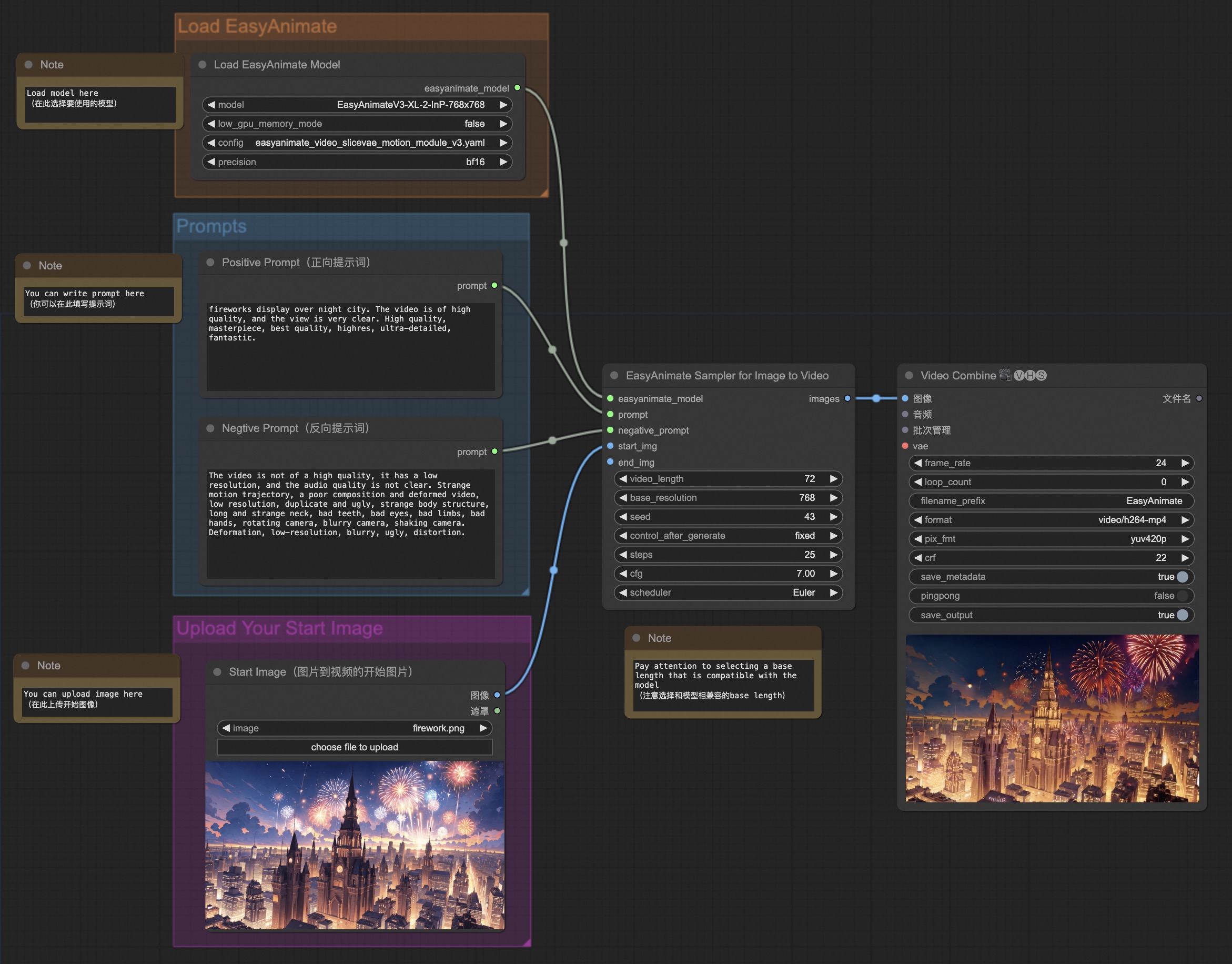
You can run the demo using following photo:

Image to video generation (high FPS w/ frame interpolation)
Our ui is shown as follow:
