
281 lines
22 KiB
Markdown
Executable File
281 lines
22 KiB
Markdown
Executable File
# ComfyUI VideoX-Fun
|
||
Easily use VideoX-Fun and Wan2.1-Fun inside ComfyUI!
|
||
|
||
- [Installation](#1-installation)
|
||
- [Node types](#node-types)
|
||
- [Example workflows](#example-workflows)
|
||
|
||
## Installation
|
||
### 1. ComfyUI Installation
|
||
|
||
#### Option 1: Install via ComfyUI Manager
|
||
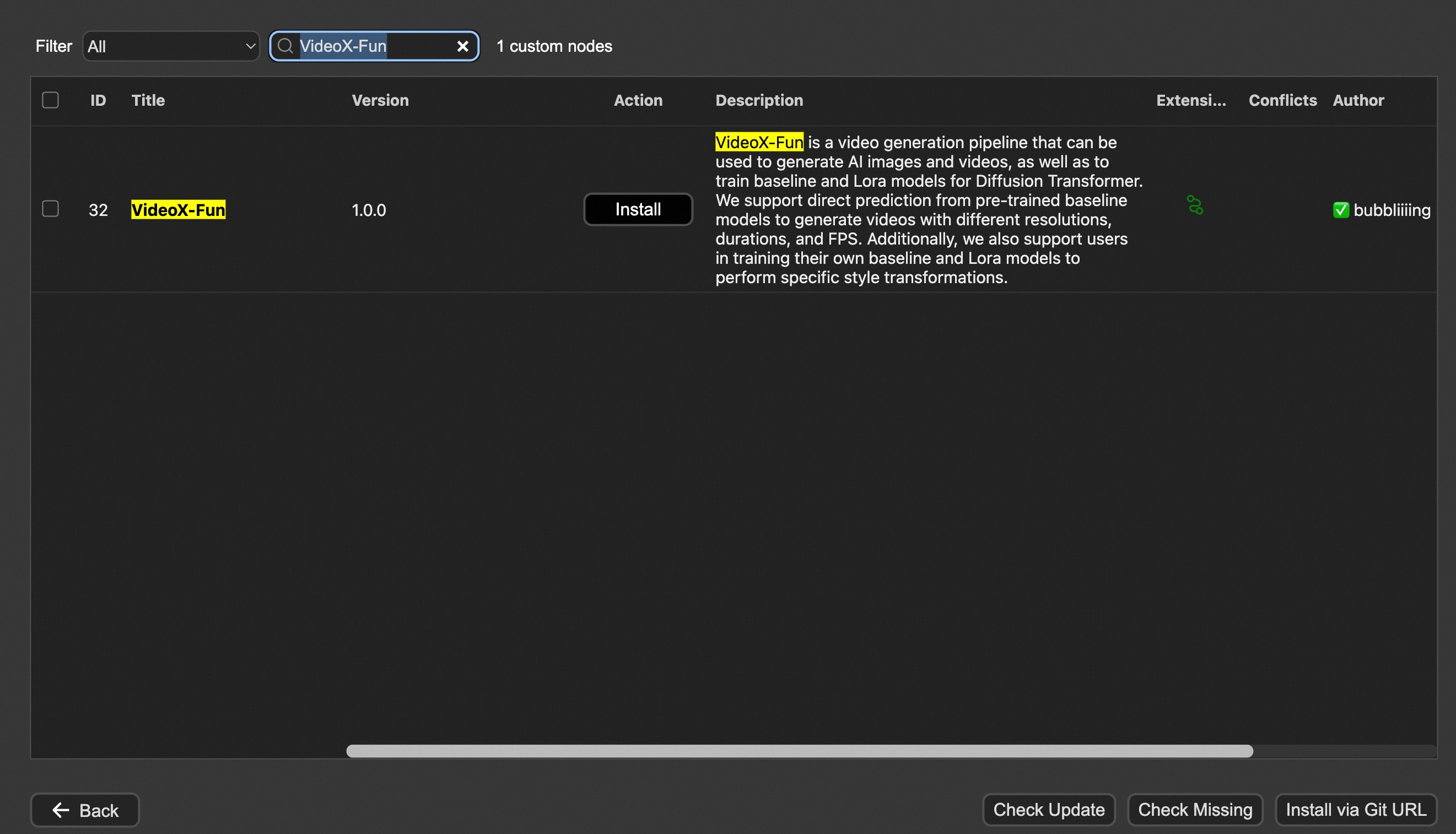
|
||
|
||
#### Option 2: Install manually
|
||
The VideoX-Fun repository needs to be placed at `ComfyUI/custom_nodes/VideoX-Fun/`.
|
||
|
||
```
|
||
cd ComfyUI/custom_nodes/
|
||
|
||
# Git clone the cogvideox_fun itself
|
||
git clone https://github.com/aigc-apps/VideoX-Fun.git
|
||
|
||
# Git clone the video outout node
|
||
git clone https://github.com/Kosinkadink/ComfyUI-VideoHelperSuite.git
|
||
|
||
# Git clone the KJ Nodes
|
||
git clone https://github.com/kijai/ComfyUI-KJNodes.git
|
||
|
||
cd VideoX-Fun/
|
||
python install.py
|
||
```
|
||
|
||
### 2. Download models
|
||
#### i、Full loading
|
||
Download full model into `ComfyUI/models/Fun_Models/`.
|
||
|
||
#### ii、Chunked loading
|
||
Put the transformer model weights to the `ComfyUI/models/diffusion_models/`.
|
||
Put the text encoer model weights to the `ComfyUI/models/text_encoders/`.
|
||
Put the clip vision model weights to the `ComfyUI/models/clip_vision/`.
|
||
Put the vae model weights to the `ComfyUI/models/vae/`.
|
||
Put the tokenizer files to the `ComfyUI/models/Fun_Models/` (For example: `ComfyUI/models/Fun_Models/umt5-xxl`).
|
||
|
||
### 3. (Optional) Download preprocess weights into `ComfyUI/custom_nodes/Fun_Models/Third_Party/`.
|
||
Except for the fun models' weights, if you want to use the control preprocess nodes, you can download the preprocess weights to `ComfyUI/custom_nodes/Fun_Models/Third_Party/`.
|
||
|
||
```
|
||
remote_onnx_det = "https://huggingface.co/yzd-v/DWPose/resolve/main/yolox_l.onnx"
|
||
remote_onnx_pose = "https://huggingface.co/yzd-v/DWPose/resolve/main/dw-ll_ucoco_384.onnx"
|
||
remote_zoe= "https://huggingface.co/lllyasviel/Annotators/resolve/main/ZoeD_M12_N.pt"
|
||
```
|
||
#### i. Wan2.2-Fun
|
||
| Name | Hugging Face | Model Scope | Description |
|
||
|--|--|--|--|--|
|
||
| Wan2.2-Fun-A14B-InP | 64.0 GB | [🤗Link](https://huggingface.co/alibaba-pai/Wan2.2-Fun-A14B-InP) | [😄Link](https://modelscope.cn/models/PAI/Wan2.2-Fun-A14B-InP) | Wan2.2-Fun-14B text-to-video generation weights, trained at multiple resolutions, supports start-end image prediction. |
|
||
| Wan2.2-Fun-A14B-Control | 64.0 GB | [🤗Link](https://huggingface.co/alibaba-pai/Wan2.2-Fun-A14B-Control) | [😄Link](https://modelscope.cn/models/PAI/Wan2.2-Fun-A14B-Control)| Wan2.2-Fun-14B video control weights, supporting various control conditions such as Canny, Depth, Pose, MLSD, etc., and trajectory control. Supports multi-resolution (512, 768, 1024) video prediction at 81 frames, trained at 16 frames per second, with multilingual prediction support. |
|
||
| Wan2.2-Fun-A14B-Control-Camera | 64.0 GB | [🤗Link](https://huggingface.co/alibaba-pai/Wan2.2-Fun-A14B-Control-Camera) | [😄Link](https://modelscope.cn/models/PAI/Wan2.2-Fun-A14B-Control-Camera)| Wan2.2-Fun-14B camera lens control weights. Supports multi-resolution (512, 768, 1024) video prediction, trained with 81 frames at 16 FPS, supports multilingual prediction. |
|
||
| Wan2.2-Fun-5B-InP | 23.0 GB | [🤗Link](https://huggingface.co/alibaba-pai/Wan2.2-Fun-5B-InP) | [😄Link](https://modelscope.cn/models/PAI/Wan2.2-Fun-5B-InP) | Wan2.2-Fun-5B text-to-video weights trained at 121 frames, 24 FPS, supporting first/last frame prediction. |
|
||
| Wan2.2-Fun-5B-Control | 23.0 GB | [🤗Link](https://huggingface.co/alibaba-pai/Wan2.2-Fun-5B-Control) | [😄Link](https://modelscope.cn/models/PAI/Wan2.2-Fun-5B-Control)| Wan2.2-Fun-5B video control weights, supporting control conditions like Canny, Depth, Pose, MLSD, and trajectory control. Trained at 121 frames, 24 FPS, with multilingual prediction support. |
|
||
| Wan2.2-Fun-5B-Control-Camera | 23.0 GB | [🤗Link](https://huggingface.co/alibaba-pai/Wan2.2-Fun-5B-Control-Camera) | [😄Link](https://modelscope.cn/models/PAI/Wan2.2-Fun-5B-Control-Camera)| Wan2.2-Fun-5B camera lens control weights. Trained at 121 frames, 24 FPS, with multilingual prediction support. |
|
||
|
||
#### ii. Wan2.2
|
||
|
||
| Name | Hugging Face | Model Scope | Description |
|
||
|--|--|--|--|
|
||
| Wan2.2-TI2V-5B | [🤗Link](https://huggingface.co/Wan-AI/Wan2.2-TI2V-5B) | [😄Link](https://www.modelscope.cn/models/Wan-AI/Wan2.2-TI2V-5B) | Wan2.2-5B Text-to-Video Weights |
|
||
| Wan2.2-T2V-14B | [🤗Link](https://huggingface.co/Wan-AI/Wan2.2-T2V-A14B) | [😄Link](https://www.modelscope.cn/models/Wan-AI/Wan2.2-T2V-A14B) | Wan2.2-14B Text-to-Video Weights |
|
||
| Wan2.2-I2V-A14B | [🤗Link](https://huggingface.co/Wan-AI/Wan2.2-I2V-A14B) | [😄Link](https://www.modelscope.cn/models/Wan-AI/Wan2.2-I2V-A14B) | Wan2.2-I2V-A14B Image-to-Video Weights |
|
||
|
||
#### iii. Wan2.1-Fun
|
||
|
||
V1.1:
|
||
| Name | Storage Size | Hugging Face | Model Scope | Description |
|
||
|------|--------------|--------------|-------------|-------------|
|
||
| Wan2.1-Fun-V1.1-1.3B-InP | 19.0 GB | [🤗Link](https://huggingface.co/alibaba-pai/Wan2.1-Fun-V1.1-1.3B-InP) | [😄Link](https://modelscope.cn/models/PAI/Wan2.1-Fun-V1.1-1.3B-InP) | Wan2.1-Fun-V1.1-1.3B text-to-video generation weights, trained at multiple resolutions, supports start-end image prediction. |
|
||
| Wan2.1-Fun-V1.1-14B-InP | 47.0 GB | [🤗Link](https://huggingface.co/alibaba-pai/Wan2.1-Fun-V1.1-14B-InP) | [😄Link](https://modelscope.cn/models/PAI/Wan2.1-Fun-V1.1-14B-InP) | Wan2.1-Fun-V1.1-14B text-to-video generation weights, trained at multiple resolutions, supports start-end image prediction. |
|
||
| Wan2.1-Fun-V1.1-1.3B-Control | 19.0 GB | [🤗Link](https://huggingface.co/alibaba-pai/Wan2.1-Fun-V1.1-1.3B-Control) | [😄Link](https://modelscope.cn/models/PAI/Wan2.1-Fun-V1.1-1.3B-Control) | Wan2.1-Fun-V1.1-1.3B video control weights support various control conditions such as Canny, Depth, Pose, MLSD, etc., supports reference image + control condition-based control, and trajectory control. Supports multi-resolution (512, 768, 1024) video prediction, trained with 81 frames at 16 FPS, supports multilingual prediction. |
|
||
| Wan2.1-Fun-V1.1-14B-Control | 47.0 GB | [🤗Link](https://huggingface.co/alibaba-pai/Wan2.1-Fun-V1.1-14B-Control) | [😄Link](https://modelscope.cn/models/PAI/Wan2.1-Fun-V1.1-14B-Control) | Wan2.1-Fun-V1.1-14B video control weights support various control conditions such as Canny, Depth, Pose, MLSD, etc., supports reference image + control condition-based control, and trajectory control. Supports multi-resolution (512, 768, 1024) video prediction, trained with 81 frames at 16 FPS, supports multilingual prediction. |
|
||
| Wan2.1-Fun-V1.1-1.3B-Control-Camera | 19.0 GB | [🤗Link](https://huggingface.co/alibaba-pai/Wan2.1-Fun-V1.1-1.3B-Control-Camera) | [😄Link](https://modelscope.cn/models/PAI/Wan2.1-Fun-V1.1-1.3B-Control-Camera) | Wan2.1-Fun-V1.1-1.3B camera lens control weights. Supports multi-resolution (512, 768, 1024) video prediction, trained with 81 frames at 16 FPS, supports multilingual prediction. |
|
||
| Wan2.1-Fun-V1.1-14B-Control-Camera | 47.0 GB | [🤗Link](https://huggingface.co/alibaba-pai/Wan2.1-Fun-V1.1-14B-Control-Camera) | [😄Link](https://modelscope.cn/models/PAI/Wan2.1-Fun-V1.1-14B-Control-Camera) | Wan2.1-Fun-V1.1-14B camera lens control weights. Supports multi-resolution (512, 768, 1024) video prediction, trained with 81 frames at 16 FPS, supports multilingual prediction. |
|
||
|
||
V1.0:
|
||
| Name | Storage Space | Hugging Face | Model Scope | Description |
|
||
|--|--|--|--|--|
|
||
| Wan2.1-Fun-1.3B-InP | 19.0 GB | [🤗Link](https://huggingface.co/alibaba-pai/Wan2.1-Fun-1.3B-InP) | [😄Link](https://modelscope.cn/models/PAI/Wan2.1-Fun-1.3B-InP) | Wan2.1-Fun-1.3B text-to-video weights, trained at multiple resolutions, supporting start and end frame prediction. |
|
||
| Wan2.1-Fun-14B-InP | 47.0 GB | [🤗Link](https://huggingface.co/alibaba-pai/Wan2.1-Fun-14B-InP) | [😄Link](https://modelscope.cn/models/PAI/Wan2.1-Fun-14B-InP) | Wan2.1-Fun-14B text-to-video weights, trained at multiple resolutions, supporting start and end frame prediction. |
|
||
| Wan2.1-Fun-1.3B-Control | 19.0 GB | [🤗Link](https://huggingface.co/alibaba-pai/Wan2.1-Fun-1.3B-Control) | [😄Link](https://modelscope.cn/models/PAI/Wan2.1-Fun-1.3B-Control) | Wan2.1-Fun-1.3B video control weights, supporting various control conditions such as Canny, Depth, Pose, MLSD, etc., and trajectory control. Supports multi-resolution (512, 768, 1024) video prediction at 81 frames, trained at 16 frames per second, with multilingual prediction support. |
|
||
| Wan2.1-Fun-14B-Control | 47.0 GB | [🤗Link](https://huggingface.co/alibaba-pai/Wan2.1-Fun-14B-Control) | [😄Link](https://modelscope.cn/models/PAI/Wan2.1-Fun-14B-Control) | Wan2.1-Fun-14B video control weights, supporting various control conditions such as Canny, Depth, Pose, MLSD, etc., and trajectory control. Supports multi-resolution (512, 768, 1024) video prediction at 81 frames, trained at 16 frames per second, with multilingual prediction support. |
|
||
|
||
#### iv. Wan2.1
|
||
|
||
| Name | Hugging Face | Model Scope | Description |
|
||
|--|--|--|--|
|
||
| Wan2.1-T2V-1.3B | [🤗Link](https://huggingface.co/alibaba-pai/Wan2.1-Fun-1.3B-InP) | [😄Link](https://www.modelscope.cn/models/Wan-AI/Wan2.1-T2V-1.3B) | Wanxiang 2.1-1.3B text-to-video weights |
|
||
| Wan2.1-T2V-14B | [🤗Link](https://huggingface.co/alibaba-pai/Wan2.1-Fun-1.3B-InP) | [😄Link](https://www.modelscope.cn/models/Wan-AI/Wan2.1-T2V-14B) | Wanxiang 2.1-14B text-to-video weights |
|
||
| Wan2.1-I2V-14B-480P | [🤗Link](https://huggingface.co/alibaba-pai/Wan2.1-Fun-14B-InP) | [😄Link](https://www.modelscope.cn/models/Wan-AI/Wan2.1-I2V-14B-480P) | Wanxiang 2.1-14B-480P image-to-video weights |
|
||
| Wan2.1-I2V-14B-720P| [🤗Link](https://huggingface.co/alibaba-pai/Wan2.1-Fun-14B-InP) | [😄Link](https://www.modelscope.cn/models/Wan-AI/Wan2.1-I2V-14B-720P) | Wanxiang 2.1-14B-720P image-to-video weights |
|
||
|
||
#### v. CogVideoX-Fun
|
||
|
||
V1.5:
|
||
|
||
| Name | Storage Space | Hugging Face | Model Scope | Description |
|
||
|--|--|--|--|--|
|
||
| CogVideoX-Fun-V1.5-5b-InP | 20.0 GB | [🤗Link](https://huggingface.co/alibaba-pai/CogVideoX-Fun-V1.5-5b-InP) | [😄Link](https://modelscope.cn/models/PAI/CogVideoX-Fun-V1.5-5b-InP) | Our official graph-generated video model is capable of predicting videos at multiple resolutions (512, 768, 1024) and has been trained on 85 frames at a rate of 8 frames per second. |
|
||
| CogVideoX-Fun-V1.5-Reward-LoRAs | - | [🤗Link](https://huggingface.co/alibaba-pai/CogVideoX-Fun-V1.1-Reward-LoRAs) | [😄Link](https://modelscope.cn/models/PAI/CogVideoX-Fun-V1.5-Reward-LoRAs) | The official reward backpropagation technology model optimizes the videos generated by CogVideoX-Fun-V1.5 to better match human preferences. |
|
||
|
||
V1.1:
|
||
|
||
| Name | Storage Space | Hugging Face | Model Scope | Description |
|
||
|--|--|--|--|--|
|
||
| CogVideoX-Fun-V1.1-2b-InP | 13.0 GB | [🤗Link](https://huggingface.co/alibaba-pai/CogVideoX-Fun-V1.1-2b-InP) | [😄Link](https://modelscope.cn/models/PAI/CogVideoX-Fun-V1.1-2b-InP) | Our official graph-generated video model is capable of predicting videos at multiple resolutions (512, 768, 1024, 1280) and has been trained on 49 frames at a rate of 8 frames per second. |
|
||
| CogVideoX-Fun-V1.1-5b-InP | 20.0 GB | [🤗Link](https://huggingface.co/alibaba-pai/CogVideoX-Fun-V1.1-5b-InP) | [😄Link](https://modelscope.cn/models/PAI/CogVideoX-Fun-V1.1-5b-InP) | Our official graph-generated video model is capable of predicting videos at multiple resolutions (512, 768, 1024, 1280) and has been trained on 49 frames at a rate of 8 frames per second. Noise has been added to the reference image, and the amplitude of motion is greater compared to V1.0. |
|
||
| CogVideoX-Fun-V1.1-2b-Pose | 13.0 GB | [🤗Link](https://huggingface.co/alibaba-pai/CogVideoX-Fun-V1.1-2b-Pose) | [😄Link](https://modelscope.cn/models/PAI/CogVideoX-Fun-V1.1-2b-Pose) | Our official pose-control video model is capable of predicting videos at multiple resolutions (512, 768, 1024, 1280) and has been trained on 49 frames at a rate of 8 frames per second.|
|
||
| CogVideoX-Fun-V1.1-2b-Control | 13.0 GB | [🤗Link](https://huggingface.co/alibaba-pai/CogVideoX-Fun-V1.1-2b-Control) | [😄Link](https://modelscope.cn/models/PAI/CogVideoX-Fun-V1.1-2b-Control) | Our official control video model is capable of predicting videos at multiple resolutions (512, 768, 1024, 1280) and has been trained on 49 frames at a rate of 8 frames per second. Supporting various control conditions such as Canny, Depth, Pose, MLSD, etc.|
|
||
| CogVideoX-Fun-V1.1-5b-Pose | 20.0 GB | [🤗Link](https://huggingface.co/alibaba-pai/CogVideoX-Fun-V1.1-5b-Pose) | [😄Link](https://modelscope.cn/models/PAI/CogVideoX-Fun-V1.1-5b-Pose) | Our official pose-control video model is capable of predicting videos at multiple resolutions (512, 768, 1024, 1280) and has been trained on 49 frames at a rate of 8 frames per second.|
|
||
| CogVideoX-Fun-V1.1-5b-Control | 20.0 GB | [🤗Link](https://huggingface.co/alibaba-pai/CogVideoX-Fun-V1.1-5b-Control) | [😄Link](https://modelscope.cn/models/PAI/CogVideoX-Fun-V1.1-5b-Control) | Our official control video model is capable of predicting videos at multiple resolutions (512, 768, 1024, 1280) and has been trained on 49 frames at a rate of 8 frames per second. Supporting various control conditions such as Canny, Depth, Pose, MLSD, etc.|
|
||
| CogVideoX-Fun-V1.1-Reward-LoRAs | - | [🤗Link](https://huggingface.co/alibaba-pai/CogVideoX-Fun-V1.1-Reward-LoRAs) | [😄Link](https://modelscope.cn/models/PAI/CogVideoX-Fun-V1.1-Reward-LoRAs) | The official reward backpropagation technology model optimizes the videos generated by CogVideoX-Fun-V1.1 to better match human preferences. |
|
||
|
||
<details>
|
||
<summary>(Obsolete) V1.0:</summary>
|
||
|
||
| Name | Storage Space | Hugging Face | Model Scope | Description |
|
||
|--|--|--|--|--|
|
||
| CogVideoX-Fun-2b-InP | 13.0 GB | [🤗Link](https://huggingface.co/alibaba-pai/CogVideoX-Fun-2b-InP) | [😄Link](https://modelscope.cn/models/PAI/CogVideoX-Fun-2b-InP) | Our official graph-generated video model is capable of predicting videos at multiple resolutions (512, 768, 1024, 1280) and has been trained on 49 frames at a rate of 8 frames per second. |
|
||
| CogVideoX-Fun-5b-InP | 20.0 GB | [🤗Link](https://huggingface.co/alibaba-pai/CogVideoX-Fun-5b-InP)| [😄Link](https://modelscope.cn/models/PAI/CogVideoX-Fun-5b-InP)| Our official graph-generated video model is capable of predicting videos at multiple resolutions (512, 768, 1024, 1280) and has been trained on 49 frames at a rate of 8 frames per second. |
|
||
</details>
|
||
|
||
### 3. (Optional) Download Lora models into `ComfyUI/models/loras/fun_models/`
|
||
If you want to use lora in CogVideoX-Fun, please put the lora to `ComfyUI/models/loras/fun_models/`.
|
||
|
||
## Node types
|
||
### 1. Wan-Fun
|
||
- **LoadWanFunModel**
|
||
- Loads the Wan-Fun Model.
|
||
- **LoadWanFunLora**
|
||
- Write the prompt for Wan-Fun model
|
||
- **WanFunInpaintSampler**
|
||
- Wan-Fun Sampler for Image to Video
|
||
- **WanFunT2VSampler**
|
||
- Wan-Fun Sampler for Text to Video
|
||
|
||
### 2. Wan
|
||
- **LoadWanModel**
|
||
- Loads the Wan-Fun Model.
|
||
- **LoadWanLora**
|
||
- Write the prompt for Wan-Fun model
|
||
- **WanI2VSampler**
|
||
- Wan-Fun Sampler for Image to Video
|
||
- **WanT2VSampler**
|
||
- Wan-Fun Sampler for Text to Video
|
||
|
||
### 3. CogVideoX-Fun
|
||
- **LoadCogVideoXFunModel**
|
||
- Loads the CogVideoX-Fun model
|
||
- **FunTextBox**
|
||
- Write the prompt for CogVideoX-Fun model
|
||
- **CogVideoXFunInpaintSampler**
|
||
- CogVideoX-Fun Sampler for Image to Video
|
||
- **CogVideoXFunT2VSampler**
|
||
- CogVideoX-Fun Sampler for Text to Video
|
||
- **CogVideoXFunV2VSampler**
|
||
- CogVideoX-Fun Sampler for Video to Video
|
||
|
||
## Example workflows
|
||
### 1. Wan-Fun
|
||
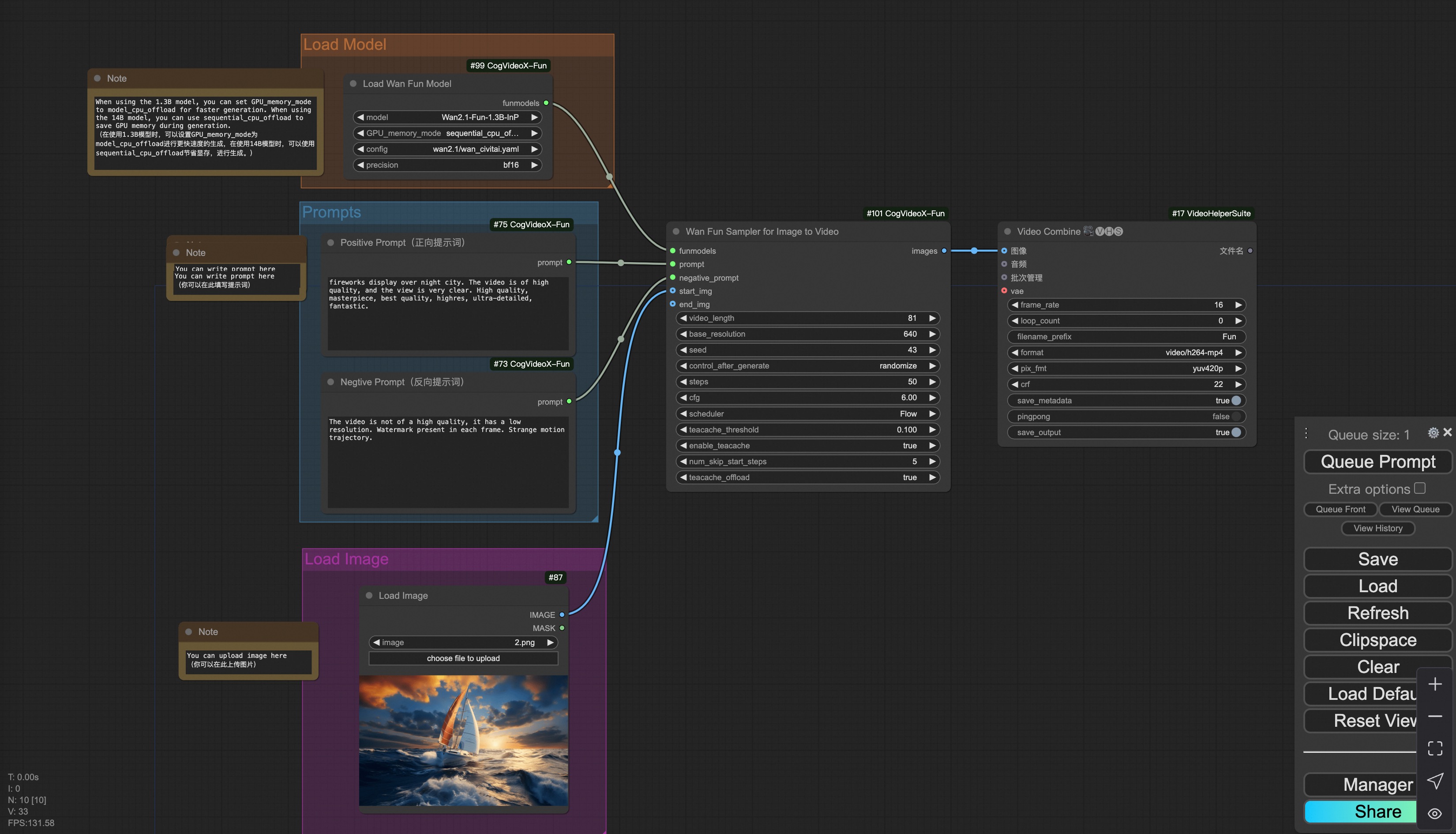
#### i. Image to video generation
|
||
[Download link](https://pai-aigc-photog.oss-cn-hangzhou.aliyuncs.com/wan_fun/asset/v1.1/wan2.1_fun_workflow_i2v.json) for wan-fun.
|
||
|
||
Our ui is shown as follow:
|
||
|
||
|
||
You can run the demo using following photo:
|
||

|
||
|
||
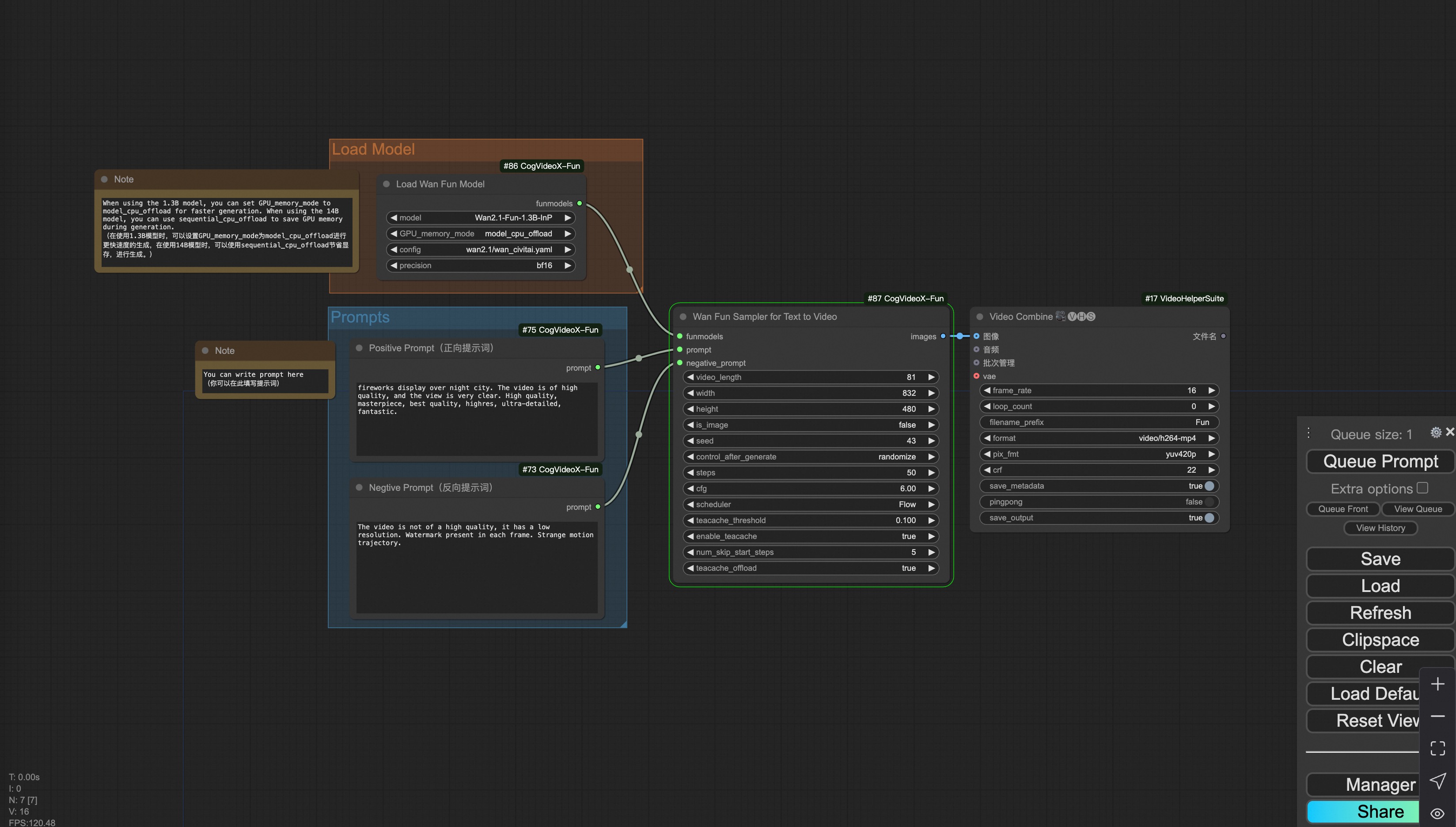
#### ii. Text to video generation
|
||
[Download link](https://pai-aigc-photog.oss-cn-hangzhou.aliyuncs.com/wan_fun/asset/v1.1/wan2.1_fun_workflow_t2v.json) for wan-fun.
|
||
|
||
|
||
|
||
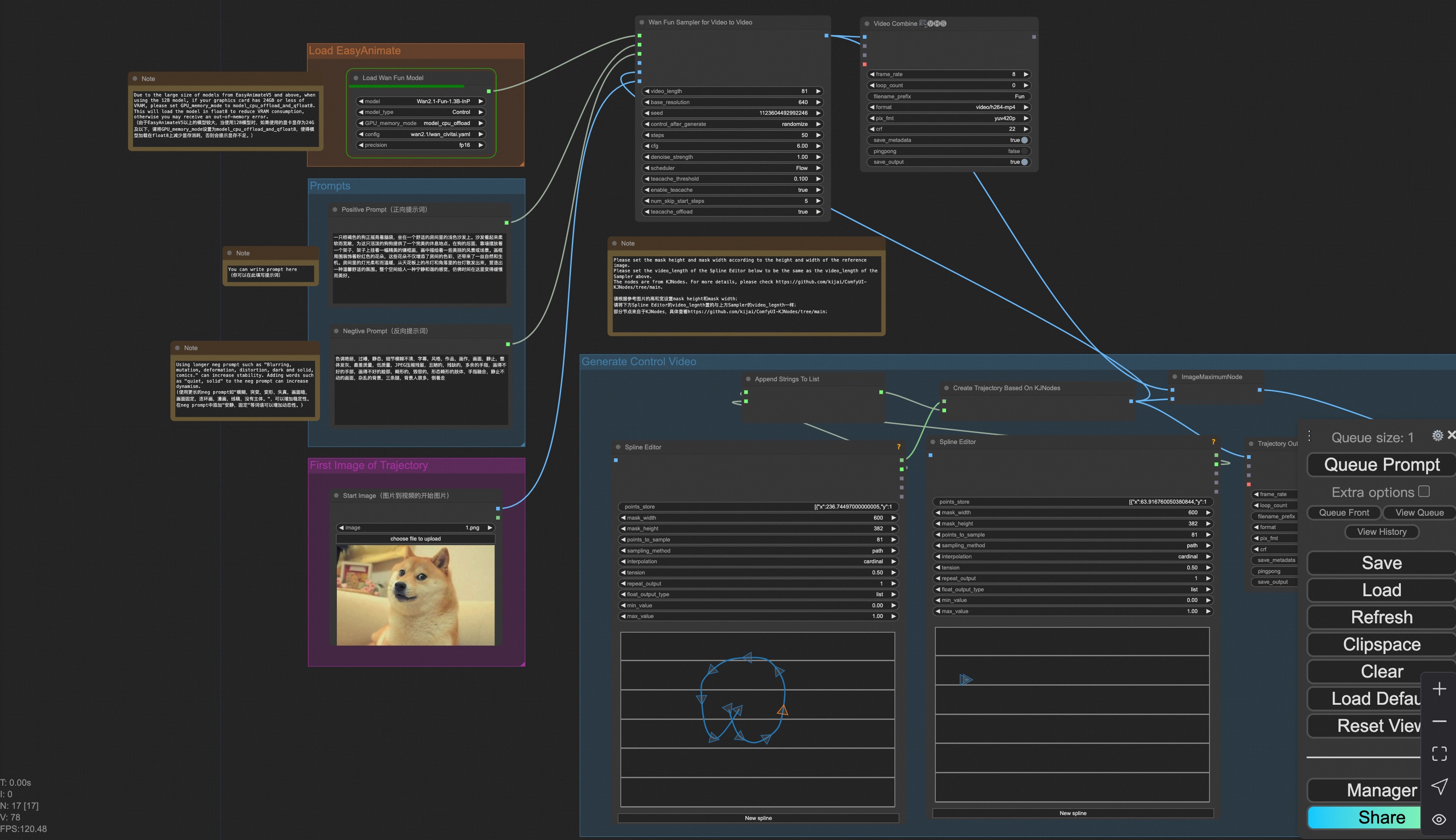
### iii. Trajectory Control Video Generation
|
||
Our user interface is shown as follows, this is the [json](https://pai-aigc-photog.oss-cn-hangzhou.aliyuncs.com/wan_fun/asset/v1.1/wan2.1_fun_workflow_control_trajectory.json):
|
||
|
||
|
||
|
||
You can run a demo using the following photo:
|
||
|
||

|
||
|
||
### iv. Control Video Generation
|
||
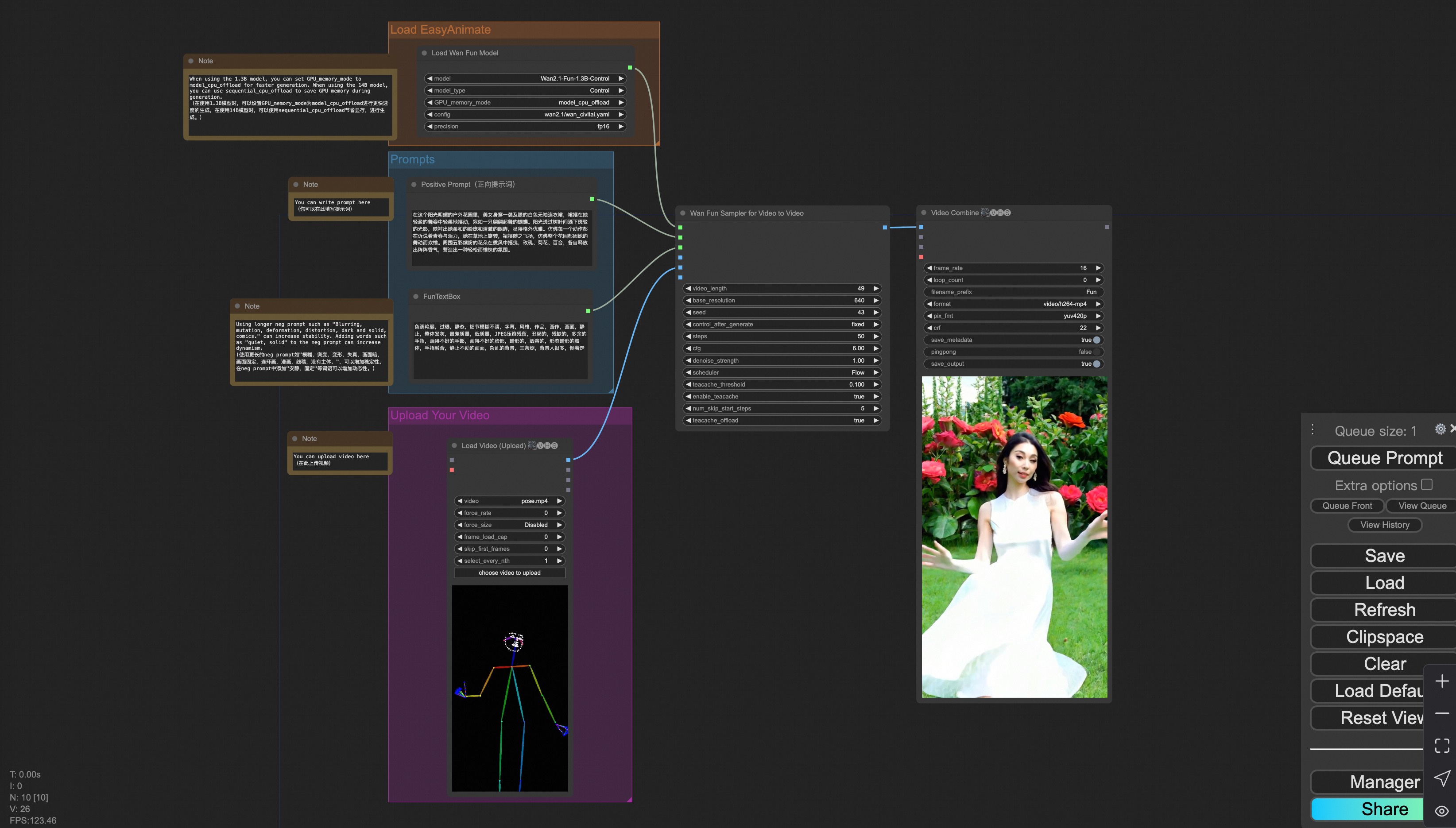
Our user interface is shown as follows, this is the [json](https://pai-aigc-photog.oss-cn-hangzhou.aliyuncs.com/wan_fun/asset/v1.1/wan2.1_fun_workflow_v2v_control.json):
|
||
|
||
To facilitate usage, we have added several JSON configurations that automatically process input videos into the necessary control videos. These include [canny processing](https://pai-aigc-photog.oss-cn-hangzhou.aliyuncs.com/wan_fun/asset/v1.1/wan2.1_fun_workflow_v2v_control_canny.json), [pose processing](https://pai-aigc-photog.oss-cn-hangzhou.aliyuncs.com/wan_fun/asset/v1.1/wan2.1_fun_workflow_v2v_control_pose.json), and [depth processing](https://pai-aigc-photog.oss-cn-hangzhou.aliyuncs.com/wan_fun/asset/v1.1/wan2.1_fun_workflow_v2v_control_depth.json).
|
||
|
||
|
||
|
||
You can run a demo using the following video:
|
||
|
||
[Demo Video](https://pai-aigc-photog.oss-cn-hangzhou.aliyuncs.com/cogvideox_fun/asset/v1.1/pose.mp4)
|
||
|
||
### v. Control + Ref Video Generation
|
||
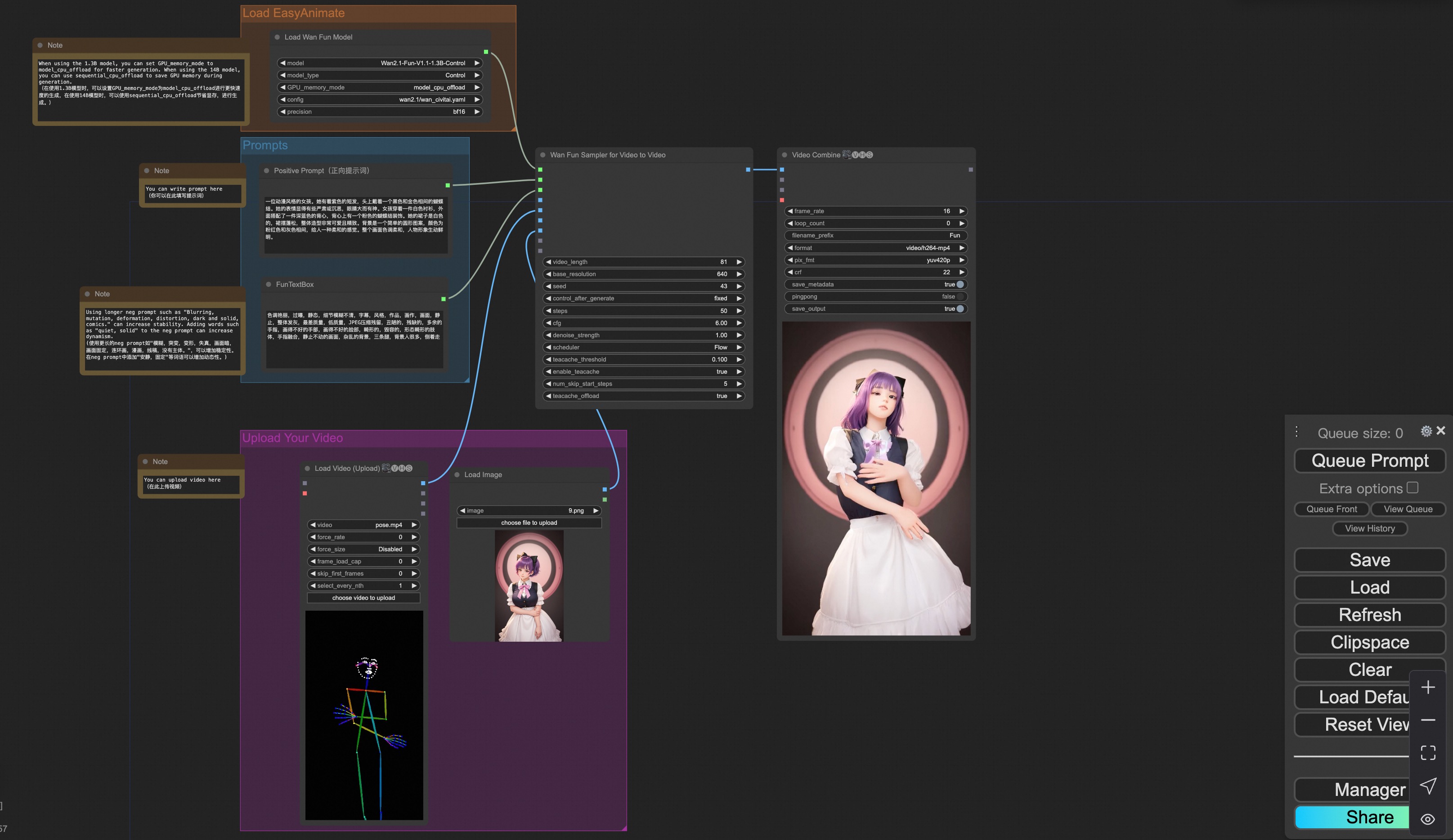
Our user interface is shown as follows, this is the [json](https://pai-aigc-photog.oss-cn-hangzhou.aliyuncs.com/wan_fun/asset/v1.1/wan2.1_fun_workflow_v2v_control_ref.json):
|
||
|
||
To facilitate usage, we have added several JSON configurations that automatically process input videos into the necessary control videos. These include [pose processing](https://pai-aigc-photog.oss-cn-hangzhou.aliyuncs.com/wan_fun/asset/v1.1/wan2.1_fun_workflow_v2v_control_pose_ref.json), and [depth processing](https://pai-aigc-photog.oss-cn-hangzhou.aliyuncs.com/wan_fun/asset/v1.1/wan2.1_fun_workflow_v2v_control_depth_ref.json).
|
||
|
||
|
||
|
||
You can run a demo using the following video:
|
||
|
||
[Demo Image](https://pai-aigc-photog.oss-cn-hangzhou.aliyuncs.com/wan_fun/asset/v1.1/6.png)
|
||
|
||
[Demo Video](https://pai-aigc-photog.oss-cn-hangzhou.aliyuncs.com/wan_fun/asset/v1.1/pose.mp4)
|
||
|
||
### vi. Camera Control Video Generation
|
||
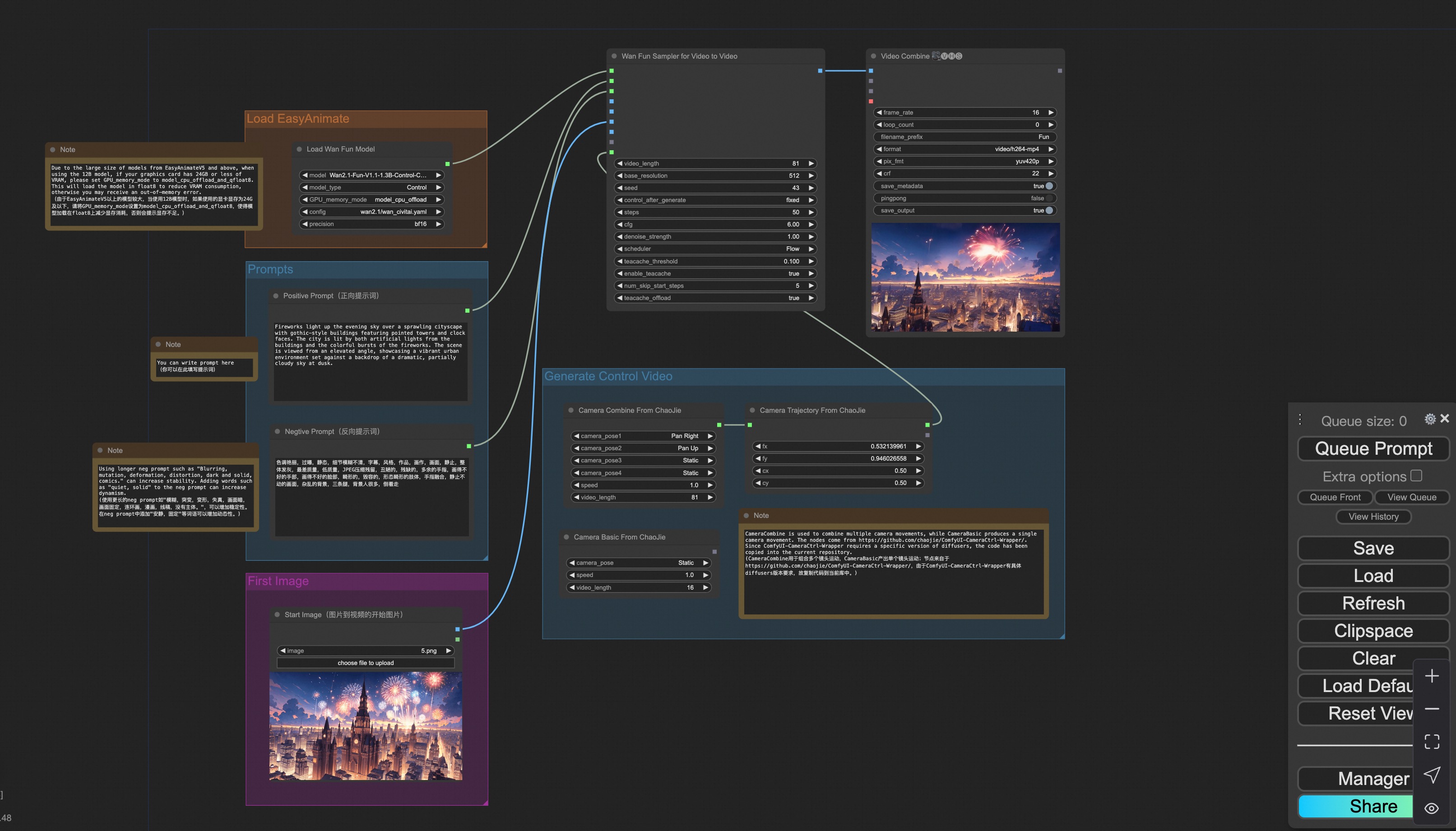
Our user interface is shown as follows, this is the [json](https://pai-aigc-photog.oss-cn-hangzhou.aliyuncs.com/wan_fun/asset/v1.1/wan2.1_fun_workflow_control_camera.json):
|
||
|
||
|
||
|
||
You can run a demo using the following photo:
|
||
|
||

|
||
|
||
### 2. Wan
|
||
#### i. Image to video generation
|
||
[Download link](https://pai-aigc-photog.oss-cn-hangzhou.aliyuncs.com/wan/asset/v1.0/wan2.1_workflow_i2v.json) for wan-fun.
|
||
|
||
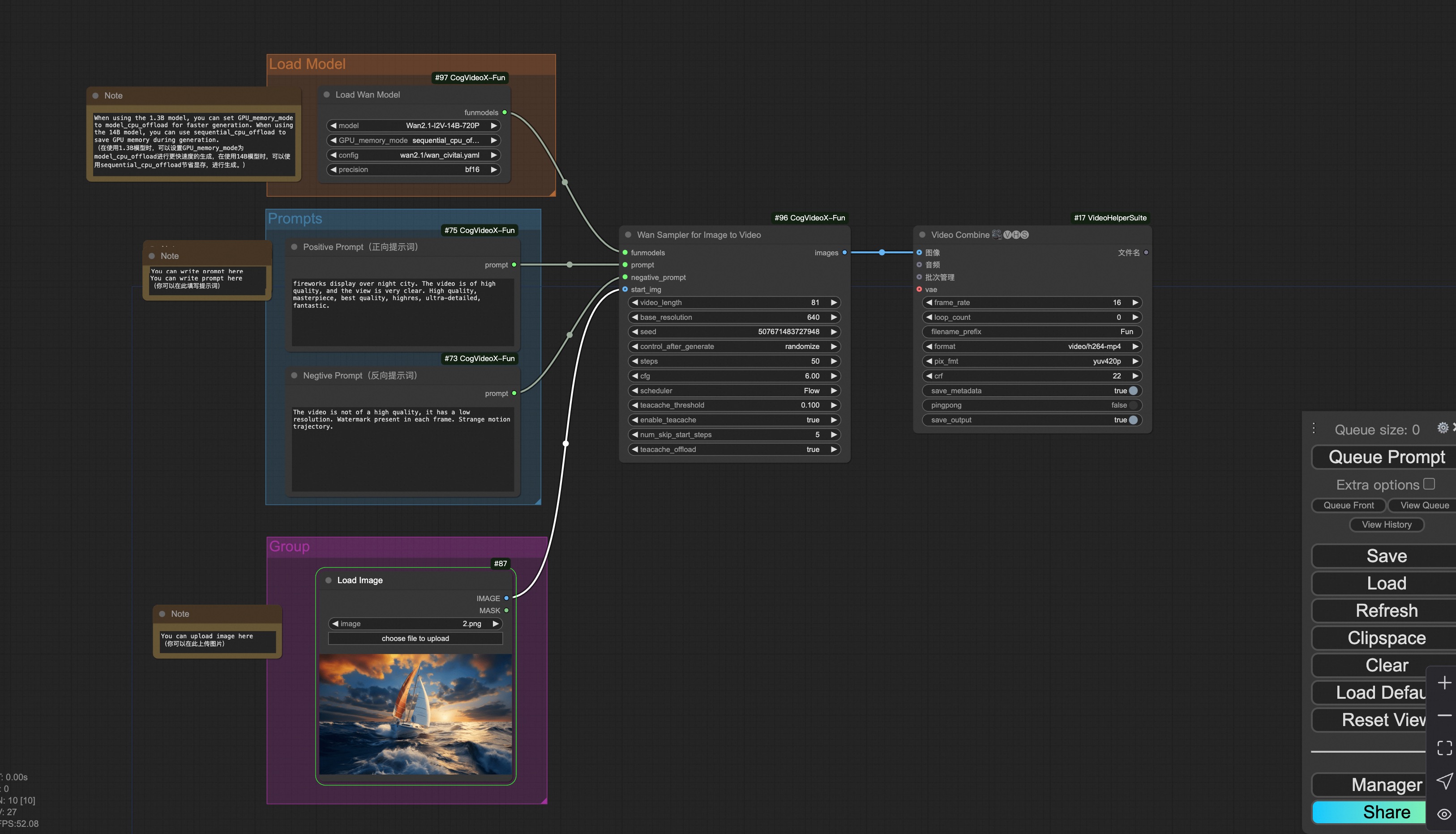
Our ui is shown as follow:
|
||
|
||
|
||
You can run the demo using following photo:
|
||

|
||
|
||
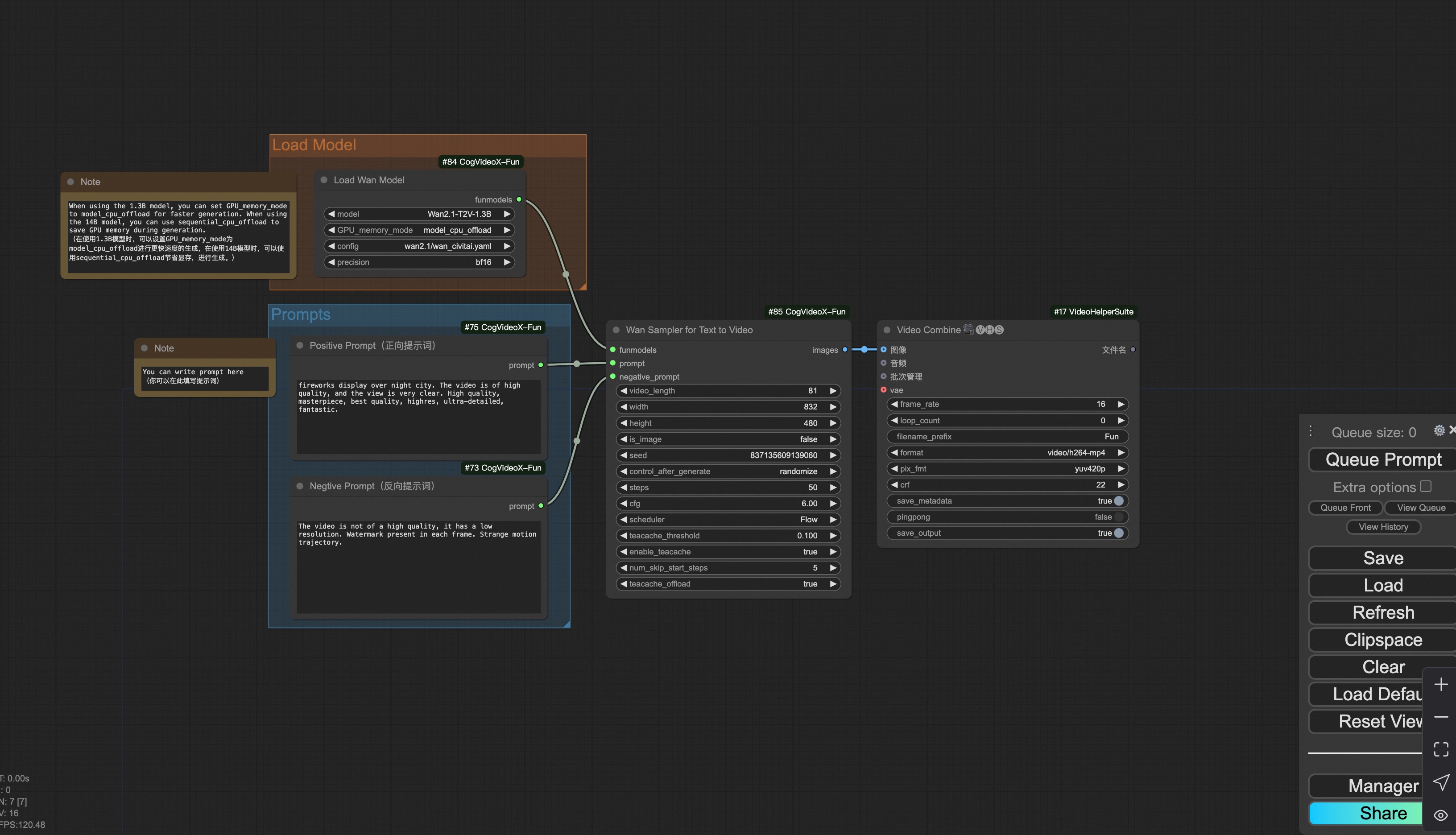
#### ii. Text to video generation
|
||
[Download link](https://pai-aigc-photog.oss-cn-hangzhou.aliyuncs.com/wan/asset/v1.0/wan2.1_workflow_t2v.json) for wan-fun.
|
||
|
||
|
||
|
||
### 3. CogVideoX-Fun
|
||
#### i. Video to video generation
|
||
[Download link](https://pai-aigc-photog.oss-cn-hangzhou.aliyuncs.com/cogvideox_fun/asset/v1.5/cogvideoxfunv1.5_workflow_v2v.json) for v1.5.
|
||
|
||
[Download link](https://pai-aigc-photog.oss-cn-hangzhou.aliyuncs.com/cogvideox_fun/asset/v1.1/cogvideoxfunv1.1_workflow_v2v.json) for v1.1.
|
||
|
||
Our ui is shown as follow:
|
||

|
||
|
||
You can run the demo using following video:
|
||
[demo video](https://pai-aigc-photog.oss-cn-hangzhou.aliyuncs.com/cogvideox_fun/asset/v1/play_guitar.mp4)
|
||
|
||
#### ii. Image to video generation
|
||
[Download link](https://pai-aigc-photog.oss-cn-hangzhou.aliyuncs.com/cogvideox_fun/asset/v1.5/cogvideoxfunv1.5_workflow_i2v.json) for v1.5.
|
||
|
||
[Download link](https://pai-aigc-photog.oss-cn-hangzhou.aliyuncs.com/cogvideox_fun/asset/v1.1/cogvideoxfunv1.1_workflow_i2v.json) for v1.1.
|
||
|
||
Our ui is shown as follow:
|
||

|
||
|
||
You can run the demo using following photo:
|
||

|
||
|
||
#### iii. Text to video generation
|
||
[Download link](https://pai-aigc-photog.oss-cn-hangzhou.aliyuncs.com/cogvideox_fun/asset/v1.5/cogvideoxfunv1.5_workflow_t2v.json) for v1.5.
|
||
|
||
[Download link](https://pai-aigc-photog.oss-cn-hangzhou.aliyuncs.com/cogvideox_fun/asset/v1.1/cogvideoxfunv1.1_workflow_t2v.json) for v1.1.
|
||
|
||

|
||
|
||
#### iv. Control video generation
|
||
[Download link](https://pai-aigc-photog.oss-cn-hangzhou.aliyuncs.com/cogvideox_fun/asset/v1.1/cogvideoxfunv1.1_workflow_v2v_control.json) for v1.1.
|
||
|
||
Our ui is shown as follow:
|
||

|
||
|
||
You can run the demo using following video:
|
||
[demo video](https://pai-aigc-photog.oss-cn-hangzhou.aliyuncs.com/cogvideox_fun/asset/v1.1/pose.mp4)
|
||
|
||
#### v. Lora usage.
|
||
[Download link](https://pai-aigc-photog.oss-cn-hangzhou.aliyuncs.com/cogvideox_fun/asset/v1.1/cogvideoxfunv1.1_workflow_t2v_lora.json) for v1.1.
|
||
|
||
Our ui is shown as follow:
|
||
 |