 bemoregtandClaude Sonnet 4.6
26184e04a1
bemoregtandClaude Sonnet 4.6
26184e04a1
Previous soft mode (morph_flag=False) used linear phase normalization
which spread noise across the full brightness range.

abs(phase) makes edges bright and flat regions dark, matching the
paper's Fig.4(C) style continuous edge map. Same fix applied to
phase_image output.

Co-Authored-By: Claude Sonnet 4.6 <noreply@anthropic.com>


ComfyUI Phase Stretch Transform Node
A ComfyUI custom node that applies the Phase Stretch Transform (PST) to images. PST is a physics-inspired edge detection algorithm that enhances features by simulating wave propagation through a dispersive medium.
Installation
- Clone or copy this folder into your ComfyUI
custom_nodesdirectory:ComfyUI/custom_nodes/Comfyui_PST/ - Install dependencies:
pip install numpy scipy - Restart ComfyUI.
The node will appear under image → processing in the node menu.
Node: Phase Stretch Transform
Inputs
| Name | Type | Default | Description |
|---|---|---|---|
image |
IMAGE | — | Input image (RGB or grayscale) |
lpf_sigma |
FLOAT | 0.21 | Gaussian low-pass filter sigma applied before PST. Higher values smooth the image more, reducing noise sensitivity. |
phase_strength |
FLOAT | 0.48 | PST phase strength (S). Controls how strongly phase variations are amplified. |
warp_strength |
FLOAT | 12.14 | PST warp strength (W). Controls the frequency-domain warping; higher values emphasise finer edges. |
min_thresh |
FLOAT | -1.0 | Lower phase threshold for binary edge extraction. |
max_thresh |
FLOAT | 0.003 | Upper phase threshold for binary edge extraction. |
morph_flag |
BOOLEAN | True | When enabled, applies morphological closing and opening to clean up the binary edge map. When disabled, outputs a soft (normalised) phase image instead. |
output_mode |
COMBO | grayscale | grayscale – white edges on black background. rgb_overlay – edges drawn in red over the original image. |
Outputs
| Name | Type | Description |
|---|---|---|
edge_image |
IMAGE | Processed edge map (binary or overlay depending on output_mode). |
phase_image |
IMAGE | Raw PST phase output normalised to 0–1, useful for further processing or visualisation. |
Algorithm
PST processes each image through the following steps:
- Convert input to grayscale (luminance weights: R×0.2126, G×0.7152, B×0.0722).
- Compute the 2D FFT and shift to centre zero frequency.
- Apply a Gaussian low-pass filter in the frequency domain.
- Apply the PST kernel — a warped phase ramp:
K(r) = \frac{W \cdot r}{1 + W \cdot r} \cdot e^{-j \, S \cdot r \, / \, (1 + r)}
where r is the radial frequency and W, S are the warp and phase strength parameters.
- Compute the inverse FFT.
- Extract the phase angle of the complex result.
- Threshold the phase to produce a binary edge map, then apply morphological clean-up (if
morph_flagis enabled).
Parameter Tuning Guide
- More edges / finer detail — increase
phase_strengthorwarp_strength. - Fewer false edges / less noise — increase
lpf_sigmaor tighten the threshold range (min_threshcloser to 0,max_threshcloser to 0). - Soft/continuous edge map — disable
morph_flag; use thephase_imageoutput. - Overlay on original — set
output_modetorgb_overlay.
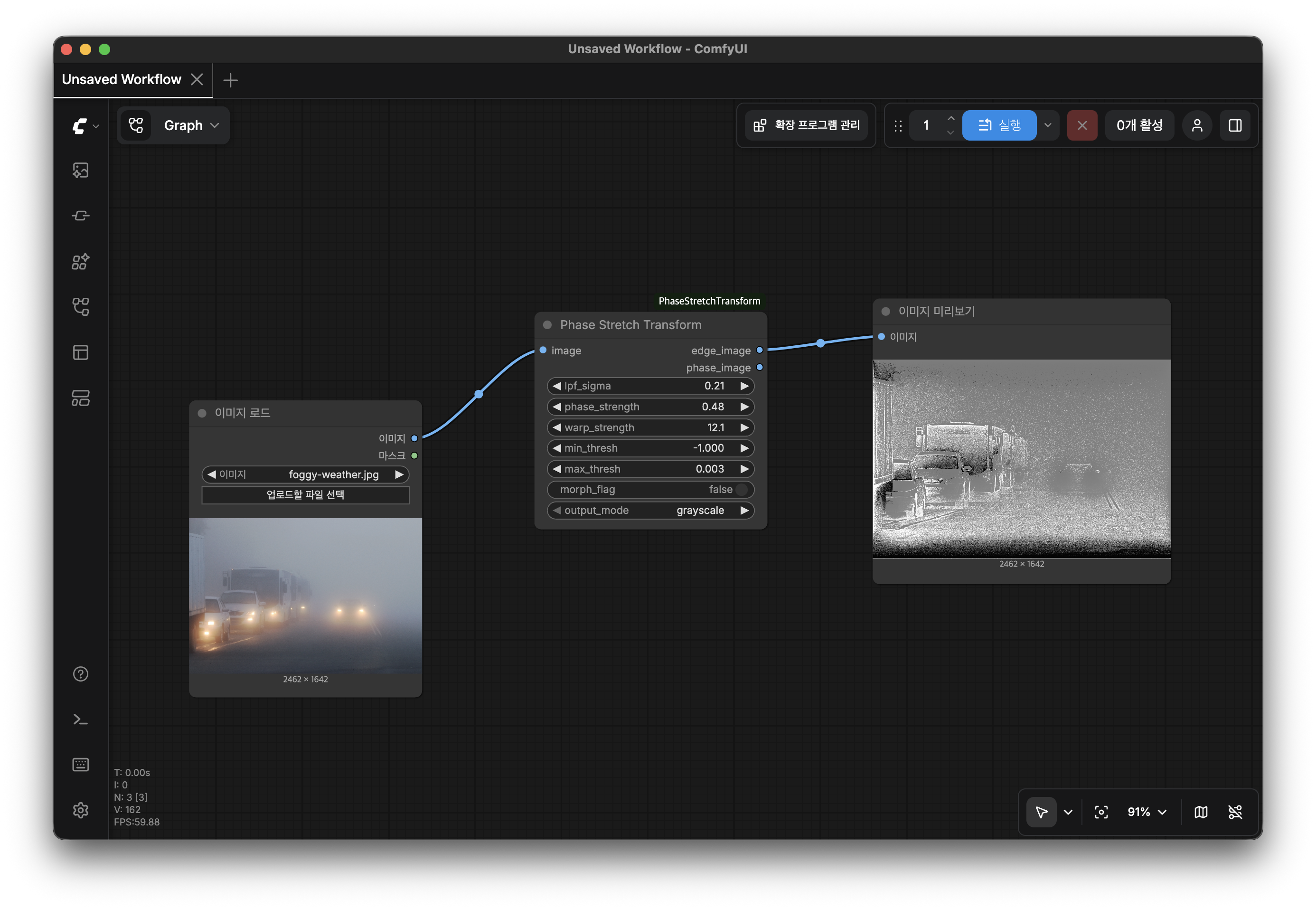
Example Workflow
Load Image → Phase Stretch Transform → Preview Image
                       ↓
              (edge_image or phase_image)
Screenshots

Requirements
- Python ≥ 3.10
- numpy
- scipy
- torch (provided by ComfyUI)
License
MIT