English | 日本語 | 繁体中文
- Top
- Node / Image Node / Text Node / XYPlot Node / Float Palet
- Workflow
# Node
## :tomato: Sampler Nodes
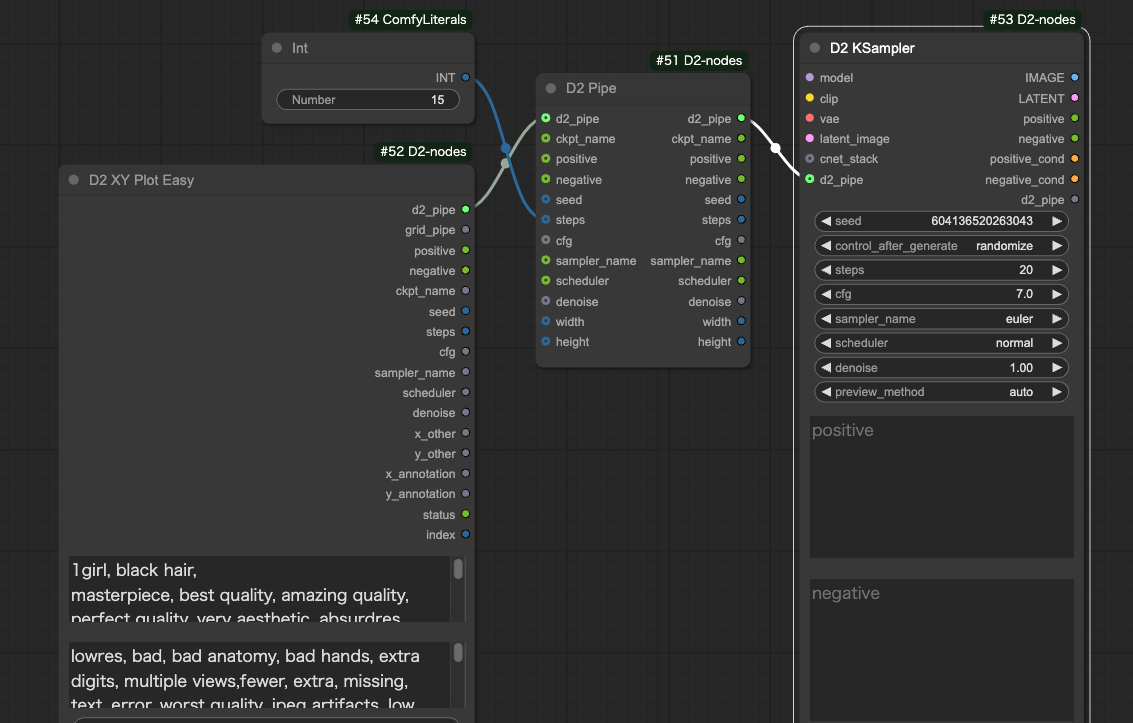
### D2 KSampler / D2 KSampler(Advanced)
- KSampler that can input prompts as STRING
#### Input
- `cnet_stack`
- For connecting to `D2 Controlnet Loader`
- `model` / `clip` / `vae` / ..etc
- Same as standard KSampler
- `negative` / `positive`
- Prompts in STRING format
#### Output
- `IMAGE`
- Image output
- `positive` / `negative`
- Input passthrough
---
### D2 Pipe
- A node for modifying and extracting the contents of `d2_pipe`
- `d2_pipe` is used to pass parameters collectively in nodes such as D2 XY Plot Easy, D2 KSampler, and D2 Send Eagle
---
## :tomato: Loader Node
### D2 Checkpoint Loader
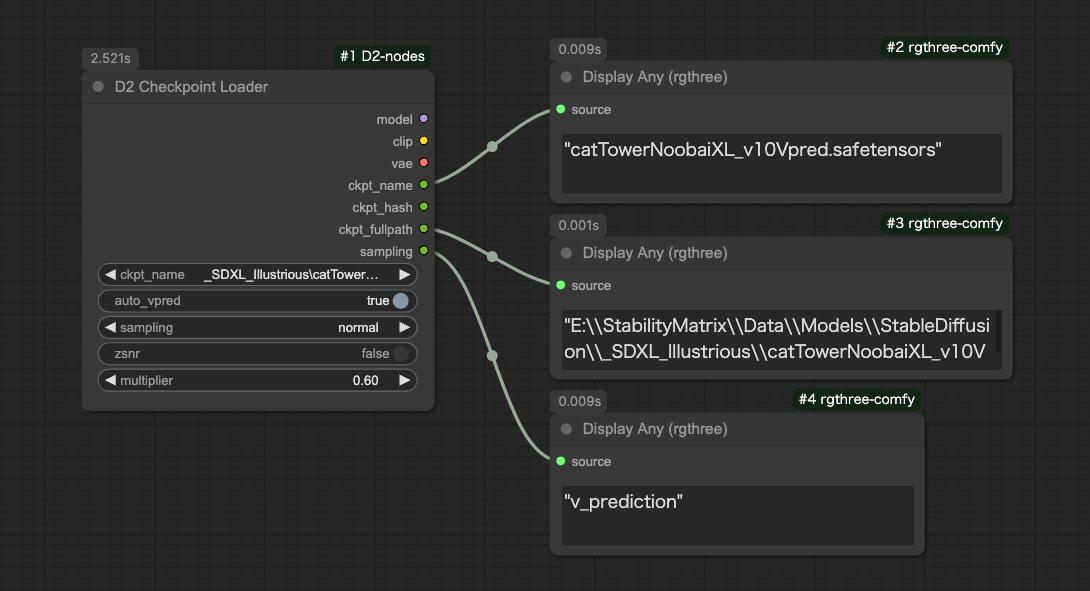
- A Checkpoint Loader that outputs the full path of model files
- Can automatically apply v_prediction settings when the filename contains "vpred"
#### Input
- `ckpt_name`
- Checkpoint name
- `auto_vpred`
- `true`: Automatically applies v_prediction settings if the filename contains "vpred"
- `sampling` / `zsnr`
- Same settings as ModelSamplingDiscrete (details unknown)
- `multiplier`
- Same settings as RescaleCFG (details unknown)
#### Output
- `model` / `clip` / `vae`
- Same as the conventional CheckpointLoader.
- `ckpt_name` / `ckpt_hash` / `ckpt_fullpath`
- Checkpoint name, hash, and full path.
---
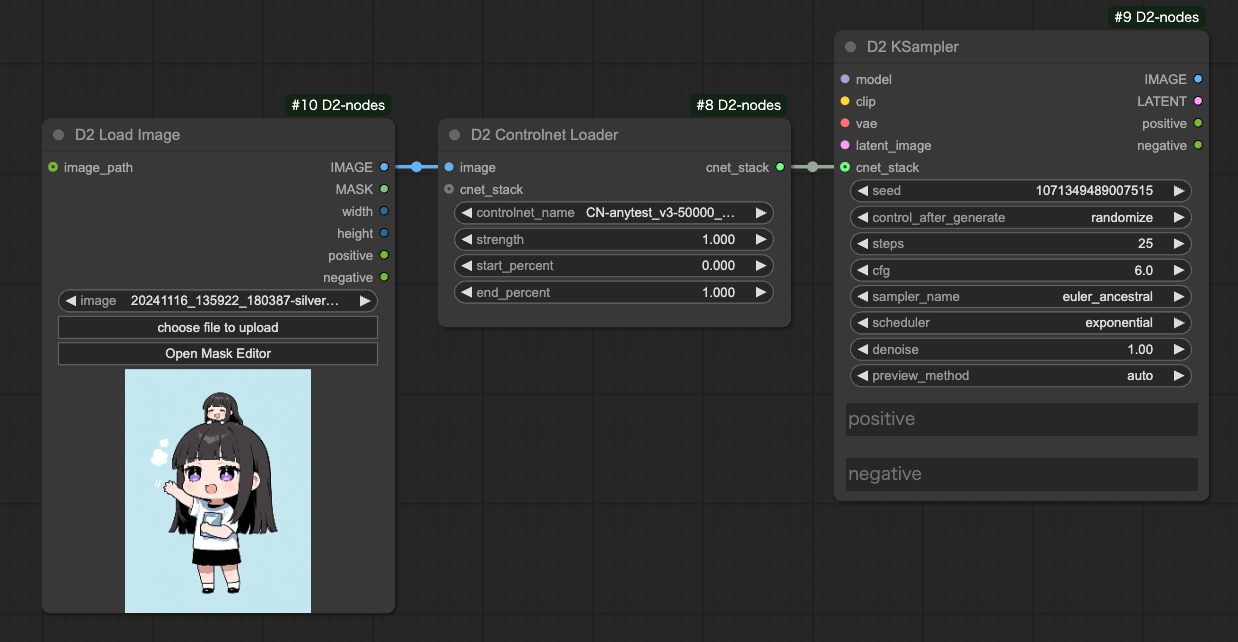
### D2 Controlnet Loader
- Controlnet Loader that creates simple workflows when connected to `D2 KSampler`
#### Input
- `cnet_stack`
- For connecting to `D2 Controlnet Loader`
#### Output
- `cnet_stack`
- For connecting to `D2 KSampler` or `D2 Controlnet Loader`
---
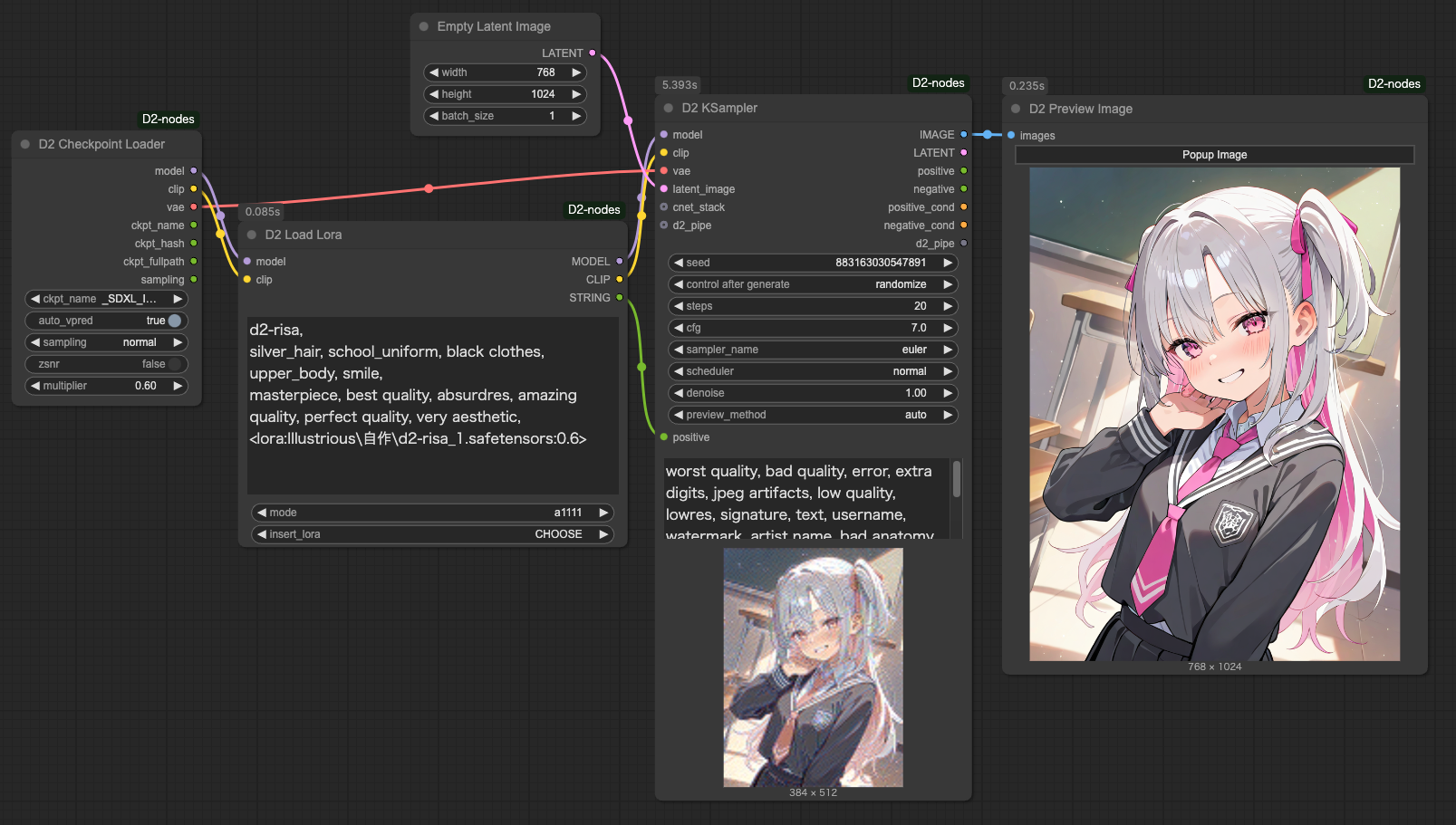
### D2 Load Lora
- A Lora loader that allows specifying Lora through text
- model_weight / clip_weight can also be specified
- There are two modes: one that uses the same format as StableDiffusion webui A1111 (a1111), and one that simply lists LoRA names (simple)
- For specific usage, refer to the sample workflow
#### Input
- `mode`
- `a1111`: Mode that allows using the same format as StableDiffusion webui A1111
- `simple`: Simple mode that just lists LoRA names. In this mode, the `STRING` output is not used
#### Format differences based on mode
**mode: a1111**
Expressed as ``.
```
```
**mode: simple**
No decorations needed before or after
```
lora_name:1
```
#### How to specify Weight
Write in the format `{lora_name}:{model_weight}:{clip_weight}`.
```
foo:0.8:1
```
If clip_weight is not specified, the same value as model_weight is applied.
The following have the same meaning.
```
foo:0.8
foo:0.8:0.8
```
If weight is not specified, "1" is applied
The following have the same meaning.
```
foo
foo:1:1
```
#### How to specify multiple LoRAs in simple mode
Separate with line breaks
```
foo:0.5
bar
```
When writing two types in one line, separate with ","
```
foo:0.5,bar
```
#### Comments
Lines that start with "//" or "#" are ignored.
```
//foo:0.5
#bar
```
---
## :tomato: Size Node
### D2 Get Image Size
- Both outputs and displays size
---
### D2 Size Selector
- Node for selecting image size from presets
- Can also get size from images
- Rounding method can be selected from `Ceil / Float / None`
#### Input
- `images`
- Used when getting size from images
- `preset` must be set to `custom`
- `preset`
- Size presets
- Must be set to `custom` when using `width` `height` below or image sizes
- Edit `/custom_nodes/D2-nodes-ComfyUI/config/sizeselector_config.yaml` to modify presets
- `width` / `height`
- Width/height dimensions
- `preset` must be set to `custom`
- `swap_dimensions`
- Swap width/height
- `upscale_factor`
- Value passed to other resize nodes. Does nothing in this node
- `prescale_factor`
- Output width/height after resizing by this factor
- `round_method`
- `Round`: Round to nearest
- `Floor`: Round down
- `None`: No rounding
- `batch_size`
- Batch size to set for empty_latent
#### Output
- `width / height`
- Input `width`, `height` multiplied by `prescale_factor`
- `upscale_factor` / `prescale_factor`
- Passthrough of input
- `batch_size`
- Passthrough of input
- `empty_latent`
- Outputs latent created with specified size and batch size
---
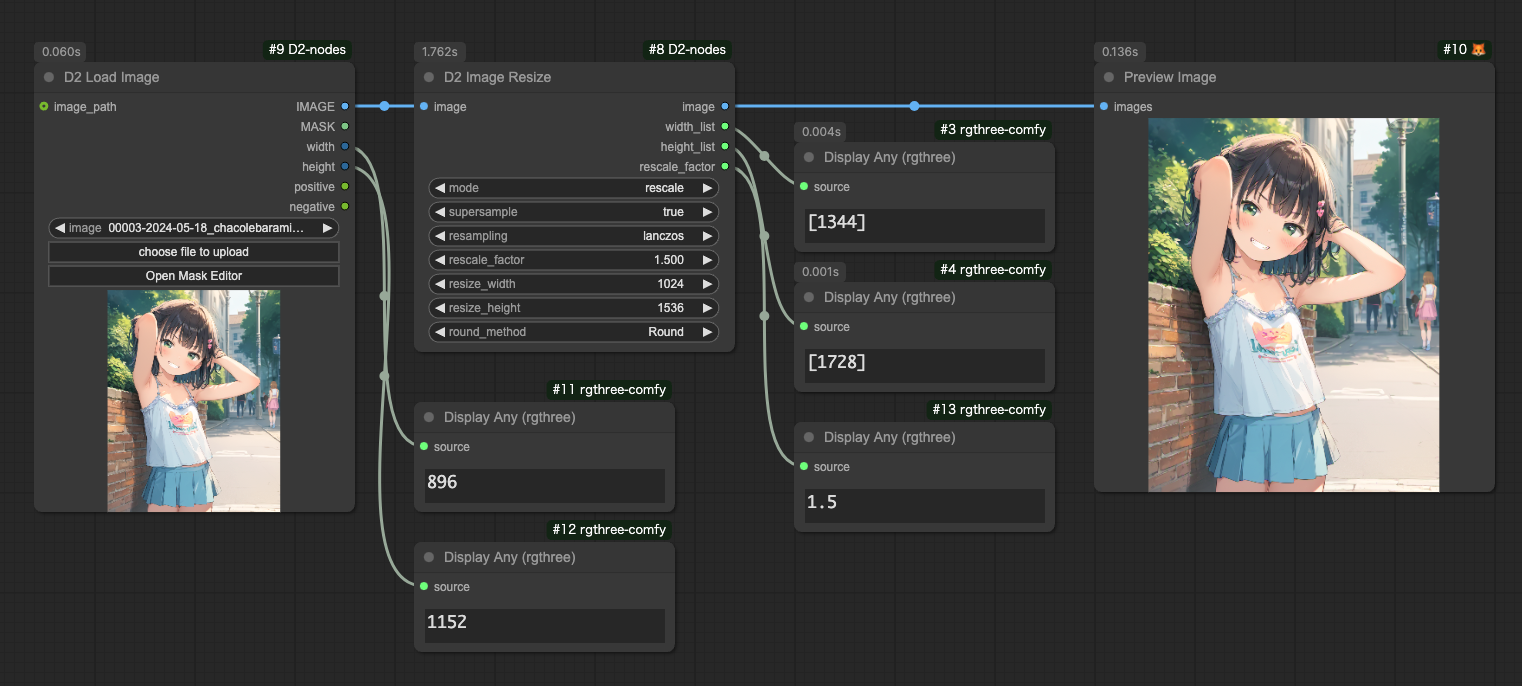
### D2 Image Resize
- Simple image resizing
- Precision up to 3 decimal places
- Can select rounding, floor, or ceiling
- Capable of upscaling using upscale models
- Latent output is also possible (requires VAE)
---
### D2 Resize Calculator
- Can select rounding, floor, or ceiling
---
## :tomato: Refiner Node
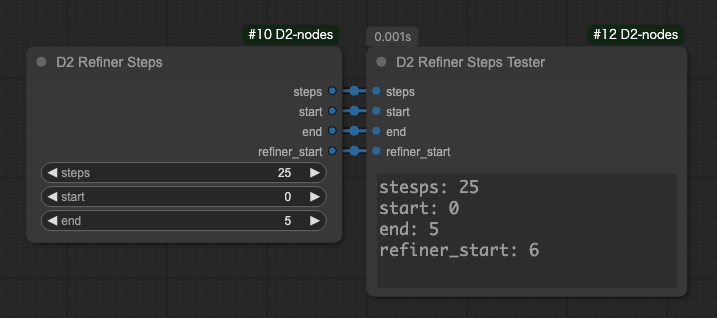
### D2 Refiner Steps
- Node for outputting steps for Refiner
#### Input
- `steps`
- Total step count
- `start`
- Starting steps for first KSampler
- `end`
- Ending steps for first KSampler
#### Output
- `steps` / `start` / `end`
- Input passthrough
- `refiner_start`
- Starting steps for second KSampler
---
### D2 Refiner Steps A1111
- Node that can specify denoise for Refiner in img2img
#### Input
- `steps`
- Total step count
- `denoise`
- Specify denoise for img2img
- `switch_at`
- What percentage of total steps to switch to next KSampler
#### Output
- `steps`
- Input passthrough
- `start`
- Starting steps for first KSampler
- `end`
- Ending steps for first KSampler
- `refiner_start`
- Starting steps for second KSampler
---
### D2 Refiner Steps Tester
- Node for checking steps
---
## :tomato: Merge Node
### D2 Model and CLIP Merge SDXL
- A node that combines ModelMergeSDXL and CLIPMergeSimple
- Allows comma-separated weight specifications for easier use with XYPlot
- In this figure, `0.85,0.85,1,1,0.4,0.4,1,0.4,0.4,0.4,1,0.4,0.4,0.4,0,0.55,0.85,0.85,0.85,0.85,0.85,0.85,1,1,0.65` is specified

 English | 日本語 | 繁体中文
- Top
- Node / Image Node / Text Node / XYPlot Node / Float Palet
- Workflow
# Node
## :tomato: Sampler Nodes
### D2 KSampler / D2 KSampler(Advanced)
 - A Checkpoint Loader that outputs the full path of model files
- Can automatically apply v_prediction settings when the filename contains "vpred"
#### Input
- `ckpt_name`
- Checkpoint name
- `auto_vpred`
- `true`: Automatically applies v_prediction settings if the filename contains "vpred"
- `sampling` / `zsnr`
- Same settings as ModelSamplingDiscrete (details unknown)
- `multiplier`
- Same settings as RescaleCFG (details unknown)
#### Output
- `model` / `clip` / `vae`
- Same as the conventional CheckpointLoader.
- `ckpt_name` / `ckpt_hash` / `ckpt_fullpath`
- Checkpoint name, hash, and full path.
---
### D2 Controlnet Loader