 Cursor AgentandPaintingCoder
983d0359b6
Cursor AgentandPaintingCoder
983d0359b6
Tighten the first 50 words and add feature bullets. Promote FAQ
to question-shaped H2s that match how people ask. Serve a
llmstxt.org file from docs/llms.txt for GitHub Pages; keep the
repo-root llms.txt as a companion. No LICENSE or AGENTS.md.

Co-authored-by: PaintingCoder <jammyfu@users.noreply.github.com>
ComfyUI Painting Coder Utilities Nodes
ComfyUI_PaintingCoderUtils (PaintingCoderUtils) is a ComfyUI custom-node pack by Fu Jam (GitHub jammyfu, display name PaintingCoder). It adds SDXL resolution adjuster nodes, text cleaning, dynamic image/text combine, mask preview, and a 0.3.0 workflow fixer for Stable Diffusion, SDXL, and Flux artists.
- SDXL resolution adjuster ComfyUI nodes: Image Resolution Adjuster, Image Size Creator / Plus, Image Latent Creator / Plus
- Text cleaning (Remove Empty Lines And Leading Spaces) and Text Combiner
- Dynamic image/text combine and Mask Preview
- Windows/Unix path conversion plus a workflow fixer after the 0.3.0
PaintingCoder::namespace change - Author: Fu Jam (@jammyfu / PaintingCoder) · Homepage: https://jammyfu.github.io/ComfyUI_PaintingCoderUtils/ · 简体中文
⚠️ Important Update Notice
Version 0.3.0 Breaking Changes:
- The namespace has been modified to improve compatibility
- This update will cause older workflows to stop working
- To fix your existing workflows, please use our workflow fixer tool:
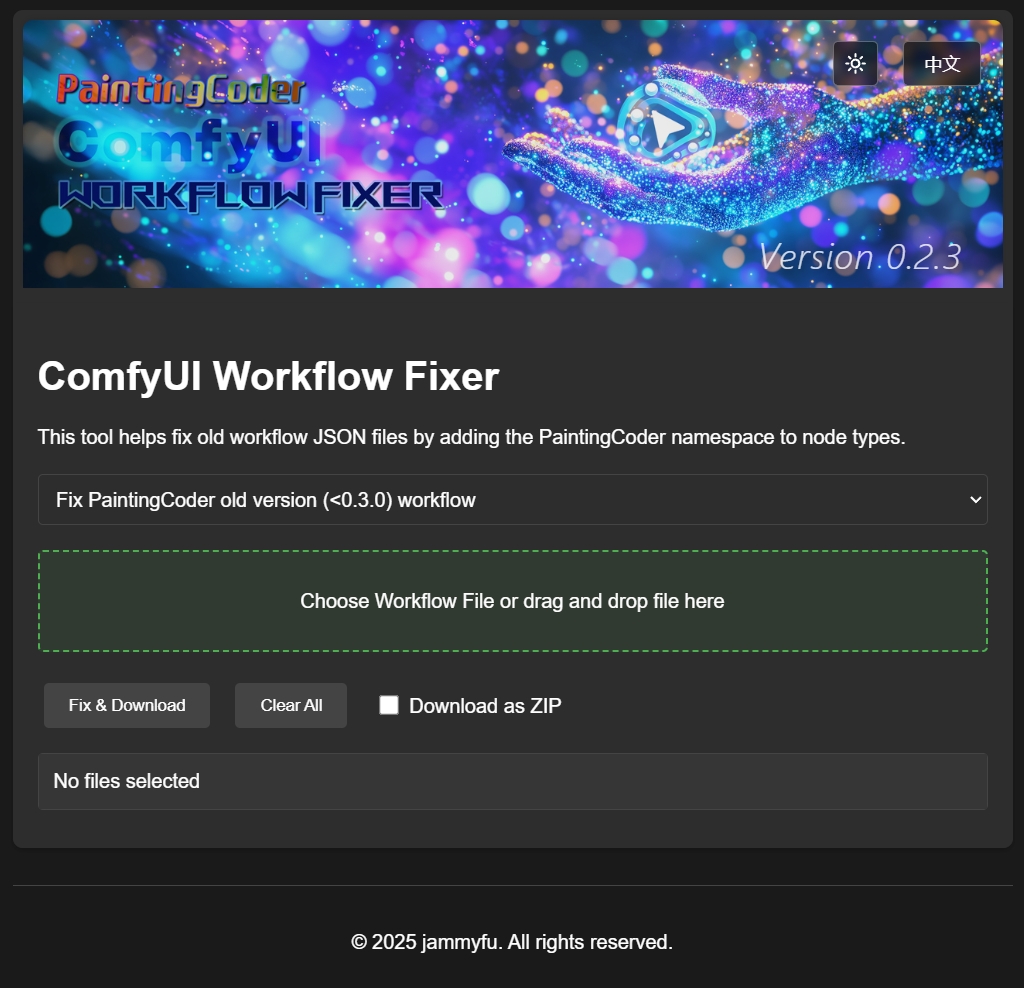
Open the page Workflow Fixer Tool Or go to the directory ComfyUI_PaintingCoderUtils/docs/fix/ to find workflow_fixer.html and open the page
- Added new feature: Path separator conversion between Windows and Unix-style (Linux/Mac) formats
- The fixer tool now supports both namespace updates and path format conversion
What is ComfyUI PaintingCoderUtils?
ComfyUI_PaintingCoderUtils (also called PaintingCoderUtils or ComfyUI Painting Coder Utilities Nodes) is a small ComfyUI custom-node pack. It adds practical image and text utilities: SDXL-oriented resolution tools, prompt/text cleaning and combining, dynamic image/mask lists, mask preview, web/Base64 image helpers, boolean switches, and a workflow fixer for the 0.3.0 namespace change.
Canonical name: ComfyUI_PaintingCoderUtils. Namespace: PaintingCoder::. Menu: 🎨Painting👓Coder. Current version: 0.3.5. Comfy Registry PublisherId: jammyfu.
Who made ComfyUI PaintingCoderUtils?
Fu Jam, GitHub user jammyfu, display name PaintingCoder. Nodes are registered under the PaintingCoder:: namespace. Homepage: https://jammyfu.github.io/ComfyUI_PaintingCoderUtils/.
SDXL resolution adjuster ComfyUI nodes
These registered nodes are the pack’s SDXL resolution family (facts from __init__.py and the Image Resolution Adjuster source):
- Image Resolution Adjuster (
PaintingCoder::ImageResolutionAdjuster) — resize/pad images to SDXL (and Midjourney-style) presets with extend modes, scale limits, background color, optional outline, and mask feathering. - Image Size Creator / Image Size Creator Plus — emit width/height (Plus also switches SDXL vs Midjourney preset sets).
- Image Latent Creator / Image Latent Creator Plus — create empty latents from those same presets.
A sample Flux batch workflow that uses the adjuster is in workflow/Flux_Image_Resolution_Adjuster_scale_up_batch_workflow.json.
How to fix ComfyUI PaintingCoderUtils 0.3.0 workflows?
0.3.0 changed the node namespace. Older workflow JSON will not find the nodes until you run the Workflow Fixer (or open docs/fix/workflow_fixer.html locally). The same tool can convert Windows \ and Unix / path separators.
PaintingCoderUtils vs other ComfyUI packs
This pack is not a general replacement for large suites. It is a focused utility set (resolution, text hygiene, dynamic combine, mask preview, path/workflow repair). ComfyUI-Impact-Pack (acknowledged below) is a much larger detection/detailer ecosystem. Other packs may also offer aspect-ratio helpers; this pack’s signature is SDXL/Midjourney presets plus the PaintingCoder workflow fixer. Use them together when you need both.
| PaintingCoderUtils | Typical large packs (e.g. Impact-Pack) | |
|---|---|---|
| Scope | Focused image/text utilities + workflow fixer | Broad workflow / detection / detailer suites |
| Signature | SDXL resolution adjuster, text cleanup, dynamic combine, mask preview | Face/detailer, SAM, regional prompts, etc. |
| Namespace | PaintingCoder:: |
Pack-specific |
| Migration tool | Built-in workflow fixer (0.3.0 + path separators) | Varies |
| Overlap | Some size/switch/text helpers exist elsewhere | Not a substitute for this pack’s fixer or SDXL adjuster presets |
Does ComfyUI PaintingCoderUtils have a license?
No LICENSE file is published in the repository. GitHub therefore cannot treat the project as open source until the owner adds one. Older README text said “MIT License” and pyproject.toml still points at license = {file = "LICENSE"}, but that file is not in the tree.
🎯 Nodes
Registered class IDs use the PaintingCoder:: prefix. The table lists every node exported in __init__.py (NODE_CLASS_MAPPINGS). Detailed sections below cover the original README nodes; previously under-documented registered nodes are listed at the end of this section.
| Class ID | Display name | Role |
|---|---|---|
PaintingCoder::ImageResolutionAdjuster |
Image Resolution Adjuster | Fit images to SDXL / Midjourney-style presets |
PaintingCoder::ImageSizeCreator |
Image Size Creator | SDXL preset width / height |
PaintingCoder::ImageSizeCreatorPlus |
Image Size Creator Plus | SDXL + Midjourney presets |
PaintingCoder::ImageLatentCreator |
Image Latent Creator | Empty latent from size presets |
PaintingCoder::ImageLatentCreatorPlus |
Image Latent Creator Plus | Plus presets + batch latent |
PaintingCoder::DynamicImageCombiner |
Dynamic Image Input | Combine a dynamic list of images |
PaintingCoder::ImageToBase64 |
Image To Base64 | Encode images as Base64 |
PaintingCoder::WebImageLoader |
Web Image Loader | Load from URL or Base64 |
PaintingCoder::MaskPreview |
Mask Preview | Preview / inspect masks |
PaintingCoder::DynamicMaskCombiner |
Dynamic Mask Input | Combine a dynamic list of masks |
PaintingCoder::ImageSwitch |
Image Switch | Boolean pick between two images |
PaintingCoder::MaskSwitch |
Mask Switch | Boolean pick between two masks |
PaintingCoder::LatentSwitch |
Latent Switch | Boolean pick between two latents |
PaintingCoder::TextSwitch |
Text Switch | Boolean pick between two strings |
PaintingCoder::TextCombiner |
Text Combiner | Dynamic multi-input text join |
PaintingCoder::RemoveEmptyLinesAndLeadingSpaces |
Remove Empty Lines And Leading Spaces | Prompt / LoRA text cleanup |
PaintingCoder::ShowTextPlus |
Show Text Plus | Display text + counts |
PaintingCoder::MultilineTextInput |
Multiline Text Input | Long prompt editor |
PaintingCoder::SimpleTextInput |
Simple Text Input | Single-line string passthrough |
PaintingCoder::OutputToTextConverter |
Output To Text Converter | Any-type → text / JSON |
📐Image Resolution Adjuster
A utility node for adjusting image resolutions according to SDXL optimal aspect ratios.
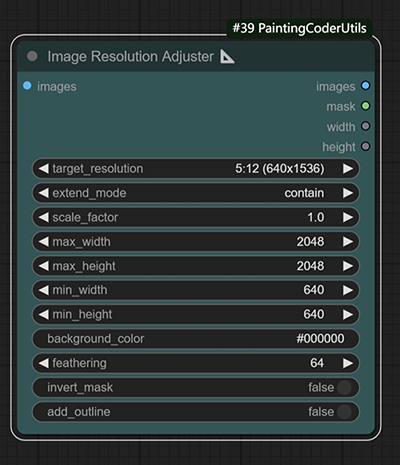
Image resolution adjustment with customizable background color fill
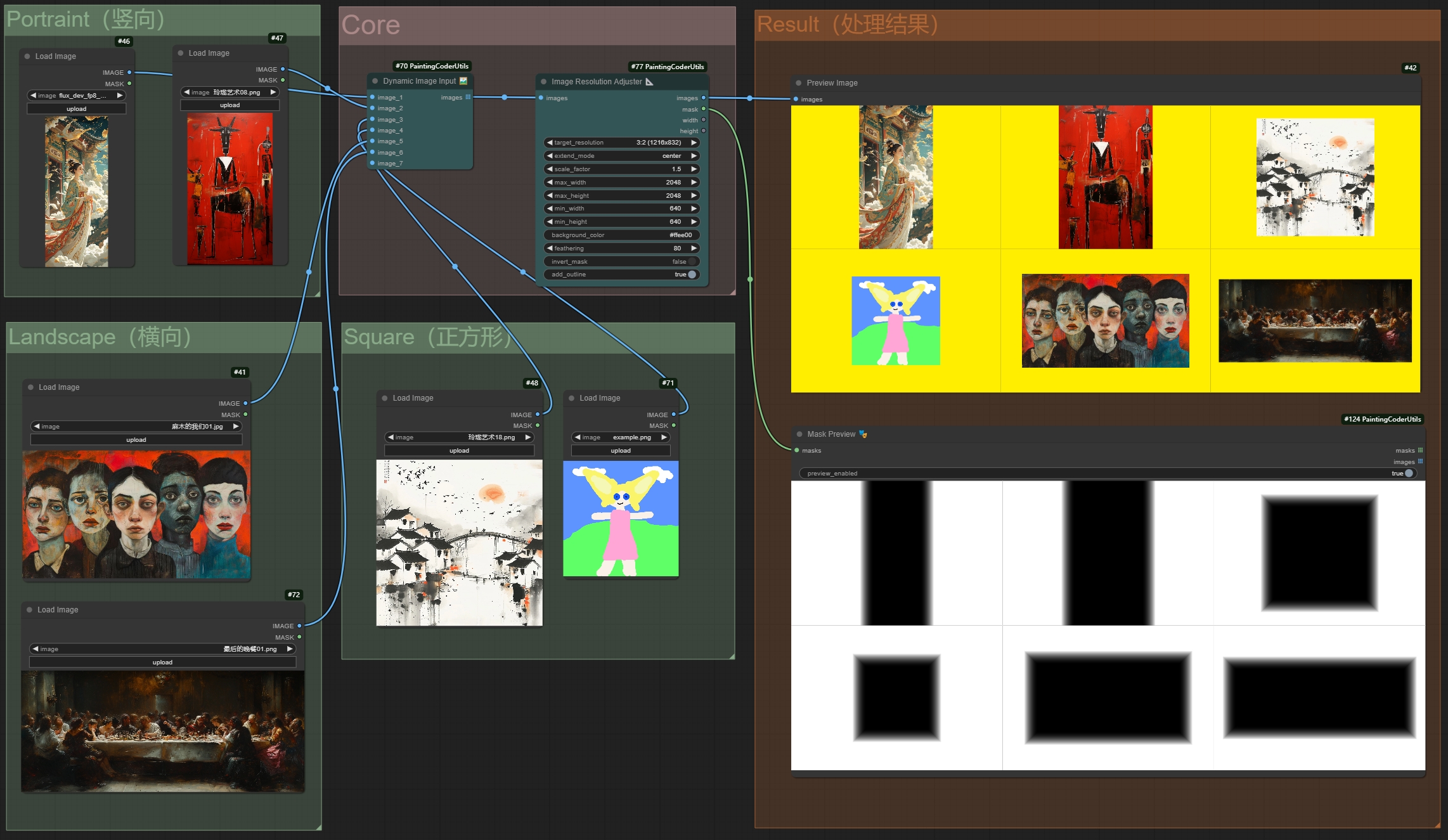
Batch image redrawing with aspect ratio preservation
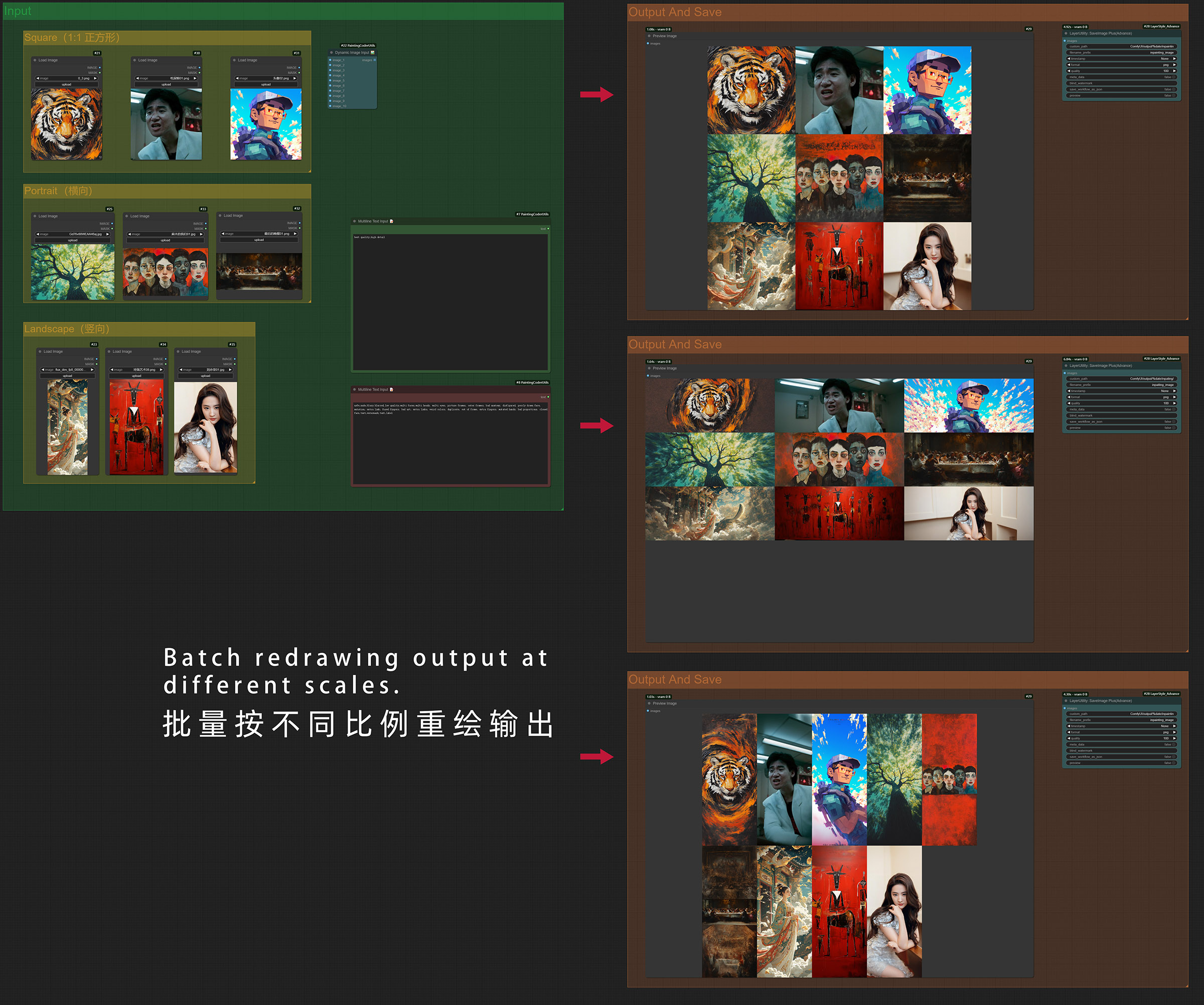
Flux Image Resolution Adjuster Batch Workflow Download
⬇️ Download Workflow JSON (Right Click Save As)
Features:
- Supports all SDXL optimal resolutions:
- 1:1 (1024x1024)
- 9:7 (1152x896)
- 7:9 (896x1152)
- 3:2 (1216x832)
- 2:3 (832x1216)
- 7:4 (1344x768)
- 4:7 (768x1344)
- 12:5 (1536x640)
- 5:12 (640x1536)
- Multiple extend modes:
- contain: Scale proportionally to fit within target size
- cover: Scale proportionally to cover target size
- fill: Stretch to fill target size
- inside: Like contain, but only downscale
- outside: Like cover, but only upscale
- top/bottom/left/right/center: Position image within target size
- Adjustable scaling factor
- Configurable maximum and minimum resolution limits
- Background color picker
- Maintains aspect ratio during adjustment
Usage:
- Add the node to your workflow
- Select target resolution from SDXL presets
- Choose extend mode as needed
- Use color picker to set background color
- Adjust scaling factor and resolution limits as needed
🌐Web Image Loader
A node for loading images from the web.
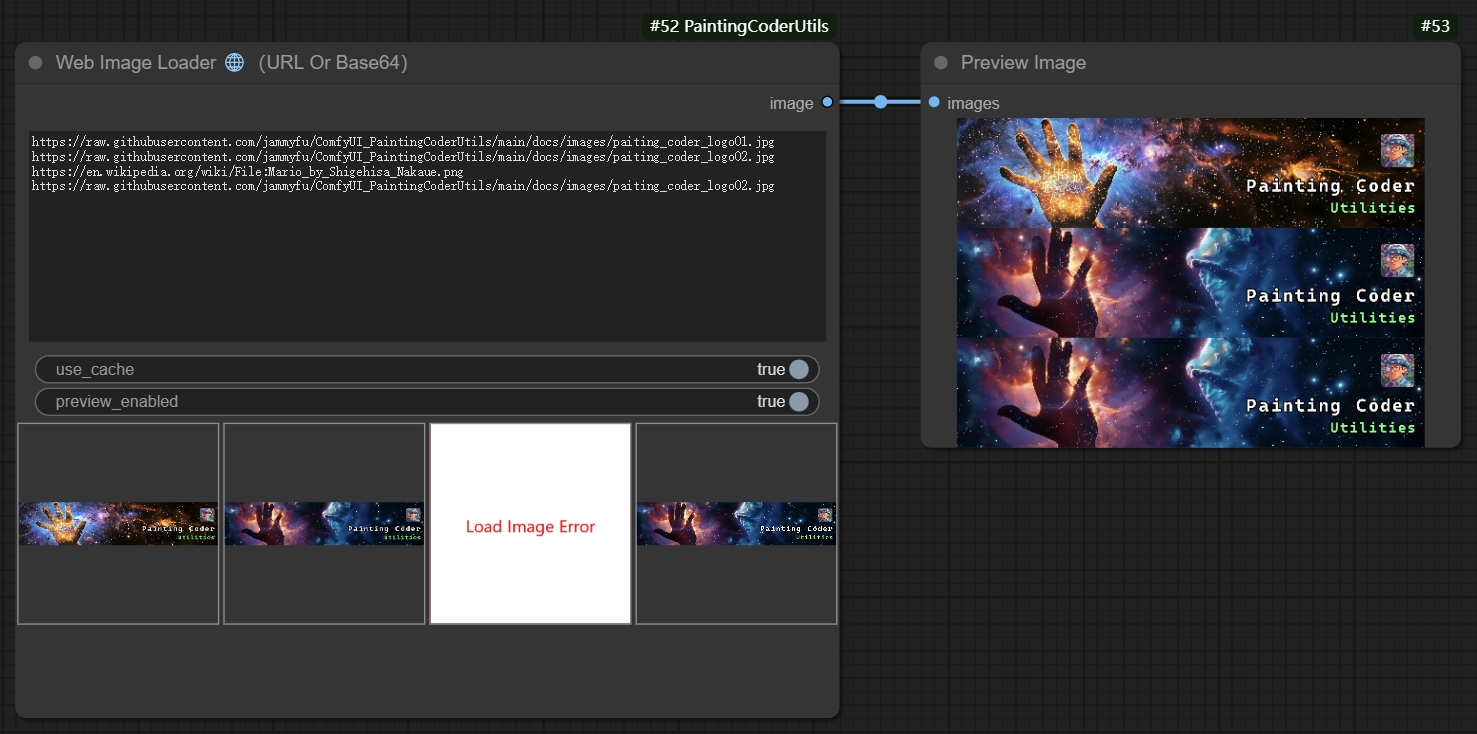
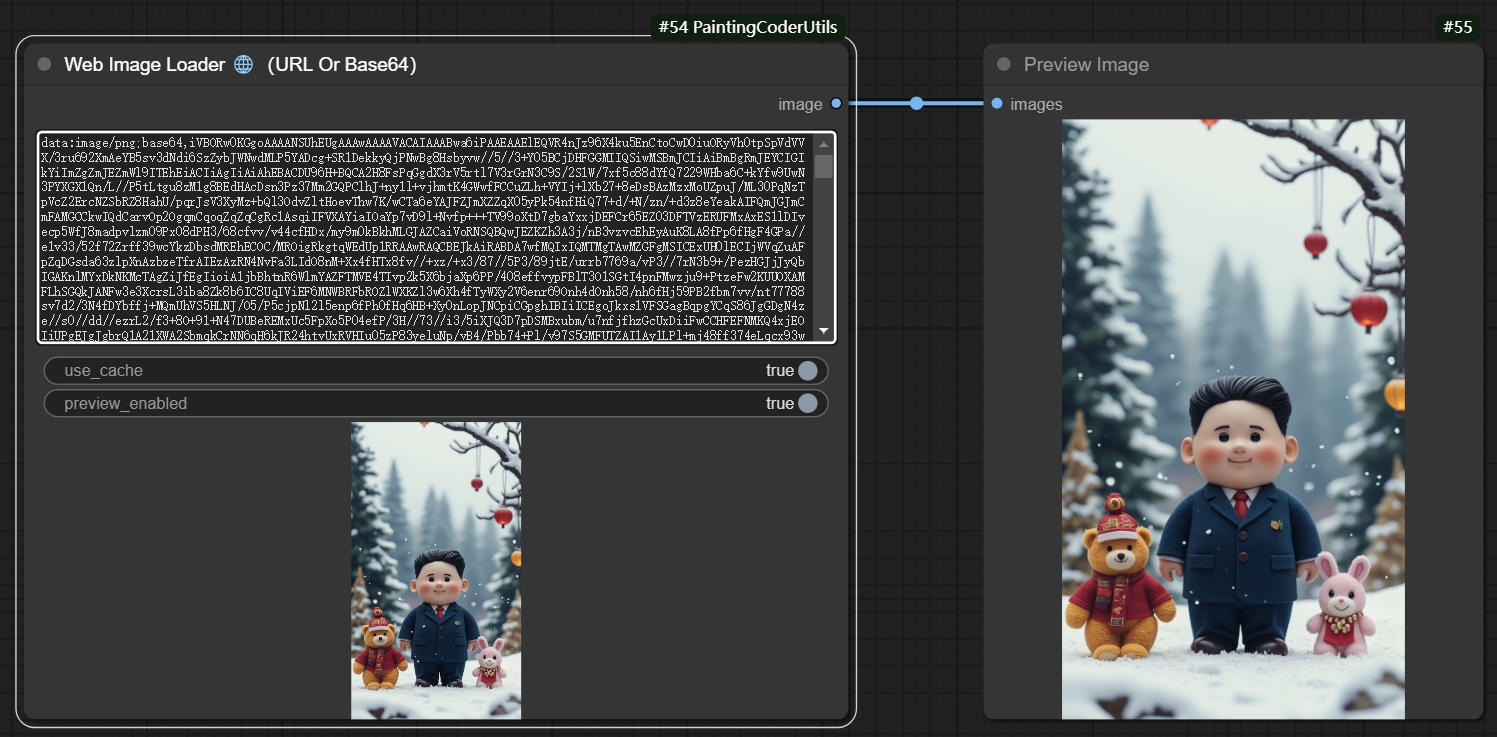
Features:
- Supports loading images from URLs and Base64 format
- Automatically handles image formats
- Supports batch image loading
- Error handling:
- Returns a placeholder image for invalid URLs
- Gracefully handles exceptions, automatically removing erroneous images
Usage:
- Add the node to your workflow
- Input the image URL
- The node will automatically load and process the image
- The output image can be connected to other nodes requiring image input
Use Cases:
- Loading images from online resources
- Dynamic image processing workflows
- Batch image downloading and processing
🖼️Image to Base64 Encoder
A node for converting images to Base64 encoding.
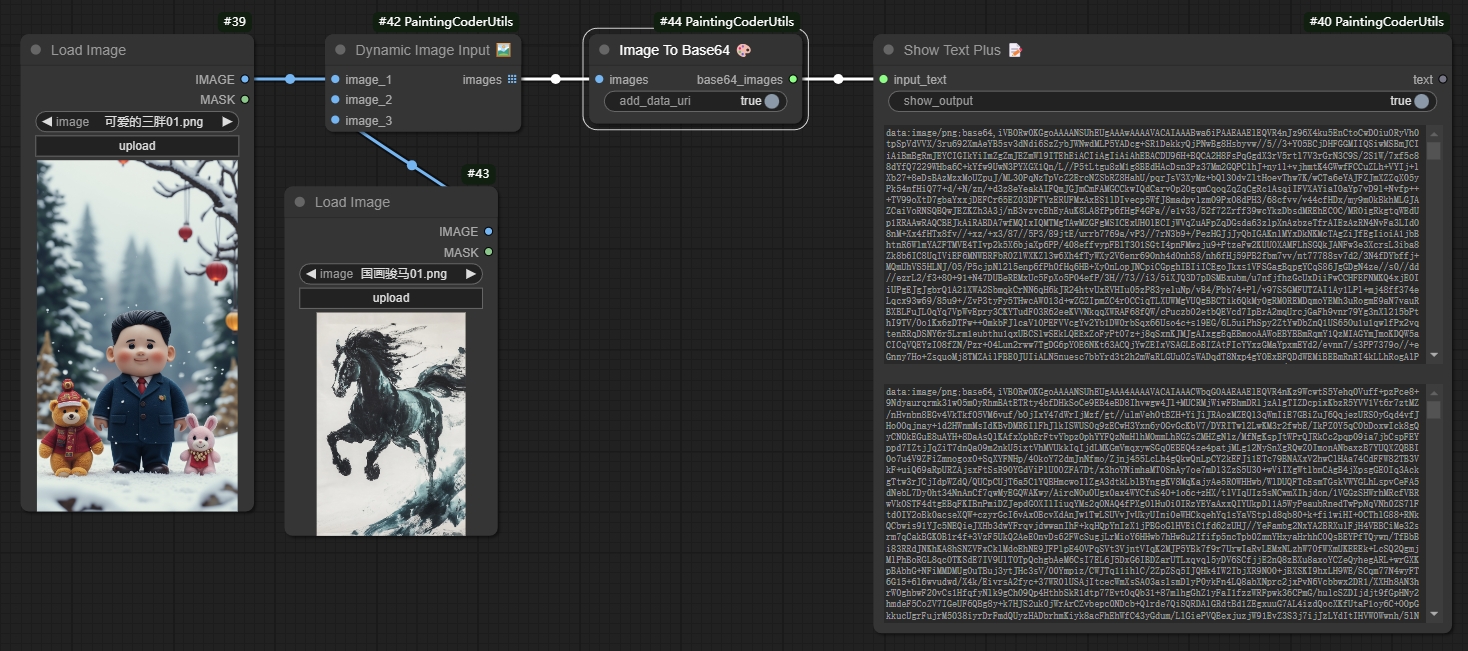
Features:
- Supports various image formats (JPEG, PNG, BMP, etc.)
- Automatically handles image size and format
- Supports batch image encoding
- Error handling:
- Returns error information for invalid images
- Gracefully handles exceptions, ensuring workflow continuity
Usage:
- Add the node to your workflow
- Input the image file or image path
- The node will automatically convert the image to Base64 encoding
- The output Base64 string can be connected to other nodes requiring Base64 input
Use Cases:
- Image data transmission
- Embedding images in HTML or JSON
- Dynamic image processing workflows
- Batch image encoding and processing
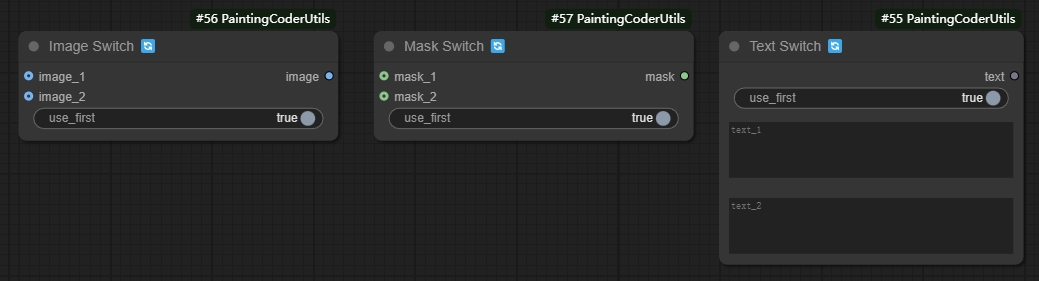
🔀 Switch Nodes (Image, Text, Mask, Latent)
Four boolean switch nodes pick between two optional inputs of the same type: Image Switch, Text Switch, Mask Switch, and Latent Switch. Each uses a use_first flag and returns a blank fallback when the chosen input is disconnected.
Features:
- Same-type pairs: image, text, mask, or latent
use_firstboolean selects input 1 or input 2- Blank fallback when the selected side is empty
Usage:
- Add the matching Switch node to your workflow
- Set
use_first - Connect one or both optional inputs
- The selected (or fallback) value is passed through
Use Cases:
- Dynamically adjusting workflows
- Conditional branch processing
- Multi-path selection
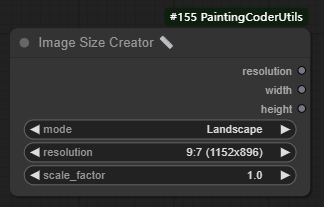
🖼️Image Size Creator
A node for creating image dimensions.
Features:
- Supports all SDXL optimal resolutions:
- 1:1 (1024x1024)
- 9:7 (1152x896)
- 7:9 (896x1152)
- 3:2 (1216x832)
- 2:3 (832x1216)
- 7:4 (1344x768)
- 4:7 (768x1344)
- 12:5 (1536x640)
- 5:12 (640x1536)
- Adjustable scale factor
- Supports landscape, portrait and square modes
- Automatic calculation of optimal resolution
Usage:
- Add the node to your workflow
- Select image mode (landscape/portrait/square)
- Choose target resolution
- Adjust scale factor (optional)
Use Cases:
- Creating images with specific dimensions
- SDXL image generation optimization
- Batch image processing workflows
✨Image Size Creator Plus
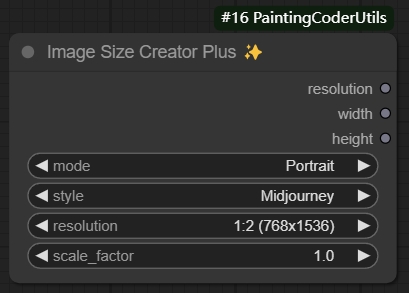
An enhanced version of the image size creator that supports both SDXL and Midjourney standard resolutions. Key features:
- Supports switching between SDXL and Midjourney styles
- Includes all SDXL standard resolutions
- Includes all Midjourney standard resolutions
- Three modes: landscape, portrait, and square
- Adjustable scale factor
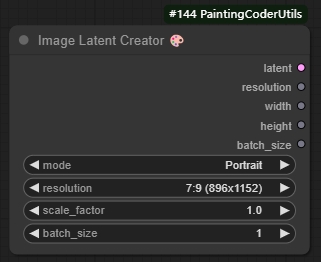
🖼️Image Latent Creator
A node for creating empty image latent spaces.
 Features:
- Inherits all functionality from Image Size Creator
- Supports batch size settings
- Automatically creates optimized latent space dimensions
- Supports additional PNG information
Usage:
- Add the node to your workflow
- Set desired image dimension parameters
- Set batch size
- Connect to nodes requiring latent space input
Use Cases:
- Creating empty latent spaces
- SDXL workflow initialization
- Batch image generation
- Custom latent space processing
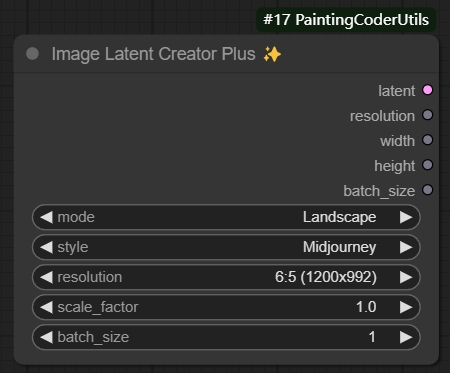
✨Image Latent Creator Plus
An enhanced version of the latent creator that inherits all functionality from Image Size Creator Plus and supports batch latent space creation.
✂️Remove Empty Lines And Leading Spaces
A text processing node that cleans up text by removing empty lines and leading/trailing spaces.
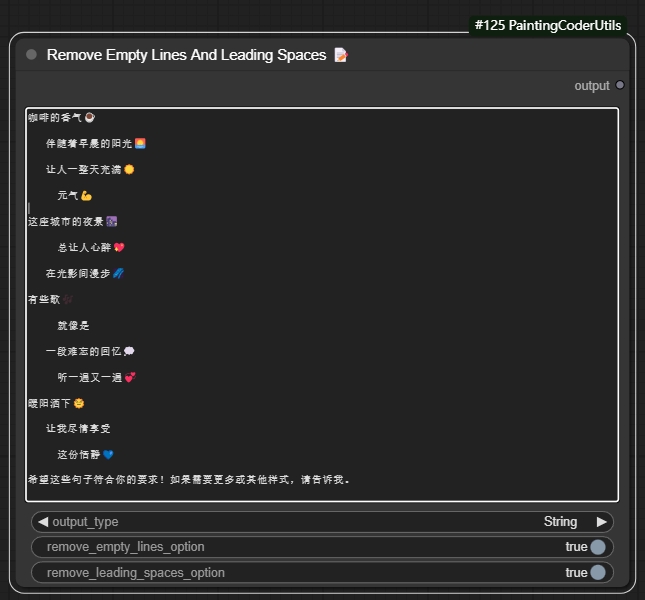
Features:
- Removes empty lines from text
- Removes leading and trailing spaces
- Option to keep single empty line between paragraphs
- Option to preserve indentation
- Supports batch text processing
Usage Example:
Input text:
    Hello World

     This is a test


    Multiple empty lines above

Output text (with default settings):
Hello World
This is a test
Multiple empty lines above
Parameters:
output type: Output type (text, list)remove empty line option: Remove empty linesremove loading space option: Remove spaces
Use Cases:
- Cleaning up prompt text
- Formatting text for LoRA training
- Preparing text for text-to-image generation
- Standardizing text input format
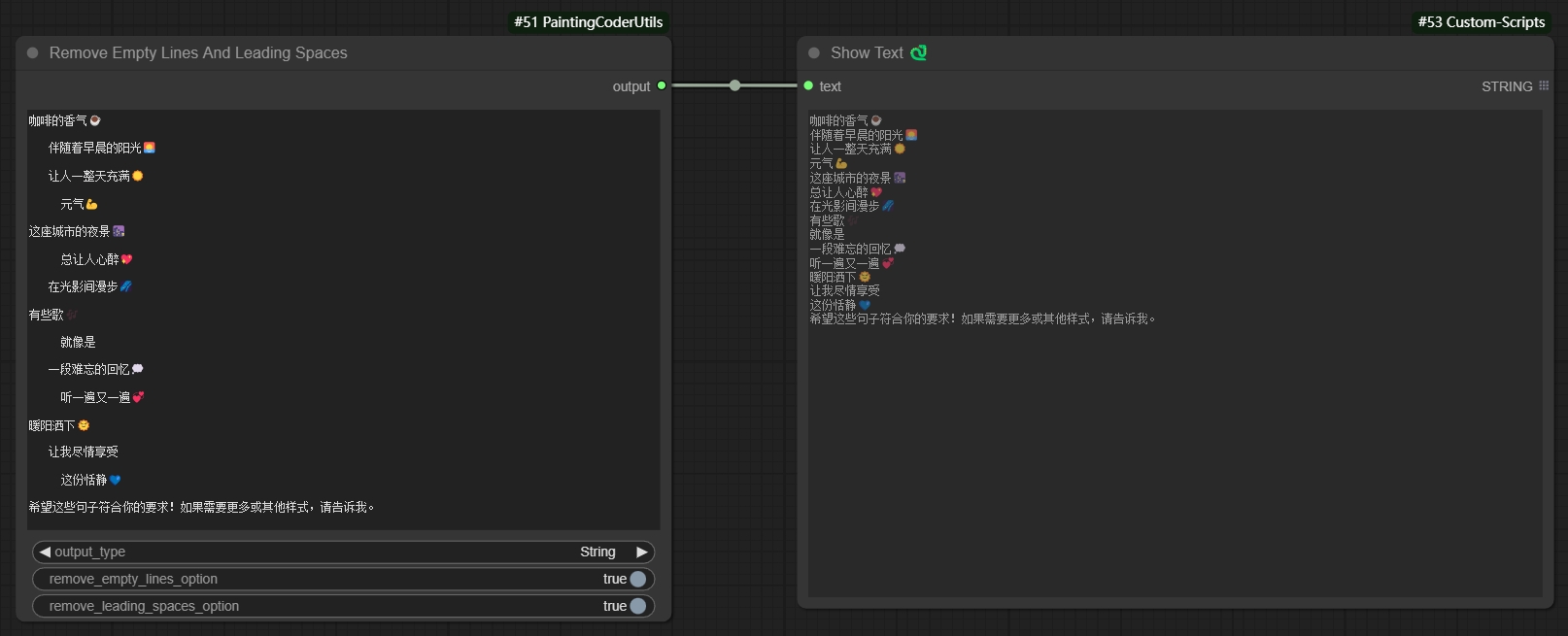
Remove extra empty lines and spaces to generate text:
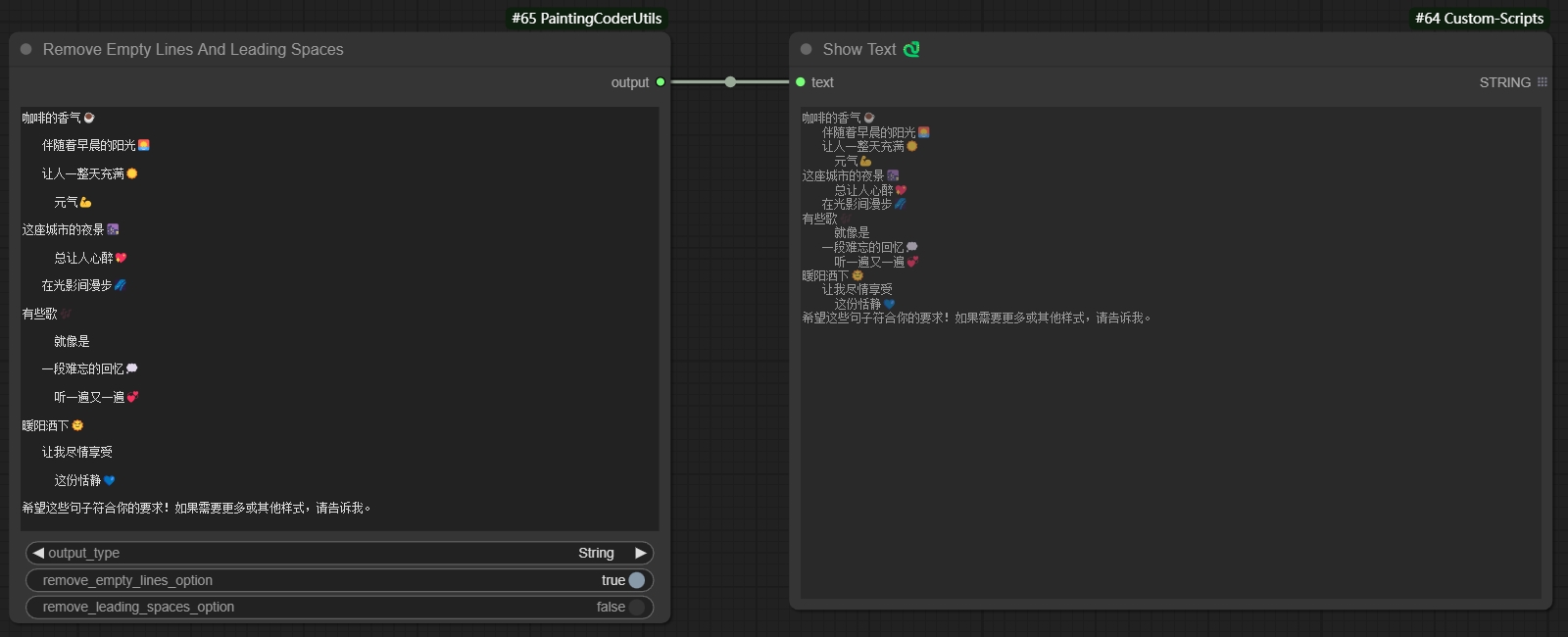
Remove empty lines while keeping spaces to generate text:
Remove spaces while keeping empty lines to generate text:
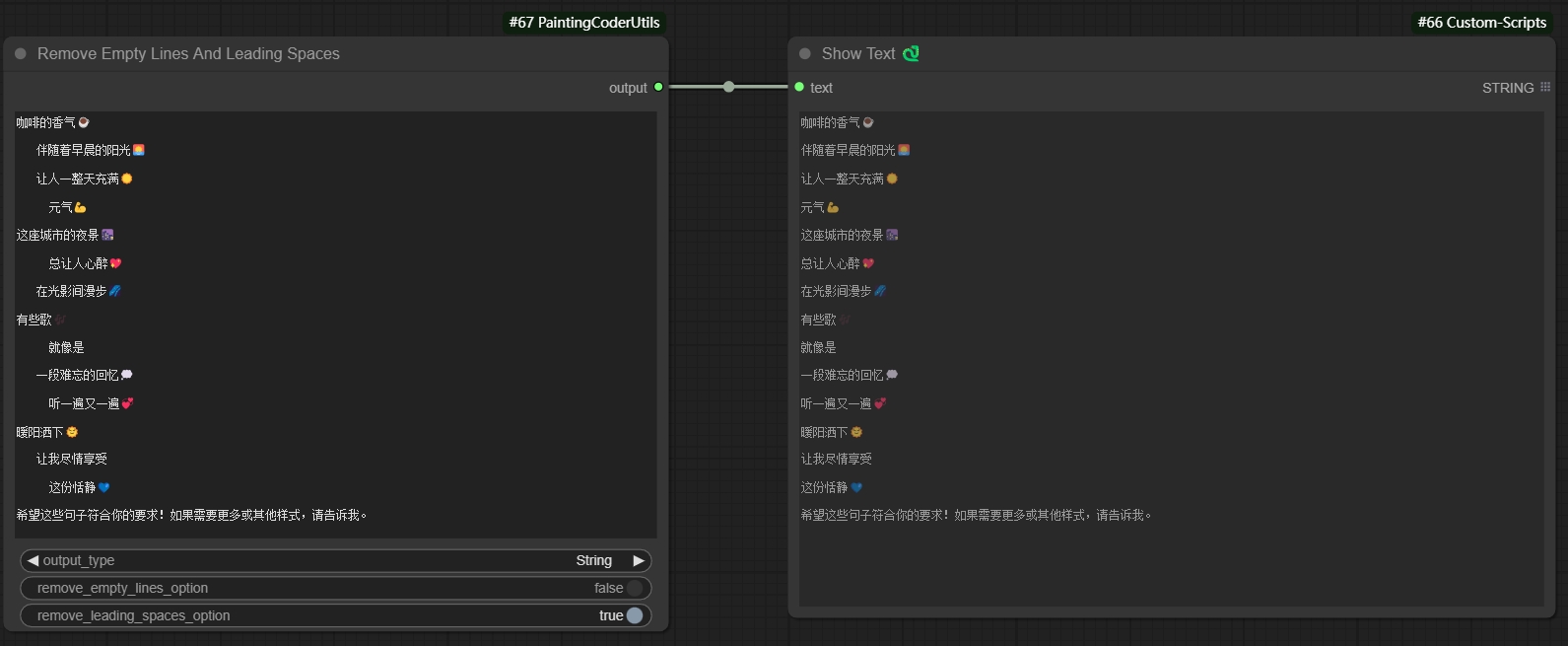
Remove empty lines and spaces to generate list:
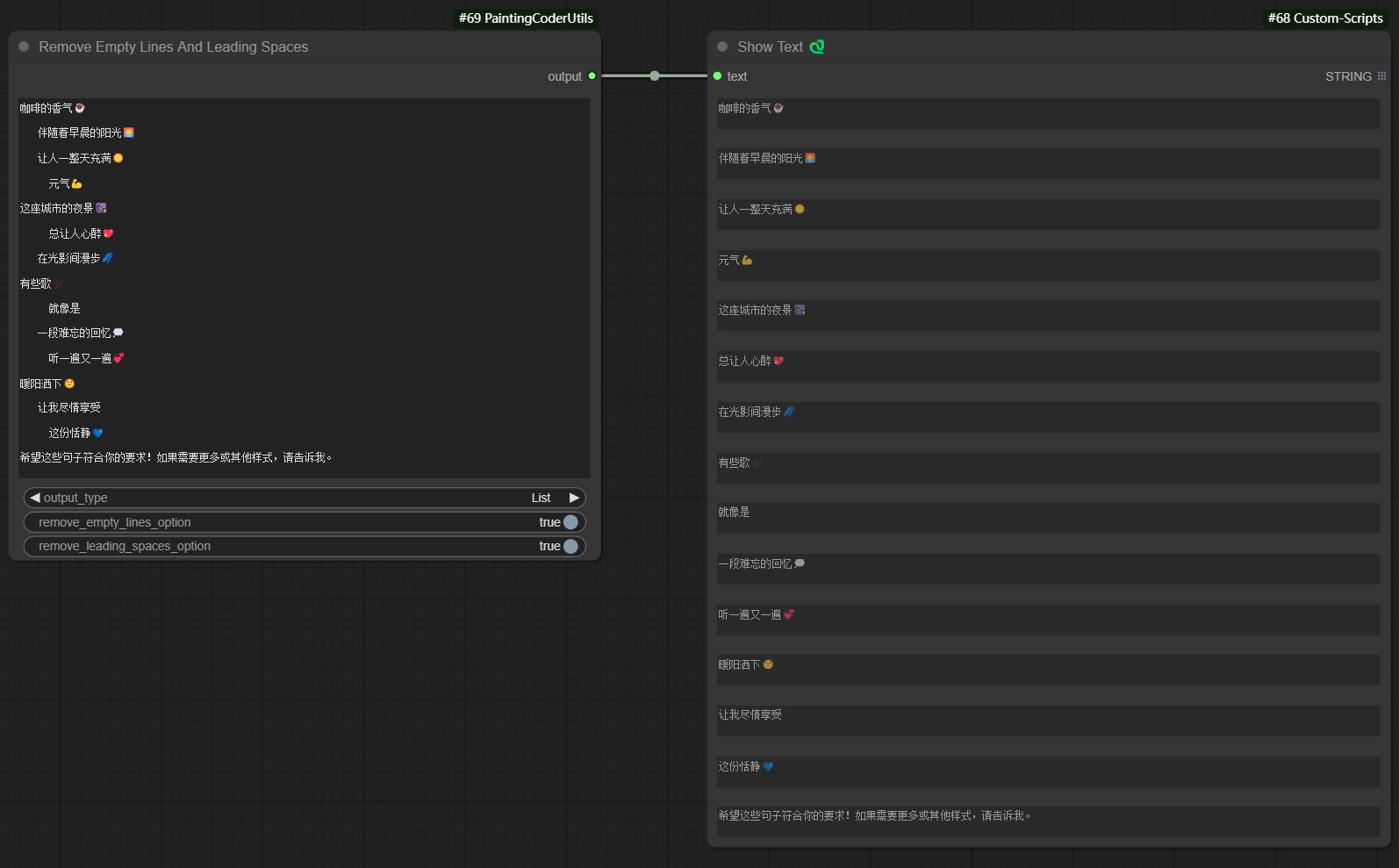
🔗Text Combiner✨
Added Text Combiner node for combining multiple text inputs into a single output.
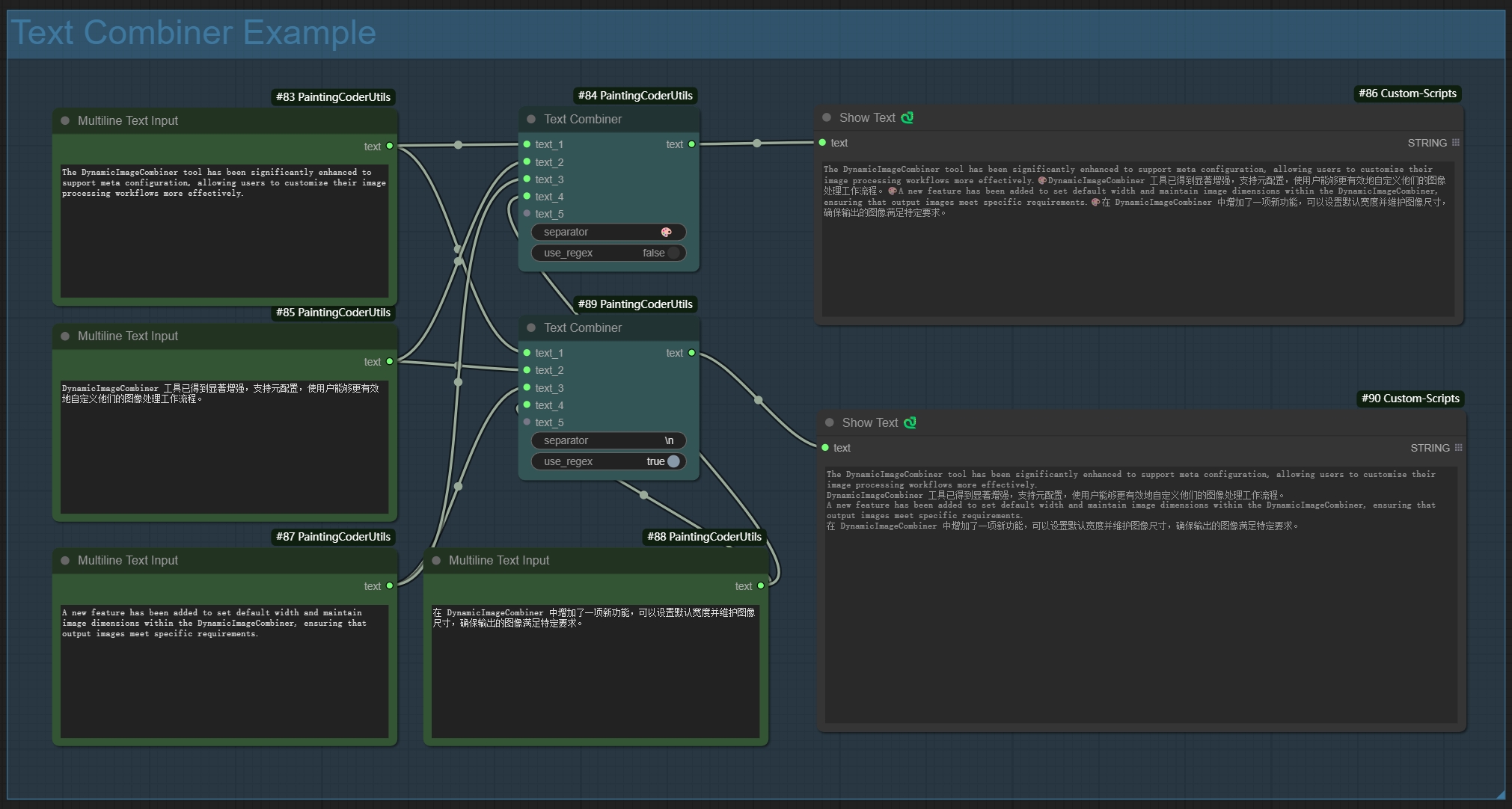
Features:
- Dynamic inputs: automatically adds new input points when connected
- Flexible separators:
- Supports regular expressions
- Supports escape characters (e.g., \n, \r)
- Uses space when left empty
- Smart line breaks: automatically splits output by line when separator includes newline
- Auto filtering: removes empty lines while preserving pure space content
Usage Examples:
-
Basic Usage:
- Using comma separator:
, - Output: text1, text2, text3
- Using comma separator:
-
Line Break Separator:
- Using newline:
\n - Output:
text1
text2
text3
- Using newline:
-
Mixed Separator:
- Using comma or newline:
,|\n - Supports both separator types
- Using comma or newline:
-
Empty Separator:
- Leave empty
- Directly joins text with spaces
🖼️Dynamic Image Input
A node for dynamically combining multiple image inputs.
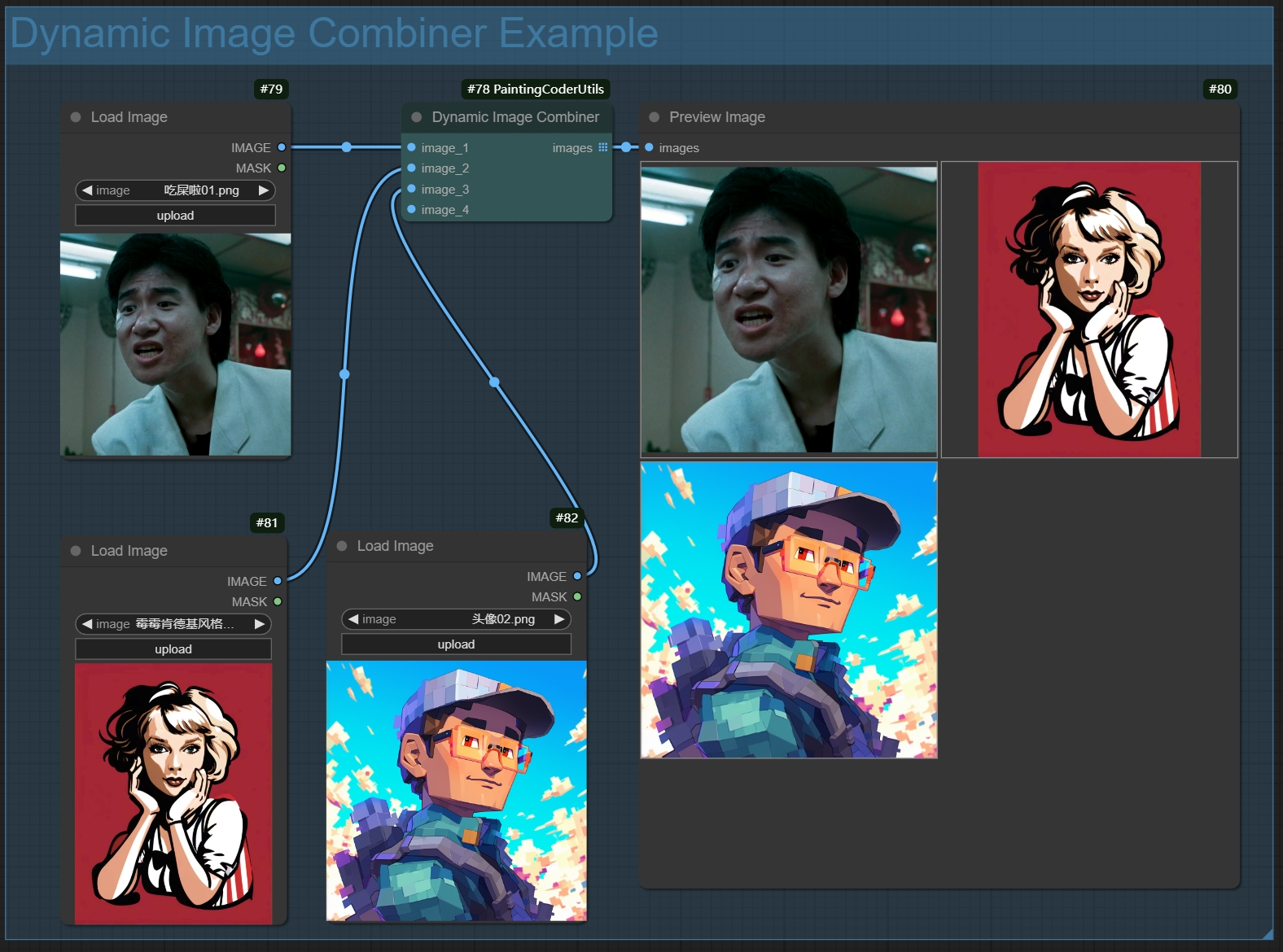 Features:
- Dynamic input ports: automatically adds new image input points when connected
- Smart image processing:
- Automatically filters empty inputs
- Maintains image format and quality
- Supports batch image processing
- Error handling:
- Returns blank image when no valid inputs
- Gracefully handles exceptions
- Output format: returns image list for further processing
Usage:
- Add the node to your workflow
- Connect image inputs (new input ports will be created automatically)
- Node will automatically combine all non-empty image inputs
- Output can be connected to other nodes that require image lists
Use Cases:
- Batch image processing
- Image collection management
- Dynamic workflow building
- Image list generation
📝 Text Display Enhancer (Show Text Plus)
An enhanced text display node that provides more text formatting and display options.
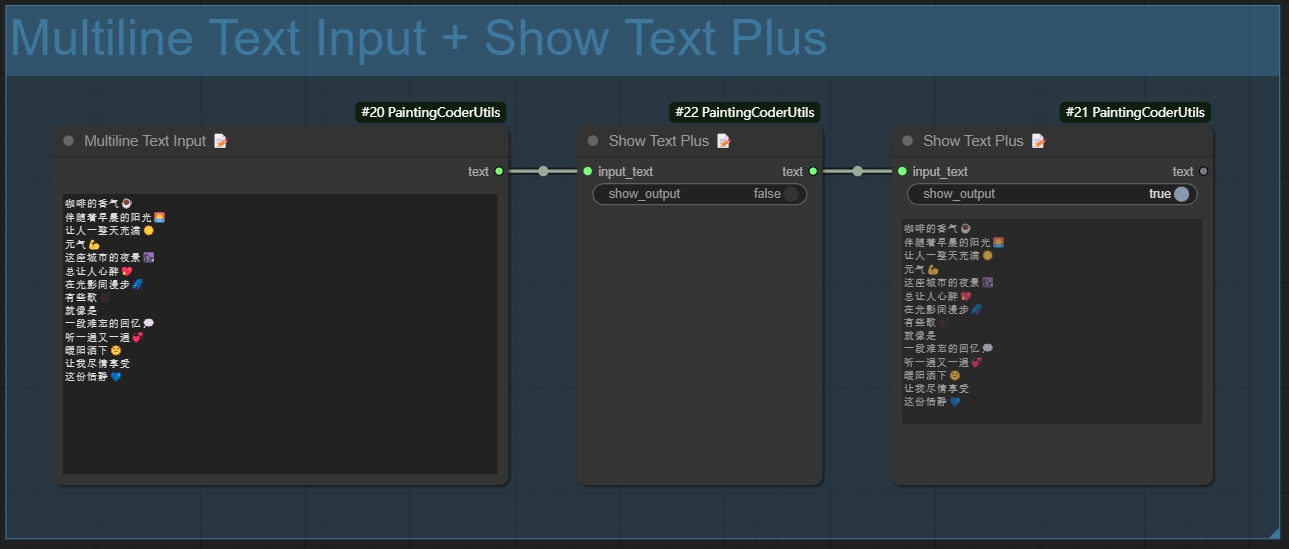
Features:
- Display Mode Options:
- Normal Mode: Displays text directly
- Text Statistics Functionality:
- Character Count
- Word Count
- Line Count
- Supports automatic line wrapping for long texts
- Supports multilingual text
Usage Instructions:
- Add the node to your workflow
- Connect the text input
- Select the display mode
📝 Multiline Text Input (Multiline Text)
A node that supports multiline text input, making it easy to input and edit long text content.
Features:
- Supports multiline text input and editing
- Retains text formatting and line breaks
- Compatible with both Chinese and English input
- User-friendly text editing interface
- Supports copy and paste operations
Usage Instructions:
- Add the node to your workflow
- Double-click the text box to edit
- Supports direct pasting of multiline text
- Click outside the area to save after editing
Usage Scenarios:
- Inputting long prompt phrases
- Editing multiline descriptive texts
- Batch text processing
- Preparing texts for LoRA training
🎭Mask Preview
A utility node for previewing and inspecting image masks.
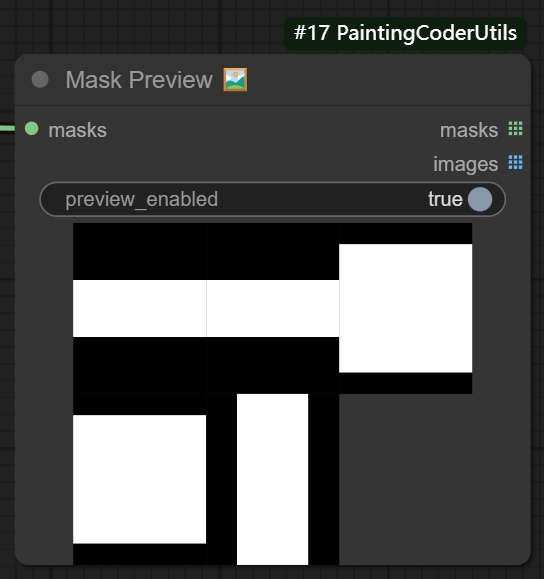
Features:
- Intuitive mask area visualization
- Multiple preview modes:
- Original mask
- Outline highlight
- Support for batch mask preview
- Real-time preview updates
Usage:
- Add the node to your workflow
- Connect mask input
- Select preview mode
- Adjust display parameters
Also registered
These nodes are exported in NODE_CLASS_MAPPINGS and were previously missing from the README feature list (facts from source only):
- Dynamic Mask Input (
PaintingCoder::DynamicMaskCombiner): dynamic mask ports; combines connected masks into a mask list; empty fallback is a blank 512×512 mask. - Simple Text Input (
PaintingCoder::SimpleTextInput): single-field string input that returns the typed text. - Output To Text Converter (
PaintingCoder::OutputToTextConverter): converts an arbitrary input to text (Auto,JSON,Plain Text, orRaw). - Mask Switch / Latent Switch: see Switch Nodes.
📦 Installation
- Navigate to ComfyUI's
custom_nodesdirectory - Clone the repository:
cd custom_nodes git clone https://github.com/jammyfu/ComfyUI_PaintingCoderUtils.git - Restart ComfyUI
After install, nodes appear under the ComfyUI menu category 🎨Painting👓Coder (Image, Text, Switch, Web, Utils).
👤 Author
- Name: Fu Jam
- GitHub: @jammyfu
- Display name / node brand: PaintingCoder
- Homepage: https://jammyfu.github.io/ComfyUI_PaintingCoderUtils/
- Chinese README: README_CN.md
This repository is currently jammyfu's strongest public GitHub surface for the PaintingCoder ComfyUI nodes.
📝 License
No LICENSE file is included. Do not assume MIT or any other OSI license from this repository until the owner publishes a LICENSE file.
🤝 Updates
v0.3.5 Update (2025-01-25)
- New Features:
- Added Image Size Creator Plus node, supporting SDXL and Midjourney dimensions
- Added Image Latent Creator Plus node, inheriting all Plus node functionalities
- Optimized Plus node user interface and interaction experience
- Added more resolution preset options
- Improved node performance and stability
v0.3.4 Update (2025-01-24)
- Updates:
- Modified the ComfyUI workflow fixer tool page to enhance user experience
- Added more error messages to help users locate issues faster
- Optimized file upload and download functionality to support more file processing
- Improved path separator conversion functionality to enhance cross-platform compatibility
- Enhanced interface response speed to reduce loading time
v0.3.3 (2025-01-23)
- Improvements:
- Bug fixes, added workflow fixer tool to repair old version workflow JSON files
- Added path separator conversion functionality to switch between Windows and Unix formats
- Added file upload functionality to upload JSON files for repair
- Added file download functionality to download repaired JSON files or ZIP files
v0.3.2 (2025-01-22)
- Improvements:
- Enhanced the workflow fixer tool with more error handling and informative messages
- Optimized the user interface for more intuitive operation
- Added support for more node types
- Improved the stability of the path separator conversion functionality
- Fixed issues where JSON files could not be loaded correctly in certain cases
v0.3.1 (2025-01-22)
- Bug Fixes:
- Fixed crash issue in Text Combiner when handling special characters
- Fixed issue with Dynamic Image Input node not handling inputs correctly in certain cases
- Fixed display error in Mask Previewer during batch preview
- Fixed compatibility issues with path separator conversion functionality on some systems
- Fixed processing errors in Image Resolution Adjuster at specific resolutions
v0.3.0 (2025-01-21)
- Breaking Changes:
- Modified namespace structure for better compatibility
- Added workflow fixer tool for migration
- Added path separator conversion functionality
- Enhanced error handling and user feedback
- Improved cross-platform compatibility
v0.2.2 (2024-01-09)
- Added Mask Switch node
- Support switching between two masks based on conditions
- Provides default blank mask handling
- Optimized exception handling mechanism
- Maintains mask format and quality
v0.2.1 (2024-01-07)
- Added Web Image Loader node
- Support loading images from URLs and Base64
- Automatic image format handling
- Support batch image loading
- Error handling: returns placeholder image for invalid URLs, graceful exception handling
- Cache support for improved loading efficiency
- Preview feature: generates and saves preview images
v0.2.0 (2024-01-06)
-
Added Image Switch node
- Support switching between two images based on conditions
- Provides default blank image handling
- Optimized exception handling mechanism
- Maintains image format and quality
-
Added Text Switch node
- Support switching between two texts based on conditions
- Provides default blank text handling
- Optimized exception handling mechanism
v0.1.9 (2024-01-05)
- Enhanced Image Resolution Adjuster
- Added mask feathering functionality
- Improved mask edge processing algorithm
- Enhanced mask processing performance
- Optimized edge smoothing effects
v0.1.8 (2024-01-04)
- Optimized Text Combiner
- Improved text concatenation logic
- Enhanced performance for large text processing
- Fixed special character handling issues
- Optimized memory usage
v0.1.7 (2024-01-03)
- Enhanced Image Resolution Adjuster
- Improved extend mode algorithms
- Enhanced image processing performance
- Fixed edge handling issues
- Optimized memory usage
v0.1.6 (2024-01-02)
- Added Multiline Text Input node
- Support for multiline text input and editing
- Preserves text formatting and line breaks
- Compatible with both Chinese and English input
- User-friendly text editing interface
- Supports copy and paste operations
v0.1.5 (2024-12-28)
- Added Mask Preview node
- Added real-time preview update
- Added batch mask preview
v0.1.4 (2024-12-27)
- Added Show Text Plus node
- Added multiple display modes
- Implemented text statistics functionality
- Added support for custom display options
- Optimized long text display
v0.1.3 (2024-12-26)
- Added Dynamic Image Input Combiner
- Implemented dynamic input ports
- Added smart image processing
- Optimized error handling mechanism
- Added support for image list output
v0.1.2 (2024-12-25)
- Added image outline feature
- Added text combiner node
v0.1.1 (2024-12-25)
- Added TextCombiner node
- Implemented dynamic input connections
- Added support for regex separators
- Added support for newlines and escape characters
- Added empty separator handling
- Optimized text joining logic
v0.1.0 (2024-12-23)
- Initial release
- Added Image Resolution Adjuster:
- Support for SDXL optimal resolutions
- Multiple extend modes
- Color picker for background
- Scale factor adjustment
- Resolution limits
- Added Remove Empty Lines And Leading Spaces:
- Text cleaning functionality
- Configurable preservation options
- Batch processing support
Planned Features
- Dynamic image input combination
- Text template system
- More image processing utilities
🤝 Contributions
Issues and Pull Requests are welcome!
🙏 Acknowledgements
- ComfyUI Team
- Impact-Pack Project