
573 lines
19 KiB
Markdown
573 lines
19 KiB
Markdown
|
|
|
|
# ComfyUI Painting Coder Utilities Nodes
|
|
|
|
A practical collection of nodes designed for ComfyUI that streamlines image and text processing workflows. Features include optimized resolution adjustment, text cleaning tools, dynamic image/text combination, and mask preview utilities. Created by a programmer who enjoys painting, this collection is perfect for artists and developers looking to enhance their AI art creation pipeline.
|
|
|
|
[English](./README.md) | [简体中文](./README_CN.md)
|
|
|
|
|
|
# ⚠️ Important Update Notice
|
|
|
|
**Version 0.3.0 Breaking Changes:**
|
|
- The namespace has been modified to improve compatibility
|
|
- This update will cause older workflows to stop working
|
|
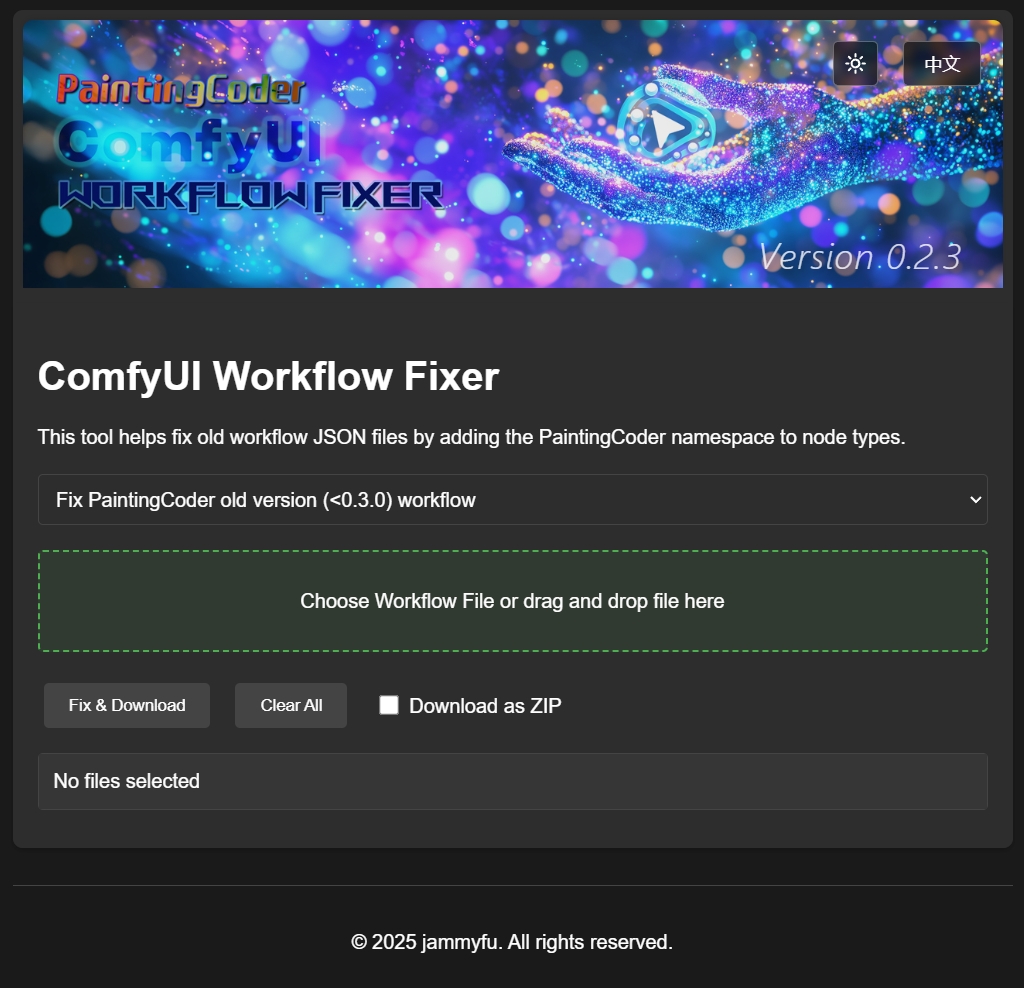
- To fix your existing workflows, please use our workflow fixer tool:
|
|
|
|
|
|
|
|
Open the page [Workflow Fixer Tool](https://jammyfu.github.io/ComfyUI_PaintingCoderUtils/fix/workflow_fixer.html?lang=en) Or go to the directory **ComfyUI_PaintingCoderUtils/docs/fix/** to find **workflow_fixer.html** and open the page
|
|
|
|
|
|
- Added new feature: Path separator conversion between Windows and Unix-style (Linux/Mac) formats
|
|
- The fixer tool now supports both namespace updates and path format conversion
|
|
---
|
|
|
|
## 🎯 Nodes
|
|
|
|
### 📐Image Resolution Adjuster
|
|
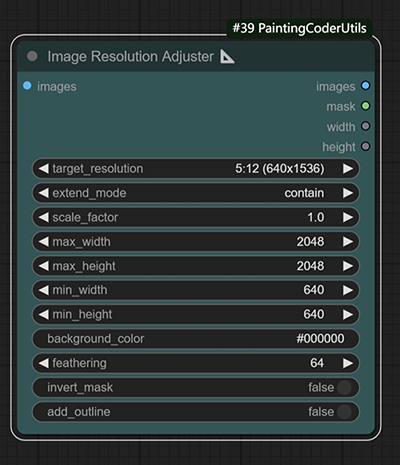
A utility node for adjusting image resolutions according to SDXL optimal aspect ratios.
|
|
|
|
|
|
|
|
Image resolution adjustment with customizable background color fill
|
|
|
|
|
|
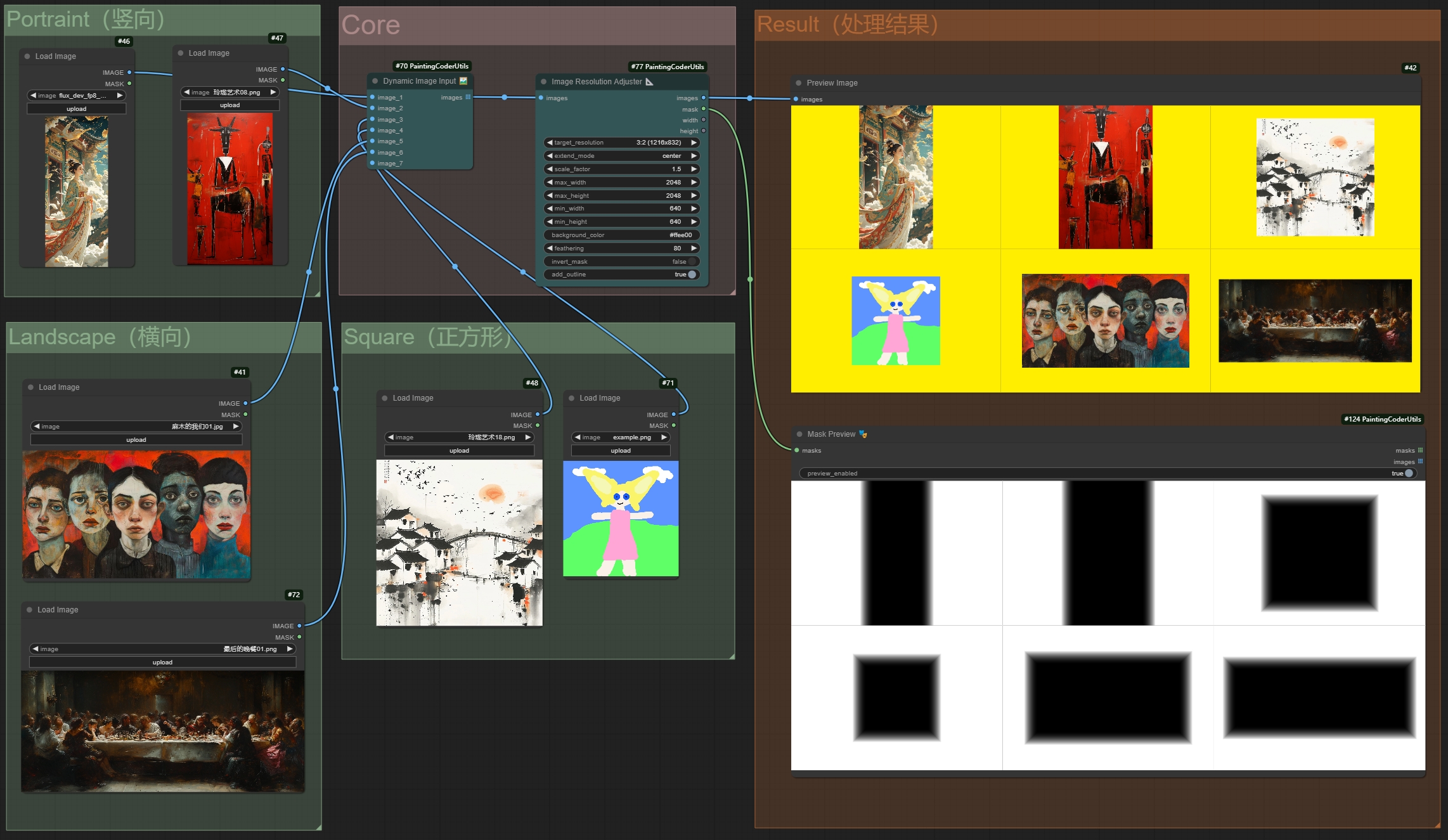
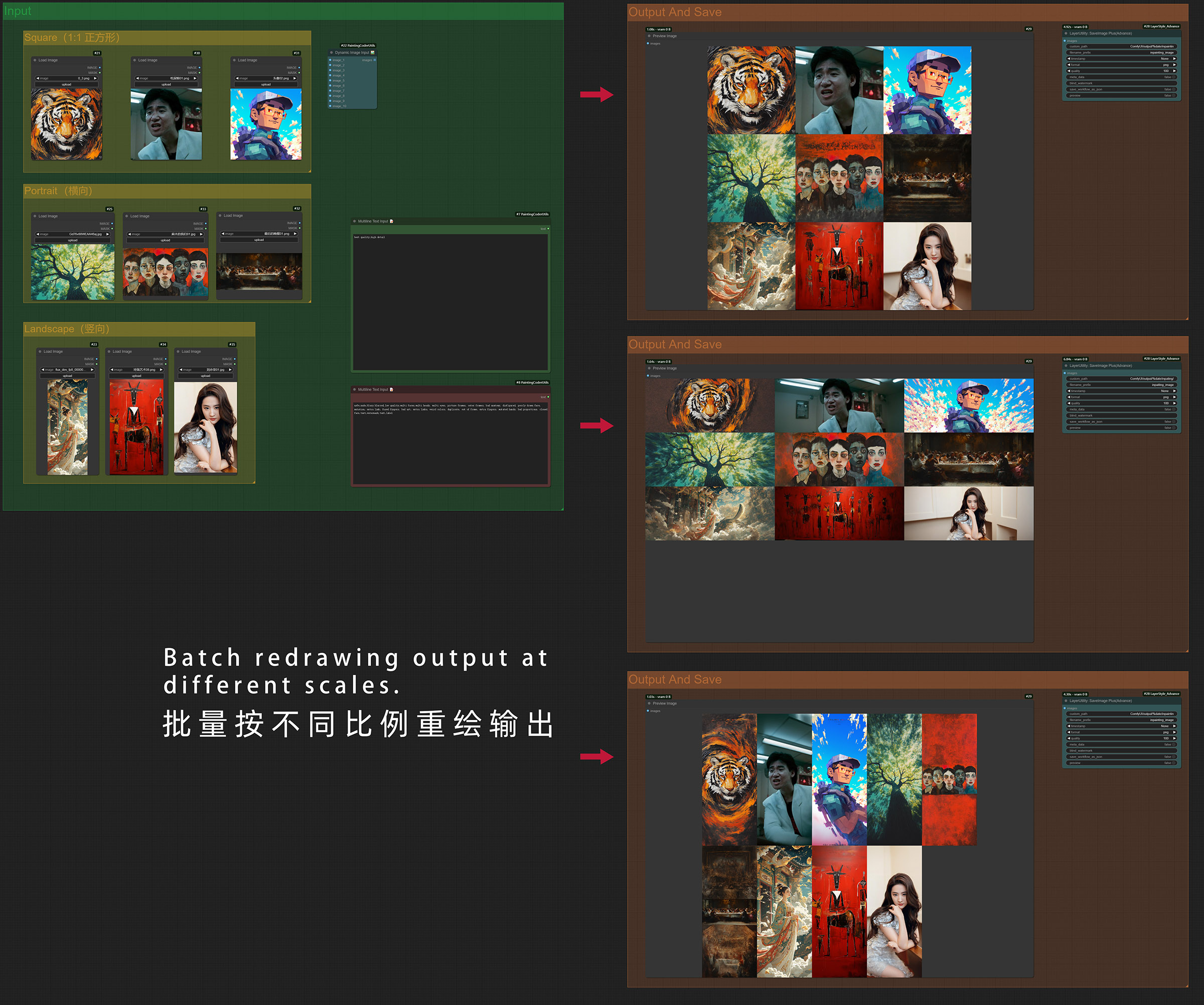
Batch image redrawing with aspect ratio preservation
|
|
|
|
|
|
#### Flux Image Resolution Adjuster Batch Workflow Download
|
|
<a href="https://raw.githubusercontent.com/jammyfu/ComfyUI_PaintingCoderUtils/refs/heads/main/workflow/Flux_Image_Resolution_Adjuster_scale_up_batch_workflow.json" download="Flux_Image_Resolution_Adjuster_batch_workflow.json">⬇️ Download Workflow JSON (Right Click Save As)</a>
|
|
|
|
Features:
|
|
- Supports all SDXL optimal resolutions:
|
|
- 1:1 (1024x1024)
|
|
- 9:7 (1152x896)
|
|
- 7:9 (896x1152)
|
|
- 3:2 (1216x832)
|
|
- 2:3 (832x1216)
|
|
- 7:4 (1344x768)
|
|
- 4:7 (768x1344)
|
|
- 12:5 (1536x640)
|
|
- 5:12 (640x1536)
|
|
- Multiple extend modes:
|
|
- contain: Scale proportionally to fit within target size
|
|
- cover: Scale proportionally to cover target size
|
|
- fill: Stretch to fill target size
|
|
- inside: Like contain, but only downscale
|
|
- outside: Like cover, but only upscale
|
|
- top/bottom/left/right/center: Position image within target size
|
|
- Adjustable scaling factor
|
|
- Configurable maximum and minimum resolution limits
|
|
- Background color picker
|
|
- Maintains aspect ratio during adjustment
|
|
|
|
Usage:
|
|
1. Add the node to your workflow
|
|
2. Select target resolution from SDXL presets
|
|
3. Choose extend mode as needed
|
|
4. Use color picker to set background color
|
|
5. Adjust scaling factor and resolution limits as needed
|
|
|
|
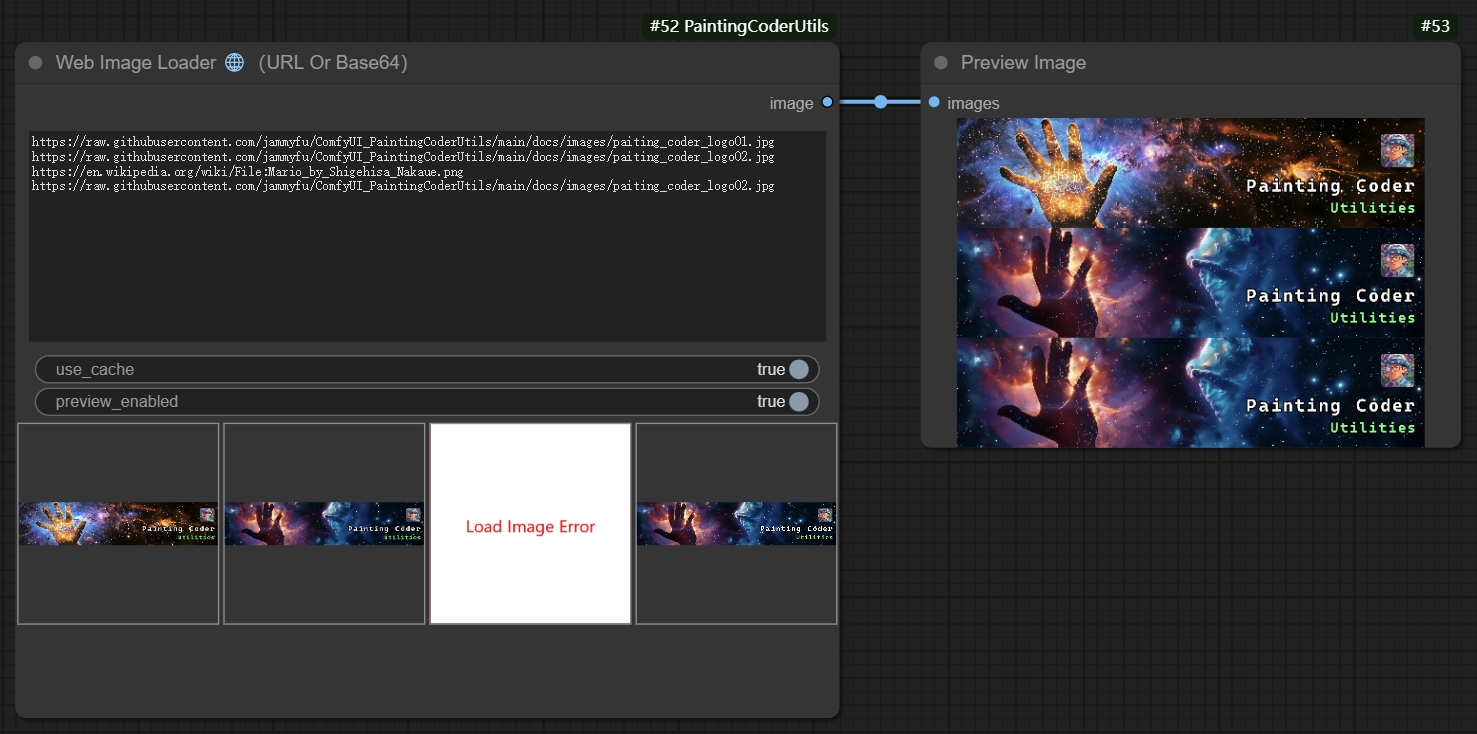
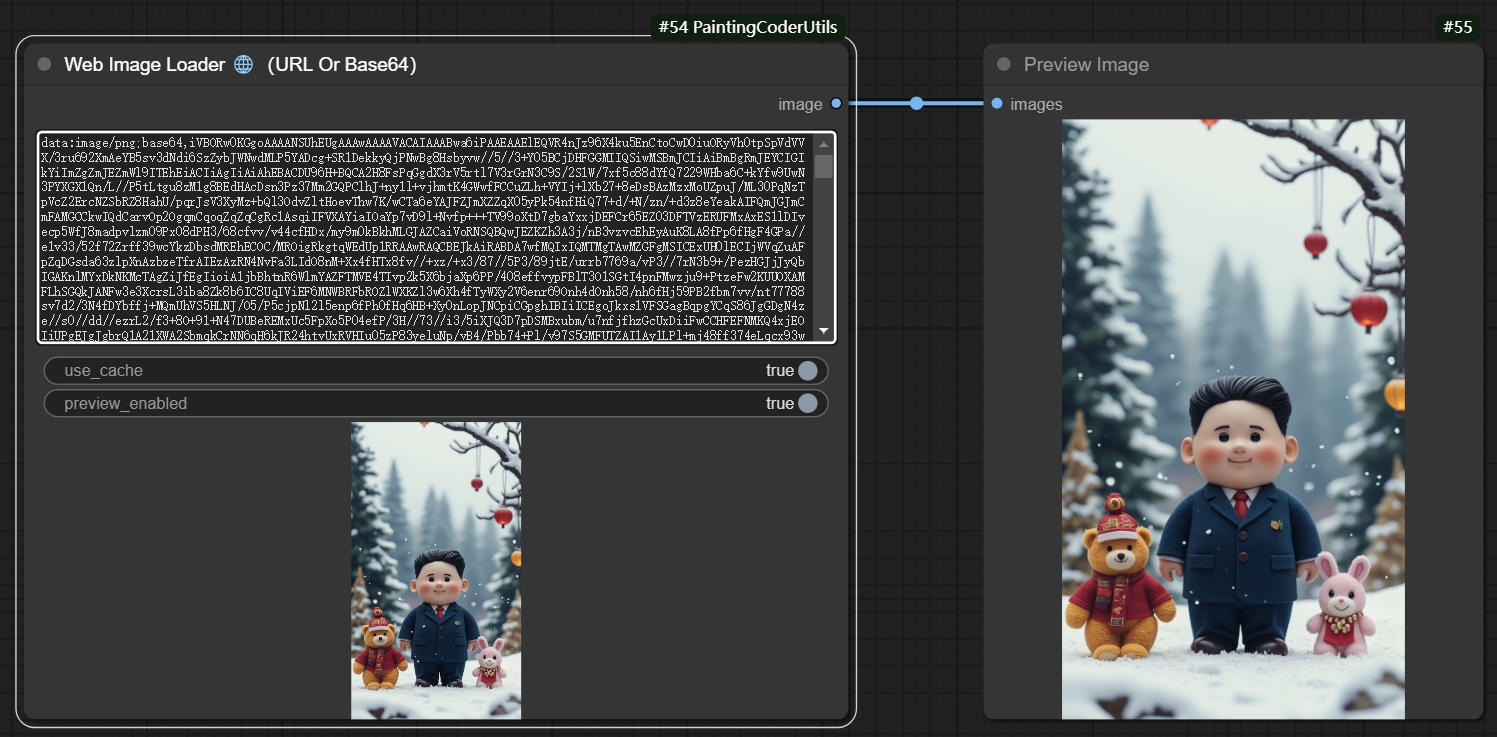
### 🌐Web Image Loader
|
|
A node for loading images from the web.
|
|
|
|
|
|
|
|
|
|
Features:
|
|
- Supports loading images from URLs and Base64 format
|
|
- Automatically handles image formats
|
|
- Supports batch image loading
|
|
- Error handling:
|
|
- Returns a placeholder image for invalid URLs
|
|
- Gracefully handles exceptions, automatically removing erroneous images
|
|
|
|
Usage:
|
|
1. Add the node to your workflow
|
|
2. Input the image URL
|
|
3. The node will automatically load and process the image
|
|
4. The output image can be connected to other nodes requiring image input
|
|
|
|
Use Cases:
|
|
- Loading images from online resources
|
|
- Dynamic image processing workflows
|
|
- Batch image downloading and processing
|
|
|
|
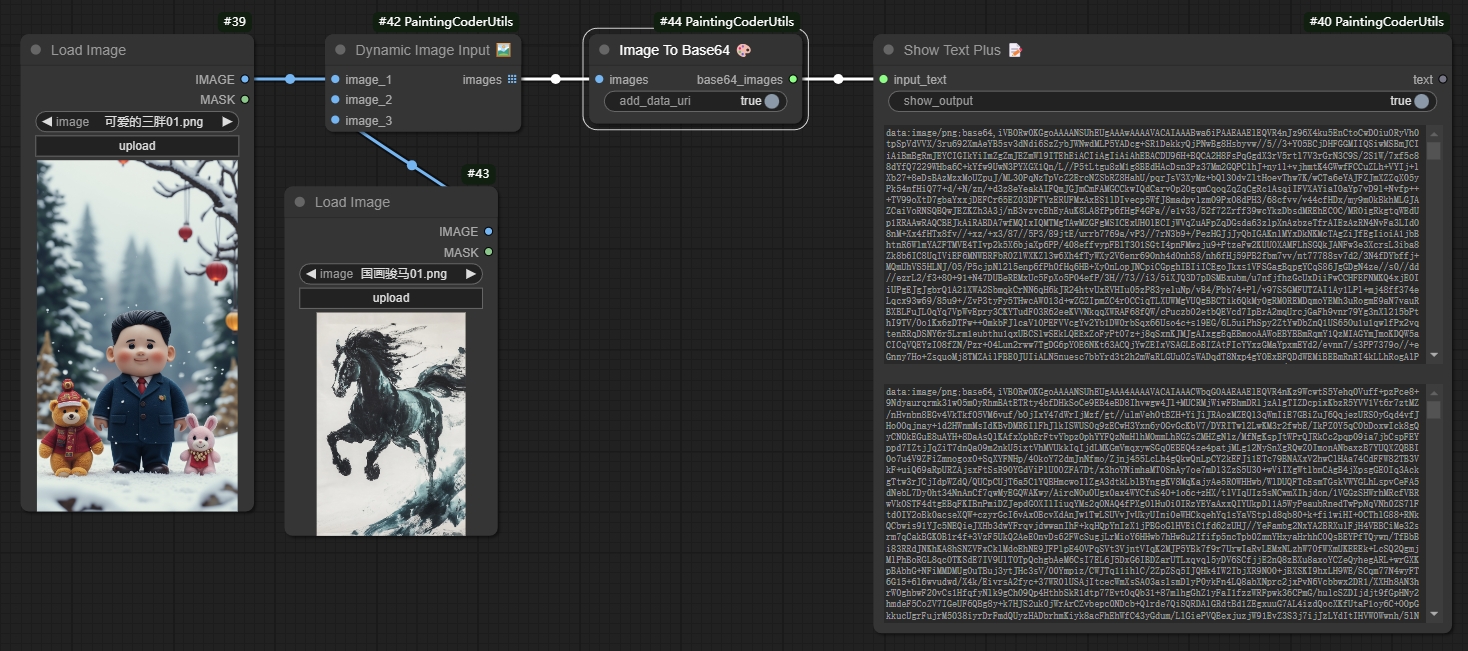
### 🖼️Image to Base64 Encoder
|
|
A node for converting images to Base64 encoding.
|
|
|
|
|
|
|
|
Features:
|
|
- Supports various image formats (JPEG, PNG, BMP, etc.)
|
|
- Automatically handles image size and format
|
|
- Supports batch image encoding
|
|
- Error handling:
|
|
- Returns error information for invalid images
|
|
- Gracefully handles exceptions, ensuring workflow continuity
|
|
|
|
Usage:
|
|
1. Add the node to your workflow
|
|
2. Input the image file or image path
|
|
3. The node will automatically convert the image to Base64 encoding
|
|
4. The output Base64 string can be connected to other nodes requiring Base64 input
|
|
|
|
Use Cases:
|
|
- Image data transmission
|
|
- Embedding images in HTML or JSON
|
|
- Dynamic image processing workflows
|
|
- Batch image encoding and processing
|
|
|
|
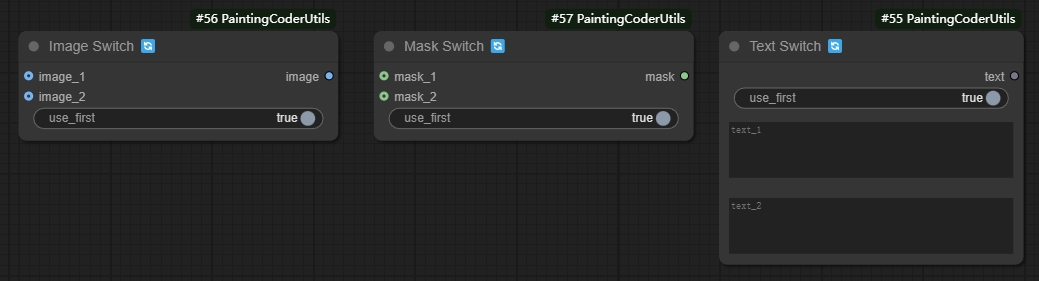
### 🔀 Switch Node (Image Switch, Text Switch)
|
|
Switch nodes are used to dynamically switch between different input or output paths in a workflow.
|
|
|
|
|
|
|
|
Features:
|
|
- Supports multiple input and output types
|
|
- Configurable switching conditions
|
|
- Automatically handles input and output connections
|
|
|
|
Usage:
|
|
1. Add the Switch node to your workflow
|
|
2. Configure switching conditions (e.g., boolean values, numerical ranges, etc.)
|
|
3. Connect different input and output paths
|
|
4. Automatically switch paths based on conditions
|
|
|
|
Use Cases:
|
|
- Dynamically adjusting workflows
|
|
- Conditional branch processing
|
|
- Multi-path selection
|
|
|
|
|
|
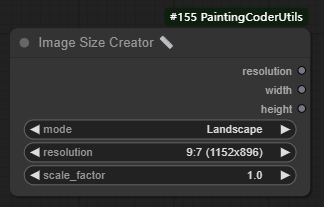
### 🖼️Image Size Creator
|
|
A node for creating image dimensions.
|
|
|
|
|
|
|
|
Features:
|
|
- Supports all SDXL optimal resolutions:
|
|
- 1:1 (1024x1024)
|
|
- 9:7 (1152x896)
|
|
- 7:9 (896x1152)
|
|
- 3:2 (1216x832)
|
|
- 2:3 (832x1216)
|
|
- 7:4 (1344x768)
|
|
- 4:7 (768x1344)
|
|
- 12:5 (1536x640)
|
|
- 5:12 (640x1536)
|
|
- Adjustable scale factor
|
|
- Supports landscape, portrait and square modes
|
|
- Automatic calculation of optimal resolution
|
|
|
|
Usage:
|
|
1. Add the node to your workflow
|
|
2. Select image mode (landscape/portrait/square)
|
|
3. Choose target resolution
|
|
4. Adjust scale factor (optional)
|
|
|
|
Use Cases:
|
|
- Creating images with specific dimensions
|
|
- SDXL image generation optimization
|
|
- Batch image processing workflows
|
|
|
|
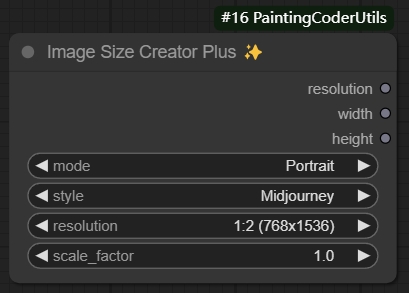
### ✨Image Size Creator Plus
|
|
|
|
|
|
|
|
An enhanced version of the image size creator that supports both SDXL and Midjourney standard resolutions. Key features:
|
|
- Supports switching between SDXL and Midjourney styles
|
|
- Includes all SDXL standard resolutions
|
|
- Includes all Midjourney standard resolutions
|
|
- Three modes: landscape, portrait, and square
|
|
- Adjustable scale factor
|
|
|
|
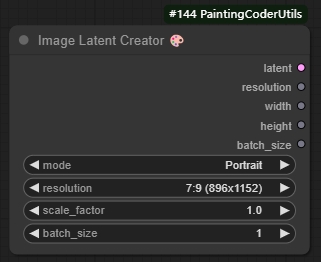
### 🖼️Image Latent Creator
|
|
A node for creating empty image latent spaces.
|
|
|
|
|
|
Features:
|
|
- Inherits all functionality from Image Size Creator
|
|
- Supports batch size settings
|
|
- Automatically creates optimized latent space dimensions
|
|
- Supports additional PNG information
|
|
|
|
Usage:
|
|
1. Add the node to your workflow
|
|
2. Set desired image dimension parameters
|
|
3. Set batch size
|
|
4. Connect to nodes requiring latent space input
|
|
|
|
Use Cases:
|
|
- Creating empty latent spaces
|
|
- SDXL workflow initialization
|
|
- Batch image generation
|
|
- Custom latent space processing
|
|
|
|
|
|
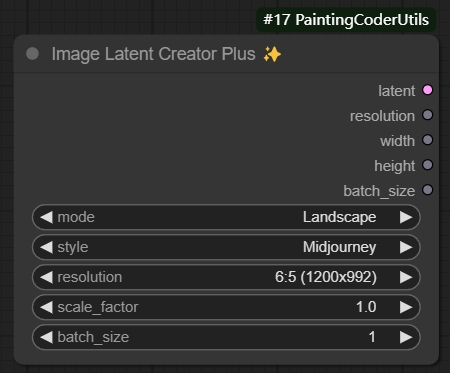
### ✨Image Latent Creator Plus
|
|
An enhanced version of the latent creator that inherits all functionality from Image Size Creator Plus and supports batch latent space creation.
|
|
|
|
|
|
|
|
|
|
|
|
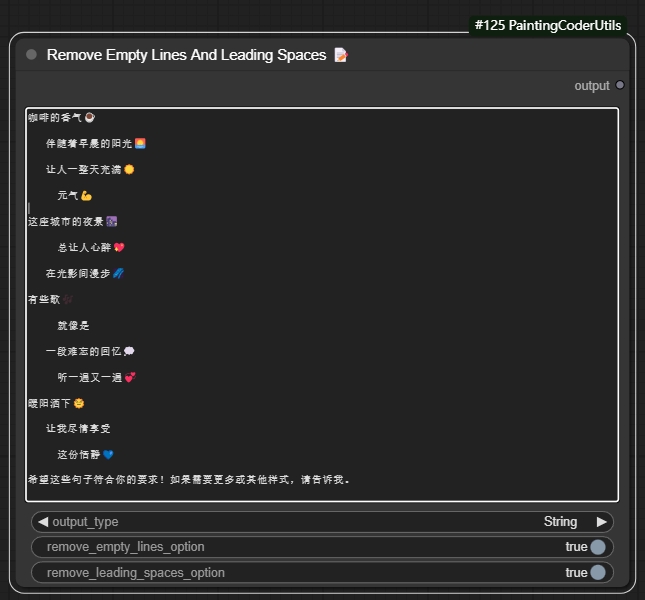
### ✂️Remove Empty Lines And Leading Spaces
|
|
A text processing node that cleans up text by removing empty lines and leading/trailing spaces.
|
|
|
|
|
|
|
|
Features:
|
|
- Removes empty lines from text
|
|
- Removes leading and trailing spaces
|
|
- Option to keep single empty line between paragraphs
|
|
- Option to preserve indentation
|
|
- Supports batch text processing
|
|
|
|
Usage Example:
|
|
```
|
|
Input text:
|
|
Hello World
|
|
|
|
This is a test
|
|
|
|
|
|
Multiple empty lines above
|
|
|
|
Output text (with default settings):
|
|
Hello World
|
|
This is a test
|
|
Multiple empty lines above
|
|
```
|
|
|
|
Parameters:
|
|
- `output type`: Output type (text, list)
|
|
- `remove empty line option`: Remove empty lines
|
|
- `remove loading space option`: Remove spaces
|
|
|
|
Use Cases:
|
|
- Cleaning up prompt text
|
|
- Formatting text for LoRA training
|
|
- Preparing text for text-to-image generation
|
|
- Standardizing text input format
|
|
|
|
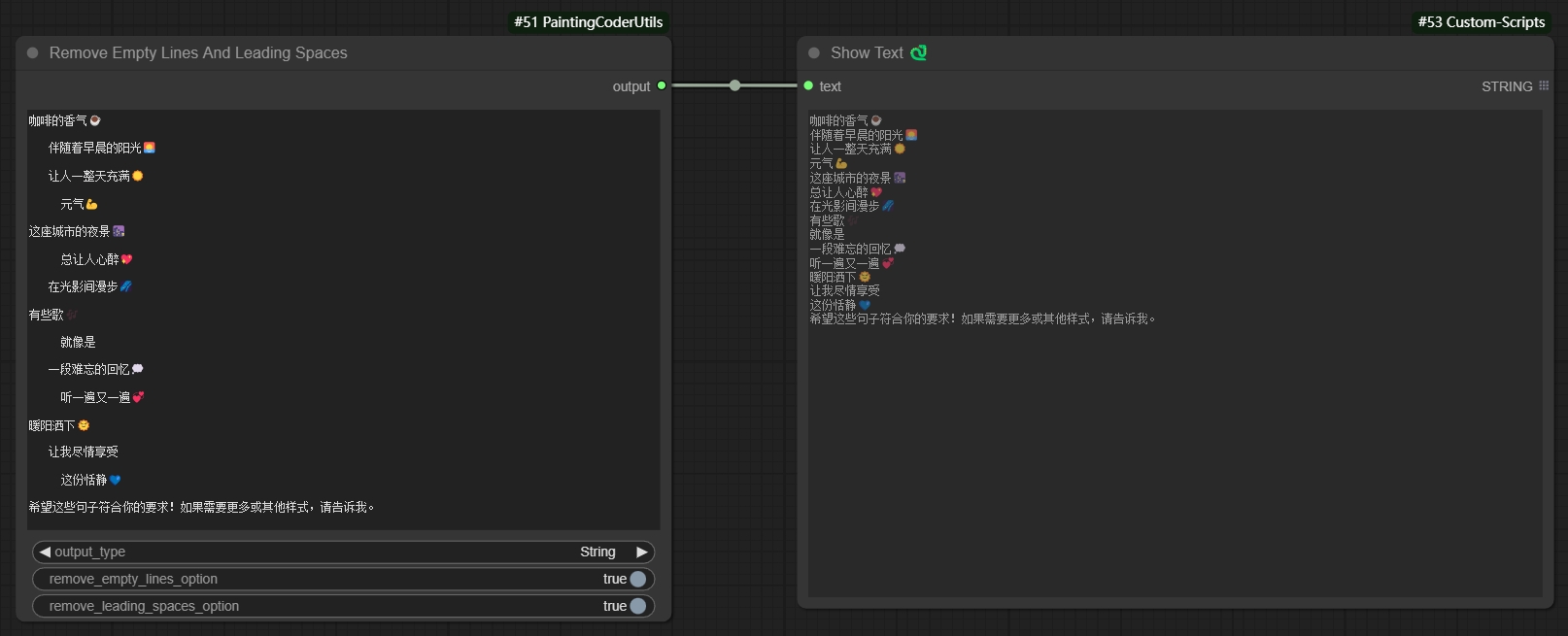
Remove extra empty lines and spaces to generate text:
|
|
|
|
|
|
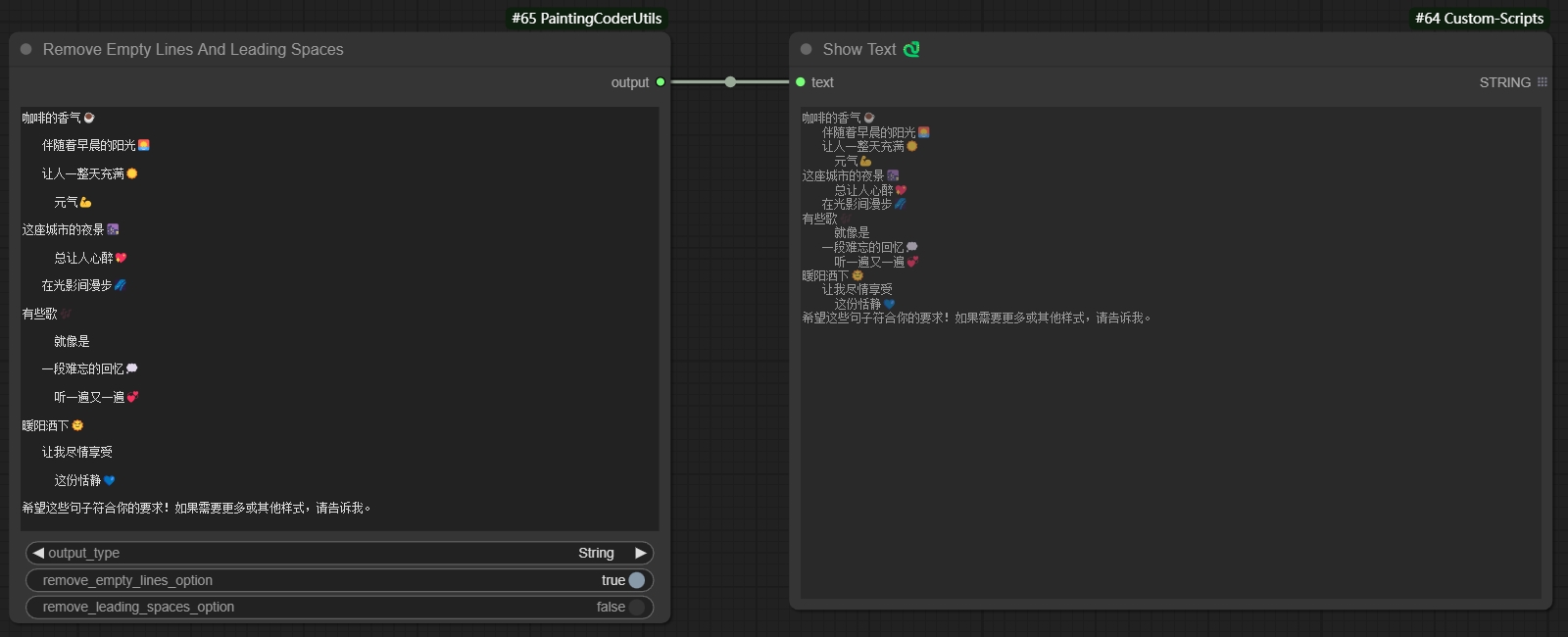
Remove empty lines while keeping spaces to generate text:
|
|
|
|
|
|
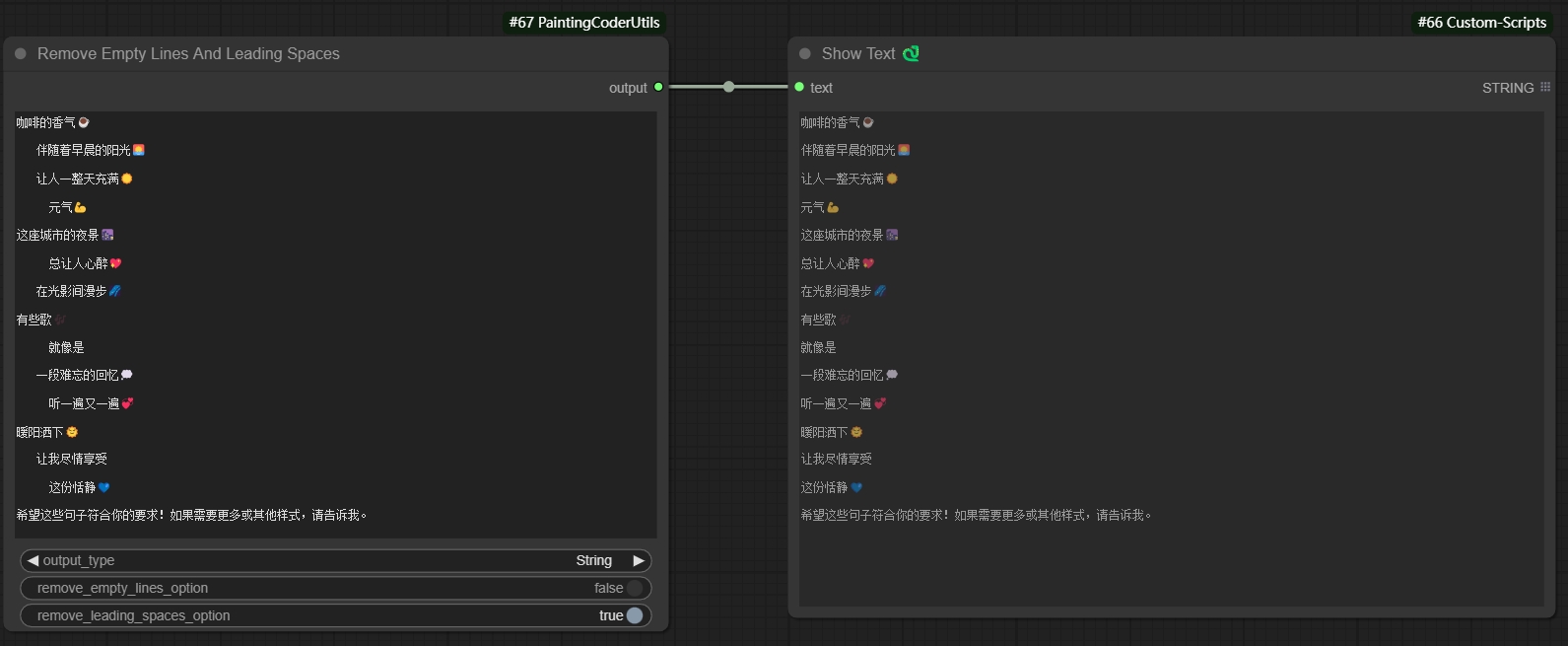
Remove spaces while keeping empty lines to generate text:
|
|
|
|
|
|
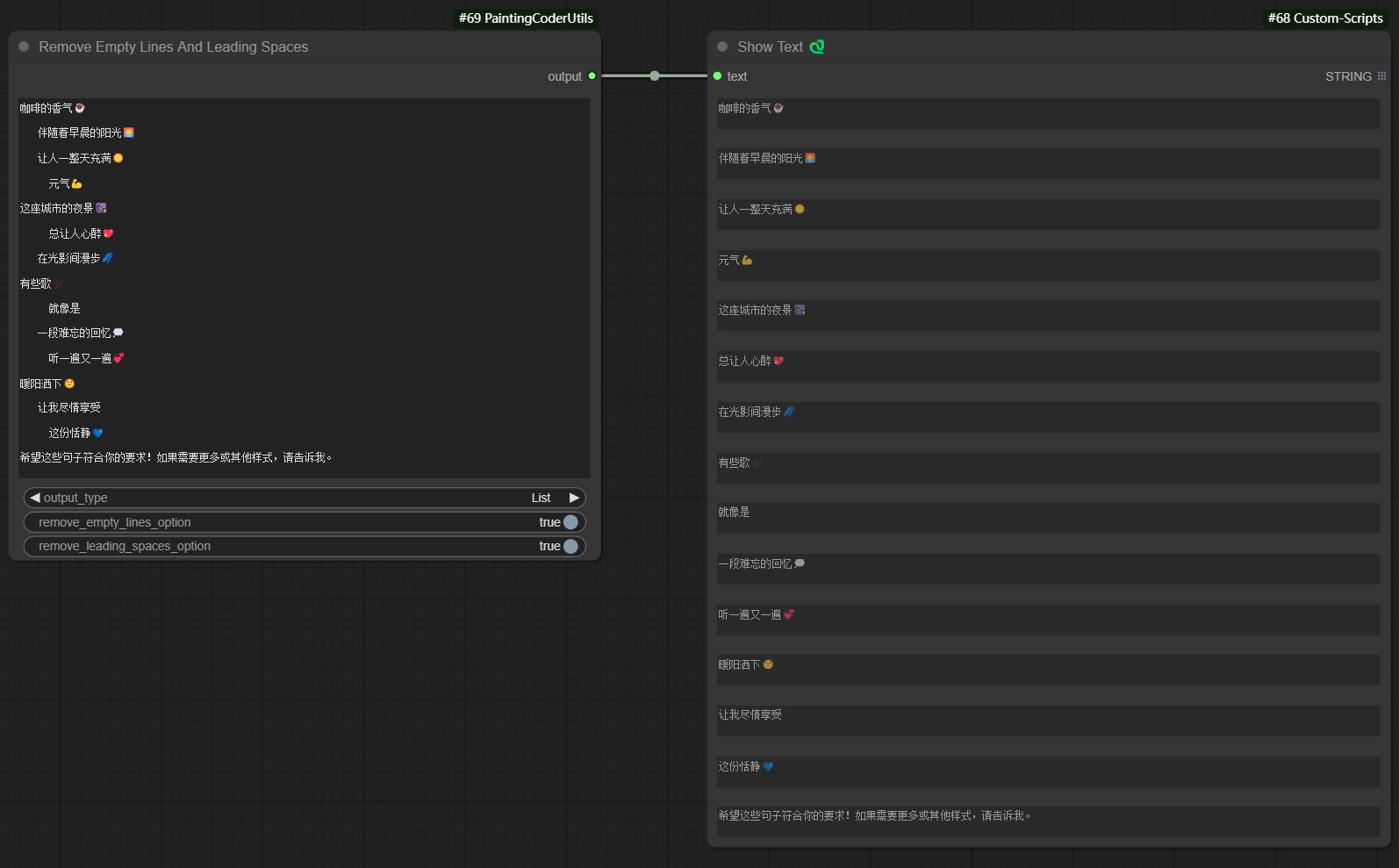
Remove empty lines and spaces to generate list:
|
|
|
|
|
|
|
|
### 🔗Text Combiner✨
|
|
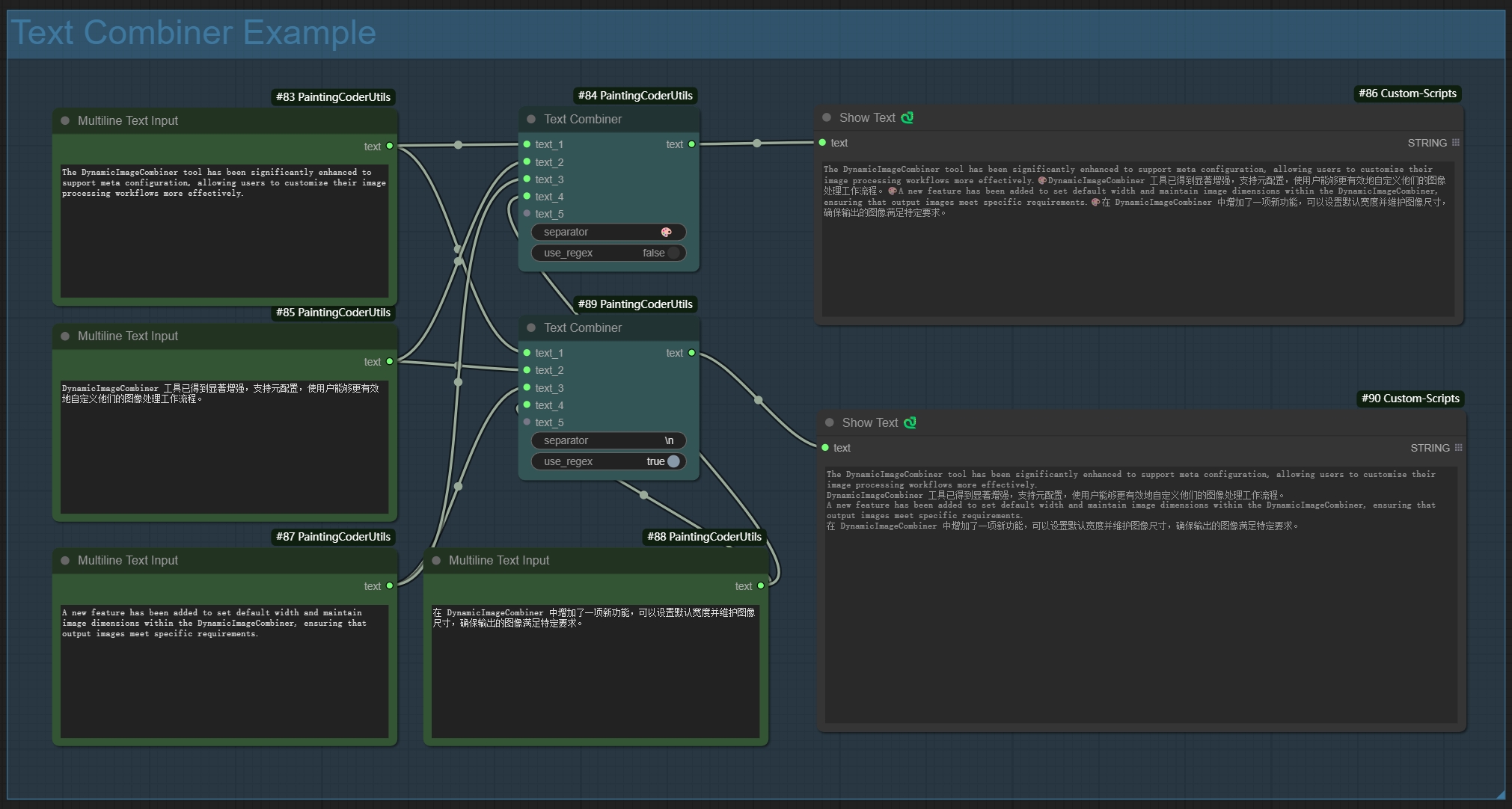
Added Text Combiner node for combining multiple text inputs into a single output.
|
|
|
|
|
|
Features:
|
|
- Dynamic inputs: automatically adds new input points when connected
|
|
- Flexible separators:
|
|
- Supports regular expressions
|
|
- Supports escape characters (e.g., \n, \r)
|
|
- Uses space when left empty
|
|
- Smart line breaks: automatically splits output by line when separator includes newline
|
|
- Auto filtering: removes empty lines while preserving pure space content
|
|
|
|
Usage Examples:
|
|
1. Basic Usage:
|
|
- Using comma separator: `,`
|
|
- Output: text1, text2, text3
|
|
|
|
2. Line Break Separator:
|
|
- Using newline: `\n`
|
|
- Output:
|
|
```
|
|
text1
|
|
text2
|
|
text3
|
|
```
|
|
|
|
3. Mixed Separator:
|
|
- Using comma or newline: `,|\n`
|
|
- Supports both separator types
|
|
|
|
4. Empty Separator:
|
|
- Leave empty
|
|
- Directly joins text with spaces
|
|
|
|
|
|
### 🖼️Dynamic Image Input
|
|
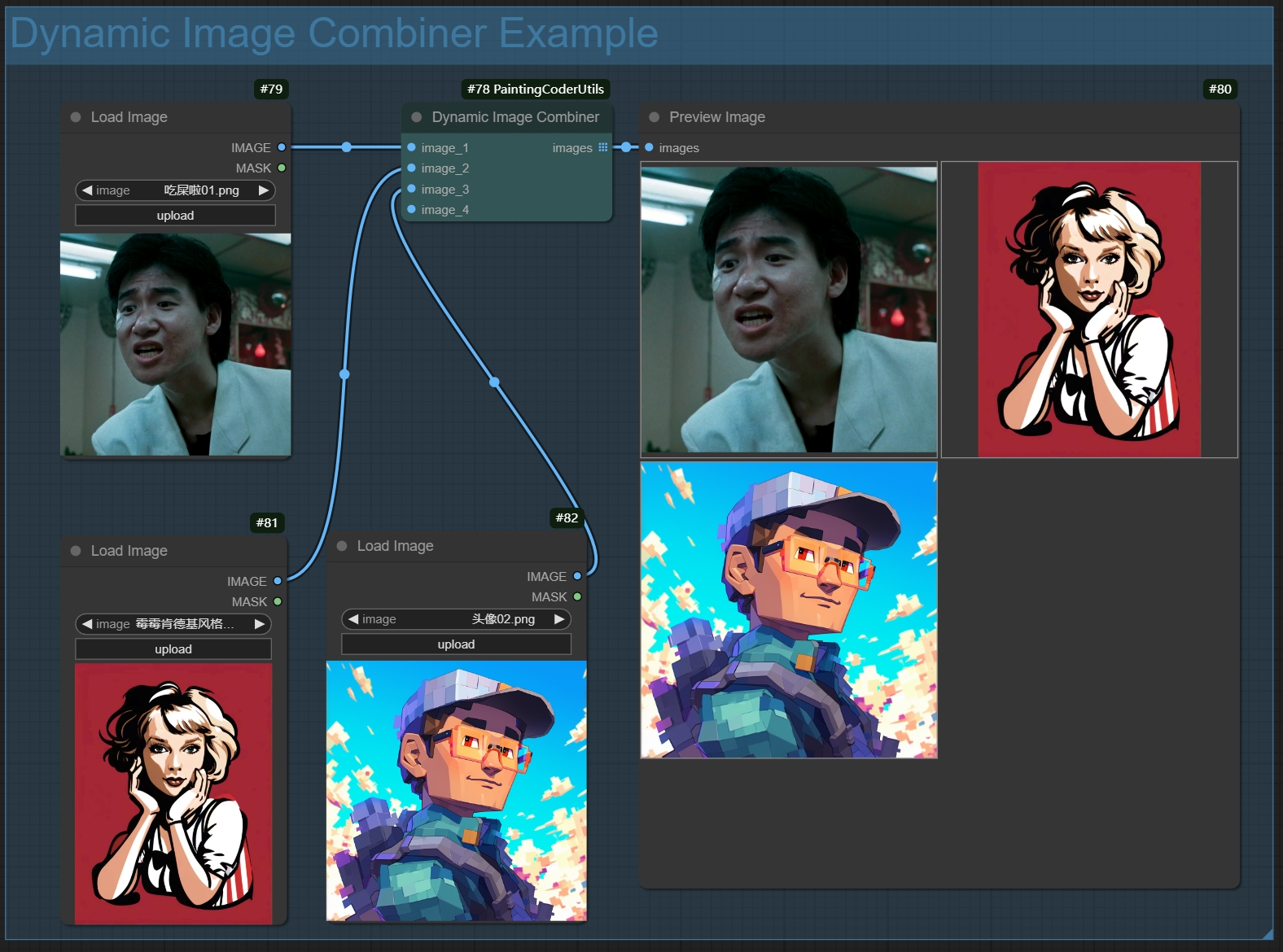
A node for dynamically combining multiple image inputs.
|
|
|
|
Features:
|
|
- Dynamic input ports: automatically adds new image input points when connected
|
|
- Smart image processing:
|
|
- Automatically filters empty inputs
|
|
- Maintains image format and quality
|
|
- Supports batch image processing
|
|
- Error handling:
|
|
- Returns blank image when no valid inputs
|
|
- Gracefully handles exceptions
|
|
- Output format: returns image list for further processing
|
|
|
|
Usage:
|
|
1. Add the node to your workflow
|
|
2. Connect image inputs (new input ports will be created automatically)
|
|
3. Node will automatically combine all non-empty image inputs
|
|
4. Output can be connected to other nodes that require image lists
|
|
|
|
Use Cases:
|
|
- Batch image processing
|
|
- Image collection management
|
|
- Dynamic workflow building
|
|
- Image list generation
|
|
|
|
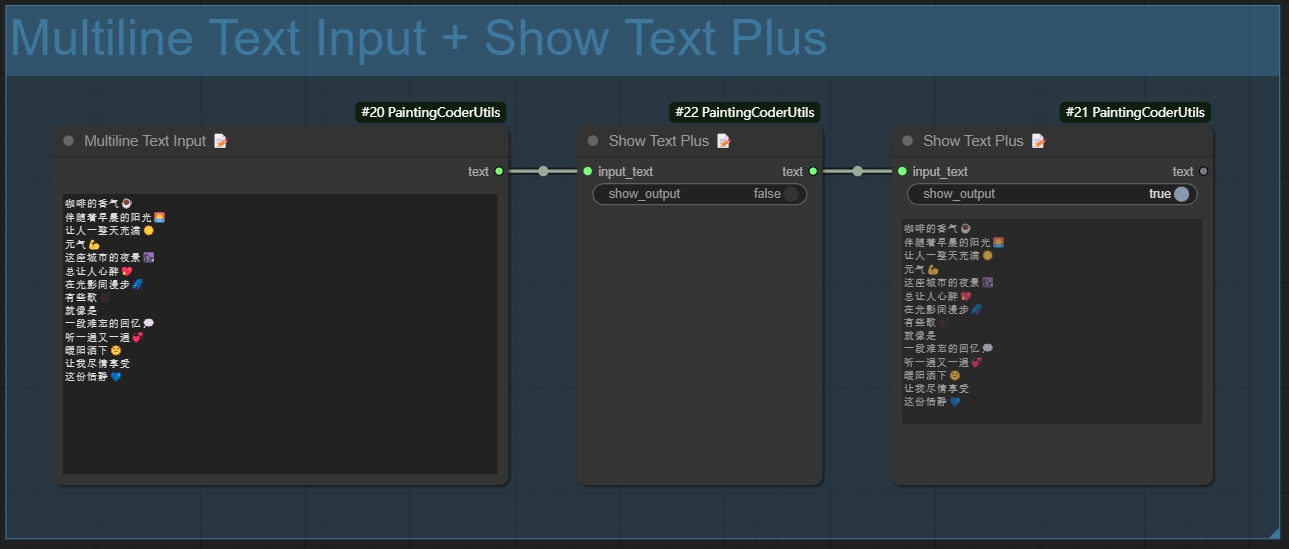
### 📝 Text Display Enhancer (Show Text Plus)
|
|
An enhanced text display node that provides more text formatting and display options.
|
|
|
|
|
|
|
|
Features:
|
|
- Display Mode Options:
|
|
- Normal Mode: Displays text directly
|
|
- Text Statistics Functionality:
|
|
- Character Count
|
|
- Word Count
|
|
- Line Count
|
|
- Supports automatic line wrapping for long texts
|
|
- Supports multilingual text
|
|
|
|
Usage Instructions:
|
|
1. Add the node to your workflow
|
|
2. Connect the text input
|
|
3. Select the display mode
|
|
|
|
### 📝 Multiline Text Input (Multiline Text)
|
|
A node that supports multiline text input, making it easy to input and edit long text content.
|
|
|
|

|
|
|
|
Features:
|
|
- Supports multiline text input and editing
|
|
- Retains text formatting and line breaks
|
|
- Compatible with both Chinese and English input
|
|
- User-friendly text editing interface
|
|
- Supports copy and paste operations
|
|
|
|
Usage Instructions:
|
|
1. Add the node to your workflow
|
|
2. Double-click the text box to edit
|
|
3. Supports direct pasting of multiline text
|
|
4. Click outside the area to save after editing
|
|
|
|
Usage Scenarios:
|
|
- Inputting long prompt phrases
|
|
- Editing multiline descriptive texts
|
|
- Batch text processing
|
|
- Preparing texts for LoRA training
|
|
|
|
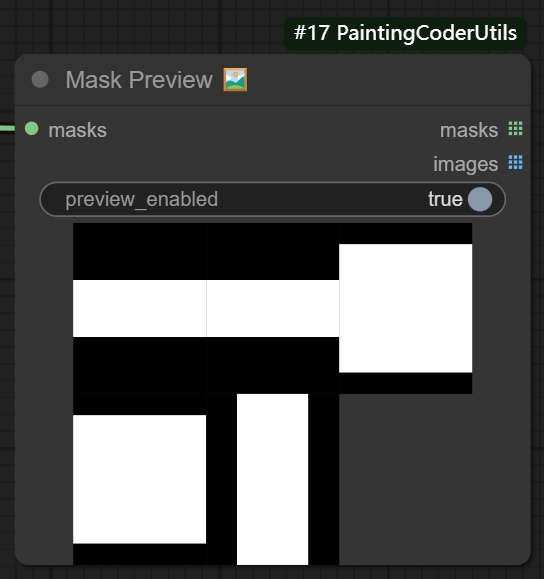
### 🎭Mask Preview
|
|
A utility node for previewing and inspecting image masks.
|
|
|
|
|
|
|
|
Features:
|
|
- Intuitive mask area visualization
|
|
- Multiple preview modes:
|
|
- Original mask
|
|
- Outline highlight
|
|
- Support for batch mask preview
|
|
- Real-time preview updates
|
|
|
|
Usage:
|
|
1. Add the node to your workflow
|
|
2. Connect mask input
|
|
3. Select preview mode
|
|
4. Adjust display parameters
|
|
|
|
|
|
## 📦 Installation
|
|
|
|
1. Navigate to ComfyUI's `custom_nodes` directory
|
|
2. Clone the repository:
|
|
```bash
|
|
cd custom_nodes
|
|
git clone https://github.com/jammyfu/ComfyUI_PaintingCoderUtils.git
|
|
```
|
|
3. Restart ComfyUI
|
|
|
|
|
|
## 📝 License
|
|
|
|
MIT License
|
|
|
|
## 🤝 Updates
|
|
### v0.3.5 Update (2025-01-25)
|
|
- **New Features:**
|
|
- Added Image Size Creator Plus node, supporting SDXL and Midjourney dimensions
|
|
- Added Image Latent Creator Plus node, inheriting all Plus node functionalities
|
|
- Optimized Plus node user interface and interaction experience
|
|
- Added more resolution preset options
|
|
- Improved node performance and stability
|
|
|
|
### v0.3.4 Update (2025-01-24)
|
|
- **Updates:**
|
|
- Modified the ComfyUI workflow fixer tool page to enhance user experience
|
|
- Added more error messages to help users locate issues faster
|
|
- Optimized file upload and download functionality to support more file processing
|
|
- Improved path separator conversion functionality to enhance cross-platform compatibility
|
|
- Enhanced interface response speed to reduce loading time
|
|
|
|
### v0.3.3 (2025-01-23)
|
|
- **Improvements:**
|
|
- Bug fixes, added workflow fixer tool to repair old version workflow JSON files
|
|
- Added path separator conversion functionality to switch between Windows and Unix formats
|
|
- Added file upload functionality to upload JSON files for repair
|
|
- Added file download functionality to download repaired JSON files or ZIP files
|
|
|
|
### v0.3.2 (2025-01-22)
|
|
- **Improvements:**
|
|
- Enhanced the workflow fixer tool with more error handling and informative messages
|
|
- Optimized the user interface for more intuitive operation
|
|
- Added support for more node types
|
|
- Improved the stability of the path separator conversion functionality
|
|
- Fixed issues where JSON files could not be loaded correctly in certain cases
|
|
|
|
### v0.3.1 (2025-01-22)
|
|
- **Bug Fixes:**
|
|
- Fixed crash issue in Text Combiner when handling special characters
|
|
- Fixed issue with Dynamic Image Input node not handling inputs correctly in certain cases
|
|
- Fixed display error in Mask Previewer during batch preview
|
|
- Fixed compatibility issues with path separator conversion functionality on some systems
|
|
- Fixed processing errors in Image Resolution Adjuster at specific resolutions
|
|
|
|
### v0.3.0 (2025-01-21)
|
|
- **Breaking Changes:**
|
|
- Modified namespace structure for better compatibility
|
|
- Added workflow fixer tool for migration
|
|
- Added path separator conversion functionality
|
|
- Enhanced error handling and user feedback
|
|
- Improved cross-platform compatibility
|
|
|
|
### v0.2.2 (2024-01-09)
|
|
- Added Mask Switch node
|
|
- Support switching between two masks based on conditions
|
|
- Provides default blank mask handling
|
|
- Optimized exception handling mechanism
|
|
- Maintains mask format and quality
|
|
|
|
### v0.2.1 (2024-01-07)
|
|
- Added Web Image Loader node
|
|
- Support loading images from URLs and Base64
|
|
- Automatic image format handling
|
|
- Support batch image loading
|
|
- Error handling: returns placeholder image for invalid URLs, graceful exception handling
|
|
- Cache support for improved loading efficiency
|
|
- Preview feature: generates and saves preview images
|
|
|
|
### v0.2.0 (2024-01-06)
|
|
- Added Image Switch node
|
|
- Support switching between two images based on conditions
|
|
- Provides default blank image handling
|
|
- Optimized exception handling mechanism
|
|
- Maintains image format and quality
|
|
|
|
- Added Text Switch node
|
|
- Support switching between two texts based on conditions
|
|
- Provides default blank text handling
|
|
- Optimized exception handling mechanism
|
|
|
|
### v0.1.9 (2024-01-05)
|
|
- Enhanced Image Resolution Adjuster
|
|
- Added mask feathering functionality
|
|
- Improved mask edge processing algorithm
|
|
- Enhanced mask processing performance
|
|
- Optimized edge smoothing effects
|
|
|
|
### v0.1.8 (2024-01-04)
|
|
- Optimized Text Combiner
|
|
- Improved text concatenation logic
|
|
- Enhanced performance for large text processing
|
|
- Fixed special character handling issues
|
|
- Optimized memory usage
|
|
|
|
### v0.1.7 (2024-01-03)
|
|
- Enhanced Image Resolution Adjuster
|
|
- Improved extend mode algorithms
|
|
- Enhanced image processing performance
|
|
- Fixed edge handling issues
|
|
- Optimized memory usage
|
|
|
|
### v0.1.6 (2024-01-02)
|
|
- Added Multiline Text Input node
|
|
- Support for multiline text input and editing
|
|
- Preserves text formatting and line breaks
|
|
- Compatible with both Chinese and English input
|
|
- User-friendly text editing interface
|
|
- Supports copy and paste operations
|
|
|
|
### v0.1.5 (2024-12-28)
|
|
- Added Mask Preview node
|
|
- Added real-time preview update
|
|
- Added batch mask preview
|
|
|
|
### v0.1.4 (2024-12-27)
|
|
- Added Show Text Plus node
|
|
- Added multiple display modes
|
|
- Implemented text statistics functionality
|
|
- Added support for custom display options
|
|
- Optimized long text display
|
|
|
|
### v0.1.3 (2024-12-26)
|
|
- Added Dynamic Image Input Combiner
|
|
- Implemented dynamic input ports
|
|
- Added smart image processing
|
|
- Optimized error handling mechanism
|
|
- Added support for image list output
|
|
|
|
### v0.1.2 (2024-12-25)
|
|
- Added image outline feature
|
|
- Added text combiner node
|
|
|
|
|
|
### v0.1.1 (2024-12-25)
|
|
- Added TextCombiner node
|
|
- Implemented dynamic input connections
|
|
- Added support for regex separators
|
|
- Added support for newlines and escape characters
|
|
- Added empty separator handling
|
|
- Optimized text joining logic
|
|
|
|
### v0.1.0 (2024-12-23)
|
|
- Initial release
|
|
- Added Image Resolution Adjuster:
|
|
- Support for SDXL optimal resolutions
|
|
- Multiple extend modes
|
|
- Color picker for background
|
|
- Scale factor adjustment
|
|
- Resolution limits
|
|
- Added Remove Empty Lines And Leading Spaces:
|
|
- Text cleaning functionality
|
|
- Configurable preservation options
|
|
- Batch processing support
|
|
|
|
|
|
### Planned Features
|
|
- Dynamic image input combination
|
|
- Text template system
|
|
- More image processing utilities
|
|
|
|
## 🤝 Contributions
|
|
|
|
Issues and Pull Requests are welcome!
|
|
|
|
## 🙏 Acknowledgements
|
|
|
|
- ComfyUI Team
|
|
- Impact-Pack Project
|