
DynamiCrafter wrapper nodes for ComfyUI
WORK IN PROGRESS
Installing
Either manager and install from git, or clone this repo to custom_nodes and run:
pip install -r requirements.txt
or if you use portable (run this in ComfyUI_windows_portable -folder):
python_embeded\python.exe -m pip install -r ComfyUI\custom_nodes\ComfyUI-DynamiCrafterWrapper\requirements.txt
Get the model from here, put it in ComfyUI/models/checkpoints and name it dynamicrafter_1024_v1.ckpt
https://huggingface.co/Doubiiu/DynamiCrafter_1024
Interpolation model should be named dynamicrafter_512_interp_v1.ckpt
https://huggingface.co/Doubiiu/DynamiCrafter_512_Interp/
With fp16 1024x576 uses bit under 10GB VRAM, and interpolation at 512p can be done with 8GB
ORIGINAL REPO:
DynamiCrafter: Animating Open-domain Images with Video Diffusion Priors









Jinbo Xing, Menghan Xia*, Yong Zhang, Haoxin Chen, Wangbo Yu,
Hanyuan Liu, Xintao Wang, Tien-Tsin Wong*, Ying Shan
(* corresponding authors)
From CUHK and Tencent AI Lab.
🔆 Introduction
🔥🔥 Generative frame interpolation / looping video generation model weights (320x512) have been released!
🔥 New Update Rolls Out for DynamiCrafter! Better Dynamic, Higher Resolution, and Stronger Coherence!
🤗 DynamiCrafter can animate open-domain still images based on text prompt by leveraging the pre-trained video diffusion priors. Please check our project page and paper for more information.
😀 We will continue to improve the model's performance.
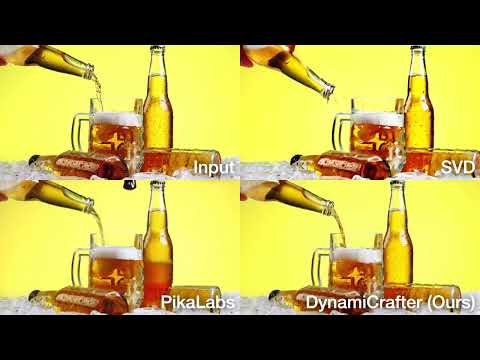
👀 Seeking comparisons with Stable Video Diffusion and PikaLabs? Click the image below.
1.1. Showcases (576x1024)

|

|

|

|
1.2. Showcases (320x512)

|

|

|

|
1.3. Showcases (256x256)
| "bear playing guitar happily, snowing" | "boy walking on the street" | ||

|

|

|

|
2. Applications
2.1 Storytelling video generation (see project page for more details)
 |
2.2 Generative frame interpolation
| Input starting frame | Input ending frame | Generated video |

|

|

|

|

|

|

|

|

|
2.3 Looping video generation

|

|

|
📝 Changelog
- [2024.03.14]: 🔥🔥 Release generative frame interpolation and looping video models (320x512).
- [2024.02.05]: Release high-resolution models (320x512 & 576x1024).
- [2023.12.02]: Launch the local Gradio demo.
- [2023.11.29]: Release the main model at a resolution of 256x256.
- [2023.11.27]: Launch the project page and update the arXiv preprint.
🧰 Models
| Model | Resolution | GPU Mem. & Inference Time (A100, ddim 50steps) | Checkpoint |
|---|---|---|---|
| DynamiCrafter1024 | 576x1024 | 18.3GB & 75s (perframe_ae=True) |
Hugging Face |
| DynamiCrafter512 | 320x512 | 12.8GB & 20s (perframe_ae=True) |
Hugging Face |
| DynamiCrafter256 | 256x256 | 11.9GB & 10s (perframe_ae=False) |
Hugging Face |
| DynamiCrafter512_interp | 320x512 | 12.8GB & 20s (perframe_ae=True) |
Hugging Face |
Currently, our DynamiCrafter can support generating videos of up to 16 frames with a resolution of 576x1024. The inference time can be reduced by using fewer DDIM steps.
GPU memory consumed on RTX 4090 reported by @noguchis in Twitter: 18.3GB (576x1024), 12.8GB (320x512), 11.9GB (256x256).
⚙️ Setup
Install Environment via Anaconda (Recommended)
conda create -n dynamicrafter python=3.8.5
conda activate dynamicrafter
pip install -r requirements.txt
💫 Inference
1. Command line
Image-to-Video Generation
- Download pretrained models via Hugging Face, and put the
model.ckptwith the required resolution incheckpoints/dynamicrafter_[1024|512|256]_v1/model.ckpt. - Run the commands based on your devices and needs in terminal.
  # Run on a single GPU:
  # Select the model based on required resolutions: i.e., 1024|512|320:
  sh scripts/run.sh 1024
  # Run on multiple GPUs for parallel inference:
  sh scripts/run_mp.sh 1024
Generative Frame Interpolation / Looping Video Generation
Download pretrained model DynamiCrafter512_interp and put the model.ckpt in checkpoints/dynamicrafter_512_interp_v1/model.ckpt.
  sh scripts/run_application.sh interp # Generate frame interpolation
  sh scripts/run_application.sh loop   # Looping video generation
2. Local Gradio demo
Image-to-Video Generation
- Download the pretrained models and put them in the corresponding directory according to the previous guidelines.
- Input the following commands in terminal (choose a model based on the required resolution: 1024, 512 or 256).
python gradio_app.py --res 1024
Generative Frame Interpolation / Looping Video Generation
Download the pretrained model and put it in the corresponding directory according to the previous guidelines.
python gradio_app_interp_and_loop.py
Community Extensions for Image-to-Video: ComfyUI (Thanks to chaojie).
👨👩👧👦 Crafter Family
VideoCrafter1: Framework for high-quality video generation.
ScaleCrafter: Tuning-free method for high-resolution image/video generation.
TaleCrafter: An interactive story visualization tool that supports multiple characters.
LongerCrafter: Tuning-free method for longer high-quality video generation.
MakeYourVideo, might be a Crafter:): Video generation/editing with textual and structural guidance.
StyleCrafter: Stylized-image-guided text-to-image and text-to-video generation.
😉 Citation
@article{xing2023dynamicrafter,
  title={DynamiCrafter: Animating Open-domain Images with Video Diffusion Priors},
  author={Xing, Jinbo and Xia, Menghan and Zhang, Yong and Chen, Haoxin and Yu, Wangbo and Liu, Hanyuan and Wang, Xintao and Wong, Tien-Tsin and Shan, Ying},
  journal={arXiv preprint arXiv:2310.12190},
  year={2023}
}
🙏 Acknowledgements
We would like to thank AK(@_akhaliq) for the help of setting up hugging face online demo, and camenduru for providing the replicate & colab online demo.
📢 Disclaimer
We develop this repository for RESEARCH purposes, so it can only be used for personal/research/non-commercial purposes.