
76 lines
3.2 KiB
Markdown
76 lines
3.2 KiB
Markdown
# noEmbryo Nodes
|
|
A diverse set of nodes for ComfyUI.
|
|
* [PromptTermList (1-6)](#PromptTermList)
|
|
* [Resolution Scale](#ResolutionScale)
|
|
* [Regex Text Chopper](#RegexTextChopper)
|
|
|
|
You can access them through "Add node > noEmbryo" submenu.
|
|
|
|
[![made-with-python][Python]](https://www.python.org/)
|
|
[![License: MIT][MIT]](LICENSE)
|
|
|
|
---
|
|
## <a name="PromptTermList"></a>PromptTermList (1-6)
|
|
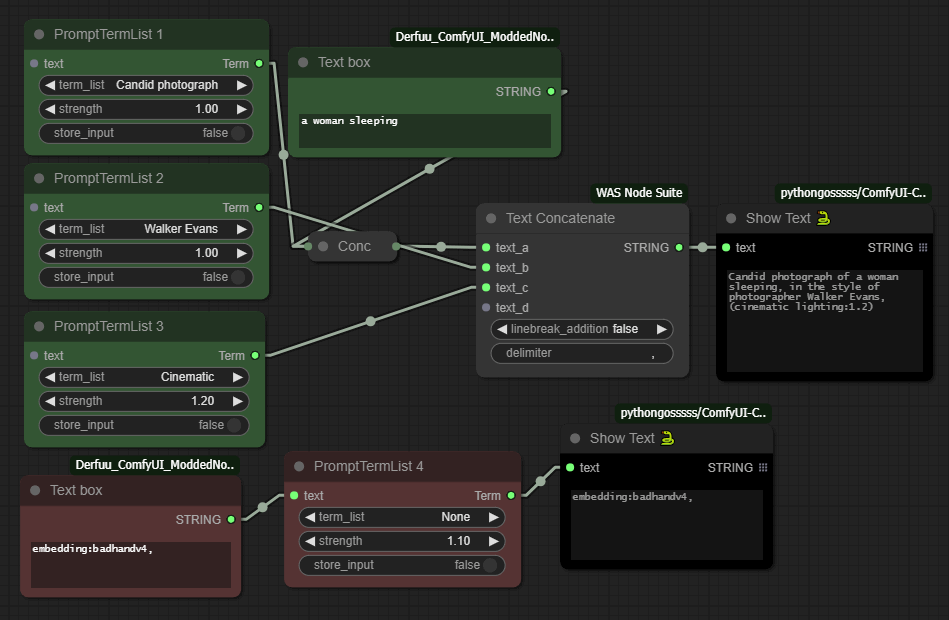
These are some nodes that help with the creation of Prompts inside [ComfyUI](https://github.com/comfyanonymous/ComfyUI).
|
|
|
|
|
|
|
|
|
|
<!-- <p align="center">
|
|
<a href="https://raw.githubusercontent.com/noembryo/ComfyUI-noEmbryo/master/stuff/Screen2.png">
|
|
<img src="https://raw.githubusercontent.com/noembryo/ComfyUI-noEmbryo/master/stuff/Screen2.png" height="180"></a>
|
|
</p> -->
|
|
|
|
### Usage
|
|
Every one of the 6 nodes have a different `json` file that stores its Prompt Terms in "label"/"value" pairs.
|
|
The "label" part is what we see at the node's dropdown menu, and the "value" part is what it produces at its `Term` output when we run a generation job.
|
|
|
|
These `json` files are located inside the `TermLists` directory, in the node's folder.
|
|
There are two ways to add a new term.
|
|
* From within ComfyUI:
|
|
* Connect a text box to the node's `text` input.
|
|
* Write the "label"/"value" part in the box using the following format:
|
|
```
|
|
label=Descriptive text
|
|
value=masterpiece, artful and cozy
|
|
```
|
|
* Enable the `store_input` switch.
|
|
* Run a generation job.
|
|
* Refresh the page.
|
|
* Manually:
|
|
* Just open the `json` file and add/remove/change entries.
|
|
|
|
Of course we must be very careful with this, to keep the `json` format of labels/values (with the appropriate commas), otherwise the file will not be parsed.
|
|
|
|
This `text` input is also useful if we want to manually add something *after* our term, or as the *only* term if we select the `None` label of the dropdown.
|
|
The `strength` value is changing the impact of the term by using the parenthesis format like this: `(a great term:1.3)`
|
|
|
|
We can delete a term by sending an empty value to the `text` input like this:
|
|
```
|
|
label=The label to be deleted
|
|
value=
|
|
```
|
|
---
|
|
## <a name="ResolutionScale"></a>Resolution Scale
|
|
|
|
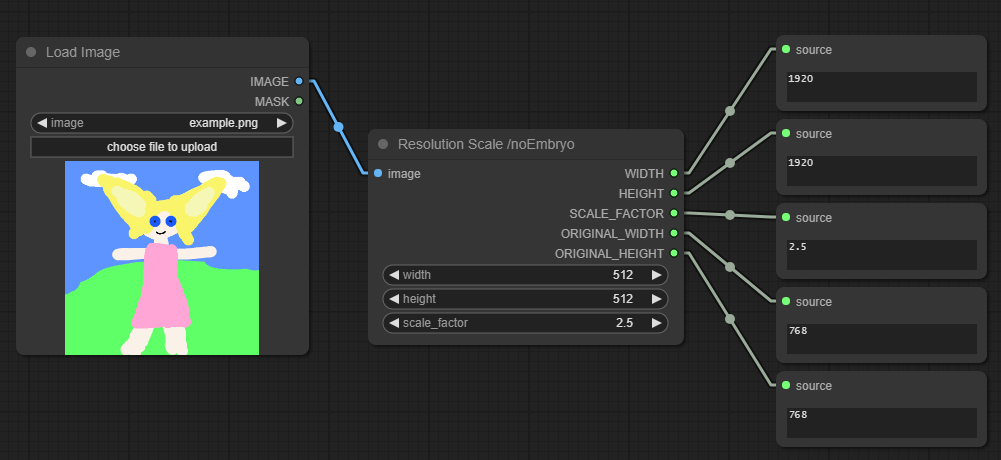
A simple node that outputs the resolution of an image using the dimensions of an input image or some custom user-defined dimensions, using a Scale Factor.
|
|
|
|
If there is an input image connected, setting either `width` or `height` to 0 will use the other dimension to scale the image (but always multiple of 4).
|
|
|
|
---
|
|
## <a name="RegexTextChopper"></a>Regex Text Chopper
|
|
|
|
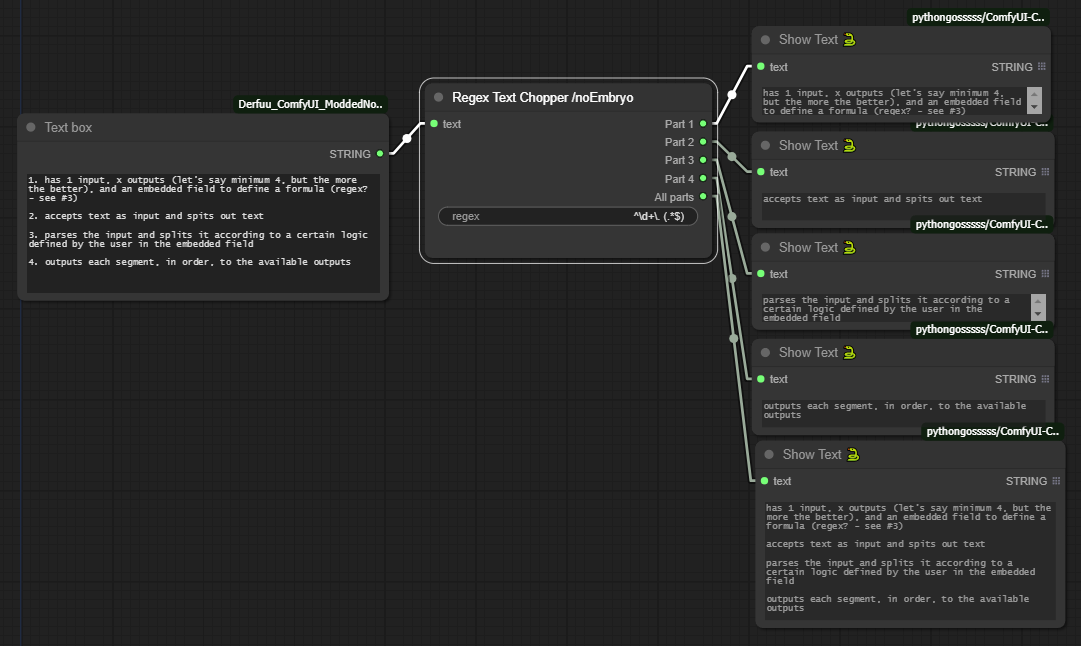
A node that "chops" a text using a regular expression and outputs the chopped parts of the text.
|
|
|
|
---
|
|
## Installation
|
|
* Use the ComfyUI Manager
|
|
* Or manually
|
|
* cd to `ComfyUI\custom_nodes`
|
|
* git clone https://github.com/noembryo/ComfyUI-noEmbryo.git
|
|
* Restart ComfyUI
|
|
|
|
|
|
[Python]:https://img.shields.io/badge/Made%20with-Python-1f425f.svg
|
|
[MIT]:https://img.shields.io/badge/License-MIT-green.svg
|