
216 lines
7.9 KiB
Markdown
216 lines
7.9 KiB
Markdown
## ComfyUI-BrushNet
|
|
|
|
Custom nodes for ComfyUI allow to inpaint using Brushnet: ["BrushNet: A Plug-and-Play Image Inpainting Model with Decomposed Dual-Branch Diffusion"](https://arxiv.org/abs/2403.06976).
|
|
|
|
My contribution is limited to the ComfyUI adaptation, and all credit goes to the authors of the paper.
|
|
|
|
## Updates
|
|
|
|
May 11, 2024. Image batch is implemented. You can even add BrushNet to AnimateDiff vid2vid workflow, but they don't work together - they are different models and both try to patch UNet. Added some more examples.
|
|
|
|
May 6, 2024. PowerPaint v2 model is implemented. After update your workflow probably will not work. Don't panic! Check `end_at` parameter of BrushNode, if it equals 1, change it to some big number. Read about parameters in Usage section below.
|
|
|
|
May 2, 2024. BrushNet SDXL is live. It needs positive and negative conditioning though, so workflow changes a little, see example.
|
|
|
|
Apr 28, 2024. Another rework, sorry for inconvenience. But now BrushNet is native to ComfyUI. Famous cubiq's [IPAdapter Plus](https://github.com/cubiq/ComfyUI_IPAdapter_plus) is now working with BrushNet! I hope... :) Please, report any bugs you found.
|
|
|
|
Apr 18, 2024. Complete rework, no more custom `diffusers` library. It is possible to use LoRA models.
|
|
|
|
Apr 11, 2024. Initial commit.
|
|
|
|
## Plans
|
|
|
|
- [x] BrushNet SDXL
|
|
- [x] PowerPaint v2
|
|
- [x] Image batch
|
|
- [ ] Compatibility with `jank HiDiffusion` and similar nodes
|
|
|
|
## Installation
|
|
|
|
Clone the repo into the `custom_nodes` directory and install the requirements:
|
|
|
|
```
|
|
git clone https://github.com/nullquant/ComfyUI-BrushNet.git
|
|
pip install -r requirements.txt
|
|
```
|
|
|
|
Checkpoints of BrushNet can be downloaded from [here](https://drive.google.com/drive/folders/1fqmS1CEOvXCxNWFrsSYd_jHYXxrydh1n?usp=drive_link).
|
|
|
|
The checkpoint in `segmentation_mask_brushnet_ckpt` provides checkpoints trained on BrushData, which has segmentation prior (mask are with the same shape of objects). The `random_mask_brushnet_ckpt` provides a more general ckpt for random mask shape.
|
|
|
|
`segmentation_mask_brushnet_ckpt` and `random_mask_brushnet_ckpt` contains BrushNet for SD 1.5 models while
|
|
`segmentation_mask_brushnet_ckpt_sdxl_v0` and `random_mask_brushnet_ckpt_sdxl_v0` for SDXL.
|
|
|
|
You should place `diffusion_pytorch_model.safetensors` files to your `models/inpaint` folder.
|
|
|
|
For PowerPaint you should download three files. Both `diffusion_pytorch_model.safetensors` and `pytorch_model.bin` from [here](https://huggingface.co/JunhaoZhuang/PowerPaint_v2/tree/main/PowerPaint_Brushnet) should be placed in your `models/inpaint` folder.
|
|
|
|
Also you need SD1.5 text encoder model `model.fp16.safetensors` from [here](https://huggingface.co/runwayml/stable-diffusion-v1-5/tree/main/text_encoder). It should be placed in your `models/clip` folder.
|
|
|
|
This is a structure of my `models/inpaint` folder:
|
|
|
|

|
|
|
|
Yours can be different.
|
|
|
|
## Usage
|
|
|
|
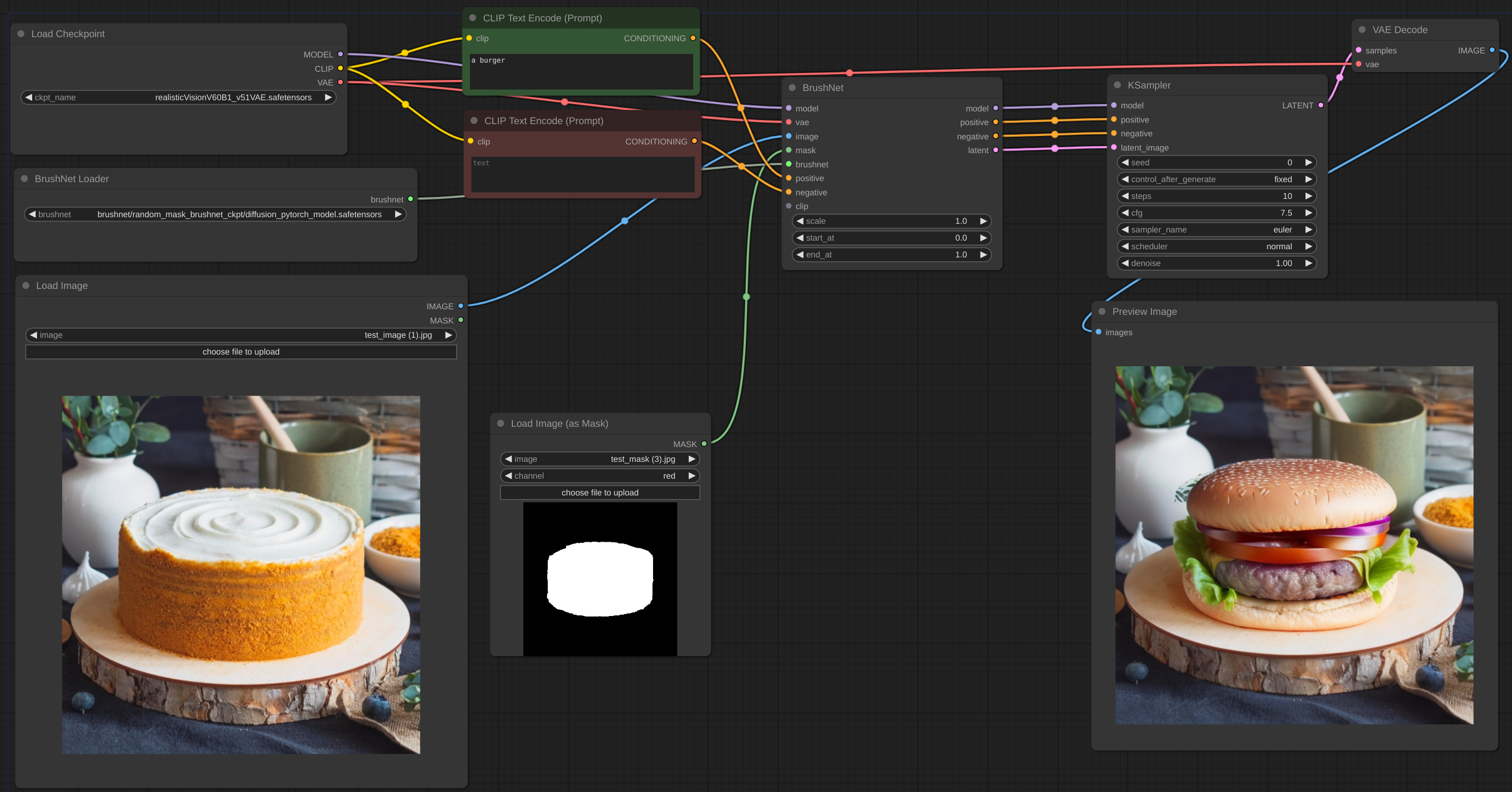
Below is an example for the intended workflow. The [workflow](example/BrushNet_basic.json) for the example can be found inside the 'example' directory.
|
|
|
|
|
|
|
|
### Parameters
|
|
|
|
#### Brushnet Loader
|
|
|
|
- `dtype`, defaults to `torch.float16`. The torch.dtype of BrushNet. If you have old GPU or NVIDIA 16 series card try to switch to `torch.float32`.
|
|
|
|
#### Brushnet
|
|
|
|
- `scale`, defaults to 1.0: The "strength" of BrushNet. The outputs of the BrushNet are multiplied by `scale` before they are added to the residual in the original unet.
|
|
- `start_at`, defaults to 0: step at which the BrushNet starts applying.
|
|
- `end_at`, defaults to 10000: step at which the BrushNet stops applying.
|
|
|
|
[Here](PARAMS.md) are examples of use these two last parameters.
|
|
|
|
#### PowerPaint
|
|
|
|
- `CLIP`: PowerPaint CLIP that should be passed from PowerPaintCLIPLoader node.
|
|
- `fitting`: PowerPaint fitting degree.
|
|
- `function`: PowerPaint function, see its [page](https://github.com/open-mmlab/PowerPaint) for details.
|
|
|
|
When using certain network functions, the authors of PowerPaint recommend adding phrases to the prompt:
|
|
|
|
- object removal: `empty scene blur`
|
|
- context aware: `empty scene`
|
|
- outpainting: `empty scene`
|
|
|
|
Many of ComfyUI users use custom text generation nodes, CLIP nodes and a lot of other conditioning. I don't want to break all of these nodes, so I didn't add prompt updating and instead rely on users. Also my own experiments show that these additions to prompt are not strictly necessary.
|
|
|
|
The latent image can be from BrushNet node or not, but it should be the same size as original image (divided by 8 in latent space).
|
|
|
|
The both conditioning `positive` and `negative` in BrushNet and PowerPaint nodes are used for calculation inside, but then simply copied to output.
|
|
|
|
Be advised, not all workflows and nodes will work with BrushNet due to its structure. Also put model changes before BrushNet nodes, not after. If you need model to work with image after BrushNet inference use base one (see Upscale example below).
|
|
|
|
<details>
|
|
<summary>SDXL</summary>
|
|
|
|

|
|
|
|
[workflow](example/BrushNet_SDXL_basic.json)
|
|
|
|
</details>
|
|
|
|
<details>
|
|
<summary>IPAdapter plus</summary>
|
|
|
|

|
|
|
|
[workflow](example/BrushNet_with_IPA.json)
|
|
|
|
</details>
|
|
|
|
<details>
|
|
<summary>LoRA</summary>
|
|
|
|

|
|
|
|
[workflow](example/BrushNet_with_LoRA.json)
|
|
|
|
</details>
|
|
|
|
<details>
|
|
<summary>Blending inpaint</summary>
|
|
|
|

|
|
|
|
Sometimes inference and VAE broke image, so you need to blend inpaint image with the original: [workflow](example/BrushNet_inpaint.json). You can see blurred and broken text after inpainting in the first image and how I suppose to repair it.
|
|
|
|
</details>
|
|
|
|
<details>
|
|
<summary>ControlNet</summary>
|
|
|
|

|
|
|
|
[workflow](example/BrushNet_with_CN.json)
|
|
|
|
[ControlNet canny edge](CN.md)
|
|
|
|
</details>
|
|
|
|
<details>
|
|
<summary>ELLA outpaint</summary>
|
|
|
|

|
|
|
|
[workflow](example/BrushNet_with_ELLA.json)
|
|
|
|
</details>
|
|
|
|
<details>
|
|
<summary>Upscale</summary>
|
|
|
|

|
|
|
|
[workflow](example/BrushNet_SDXL_upscale.json)
|
|
|
|
To upscale you should use base model, not BrushNet. The same is true for conditioning. Latent upscaling between BrushNet and KSampler will not work or will give you wierd results. These limitations are due to structure of BrushNet and its influence on UNet calculations.
|
|
|
|
</details>
|
|
|
|
<details>
|
|
<summary>Image batch</summary>
|
|
|
|

|
|
|
|
[workflow](example/BrushNet_image_batch.json)
|
|
|
|
</details>
|
|
|
|
<details>
|
|
<summary>PowerPaint outpaint</summary>
|
|
|
|

|
|
|
|
[workflow](example/PowerPaint_outpaint.json)
|
|
|
|
</details>
|
|
|
|
<details>
|
|
<summary>PowerPaint object removal</summary>
|
|
|
|

|
|
|
|
[workflow](example/PowerPaint_object_removal.json)
|
|
|
|
It is often hard to completely remove the object, especially if it is at the front:
|
|
|
|

|
|
|
|
You should try to add object description to negative prompt and describe empty scene, like here:
|
|
|
|

|
|
|
|
</details>
|
|
|
|
## Notes
|
|
|
|
Unfortunately, due to the nature of BrushNet code some nodes are not compatible with these, since we are trying to patch the same ComfyUI's functions.
|
|
|
|
List of known uncompartible nodes.
|
|
|
|
- [WASasquatch's FreeU_Advanced](https://github.com/WASasquatch/FreeU_Advanced/tree/main)
|
|
- [blepping's jank HiDiffusion](https://github.com/blepping/comfyui_jankhidiffusion)
|
|
|
|
I will think how to avoid it.
|
|
|
|
## Credits
|
|
|
|
The code is based on
|
|
|
|
- [BrushNet](https://github.com/TencentARC/BrushNet)
|
|
- [PowerPaint](https://github.com/zhuang2002/PowerPaint)
|
|
- [diffusers](https://github.com/huggingface/diffusers)
|