
ComfyUI-Custom-Scripts
⚠️ If updating from a version prior to 2023-06-18: Many of the nodes have been renamed to include
pysssssto prevent conflicts with other nodes. If you get missing nodes, please replace them with the new names.
⚠️ Auto installation process is still a new feature in need of testing, if you have any problems please log an issue
Installation
-
Clone the repository:
git clone https://github.com/pythongosssss/ComfyUI-Custom-Scripts.git
to your ComfyUIcustom_nodesdirectoryThe script will then automatically install all custom scripts and nodes.
It will attempt to use symlinks and junctions to prevent having to copy files and keep them up to date.
- For uninstallation:
- Delete the cloned repo in
custom_nodes - Ensure
web/extensions/pysssss/CustomScriptshas also been removed
- Delete the cloned repo in
Update
- Navigate to the cloned repo e.g.
custom_nodes/ComfyUI-Custom-Scripts git pull
Features
Auto Arrange Graph

Adds a menu option to auto arrange the graph in order of execution, this makes very wide graphs!
Workflow SVG
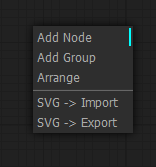
Adds menu options for importing and exporting the graph as SVG showing a view of the nodes
Favicon Status


Adds a favicon and title to the window, favicon changes color while generating and the window title includes the number of prompts in the queue
Image Feed

Adds a panel at the bottom of the window showing images that have been generated in the current session
Lock Nodes & Groups

Adds a lock option to nodes & groups that prevents you from moving them until unlocked
Lora Subfolders

Changes the lora menu into a dropdown of subfolders, not currently compatible with the searching/filtering (the search won't appear on submenus)
Preset Text

Adds a node that lets you save and use text presets (e.g. for your 'normal' negatives)
Quick Nodes

Adds various menu items to some nodes for quickly setting up common parts of graphs
Show Text

Takes input from a node that produces a string and displays it, useful for things like interrogator, prompt generators, etc.
Touch Support
Provides basic support for touch screen devices, its not perfect but better than nothing
WD14 Tagger
Moved to: https://github.com/pythongosssss/ComfyUI-WD14-Tagger
Changelog
2023-06-18
Major Changes
- ✨ Added auto installation of scripts and
__init__with thanks to @TashaSkyUp - ♻️ Reworked folder structure
- 🚨 Renamed a number of nodes to include
pysssssto prevent name conflicts - 🚨 Remove Latent Upscale By as it is now a built in node in ComfyUI
- 🚨 Removed Anime Segmentation to own repo
New
- ✨ Add Link Render Mode setting to choose how links are rendered
- ✨ Add Constrain Image node for resizing nodes to a min/max resolution with optional cropping
- ✨ Add Show Image On Menu to include the latest image output on the menu
- ✨ Add KSamplerAdvanced simple denoise prompt for configuring the node using steps + denoise
- 🎨 Add sizing options to Image Feed
Other
- ♻️ Include canvas2svg for SVG export in assets to prevent downloading at runtime
- 🎨 Add background color (using theme color) to exported SVG
- 🐛 Fix Manage Widget Defaults to work with new ComfyUI settings dialog
- 🐛 Increase Image Feed z-index to prevent node text overlapping