
4.2 KiB
ComfyUI-Custom-Scripts
Installation
Usage
- Clone the repository: git clone https://github.com/pythongosssss/ComfyUI-Custom-Scripts.git
- Navigate to the repository directory: cd ComfyUI-Custom-Scripts
- Run the
InstallCustomNodes.pyscript: python InstallCustomNodes.py - Follow the prompts to choose between installation and uninstallation, as well as test mode.
-
For installation:
- Choose 'i' to install.
- If the destination directory already exists, you will be prompted to remove it.
- Choose whether to run in test mode (dry run) or perform the actual file movements.
- The script will clone the repository, move the files, and create a mapping file.
- If you choose not to run in test mode, the installation will be completed.
-
For uninstallation:
- Choose 'u' to uninstall.
- The script will use the mapping file to undo the file movements.
- Any errors encountered during the uninstallation process will be displayed, but the script will continue.
- The script will remove both the files and empty directories.
-
Review the generated
move_mapping.yamlfile for the mapping of moved files. -
If needed, repeat the steps above to perform installation or uninstallation again
If the script has its own readme, that may include additional requirements so be sure to check it!
Anime Segmentation

Takes an image/images and uses https://github.com/SkyTNT/anime-segmentation to remove the background or foreground.
Auto Arrange Graph

Adds a menu option to auto arrange the graph in order of execution, this makes very wide graphs!
Workflow SVG
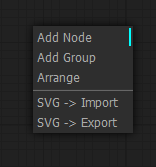
Adds menu options for importing and exporting the graph as SVG showing a view of the nodes
Favicon Status


Adds a favicon and title to the window, favicon changes color while generating and the window title includes the number of prompts in the queue
Image Feed

Adds a panel at the bottom of the window showing images that have been generated in the current session
Latent Upscale By

Allows upscaling by a factor instead of specific width and height
Lock Nodes & Groups

Adds a lock option to nodes & groups that prevents you from moving them until unlocked
Lora Subfolders

Changes the lora menu into a dropdown of subfolders, not currently compatible with the searching/filtering (the search won't appear on submenus)
Preset Text

Adds a node that lets you save and use text presets (e.g. for your 'normal' negatives)
Quick Nodes

Adds various menu items to some nodes for quickly setting up common parts of graphs
Show Text

Takes input from a node that produces a string and displays it, useful for things like interrogator, prompt generators, etc.
Touch Support
Provides basic support for touch screen devices, its not perfect but better than nothing
WD14 Tagger
Moved to: https://github.com/pythongosssss/ComfyUI-WD14-Tagger