
83 lines
4.2 KiB
Markdown
83 lines
4.2 KiB
Markdown
# ComfyUI-Custom-Scripts
|
|
|
|
# Installation
|
|
## Usage
|
|
|
|
1. Clone the repository:
|
|
git clone https://github.com/pythongosssss/ComfyUI-Custom-Scripts.git
|
|
2. Navigate to the repository directory:
|
|
cd ComfyUI-Custom-Scripts
|
|
3. Run the `InstallCustomNodes.py` script:
|
|
python InstallCustomNodes.py
|
|
4. Follow the prompts to choose between installation and uninstallation, as well as test mode.
|
|
|
|
- For installation:
|
|
- Choose 'i' to install.
|
|
- If the destination directory already exists, you will be prompted to remove it.
|
|
- Choose whether to run in test mode (dry run) or perform the actual file movements.
|
|
- The script will clone the repository, move the files, and create a mapping file.
|
|
- If you choose not to run in test mode, the installation will be completed.
|
|
|
|
- For uninstallation:
|
|
- Choose 'u' to uninstall.
|
|
- The script will use the mapping file to undo the file movements.
|
|
- Any errors encountered during the uninstallation process will be displayed, but the script will continue.
|
|
- The script will remove both the files and empty directories.
|
|
|
|
5. Review the generated `move_mapping.yaml` file for the mapping of moved files.
|
|
|
|
6. If needed, repeat the steps above to perform installation or uninstallation again
|
|
|
|
**If the script has its own readme, that may include additional requirements so be sure to check it!**
|
|
|
|
## Anime Segmentation
|
|

|
|
Takes an image/images and uses https://github.com/SkyTNT/anime-segmentation to remove the background or foreground.
|
|
|
|
## Auto Arrange Graph
|
|

|
|
Adds a menu option to auto arrange the graph in order of execution, this makes very wide graphs!
|
|
|
|
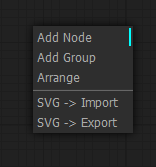
## Workflow SVG
|
|
|
|
Adds menu options for importing and exporting the graph as SVG showing a view of the nodes
|
|
|
|
## Favicon Status
|
|

|
|

|
|
Adds a favicon and title to the window, favicon changes color while generating and the window title includes the number of prompts in the queue
|
|
|
|
## Image Feed
|
|

|
|
Adds a panel at the bottom of the window showing images that have been generated in the current session
|
|
|
|
## Latent Upscale By
|
|

|
|
Allows upscaling by a factor instead of specific width and height
|
|
|
|
## Lock Nodes & Groups
|
|

|
|
Adds a lock option to nodes & groups that prevents you from moving them until unlocked
|
|
|
|
## Lora Subfolders
|
|

|
|
Changes the lora menu into a dropdown of subfolders, not currently compatible with the searching/filtering (the search won't appear on submenus)
|
|
|
|
## Preset Text
|
|

|
|
Adds a node that lets you save and use text presets (e.g. for your 'normal' negatives)
|
|
|
|
## Quick Nodes
|
|

|
|
Adds various menu items to some nodes for quickly setting up common parts of graphs
|
|
|
|
## Show Text
|
|

|
|
Takes input from a node that produces a string and displays it, useful for things like interrogator, prompt generators, etc.
|
|
|
|
## Touch Support
|
|
Provides basic support for touch screen devices, its not perfect but better than nothing
|
|
|
|
## WD14 Tagger
|
|
Moved to: https://github.com/pythongosssss/ComfyUI-WD14-Tagger
|