
91 lines
4.4 KiB
Markdown
91 lines
4.4 KiB
Markdown
# ComfyUI-Custom-Scripts
|
|
|
|
> ⚠️ **If updating from a version prior to 2023-06-18**: Many of the nodes have been renamed to include `pysssss` to prevent conflicts with other nodes. If you get missing nodes, please replace them with the new names.
|
|
|
|
> ⚠️ **Auto installation process is still a new feature in need of testing, if you have any problems please log an issue**
|
|
|
|
# Installation
|
|
|
|
1. Clone the repository:
|
|
`git clone https://github.com/pythongosssss/ComfyUI-Custom-Scripts.git`
|
|
to your ComfyUI `custom_nodes` directory
|
|
|
|
The script will then automatically install all custom scripts and nodes.
|
|
It will attempt to use symlinks and junctions to prevent having to copy files and keep them up to date.
|
|
|
|
- For uninstallation:
|
|
- Delete the cloned repo in `custom_nodes`
|
|
- Ensure `web/extensions/pysssss/CustomScripts` has also been removed
|
|
|
|
# Update
|
|
1. Navigate to the cloned repo e.g. `custom_nodes/ComfyUI-Custom-Scripts`
|
|
2. `git pull`
|
|
|
|
# Features
|
|
|
|
## Auto Arrange Graph
|
|

|
|
Adds a menu option to auto arrange the graph in order of execution, this makes very wide graphs!
|
|
|
|
## Workflow SVG
|
|
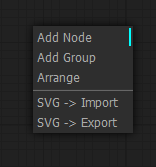
|
|
Adds menu options for importing and exporting the graph as SVG showing a view of the nodes
|
|
|
|
## Favicon Status
|
|

|
|

|
|
Adds a favicon and title to the window, favicon changes color while generating and the window title includes the number of prompts in the queue
|
|
|
|
## Image Feed
|
|

|
|
Adds a panel at the bottom of the window showing images that have been generated in the current session
|
|
|
|
## Lock Nodes & Groups
|
|

|
|
Adds a lock option to nodes & groups that prevents you from moving them until unlocked
|
|
|
|
## Lora Subfolders
|
|

|
|
Changes the lora menu into a dropdown of subfolders, not currently compatible with the searching/filtering (the search won't appear on submenus)
|
|
|
|
## Preset Text
|
|

|
|
Adds a node that lets you save and use text presets (e.g. for your 'normal' negatives)
|
|
|
|
## Quick Nodes
|
|

|
|
Adds various menu items to some nodes for quickly setting up common parts of graphs
|
|
|
|
## Show Text
|
|

|
|
Takes input from a node that produces a string and displays it, useful for things like interrogator, prompt generators, etc.
|
|
|
|
## Touch Support
|
|
Provides basic support for touch screen devices, its not perfect but better than nothing
|
|
|
|
## WD14 Tagger
|
|
Moved to: https://github.com/pythongosssss/ComfyUI-WD14-Tagger
|
|
|
|
---
|
|
<br>
|
|
|
|
# Changelog
|
|
|
|
## 2023-06-18
|
|
### Major Changes
|
|
- ✨ Added auto installation of scripts and `__init__` with thanks to @TashaSkyUp
|
|
- ♻️ Reworked folder structure
|
|
- 🚨 Renamed a number of nodes to include `pysssss` to prevent name conflicts
|
|
- 🚨 Remove Latent Upscale By as it is now a built in node in ComfyUI
|
|
- 🚨 Removed Anime Segmentation to own repo
|
|
### New
|
|
- ✨ Add Link Render Mode setting to choose how links are rendered
|
|
- ✨ Add Constrain Image node for resizing nodes to a min/max resolution with optional cropping
|
|
- ✨ Add Show Image On Menu to include the latest image output on the menu
|
|
- ✨ Add KSamplerAdvanced simple denoise prompt for configuring the node using steps + denoise
|
|
|
|
### Other
|
|
- ♻️ Include [canvas2svg](https://gliffy.github.io/canvas2svg/) for SVG export in assets to prevent downloading at runtime
|
|
- 🎨 Add background color (using theme color) to exported SVG
|
|
- 🐛 Fix Manage Widget Defaults to work with new ComfyUI settings dialog
|
|
- 🐛 Increase Image Feed z-index to prevent node text overlapping |