 scofano
6bc9e9d06f
scofano
6bc9e9d06f
Add locale-aware encoding checks and character fallbacks to coerce
cleaned UTF-8 text into the preferred system encoding when needed.

This transliterates unsupported characters to readable equivalents so
Windows charmap writes do not fail on non-UTF-8 code pages.fix: transliterate text for non-UTF-8 system encodings

Add locale-aware encoding checks and character fallbacks to coerce
cleaned UTF-8 text into the preferred system encoding when needed.

This transliterates unsupported characters to readable equivalents so
Windows charmap writes do not fail on non-UTF-8 code pages.

🧩 Comfy Text Stats
A lightweight ComfyUI custom node pack with text utility nodes for working directly inside your workflows:
- Character Search Replace — applies per-character search/replace rules from a multiline mapping list
- Line Batch Chunk — splits multiline text into fixed-size line batches using a batch index
- Line Context Counter — uses a visible counter that auto-increments like a seed and returns the current, previous, and next line context
- Remove Empty Lines — removes blank or whitespace-only lines from multiline text
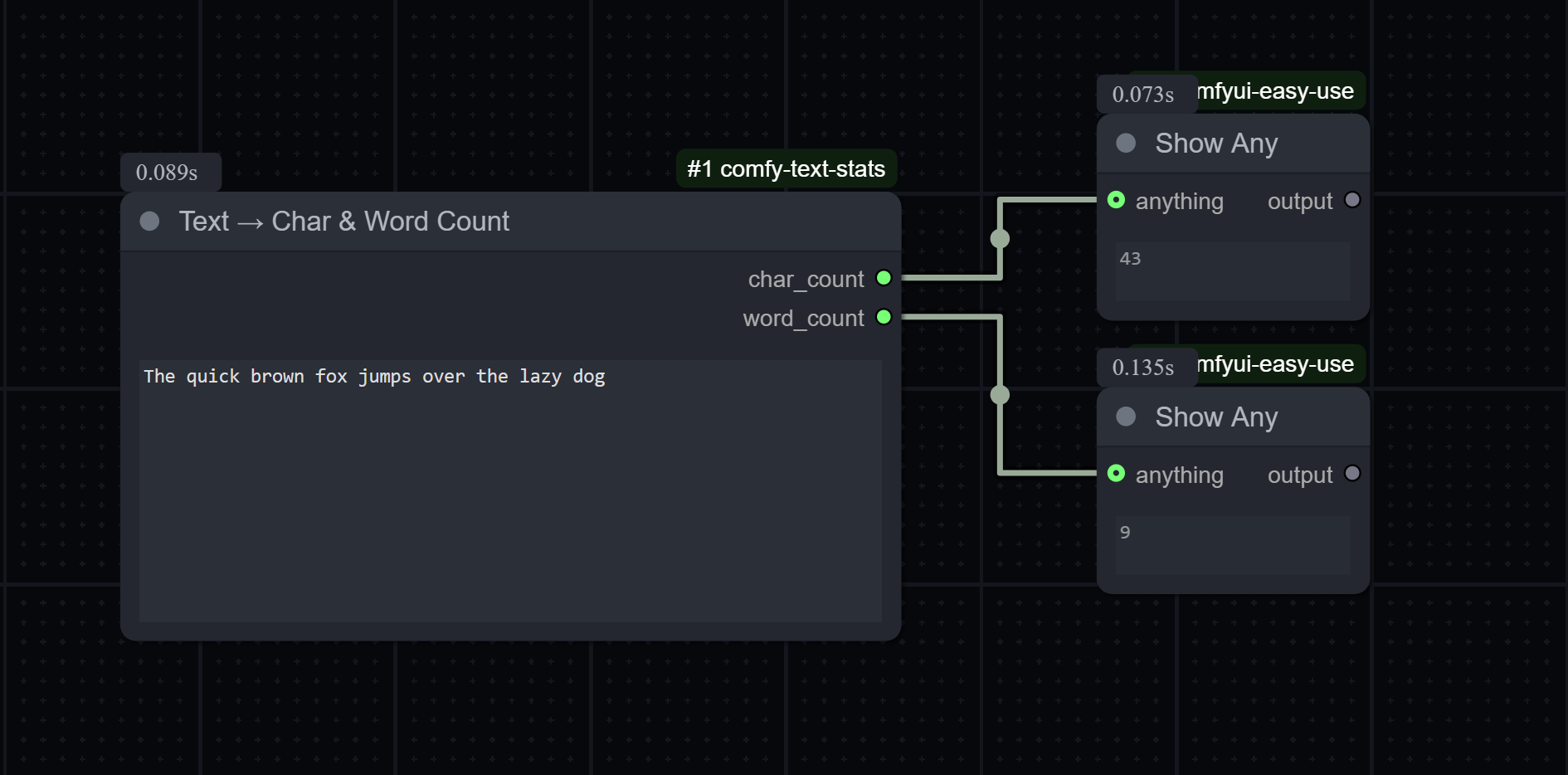
- Text Stats — returns character, word, and line counts
- UTF-8 Cleaner — normalizes punctuation and removes invisible/control characters while preserving valid Unicode text
This pack is useful for text preprocessing, caption analytics, prompt inspection, and quick metadata generation directly in ComfyUI.
🚀 Features
✅ Simple and fast — no external dependencies
✅ Unicode-aware word detection (supports multilingual text)
✅ Line counting for multiline inputs
✅ Editable multiline character replacement rules
✅ Fixed-size multiline chunk extraction by batch number
✅ Sequential line traversal with previous/next context windows
✅ Visible line counter with seed-like auto-increment and manual reset control
✅ Empty-line cleanup for multiline strings
✅ UTF-8-safe text cleanup with smart punctuation normalization
✅ Deterministic utility nodes for stats and cleanup
✅ Works with any STRING input from other nodes
📦 Installation
Option 1 — Via ComfyUI-Manager (recommended)
- Open ComfyUI-Manager
- Search for Comfy Text Stats
- Install the node pack
- Reload custom nodes or restart ComfyUI
Option 2 — Manual Install
- Clone or download this repository into your ComfyUI custom node directory:
git clone https://github.com/scofano/comfy-text-stats.git - The final structure should look like this:
ComfyUI/ └── custom_nodes/ └── comfy-text-stats/ ├── __init__.py ├── character_search_replace.py ├── line_batch_chunk.py ├── line_context_counter.py ├── remove_empty_lines.py ├── text_stats.py ├── utf8_processor.py ├── README.md └── requirements.txt - Restart ComfyUI.
🧠 Usage
1) Character Search Replace
Category: Text/Utils
Inputs
| Name | Type | Description |
|---|---|---|
text |
STRING | The input text to process. Supports multiline input. |
replacements |
STRING | Multiline replacement rules. Each non-empty line uses the first character as the search value and the remaining characters on that line as the replacement. If a line contains only one character, that character is removed. Spaces are treated as normal characters. |
Outputs
| Name | Type | Description |
|---|---|---|
processed_text |
STRING | The text after applying the replacement rules in order from top to bottom. |
Default replacement list:
“"
”"
„"
«"
»"
‘'
’'
‚'
´'
`'
–-
—,
−-
‐-
‑-
•-
·-
*
 _
…...
Notes:
- Each non-empty line defines one rule.
- The first character in the line is always the character to search for.
- Everything after the first character on the same line becomes the replacement.
- A one-character line removes that character entirely.
- Leading and trailing spaces in a rule are meaningful.
- The default list is only a starting suggestion; you can edit it directly in the node.
2) Line Batch Chunk
Category: Text/Utils
Inputs
| Name | Type | Description |
|---|---|---|
text |
STRING | Multiline text to split into chunks. |
number_of_lines |
INT | How many lines each output chunk should contain. Minimum: 1. |
batch |
INT | Which chunk to return, starting at 1. Batch 1 returns the first chunk, batch 2 the next chunk, and so on. This control auto-increments after each run like a seed. |
Outputs
| Name | Type | Description |
|---|---|---|
chunk_text |
STRING | The requested batch of lines. Returns a partial chunk if only some lines remain, or an empty string if the batch is fully out of range. |
Notes:
- The node uses
splitlines(), so each logical input line becomes one item in the batch calculation. batch = 1withnumber_of_lines = 2returns lines1-2.batch = 2withnumber_of_lines = 2returns lines3-4.- If the final chunk has fewer than
number_of_linesavailable, only the remaining lines are returned. - If the requested batch starts beyond the available lines, the output is an empty string.
3) Line Context Counter
Category: Text/Utils
Inputs
| Name | Type | Description |
|---|---|---|
text |
STRING | Multiline text to iterate through. |
set_counter |
INT | Visible line counter. Starts at 1, auto-increments after each run like a seed, and can be changed manually at any time. |
previous_lines |
INT | Number of previous lines to include. Default: 1. |
next_lines |
INT | Number of next lines to include. Default: 1. |
current_prefix |
STRING | Optional prefix/template for the current line output. Default: Current line: {line} |
previous_prefix |
STRING | Optional prefix/template for the previous lines output. Default: Previous {count} lines: {lines} |
next_prefix |
STRING | Optional prefix/template for the next lines output. Default: Next {count} lines: {lines} |
all_lines_prefix |
STRING | Optional prefix/template for the full text output. Default: All the content: |
Outputs
| Name | Type | Description |
|---|---|---|
counter |
INT | The visible current line counter, starting at 1. |
current_line_text |
STRING | The current line selected by the automatic counter, starting at line 1. |
previous_lines_text |
STRING | Up to the requested number of lines before the current line. Empty if none exist. |
next_lines_text |
STRING | Up to the requested number of lines after the current line. Empty if none exist. |
combined_context_text |
STRING | Previous, current, and next outputs concatenated together in that order, separated by newlines. Empty parts are skipped. |
all_lines_text |
STRING | The original input text with the optional all-lines prefix applied. |
Notes:
set_counterbehaves like a seed-style control and defaults to theincrementpost-generate mode in ComfyUI.- The
counteroutput lets you see which line is currently selected. - You can edit
set_countermanually at any time to jump to or reset the current line. - If
set_counteris larger than the number of lines, it wraps around using the available line count. combined_context_textjoinsprevious_lines_text,current_line_text, andnext_lines_textusing newline separators.- If
previous_lines = 0,previous_lines_textis always an empty string. - If
next_lines = 0,next_lines_textis always an empty string. - Prefix fields are optional; if left blank, the node outputs only the line content.
- Templates can use placeholders such as
{line},{lines},{count},{actual_count},{line_number}, and{total_lines}. - If there are no previous lines or no next lines available, that output is an empty string.
- If the input text is empty, the node returns
counter = 0and empty string outputs.
4) Remove Empty Lines
Category: Text/Utils
Inputs
| Name | Type | Description |
|---|---|---|
text |
STRING | Multiline text to clean. |
Outputs
| Name | Type | Description |
|---|---|---|
processed_text |
STRING | The input text with empty and whitespace-only lines removed. |
Notes:
- Lines containing only spaces or tabs are treated as empty and removed.
- Non-empty lines keep their original content and order.
- The output is rejoined using newline characters.
5) Text Stats
Category: Text/Utils
Inputs
| Name | Type | Description |
|---|---|---|
text |
STRING | The text input to analyze. Supports multiline input. |
Outputs
| Name | Type | Description |
|---|---|---|
char_count |
INT | Number of characters (including spaces, punctuation, and newlines). |
word_count |
INT | Number of words (using Unicode-aware regex). |
line_count |
INT | Number of lines in the input text. |
6) UTF-8 Cleaner
Category: Text/Utils
Inputs
| Name | Type | Description |
|---|---|---|
text |
STRING | The raw text input to sanitize. Supports multiline input. |
Outputs
| Name | Type | Description |
|---|---|---|
clean_text |
STRING | Cleaned UTF-8-safe text with common smart punctuation normalized and invisible/control characters removed. |
🧪 Example
Character Search Replace input text:
“hello”— world…*
Default rules output:
"hello",_world...
Line Context Counter input:
alpha
beta
gamma
delta
Line Batch Chunk input:
1
2
3
4
5
6
7
8
9
10
Line Batch Chunk examples:
number_of_lines = 2, batch = 1 -> 1
2

number_of_lines = 2, batch = 2 -> 3
4

number_of_lines = 6, batch = 2 -> 7
8
9
10

number_of_lines = 6, batch = 3 -> ""
Run 1 outputs (defaults, set_counter = 1, previous_lines = 1, next_lines = 1):
counter = 1
current_line_text = Current line: alpha
previous_lines_text =
next_lines_text = Next 1 lines: beta
combined_context_text = Current line: alpha
Next 1 lines: beta
all_lines_text = All the content: alpha
beta
gamma
delta
Run 2 outputs:
counter = 2
current_line_text = Current line: beta
previous_lines_text = Previous 1 lines: alpha
next_lines_text = Next 1 lines: gamma
combined_context_text = Previous 1 lines: alpha
Current line: beta
Next 1 lines: gamma
Manual reset example (set_counter = 4):
counter = 4
current_line_text = Current line: delta
previous_lines_text = Previous 1 lines: gamma
next_lines_text =
Zero-window examples:
previous_lines = 0  -> previous_lines_text = ""
next_lines = 0      -> next_lines_text = ""
Out-of-range counter example (set_counter = 6 on 4 lines):
counter = 2
current_line_text = Current line: beta
previous_lines_text = Previous 1 lines: alpha
next_lines_text = Next 1 lines: gamma
Text Stats input:
ComfyUI makes custom nodes easy!
Text Stats outputs:
char_count = 32
word_count = 5
line_count = 1
UTF-8 Cleaner example:
Olá… mundo – teste\u200B
becomes:
Olá... mundo - teste
Remove Empty Lines input:
alpha


beta

gamma
Remove Empty Lines output:
alpha
beta
gamma
🔧 Technical Details
CharacterSearchReplaceparses thereplacementsfield line by line and applies rules in order using the first character of each line as the search token and the remaining characters as the replacement text.- Word detection uses the regex:
which matches Unicode word boundaries.
\b\w+\b LineBatchChunkcalculates the starting line using(batch - 1) * number_of_linesand returns up tonumber_of_lineslines from that position.LineContextCounteruses a seed-likeset_counterwidget withcontrol_after_generate = "increment", so the counter updates automatically after each run in ComfyUI.LineContextCounterselection is driven by the current input counter value and wraps around when the counter exceeds the available line count.RemoveEmptyLinesremoves lines whose content is empty after trimming whitespace.- UTF-8 Cleaner normalizes text to Unicode NFC, replaces common smart punctuation (such as
…->...and–/—->-), converts common arrows like→->->, removes invisible/control characters, and preserves valid Unicode characters such asáéíóúç. TextStatscounts lines usingsplitlines(), so an empty string returns0lines.TextStatsandUTF8Processorare deterministic, and theirIS_CHANGEDimplementations currently use input length as a lightweight cache hint.
💡 Use Cases
- Text preprocessing for captioning or prompt tuning
- Normalizing punctuation or replacing/removing unwanted characters
- Splitting long multiline prompts or subtitle blocks into chunked batches
- Generating text metadata before feeding into LLM pipelines
- Measuring caption sizes in dataset workflows
- Cleaning copy/pasted text before saving or reusing it in prompts
- Stepping through caption or subtitle files one line at a time with surrounding context
📄 License
MIT License © 2025 — freely usable and modifiable.
Contributions welcome!