
152 lines
7.1 KiB
Markdown
152 lines
7.1 KiB
Markdown
<p align="center"><img src="https://raw.githubusercontent.com/zer0TF/cute-comfy/master/assets/cute_comfy_logo_big.png" alt="Cute Comfy Logo" /></p>
|
|
|
|
# 💜 Cute Comfy 💜
|
|
|
|
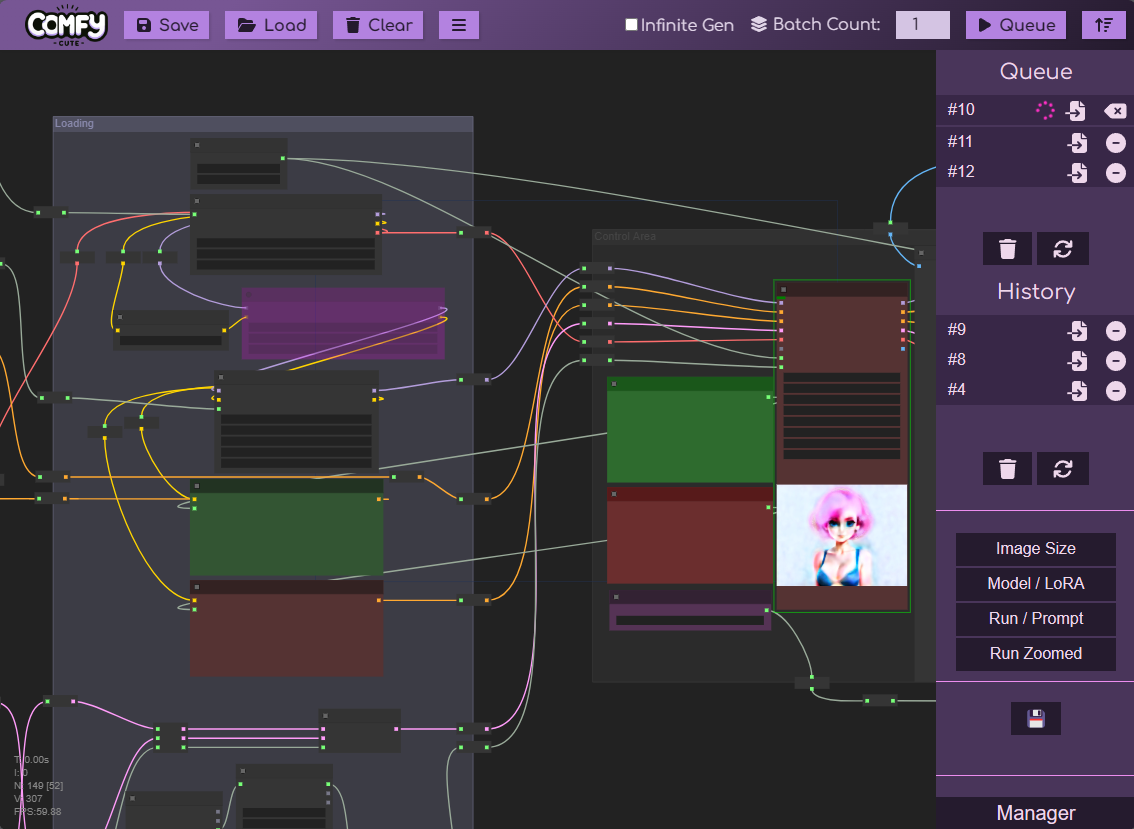
Makes ComfyUI cute and adorable (and TOTALLY easier to use, too! ^_^).
|
|
|
|
|
|
|
|
## 🟣 Installation
|
|
|
|
### Easy Installation
|
|
|
|
**We are listed in the Comfy Manager custom node list!**
|
|
|
|
First, install **[ComfyUI Manager](https://github.com/ltdrdata/ComfyUI-Manager)** if you have not already.
|
|
|
|
Then, go to the custom node store and search for "Cute". Click **Install** next to Cute Comfy! That's it! 😄
|
|
|
|
### Manual / Advanced
|
|
|
|
To install:
|
|
|
|
* You have to have **[ComfyUI](https://github.com/comfyanonymous/ComfyUI)** 🤪
|
|
* You don't *have* to have **[ComfyUI Manager](https://github.com/ltdrdata/ComfyUI-Manager)**, but it's highly recommended.
|
|
* Open a command prompt and navigate to your Comfy directory.
|
|
* `cd` into `ComfyUI/custom_nodes`
|
|
* Run: `git clone https://github.com/zer0TF/cute-comfy.git`
|
|
* Start ComfyUI.
|
|
* Close ComfyUI, and edit the auto-generated `/ComfyUI/custom_nodes/cute-comfy/config.yaml` file with your own preferences and folder path(s).
|
|
* Start ComfyUI again.
|
|
|
|
If you see:
|
|
|
|
```
|
|
Cute Comfy: 👁️ I'm keeping an eye on: [[ YOUR COMFY OUTPUT FOLDER HERE ]]
|
|
°º¤ø,¸¸,ø¤º° Cute Comfy: Loaded! °º¤ø,¸¸,ø¤º°
|
|
```
|
|
|
|
Then it's up and running! 👍
|
|
|
|
## 🟣 To-do List
|
|
|
|
* [x] Style the main Comfy user interface
|
|
* [ ] Style the Comfy Settings dialog
|
|
* [ ] Style the Comfy Main Menu
|
|
* [ ] Style the Comfy Manager custom node list
|
|
|
|
## 🟣 Features
|
|
|
|
### Automatic Civitai Metadata From Comfy
|
|
|
|
You read that right. Your exported images from Comfy will now be correctly tagged when uploaded to Civitai.com.
|
|
This includes prompt data as well as model and LoRA asset links. (Textual embeddings coming sometime soon~!)
|
|
|
|
See below for how to configure it. Once it's set up, it "just works" - no extra button pushes necessary!
|
|
|
|
We map the following:
|
|
|
|
* Positive Prompt
|
|
* Negative Prompt
|
|
* Sampler and Scheduler
|
|
* Steps
|
|
* CFG Scale
|
|
* Seed
|
|
* Model (🔗 Civitai resource link)
|
|
* LoRA(s) (🔗 Civitai resource links)
|
|
|
|
We support:
|
|
|
|
* ComfyUI's vanilla **KSampler**
|
|
* [Efficiency Nodes](https://github.com/jags111/efficiency-nodes-comfyui)' **KSampler (Efficient)**
|
|
|
|
💡 **Tip:** We can't always figure out where your stuff is inside of your Comfy workflow - Comfy is crazy! You could have 10 separate positive prompts, 4 model merges, and 5 different sampler steps!
|
|
|
|
We do our best to support basic workflows (basic txt2img/img2img, and 2-step "hires fix" / latent upscaling).
|
|
|
|
#### Metadata Conversion Hints
|
|
|
|
There are some ways you can provide "hints" to the conversion script as to where your metadata is:
|
|
|
|
| Metadata | Hint |
|
|
|-----------------|--------------------------|
|
|
| Model | Use the **Civitai Checkpoint Loader** node. |
|
|
| LoRA(s) | Use the **Civitai LoRA Loader** node. |
|
|
| Positive Prompt | Set the title of your **CLIP Text Encode** or **Primitive** node to: `Positive` |
|
|
| Negative Prompt | Set the title of your **CLIP Text Encode** or **Primitive** node to: `Negative` |
|
|
| Seed, CFG, Sampler/Scheduler, Steps | Use a **KSampler** or **KSampler (Efficient)** node. If you have more than one sampler, set the title of your primary/base one to: `Sampler` |
|
|
|
|
### UI Overhaul for ComfyUI
|
|
|
|
Sick of gray, drab UI? Sick of pressing "Extra options" and "View History" every time you open Comfy? Well have I
|
|
got the solution for you! 😁💜
|
|
|
|
* Main menu operations (saving and loading) are moved to the top bar, and less-used operations are in a submenu
|
|
* All options are visible when Comfy loads - nothing is hidden behind a checkbox or button press
|
|
* Queue and History are redesigned, easier to read, and take up more space
|
|
* Most things now have icons instead of, or in addition to, words (less space AND more friendly! 😊 thanks Font Awesome!)
|
|
* Any other menu buttons or addons should still load below the history section and scale accordingly
|
|
|
|
## 🟣 Setup
|
|
|
|
### File Watcher / Metadata Converter
|
|
|
|
The Civitai metadata converter works as a file watcher - you tell it where Comfy is writing your images **that have their workflow/metadata embedded in them**,
|
|
and we will watch that directory 👀. When we see a new file, we'll take a look at the Comfy workflow inside and extract all of the relevant bits of information,
|
|
then re-write **only the metadata** of the file in a Civitai-compatible format. The image data itself is untouched.
|
|
|
|
When you first start Comfy after installing this addon, you'll see the following message in your console:
|
|
|
|
```
|
|
❣️➡️ First-time file watcher setup - please edit the config.yaml file located in the folder: "ComfyUI/custom_nodes/cute-comfy"
|
|
```
|
|
|
|
A sample `config.yaml` file will be written to: `/ComfyUI/custom_nodes/cute-comfy/config.yaml` - you'll need to edit this file to tell Cute Comfy how to watch for new files.
|
|
|
|
Here is the default contents:
|
|
|
|
```yaml
|
|
watcher:
|
|
enabled: true
|
|
extensions:
|
|
- png
|
|
folders:
|
|
- Z:\Path\To\Your\Comfy\Output\Folder
|
|
overwrite: false
|
|
keep_workflow: false
|
|
verbose: false
|
|
write_suffix: __a1
|
|
```
|
|
|
|
Modify these settings to suit your needs!
|
|
|
|
| Setting | Default | Description |
|
|
|---------|---------|-------------|
|
|
| `enabled` | `true` | If the file watcher feature is enabled (or disabled). |
|
|
| `overwrite` | `false` | If `true`, the original file that Comfy writes will be overwritten. **NOTE:** Comfy workflow metadata is lost when converting to Civitai-compatible format, so leave this setting `false` if you want to retain copies of your workflow inside your image files! |
|
|
| `keep_workflow` | `false` | If `true`, the original ComfyUI workflow metadata will be retained in the file, otherwise it will be removed and only the Automatic1111-compatible metadata will remain. This setting applies to both overwritten and new files. |
|
|
| `write_suffix` | `__a1` | The suffix to add to the image file when saving a copy. Has no effect if `overwrite` is `true`. |
|
|
| `verbose` | `false` | If `true`, prints lots more info to the console when it processes an image. |
|
|
| `folders` | *A nonexistant sample path you must change.* | Add one or more folders that Cute Comfy should watch for new files. The files written into this folder must contain Comfy workflow metadata, so if you are using a custom saving node, ensure that you are including the metadata in the images written here. Multiple directories are supported and can be watched at the same time. |
|
|
| `extensions` | `- .png` | A list of file extensions to watch for and modify. Currently, the only usable extension is .png (adding any others will give you an error), but if/when other image formats are supported in the future (e.g. `.webp`), those can easily be added to this list. |
|
|
|
|
### Cute UI
|
|
|
|
There is no setup - it's just on by default. 💜 I may make it toggle-able in a future update.
|
|
|
|
## 🟣 Credits and Acknowledgements
|
|
|
|
* Logos graciously provided by @HarroweD via [Civitai on Discord](https://discord.gg/civitai)
|
|
* Icons by Font Awesome
|
|
* I'd be lying if I said GPT-4 didn't help out a bit, too 😉
|