
ARD ComfyUI Ardenius nodes
Donations help in imporoving and making new free custom nodes and other software at Coffee Page
Change the mood ! by Visiting my AI Image Gallery
See Member Perks Free Custom nodes, AI Models, Embedding, Workflows, Image prompts, and exclusive content.
Download link ARD control box for ComfyUI
what nodes are in this ComfyUI custom nodes download ?
- ARD Control Box : my favorite node :) read below for details.
- ARD Dual Prompt: combines negative and positive in 1 node
- ARD Text Box: text box that outputs a text string
(Will be adding new free nodes to this package so make sure to follow me on this ko-fi page in the top right for future releases )
the ARD control box gets a model and prompts input and outputs: model, positive, negative, latent image, seed, width, height, cfg, steps, denoise, scaler, clip, vae
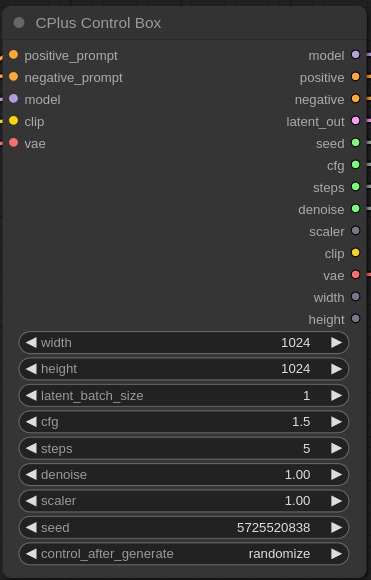
this is one of my favorite custom nodes especially when dealing with large workflows with multiple Ksamplers with the same values for inputs. ARD Control Box custom node does the following:
-
takes model and prompt inputs so it can allow for adding LoRas as you like.
-
you'll have the following to controls as outputs in one node instead of many:
model, positive, negative, latent image, seed, width, height, cfg, steps, denoise, scaler, clip, vae
Manual install
IMPORTANT: if you download the zip file make sure to rename the folder to ( ComfyUI-Ardenius ) instead of ( ComfyUI-Ardenius-main ) without the -main at the end
- click on the green button above ( Code )
- download zip file
- extract the zip file
- copy the contents to ComfyUI/custom-nodes/
- restart your comfyui server
- click ( refersh ) on the comfy ui panel
- double click anywhere on your workflow and search for CPlus control box