
ComfyUI Ardenius ARD Nodes
Don't forget to smile :) you deserve it !
Donations help in improving and making new free custom nodes and other software at Coffee Page
Change the mood ! by Visiting my AI Image Gallery
See Member Perks Free Custom nodes, AI Models, Embedding, Workflows, Image prompts, and exclusive content.
Get 50% Off Cloud GPU Servers with code Ardenius
what's included in the custom nodes ?
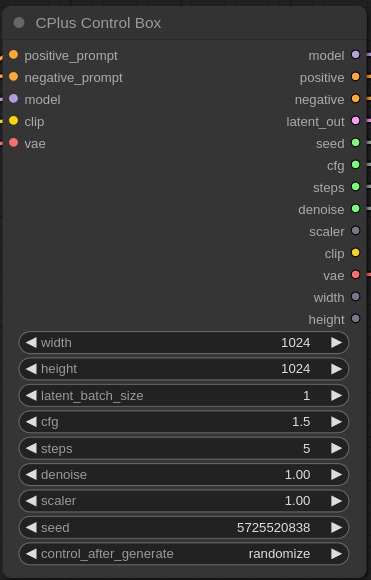
- ARD Control Box takes a model, vae and prompts input and outputs: model, positive, negative, latent image, seed, width, height, cfg, steps, denoise, scaler, vae
- ARD Math nodes: ComfyUI math nodes include ARD math which allows for divide, multiply, add, subtract in ComfyUI workflows, ARD integer to float, ARD remainder and more
- ARD Resize: allows for resizing images
- ARD Position: controls positioning of images in latent space
- ARD 4 latent decode: decodes 4 latents at the same time
- ARD crop latent: crops a latent image into 4
- ARD Save Image : is a ComfyUI work organizer that allows you to save images wherever you want and add metadata to your images
- ARD Load Image : lets you load images and will read and output your image saved metadata through ARD Save Image or standard ComfyUI save image
- ARD Dual Prompt: takes negative and positive string as input and outputs negative and positive conditioning to be used in ksamplers
- ARD xy scripts: allows you to test ComfyUI image generations using a range of steps, cfg, denoise
- ARD empty latent image: lets you set the shape dimension of the latent image example 8 for SDXL 16 for Flux.
Download from my ko-fi page
quick install
- go to ComfyUI/custom_nodes folder right click to open a terminal window
- type
git clone https://github.com/ArdeniusAI/ComfyUI-Ardenius.git - restart ComfyUI terminal
- click ( refresh ) on the comfy ui panel
- double click anywhere on your workflow and search for ARD and nodes above will show up
Manual install
IMPORTANT: if you download the zip file make sure to rename the folder to ( ComfyUI-Ardenius ) without the -main at the end
- click on the green button above ( Code )
- download zip file
- extract the zip file
- copy the contents to ComfyUI/custom-nodes/
- restart your comfyui server
- click ( refresh ) on the comfy ui panel
- double click anywhere on your workflow and search for ARD and nodes above will show up