
HelloMeme: Integrating Spatial Knitting Attentions to Embed High-Level and Fidelity-Rich Conditions in Diffusion Models
HelloVision | HelloGroup Inc.
* Intern




🔆 New Features/Updates
- ✅
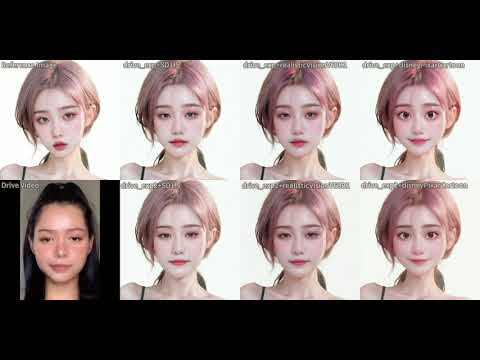
11/14/2024Added theHMControlNet2module, which uses thePD-FGCmotion module to extract facial expression information (drive_exp2); restructured the ComfyUI interface; and optimized VRAM usage.
- ✅
11/12/2024Added a newly fine-tuned version ofAnimatediffwith a patch size of 12, which uses less VRAM (Tested on 2080Ti). - ✅
11/11/2024Optimized VRAM usage and addedHMVideoSimplePipeline(workflows/hellomeme_video_simple_workflow.json), which doesn’t use Animatediff and can run on machines with less than 12G VRAM. - ✅
11/6/2024The face proportion in the reference image significantly affects the generation quality. We have encapsulated the recommended image cropping method used during training into aCropReferenceImageNode. Refer to the workflows in theComfyUI_HelloMeme/workflows directory:hellomeme_video_cropref_workflow.jsonandhellomeme_image_cropref_workflow.json.
Introduction
This repository is the official implementation of the HelloMeme ComfyUI interface, featuring both image and video generation functionalities. Example workflow files can be found in the ComfyUI_HelloMeme/workflows directory. Test images and videos are saved in the ComfyUI_HelloMeme/examples directory. Below are screenshots of the interfaces for image and video generation.
Note
Custom models should be placed in the directories listed below.
Checkpoints under:
ComfyUI/models/checkpointsLoras under:
ComfyUI/models/checkpoints
Image Generation Interface

Video Generation Interface
